Tag: backup planning

  • You have cloud backups for your business, but are you wasting money on storage you don’t need? 5 ways to tidy up your cloud storage

    You have cloud backups for your business, but are you wasting money on storage you don’t need? 5 ways to tidy up your cloud storage

    The worst backup situation to have as a business owner is no backups at all, so if you’ve made keeping backups of your data a priority in your business, we want to encourage you to keep the effort up. Having data backups is crucial for making a full recovery in the event of device failure, cyber security breaches and more.

    With that said, the cost of storage and in particular cloud storage is something to be considered when formulating a plan for backups. With physical hardware you have a tangible wall that prevents storage costs from ballooning out of control, but with cloud storage no such wall exists. Your provider will likely sell you as much data storage as you need and if your backups aren’t set up in an efficient way you may find the costs continue to rise while not being entirely sure as to why.

    Here are five ways to setup efficiency for your cloud backup solution and keep costs under control:

    1. Implement Data Archiving Policies: Regularly archive older, infrequently accessed data to cheaper, long-term storage solutions. This reduces the cost of more expensive, high-performance storage.
    2. Use Tiered Storage Solutions: Take advantage of cloud providers’ tiered storage options. Store critical, frequently accessed data in high-performance storage and less critical data in more economical storage tiers.
    3. Automate Backup Schedules and Policies: Set up automated backup schedules to ensure data is backed up regularly without human intervention. Use policies to manage retention, ensuring outdated backups are deleted after a certain period.
    4. Compress and Deduplicate Data: Use data compression and deduplication techniques to reduce the amount of storage required. Compression reduces file size, while deduplication eliminates duplicate copies of data.
    5. Monitor and Optimize Storage Usage: Regularly review storage usage and costs. Use analytics and reporting tools provided by cloud providers to identify unused or underused resources and optimize storage allocation accordingly.

    By implementing these strategies, business owners can effectively manage their cloud storage costs and maintain an organized, efficient backup system.

    Did you know backups are a core feature of Valley Techlogic’s service offering? Not only can we assist you in maintaining your existing backups, we also will keep our own backup of your data as part of your service plan with us.

    You can learn more about our backup program here, but in a nutshell whether you want to keep your current backups and utilize ours as an additional copy or erase that expenditure from your billing and let us handle it – Valley Techlogic can support your business’s backup planning in addition to the other ways we support your business.

    Learn more today by scheduling a meeting with one of our experienced

    Looking for more to read? We suggest these other articles from our site.

    This article was powered by Valley Techlogic, leading provider of trouble free IT services for businesses in California including Merced, Fresno, Stockton & More. You can find more information at https://www.valleytechlogic.com/ or on Facebook at https://www.facebook.com/valleytechlogic/ . Follow us on Twitter at https://x.com/valleytechlogic and LinkedIn at https://www.linkedin.com/company/valley-techlogic-inc/.

  • Technology that you can build on, supporting your construction business through tech

    Technology that you can build on, supporting your construction business through tech

    We’re continuing from last week where we touched on how technology integrates with the field of dentistry, we want to switch gears from a business sector that helps us maintain our tooth structure to one that helps us maintain our societal structure. We’re looking at how technology can help those in the construction.

    Our construction clients are used to taking on big projects and creating comprehensive plans for tackling those projects with their teams. They aren’t always nailed down to one location, being out in the field and having employees logging in from remote offsite locations is part of their norm.

    Documentation is important for the work they do. They often have a dedicated server that keeps track of all the reports that come with having a construction business. Planning data, financials, insurance information – all of that must be available at a click of a button so they can run their business as smoothly as possible.

    If you’re in construction, ask yourself if any of these tech related items would be applicable to your business:

    1. Slow or non-existent internet on work sites. As we mentioned above, your employees aren’t logging in from one location, they go where the work is that day. You need support for your connectivity that’s flexible for the way you do business.
    2. Equipment that goes “missing”. Like us, you have expensive equipment that needs monitoring and logging. Our construction clients need solutions for making sure their equipment doesn’t “walk off” the job site. Security cameras solutions with the ability to save and review the data they collect are crucial for these clients.
    3. Regulatory compliance concerns. If you work in the government sector (or would like to) you’re probably aware of the ongoing attempt to secure our national data through CMMC (Cybersecurity Maturity Model Certification).

      There’s also the documentation you must do for every portion of your business, because if something goes wrong you need that documentation to back you up. If your documentation goes missing or can’t be retrieved because an outdated server has “malfunctioned”, or your backup solution was inadequate – it can spell trouble for your business.

    The long and short of it is, having a technology solution that supports your business is as crucial as having supports structures in a building to keep it from collapsing. A pillar may not look like much on it’s own but it could be the only thing keeping back a catastrophic collapse.

    At Valley Techlogic, we see ourselves as the pillar that not only keeps your technology equipment running as it should, but also keeps out any intrusions to your business (17.7% of all cyber attacks are aimed at your business model which is second only to the financial sector).

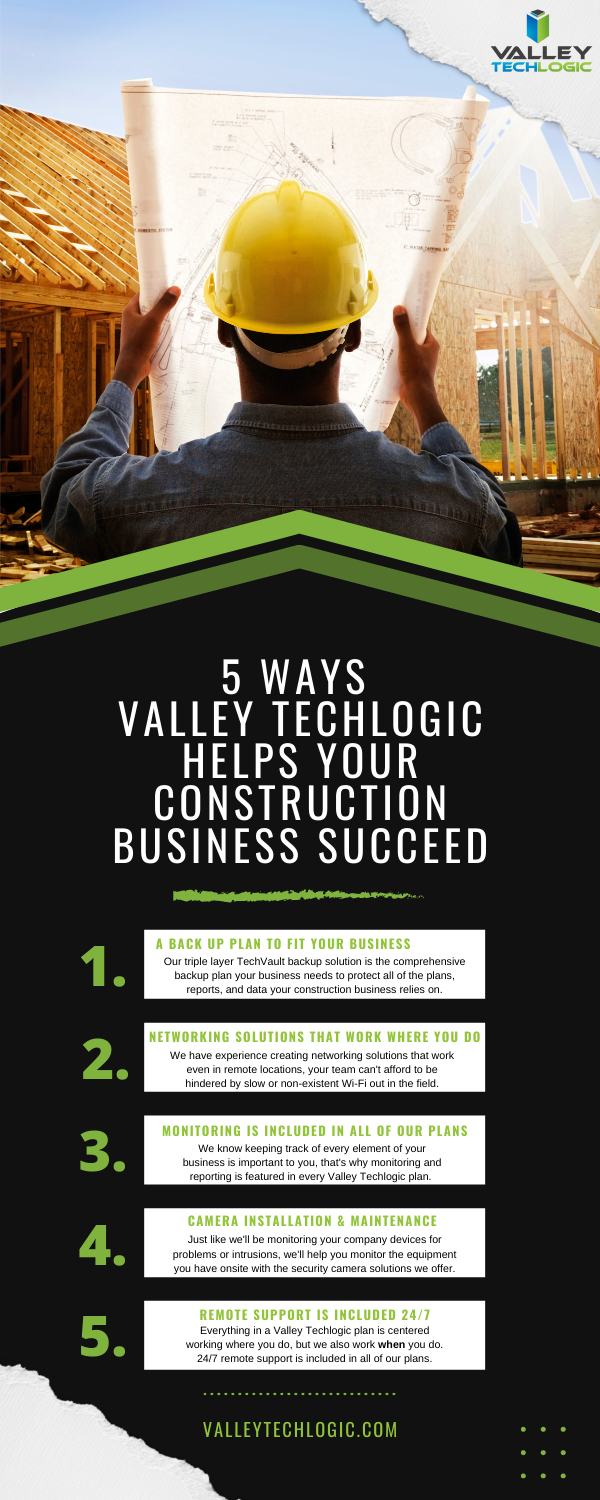
    Here is a chart with 5 ways Valley Techlogic specifically supports our construction clients:

    5 Ways VTL Supports Your Construction Business

    Still on the fence? Why not have a conversation with us directly, book a quick consultation with us here.

    Looking for more to read? We suggest these other articles from our site.

    This article was powered by Valley TechLogic, an IT service provider in Atwater, CA. You can find more information at https://www.valleytechlogic.com/ or on Facebook at https://www.facebook.com/valleytechlogic/ . Follow us on Twitter at https://x.com/valleytechlogic.

  • Cyber Insurance – What you can do to ensure your business will be covered in 2022

    Cyber Insurance – What you can do to ensure your business will be covered in 2022

    Last month we released our new cyber insurance report which is an in depth look into this topic, but we wanted to touch on what we’re specifically seeing so far in 2022 in today’s article because from what we’re seeing in from our clients and in the industry – cyber insurance requirements are on the rise.

    If you’re new to cyber insurance or aren’t sure what’s covered under this sort of policy, for most insurance providers cyber insurance offers coverage for technology related disasters. This could include a cybersecurity event such as ransomware or a data breach but depending on your level of policy it might also include IT related downtime not related to cybersecurity such as internet outages. You may even see coverage for specific device issues, such as the loss of an office server that’s critical for day-to-day operations.

    When it comes to the cybersecurity related coverage what many people don’t realize is it’s not only meant for covering your own losses, but also the potential loss incurred by your customers. If you have a data breach, your cyber insurance coverage will cover the cost of any litigation brought by your customers and it may also cover items such as on-going credit monitoring if their PII (personal identifying information) was exposed in the data breach your company suffered.

    It can be easy to feel detached from a loss you haven’t suffered yet. To put some perspective to, it during the Anthem data breach in 2015 when involved 80 million patient records, their costs to notify their customers (which HIPAA regulations stipulate must be done by snail mail) exceeded $40 million in just postage. That’s not even taking into consideration all of the other costs associated with that breach.

    They’re a major corporation, so again it may be difficult to imagine yourself in those shoes, but even for small companies the average costs are as high as $200,000 per breach. Also, if you’re hit with a ransom and think you can just pay it and get out intact, think again. Many times, even if you receive the de-encryption key from the hackers your data may still be lost.

    It’s not surprising that insurance providers are looking at this and wondering how they can alleviate some of the risk they’re taking providing insurance to customers going forward. The requirements are increasing, even for us as a technology provider for businesses we’re seeing longer forms that we’re assisting our customers with when they go to acquire a new cyber insurance policy.

    These longer forms are featuring more difficult questions as well. We have made cybersecurity a staple feature of our plans so our customers are in a good place for obtaining a cyber insurance policy, but the truth is if cybersecurity has been on the back burner for your business, you may have a difficult time in 2022 and beyond finding an insurer that’s willing to cover you.

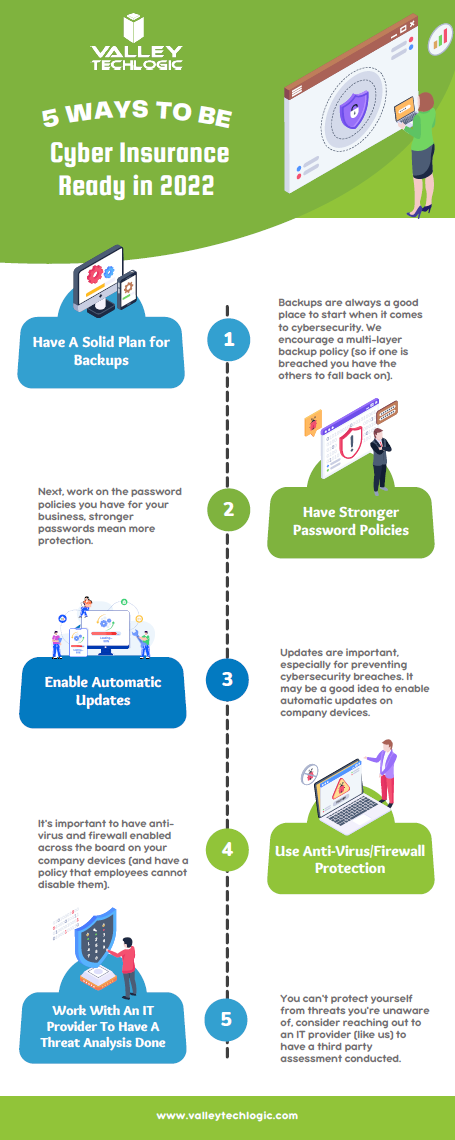
    As an idea of where to start before you go to obtain a cyber insurance policy, we’ve created this checklist of items you can begin to work on to put your business in a better position this year.

    Be Cyber Insurance Ready in 2022
    Click to grab the full size version.

    Many of the items listed are easy for even someone who’s not very tech savvy to tackle, but if you’d really like to protect your business from hackers this year, we suggest teaming up with a tech provider like Valley Techlogic.

    Cybersecurity is a core focus for our business, we will match your business with a cybersecurity framework that makes sense – for example CMMC for defense contractors, HIPAA for healthcare providers, NIST or CIS for small and medium sizes businesses of any industry – and use that framework to have a concrete game plan for making sure your networks and devices are impenetrable to bad actors. Learn more today with a quick consultation

    Looking for more to read? We suggest these other articles from our site.

    This article was powered by Valley TechLogic, IT service provider in Atwater, CA. You can find more information at https://www.valleytechlogic.com/ or on Facebook at https://www.facebook.com/valleytechlogic/ . Follow us on Twitter at https://x.com/valleytechlogic.