Tag: computer hardware

  • 5 Signs It’s Time to Switch Your IT Provider (And How to Choose the Right One)

    5 Signs It’s Time to Switch Your IT Provider (And How to Choose the Right One)

    Choosing the right IT managed service provider for your business is a tricky topic, your existing provider has access to sensitive systems and knows your business inside and out. If things aren’t going as well as they could (should) it can still feel overwhelming to think about switching. We know just how difficult switching IT providers can be (we even wrote a guide on it).

    Even though it’s challenging, there are some clear-cut signs it might be time to make a change. The five topics below are what we consider red flags:

    1. Constant Downtime and Slow Response
      • Frequent outages, slow systems, delayed ticket responses.
      • Impact on productivity and customer trust.
    2. Recurring Security Issues
      • Unpatched systems, repeated cyber incidents, lack of proactive security.
      • The cost of poor cybersecurity.
    3. Lack of Strategic Guidance
      • Your provider only “keeps the lights on” but doesn’t help you plan.
      • No roadmap for scaling, cloud adoption, or improving efficiency.
    4. Surprise Costs and Lack of Transparency
      • Hidden fees, unclear service levels, unpredictable billing.
      • Why predictable costs matter.
    5. Poor Communication and Customer Service
      • Hard-to-reach support, no regular updates, poor explanation of issues.
      • The value of clear and proactive communication.

    If your current IT managed service provider ticked any of these boxes, it might be time to begin the search for a new provider.  Below are four things we would recommend (as an IT managed service provider ourselves) you dive into with any potential new provider.

    1. Look for Proven Experience: Certifications, client references, industry expertise.
    2. They Prioritize Security and Compliance: Ask about their approach to cybersecurity and regulatory needs.
    3. Demand Proactive Support: Look for providers who offer monitoring, patching, and recommendations—not just break-fix.
    4. Check for Transparent Pricing: Make sure you understand their pricing models and what’s included.

    Ending services with your existing provider might seem scary, but in our experience most IT managed service providers want to do right by their clients (even if that client is on their way out). In our 20 plus years of experience, we have never had the incumbent provider block our ability to service their former client. Again, we have a guide on this very topic that goes into more detail and even provides a template ending your services with your existing provider.

    If you’re in the market for new IT services to support your business, Valley Techlogic has been supporting California businesses since 2004 and we can support you in whatever stage of your search you’re in. From procuring new services to providing an assessment on your current technical environment – our technicians are ready to support your business today.  Learn more with a consultation.

    Looking for more to read? We suggest these other articles from our site.

    This article was powered by Valley Techlogic, leading provider of trouble free IT services for businesses in California including Merced, Fresno, Stockton & More. You can find more information at https://www.valleytechlogic.com/ or on Facebook at https://www.facebook.com/valleytechlogic/ . Follow us on X at https://x.com/valleytechlogic and LinkedIn at https://www.linkedin.com/company/valley-techlogic-inc/.

  • Is your older computer holding you back? We have a year-by-year breakdown on how your computer can breakdown with age

    Is your older computer holding you back? We have a year-by-year breakdown on how your computer can breakdown with age

    Computers and laptops are a significant investment, especially for business owners who need to supply staff with devices to work on (hardware costs typically represents a significant portion of many business owners technology budgets). You may be wondering how long that investment will last?

    Computers degrade in performance over time due to both hardware aging and software advancements that demand more resources. Here’s a year-by-year breakdown of how a computer can become less effective with age:

    Year 1

    • The computer performs optimally, handling tasks efficiently.
    • Software updates run smoothly, and the latest applications are fully compatible.
    • Cooling systems and thermal paste are fresh, keeping temperatures stable.

    Year 2

    • Newer software and OS updates begin requiring more RAM and processing power.
    • Dust accumulation in cooling fans may lead to slightly higher temperatures.
    • Battery capacity (for laptops) starts to degrade, reducing overall battery life.

    Year 3

    • CPU and GPU thermal paste may start to dry out, slightly increasing temperatures.
    • Hard drives (HDDs) may experience minor slowdowns due to wear and fragmentation.
    • Newer software and updates may introduce features that run slower on older hardware.
    • RAM usage increases, causing occasional lag in multitasking.

    Year 4

    • SSDs may start to show signs of wear (if heavily used), and HDDs may begin failing.
    • Newer graphics-intensive software and games may struggle to run efficiently.
    • The latest OS updates might no longer be fully optimized for the older hardware.
    • More frequent crashes or errors may occur due to aging components.

    Year 5

    • The cooling system may degrade, causing overheating issues and possible thermal throttling.
    • Some critical software may no longer support the aging hardware.
    • Motherboard capacitors may start to degrade, leading to instability.
    • More frequent hardware failures (e.g., failing RAM, storage corruption).

    Year 6+

    • The system may struggle with basic tasks, especially if newer web technologies or software updates demand higher specs.
    • The risk of complete hardware failure (motherboard, power supply, storage) increases.
    • Finding compatible hardware upgrades (RAM, CPU, GPU) becomes difficult.
    • Some online services and applications may no longer support the system.

    Beyond Year 7+

    • The computer may only be viable for very light tasks (e.g., basic web browsing, document editing).
    • Certain hardware components may have reached end-of-life and might not function reliably.
    • Many newer peripherals (e.g., printers, webcams) may no longer have drivers for the aging system.
    • Major security vulnerabilities arise due to the inability to install the latest OS updates.

    Regular maintenance, such as cleaning the cooling system, replacing thermal paste, upgrading RAM or storage, and switching to lightweight software, can extend the usability of an aging computer. However, at some point, upgrading to a new system becomes the more cost-effective solution.

    That’s where Valley Techlogic can help, we have offer procurement services exclusively for our customers. We can help you pick out the best devices for yourself and staff to make the most of your technology investments. Learn more about our procurement services here or reach out today for a consultation.

    Looking for more to read? We suggest these other articles from our site.

    This article was powered by Valley Techlogic, leading provider of trouble free IT services for businesses in California including Merced, Fresno, Stockton & More. You can find more information at https://www.valleytechlogic.com/ or on Facebook at https://www.facebook.com/valleytechlogic/ . Follow us on X at https://x.com/valleytechlogic and LinkedIn at https://www.linkedin.com/company/valley-techlogic-inc/.
  • Windows 10 reaches EOL October 2025, and those who don’t upgrade may have to pay

    Windows 10 reaches EOL October 2025, and those who don’t upgrade may have to pay

    Windows operating system end of life events are a big deal, with 1.6 billion active Windows devices as of 2024 Microsoft still holds a commanding lead over any other operating system provider. Even though Windows 11 was released almost 4 years ago at this point, it still only represents 28% of the global Windows market share (with 70% still using Windows 10).

    There are a lot of reasons for this, from users being comfortable with the Windows 10 interface to many devices that simply aren’t Windows 11 ready (interested in a Windows 11 device in 2025? Here’s our guide).

    Users hanging onto a previous version of Windows until the bitter end is nothing new for Microsoft, Windows 7 still had a 12% market share when Windows 11 was released October 2021 (almost 2 years since it’s own EOL date occurred).

    In the past, Microsoft has released critical security updates even for systems no longer receiving support. Users could also purchase optional extended support plans for devices that can’t be upgraded for one reason or another (the keyword being “optional”).

    Now Microsoft has announced for the first time ever that consumers looking to extend the life of their Windows 10 devices – or just remain on the operating system they prefer – will have to $30 for a single year of Extended Security Updates (ESU).

    Businesses will be charged even more for ESU, $61 for the first year with the price increasing steeply every year beyond 2025 – $122 for the second year and $244 for the third year respectively. This does not grant Windows 10 users the ability to receive support from Microsoft for these devices, it only means they will still receive critical and important security updates.

    Microsoft has been pushing Windows 11 adoption and we will likely see a stronger market share as consumers replace older devices especially as more AI ready devices become available on the market and Microsoft users look to also take advantage of Co-Pilot.

    There are also some compelling reasons not to use a device that’s reached EOL that go beyond user preference (and the first is covered by this article):

    1. Lack of Security Updates: EOL devices no longer receive critical security patches, leaving them vulnerable to cyberattacks and malware.
    2. Compliance Risks: Using outdated devices can lead to non-compliance with industry regulations, potentially resulting in fines or reputational damage.
    3. Performance Issues: EOL devices may struggle with newer applications and workloads, leading to inefficiencies and reduced productivity.
    4. Increased Maintenance Costs: Aging hardware is more prone to failures and often requires costly repairs or workarounds to maintain functionality.

    If navigating Windows 10 EOL in your office in 2025 keeps you awake at night, Valley Techlogic can assist. Whether it be evaluating whether your office devices are Windows 11 ready or procurement assistance, we are experts at helping our clients make strategic choices in the technology hardware used by their business. Reach out today to schedule a consultation.

    Looking for more to read? We suggest these other articles from our site.

    This article was powered by Valley Techlogic, leading provider of trouble free IT services for businesses in California including Merced, Fresno, Stockton & More. You can find more information at https://www.valleytechlogic.com/ or on Facebook at https://www.facebook.com/valleytechlogic/ . Follow us on Twitter at https://x.com/valleytechlogic and LinkedIn at https://www.linkedin.com/company/valley-techlogic-inc/.

  • Thinking about buying new tech for your business in 2023? Here are our top 10 tips

    Thinking about buying new tech for your business in 2023? Here are our top 10 tips

    We recently touched on the tax savings benefits for making technology purchases before the new year, however maybe you’re only in the beginning stages of thinking about replacing equipment in your business and aren’t ready to go ahead and buy before 2022 is over.

    We’re a fan of making big technology purchases in bulk when it comes to our clients, instead of a mish mash of devices that all have different warranty times, hardware capabilities and software available to them you have one set of devices that can be managed in much the same way for their entire life span because they all came from the same place at the same time.

    While that Isn’t always achievable, you can accomplish almost the same goal by buying in sections as well. Maybe management devices get replaced first, followed by team 1 and team 2. Just any kind of organizational system to your technology buying beats the technology clutter of having everyone working on something different.

    Of course there are different considerations if your business BYOD (bring your own device) which we’ll touch on next week. Besides trying to make your technology purchases at roughly the same time here are 10 more tips for business technology buying in 2023.

    1. Research is key. Not all laptops for example are created equal (and the same goes for every other device) you want devices that will more than cover the requirements of Windows 10 or 11 and still perform well.
    2. On the same token, look up reviews. Sometimes a product SKU is problematic, it would be bad to read reviews about your chosen laptop having a problem with premature device failure AFTER you’ve bought 10 of them.
    3. Consult your employees. Your employees may have opinions about what is crucial to them in a work device, for example if you have one employee who handles your graphic design they may need extra memory or a better video card added to their particular device to do their job effectively.
    4. Spend a little extra on the extended warranty. You want these devices to last a long time for your business as they’re a big investment, it’s worth it to purchase the extended warranty (Dell offers up to 5 years for example).
    5. Look into what kind of support the company offers if you do encounter a problem. On the same page as the last tip, you want to make sure if one of the devices breaks or encounters a problem you can easily have it fix. Lenovo is another vendor we work with and they offer onsite repair of devices at a low additional cost.
    6. Consider consulting your software vendors. If you use a proprietary software in your business it’s especially important to make sure your chosen device will work with it (especially if we’re talking about replacing an onsite server).
    7. To follow up on that, if you’re considering replacing your server it might be a good time to consider the cloud. Onsite servers are a very expensive investment, we have seen more clients move to the cloud in 2022 than ever before. If your server has come up for replacement it might be worth researching before making that purchase.
    8. If you do want to purchase another onsite server, consider refurbished. Ordinarily we shy away from refurbished but when it comes to servers it can be a smart investment and we’ve found they perform just as well as new, we have saved clients thousands of dollars when they choose this option.
    9. You can choose the cloud for employee devices as well. If you have a BYOD format but still want the uniformity and security of having everyone connect from a similar machine, we recommend Windows 365. It’s a cloud PC your employees would connect to from their current device, it can give them the benefit of using a PC with more powerful hardware if you chose and you can manage these devices under one platform.
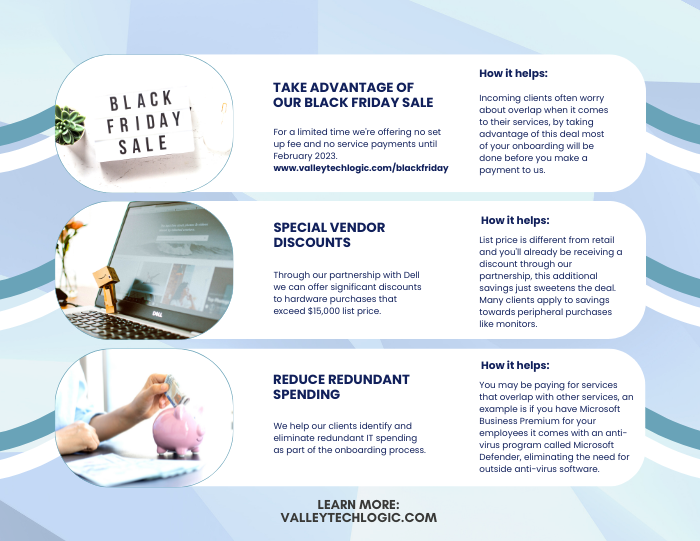
    10. Work with your IT provider to take advantage of their partnerships. Finally, if you have an IT provider it’s worth asking if they have partnerships with any vendors that can help you get a better deal. We have partnerships with Dell and Lenovo and utilize them to benefit our clients regularly. You can learn more about that here.

    Here are three ways you can save right now on your technology spending:

    Three additional money savings tips.Procurement services is something we reserve for clients. If you’d like to learn more about how we can help you purchase new devices and maintain them, click here to schedule a consultation.

    Looking for more to read? We suggest these other articles from our site.

    This article was powered by Valley Techlogic, an IT service provider in Atwater, CA. You can find more information at https://www.valleytechlogic.com/ or on Facebook at https://www.facebook.com/valleytechlogic/ . Follow us on Twitter at https://x.com/valleytechlogic.

  • The global chip shortage timeline of events, and when it could end

    The global chip shortage timeline of events, and when it could end

    The global chip shortage is still raging on and it’s effecting more business sectors than you might expect. As a technology provider we’re certainly feeling the pinch when it comes to ordering hardware for our clients. The delays have challenged us to get creative with our clients and we’re coming up with interim solutions until hardware makes it in.

    Some vendors are certainly meeting the needs for computer hardware better than others, so that buffet of choice you may be used to is a thing of the past – at least for the moment. We’re thankful for our channel connections as they give us an edge when ordering that the ordinary consumer may not have.

    We’re not the only ones feeling the pinch though, car manufacturers, appliances, even children’s toys. Consumers are being told they should consider purchasing their children’s wish list items earlier this year, if you wait those electric wish list items may be long gone before December. We’ve even seen it suggested that you may want to consider “dumb” toys such as those made of wood that are unaffected by the chip shortage. Lincoln logs anyone?

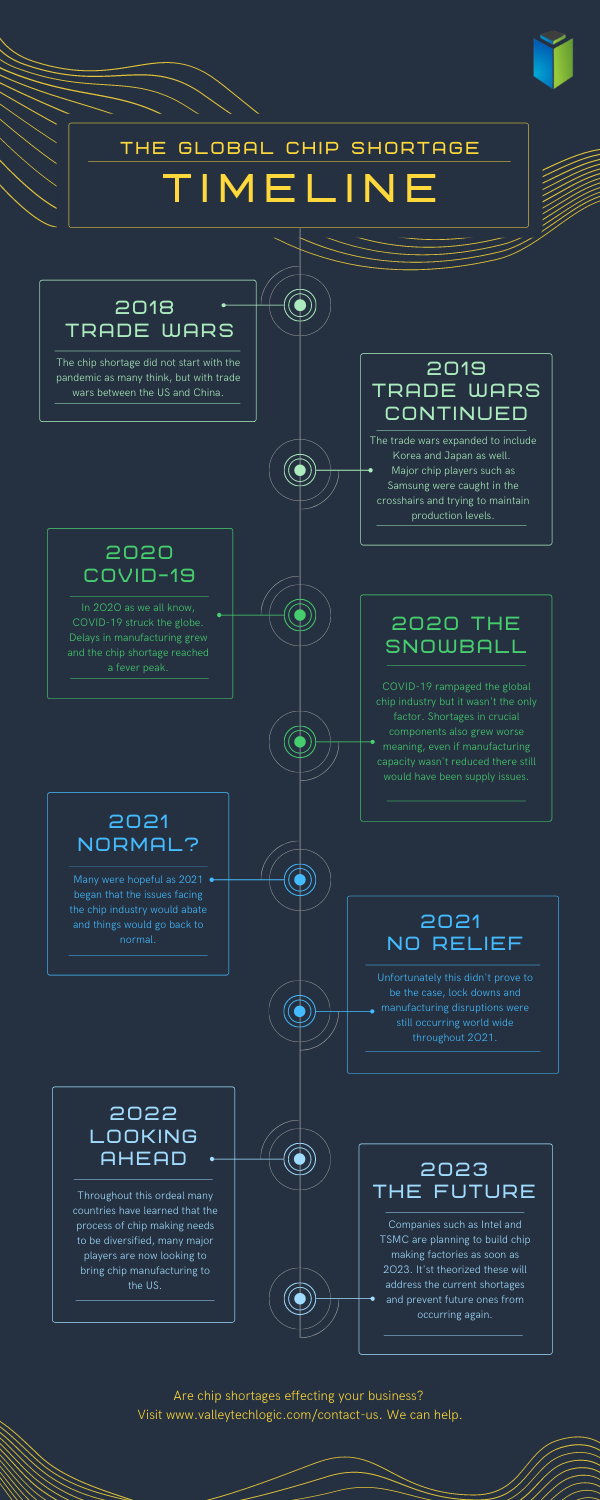
    Here is a simple timeline of events for the chip shortages, which started long before the pandemic in 2018.

    Global Chip Shortage Timeline
    Click to Download the Full Size Version

    As you can see the chip shortages definitely didn’t start with the pandemic, but it did exacerbate the existing problems greatly. Shortages in components, shortages in labor, shipping delays are all contributing to worldwide pains that have even led to products exceeding their MSRP.

    The graphic card market sums up the problem succinctly, with scalpers taking advantage of the low stock to sell cards for hundreds of dollars outside of their MSRP.

    No one can say for sure when the chip shortages will end, but major players such as Intel and chip-making behemoth TSMC are all looking to bring manufacturing state side to help. This would at least cut down on shipping times and if future global trade issues were to occur the US electronic manufacturers would be much better prepared for it.

    These are not permanent fixes though as component shortages are an ever-growing issue that needs to be addressed. We don’t know what a long-term solution will look like but more investments into infrastructure could easy the burden in the short term.

    For more information on the time line of events for the global chip shortage we suggesting reading this article which goes into more details about the timeline of events since 2018 and other global factors that have occurred.

    If you’re having difficult sourcing hardware for your business, Valley Techlogic can help. We have channel connections that allow us priority buying for our clients and should you be interested in partnering with us we can extend those benefits to your business. Reach out today to learn more.

    Looking for more to read? We suggest these other articles from our site.

    This article was powered by Valley TechLogic, an IT service provider in Atwater, CA. You can find more information at https://www.valleytechlogic.com/ or on Facebook at https://www.facebook.com/valleytechlogic/ . Follow us on Twitter at https://x.com/valleytechlogic.

  • Windows 11 system requirements – Will your computer be able to run it?

    Windows 11 system requirements – Will your computer be able to run it?

    Continuing our talking points about Windows 11 (which was officially announced June 24th of this year), we would be remiss to not talk about one very important thing – will your computer be able to run it?

    We know for business owners this question is even more loaded as you consider not only your personal machine(s) but also those of your employees. The initial system requirements looked pretty steep, requiring an 8th Gen processor and other specifications that would have phased out a lot of machines that are perhaps not even very old.

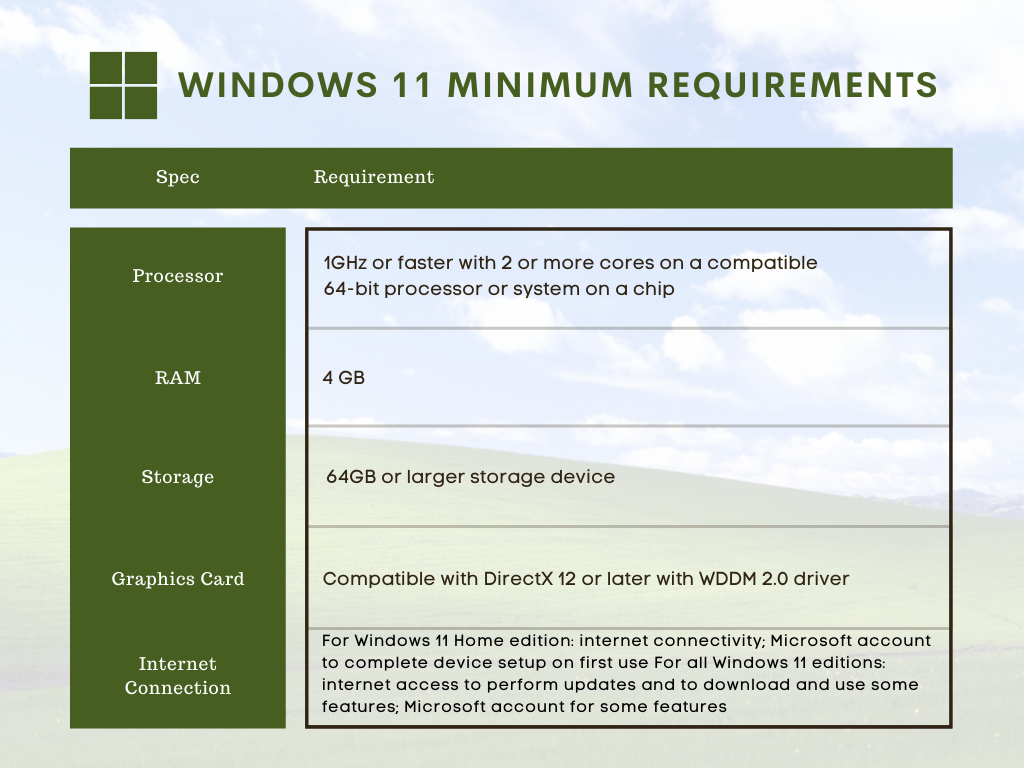
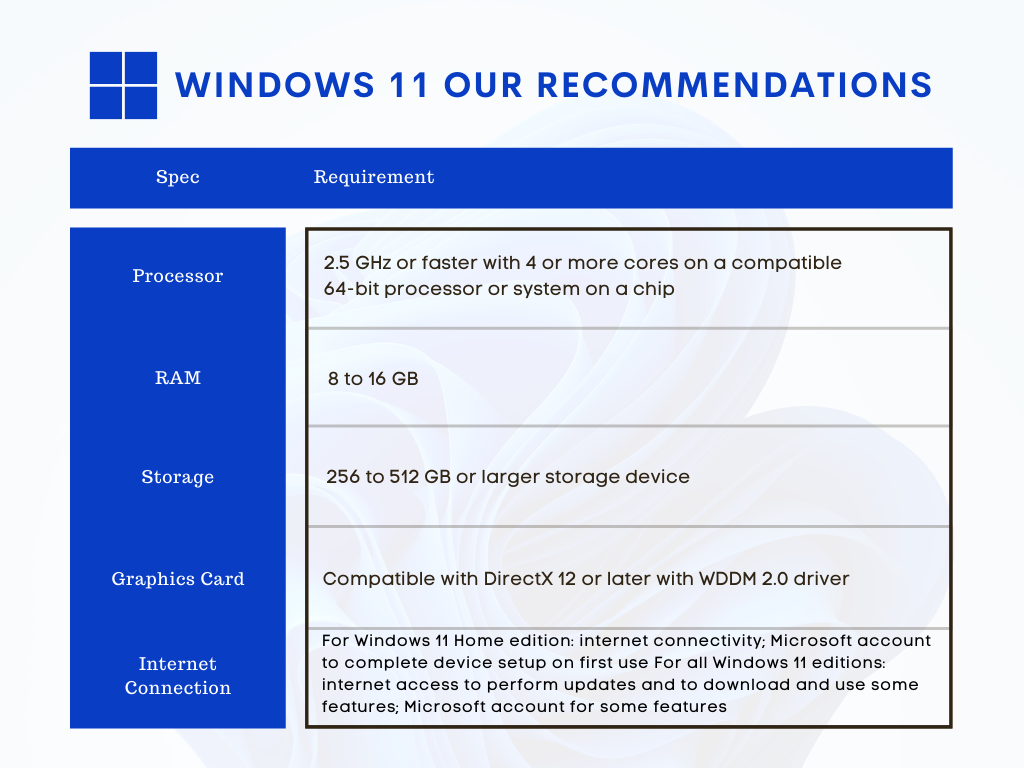
    However, Microsoft has since retracted their initially stated requirements in favor of a more modest range of specs that may still leave some very old machines out of the running but for anyone who’s replaced their computer in the last several years (which we recommend anyways) you should be fine. You can see the requirements in the chart below.

    However, minimum requirements are just one piece of the puzzle. By those markers most computers built in the last 5 years can run Windows 11, but what specs would allow it to run well and allow you to have access to the full benefit of all of the new features? Not only that, as we demand more of our computers we really need to consider optimizing them for our current usage.

    For instance, if you frequently are running out of storage space, or if having a lot of tabs open really bogs down your machine, you may find that the enhanced strain caused by a more demanding operating system could make using your machine a hassle to use. Or even just plain unusable.

    We decided to list out our recommendations for system requirements that would most benefit when upgraded to Windows 11.

    Windows 11 Our Recommendations

    As you can see some requirements mirrored those set by Microsoft, but we boosted the recommended storage space considerably and also the RAM. When it comes to RAM we really recommend clients lean towards the higher end of the spectrum, 16 GB would be a better option for future proofing your device in our opinion.

    The same goes for the processor, 4 cores is really a bare minimum requirement for a device that runs smoothly and helps you complete your tasks (no matter how demanding).

    Minimum system specs should never be seen as the best option when assessing what level of device will fit your needs, they’re just the base mark software companies must set when considering older devices on the market. The minimum requirements lets consumers know whether what they already have will work with their software.

    Microsoft also has a tool for easily checking to see if your device is ready for Windows 11, PC Health Check, however as of writing it’s currently down as they make changes to it to be in line with the current recommendations they recently set.

    Windows 11 will not be out until later this year and these recommendations may change yet again as they gather data from the version they currently have out in early access. We feel confident our recommendations will hold up and continue to serve as a viable option for anyone in the market for a new PC or laptop.

    If you’re considering upgrading the machines in your business to make them “Windows 11 ready”, we can help. We’re a Microsoft partner and specialize in helping our clients manage their Windows applications and devices on top of a host of other IT services we provide. You can learn more through a free consultation here.

    Looking for more to read? We suggest these tech articles from the last week.

    This article was powered by Valley TechLogic, an IT service provider in Atwater, CA. You can find more information at https://www.valleytechlogic.com/ or on Facebook at https://www.facebook.com/valleytechlogic/ . Follow us on Twitter at https://x.com/valleytechlogic.