Tag: hardware buying

  • Maximizing your tax deduction potential with Section 179

    Maximizing your tax deduction potential with Section 179

    It’s September which means we’re almost to the fourth quarter where most businesses look ahead towards end of year activities, it’s not unusual for us to see an increased interest in locking down new equipment and upgrades before year end.

    Each year we begin promoting the benefits of Section 179, you can learn more about it in our updated guide for 2023 or continue reading.

    In a nutshell, Section 179 is a tax savings benefit that allows you to deduct the cost of equipment you use for work from your (in some cases up to 100% of the total cost) from your tax expenses. When used correctly, this means you can purchase upgrades for your business and receive that money right back into your business when you file the following year.

    Section 179 is a permanent part of the tax code here in the United States but that doesn’t mean it’s static. Each year the deduction limits are adjusted for inflation. You can see on the chart below what this year’s limits are.
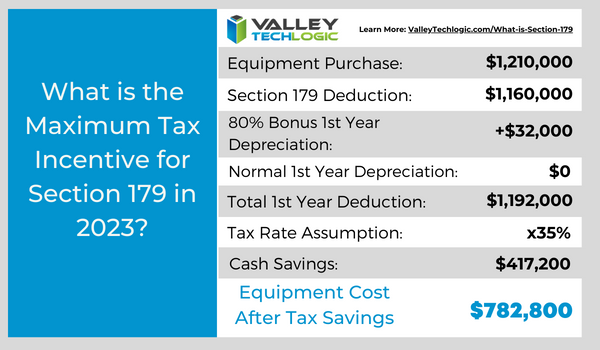
    You can choose to take the deduction in one lump sum or take a deduction for depreciation each year instead – it’s completely up to you.

    What equipment or technology purchases qualify for Section 179?

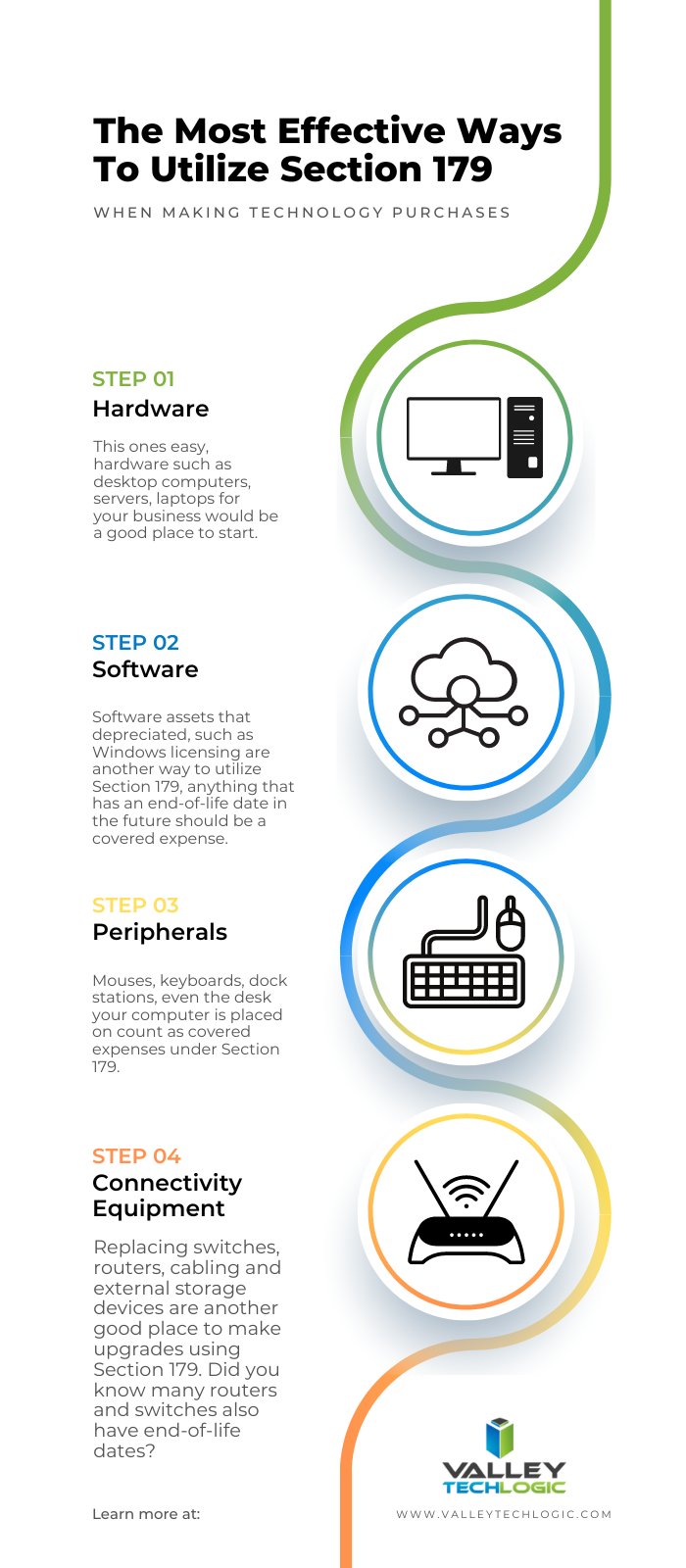
    1. New Equipment: This includes computers (as long as they’re used in your business at least 50 of the time), servers, backup devices, phone system hardware and more.
    2. Components: Such as hard drives and solid-state drives, RAM, video cards, monitors and more.
    3. Refurbished Equipment: You don’t have to buy new equipment to qualify for Section 179, in fact if you’re in the market for a new server and have been debating new vs refurbished, we have an article where we weigh in here. Equipment can also be financed or leased and still qualify.
    4. Software: If you’re looking to purchase software upgrades for your business this year – such as upgrading an older copy of Windows to the latest version – these would also qualify.
    5. Professional Services: Even professional services like ours can possibly be deducted under Section 179.

    We find many businesses are looking to make purchases before the year end because that’s when a clearer picture of their financials is available but be warned. For a purchase to qualify in 2023 these purchases must be made before December 31st. Even if the purchase was planned as part of this year’s budget, if it’s purchased January or later it will not count for this year’s taxes.

    If you’re looking for the exact math on a potential purchase and the savings you will net, we can recommend this calculator, it has been updated for 2023. It’s also important to note that the ceiling for your particular business is your net income, you cannot deduct more money than you made that year, however you can carry the deduction forward to the next year.

    We’ve spent some time discussing what does qualify under Section 179, but what about what doesn’t? The following items would not qualify under Section 179:

    1. Intangible Assets: This would include things like patents or copyrights as an example.
    2. Land: You cannot purchase land and claim a deduction for Section 179.
    3. Purchased from family: Unfortunately, you cannot claim purchases that are made through a family member. Even if the product itself would normally qualify, if the item was purchased through a sibling, parent’s or spouses’ separate business it will not qualify.

    Interested in making technology upgrades in your business and utilizing Section 179 in 2023? Valley Techlogic can help, we offer procurement services as well as technology solutions that are covered by this very useful tax code. Learn more today by scheduling a consultation.

    Looking for more to read? We suggest these other articles from our site.

    This article was powered by Valley Techlogic, an IT service provider in Atwater, CA. You can find more information at https://www.valleytechlogic.com/ or on Facebook at https://www.facebook.com/valleytechlogic/ . Follow us on Twitter at https://x.com/valleytechlogic.
  • Security Camera Buying Guide for Businesses in 2023

    Security Camera Buying Guide for Businesses in 2023

    We may be alone here, but it seems like the interest in security cameras has climbed over the past year. Perhaps it’s because the technology has vastly improved over the last decade and our clients are ready to swap out slower, inefficient models that capture lackluster video at and are expensive to maintain for newer models that capture crisp clear video and have increased features to make reviewing that video much, much easier.

    If you were unaware, the grainy surveillance footage you’re used to seeing is quickly becoming a thing of the past. If you’re a fan of crime dramas, you may have seen the police officers in those show ask to have a video unrealistically “enhanced” to show the suspects on screen from original footage that starts out barely visible. Now, that sort of technology is in some cases a reality.

    Instead of starting with grainy footage, the cameras we have available for our customers have clear easy to view footage of a wider area than you would have been able to get in the past (meaning less cameras to buy to cover the same square footage). These cameras are also backed by software enhancements that enable you to search through the footage to find a specific time, an object such as a license plate, or even specific people.

    You can learn more about the AVA powered camera systems we offer here. The best thing about the AVA solution is it can pair with your existing cameras, allowing you access to many of these benefits without buying new cameras.

    That brings us to the pros and cons of buying a new camera system for your business:

    • Pro: Enhanced Features, obviously we just spent some time going over the features you’ll stand to gain from a new camera system. Another feature you may not have considered is reduced storage costs; many camera systems now store data in the cloud meaning you will not have to pay for onsite storage (which can add up if you tend to save your footage for a while).
    • Con: Cost, obviously the cost of a new camera system can be quite expensive, but perhaps less than you may think. As technology has grown and cameras have become more ubiquitous, the costs have also dropped.
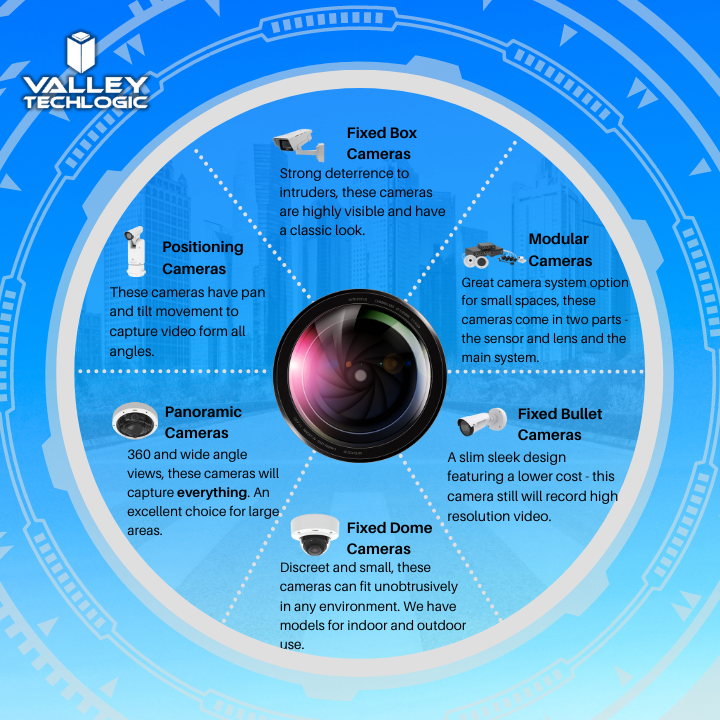
    • Pro: More Options to Fit More Spaces, if you have old school bullet style cameras only you may be surprised at the range of options and styles available now. We still recommend the bullet style for outdoor use as it’s very obvious that a camera is in place to potential intruders, but for in office use a more discreet camera might make more sense (and you can look at our chart on camera styles below).
    • Con: Installation, going through the installation of any kind of equipment can bring up unforeseen issues. Problems with wiring or getting the placement exactly right for the location it’s being placed. There is of course the expense of the installation too, which in some cases can rival the cost of the cameras themselves. Every situation is different and it’s best to have your specific setup reviewed by a technician to get a clear estimate.
    • Pro: Better Able to Work in a Variety of Conditions, older cameras often didn’t handle interference or poor lighting very well. Today’s cameras can adjust for poor lighting or poor visibility and some cameras even offer night vision for poorly lit areas of your building.
    • Con: Software Costs, of course for AI or software backed cameras you will encounter a software cost for utilizing those features. We feel it’s more than worth it considering how much more useful your cameras will be for your business and should be considered part of the cost of maintaining your security in your business.
    • Pro: More Integrations, as our AVA page illustrates, many of today’s camera systems also integrate with sensors that can monitor for odors or liquids, and even specific sounds (such as screaming or a gunshot).
    • Con: There really aren’t any additional cons outside of the expense and going through the installation process, once your new camera system is in place you will wonder how you ever got by without it.

    Here is a brief overview of the types of cameras that are now available on the market:

    While we recommend the AVA solution the most for our clients, we have camera system options for businesses of all shapes and sizes. We would be more than happy to provide a custom estimate for your business, reach out today to schedule a walkthrough with one of our security camera experts.

    Looking for more to read? We suggest these other articles from our site.

    This article was powered by Valley Techlogic, an IT service provider in Atwater, CA. You can find more information at https://www.valleytechlogic.com/ or on Facebook at https://www.facebook.com/valleytechlogic/ . Follow us on Twitter at https://x.com/valleytechlogic.

  • Need computers for your office? Purchasing before the New Year could save your business a ton of money

    Need computers for your office? Purchasing before the New Year could save your business a ton of money

    Every year we promote the tax savings benefits of Section 179 to our clients, new clients are often not aware that the computer hardware (and even some software) they use in their business is a tax deductible expense. Making these purchases before year end saves them a boat load of money on the next years tax bill and effectively works as a discount on the equipment they need.

    What is Section 179? Section 179 is an immediate tax saving deduction on any depreciable asset – such as vehicles, hardware and software. Rather than depreciating these items in future tax years and having to track that, you can benefit from lowering your liability right now.

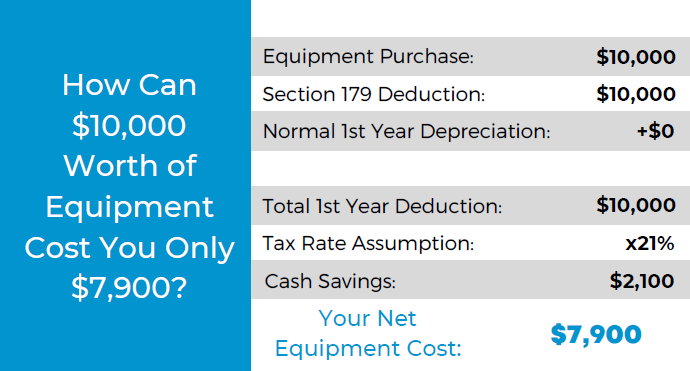
    This especially helps our clients when making larger technology purchases such as replacing aging servers. A new server can easily run $10,000 or more, but when you factor in the benefit of Section 179 it makes for a sizeable discount on a purchase of that size.

    The maximum discount for 2022 is $1,080,000, so the sky is the limit no matter what size purchase you’re planning to make. To maximize the benefits however, we do find that making these purchases at the end of the year is the most beneficial as you see the deduction much sooner when rolled into the next years taxes.

    Here’s a chart on what a $10,000 purchase would look like after utilizing Section 179:

    Of course, every business set up is different and just looking at the numbers may not give you enough of an idea of how you can use Section 179 in your business, so we also made this chart of things our clients often look to do before the year ends that may be an inspiration to you as well.

    Software is a great way to use Section 179 this year in particular, with Windows 7 and 8 for desktops and Windows Server 2012 all losing mainstream support access in 2023.

    While you’re looking to upgrade your Windows software you will probably also want to consider new hardware, the useful life expectancy for computer hardware and servers is around 5 years with typical use and any machines that came from the factory with Windows 7 or Windows Server 2012 installed will be well past that window.

    You may also not know that Microsoft has announced it will no longer allow updates for their Office suite of software on outdated machines, so the time is ticking to get those upgrades done before your office staff loses the ability to use Office software on their devices. You can learn more about the updates coming from Microsoft in 2023 with our free guide here.

    If you’re looking for assistance in procuring technology solutions for your business, Valley Techlogic can help. We have partnerships with Microsoft, Dell, and Lenovo as well as other technology vendors and can help you replace aging equipment easily before time runs out on the benefits of Section 179 this year. Reach out today to learn more.

    Looking for more to read? We suggest these other articles from our site.

    This article was powered by Valley Techlogic, an IT service provider in Atwater, CA. You can find more information at https://www.valleytechlogic.com/ or on Facebook at https://www.facebook.com/valleytechlogic/ . Follow us on Twitter at https://x.com/valleytechlogic.
  • Hardware Shortages May Continue Into 2022, So What Can Consumers Do About It?

    Hardware Shortages May Continue Into 2022, So What Can Consumers Do About It?

    COVID related hardware shortages and merchandising shortages in general are not new, since the beginning of the pandemic we have seen shortages in food, toilet paper, cleaning products and even personal protective equipment (PPE) frontline workers desperately needed to stay safe.

    Many of these shortages have been solved by an uptick in production. However, computer and electronic related shortages have been some of the worst hit and so far, the longest lasting with many experts saying we won’t see an end to them until 2022.

    At the beginning of the pandemic as schools closed and many jobs went remote the shortages when it came to laptops and desktops made sense, students and workers needed devices to continue to learn and work on.

    We saw that these shortages were solved when popular PC makers ramped up production and pushed forward new product launches to entice this entirely new market of PC consumers – many of which had abandoned bulkier hardware in favor of small and portable smart phones in years prior. It was common during this time for households to go from a single PC in the home to several.

    Now as we’ve stepped into 2021, we’re seeing shortages when it comes to the components these devices are made of. Especially when it comes to computer chips otherwise known as semi-conductors.

    We’re going to get a little technical here, a semi-conductor (or integrated chip) is a series of electronic circuits printed onto a conducting material, usually silicon. These chips form the brain of your electronic equipment. Tech News #3

    have been reported well before the pandemic hit (and are certainly be making things even worse). These silicon shortages don’t just effect PCs and laptops, cellphones, gaming equipment, even cars.

    Our growing demand for electronics has created the silicon shortage and we don’t as of yet have a solution that would allow us to keep our current breakneck pace when it comes to new electronic product launches. Many solutions center around increasing the longevity of existing products and ending planned obsolescence by allowing outside vendors to fix OEM products without voiding a customer’s warranty (as an example).

    On top of the silicon shortage, Bitcoin and Bitcoin related mining has also seen a resurgence in popularity. Powerful Graphical Processing Units (GPUs) are needed to make Bitcoin mining as efficient and productive as possible and as such we’re seeing GPUs skyrocket in price, many selling for several times their MSRP.

    It’s expected that it will take until 2022 for vendors and factories to catch up and prices to begin to stabilize. If you’re in the market for a new computer or laptop in the interim, you may find yourself in for a wait and a price hike.

    If you run or own a business, having a technology service provide like Valley Techlogic behind you can assist you in your business’s hardware needs. We have special relationships with our vendors and can use those to our customers advantage, saving them both time and money.

    If you’re a business owner located in the Central Valley and your office is due for a hardware upgrade, reach out today to find out what we can do for you.

    Looking for more to read? We suggest these tech articles from the last week.

    This article was powered by Valley TechLogic, an IT provider in Atwater, CA. You can find more information at https://www.valleytechlogic.com/ or on Facebook at https://www.facebook.com/valleytechlogic/ . Follow us on Twitter at https://x.com/valleytechlogic.