Tag: it service provider

  • 5 Signs It’s Time to Switch Your IT Provider (And How to Choose the Right One)

    5 Signs It’s Time to Switch Your IT Provider (And How to Choose the Right One)

    Choosing the right IT managed service provider for your business is a tricky topic, your existing provider has access to sensitive systems and knows your business inside and out. If things aren’t going as well as they could (should) it can still feel overwhelming to think about switching. We know just how difficult switching IT providers can be (we even wrote a guide on it).

    Even though it’s challenging, there are some clear-cut signs it might be time to make a change. The five topics below are what we consider red flags:

    1. Constant Downtime and Slow Response
      • Frequent outages, slow systems, delayed ticket responses.
      • Impact on productivity and customer trust.
    2. Recurring Security Issues
      • Unpatched systems, repeated cyber incidents, lack of proactive security.
      • The cost of poor cybersecurity.
    3. Lack of Strategic Guidance
      • Your provider only “keeps the lights on” but doesn’t help you plan.
      • No roadmap for scaling, cloud adoption, or improving efficiency.
    4. Surprise Costs and Lack of Transparency
      • Hidden fees, unclear service levels, unpredictable billing.
      • Why predictable costs matter.
    5. Poor Communication and Customer Service
      • Hard-to-reach support, no regular updates, poor explanation of issues.
      • The value of clear and proactive communication.

    If your current IT managed service provider ticked any of these boxes, it might be time to begin the search for a new provider.  Below are four things we would recommend (as an IT managed service provider ourselves) you dive into with any potential new provider.

    1. Look for Proven Experience: Certifications, client references, industry expertise.
    2. They Prioritize Security and Compliance: Ask about their approach to cybersecurity and regulatory needs.
    3. Demand Proactive Support: Look for providers who offer monitoring, patching, and recommendations—not just break-fix.
    4. Check for Transparent Pricing: Make sure you understand their pricing models and what’s included.

    Ending services with your existing provider might seem scary, but in our experience most IT managed service providers want to do right by their clients (even if that client is on their way out). In our 20 plus years of experience, we have never had the incumbent provider block our ability to service their former client. Again, we have a guide on this very topic that goes into more detail and even provides a template ending your services with your existing provider.

    If you’re in the market for new IT services to support your business, Valley Techlogic has been supporting California businesses since 2004 and we can support you in whatever stage of your search you’re in. From procuring new services to providing an assessment on your current technical environment – our technicians are ready to support your business today.  Learn more with a consultation.

    Looking for more to read? We suggest these other articles from our site.

    This article was powered by Valley Techlogic, leading provider of trouble free IT services for businesses in California including Merced, Fresno, Stockton & More. You can find more information at https://www.valleytechlogic.com/ or on Facebook at https://www.facebook.com/valleytechlogic/ . Follow us on X at https://x.com/valleytechlogic and LinkedIn at https://www.linkedin.com/company/valley-techlogic-inc/.


  • 5 Reasons to have an annual meeting with your IT service provider and how to make the most of it

    5 Reasons to have an annual meeting with your IT service provider and how to make the most of it

    If you’re a small business owner and you work with an outsourced IT provider you’re not alone, statistics vary but it’s estimated up to 60% of small businesses utilize a third-party resource for their IT.

    This can look different depending on your particular size and needs, for some businesses it can look like support for existing IT staff, for other businesses their entire IT needs are shifted onto a third party IT resource. There is no one size fits all solution, the needs of your business are unique and your IT support provider should be a resource for helping you grow your business and keep up with the technology demands of modern work places.

    That is why it’s so important you meet with your IT team at the minimum annually, although we really could make a strong argument for quarterly (especially during times of intense growth or change within your business). Keeping them in the loop allows them to provide for your business adequately and on the opposite end you can learn about their recommendations for your business, which are often times free or low-cost solutions and improvements to your technology infrastructure and security.

    Even for recommendations that carry a cost you can plan for these things in advance rather than having it come up as an unpleasant surprise later on, an example would be let’s say their reporting has discovered your on-premises server is struggling to keep up with your demand or even showing signs of failure. This could be talked about in a meeting ahead of time but instead it might become a major headache when the server fails spontaneously and has to be replaced on the spot. Maybe you would have thought about making the move to the cloud this year or could have planned out your hardware purchases to coincide with more favorable timing, you’ll never know but hindsight is 20/20 and you will probably make a different choice going forward.

    So, what are the 5 reasons to have an annual meeting with your IT service provider?

    1. Future Planning: As we outlined in the scenario above, having this meeting allows you to create a plan for the year ahead. If your business has a busy season (most of us do) you can schedule any maintenance or downtime during the off-season. You can plan out hardware purchasing, software upgrades, cybersecurity improvements and more.
    2. Review Documentation: Your annual meeting is also a great time to review any reports your IT service provider has created for your business. At Valley Techlogic we’re constantly tracking items we’re doing on the back end for our clients, the regular maintenance, our 24/7 cyber security monitoring, backup and data services we provide just to name a few.
    3. Project Planning: We also suggest touching on any projects you would like to complete, such as switching out your traditional landline system to VoIP, security cameras (if they provide that service) and any installation or infrastructure projects. Even if you’re not ready to commit to them now, keeping your IT provider in the loop will allow them to plan for these projects on their end as well and keep them in mind when doing their own scheduling.
    4. Service Delivery Improvements: Whether you’re currently happy with your IT providers’ services or not, are they aware of it? Your annual meeting is a great time to review the services you have with your provider and whether they’re currently meeting your expectations (if they’re not, maybe it’s time to make a change and our Switching IT providers kit can help you do it).
    5. Reviewing Past Work: In the same vein, this annual meeting should also be used for reviewing the work they have done for you this last year and any follow-up requests. Despite all the tools and widgets we use in the IT industry, we’re still not omnipresent and sometimes a request is better delivered verbally. They will probably have in their meeting notes items they wish to go over and revisit to make sure you were satisfied with the outcome as well.

    We could address even more benefits of having this an annual meeting with your provider but these five will greatly improve the services they’re able to provide for your business and get you the most value out of the service you’re paying for.

    If you’re working with an IT service provider who doesn’t give you the option of meeting annually, it would be our recommendation you look for a new provider. Our Switching IT Provider’s kit makes it easy to switch (we even provide you with a template letter for discontinuing your service) and if you’re looking for an IT service provider who makes meeting with clients regularly a priority, than why not give Valley Techlogic a shot by clicking here or the image below.

    Looking for more to read? We suggest these other articles from our site.

    This article was powered by Valley Techlogic, an IT service provider in Atwater, CA. You can find more information at https://www.valleytechlogic.com/ or on Facebook at https://www.facebook.com/valleytechlogic/ . Follow us on Twitter at https://x.com/valleytechlogic.

  • Hiring a tech vs outsourcing, a cost breakdown

    Hiring a tech vs outsourcing, a cost breakdown

    If you’ve realized you need additional IT support for your business but are on the fence about which route to take, hiring IT staff or outsourcing your needs to an IT service provider the choice can be difficult.

    Many of our clients reach us because they have been using an unreliable IT support service, their existing IT staff left, or sometimes because they’ve somehow gotten by with no IT at all but realize that needs to change.

    We also frequently have clients who are utilizing a person in their office who is “tech savvy” but is not IT, it can be quite expensive to hire an IT professional with the experience needed to perform the variety of duties needed work on items such as cybersecurity improvements, hardware upgrades, software deployments and more.

    Here are some benefits of hiring in house IT staff:

    1. They’re already at your office so there’s no waiting for IT support to show up.
    2. They will be well versed on your systems since in many cases they will be the one who set them up in the first place.
    3. They should be pre-emptively taking care of updates that will keep your business more secure.

    On the other hand, here are the benefits of outsourcing your IT:

    1. The cost is usually much lower than hiring personnel.
    2. You get many experts for one price, no matter how well versed your IT person is they can’t be an expert in everything.
    3. You get software tools that may be otherwise unavailable to a single business or not cost effective to purchase.
    4. Round the clock service and monitoring, many IT service providers including us offer 24/7 support.
    5. You will have an agreement with them that spells out the level of service you’re supposed to receive.

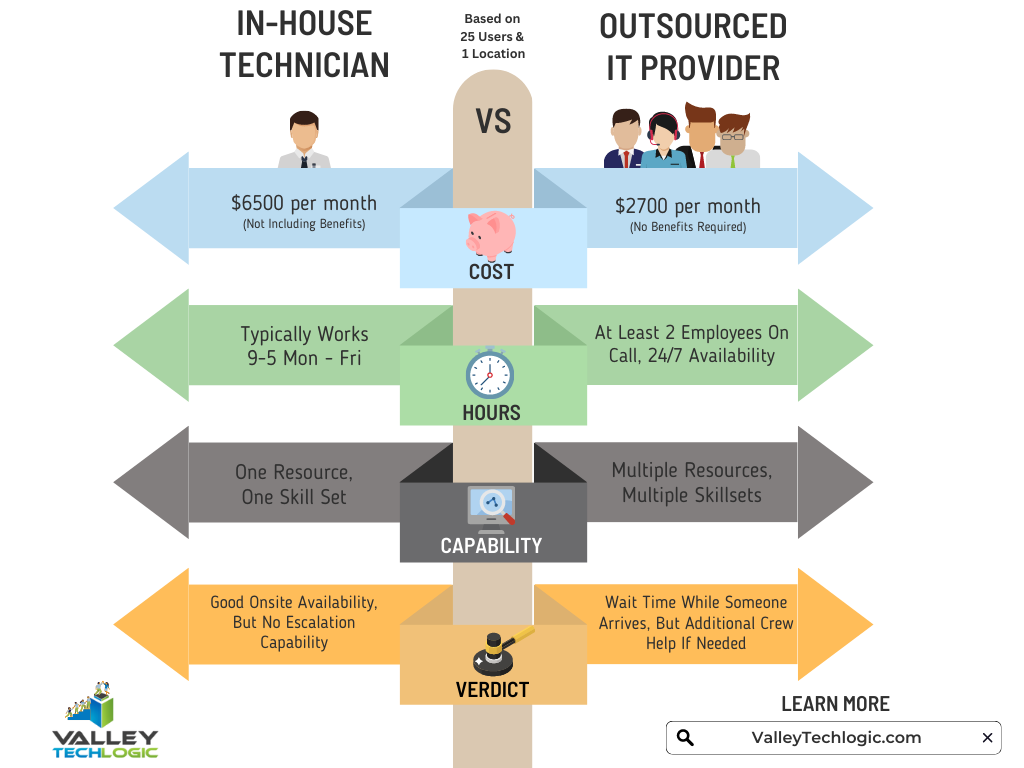
    It’s a difficult choice and only you know whether your business would greatly benefit from having in-house staff or whether outsourcing your IT is your best option. As you weigh your options we created this chart with the average baseline cost for an in-house IT person vs. an IT service plan with us.

    However, as we mentioned many of our clients are utilizing an in-house resource already, these tech savvy staff are usually performing the day-to-day activities such as patching and password resets but may be missing crucial items such as cybersecurity prevention or maintaining (or even starting) backups.

    For clients like these we recommend our co-managed plan option. With our co-managed plan we work directly with the staff already performing your IT duties, if there’s an issue they call us directly and we pass on a cost savings to you.

    We do that because usually by working with a staff member that already knows your systems we can bypass a lot of the early troubleshooting that occurs, and that staff member usually still handles minor day to day tech related activities.

    If you would like to learn more about our co-managed plan options just reach out today for a consultation.

    Looking for more to read? We suggest these other articles from our site.

    This article was powered by Valley Techlogic, an IT service provider in Atwater, CA. You can find more information at https://www.valleytechlogic.com/ or on Facebook at https://www.facebook.com/valleytechlogic/ . Follow us on Twitter at https://x.com/valleytechlogic.

  • How the “skills gap” is changing the world of IT

    How the “skills gap” is changing the world of IT

    The term “skills gap” has been popping up a lot lately and in a nutshell it’s the refers to the difference between the skills your business needs from its employees and what’s actually available in the marketplace.

    Tech innovations occur so rapidly it would be impossible for any one person to be a master in everything that’s required to maintain the technology in most modern workplaces, there will always be a need to seek out assistance with some component of it whether it be through outsourced help or through automation – or both.

    In a survey by Monster nearly one third of employers agree the skills gap has been growing, and it’s effecting how they’re sourcing and employing candidates. With inflation on the rise employees are also seeking greater compensation for highly in-demand skill sets, which from a budgetary standpoint may be difficult for many employers to grapple with.

    It may be advantageous for employers to offer compensation or incentives to existing employees to increase their existing skillsets or “reskill”. With the many hurdles found in hiring qualified candidates in the current working environment, retention will be a key factor in many businesses being able to stay afloat.

    Automation is another component hiring managers are looking towards, especially in the world of tech.

    1. Backing up data: If you’re a Microsoft 365 customer, backing up your device data is easy with OneDrive.
    2. Email Signature: Still typing your name at the end of every email response? It doesn’t take very long, but across dozens of emails per week it can add up. Setup an email signature in Outlook (with a new email open go to Insert > Signatures) and save that little bit of time with every email.
    3. Paying Bills: Still making manual payments? Why? Setup automatic payments where you can and skip logging in and making that manual payment every month.
    4. Typing Passwords: Not only does typing in a password for everything waste valuable time, it also creates a security risk because an easy to remember password is also potentially an easy to crack password. Try using a password manager like LastPass to create stronger passwords and save time.

    Of course, there are much more advanced automation services available to assist your business, but many will require at least some initial tech know-how or even an on-hand technician available to maintain them.

    The skills gap is also affecting those who rely on short-term technical help to bridge the gap, during a time when it seems like the price of everything is going up so to, is the cost of hiring emergency technical support. Especially when it’s required afterhours.

    If after reading this you’re wondering what your best option is, trying to hire someone or relying on expensive emergency support we do want to provide a third option – outsourced IT.

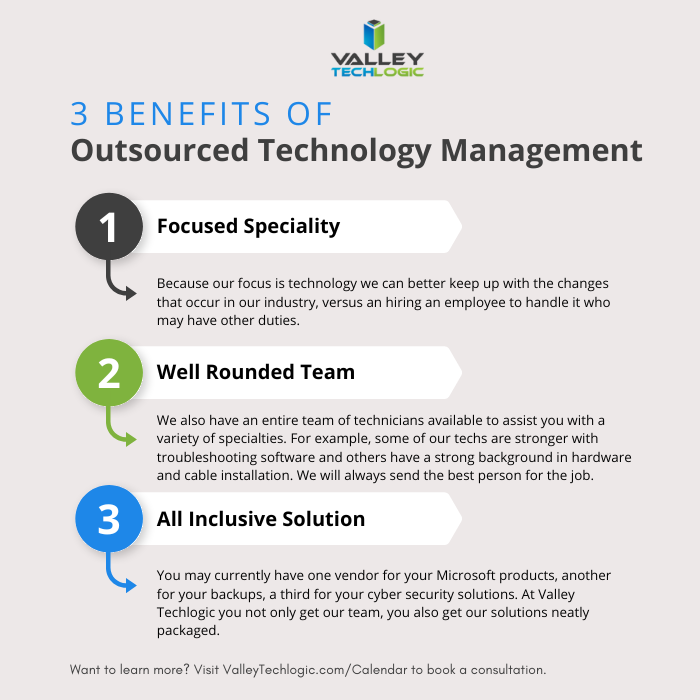
    We’re not unbiased here, but hiring outsourced IT does have a number of benefits in the current hiring climate that you may not have considered. See the chart below for examples:

    Interested in learning more? Schedule a consultation with us today.

    Looking for more to read? We suggest these other articles from our site.

    This article was powered by Valley Techlogic, an IT service provider in Atwater, CA. You can find more information at https://www.valleytechlogic.com/ or on Facebook at https://www.facebook.com/valleytechlogic/ . Follow us on Twitter at https://x.com/valleytechlogic.

  • Looking for a new IT provider? Here’s a checklist to start with

    Looking for a new IT provider? Here’s a checklist to start with

    As an IT provider ourselves we have some thoughts – okay a lot of thoughts – on what makes a good one.

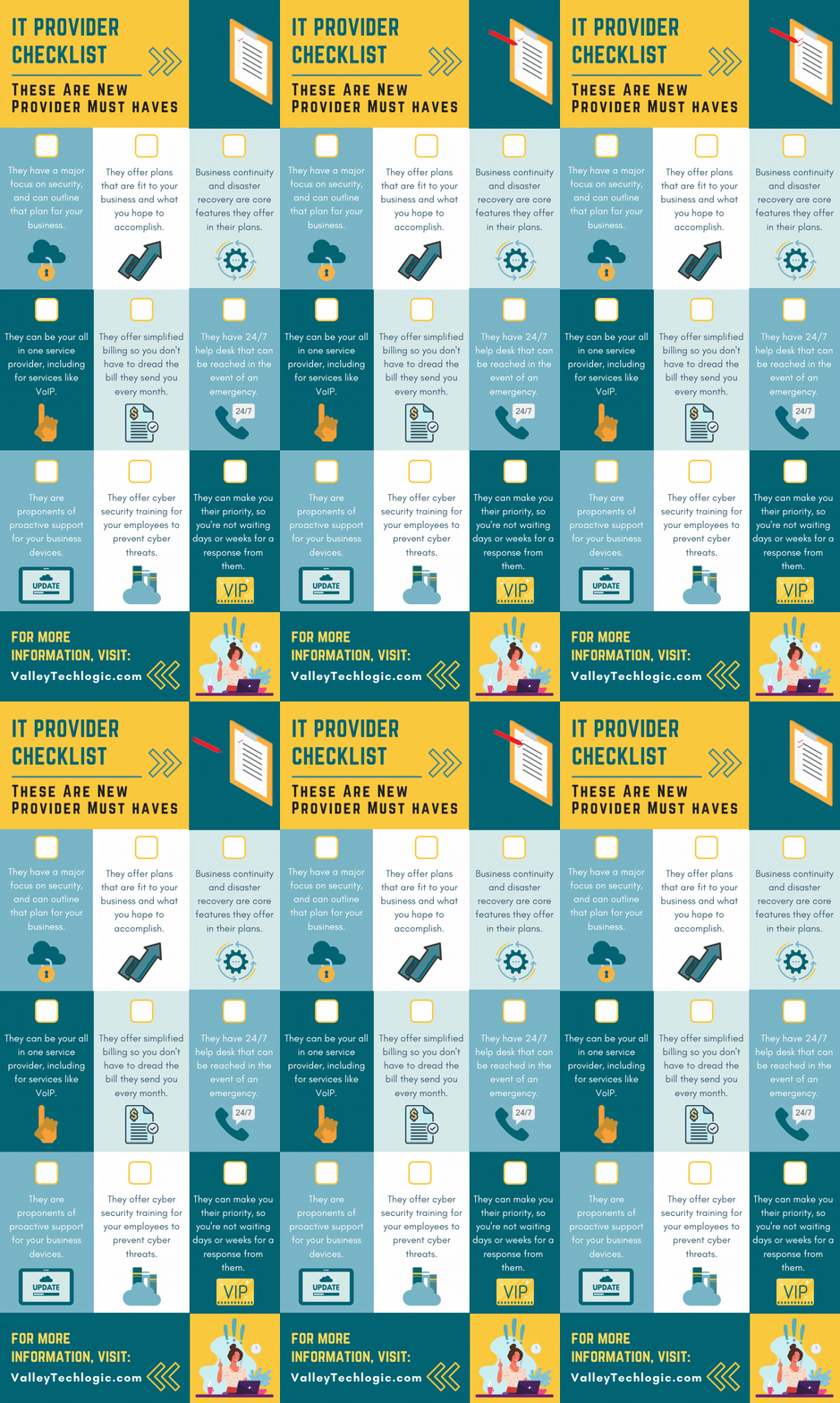
    It’s an unfortunate fact that many of our clients came to us after being failed, sometimes catastrophically, by their previous provider. While we service a large portion of the Central California area, we know many readers fall outside this region and we thought it would be helpful to provide a printable and online capable checklist for the top 9 things to look for in an IT provider.

    The items found on this checklist are simple enough you could even have it handy while you interview new provider options. If the answers to any of these questions are a “no” or even hesitancy, we suggest you continue looking. Items like security, disaster recovery and responsiveness to requests are hard stops when it comes to choosing a provider that will best support your business.

    If your old IT service provider left you in the lurch during a disaster, why would you risk choosing a new provider that can’t guarantee that the same thing won’t happen again?

    You also want to make sure they believe in proactive maintenance. When choosing a new provider and paying for their services the last thing you want to have happen is that you’re still the person responsible for maintaining your own IT. Paying their bill every month while still slogging through updates on workstations yourself would just be salt in the wound. We think this should be an included part of any full coverage service plan.

    Speaking of full coverage plans, at Valley Techlogic we believe in unified billing. This means when you choose us all of your IT services are contained under our one billing umbrella. We manage their IT subscriptions, their VoIP plans – everything is designed to be as hassle free as possible. While not all providers operate the same as we do in this regard, we (and our clients) think of it as a positive feature.

    Migrating from your previous provider can also be an intimidating time for any business owner, this person or business had access to all of your sensitive systems and if things ended on a sour note, you may be feeling unsure whether your data and systems are safe.

    We wrote a comprehensive guide on what to do when your IT guy (or IT provider) suddenly quits, you can find it here. The topics are applicable whether they quit or were fired by you. It’s our suggestion you don’t try to manage this on your own, locking down access and recovering credentials is really best left to the professionals.

    If your business is located in Central California (Sacramento, Stockton, Modesto, Fresno, Merced and everywhere in between) and you’re looking for a new IT service provider, Valley Techlogic meets all of the criteria found in the above checklist and more. Reach out today to learn more.

    Looking for more to read? We suggest these other articles from our site.

    This article was powered by Valley TechLogic, an IT service provider in Atwater, CA. You can find more information at https://www.valleytechlogic.com/ or on Facebook at https://www.facebook.com/valleytechlogic/ . Follow us on Twitter at https://x.com/valleytechlogic.