Tag: laptop buying

  • In the market for a new laptop? Take these 5 factors into consideration

    In the market for a new laptop? Take these 5 factors into consideration

    With Windows 10 approaching end of life in 2025, it’s putting a lot of people in the market for a new Windows 11 capable device.

    A work laptop’s size, type of screen, keyboard, and trackpad are just a few of the personal variables that go into choosing one. But certain factors are more important than others when it comes to choosing the right specifications for your professional laptop. The type of work you do and how you approach it will determine which kind of laptop is best for you; there are lightweight models that are good for simple tasks and robust, graphics-intensive versions that are great for graphic design or multitasking.

    These are the top five factors that we think are most crucial when using your laptop for work:

    Battery Life: Battery life might not be a major concern for people who use their laptops mostly at desks. However, battery life becomes a critical factor to take into account if mobility is necessary for your profession. It’s crucial to remember that better specs are frequently associated with lower battery life. It can be more sensible to go with a lighter, less powerful laptop if your tasks are simple but yet need mobility.

    RAM/Memory: For work laptops, we advise having at least 16 GB of RAM (or the option to upgrade). Reducing memory could cause problems with performance because Windows uses a lot of memory, especially for heavy users. For very low usage, 8 GB could be plenty, while 16 or 32 GB is better for heavier workloads.

    Storage: Choosing a larger storage capacity is advised because Windows takes some of the available storage during installation. 500 GB might be plenty for light users, but most users should strive for at least 1 TB.

    Video Card: A high-quality video card is essential for graphic-intensive tasks like graphic design and video editing, not only for gaming. A good video card is crucial when choosing a professional laptop if these are duties you perform as part of your workflow. Gamers’ laptops are frequently equipped with excellent video cards and screens making them a good choice even for non-gaming purposes.

    CPU: When purchasing a laptop, the CPU’s quality is quite important. Greater capability for managing numerous browser tabs or running programs simultaneously is correlated with a more powerful CPU. If you find yourself multi-tasking for work, you will need to look for a powerful CPU.

    For organizations purchasing laptops for multiple users, customization can be challenging. Valley Techlogic offers expert recommendations tailored to meet your workforce’s needs while considering budget constraints. Through our procurement services, we have partnerships with major vendors like Dell, Lenovo, and HP, providing a wider range of choices than typically available in physical stores.

    Valley Techlogic also offers installation services to assist with setting up new equipment and ensuring it’s ready for your employees.

    Discover more about our procurement services by scheduling a consultation here and you can learn more about our procurement services here.

    Looking for more to read? We suggest these other articles from our site.

    This article was powered by Valley Techlogic, an IT service provider in Atwater, CA. You can find more information at https://www.valleytechlogic.com/ or on Facebook at https://www.facebook.com/valleytechlogic/ . Follow us on Twitter at https://x.com/valleytechlogic.

  • Need a new work laptop? Here are five features to focus on

    Need a new work laptop? Here are five features to focus on

    Selecting a new work device is a personal choice, there are factors a lot of buyers focus on. Sizing, screen type, track pad feel or material, keyboard type. All of these peripheral factors that go into choosing the perfect laptop to complete your work on.

    We want to dig specifically into what you should consider when it comes to the specs of your work laptop. What you do and how you do it will greatly affect whether a laptop is the right choice for you, from smaller footprint lower cost models that work perfectly for light duty to robust, graphic and memory intense models that can handle high use scenarios such as graphic design or multi-tasking.

    Here are the five things we consider most important when it comes to the use of your laptop for work.

    1. Battery Life. Battery life may not be as important if you intend to dock your computer at a desk and leave it there primarily. If you need your laptop on the go, however battery life is hugely important and what’s available varies widely. One thing to remember is that higher specs usually correlate to less battery life, so if your job is light duty but on the go it may be better to look for a lighter, less powerful laptop.
    2. RAM/Memory. No matter what we recommend at least 16 GBs in your laptop (or the ability to upgrade). This is because Windows itself uses quite a bit of memory, so if you opt for less memory in your work laptop you may find it struggles to keep up. 8 GBs might be okay for very, very light usage but for heavy users 16 or 32 GBs is preferable.
    3. Storage. Again, because Windows does use up some of the storage available for its installation we want to look for more capacity if possible. For light users 500 GBs is fine, but for most users we would recommend at least 1 TB.
    4. Video Card. When you think video cards you might think gaming, but a good video card is also used by your computer for certain processes, especially graphically intense one. If video editing or graphic design is part of your workflow, we suggest looking for a work laptop with a better video card even if it’s a laptop that’s marketing is aimed at gamers. As a bonus these laptops will usually have a better quality screen as well.
    5. CPU. We can’t overlook the CPU quality In the laptop buying process. More CPU power means more capacity to run programs or have a lot of tabs open in your browser.

    Of course, if you’re buying for many users within your organization, it can be difficult to customize your buying to specific users. At Valley Techlogic we’re able to make recommendations for laptops that will meet the needs of your workforce while also keeping budget in mind.

    Through Valley Techlogic’s procurement services we can help you buy new equipment for your office through our vendors with more choices than are usually offered through their brick-and-mortar presence. We have relationships with Dell, Lenovo, HP and more that we can use to your advantage.

    Valley Techlogic also offers installation services if you need help setting up your new equipment and getting it ready for your employees.

    Learn more about our procurement services today by clicking the banner below to get started, or click here to schedule a consultation.

    Looking for more to read? We suggest these other articles from our site.

    This article was powered by Valley Techlogic, an IT service provider in Atwater, CA. You can find more information at https://www.valleytechlogic.com/ or on Facebook at https://www.facebook.com/valleytechlogic/ . Follow us on Twitter at https://x.com/valleytechlogic.

  • Black Friday Isn’t just for consumer purchases, business owners can take advantage as well with these tech deals

    Black Friday Isn’t just for consumer purchases, business owners can take advantage as well with these tech deals

    The holidays are rapidly approaching and with Thanksgiving and Black Friday this week we thought it would be a good idea to offer some tips when it comes to Black Friday shopping for your business.

    If you aren’t aware, “Black Friday” is the day following Thanksgiving when retailers offer deep discounts to entice buyers who are holiday shopping. These discounts also occur on technology purchases with laptops being a popular item.

    We’re Dell and Lenovo partners here at Valley Techlogic, and both have their holiday deals live now but things are selling out fast. Dell has laptops and desktops available as well as some peripherals. Lenovo even has a handy page for their Black Friday allowing buyers to sort by what they’re looking for easily.

    Another retailer you can look to for some Black Friday specials for your business is Best Buy. Following the trend this year they’ve also released some of their Black Friday specials earlier this year and would be a great place to look for a laptop or computer monitor.

    It also goes without saying that Amazon is a great place to look for those holiday tech deals, particularly when it comes to peripherals. If you have a business account with them you may even see better pricing then on your regular consumer account, it’s always worth checking.

    If you’re looking to buy in bulk, particularly if you’re also taking advantage of Section 179 this year, then we’ve got you covered. As we mentioned we have partnerships with both Dell and Lenovo and not only can we take advantage of their Black Friday pricing on your behalf, we can also work with our sales representatives to possibly secure a discount on top of that for larger purchases.

    The deals don’t stop at hardware, many software vendors will also offer deals for Black Friday especially in the creative space. Adobe Creative Cloud is 40% off this month and allows you access to Photoshop, Premier Pro and more.

    If you’re been looking for a new webhost Hostinger also has their hosting 80% off (hosting starting at $2.50 per month).

    We’ve also seen deals on VPNs and anti-virus software, though we recommend coordinating with your tech team on whether or not those are worth taking advantage of for your business.

    This year, we’ve decided to join in on the action and offer our own Black Friday Special, for five businesses that sign up we’ll be waving our setup fees and any payments until January 1st, 2023.

    Click to grab the full size version.

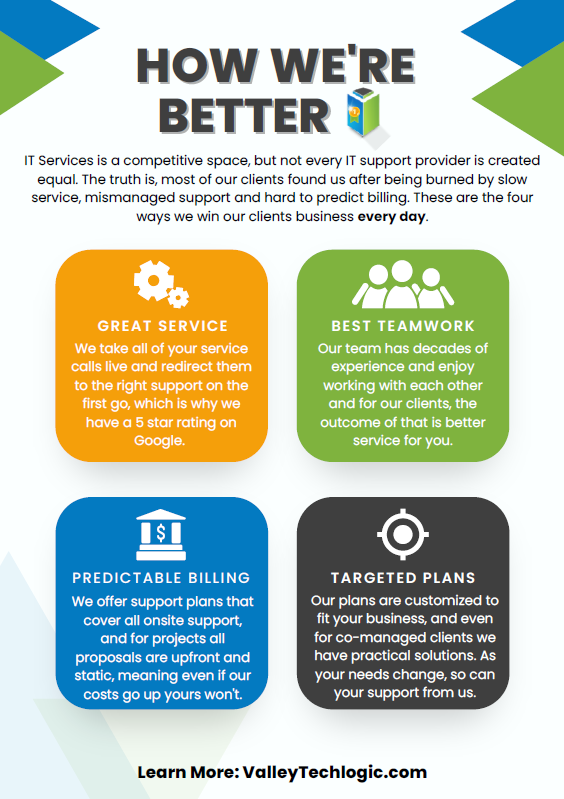
    If your current IT support has left something to be desired, why not start 2023 off on a better foot? Here are four ways we support our clients that differ from our competitors:itWe also make switching easy with our white glove hand off service, we will work directly with your current IT to make for a seamless transition. We can even provide a template for the letter you can send to discontinue your current service. What are you waiting for? Sign up today as this deal ends November 30th!

    Looking for more to read? We suggest these other articles from our site.

    This article was powered by Valley Techlogic, an IT service provider in Atwater, CA. You can find more information at https://www.valleytechlogic.com/ or on Facebook at https://www.facebook.com/valleytechlogic/ . Follow us on Twitter at https://x.com/valleytechlogic.