
Tag: social media

  • 5 Ways to Establish your Business Presence Online

    5 Ways to Establish your Business Presence Online

    New Twitter owner and billionaire Elon Musk recently announced he may be opening up the “Blue Check” for $8 a month, rather than the rigorous process you had to go through to potentially get it before.

    For most platforms, establishing your business is not a simple monthly charge. It can take time and effort to build an audience on social media or gain traffic for your website. Luckily, the effort you put into one often helps the others, and you don’t need to be an SEO expert to get started.

    The average person spends 8 hours a day doing digital activities, there is no shortage of time or eyes to view the content you create but it is a competitive market now (it’s estimated 252,000 new websites are created daily).

    How do we definite an online presence? It’s not merely existing online, while just having a website or social media page may get you traffic you can still do things to increase that traffic. Your online presence has three key components: visibility, credibility, and reputation.

    Yes, even reputation is a factor that comes in when you’re trying to get your website “ranked” on Google. By ranked we mean having a place in search engine results when a potential customer types in a keyword phrase.

    You want to protect your online reputation by posting content that is relevant to your business, if you’re in refrigerator sales the bulk of your content should be about refrigerators not the latest trendy outwear for the 2023 season. Trying to gain traffic by “tricking’ people into clicking will reduce your reputation and your ability to creep up in the search engine results.

    On a similar note, credibility is another factor and you can greatly amplify that by connecting with other websites in the form of “backlinks”, basically they link to your website and you link to theirs. In our refrigeration example, if you sell refrigerators but don’t repair them sharing links with another business that does would improve your businesses credibility online and give you a boost from whatever traffic that other business sends your way.

    Finally, visibility is what happens when you combine your efforts in improving your reputation and credibility online by posting and sharing valuable content to your audience. There’s a world of difference that happens traffic wise when you appear on the first page of Google vs the 2nd page and beyond.

    It doesn’t stop with optimizing your website though, here are 10 other things to work on to improve your online presence and give your business a boost in traffic that could lead to a boost in customer conversions:

    1. Have an easy to navigate site: The first is a no brainer, if your website is clunky or slow to load people won’t stick around to see what you’re selling. Google has a page speed tool that can give you some insight on how your website stacks up.
    2. Start a blog: If you’re not currently writing a blog (like this) then you’re missing out on a weekly (or daily, or monthly, whatever works for your schedule) injection of new keywords to your website. Landing pages are great but they’re one and done, you can strengthen your online presence by adding new content about your business through a blog.
    3. Post on social media too: You don’t need to be on every social media platform, some may not be relevant to your business. We encourage you to think about the platforms where your customers are likely to be, and then post daily on those platforms. You can create simple marketing graphics with a tool like Canva which practically does the work for you.
    4. Use hashtags too: Hashtags allow you to connect your content to people who enjoy the same content or are interested in a specific topic. Going back to our refrigerator example, if there’s a new model from a popular brand then using that brand name as a hashtag could make sense in the announcement post about it.
    5. Don’t ignore business directories: If you’re struggling to find a way to share links with other websites, starting with the free business directories is one of the best ways to improve your online presence and have your business linked from somewhere else. Start with the big traffic sites like Google My Business, Facebook, and Bing.

    Wondering what makes a good website? Here are 6 bonus tips:
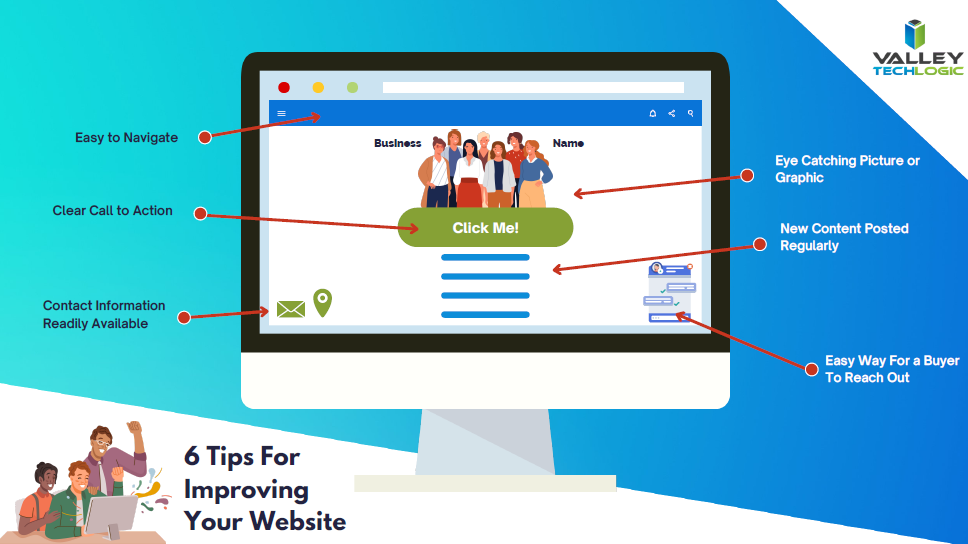
    Click to view the full size version.

    Trying to work on your online presence can be difficult if the technology you use in your business Isn’t up to the task. Imagine taking the time to write out that first blog post and your computer crashes, you may be done with it before you even get started.

    Valley Techlogic can help you with your technology goals, and having a service plan with us is like working on any of the topics we covered in this blog, you will see a net overall improvement across the board. Learn more with a free consultation today.

    Looking for more to read? We suggest these other articles from our site.

    This article was powered by Valley Techlogic, an IT service provider in Atwater, CA. You can find more information at https://www.valleytechlogic.com/ or on Facebook at https://www.facebook.com/valleytechlogic/ . Follow us on Twitter at https://x.com/valleytechlogic.


  • When the business is you, how data brokers create and sell detailed information based on your browsing history

    When the business is you, how data brokers create and sell detailed information based on your browsing history

    This week, John Oliver of “Last Week Tonight with John Oliver” aired an eye-opening segment on the world of data brokers and how easy it is to create a very detailed profile about an individual simply from their online browsing history. We suggest watching that segment (which can be found on YouTube) but we also wanted to touch base on this topic ourselves and explain what happens, why this happens, and what you can do to browse safely (and privately) online.

    There are really five clear ways data brokers capture your information online. The first is browser cookies. A cookie is a piece of information that a website stores on your device that it can than retrieve at a later time. Most websites you visit now ask you to give them permission to store cookies and most of us do so without thinking about it because the process of declining can be complicated (or perhaps you won’t be allowed on the site without doing so).

    Data brokers both buy these cookies and also place cookies on your devices themselves, which allows them to offer you highly targeted advertising. We have two solutions to this once, Chrome and Firefox both have “Do Not Track” options which will not allow the cookies to track you from site to site. There’s also a browser extension called Ghostery which gives you the option of blocking trackers.

    The second way data brokers are able to obtain information about you is through mobile applications. Many mobile applications that are “free” are not really free, you’re paying for them through the wealth of information that’s gained about you, such as your GPS data or even your private pictures and videos on your device (as many of these applications ask for “permission” for every service on your phone).

    The solution to this one is to always research the applications you download on your phone, and never give them more permissions than they need. That “white noise” application you downloaded does not need permission to your location data for instance.

    The third way may seem obvious if you stop to think about it, social media. Data brokers will scrape social media sites for information about you to “complete” their profiles on you. The easiest way to combat this is to think twice about what you’re sharing online, information such as your birthdate or where you work not only put you at risk for receiving very targeted spam – it’s also a cyber security hazard.

    The fourth way is just public records. Court documents, census data, property records, vehicle registration records, marriage and divorce records are all public and all available to data brokers at their leisure. The best way to combat this one is to address the other ones we’ve mentioned so they cannot use this information combined with the above to create a highly detailed information package on you (a singular piece of data is less useful than a full picture). You can also sign up for alerts from Google so if your name is mentioned on the web you’ll be notified.

    The fifth way may surprise you, but it’s your credit card company. Data brokers are able to buy your “anonymized” credit card data directly from your credit card company. They can then combine this data with receipts they may have accessed in other ways and your social media posts “Look at what I just bought!” and voila, data brokers now know how you’re spending your money (and what they should try to sell you next).

    There Isn’t a good way to combat the last one and it illustrates the point the best, we need more restrictions on how our data is used and who is allowed to collect it. Some states are leading the way with this, such as the California Consumer Privacy Act (CCPA) which gives consumers more control over their online data (and the ability to remove it).

    We’ve created this chart to give you five things you can do RIGHT NOW to protect your privacy online.

    Small Version of The Privacy Tips Chart
    Click to grab the full size version.

    While there are steps we can take to protect ourselves, more needs to be done to protect our privacy as we browse online. Privacy is also a concern for business owners and the businesses they run, if you would like to learn more about how Valley Techlogic can help schedule a consultation today.

    Looking for more to read? We suggest these other articles from our site.

    This article was powered by Valley TechLogic, an IT service provider in Atwater, CA. You can find more information at https://www.valleytechlogic.com/ or on Facebook at https://www.facebook.com/valleytechlogic/ . Follow us on Twitter at https://x.com/valleytechlogic.

  • Unsure if the person you’re interacting with may be a fake? This Chrome extension can detect fake profile pictures with 99.29% accuracy

    Unsure if the person you’re interacting with may be a fake? This Chrome extension can detect fake profile pictures with 99.29% accuracy

    As we discussed last week, financial scams may be on the rise in 2022. Social engineering is a pretty common tactic utilized by scammers when it comes to siphoning funds from unwitting victims, but there are some tools you can use to combat it.

    Recently a company called V7 Labs has released an extension for Chrome that’s able to detect artificially generated profile pictures, such as those created by Thispersondoesnotexist.com (see below for an example).Examples of "ThisPersonDoesNotExist"

    The Fake Profile Detector extension can help you detect if a social media profile picture is a fake just by right clicking on it, it’s able to zero in on things you may miss at first glance – such as a pupil that’s not in the right place or clothing that appears to be bleeding into the skin. The extension does not work with video (yet). Also, just to note you should always verify an extension is from a trusted source before downloading it to your browser.

    Social engineering scams aren’t limited to just financial scams, they’re also utilized to gain information or to spread misinformation. As AI tools have grown more sophisticated it’s not easy to rely on someone’s profile picture to give you a good indication of who you’re talking to online.

    It’s also very easy to create fake profiles using real pictures, even pictures of people you may actually know. It’s typical for the scammer to start the conversation off with they got “locked out” of their main account and would like you to add their new one. You should also confirm with your friends and family before accepting a request from a new account.

    Or maybe it was their actual social media account, but a scammer was able to gain access. Sometimes scammers may even leave the password alone. The victim then may not know they have an intrusion, and the scammer just monitors and deletes messages of the conversations they’re having without the victim’s knowledge.

    We have created this chart of the top five things you should watch out for when it comes to social engineering scams.

    Click to download the full size version.

    Social engineering is not limited to just social media sites such as Facebook and Twitter. The most common type of social engineering are phishing attacks, and scammers setting their sites on businesses to take advantage of may have an easier time of convincing a user they are who they say they are when it comes to the more casual relationships we tend to have with colleagues.

    We wrote a blog explaining what to look out for when it comes to phishing emails, but at Valley Techlogic we also think this issue can be tackled from a software and training perspective.

    The tools we utilized will make sure that much of that suspicious spam never makes it to your end user, and the training we offer to our clients can help them make sure that if an employee does get a spoofed phishing email – they know exactly what to do about it.

    To learn more, schedule a free consultation with our sales team today.

    Looking for more to read? We suggest these other articles from our site.

    This article was powered by Valley TechLogic, IT service provider in Atwater, CA. You can find more information at https://www.valleytechlogic.com/ or on Facebook at https://www.facebook.com/valleytechlogic/ . Follow us on Twitter at https://x.com/valleytechlogic.

  • Top 10 Tips for Managing Your Social Media Presence

    Top 10 Tips for Managing Your Social Media Presence

    As a technology service provider, we don’t think it’s much of a leap to weigh in on the topic of social media, there are many technical aspects that come with managing your business’s presence on all the various social media platforms. You may be asking yourself if it’s worth the effort or which ones would be the best fit for your business – or even how to go about setting them up in the first place.

    We have to be honest that we’re somewhat “green” to this space ourselves, having only dived into it within the last year in earnest. However, I think this gives us a unique perspective as we’re not claiming to be experts. We use and have grown within the social media space this year and these are our tips for getting started.

    1. Claim Your Business. Whether you plan to move forward with a platform or not, we recommend claiming your business identity on as many of the networks as you can, by doing this you can ensure your business name is not taken by someone else later on.
    2. Start And/Or Finish Filling Out Google My Business. While not a social media account per se, Google My Business is a crucial advertising tool that allows visitors to reach not only your website but also all of your social media accounts through a Google search. It is important to maintain this account with valid information.
    3. Fully Fill Out Your Profile Pages. As with Google My Business, it’s important to fully establish the profile before jumping into posting content. The more information about your business you can provide the better.
    4. Decide Which Platforms to Focus Your Efforts. Not every platform is a good fit for every business, you need to go to where your customers are. We recommend LinkedIn and Facebook as good places to start but depending on your business sector platforms such as Instagram or Twitter may net you a good response as well. Even TikTok may be worth the effort for your business depending on your overall audience.
    5. Post Regularly. You should set a schedule and stick to it when it comes to sharing content on social media, these platforms reward regular activity by focusing more eyes (and potential customers) at business’s who utilize their platforms consistently.
    6. Share Things About Your Business. Customers like to get an “inside look” into the inner workings of the business’s they’re thinking about engaging with, especially in the business-to-business sector. Share things like company events and photos to engage with your audience on a personal level.
    7. Share Custom Content. Another idea for content is to share things you make or blogs you post. Both Google and the social media platforms reward custom made content.
    8. Invite People You Know to Like Your Page. When first starting out it’s a good idea to invite customers and colleagues to like your social media pages, this allows them to receive the updates you post and helps you begin building an audience.
    9. Consider Paid Activity. We don’t suggest trying this off the bat but once your page is somewhat established, you might consider paid ads through these platforms to drive the content you’re creating and sharing to an even wider audience.
    10. Engage With Your Audience. Our final tip is just to remind you to always engage with your audience, responding to comments not only lets you form a connection with potential clients but it also shows that your business is proactive and responsive.

    We also found this article on Facebook statistics really helpful when it comes to evaluating Facebook in particular. Facebook falls just behind YouTube and Google on having the most web traffic, but that’s still hundreds of millions of users.

    One bonus tip, many of us don’t consider YouTube to be a social media application, but it really is. Not only can you connect with your audience on a personal level through video, it’s also connected to Google as they own it. Building up a business YouTube account can also lead to more traffic from Google.

    We hope these tips help with getting started in social media, while outside our normal scope if your business would like advice on this topic or on any of regular service topics feel free to reach out.

    Looking for more to read? We suggest these tech articles from the last week.

    This article was powered by Valley TechLogic, an IT provider in Atwater, CA. You can find more information at https://www.valleytechlogic.com/ or on Facebook at https://www.facebook.com/valleytechlogic/ . Follow us on Twitter at https://x.com/valleytechlogic.