Author: rory-admin

  • On June 24th, 2021 Microsoft introduced Windows 11, a free upgrade to Windows 10

    On June 24th, 2021 Microsoft introduced Windows 11, a free upgrade to Windows 10

    Yesterday, June 24th 2021 Microsoft unveiled Windows 11. While they struggled to get the live stream going (it went down several times during the unveiling) Windows 11 itself still had an impressive range of features, many of which we think will shake the PC industry as we know it.

    To start, they revealed that Windows 11 will be faster than past versions and updates will be 40% smaller. These features are a nod to what came later in the stream in our opinion. Faster and more agile seems to be the name of the game with Windows 11.

    Windows 11 will have many user adaptive features, including window “snapping” that will allow users to arrange their desktop environment exactly how they like. They showcased grids that had even 4 or 5 squares of varying sizes. If you dock your laptop to a second monitor then remove it, it will even “remember” your setup when you plug it back in.

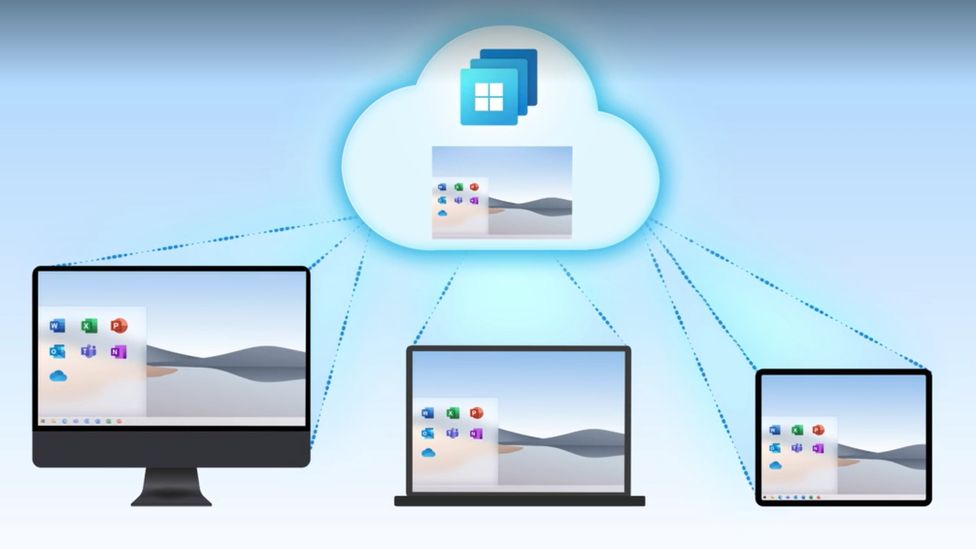
    Also, in the same vein is the new widgets feature that will show users a custom set of data specific to them and how they’re using their device. If you’re sensing that Microsoft is aiming to bridge the gap between PC and mobile devices with Windows 11, you wouldn’t be wrong. With it’s slick appearance widgets seem to be a much improved version of the the “Interest feature” that was released to Windows 10 in April.

    Windows 11 Widgets

    Speaking of bridging the gap between PC and mobile devices, one of the biggest ways Microsoft is aiming to do that is by allowing Android applications to downloaded and used on Windows 11 PCs. We plan to do a deep dive on this later on when more is known, but Android applications will be available in the Microsoft store powered by Amazon’s Appstore.

    The combined efforts of these two tech behemoths seems like a move squarely aimed at taking a piece of Google’s mobile pie – and a large pie at that with the Android phone market making up 72% of the market share as of 2021.

    Converting mobile users to PC seems to have been a concerted effort of Microsoft for a while now and it will be interesting to see what effort merging their various services together (Xbox will also be more accessible through Windows 11 with the addition of Xbox Game Pass for PC being expanded upon) will have on those efforts.

    They also plan on making the Microsoft store more accessible for developers, who if they bring their own eCommerce solution will not even have to share a cut with Microsoft.

    We haven’t even touched on Microsoft 11’s appearance, which seems much sleeker and perhaps slight Apple-esque with the slim task bar with centered icons. One of those center icons was a built in Microphone mute button, which Microsoft used as a segue to announce Teams as a built in Windows 11 integration.

    Microsoft Teams Windows 11

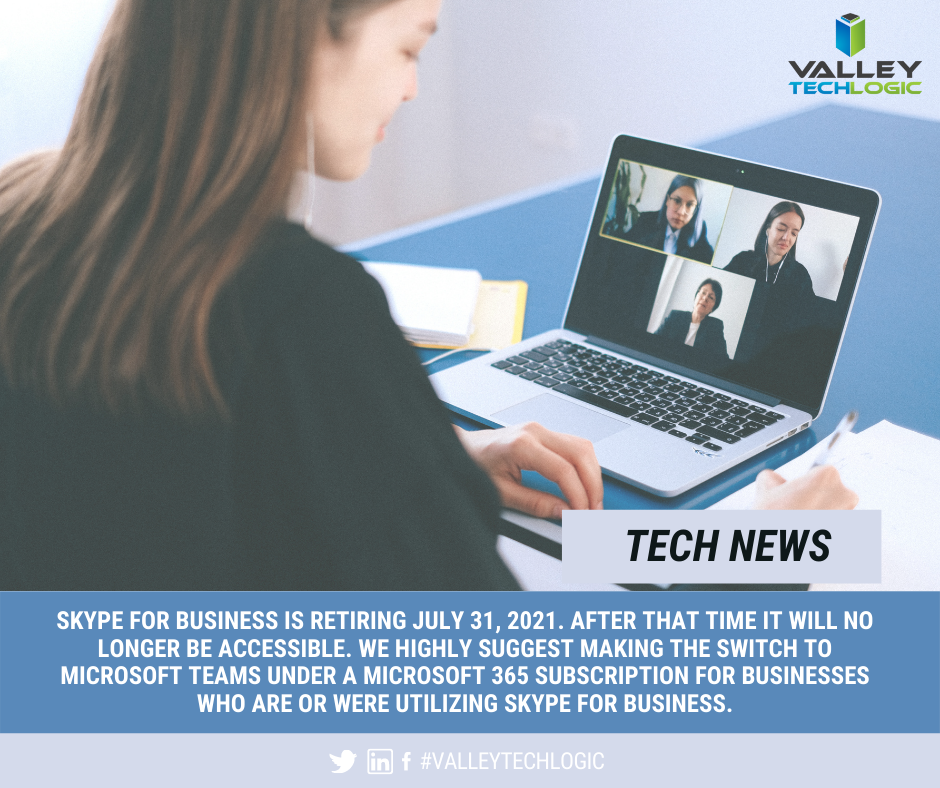
    With that we only assume Microsoft is moving away from Skype and trying to make a move that again takes aim at a competitor, namely Zoom. Teams will even work across non-Microsoft platforms including iOS. We’re eager to see what features are added to Teams as not too much was showcased in this demo.

    There’s not currently a release date set for Windows 11 other than later this year, but the speculation is it will be released sometime in October which would fall in line with Microsoft’s typical major update release schedule.

    We’ll be following this topic closely, as a Microsoft partner new Window’s releases can be both an exciting yet daunting prospect for our customers. If your business needs assistance in getting your office “Windows 11 ready”, we can help. Schedule a free consultation here.

    Looking for more to read? We suggest these tech articles from the last week.

    This article was powered by Valley TechLogic, an IT provider in Atwater, CA. You can find more information at https://www.valleytechlogic.com/ or on Facebook at https://www.facebook.com/valleytechlogic/ . Follow us on Twitter at https://x.com/valleytechlogic.
  • Windows 10 End of Life is Coming, and It’s Sooner Than You Think

    Windows 10 End of Life is Coming, and It’s Sooner Than You Think

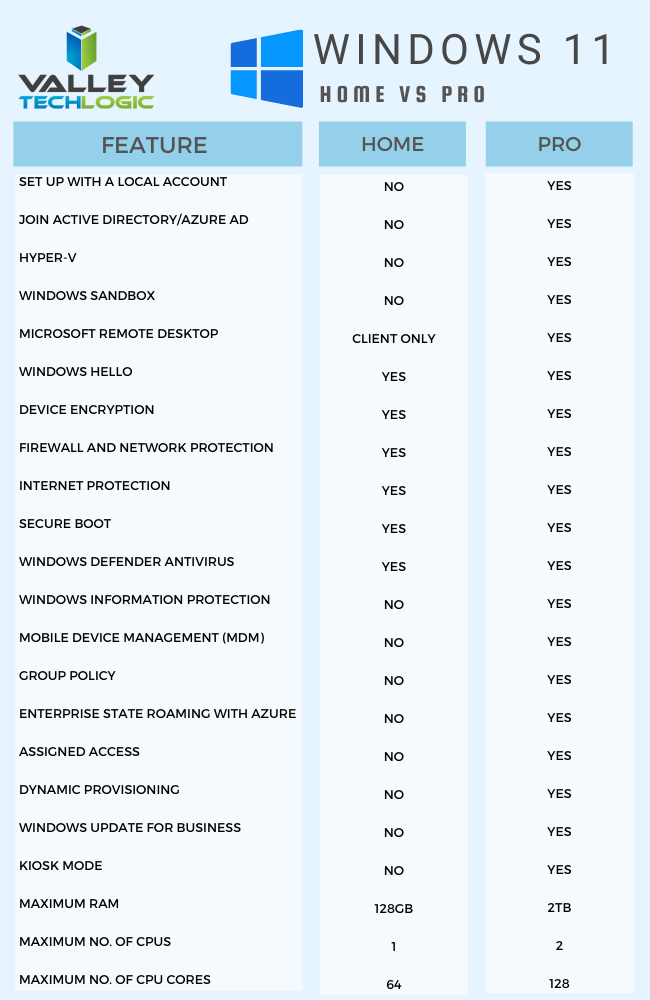
    While Windows 11 (code name Sun Valley) hasn’t officially been introduced to the public, it’s created enough of a stir that the topic of Windows 10 support ending has been pushed to the forefront of the tech news cycle. Windows 10 will officially end mainstream support on October 14, 2025.

    Back in 2015 it was circled around that Microsoft 10 would be the “last Windows release”, indicating Windows would follow the route of Apple and just continuously update this version in perpetuity. We would have said that was unlikely back then and it seems we would have been right.

    While the comment that initiated that rumor can be tied back to one Microsoft employee, Microsoft didn’t exactly dismiss the notion at the time. They have been moving forward since then into the “as a service” model, especially with their service Microsoft 365 replacing Office 365 as it was known.

    Most of us can remember a time when you paid a one-time fee to use the Office suite of software, but Microsoft has fully moved to a subscription model only under Microsoft 365. “As a service” is basically the de facto model in tech at this point, with Adobe also being another example (remember when you could just buy Photoshop?).

    Businesses like Google always operated under an “as a service” model. So, it makes us question if the roll out of Windows 11 will look the same as past releases.

    Especially for businesses, instead of pricey one-time licensing fees will we be looking at a monthly charge potentially? And how would that work when Windows 11 eventually went end of life?

    Tech News #13

    Microsoft has operated under two models for end of life so far, fixed and what they now call the modern lifecycle. Under the fixed lifecycle there weren’t really too many restrictions for support, as long as you kept your version up to date you would receive some level of support for 10 years.

    Now, they operate on a regular update cycle. With a feature update usually arriving in October, a year end update in November and a mid-year update in June or July. While you can expect regular updates between those dates, major feature updates are now condensed.

    Customers are encouraged to perform at least one of these updates a year to stay current. Failing to update with one of these major releases may make your version ineligible for next year’s releases.

    More news about Windows 11 may be arriving next week in an event announced by Microsoft, you can attend the live stream here on June 24th at 11 AM Eastern Time. We’re looking forward to summarizing the details of this event in next weeks blog.

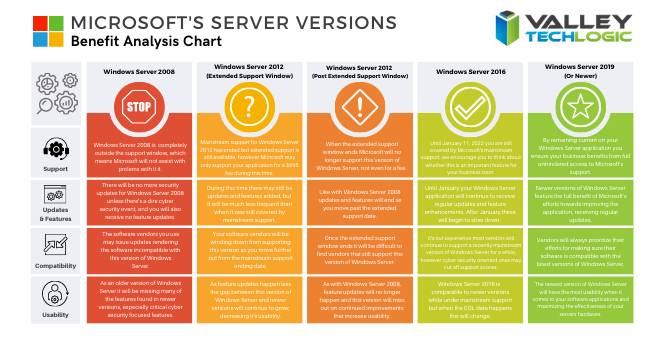
    Beyond Windows 10 for PCs, there will probably be a significant update to Windows Server as well. Server updates tend to happen more often, with Windows Server 2022 following just 3 years after Windows Server 2019 (it’s been in preview since March of this year).

    If your business needs help navigating the ever-changing landscape of Windows or if you’re trying to figure out how to get outdated, unsupported versions back to mainstream support, we’re here for you. Valley Techlogic is a Microsoft Partner and we’re experts when it comes helping businesses manage their Microsoft products, whether it’s Windows or Microsoft 365. Connect with us today to learn more.

    Looking for more to read? We suggest these tech articles from the last week.

    This article was powered by Valley TechLogic, an IT provider in Atwater, CA. You can find more information at https://www.valleytechlogic.com/ or on Facebook at https://www.facebook.com/valleytechlogic/ . Follow us on Twitter at https://x.com/valleytechlogic.

  • The Massive Internet Outage and The Human Error Behind It

    The Massive Internet Outage and The Human Error Behind It

    A number of major websites were down yesterday morning, including Google, Amazon, Reddit and Twitch. The outage lasted for an hour and even broke services such as Twitter’s emoji.

    The outage occurred through Fastly which is a cloud computing provider and highlights how interconnected (and sensitive) the world wide web really is.

    The error occurred with something called the Content Delivery Network (CDN) which is a geographically distributed network of proxy services and data centers. They came about when performance bottlenecks in the 90’s were causing slowdowns, especially as use exploded.

    By distributing the load it allowed for the faster connectivity and increased bandwidth we enjoy today, along with better reliability. CDN nodes are deployed at multiple locations, and while the entire internet won’t go down if one is affected, as yesterday proves it can still cause significant issues.

    So, what caused yesterday’s issue in the first place?

    Believe it or not the thing that brought down all those major players was actually a customer error. A dormant bug in Fastly’s code reared it’s head on Tuesday when a customer changed updated their settings.

    This setting change (which was a valid configuration) triggered a specific circumstance which activated the bug and caused Fastly servers to begin reporting errors throughout 85% of their network.

    Fastly claims they detected the error within one minute which allowed them to contain the incident within an hour. They say they should have anticipated this error could occur in their messaging on the incident. Fastly maintains one of the largest CDN’s on the internet.

    While it was a relatively short outage, the cost to the websites that were down is still staggering, Early estimates indicated Amazon alone could have lost $32 million in sales.

    This outage indicates how truly disruptive technology related downtime is. Even for small business’s the costs can be extreme. Look at our chart below to see just how much downtime costs can add up.

    A Chart With Downtime Costs

    We know these numbers seem extreme, but if you tally up potential sales lost and the cost of just running your business during an outage – it really can add up fast.

    If you’d like to learn more about what downtime really costs you, as well as how to prevent it, we have a free report on this topic you can find here.

    We help the business’s we support prevent unnecessarily downtime every day. If you’re finding yourself navigating this and other technical problems – we can help. Visit our plan page to see if Valley Techlogic could be a good fit for your business.

    Looking for more to read? We suggest these tech articles from the last week.

    This article was powered by Valley TechLogic, an IT provider in Atwater, CA. You can find more information at https://www.valleytechlogic.com/ or on Facebook at https://www.facebook.com/valleytechlogic/ . Follow us on Twitter at https://x.com/valleytechlogic.
  • The 5 Biggest Mistakes Business Owners Make With Their Technology

    The 5 Biggest Mistakes Business Owners Make With Their Technology

    Running a business requires wearing a lot of hats. You must dabble in a little bit of everything – accounting, management, human resources, technical support.

    We’re all told the best leaders know how to delegate but that can be hard when you’re talking about the business you’ve painstakingly built with your time and effort. Most business owners don’t clock out when the 9-5 day is over, a Gallup poll found that 39% of business owners work more than 60 hours per week.

    Tech News #12

    It’s not just about time logged either, there’s more stress and more on the line. You can’t simply find another job if your business fails, once you’ve owned your own business it can be impossible emotionally to untick that box and work for someone else. That’s not even considering the fallout of a business failing and the mess it leaves behind.

    But enough of the doom and gloom, as a technology company we’re here to support the businesses we take on as clients and lead them down the best possible path. That includes guiding business owners to smarter decisions when it comes to their technology.

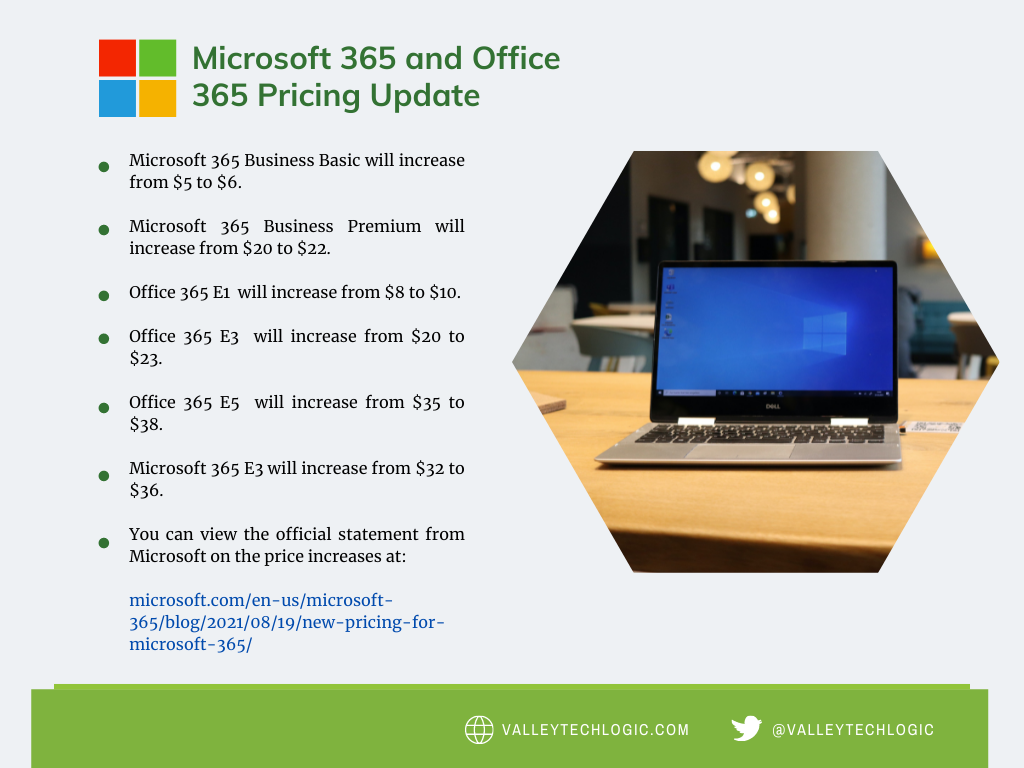
    Here are the 5 biggest mistakes we see business owners make from a technology standpoint.

    1. Not keeping your hardware up to date. Look, we get it. Hardware is expensive, especially if you’re making a larger purchase for multiple employees or investing in a new server. However, this is not something you can put off until later. Waiting until your hardware fails will leave you with both the expense of new hardware and the expense of the downtime while you’re waiting for that new hardware to be deployed. We don’t think it makes sense to wait and be double billed, do you?
    2. Not keeping your software up to date either. Updates can feel like a hassle (especially if you’re performing them yourself) but it’s not a good idea to put them off until later. There’s a cumulative effect when you wait. What was once a simple update becomes a complex package of updates that will take longer and leave you with a gap in your coverage that could leave you open to the negative effects those updates were trying to prevent.
    3. Speaking of negative effects, ignoring cyber security. We get the “it will never happen to me” line all the time, and equally as often we hear from those same people later when it The phrase “Don’t be a statistic” is used frequently in cautionary tales and this is no exception. 76% of businesses will experience a cyber-attack and we personally don’t recommend rolling the dice and hoping you’re not part of the majority.
    4. Forgoing any kind of training for employees. In the same vein as #3, some training in technology and how to use the equipment you’re providing employees is a must, and even if you operate on a BYOD (Bring Your Own Device) model you’re not off the hook. Most cyber-attacks happen due to human error. By not training your employees you’re not just giving hackers the keys to your office, you’re holding the door open for them.
    5. Thinking you can do it all yourself. Like we said, the best leaders know when to delegate. If you’re not a technology expert but you’re performing most or all of your own IT services what are you doing? How often does a technology snafu turn into an all day (and night) event? Are things in your business being neglected because you’re the only one that knows how to maintain them?

    There is a better way. Outsourcing is a scary word to many business owners, but the truth is help is out there and it’s local to you. We help business owners across the Central Valley who find that once the technology headache is taken off their plate, they have more time and energy to put back into growing their business. If you would like to find out more, reach out to us for a free consultation here.

    Looking for more to read? We suggest these tech articles from the last week.

    This article was powered by Valley TechLogic, an IT provider in Atwater, CA. You can find more information at https://www.valleytechlogic.com/ or on Facebook at https://www.facebook.com/valleytechlogic/ . Follow us on Twitter at https://x.com/valleytechlogic.

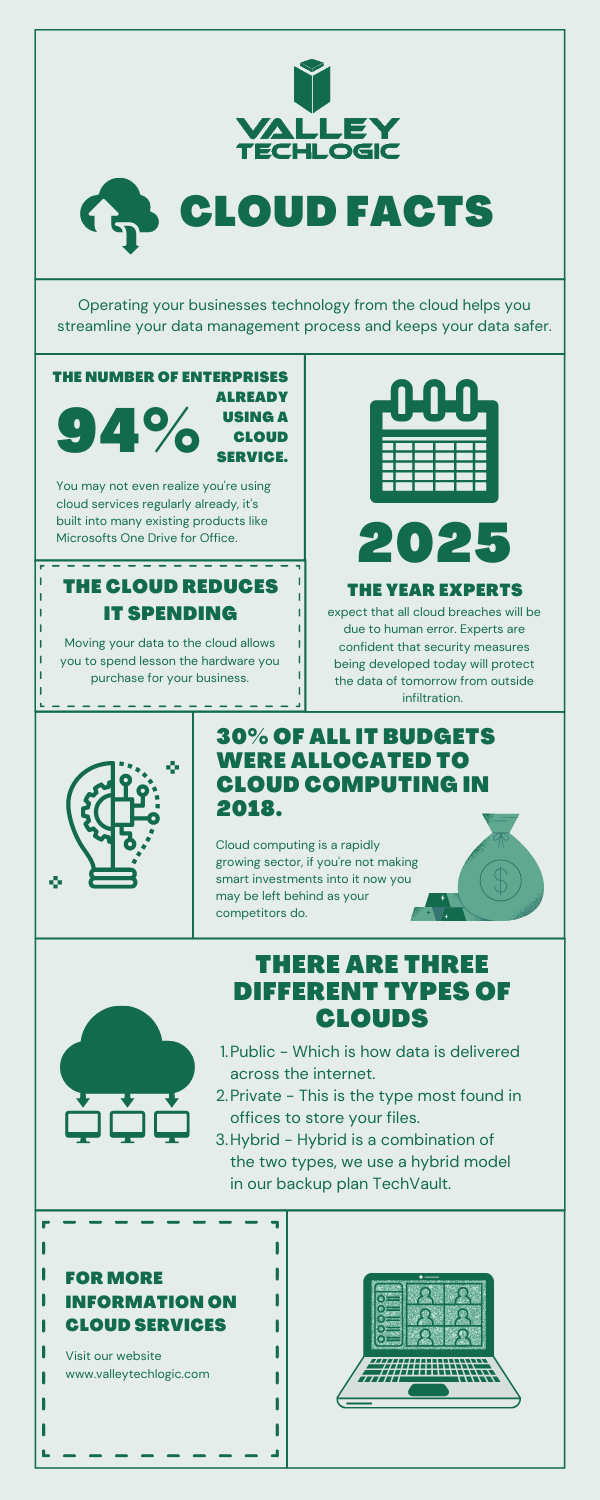
  • Considering Moving to the Cloud? Here Are 5 Things You Should Know.

    Considering Moving to the Cloud? Here Are 5 Things You Should Know.

    Moving to the cloud makes sense for a lot of businesses. The infrastructure required for a business level technology setup can be difficult to budget for, and you also have to consider the ongoing maintenance required.

    Even if your business has an onsite server, it makes sense to have a cloud backup. This way if anything happens to your physical server, you have a backup ready. There are even archival backups available that are incredibly safe from cyber attacks (this is something we offer as part of our TechVault service, you can learn more here).

    Here are 5 things you should consider as you venture into the cloud computing space.

    1. Compatibility. You need to consider whether the cloud service you’re moving to is compatible with your existing software and services for a smooth roll out. Since cloud services are usually used to host remote setups, this is especially important if you don’t have all of your employees at a singular location. Also, if your business uses legacy systems, it may be more difficult and complex to move to the cloud but not necessarily impossible.
    2. Internet Connection. Another thing to consider is the type of internet connection your office has. If you have a slow or unreliable connection, it may make rollovers from backup more difficult. It may be worth looking to see if higher speed/increased bandwidth internet solution is available at your office location to help support your cloud solution.
    3. Service Level Agreements. Most cloud providers have guarantees they spell out in these agreements regarding uptime and maintenance. You will want to review these agreements carefully and make sure the arrangement will work for your particular business. We have a free report on the cost of downtime here.
    4. Disaster Recovery. Piggybacking off topic number 3, you also need sure they cover you on the off chance there is a disaster on their end as well as support your efforts to recover if something happens to your onsite backups. Many cloud service providers offer this type of support for an additional fee or as a service add-on.
    5. Scaling. Finally, you want to pick a provider that can grow with your business. One of the benefits of a cloud solution is the ability to scale without the expensive upfront cost. When it comes time to upgrade you should know how easily you can move from one plan to the next.

    As a bonus, here is our chart of common Cloud acronyms found in this space.

    Chart With Cloud Acronyms

    Backup solutions, including those in the cloud, can be a complex undertaking. You want to make sure It’s done correctly so if the time should come that you actually need to utilize that backup it goes as smooth as possible and doesn’t leave your business down for an extended period of time.

    At Valley Techlogic we are experts in the field of crafting backup solutions tailored to the businesses we service. If your business is located in the Central Valley and you need assistance in creating a reliable backup solution for your business, we’re happy to provide a free consultation. You can schedule one here.

    Looking for more to read? We suggest these tech articles from the last week.

    This article was powered by Valley TechLogic, an IT provider in Atwater, CA. You can find more information at https://www.valleytechlogic.com/ or on Facebook at https://www.facebook.com/valleytechlogic/ . Follow us on Twitter at https://x.com/valleytechlogic.

  • The Semiconductor Shortage Is Affecting Products Worldwide – When Will It End?

    The Semiconductor Shortage Is Affecting Products Worldwide – When Will It End?

    As we approach the summer and more than a year since the pandemic began, it seems like there is no end to the shortages that seem to be a staple piece of pandemic life.

    The reasons for the various shortages are complex, but mostly fall to issues with production and the stockpiling of products as consumers and businesses alike try to “weather out” the various (and sometimes self-created) storms.

    The shortages are interlinked with each other as well, it doesn’t seem like a shortage in lumber for instance would be tied to the semiconductor shortage but in a way it is. Ramping up production often requires a ramp up in machinery and that machinery is powered by computer chips.

    Consumers are also feeling the shortages when it comes to auto sales, with used cars being worth significantly more than they were pre-pandemic.

    Now in addition to cars, we’re seeing shortages in televisions and refrigerators that also use the chips. Appliance delivery is being backed up for months for some consumers. Homeowners and would be homeowners across the country are feeling the pinch on all sides with shortages in both appliances and lumber.

    Also, not exactly connected to the semiconductor shortage but in the computer sector we’re also seeing shortages with hard drives, driven by the new cryptocurrency Chia.

    While being advertised as an “ecofriendly” crypto, it’s been found that the mining of Chia can burn out a drive in a matter of weeks. Prices of drives are skyrocketing in response (if you’re able to find hard drives to purchase at all).

    In a nutshell, buying a computer right now could be difficult and more expensive.

    So, what are chip manufacturers doing about it? The world’s largest chip manufacturer, TSMC (Taiwan Semiconductor Manufacturing Company), has been quoted as saying they expect to catch up to the automotive demand for chips by June. Although some speculate this is highly ambitious.

    Tech News #11

    Beyond the automotive sector, Samsung is considering delaying the release of the latest Galaxy phone series while shortages remain. Manufacturers will have to work with the capacity limits for production by suspending or delaying certain product launches.

    As for the chip manufacturers themselves, it’s expected production will increase eventually while demand may cool as life returns to normal in many sectors of the country. It’s expected a leveling out will occur by 2022 with consumers and business’s alike having to work around the shortages in the meantime.

    If your business needs to replace computers or computer parts, we can help. We have connections that may assist with getting products more expediently than you can get on your own and with closer to normal pricing. Contact us for a consultation here.

    Looking for more to read? We suggest these tech articles from the last week.

    This article was powered by Valley TechLogic, an IT provider in Atwater, CA. You can find more information at https://www.valleytechlogic.com/ or on Facebook at https://www.facebook.com/valleytechlogic/ . Follow us on Twitter at https://x.com/valleytechlogic.

  • The Extreme Side of RAAS (Ransomware As A Service)

    The Extreme Side of RAAS (Ransomware As A Service)

    When many people think ransomware they usually think on the small scale, someone’s email or computer being held hostage until a small sum is paid or an IT professional can assist with the problem (for the lucky ones).

    Or perhaps you think of the major breaches where millions of accounts are leaked to the public, usually containing emails, phone numbers and other identifying information. As a whole the public has become desensitized to these sort of breaches (even though they’re still a serious problem).

    What we probably do not immediately jump to is a full-scale terrorist level attack that can cripple large swaths of the country – such is the case with the Colonial Pipeline Hack.

    Tech News #10


    While it’s still an ongoing situation, here are the details in summary.

    Systems were shut down Friday at the Colonial Pipeline, a pipeline which supplies 45% of the fuel used on the East Coast. FBI has confirmed the pipeline was shutdown voluntarily to prevent future damage and to assess the situation, however this has left much of the country in limbo as gas prices climb and many states have declared a state of emergency.

    It’s being urged that residents in those states do not stock pile gas as that will only prolong the problem of shortages once operations resume. As of Wednesday, operations are still down but they say they hope to resume operations by the end of the week.

    It’s also been confirmed by the FBI that the RAAS (Ransomware As A Service) group DarkSide is responsible for the attack. They create hacking tools that are then used in attacks on businesses, the group itself usually targets for profit businesses in English speaking countries.

    As a relatively new hacking group, they have since August 2020 conducted attacks on various businesses trying to extort money from them by threatening to release the data they obtain in their hacking efforts. They claim to donate all or part of their ill-gotten gains to charity organizations. Their ransomware demands range from $200,000 to $2 million.

    They claim to operate with a code of ethics and will not attack hospitals, schools etc. However, this pipeline attack will have a trickle-down effect to those services and the public at large.

    Ransomware in any form is disruptive and violating and it’s clear more needs to be done to stamp out these attacks.

    Raising public awareness about cyber security and the efforts required to be safe online will help. In addition to that, requiring businesses to have protective measures in place will cut off these groups before they’re able to acquire the funding they need to become large hacking organizations.

    We need to work together to making hacking less lucrative, because as it’s been shown our way of life and public safety may be at stake.

    If you run a business and need help with your cyber security services, we’re here for you. We have tailored cyber security plans for businesses of all sizes, and we would be happy to guide you through the process of protecting your business. Schedule a free consultation here today.

    Update: As of Thursday, the Colonial Pipeline has resumed operations. It’s unknown how long the gas shortages caused by the outage will last.

    Looking for more to read? We suggest these tech articles from the last week.

    This article was powered by Valley TechLogic, an IT provider in Atwater, CA. You can find more information at https://www.valleytechlogic.com/ or on Facebook at https://www.facebook.com/valleytechlogic/ . Follow us on Twitter at https://x.com/valleytechlogic.
  • Have a Dell laptop or computer? This vulnerability is one to watch out for.

    Have a Dell laptop or computer? This vulnerability is one to watch out for.

    Vulnerabilities that can broadly attack major systems or specific retailers are especially problematic. Many of these vulnerabilities are quietly patched before you’re even aware there was a problem but sometimes things can fly under the radar for a while.

    Such is the case in an affected Dell driver that has been pushed out to machines for the last 12 years. It was recently discovered this driver can allow bad actors to possibly gain more access to the affected Dell systems. It’s estimated hundreds of millions of Dell computers, laptops and tablets could have the affected driver and be at risk.

    While it’s not considered critical at the moment because the affected computers would already have to be compromised in some way for it to be used, it’s still problematic because it could make removing malware or other system infections more difficult. These drivers would potentially allow them unrestricted to the affected machines in the event the user is hacked.Tech News #9

    There are currently no recorded cases of this exploit being used, however now that it’s been made public that may change. Researchers have held back the details of the exploit to allow users time to patch, and Dell has issued a security advisory regarding the driver. However, they have not as of writing revoked the affected driver.

    This is another reminder as to the importance of maintaining updates on your machines. Even with security measures in place, no system is perfect. Vulnerabilities can be discovered years later with varying levels of severity. By maintaining patching, you won’t be caught off guard or risk having your machines exploited by a vulnerability.

    Here are 5 patching best practices:

    1. Automate. If you can, automate the process. Schedule your patches to happen at a time you won’t be busy working on your computer.
    2. Plan your approach. If you’re managing patching for your business, you want to plan how you’ll approach patching company wide. It may be prudent to patch overnight or patch in waves if your business is open extended hours.
    3. Test patches. Test patches on a single machine before rolling them out company wide, sometimes patches can create problems that might necessitate a rollback and that might hinder your business if everyone in the office is down.
    4. Maintain patch levels. The last thing you want to do is fall seriously behind on patches. Patching will be a lengthy process as you try and catch up, and your machines may be left vulnerable in the interim.
    5. Get Help If You Need It. Patching your home machines is a fairly straight forward process usually but patching from a business perspective can have many intricacies beyond just “apply patches”. When in doubt, leave it up to the professionals.

    If you need help with patching or the myriad of other items that keep your office machines in tip top shape and safe from malware, Valley Techlogic is here for your business. You can schedule a free consultation here.

    Looking for more to read? We suggest these tech articles from the last week.

    This article was powered by Valley TechLogic, an IT provider in Atwater, CA. You can find more information at https://www.valleytechlogic.com/ or on Facebook at https://www.facebook.com/valleytechlogic/ . Follow us on Twitter at https://x.com/valleytechlogic.

  • Top 10 Tips for Managing Your Social Media Presence

    Top 10 Tips for Managing Your Social Media Presence

    As a technology service provider, we don’t think it’s much of a leap to weigh in on the topic of social media, there are many technical aspects that come with managing your business’s presence on all the various social media platforms. You may be asking yourself if it’s worth the effort or which ones would be the best fit for your business – or even how to go about setting them up in the first place.

    We have to be honest that we’re somewhat “green” to this space ourselves, having only dived into it within the last year in earnest. However, I think this gives us a unique perspective as we’re not claiming to be experts. We use and have grown within the social media space this year and these are our tips for getting started.

    1. Claim Your Business. Whether you plan to move forward with a platform or not, we recommend claiming your business identity on as many of the networks as you can, by doing this you can ensure your business name is not taken by someone else later on.
    2. Start And/Or Finish Filling Out Google My Business. While not a social media account per se, Google My Business is a crucial advertising tool that allows visitors to reach not only your website but also all of your social media accounts through a Google search. It is important to maintain this account with valid information.
    3. Fully Fill Out Your Profile Pages. As with Google My Business, it’s important to fully establish the profile before jumping into posting content. The more information about your business you can provide the better.
    4. Decide Which Platforms to Focus Your Efforts. Not every platform is a good fit for every business, you need to go to where your customers are. We recommend LinkedIn and Facebook as good places to start but depending on your business sector platforms such as Instagram or Twitter may net you a good response as well. Even TikTok may be worth the effort for your business depending on your overall audience.
    5. Post Regularly. You should set a schedule and stick to it when it comes to sharing content on social media, these platforms reward regular activity by focusing more eyes (and potential customers) at business’s who utilize their platforms consistently.
    6. Share Things About Your Business. Customers like to get an “inside look” into the inner workings of the business’s they’re thinking about engaging with, especially in the business-to-business sector. Share things like company events and photos to engage with your audience on a personal level.
    7. Share Custom Content. Another idea for content is to share things you make or blogs you post. Both Google and the social media platforms reward custom made content.
    8. Invite People You Know to Like Your Page. When first starting out it’s a good idea to invite customers and colleagues to like your social media pages, this allows them to receive the updates you post and helps you begin building an audience.
    9. Consider Paid Activity. We don’t suggest trying this off the bat but once your page is somewhat established, you might consider paid ads through these platforms to drive the content you’re creating and sharing to an even wider audience.
    10. Engage With Your Audience. Our final tip is just to remind you to always engage with your audience, responding to comments not only lets you form a connection with potential clients but it also shows that your business is proactive and responsive.

    We also found this article on Facebook statistics really helpful when it comes to evaluating Facebook in particular. Facebook falls just behind YouTube and Google on having the most web traffic, but that’s still hundreds of millions of users.

    One bonus tip, many of us don’t consider YouTube to be a social media application, but it really is. Not only can you connect with your audience on a personal level through video, it’s also connected to Google as they own it. Building up a business YouTube account can also lead to more traffic from Google.

    We hope these tips help with getting started in social media, while outside our normal scope if your business would like advice on this topic or on any of regular service topics feel free to reach out.

    Looking for more to read? We suggest these tech articles from the last week.

    This article was powered by Valley TechLogic, an IT provider in Atwater, CA. You can find more information at https://www.valleytechlogic.com/ or on Facebook at https://www.facebook.com/valleytechlogic/ . Follow us on Twitter at https://x.com/valleytechlogic.
  • Cyber Security Training Is More Accessible Than You Think

    Cyber Security Training Is More Accessible Than You Think

    It can be a hard pitch getting your employees to commit to cyber security training, and you yourself may wonder if it’s worth the time spent on it.

    It’s a simple fact, when it comes to cyber security breaches humans are the weakest link. There is no software measure that can preempt the human element when it comes to bad actors getting into your business’s systems and accessing your sensitive data.

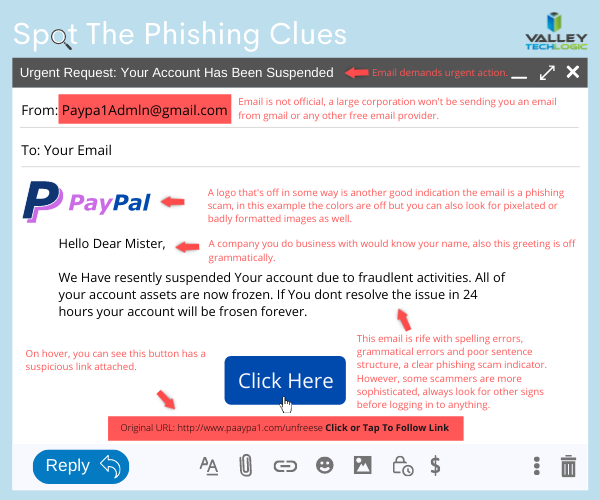
    It’s not your employees’ fault, hackers are constantly devising new ways to breach your systems. They spend countless hours on it and they’re very, very good at it. Just look at these eye-opening statistics.

    Statistics on Phishing

    When many people think cyber security training, they think of something they’ll have to spend hours on. Long form videos with wordy explanations in tech-speak that doesn’t resonate or get absorbed by the intended audience.

    However, cyber security training has come a long way past that. Like most of our internet consumption activities, it can be delivered in quick bites that drive the point home in a way that speaks to your employees and many offer micro quizzes that quickly evaluate whether the information provided was understood.

    The systems we have used have management and owner portals so you can continuously monitor the results of these quizzes as well as the results of simulated phishing exercises.

    Web Training Portal

    Phishing remains a top threat to companies across the country, of breaches that have occurred in 2021, 22% involved phishing (45% involved hacking and 17% involved malware).

    Simulated phishing exercises allow you to randomly test your employees in a safe environment. The results are confidential and if you find this is a regular problem with your organization it lets you know you need to step up your efforts in regard to email safety training and have more stringent policies in place.

    There is even cyber security training that can be delivered directly via your email client, the short form videos will appear on the right-hand side and the micro quizzes can be taken immediately after viewing. making it highly accessible since there’s no need to navigate to a website.

    An additional benefit is you can inform your clients and vendors that you are conducting cyber security training within your organization.

    Also, if you access cyber security training through your IT service provider it can be highly affordable or even free. At Valley Techlogic we believe in the benefit of not only providing IT and support and service to our clients, but also making tools and information available to allow them to be completely informed in their IT choices. This includes offering cyber security training as an option for the businesses we provide services for.

    Cyber security is best implemented through a package effort of passive prevention and active prevention, passive prevention is the software we employ that prevents and mitigates cyber security threats. Active prevention is the training we offer that allows  employees to safeguard their own systems and prevents potential threats from occurring at all.

    If you’d like more information on cyber security training and/or other cyber security prevention services, you can reach out to us here. We also offer a free cyber security training kit you can get started with here.

    Looking for more to read? We suggest these tech articles from the last week.

    This article was powered by Valley TechLogic, an IT provider in Atwater, CA. You can find more information at https://www.valleytechlogic.com/ or on Facebook at https://www.facebook.com/valleytechlogic/ . Follow us on Twitter at https://x.com/valleytechlogic.