Category: Uncategorized

  • A look back at the 2024’s 8 most expensive breaches

    A look back at the 2024’s 8 most expensive breaches

    2024 is coming to a close and with it we’re reviewing the year in technology as a whole. While we’ve covered advancements in AI, continued benefits to businesses from vendors like Microsoft 365 helping capitalize on more productivity from their technology, more options in hardware and greater adoption for cyber security especially with more regulations in place all point to positive trends in the technology space, there were still a number of notable negatives especially when it comes to cyber security breaches.

    2024 saw a 76% spike in data theft according to to Crowdstrike’s annual global threat report (we’d be remiss not to mention they also unfortunately had a notable breach themselves over the summer).  However, even with the scale of the Crowdstrike breach it still did not make the list on the top 8 most expensive cybersecurity breaches of 2024.

    Below is that list and the eye watering numbers paid out in ransom, fines and overall reduction to business productivity for these companies to resume business as usual.

    • MGM Resorts: This breach occurred in September 2024, with costs exceeding $100 million due to a ransomware attack that paralyzed operations for weeks. Recovery costs, lost revenue, and fines made it one of the year’s most expensive breaches.
    • MoveIt: A vulnerability in the file transfer software resulted in widespread data breaches for numerous organizations, costing tens of millions collectively. The breach was first reported in June 2024.
    • T-Mobile: A recurring target, T-Mobile faced another breach in February 2024, costing an estimated $150 million, including regulatory penalties and class-action settlements.
    • Latitude Financial: In March 2024, this Australian financial services company suffered a breach exposing millions of customer records, with costs exceeding $76 million, mainly from customer remediation and regulatory fines.
    • Clorox: A cyberattack in August 2024 disrupted operations, leading to a $500 million loss in revenue, with breach recovery costs adding to the financial toll.
    • Capita: This UK outsourcing giant faced a major breach early in 2024, costing approximately $150 million, driven by client compensations and operational disruptions.
    • Tesla Supplier Breach: Hackers targeted a Tesla supplier in mid-2024, compromising proprietary designs and incurring losses in the range of $50-100 million.
    • Western Digital: A breach in early 2024 affected critical business data, with costs reportedly surpassing $100 million, including regulatory fines and lost business.

    Even if you’re a small business, you’re still at risk of data breaches and the effects (including ransomware costs that will cripple your bottom line). Cybersecurity protection, including preventing data breaches, is a core face of every Valley Techlogic service plan. Learn more today and take advantage of our 2024 Holiday Offer.

    Looking for more to read? We suggest these other articles from our site.

    This article was powered by Valley Techlogic, leading provider of trouble free IT services for businesses in California including Merced, Fresno, Stockton & More. You can find more information at https://www.valleytechlogic.com/ or on Facebook at https://www.facebook.com/valleytechlogic/ . Follow us on Twitter at https://x.com/valleytechlogic and LinkedIn at https://www.linkedin.com/company/valley-techlogic-inc/.


  • Verizon’s massive outage this week and it’s connection to Hurricane Helene

    Verizon’s massive outage this week and it’s connection to Hurricane Helene

    While much of the eastern side of the country continues to grapple with the effects of Hurricane Helene (in particular western North Carolina which had many towns wiped off the map), restoring cellular communication has been a top priority to locate and aid those currently affected.

    In order to do that, cellular communication providers have enabled something called “disaster roaming” in the effected areas, this type of roaming services allows customers of any mobile phone company to use any available cell tower. Normally, cell towers are maintained and restricted to certain companies. So, for example, you may find as an AT&T customer you have better service in one locations vs another. With disaster roaming turned on this would no longer be the case.

    What does this have to do with the Verizon outage that occurred this week? Well, this unplanned outage that affected as of writing caused over 100,000 reports from customers on DownDetector.com, a site that reports service complaints, also affected the areas currently recovering from Hurricane Helene.

    Users reported their phones being stuck in “SOS” mode, and after several hours issued a statement that their engineers had fixed the issue and that anyone still affected should try restarting their phones. During the outage the company’s response was underwhelming, in many cases just informing customers they were “aware of the issue”.

    The timing of this outage and the announcement that disaster roaming was turned on in certain areas is also possibly worth investigating, though no announcement on the cause of the outage has been revealed at this time.

    This is also not the first time we’ve written about a major cellular outage (AT&T and T-Mobile have had their fair share as well). Disasters like the one currently ongoing in North Carolina highlight our need to have effective ways to communicate in times of an emergency and it is past time that cellular companies be held to a higher standard when it comes to communicating and addressing outages that can have drastic consequences for their customers.

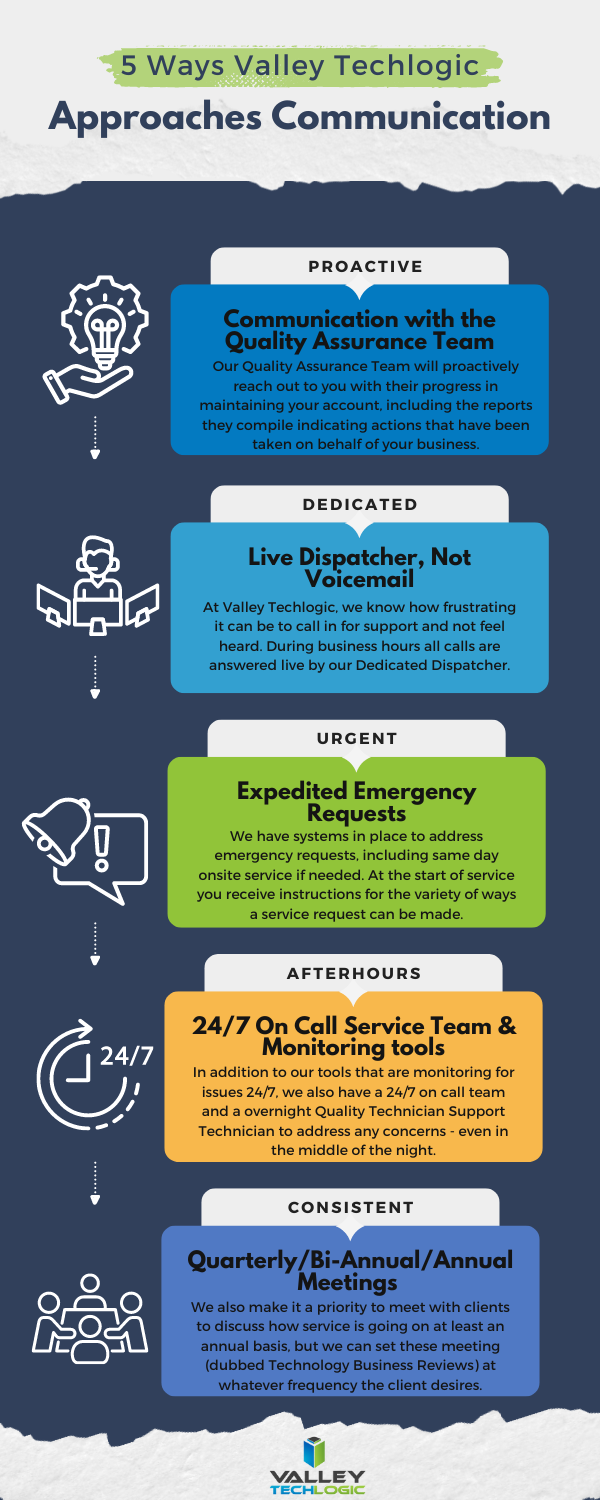
    Effective communication is an important part of running a business, if you’re not making your customers aware of your intentions then you’re leaving it up to them to draw conclusions on your behalf. Below are five ways Valley Techlogic addresses communicating with clients who have a technology service plan with us:

    Don’t settle for underwhelming or non-existent communication on the services you pay for, learn more about how Valley Techlogic can support your business today with a free consultation.

    Looking for more to read? We suggest these other articles from our site.

    This article was powered by Valley Techlogic, leading provider of trouble free IT services for businesses in California including Merced, Fresno, Stockton & More. You can find more information at https://www.valleytechlogic.com/ or on Facebook at https://www.facebook.com/valleytechlogic/ . Follow us on Twitter at https://x.com/valleytechlogic and LinkedIn at https://www.linkedin.com/company/valley-techlogic-inc/.

  • Microsoft Copilot, is it worth investigating for your business? 10 things you can use it for TODAY

    Microsoft Copilot, is it worth investigating for your business? 10 things you can use it for TODAY

    Released earlier this year, Microsoft Copilot is available for you to use today and is Microsoft’s answer to the growing trend of AI assisted technologies. Copilot is a Microsoft 365 offering alongside their other popular business software applications such as Word, Excel, PowerPoint, Outlook and more but you may be asking, what can I do with it?

    Here are 10 real life use cases for Microsoft Copilot:

    1. Automate Reporting from Excel: If you’re still manually generating reports based on the Excel spreadsheets created by your business that can end today. Copilot can generate comprehensive reports based on trends, perform calculations and more. Copilot will even analyze the data and alert you if it senses there are errors.
    2. Create Visuals from Your Data: If you need charts to demonstrate certain aspects of your business to clients and partners, Copilot can generate charts and graphs based on the data you have available with the click of a button.
    3. Document Creation: Like other AI tools, Copilot can help you reword documents you currently have in progress or offer additional creative inspiration alongside your UGC (User-Generated Content). It can also generate images that will complement your documents.
    4. Easy Integration: Since Copilot is a Microsoft tool, that makes integrating it into your business easier than trying to evaluate the many emerging AI technologies on the market and you can train your staff on the features found with AI.
    5. Use Copilot for Reminders: You can train Copilot to create reminders for you based on previous activity, say you have a monthly meeting each month. Copilot can look at that data and create reminders for it going forward without you needing to manually schedule those reminders yourself.
    6. Fraud Detection: Speaking of analyzing behaviors, Copilot can also look for behaviors that are unusual within your business – such as financial transactions that differ greatly from your norm and report these to you.
    7. AI-Powered Customer Chat: Copilot can be an automated chat and response tool for your business when it comes to interacting with your clients, including allowing it to respond to routine questions so you don’t need to take time out of your day to do so.
    8. Marketing Campaigning: Copilot can analyze your customer base and suggest marketing campaign ideas to send to your target audience.
    9. Software Development: As with ChatGPT and the like, Copilot can even offer assistance if your business has in-house programmers or technical people. Even for nontechnical roles, many questions can be answered via AI without needing to go down the rabbit hole of a Google search.
    10. Tailored to You: In case we weren’t clear, Copilot can do as much or as little as you want it to do – from writing emails, to creating slide decks, to analyzing data, to performing routine tasks, Copilot and AI in general is powerful tool that most businesses should be taking advantage of in 2024.

    If all of these advantages weren’t enough, Microsoft just recently announced Copilot for Security. Taking advantage of the vast wealth of data the Microsoft Security Suite has available and powered by AI, Microsoft Copilot for Security will look for user risks and can even resolve security incidents before they become a problem.

    If you would like to learn more about utilizing Copilot for your business, Valley Techlogic has been a Microsoft partner since 2004 and would be able to assist your business as we enter this new age of AI powered technology. Schedule a consultation with us today to learn more.

    Looking for more to read? We suggest these other articles from our site.

    This article was powered by Valley Techlogic, an IT service provider in Atwater, CA. You can find more information at https://www.valleytechlogic.com/ or on Facebook at https://www.facebook.com/valleytechlogic/ . Follow us on Twitter at https://x.com/valleytechlogic.

  • 10 Microsoft 365 tools you need to take advantage of TODAY

    10 Microsoft 365 tools you need to take advantage of TODAY

    Most of our clients are Microsoft 365 customers and enjoy the tools and applications they receive through their Microsoft 365 subscription. Many of these same clients were long time Office customers and were already familiar with the software benefits – such as Word, Office, Outlook, Powerpoint and Excel. These are staple products in the business community and chances are if you’ve been in business long enough you’ve had some exposure to them throughout your career.

    We have had clients who miss the days when Office was a standalone product only. While you still can purchase Office 2021 for a one-time fee, many have to weigh the value of a pretty substantial upfront cost when purchasing for many employees for a product that will at some point expire vs the subscription model that is now favored by many software companies. This is a discussion onto itself, but in a nutshell many clients choose to go with a Microsoft 365 subscription.

    There is an obvious benefit to doing so right off the bat if you choose to go with Microsoft 365 Business Premium, the security benefits of this plan are well known and touted throughout the technology industry as being the crème de la crème of security suites for Windows machines.

    However, there are many benefits to your Microsoft 365 subscription that many users are not even aware of. Microsoft 365 is much more than just an Office subscription – your plan comes with business utility programs that can make organizing and running your business better.

    Here are 10 tools you can take advantage of TODAY if you have a Microsoft 365 subscription:

    1. Microsoft OneNote: OneNote is Microsoft’s digital notetaking app, it’s a step way above NotePad with the ability to organize multiple notes (with colored tabs) and collaborate and share your notes with other.
    2. Microsoft Intune: Intune allows you to control and manage all of the Microsoft endpoints within your business from one place. This one might need an IT pro when it comes to setup and management but once you get it going it really can simplify many IT tasks for your team.
    3. Microsoft Forms: Did you know that you can create surveys, quizzes and polls with a Microsoft product? You can with forms, you can even export the data to Excel and share the forms you create on your website or social media platforms.
    4. Microsoft List: With Microsoft 365 you don’t have to go off platform when it comes to managing even the somewhat more mundane aspects of your business, Microsoft Lists is Microsoft’s solution for keeping track of well, everything. Also just like with Forms you’re able to export these lists to Excel with a click of a button.
    5. Microsoft Bookings: Microsoft Bookings is Microsoft solutions to having a public calendar where clients or colleagues can book a meeting with you, and it’s tied right to your Outlook calendar. Another benefit of Bookings is it can be added to your website for prospective clients to book time with you and eliminating the cost of an outside calendar application.
    6. Microsoft To Do: If you or your employees struggle with staying on task, Microsoft To Do is the solution for you. You can plan out your days in advance and Microsoft To Do will be your one stop place for keeping things on track.
    7. Microsoft Viva: Microsoft Viva is an addition to Microsoft Teams that adds a lot of functionality not usually found in a chat program, Microsoft Viva is a multi-faceted platform but in a nutshell it allows you to set goals for your business, provide training to your employees and see insights into their workday, as well as offering them to provide feedback to you all in the Teams application they already use.
    8. Microsoft Streams: If you already use Teams for your video conference calls then you’re familiar with how reliable Microsoft is when it comes to video streaming. Microsoft Stream takes that a step further and allows you to broadcast video outside your organization with up to 1000 participants.
    9. Microsoft Power BI: Microsoft Power BI provides a snapshot of your business’s data in the form of charts and graphs, so you can see how the data your business creates evolves and changes over time.
    10. Microsoft Planner: Finally, we bring it all home with Microsoft Planner, it’s exactly what you would expect it to be a simple visual tool for planning out meetings, business goals, marketing pitches and more all found at your fingertips with your Microsoft 365 subscription.

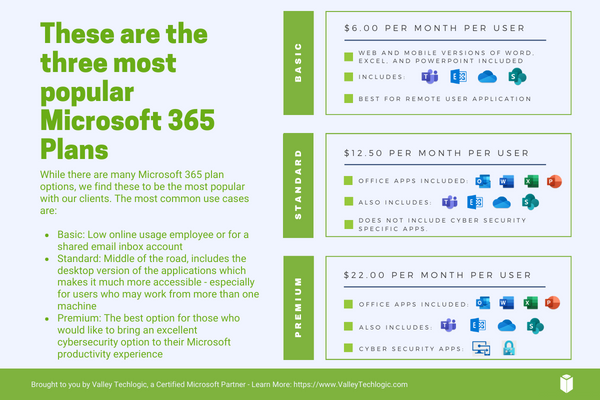
    Of course, if you’re considering signing up for Microsoft 365, you do have to take the cost into account. Here are the costs for the most popular plans (these costs factor in a discount for committing to an annual subscription, the costs are approximately 20% higher when you choose a monthly term).

    Interested in learning more about Microsoft 365? Valley Techlogic is a Microsoft partner, and we can walk you through the process of buying and making the most of your new subscription. Learn more today with a consultation.

    Looking for more to read? We suggest these other articles from our site.

    This article was powered by Valley Techlogic, an IT service provider in Atwater, CA. You can find more information at https://www.valleytechlogic.com/ or on Facebook at https://www.facebook.com/valleytechlogic/ . Follow us on Twitter at https://x.com/valleytechlogic.

  • Refurbished versus new, what are your options when it comes to on-premises servers?

    Refurbished versus new, what are your options when it comes to on-premises servers?

    There’s no debate, when it comes to buying an on-premises server for your office it’s a big decision where cost is absolutely a major factor. The word “refurbished” sometimes causes our clients to recoil, we’ve all had bad experiences purchasing refurbished electronics that were DOA (dead on arrival) or perhaps were cosmetically or functionally dubious.

    With servers it’s a little different. Typically, what we see from servers is that one was sent back to the retailer very early on into its life span. Sometimes it’s because the configuration just wasn’t right for the purchaser or because they come from a sector that has very rigorous standards for server replacement (some sectors look to replace servers every 3 years). These servers will still have a lot of life left in them and the big server manufacturers (Dell, IBM, HP etc) will reset them, add some new components, and bring them back up to practically like new conditions.

    If you have a very specific goal in mind for your on-premises server and know you need the latest and greatest hardware components to meet that goal, then we definitely recommend purchasing new. If your goal is to replace an existing aging server or your needs for capacity are more minimal, refurbished is a great option.

    Here are three pluses when buying a new server.

    1. Warranty – New servers will have the longest warranty available; we typically see 5 years being the standard.
    2. Customizable – When you buy a new server you get to customize the hardware and storage, with a refurbished server you’re purchasing what the manufacturer has available.
    3. Modern Features – A new server will have all the latest features, have the highest performance, and be compatible with modern software.

    There also pluses when considering refurbished:

    1. Cost Saving – Of course, the first plus is the cost saving benefits. We often find a refurbished server is substantially less than a new server. You could save as much as 80% compared to buying a new server.
    2. Still Effective – A refurbished server will still be almost as effective as a new server, and for many of our clients there is no noticeable difference between new and refurbished for their use case.
    3. Still Includes a Warranty – While it won’t come with a manufacturer’s warranty, Valley Techlogic offers a 1-year warranty for clients who purchase a refurbished server through us.

    Of course, there are things to consider when doing a server upgrade in general. Here is a chart with the benefits you will receive when replacing an aging on-premises server:

    Another thing to consider is if your current server is compatible with your existing line of office software a refurbished server may be more compatible, sometimes being on the bleeding edge of technology can have its downsides especially when it comes to legacy software.

    You also want to keep in mind that lead times will vary as well, refurbished servers are often more available while a server customized for your business could take longer to get. If your current server is on it’s last leg or has even died, refurbished may not be your best option but your only option.

    There are a lot of things to consider when it comes to buying a server, and Valley Techlogic can help. We not only offer in-house procurement services we also can do an assessment of your specific situation and offer the best buying advice for your business. Reach out today to learn more.

    Looking for more to read? We suggest these other articles from our site.

    This article was powered by Valley Techlogic, an IT service provider in Atwater, CA. You can find more information at https://www.valleytechlogic.com/ or on Facebook at https://www.facebook.com/valleytechlogic/ . Follow us on Twitter at https://x.com/valleytechlogic.

  • When a data breach leads to jail time for an ex-CEO, and why you should take data security seriously in 2023

    When a data breach leads to jail time for an ex-CEO, and why you should take data security seriously in 2023

    We’ve seen plenty of examples of extreme monetary penalties occurring from data breaches, but this is the first we’ve seen of anyone actually being jailed for one.

    Vastaamo was a Finnish psychotherapy provider that was founded in 2008. While it was a sub-contractor under the government, Vastaamo like many healthcare related businesses was the subject of data breach attempts, with two additional successful attempts occurring  in 2018 and 2019. These attempts failed to be reported by the company.

    The ex-CEO Ville Tapio did report the 2020 breach to authorities, after all of their patient data was stolen by the cyber criminals. These criminals asked for €450,000 (about $.0.5 million in US dollars at the time of writing) and when that was unsuccessful, they then demanded €200 from each patient of the clinic for which they had records on. They warned this fee would increase to €500 each if the clinic did not pay within 24 hours.

    They warned the patients that after 48 hours with no payment they would be doxxed. Doxxing is when your private details are leaked online (this can include your payment information but also things like your address). In this case they were even willing to leak client session records and notes. They leaked the details of 300 patients which included politicians and police office. A 10 GB file containing the patient notes for over 2000 patients was also found on the dark web following the hack.

    While the clinic, Vastaamo, was a victim in this case authorities still looked at the overall picture when making the decision to charge ex-CEO Ville Tapio, including the previous breaches and the fact that he had insider knowledge of the company’s cybersecurity coverage (or lack thereof). He was charged with a 3-month suspended sentence and the company itself had to file bankruptcy and eventually went under.

    The severity of the breach and the companies lack of accountability when it came to cybersecurity protections made them run afoul of the GDPR (General Data Protection Regulation) which are Europe’s regulations on data protection and privacy for its citizens.

    If you’re a US based company owner it’s not a good idea to think “Well nothing like this could happen here”. California recently passed the CCPA (California Consumer Privacy Act) which allows customers more say so over the data your business collects on them. If your business has contracts with the DoD (Department of Defense) you’re probably already seeing stricter restrictions and regulations for how your business must be cybersecurity compliant to keep doing business with the government via CMMC (Cybersecurity Maturity Model Certification). HIPAA is old news for medical practitioners, but we still find many that are not compliant with the regulations.

    Suffice to say there can be blowback that extends beyond financial penalties and injuries to your business’s reputation. Small steps in protecting the data within your business can make a huge difference in the outcome you have (whether it be avoiding an attack altogether or making for an easier recovery).

    If you need creating or developing a more robust cybersecurity gameplan, Valley Techlogic is the one you’re looking for. Cybersecurity is our number one concern, and we take implementing cyber prevention measures for our clients very seriously. If you would like a consultation to learn more just visit here to get started.

    Looking for more to read? We suggest these other articles from our site.

    This article was powered by Valley Techlogic, an IT service provider in Atwater, CA. You can find more information at https://www.valleytechlogic.com/ or on Facebook at https://www.facebook.com/valleytechlogic/ . Follow us on Twitter at https://x.com/valleytechlogic.

  • Support will end for Windows Server 2012 in October 2023, pros and cons of upgrading, replacing, or transitioning to the cloud

    Support will end for Windows Server 2012 in October 2023, pros and cons of upgrading, replacing, or transitioning to the cloud

    As promised continuing off the back of last weeks article on Steam ending support for Windows 7 and 8 we wanted to talk about the real elephant in the room for businesses coming up this year, Windows Server 2012 end of life date which will occur October 10th, 2023.

    On that date extended support for Windows Server 2012 will end. So, what does that mean for you? In general, we’ve seen that Windows products no longer receiving support from Microsoft have in an increased risk of cyber threats as hackers launch targeted attacks on these devices. In some cases Microsoft has stepped in to release patches in especially severe cases but it’s not a good idea to count on that.

    You can also expect your vendors will end support for Windows Server 2012 in October if they haven’t already, and it also will cause your business to fall out alignment with compliance to agencies like HIPAA or PCI and others. Without vendor or Microsoft assistance it may be difficult to receive support for these devices if they suddenly fail as well.

    All in all, there’s no good reason to do nothing with this news but many of our clients wonder when it’s time to upgrade, replace or even abandon the notion of an on-premises server altogether by moving their data to the cloud.

    There’s no easy answer to this question, we do have one quick suggestion though if October comes around and you’re still debating your options. If it’s possible to take the “walled garden” approach to any device running an outdated version of Windows, we highly suggest it. What this means is getting to a place where you prevent the device from accessing the internet and only access it with other devices via a firewall or some other means of protection. This will allow you to have a little bandwidth to stretch out making a plan to upgrade, replace or remove it.

    If you do feel like you’re reading to make a decision but need some assistance on which way to go, we do have five tips for when it’s time to replace a server:

    1. Warranty: Warranty is a big concern with servers, most servers have a useful life of 5 years though some manufacturers will offer extended renewals (not generally past 7 years though). Replacing hardware in a server is similar to replacing components of a vehicle, it can add up fast.
    2. Slow Running: If your server is a slog to work with, updating the operating system to a newer addition is not going to improve it.
    3. Expired OS: Having an expired operating system is a good reason to replace the server especially if the operating system was relatively new when the server was purchased.
    4. Storage Capacity: Storage capacity and solid state drive technology continues to improve each year, if you have a server with older hard drives or very small hard drives compared to modern standards it may make sense to start fresh with a new server vs trying to transition new drives into the old one.
    5. Software Requirements: If your software requirements have changed since the server was purchased and your old server can’t run your line of business software either well or at all, that’s a good reason to upgrade to a newer server.

    If you answered no to all of the above then it might be worth considering whether upgrading to a supported Windows server is an option for you. We recommend leaving this task up to the professionals, upgrading a server is not the same as upgrading a laptop or desktop device. If the answer to any of the above questions was yes, then we highly recommend replacing, but should you replace your physical server or switch to the cloud? See our chart below for guidance:

    Cloud or On Premise Server? Still need more help with your Windows Server 2012? Valley Techlogic has been a Microsoft partner since 2004 and we’re experts in all things Windows. Reach out today for a consultation.

    Looking for more to read? We suggest these other articles from our site.

    This article was powered by Valley Techlogic, an IT service provider in Atwater, CA. You can find more information at https://www.valleytechlogic.com/ or on Facebook at https://www.facebook.com/valleytechlogic/ . Follow us on Twitter at https://x.com/valleytechlogic.

  • Bridging the technical gap, how technology can bring your dental practice into the future

    Bridging the technical gap, how technology can bring your dental practice into the future

    Dental practitioners are not technology novices, new technologies emerge all the time that help aid patients in the care of their teeth and in advancing restoration processes to combat the effects of tooth decay (just look at the use of lasers for repairing cavities).

    However, we see all the time that our dental practice owning clients will still be stuck in the past when it comes to the rest of their technology.

    If you’re a dentist, ask yourself if the following is true:

    1. Patient records aren’t as organized as you’d like them to be, you’re either still using the old tried and true (and also slow and cluttered) filing cabinet method, or you made the digital leap but don’t have a system for protecting confidentiality. Did you know dentists can also be subject to HIPAA rules?
    2. You have an office server but it’s ancient, well past the 5-year recommend life span for a server and running a copy of Windows server that’s no longer supported by Microsoft. Anything older than Windows Server 2019 is subject to the downsides of no longer being a supported operating system (including increased cybersecurity risks).
    3. Your own system and/or your employee’s workstations are sluggish, you often hear your office assistants tell patients “Sorry, this system is just so slow!” as they’re trying to check them out after a procedure or cleaning. This is frustrating for your employees, and your patients.

    It doesn’t have to be this way. We know as a dental office owner you’re no stranger to bringing on new technologies that can improve the way you do business. Making investments in the technology you use will make your dental practice more efficient, improve the safety of your clients’ records protecting you from liability, and help you accomplish goals you may have for growing your dental practice.

    Unlike the tools you use to practice your trade, you may be a little unsure where to start. Your clients come to you for your expertise in helping them protect their teeth because you’re a trusted expert. So why wouldn’t you reach out to an expert yourself as you navigate these investments in your business?

    The move from more analogue methods, such as the trusted filing cabinet system, may be intimidating, but think of the time it will save pulling up client records and the space you will reclaim in your office.

    New servers and workstations are large investments, but the downtime that occurs when these methods just fail (and they will) is substantial. Can you afford to be potentially stuck for weeks or even months if your office server that houses everything about your business suddenly goes kaput?

    We don’t want to sound gloom and doom, but help is out there to make informed choices about these issues before they become a problem.

    Valley Techlogic can help your dental practice; we have experience with the intricacies of your business and the concerns dental providers have when addressing these complex topics.

    We can help you bring your business into compliance with HIPAA, so as you grow your business your patients can feel confident their private information is protected at your practice. Below is a chart with some HIPAA rules specifically for dentists:

    Dentist need to follow HIPAA too

    If you’d like to learn more about Valley Techlogic can be a partner in technology for your dental practice, schedule a free consultation today.

    Looking for more to read? We suggest these other articles from our site.

    This article was powered by Valley TechLogic, an IT service provider in Atwater, CA. You can find more information at https://www.valleytechlogic.com/ or on Facebook at https://www.facebook.com/valleytechlogic/ . Follow us on Twitter at https://x.com/valleytechlogic.

  • AWS had an outage this week that took out many top websites and is causing delivery issues for Amazon

    AWS had an outage this week that took out many top websites and is causing delivery issues for Amazon

    Amazon Web Services (AWS) is so prevalent in their cloud services they could be considered an internet backbone. Their cloud computing network is so ubiquitous with online web hosting it would be difficult to find a business that doesn’t utilize their service for some or all of their online hosting requirements.

    So, when an outage occurs on their networks the effects are far reaching and severe. This week’s outage lasted five hours and effected major players – such as Netflix, Southwest Airlines, the Associated Press, Delta and more. The outage mostly occurred on the east coast but even Amazon’s own e-commerce site was affected, which may cause delays in some deliveries as Christmas shopping is in full swing.

    This outage echo’s the Facebook outage that happened on October 4th  in that there is a ripple effect that occurs when these large providers have an outage. This instance is also similar in that, like with Facebook, there has been no word as of posting as to why yesterday’s outage even happened.

    The outage didn’t just affect big businesses either, many smaller businesses that utilize AWS for their company hosting found themselves locked out services necessary to complete their job duties. It points to the issues that can occur when all of our information is locked into just a few centralized places.

    When the internet was first established it was originally designed to be a decentralized network. No one business was meant to control most of it, that was so no single point failure could level it. Now “Big Tech” has eroded that goal and it will be difficult to undo the current state of things.

    It’s hard to argue though that AWS Isn’t a convenient service to use, they have streamlined the cloud computing process where many others have sought to make it convoluted for the end user, they have flexible payment options and it’s accessible on demand. When you compare it to Azure, who groups users under a domain (making it difficult to access the one you need) and is slower when it comes to large data transfers unless you have a premium subscription, it’s easy to see why many businesses choose AWS.

    Still, diversifying our networks would help protect us from outages such as these and major breaches. If you’re a business looking into cloud solutions, you might consider the Multicloud Redundancy approach.  What this means is you might have some of your data and services hosted by AWS and some hosted by another provider.

    Another option is hybrid cloud. Hybrid cloud is when you have a mixture of on premises storage (such as your office server), private cloud services and public cloud services (like AWS).

    Chart of cloud solution options
    Click to view the full size version.

    At Valley Techlogic we utilize AWS, but we also take the hybrid cloud approach. In fact, our backup program TechVault utilizes three different methods of storing your data. In this world of uncertainty when it comes to cybersecurity attacks and online outages that you have no control over, diversity is key.

    If you would like to learn more about TechVault or need help with your cloud service choices, reach out to us today.

    Looking for more to read? We suggest these other articles from our site.

    This article was powered by Valley TechLogic, IT service provider in Atwater, CA. You can find more information at https://www.valleytechlogic.com/ or on Facebook at https://www.facebook.com/valleytechlogic/ . Follow us on Twitter at https://x.com/valleytechlogic.

  • Windows 10 End of Life is Coming, and It’s Sooner Than You Think

    Windows 10 End of Life is Coming, and It’s Sooner Than You Think

    While Windows 11 (code name Sun Valley) hasn’t officially been introduced to the public, it’s created enough of a stir that the topic of Windows 10 support ending has been pushed to the forefront of the tech news cycle. Windows 10 will officially end mainstream support on October 14, 2025.

    Back in 2015 it was circled around that Microsoft 10 would be the “last Windows release”, indicating Windows would follow the route of Apple and just continuously update this version in perpetuity. We would have said that was unlikely back then and it seems we would have been right.

    While the comment that initiated that rumor can be tied back to one Microsoft employee, Microsoft didn’t exactly dismiss the notion at the time. They have been moving forward since then into the “as a service” model, especially with their service Microsoft 365 replacing Office 365 as it was known.

    Most of us can remember a time when you paid a one-time fee to use the Office suite of software, but Microsoft has fully moved to a subscription model only under Microsoft 365. “As a service” is basically the de facto model in tech at this point, with Adobe also being another example (remember when you could just buy Photoshop?).

    Businesses like Google always operated under an “as a service” model. So, it makes us question if the roll out of Windows 11 will look the same as past releases.

    Especially for businesses, instead of pricey one-time licensing fees will we be looking at a monthly charge potentially? And how would that work when Windows 11 eventually went end of life?

    Tech News #13

    Microsoft has operated under two models for end of life so far, fixed and what they now call the modern lifecycle. Under the fixed lifecycle there weren’t really too many restrictions for support, as long as you kept your version up to date you would receive some level of support for 10 years.

    Now, they operate on a regular update cycle. With a feature update usually arriving in October, a year end update in November and a mid-year update in June or July. While you can expect regular updates between those dates, major feature updates are now condensed.

    Customers are encouraged to perform at least one of these updates a year to stay current. Failing to update with one of these major releases may make your version ineligible for next year’s releases.

    More news about Windows 11 may be arriving next week in an event announced by Microsoft, you can attend the live stream here on June 24th at 11 AM Eastern Time. We’re looking forward to summarizing the details of this event in next weeks blog.

    Beyond Windows 10 for PCs, there will probably be a significant update to Windows Server as well. Server updates tend to happen more often, with Windows Server 2022 following just 3 years after Windows Server 2019 (it’s been in preview since March of this year).

    If your business needs help navigating the ever-changing landscape of Windows or if you’re trying to figure out how to get outdated, unsupported versions back to mainstream support, we’re here for you. Valley Techlogic is a Microsoft Partner and we’re experts when it comes helping businesses manage their Microsoft products, whether it’s Windows or Microsoft 365. Connect with us today to learn more.

    Looking for more to read? We suggest these tech articles from the last week.

    This article was powered by Valley TechLogic, an IT provider in Atwater, CA. You can find more information at https://www.valleytechlogic.com/ or on Facebook at https://www.facebook.com/valleytechlogic/ . Follow us on Twitter at https://x.com/valleytechlogic.