

Tag: business technology purchases

  • Microsoft layoffs and how the economy is affecting the tech sector

    Microsoft layoffs and how the economy is affecting the tech sector

    It was announced this week that Microsoft will be laying off 10,000 employees in a bid to cut costs in response to “macroeconomic conditions and changing customer priorities”.

    They join the likes of Amazon who also recently laid off 18,000 employees and Meta who cut 11,000 jobs last November. With increasing costs and decreasing sales across many industries amid economic uncertainty, we expect more layoffs to occur both in the tech sector and beyond.

    Satya Nadella, CEO of Microsoft, commented in a recent interview that Microsoft is not “immune to the global changes” and that he expects two years of challenges ahead for the tech sector.

    We’re still seeing hardware shortages stemming from the pandemic and the chip shortages we’ve written about recently. Suffice to say it’s been even more difficult for businesses to navigate maintaining the technology in their office or making needed tech related purchases.

    The worst thing that you can do is hold still and put off making needed upgrades or addressing technology challenges in your business. There are risks associated with outdated technology, they are:

    1. Lack of security compliance: It’s been shown that are on the rise, even faster than before due to malware being more accessible for even those who are not particularly “net savvy”. Even if you thought your business was too small to be a target before, with increased desperation any target might do – including you.
    2. More crashes and downtime: Time is money, especially in this economy. Old devices are more prone to crashing or just giving out completely, at which point you’ll still have to pay to replace them but you’ll have the added cost of the waiting you have to do until the replacement comes in.
    3. Decreased productivity: Your employees are probably your biggest payroll item, do you really want to hinder their productivity by making them use a device that’s sluggish or not working properly? The cost of a new laptop or desktop is a drop in the bucket compared to the cost of wasted time they may spend navigating around issues.
    4. It could put you at a disadvantage to your competitors: The increase of reliance on digital solutions has not been stymied by the current economic landscape, the extra reliance that was exacerbated by the pandemic conditions is there and continues to grow. If your competitors are keeping up with it and you’re not, that will give them an edge you may not want them to have.
    5. Lack of data and transparency: We’ve mostly focused on hardware here but there are significant risks to not making needed software upgrades as well. Modern software is often leaps and bounds ahead in giving you needed data and reports, and we believe knowledge is power. You can’t be sure you’re making the best choices for your business if you’re doing them blindly.

    Now more than ever you need a partner in navigating the technology landscape, and Valley Techlogic can be that partner. We can help you address your technology challenges in a way that still keeps budgetary constraints in mind. We have been in business since 2004 and have experience weathering challenging times. We can even reduce your technology spending in the following ways:
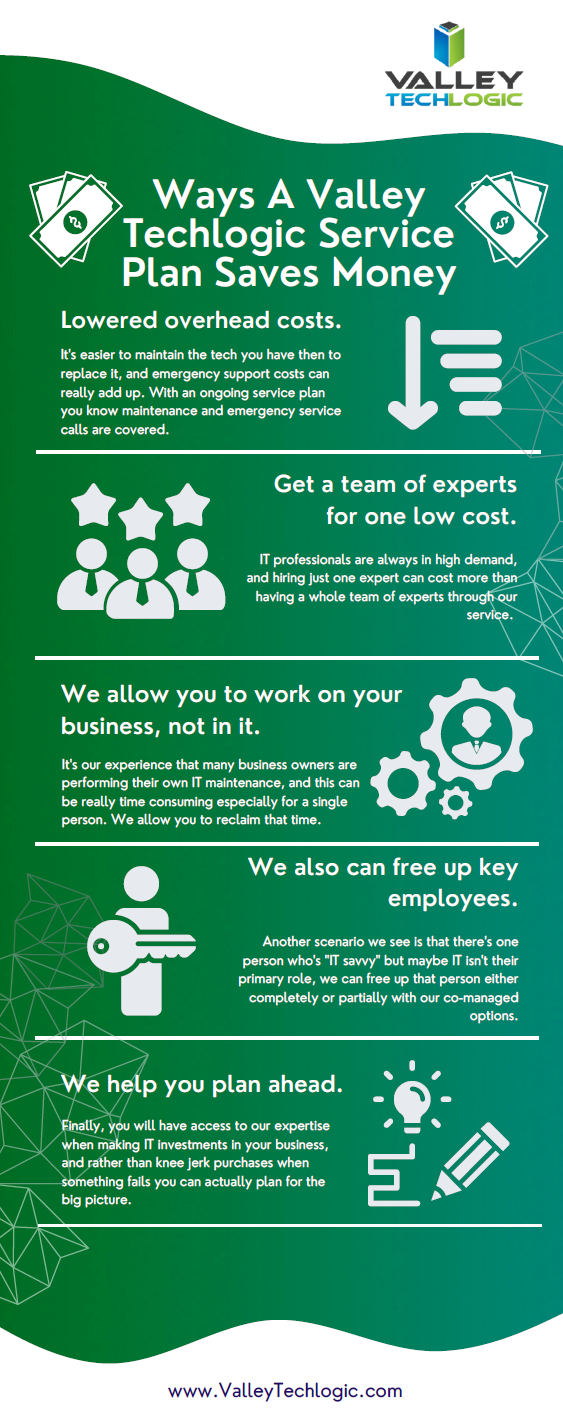
    Click to grab the full size version.

    We’re offering your first service call with us free, because we know you need to be certain when making choices for your business. We know after you try us out you will have the confidence to proceed, you can schedule your first service call here.

    Looking for more to read? We suggest these other articles from our site.

    This article was powered by Valley Techlogic, an IT service provider in Atwater, CA. You can find more information at https://www.valleytechlogic.com/ or on Facebook at https://www.facebook.com/valleytechlogic/ . Follow us on Twitter at https://x.com/valleytechlogic.

  • Thinking about buying new tech for your business in 2023? Here are our top 10 tips

    Thinking about buying new tech for your business in 2023? Here are our top 10 tips

    We recently touched on the tax savings benefits for making technology purchases before the new year, however maybe you’re only in the beginning stages of thinking about replacing equipment in your business and aren’t ready to go ahead and buy before 2022 is over.

    We’re a fan of making big technology purchases in bulk when it comes to our clients, instead of a mish mash of devices that all have different warranty times, hardware capabilities and software available to them you have one set of devices that can be managed in much the same way for their entire life span because they all came from the same place at the same time.

    While that Isn’t always achievable, you can accomplish almost the same goal by buying in sections as well. Maybe management devices get replaced first, followed by team 1 and team 2. Just any kind of organizational system to your technology buying beats the technology clutter of having everyone working on something different.

    Of course there are different considerations if your business BYOD (bring your own device) which we’ll touch on next week. Besides trying to make your technology purchases at roughly the same time here are 10 more tips for business technology buying in 2023.

    1. Research is key. Not all laptops for example are created equal (and the same goes for every other device) you want devices that will more than cover the requirements of Windows 10 or 11 and still perform well.
    2. On the same token, look up reviews. Sometimes a product SKU is problematic, it would be bad to read reviews about your chosen laptop having a problem with premature device failure AFTER you’ve bought 10 of them.
    3. Consult your employees. Your employees may have opinions about what is crucial to them in a work device, for example if you have one employee who handles your graphic design they may need extra memory or a better video card added to their particular device to do their job effectively.
    4. Spend a little extra on the extended warranty. You want these devices to last a long time for your business as they’re a big investment, it’s worth it to purchase the extended warranty (Dell offers up to 5 years for example).
    5. Look into what kind of support the company offers if you do encounter a problem. On the same page as the last tip, you want to make sure if one of the devices breaks or encounters a problem you can easily have it fix. Lenovo is another vendor we work with and they offer onsite repair of devices at a low additional cost.
    6. Consider consulting your software vendors. If you use a proprietary software in your business it’s especially important to make sure your chosen device will work with it (especially if we’re talking about replacing an onsite server).
    7. To follow up on that, if you’re considering replacing your server it might be a good time to consider the cloud. Onsite servers are a very expensive investment, we have seen more clients move to the cloud in 2022 than ever before. If your server has come up for replacement it might be worth researching before making that purchase.
    8. If you do want to purchase another onsite server, consider refurbished. Ordinarily we shy away from refurbished but when it comes to servers it can be a smart investment and we’ve found they perform just as well as new, we have saved clients thousands of dollars when they choose this option.
    9. You can choose the cloud for employee devices as well. If you have a BYOD format but still want the uniformity and security of having everyone connect from a similar machine, we recommend Windows 365. It’s a cloud PC your employees would connect to from their current device, it can give them the benefit of using a PC with more powerful hardware if you chose and you can manage these devices under one platform.
    10. Work with your IT provider to take advantage of their partnerships. Finally, if you have an IT provider it’s worth asking if they have partnerships with any vendors that can help you get a better deal. We have partnerships with Dell and Lenovo and utilize them to benefit our clients regularly. You can learn more about that here.

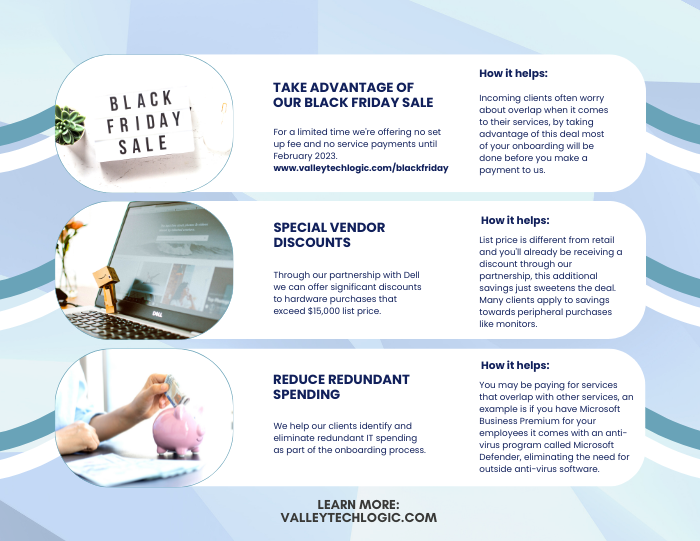
    Here are three ways you can save right now on your technology spending:

    Three additional money savings tips.Procurement services is something we reserve for clients. If you’d like to learn more about how we can help you purchase new devices and maintain them, click here to schedule a consultation.

    Looking for more to read? We suggest these other articles from our site.

    This article was powered by Valley Techlogic, an IT service provider in Atwater, CA. You can find more information at https://www.valleytechlogic.com/ or on Facebook at https://www.facebook.com/valleytechlogic/ . Follow us on Twitter at https://x.com/valleytechlogic.