Tag: cloud backups

  • Inclement weather, solar flares, earthquakes – how disaster proof is your businesses technology?

    Inclement weather, solar flares, earthquakes – how disaster proof is your businesses technology?

    We’ve written quite a bit about cyber security disasters and disaster recovery in that context (here are just a couple options Why every business needs a documented backup and disaster recovery strategy and Data Breached? 5 ways to reduce the impact on your business), but what about a disaster that’s truly out of your hands?

    Depending on where you live there are different types of types of disasters to worry about, and some disasters such as solar flares or geomagnetic storms are a global concern.

    While it’s been hyped by certain news outlets that a solar storm of spectacular magnitude could wipe out our global network and cause nationwide blackouts, solar events of the level required to cause mass destruction are spectacularly rare. Nasa rates solar flare levels on a scale that includes B Class which is the smallest, through C, M and X class which is the biggest. Within each scale there is a rating from 1-9 for the first three levels of solar flares and X class flares can be rated up to 17.

    X-class flares actually occur fairly frequently, with there being 11 so far in 2023 at the time of writing. These flares are strong enough to disrupt satellite signals or deliver a minor dose of radiation to passengers on an airplane when they occur.

    The best defense against solar events such as these is to advocate for improving our electricity grids, above ground electricity components are the most vulnerable if a significant solar flare were to occur. We do want to stress again though that an event of that nature would be exceedingly rare.

    Let’s now take a look at events that are much more common, such as inclement weather or for California based businesses such as ours, earthquakes.

    While you most likely have insurance that would cover your physical property including your office building, hardware and office furniture, it might be important to ask your insurance broker if it will also cover intangible assets.

    It is likely you’ll need a cyber liability policy to provide coverage for your data, below is a chart for what we typically see is covered (and not covered) by cyber liability coverage.
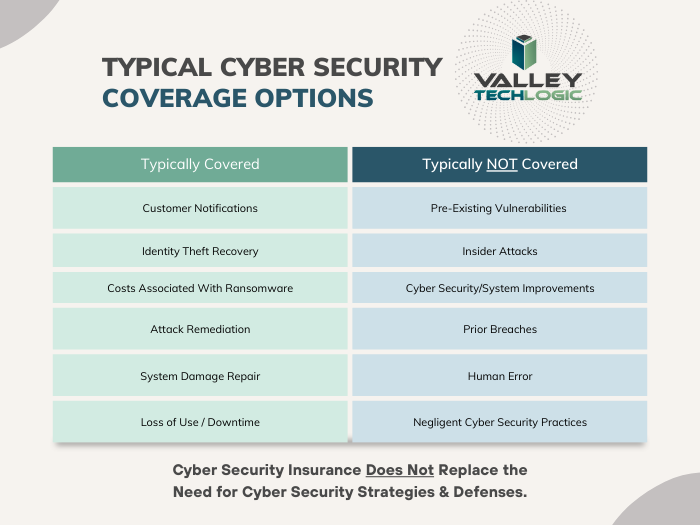
    As you can see most cyber liability policies cover business interruptions and data loss even if the cause is not cyber security related. What’s often not covered is events that fall within your control (such as the human element we’re always mentioning when it comes to common hacking techniques such as phishing).

    Another good way to protect your data from disaster events that may impact your business is to have most of your data located off premises in the cloud.

    While the cloud is often construed as a nebulous concept, really hosting your data in the cloud just means it’s on a server somewhere else. If your on-premises server is subject to catastrophic system failure for any reason, the cloud copy of your data would be safe.

    There are many low cost or free cloud options you can take advantage of for your data, we have a guide to the best way to use the free OneDrive storage that comes with your Microsoft 365 subscription here.

    Also, if you work with a managed IT provider such as Valley Techlogic, backups and backup maintenance is often included as part of your service plan. We have information about our own back program, TechVault.

    If disaster proofing your business in 2024 is on your to-do list, why not collaborate with us? We have experience in creating plans for businesses to make sure we avoid all preventable downtime and to protect your data from catastrophic events. If you’ve already suffered a data breach or other system outage and need assistance in data recovery that is also a service Valley Techlogic can provide. Reach out today for more information.

    Looking for more to read? We suggest these other articles from our site.

    This article was powered by Valley Techlogic, an IT service provider in Atwater, CA. You can find more information at https://www.valleytechlogic.com/ or on Facebook at https://www.facebook.com/valleytechlogic/ . Follow us on Twitter at https://x.com/valleytechlogic.

  • Zero trust or zero effort, how does your businesses security stack measure up?

    Zero trust or zero effort, how does your businesses security stack measure up?

    Have you been working on strengthening your cyber security stack in your business or crossing your fingers and hoping for the best? How much protection is really enough?

    There are a lot of remedies for improving cyber security out there, but which ones present the best value for your business, and what constitutes a “zero trust” environment?

    If you’re just starting out, these 10 items will greatly improve your business’s cyber security safety in a short amount of time (we call these “best practices”):

    1. Use multi-factor authentication. This one is obvious, but we still see it not being employed regularly. Multi-factor authentication is generally extremely easy to enable (often times just a checkbox) and it greatly improves the safety of that account. When we’re talking about accounts like your business email, or your banking account it’s a no brainer.
    2. Use a password manager. This is another easy one to employ but people still ignore it, or even worse they use the password manager built into their browser. We’re not saying that’s completely wrong, especially if you’ve started using stronger passwords because of it. It’s still a good idea, however, to use a password manager that’s not directly connected to your system. Often times the same password or biometric you use to log onto your computer is the one used to unlock your browsers password database, so if someone has breached the device all those passwords will be available to them too.
    3. Employ Biometrics. Speaking of biometrics, they can be an improvement over passwords when it comes to a physical devices security. Especially for mobile devices, most of us access our work emails, banking accounts, etc. through our phones. It’s very easy to lose a phone, so making that phone unusable to whoever finds it (or has taken it) is a good idea.
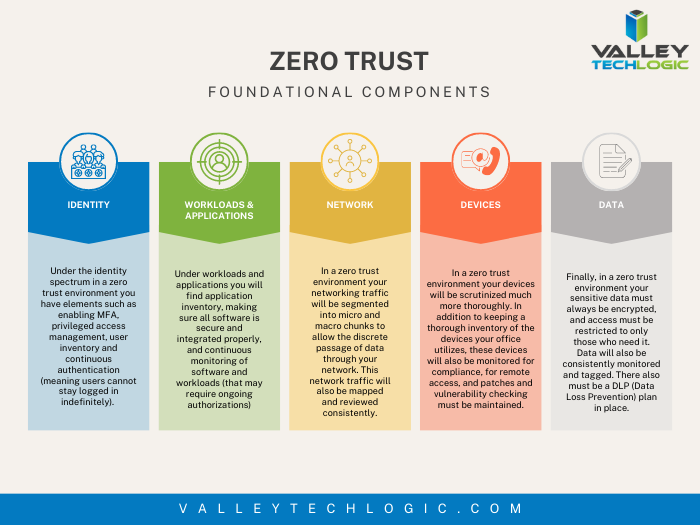
    4. Don’t give everyone admin privileges. Not every employee needs all the keys to your kingdom, limit admin access only to those who really need it so if you do have a breach the damage can be limited as well. This is a key component of a zero trust environment (which we describe in the chart below).
    5. Communicate your goals and train your employees. Loop employees into your increased cyber security efforts and provide training, no one wants to be responsible for a cyber-attack in their workplace but without training employees can become unknowing and unwilling threat vectors.
    6. Monitor network activity. Now we’re starting to get into the more challenging topics, monitoring your network activity can be a very effective way of noticing early when something is amiss. There are tools out there that can do this monitoring for you and provide warnings if suspicious behavior is detected (like a device being logged in after hours when it never usually is).
    7. Use encryption. It’s pretty easy to use encryption in email or with sensitive documents (again often just a checkbox) but it’s an effective way to make sure sensitive data doesn’t fall into the wrong hands.
    8. Use backups. Again, in the same vein of protecting your data having automatic backups will greatly increase your chances of recovering after a cyber-attack. Especially if those backups were stored offsite (such as cloud backups). We wrote an article on the best ways to manage your OneDrive storage (which is included in your Microsoft 365 subscription) here.
    9. Regularly patch your devices. Many of your vendors actually provide security protections for you via their patches, which more often than not are addressing specific security concerns that have been identified. Patching costs nothing but your time and the benefits are ten-fold compared to the costs of a security breach in your business.
    10. Have a security audit performed. The best way to address the holes in your security plan is to have a reputable IT company perform a security audit. Valley Techlogic is a provider of these audits in the Central Valley and you can request a consultation here.

    Performing these ten activities in your business will greatly improve your cybersecurity effectiveness across the board, but if you’ve reached the bottom of this article and have realized you do all of these you may be wondering what’s next? Or perhaps you’ve heard of zero trust but aren’t sure what that entails, here are the key components to having a zero-trust cybersecurity environment:

    We address ALL of these topics in our new book, Cyber Security Essentials, which covers all the components of a cybersecurity framework and how to implement them in your business. You can see a preview of the book in the video below.

    [youtube https://youtu.be/jlBAoq4tLNc]

    Looking for more to read? We suggest these other articles from our site.

    This article was powered by Valley Techlogic, an IT service provider in Atwater, CA. You can find more information at https://www.valleytechlogic.com/ or on Facebook at https://www.facebook.com/valleytechlogic/ . Follow us on Twitter at https://x.com/valleytechlogic.

  • AWS vs Azure, what is your best option when choosing a cloud platform?

    AWS vs Azure, what is your best option when choosing a cloud platform?

    We’ve had articles in the past about why you should consider making the move from on-premises to the cloud, but we’ve never specifically addressed which provider you should consider when making this move.

    For many, AWS (Amazon Web Services) and Azure are the main players that they look to when making the jump the cloud. Brand recognition is obviously there for both choices, as well as a history of impeccable uptime. Uptime is a very important factor, obviously you want your data to be available when and how you need it, but there are more things to consider.

    First, let’s look at the players. AWS has been around since 2006 and offers a “pay as you go” model, which means you pay only for the data you actually use. Many of us are familiar with the webstore Amazon, and you’d probably be surprised to learn AWS is a much bigger venture for Amazon, with 74% of their profit coming from AWS.

    Azure was launched in 2010 and is also pay as you go. However, how they differ is that Azure actually lets users access their data through a virtual machine on a Virtual Hard Desk (VHD). This means their interface is slightly more user friendly from the start. For a similar interface in AWS you must rent an EC2 (their version of a virtual machine). EC2 is more customizable but Azures Virtual Machine may more easily work with existing Cloud computing tools.

    Both are similar in that they offer scalable storage solutions; however, their object size restrictions vary slightly, with AWS having a 5 TB object size limit and Azure having a 4.75 TB limit. For most of our customers this would be a very negligible difference, however.

    Both do an excellent job of securing your data, in AWS you customize your security settings on setup. With Azure, they use Microsoft’s Cloud Defender services which are similar to the Windows Defender services you probably already utilize.

    AWS has a dashboard that may be easier to use if it’s your first-time using cloud services when it comes to looking for documentation on how to use the service. Where Azure has them beat though is that Azure keeps all of your user account and information in one place. So, depending on which kind of information you’re looking for, you may prefer one over the other.

    If customizing your cloud experience via code is something you’re after, you probably want to stick with AWS. Through their SageMaker system you can utilize their artificial intelligence (AI) tools to develop a very specific and unique experience when it comes to tracking data, making modifications, and applying updates.

    Azure on the other hand has opted for a “Codeless” interface, even someone with zero coding knowledge can drag and drop pieces to customize their cloud’s AI interface.

    Of course, from a base level you can look at what operating system these are compatible with. AWS is more compatible with Linux while Azure offers compatibility through .net with Linux, Windows and MacOS.

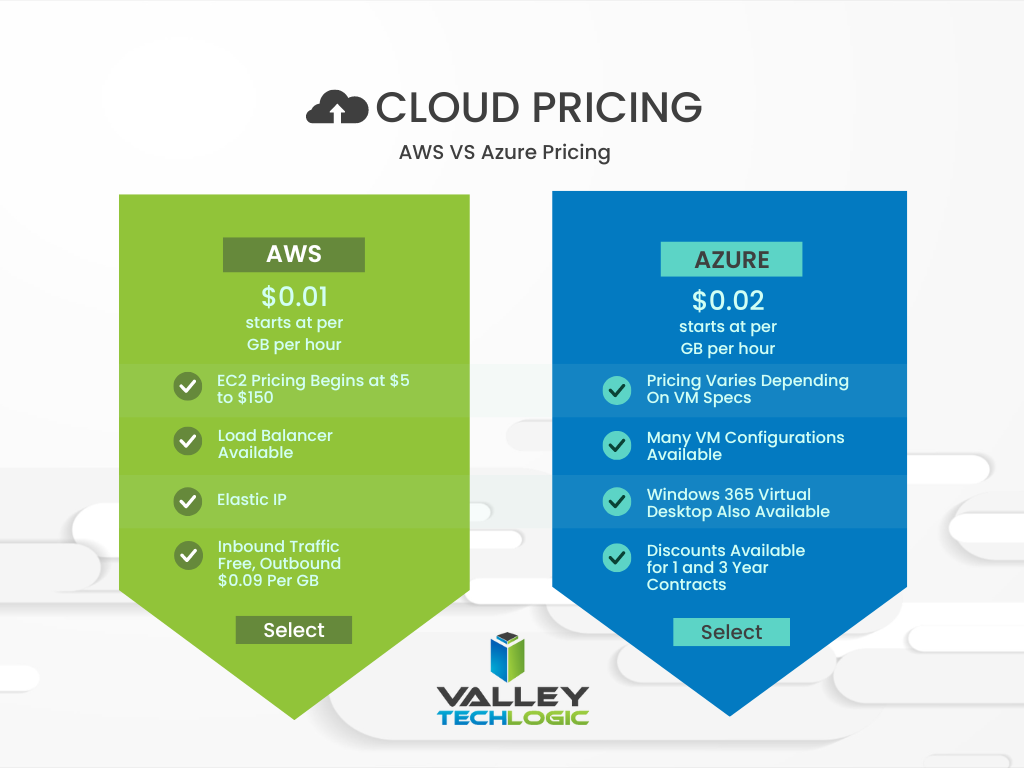
    In a nutshell, these two cloud behemoths are more alike than different but there are some factors that depending on your particular business sector or goals may lead you to shift one way or the other. We also want to spend a moment addressing a pricing breakdown for both AWS and Azure. You can see their pricing models in the chart below. We also want to note that both provide a free introductory period so you can test their services before committing to a plan.

    Are you considering a move to the cloud and aren’t sure which provider to go with, or even how to make it happen? Valley Techlogic can help. We’re experts in cloud computing and have managed many customer cloud migrations. Reach out today to schedule a free consultation.

    Looking for more to read? We suggest these other articles from our site.

    This article was powered by Valley Techlogic, an IT service provider in Atwater, CA. You can find more information at https://www.valleytechlogic.com/ or on Facebook at https://www.facebook.com/valleytechlogic/ . Follow us on Twitter at https://x.com/valleytechlogic.
  • Your data is safer in the cloud, period.

    Your data is safer in the cloud, period.

    Speaking in absolutes is not usually a good idea, but in the case of data storage we feel the onus is on us to speak plainly – and it’s the plain truth that your data is safer in the cloud.

    It’s natural to be hesitant to move everything into the cloud, especially when it really wasn’t that long ago in the grand scheme of things that all data was stored in filing cabinets. Safely tucked away and (hopefully) properly indexed to be pulled out as needed.

    Sure, we didn’t have to worry about malware with paper files, but theft and natural disasters were the enemy of on premises paper documents. Or just the ravages of time wreaking havoc on plain paper and ink. You also had to make sure to shred important documents and not just trash them lest they fall into the wrong hands.

    With the advent of computers most of our data moved to our personal computers and it greatly elevated our ability to communicate that data to others. Multi-million-dollar transactions can be easily completed by simply emailing a proposal and contract. Billing information, medical documents, all of the private information about an individual or business is often times found online and is available to be pulled up when needed.

    But this ease of information is also it’s downfall. Old fashioned robberies where thieves would break into brick-and-mortar establishments and steal private information to then be used to create false identities and/or use payment details for their own benefit have now been replaced with often a single user attacking a small business’s online accounts. They can dismantle everything that business has built in days or even hours and make recovering difficult or even impossible.

    That’s not even taking to account that a single on-premises server is just as vulnerable to fire or flood damage as your filing cabinet is. A singed or waterlogged hard drive has no more usefulness than the same data contained in a charred or dripping stack of papers.

    Like with many things in life this problem is solved by working together with others, and that’s where cloud data solutions come in. It’s still your data and we, like you, think it should have the same level of accessibility as it does when it’s on your personal computer or even a paper file on your desk.

    With the high-speed internet most of us have in our homes and offices downloading files from the cloud is often a nearly instantaneous click of a button and then you’re working on the file you were last night. Make a mistake a few hours in? Another benefit of the cloud is you can often times roll back to an earlier version.

    The cloud can sound nebulous but it’s not, it’s just using the resources of companies that put their whole stake into safeguarding data. Their existence as a business is in keeping your data safe, companies that fail at that task don’t stay in business long.

    It’s really not that different than utilizing the services of the power company for all of your power, or your local ISP for all of your networking needs. These services work best when they’re maintained by companies that dedicate themselves to the task and can provide a high level of continuity.

    And there are some major players in the game, players that have been in the business of data and even computers themselves as a whole for decades. At Valley Techlogic we greatly utilize the power of Microsoft’s cloud service – One Drive – to collaborate within our business. It’s even paved the way for our remote employees to maintain productivity with the whole team without missing a beat. The default storage capacity is 1 Terabyte (TB) which is more than most users will ever need.

    If our office ever burned down with no one inside, we can state with the utmost confidence it would not affect our ability to do business. Could you say the same?

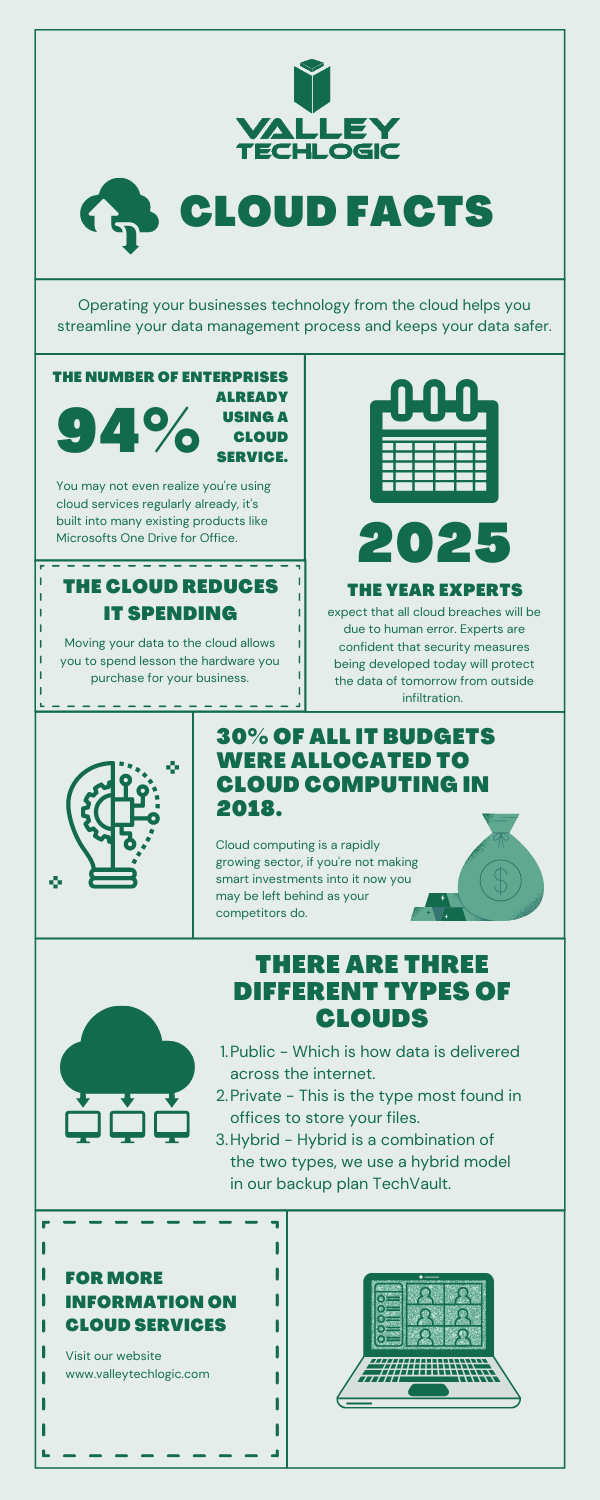
    Cloud Data Facts

    If you’re considering a move to the cloud for your business, we can help. Backups and data recovery solutions are a keystone piece of all of our service plans, learn more today.

    Looking for more to read? We suggest these other articles from our site.

    This article was powered by Valley TechLogic, an IT service provider in Atwater, CA. You can find more information at https://www.valleytechlogic.com/ or on Facebook at https://www.facebook.com/valleytechlogic/ . Follow us on Twitter at https://x.com/valleytechlogic.