Tag: data backups

  • You have cloud backups for your business, but are you wasting money on storage you don’t need? 5 ways to tidy up your cloud storage

    You have cloud backups for your business, but are you wasting money on storage you don’t need? 5 ways to tidy up your cloud storage

    The worst backup situation to have as a business owner is no backups at all, so if you’ve made keeping backups of your data a priority in your business, we want to encourage you to keep the effort up. Having data backups is crucial for making a full recovery in the event of device failure, cyber security breaches and more.

    With that said, the cost of storage and in particular cloud storage is something to be considered when formulating a plan for backups. With physical hardware you have a tangible wall that prevents storage costs from ballooning out of control, but with cloud storage no such wall exists. Your provider will likely sell you as much data storage as you need and if your backups aren’t set up in an efficient way you may find the costs continue to rise while not being entirely sure as to why.

    Here are five ways to setup efficiency for your cloud backup solution and keep costs under control:

    1. Implement Data Archiving Policies: Regularly archive older, infrequently accessed data to cheaper, long-term storage solutions. This reduces the cost of more expensive, high-performance storage.
    2. Use Tiered Storage Solutions: Take advantage of cloud providers’ tiered storage options. Store critical, frequently accessed data in high-performance storage and less critical data in more economical storage tiers.
    3. Automate Backup Schedules and Policies: Set up automated backup schedules to ensure data is backed up regularly without human intervention. Use policies to manage retention, ensuring outdated backups are deleted after a certain period.
    4. Compress and Deduplicate Data: Use data compression and deduplication techniques to reduce the amount of storage required. Compression reduces file size, while deduplication eliminates duplicate copies of data.
    5. Monitor and Optimize Storage Usage: Regularly review storage usage and costs. Use analytics and reporting tools provided by cloud providers to identify unused or underused resources and optimize storage allocation accordingly.

    By implementing these strategies, business owners can effectively manage their cloud storage costs and maintain an organized, efficient backup system.

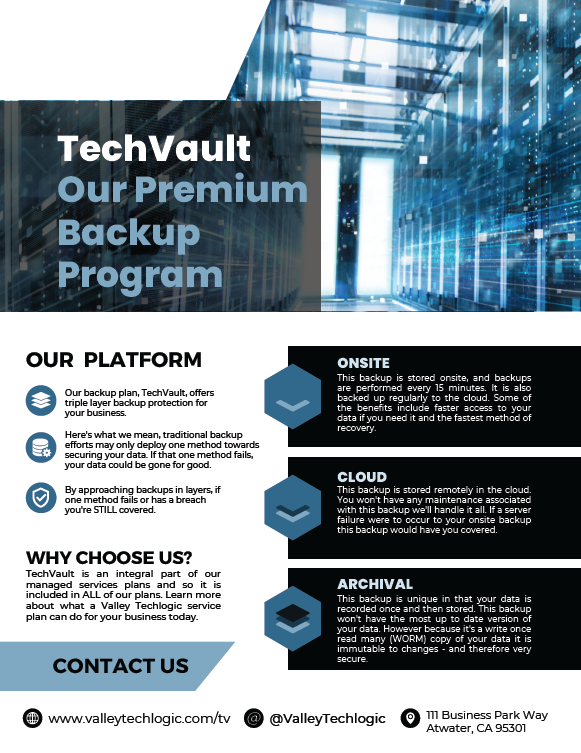
    Did you know backups are a core feature of Valley Techlogic’s service offering? Not only can we assist you in maintaining your existing backups, we also will keep our own backup of your data as part of your service plan with us.

    You can learn more about our backup program here, but in a nutshell whether you want to keep your current backups and utilize ours as an additional copy or erase that expenditure from your billing and let us handle it – Valley Techlogic can support your business’s backup planning in addition to the other ways we support your business.

    Learn more today by scheduling a meeting with one of our experienced

    Looking for more to read? We suggest these other articles from our site.

    This article was powered by Valley Techlogic, leading provider of trouble free IT services for businesses in California including Merced, Fresno, Stockton & More. You can find more information at https://www.valleytechlogic.com/ or on Facebook at https://www.facebook.com/valleytechlogic/ . Follow us on Twitter at https://x.com/valleytechlogic and LinkedIn at https://www.linkedin.com/company/valley-techlogic-inc/.

  • Are you sure you can count on your data backups? 5 ways to confirm your backups are working (and avoid the 37% data backup failure rate)

    Are you sure you can count on your data backups? 5 ways to confirm your backups are working (and avoid the 37% data backup failure rate)

    Data backups are a big part of our service offering here at Valley Techlogic (learn more here) and we believe backing up your data is one of the easiest preventative option for a host of technology related headaches – including device failure, cyber breaches, accidental deletions and more.

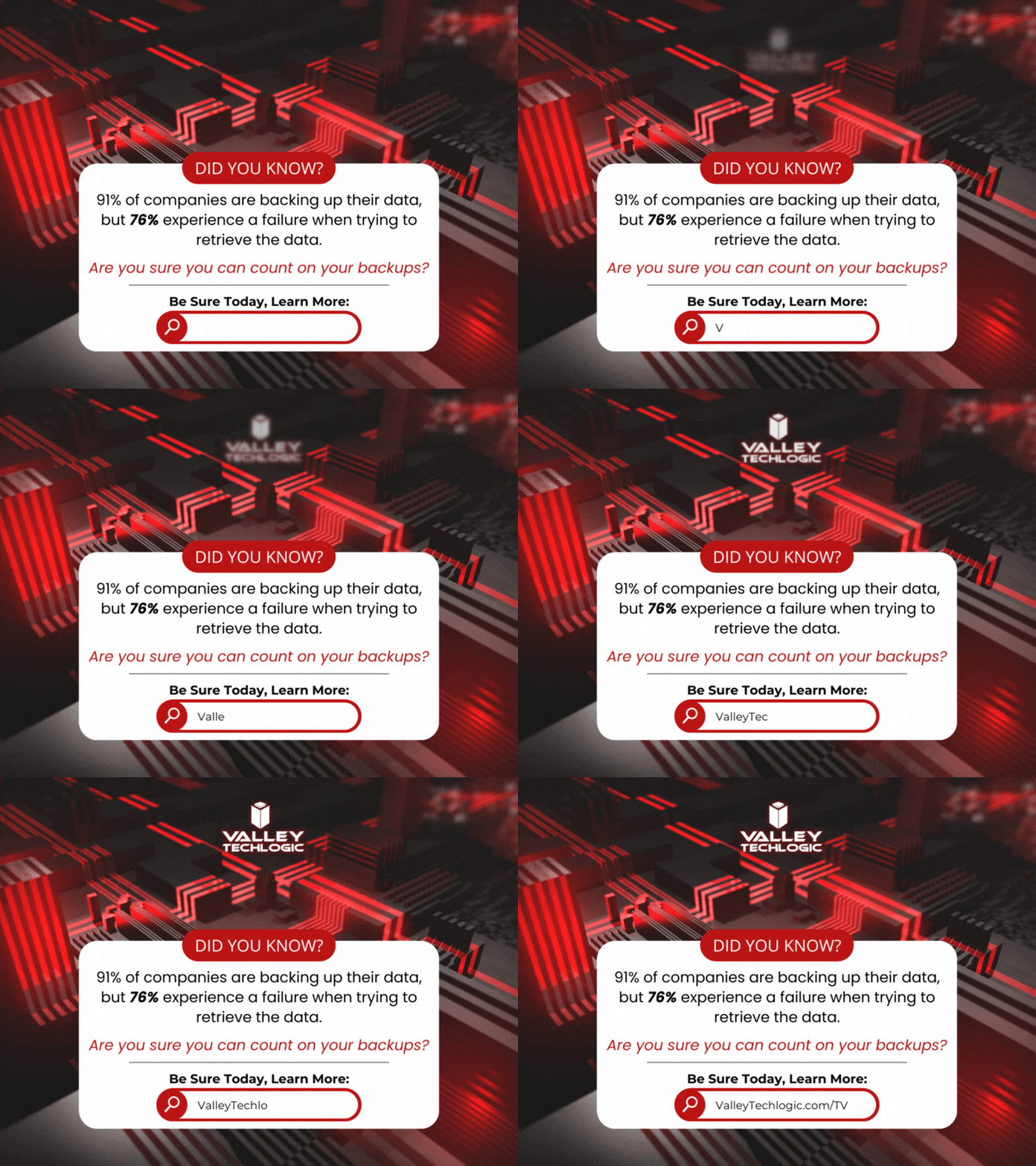
    According to the statistics 91% of business organizations have some form of data backup in place but 76% report having a data loss in the last year. This tells us backups are happening, they’re just not happening very well.

    Here are five ways to check to see if your data backups are functioning as they should:

    1. Regular Backup Testing: Schedule regular tests where you restore data from your backups to ensure they are functional. This can involve restoring a small subset of data or running a full restoration process in a test environment.
    2. Data Integrity Checks: Use checksums or hash functions to verify the integrity of backed-up data. By comparing checksums or hashes of original data with those of the backed-up data, you can ensure that the backup process has not introduced any errors or corruptions.
    3. Backup Monitoring Tools: Implement backup monitoring tools that provide real-time alerts and reports on backup status, including successful completion, errors, or failures. These tools can help you proactively identify any issues with your backup process.
    4. Versioning Verification: If your backup system supports versioning, regularly check that multiple versions of files are being retained as expected. This ensures that you have access to historical versions of data in case of accidental deletions or data corruption.
    5. Backup Logging and Auditing: Maintain detailed logs of backup activities, including start and end times, success or failure statuses, and any error messages encountered. Regularly review these logs to identify any anomalies or patterns that may indicate problems with the backup process.

    Other pitfalls we see when it comes to backups? Not backing up everything you intend to, there’s nothing worse than going to look for a file and realizing it was deleted accidentally at some point. Or not moving your files to the intended central location that does receive regular backing up and experiencing a device failure.

    It’s a good idea to take a look at the full picture when it comes to backups, for many simply backing up your office server is enough because all work stems from that central location (this is especially true if you use a type of specialized software that all employees must work through and that software is stored on the office server).

    For others work is less centralized, and it might make sense to backup the workstations of specific employees because if their devices were lost, compromised, or broken it would also mean a loss of files that are significant to your day-to-day operations.

    Another backup related item to consider? Your email. While most email services offer ample storage, we still find it’s a good idea to add a backup to that just in case (and again, this is another protection against losing data due to a breach which occurs frequently with email). At Valley Techlogic we even have a product that can backup your Microsoft 365 data specifically, and if you use Word, Excel, PowerPoint etc. throughout your business or as your business productivity software suite of choice, this kind of backup coverage can go a long way.

    In a nutshell, if you’re looking for assistance in determining if your backups are functioning as they should, in expanding your backups to include more of your data, a switch from on-premises backups to cloud or even establishing backups from the ground up Valley Techlogic is able to assist you with all of these and more. Backups are one facet of the services you’ll receive as a Valley Techlogic client, so what are you waiting for? Get started today.

    Looking for more to read? We suggest these other articles from our site.

    This article was powered by Valley Techlogic, an IT service provider in Atwater, CA. You can find more information at https://www.valleytechlogic.com/ or on Facebook at https://www.facebook.com/valleytechlogic/ . Follow us on Twitter at https://x.com/valleytechlogic.

  • Threat actors attack on cloud company leads to customers data being wiped completely

    Threat actors attack on cloud company leads to customers data being wiped completely

    Last week a Danish cloud provider called CloudNordic suffered a cyber attack that led to them losing all of their customers data in one fell swoop.

    The hackers who gained access to CloudNordic’s system immediately issued a financial demand that the company was unable and unwilling to meet and led to all of their data being encrypted by the hackers. The company said that no evidence of being hacked was left behind other than the encrypted data.

    This hack also effected their sister company, AzeroCloud, and both companies released identical statements on the ongoing issues they’re facing after this event, you can see the statement below translated to English from Danish.

    In an effort to start over the company has establish a new name and new servers and have offered to restore their clients to servers with the same name as they had previously, though they’ve also included instructions for customers who want to move their domains to new hosts.

    CloudNordic suspects the attack occurred while they were moving data centers, exposing them to already infected systems. As they were mid-migration it allowed the attackers access to their systems and even their own backups.

    CloudNordic states “”The attackers succeeded in encrypting all servers’ disks, as well as on the primary and secondary backup system, whereby all machines crashed and we lost access to all data,”.

    They’ve stated while the data was scrambled during the attack, they don’t believe the attackers copied customers data as is typical with ransomware attacks, so it’s unlikely individual customers will be targeted to be ransomed back their data.

    No known ransomware group has so far taken credit for this attack. The company CloudNordic and their sister company AzeroCloud have both said they plan to try to rebuild from here without access to their previous data.

    At Valley Techlogic, backups are an important puzzle piece when it comes to maintaining the security of your business. For many businesses, a cyber event where all of your data is lost would be difficult to impossible to recover from. Many businesses that suffer attacks like these end up going out of business.

    That’s why we created our triple layer backup plan, TechVault.

    With TechVault you not only have an onsite copy of your data, there’s also a cloud backup and what we call an archival backup.

    This archival backup is what makes this program we’ve created special, as it’s write once read many. Basically, the data can be copied back to you as many times as needed but once it’s on there, it cannot be deleted.

    This, in addition to the 24/7 monitoring we provide as well as firewall, antivirus and other protections means your data is virtually bullet proof.

    If you would like to learn more about what makes Valley Techlogic a cyber security leader in the Central Valley, schedule a consultation with us today.

    Looking for more to read? We suggest these other articles from our site.

    This article was powered by Valley Techlogic, an IT service provider in Atwater, CA. You can find more information at https://www.valleytechlogic.com/ or on Facebook at https://www.facebook.com/valleytechlogic/ . Follow us on Twitter at https://x.com/valleytechlogic.

  • RAID Arrays Explained, What is it and do you need one?

    RAID Arrays Explained, What is it and do you need one?

    RAID arrays or Redundant Array of Independent Disks is a type of storage configuration where your data is saved across multiple hard drives or SSDs. There are a number of benefits to doing this including increased performance and data redundancy. Because your data is saved across multiple drives you have better protection in the event of a drive failure.

    Basically, if one of the drives in your RAID array fails your drives will then go into “rebuild mode” which will allow the remaining drives to recover the data, the failed drive can then be replaced with little downtime for you. A RAID array is not always necessary, we wouldn’t suggest one for regular employee use for example as SSDs are very reliable (especially compared to hard drives with mechanical parts that can fail). You also have the option of cloud storage for devices that don’t have much data to save on a daily basis.

    However, for servers or other systems where data protection is critical, a RAID array is a necessary option to keep that data intact. They are also beneficial for systems that work with very large files as the computer can pull pieces of the file in unison and load them much quicker than a single drive. There are many different configurations for RAID arrays such as:

    1. RAID 0: In the world of data two is one and one is zero, and such is the case with RAID arrays. The first RAID array configuration involves breaking up your data into “stripes” across one or more drives, however it does not provide redundancy like other RAID arrays do. If a drive fails under RAID 0 the data is lost. However, it does improve speeds and can allow you to gain more space on your drives.
    2. RAID 1 provides an exact mirror of your data across multiple drives, which does allow for data redundancy. In the case of a drive failure as long as one drive is functional you will still have access to your data. The pitfall to this is your data storage can only be as big as the largest drive in the array, so if you have a 1 TB drive paired with a 4 TB drive only 1 TB would be usable. This RAID array type also doesn’t really provide a system performance boost, it’s purely a data redundancy setup.
    3. RAID 5 provides good redundancy coverage and improves performance. A RAID 5 array consists of 3 or more drives, this RAID array type splits your data consistently across the board and improves your system performance at the same time. However, for most clients we would suggest the next setup.
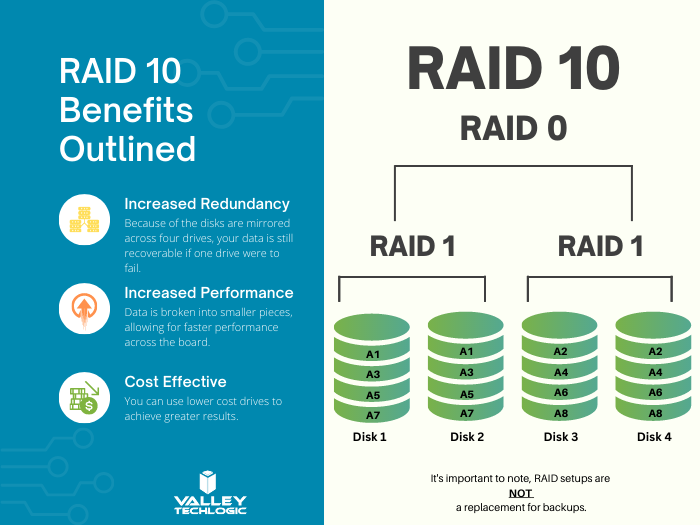
    4. RAID 10 combines two RAID 1 arrays with two RAID 0 arrays to provide both greatly improving performance (that falls in line with the RAID 0 benefit) and greatly increasing redundancy (as you get with a traditional RAID 1 set up) for not much more than you would spend to have a RAID 5 installed. For systems that run software in addition to storing data this is the setup we highly recommend.

    Here are some other benefits of having a RAID 10 setup for your server or systems where data is a high priority:

    RAID 10 Benefits ExplainedThere are still other questions that need to be answered beyond just RAID type, like what drive capacity should you be looking for? Would a HDD (Hard Drive Disk) work in this case to have more inexpensive but higher capacity or should you be looking for SDDs (Solid State Drives)?

    These are questions that can be answered by our professional sales team, they’re experts in technical equipment procurement and can help make suggestions and offer buying advice specifically tailored to your business. Learn more today by scheduling a consultation with our sales manager.

    Looking for more to read? We suggest these other articles from our site.

    This article was powered by Valley Techlogic, an IT service provider in Atwater, CA. You can find more information at https://www.valleytechlogic.com/ or on Facebook at https://www.facebook.com/valleytechlogic/ . Follow us on Twitter at https://x.com/valleytechlogic.