Tag: patching

  • If you have a computer or server with an Intel Processor, you need to patch for this vulnerability ASAP

    If you have a computer or server with an Intel Processor, you need to patch for this vulnerability ASAP

    Intel just released a fix for a vulnerability that would make certain CPUs in jeopardy of being compromised. The vulnerability would allow an attacker to gain privileged access to machines or trigger a denial-of-service attack.

    You can see the list of affected CPUs here, patching for this vulnerability may need to occur in phases including micro-updates to the BIOs, system OS and drivers. In a statement on their website Intel says malicious exploitation of this code would need execution of an arbitrary code (so it can’t be exploited with no input from the end user). They don’t believe patching for this issue will impact devices in a noticeable way.

    Originally discovered by a Google Security Engineering team and dubbed “Reptar”, a researcher at Google commented on how strange this vulnerability appears to be.

    The vulnerability changes how redundant prefixes, basically small bits of code, are interpreted by the effected CPUs. Normally CPUs ignore redundant prefixes for obvious reasons (the key word being “redundant”) but instead these prefixes triggered expanding errors within the system. The Google team found that when it was left without remediation eventually the affected machines would report processing errors and begin to malfunction.

    Destructive code like this is frightening because it may not just be a loss of data or temporary use of the affected machine, but it may cause the computer or server to fail altogether.

    This Isn’t the first CPU exploit Intel has suffered and they’re not the only ones battling attacks to their hardware, with AMD also announcing news of their own “CacheWarp” vulnerability that allowed attackers to gain root access to Linux Virtual Machines. So, if you thought these types of attacks were limited to Windows, think again. In this case the vulnerability only affects 1st through 3rd generation EPYC processors, the 4th generation is not vulnerable in this case.

    Also, with the AMD vulnerability it’s also important to note that while a patch is available for just the 3rd generation EPYC processor. For 1st and 2nd generation there is no mitigation available. As with Intel it’s not expected that the patch will have any effect on the CPU performance.

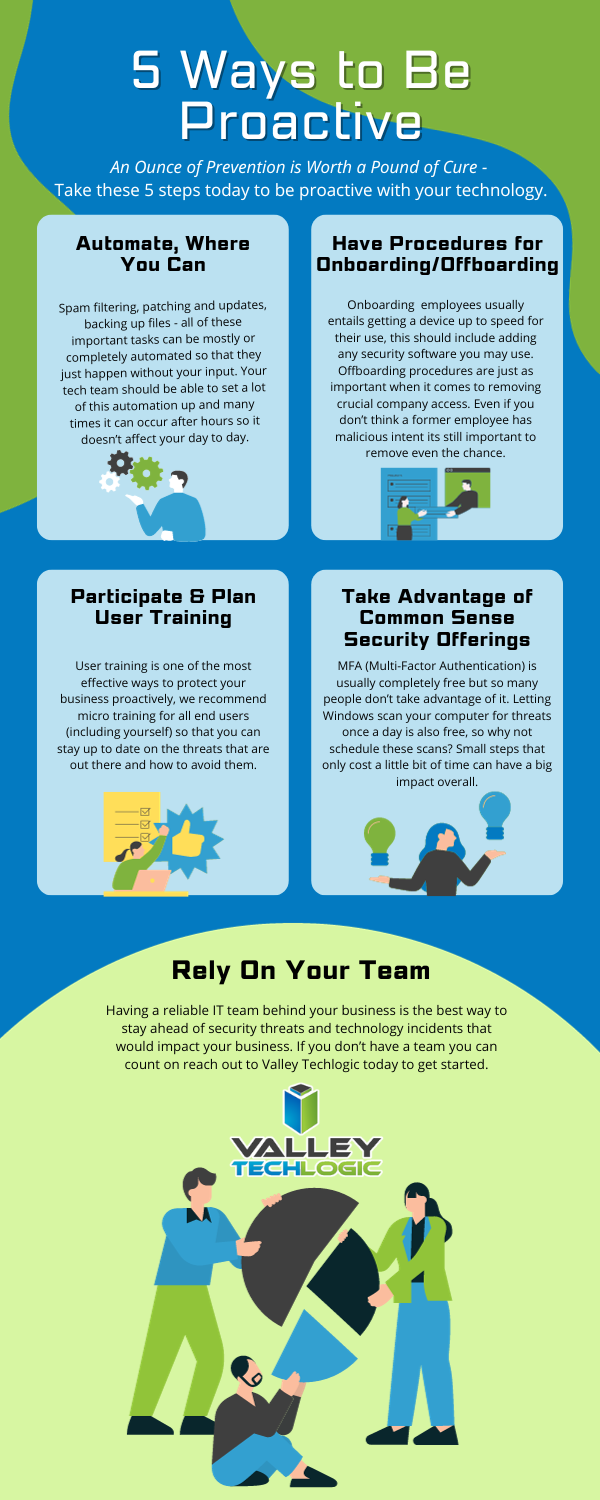
    Both companies have been very quick to patch these aggressive vulnerabilities and attacks like these highlight the need to make sure regular patching is a primary component of any tech service plan. Below are 5 key components we recommend when it comes to proactive technology support
    Proactive care is often a tough sell, with many business owners not feeling the need to spend the money on proactive tech care as these things “won’t happen to them”. It’s important to note that many attacks that occur are widespread and have no specific target in mind. If you have unpatched equipment in your office, you may be a sitting duck to any widespread attack issued to a vendor you use or because you bought a certain kind of hardware that ended up having a vulnerability. These attacks are ones of convenience not of malice as is often misconstrued.

    Even if it can be recovered from, why take the chance? Having a partner like Valley Techlogic to make sure vulnerabilities like the ones in this article are patched as soon as a fix is available means you will never be part of the eye-opening statistic about businesses who suffer a major breach. If you’re not aware, 60% of businesses close after a cyberattack. Don’t let that be you, reach out for a free consultation with us today.

    Looking for more to read? We suggest these other articles from our site.

    This article was powered by Valley Techlogic, an IT service provider in Atwater, CA. You can find more information at https://www.valleytechlogic.com/ or on Facebook at https://www.facebook.com/valleytechlogic/ . Follow us on Twitter at https://x.com/valleytechlogic.

  • Zero trust or zero effort, how does your businesses security stack measure up?

    Zero trust or zero effort, how does your businesses security stack measure up?

    Have you been working on strengthening your cyber security stack in your business or crossing your fingers and hoping for the best? How much protection is really enough?

    There are a lot of remedies for improving cyber security out there, but which ones present the best value for your business, and what constitutes a “zero trust” environment?

    If you’re just starting out, these 10 items will greatly improve your business’s cyber security safety in a short amount of time (we call these “best practices”):

    1. Use multi-factor authentication. This one is obvious, but we still see it not being employed regularly. Multi-factor authentication is generally extremely easy to enable (often times just a checkbox) and it greatly improves the safety of that account. When we’re talking about accounts like your business email, or your banking account it’s a no brainer.
    2. Use a password manager. This is another easy one to employ but people still ignore it, or even worse they use the password manager built into their browser. We’re not saying that’s completely wrong, especially if you’ve started using stronger passwords because of it. It’s still a good idea, however, to use a password manager that’s not directly connected to your system. Often times the same password or biometric you use to log onto your computer is the one used to unlock your browsers password database, so if someone has breached the device all those passwords will be available to them too.
    3. Employ Biometrics. Speaking of biometrics, they can be an improvement over passwords when it comes to a physical devices security. Especially for mobile devices, most of us access our work emails, banking accounts, etc. through our phones. It’s very easy to lose a phone, so making that phone unusable to whoever finds it (or has taken it) is a good idea.
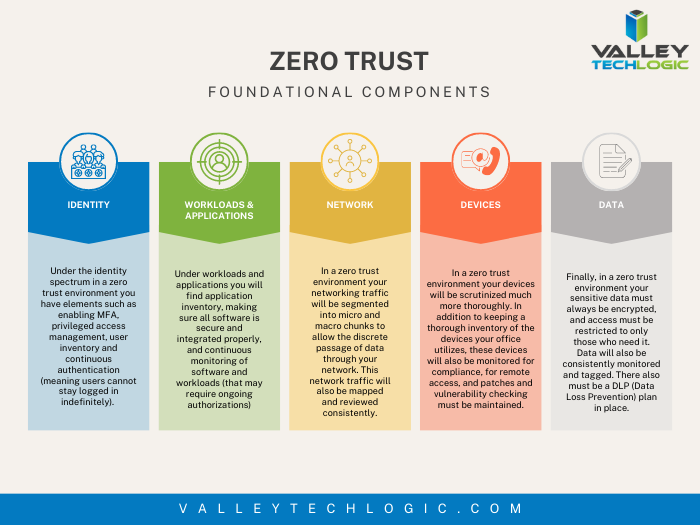
    4. Don’t give everyone admin privileges. Not every employee needs all the keys to your kingdom, limit admin access only to those who really need it so if you do have a breach the damage can be limited as well. This is a key component of a zero trust environment (which we describe in the chart below).
    5. Communicate your goals and train your employees. Loop employees into your increased cyber security efforts and provide training, no one wants to be responsible for a cyber-attack in their workplace but without training employees can become unknowing and unwilling threat vectors.
    6. Monitor network activity. Now we’re starting to get into the more challenging topics, monitoring your network activity can be a very effective way of noticing early when something is amiss. There are tools out there that can do this monitoring for you and provide warnings if suspicious behavior is detected (like a device being logged in after hours when it never usually is).
    7. Use encryption. It’s pretty easy to use encryption in email or with sensitive documents (again often just a checkbox) but it’s an effective way to make sure sensitive data doesn’t fall into the wrong hands.
    8. Use backups. Again, in the same vein of protecting your data having automatic backups will greatly increase your chances of recovering after a cyber-attack. Especially if those backups were stored offsite (such as cloud backups). We wrote an article on the best ways to manage your OneDrive storage (which is included in your Microsoft 365 subscription) here.
    9. Regularly patch your devices. Many of your vendors actually provide security protections for you via their patches, which more often than not are addressing specific security concerns that have been identified. Patching costs nothing but your time and the benefits are ten-fold compared to the costs of a security breach in your business.
    10. Have a security audit performed. The best way to address the holes in your security plan is to have a reputable IT company perform a security audit. Valley Techlogic is a provider of these audits in the Central Valley and you can request a consultation here.

    Performing these ten activities in your business will greatly improve your cybersecurity effectiveness across the board, but if you’ve reached the bottom of this article and have realized you do all of these you may be wondering what’s next? Or perhaps you’ve heard of zero trust but aren’t sure what that entails, here are the key components to having a zero-trust cybersecurity environment:

    We address ALL of these topics in our new book, Cyber Security Essentials, which covers all the components of a cybersecurity framework and how to implement them in your business. You can see a preview of the book in the video below.

    [youtube https://youtu.be/jlBAoq4tLNc]

    Looking for more to read? We suggest these other articles from our site.

    This article was powered by Valley Techlogic, an IT service provider in Atwater, CA. You can find more information at https://www.valleytechlogic.com/ or on Facebook at https://www.facebook.com/valleytechlogic/ . Follow us on Twitter at https://x.com/valleytechlogic.

  • If you’ve never heard of the Log4J vulnerability, you’re probably at risk

    If you’ve never heard of the Log4J vulnerability, you’re probably at risk

    News is moving fast on the Log4J vulnerability, also known as “Log4shell”. It was first discovered in the video game Minecraft, developers realized hackers could exploit the vulnerability to gain access to the targeted computer and take it over. They quickly released a patch but also made a disclosure that brought the exploit to the public’s view.

    The Cybersecurity & Infrastructure Security Agency (CISA) has now made a running repository that lists all of the software and devices vulnerable to this exploit. There you will find guidance on patching the effected products.

    So, what is the Log4J vulnerability and what does it do?

    It all stems from the building blocks that are used when a programmer is creating their code. Programmers will take bits of code that commonly available and used to act as a foundation for the program they’re trying to write, and in this case one of those foundational bits of code was Log4J. Log4J is used by Java to create a log of activity for the device it’s running on. It copies everything that happens as the program runs, and it makes sense that the vulnerability was initially discovered in Minecraft (a Java based game).

    This communicative bit of code is found in many different programs, which is why it could be devastating if it was widely exploited. Hackers would be able to send a message to the “Log4J” effected product giving it commands. This would essentially allow them to take over the device and have full access.

    Minecraft Isn’t the only thing based in Java either, Java is an extremely popular programming language and bits of it can be found in almost everything. Created in 1995, Java can be found on everything from your own personal laptop to the supercomputers used to solve complex scientific equations. 9937 companies openly report including Java in their tech stack, including Google, Airbnb, Amazon and more.

    Java is also the preferred language for mobile applications, such as Android. Any business interested in having a mobile facing application (which they absolutely should considering mobile devices command the highest percentage of the worldwide web traffic at 54.8%) will need to utilize Java to accomplish it.

    This is so much to say, Java is in nearly everything which makes an exploit that targets a common component of it a recipe for disaster.

    All is not lost however, now that the exploit has been discovered many businesses are working furiously on patches and notifying their customers. You can check the CISA link found at the beginning of this article to keep track of what’s being done by specific businesses.

    Click to open the full size version.

    This ordeal is a good reminder to stay up to date on patches that are offered by the software you utilize, but if you’re running a business, orchestrating patching across many different devices company wide can be much more difficult.

    Valley Techlogic offers preventative maintenance in all of our service plans, as well as disaster recovery services if the unthinkable does occur. Learn more today by scheduling a short consultation with us.

    Looking for more to read? We suggest these other articles from our site.

    This article was powered by Valley TechLogic, IT service provider in Atwater, CA. You can find more information at https://www.valleytechlogic.com/ or on Facebook at https://www.facebook.com/valleytechlogic/ . Follow us on Twitter at https://x.com/valleytechlogic.
  • Microsoft’s Windows 11 finally has an official release date, and more Windows 11 updates

    Microsoft’s Windows 11 finally has an official release date, and more Windows 11 updates

    Microsoft finally has an official release date for their first operating system release in six years, it will be released October 5th, 2021. Windows 11 will be a free upgrade to Windows 10 users – if you’re not already a Windows 10 user we urge you to upgrade while it’s still available and free.

    This means that the release is just over a month away and the buzz surrounding it is only continuing to amp up.  We had word last week that while Windows 11 may work on older computers, you may be prevented from completing updates as normal.

    Microsoft is drawing a line in the sand when it comes to not supporting old hardware. We talked about the specifications required in this article a few weeks ago and nothing has changed on Microsoft’s end when it comes to those required specifications so far. They’ll also be unveiling their own hardware lineup that will feature Windows 11 on September 22nd.

    There are even some indications you not only won’t get software updates, but you may not get security patches either, although they’ve proven to be somewhat soft on that stance on the past when it comes to unsupported copies of their operating systems. Either way with chip shortages and other pandemic related shipping delays this may be a tricky time for those looking to upgrade but realizing they don’t have a machine with the hardware capable of supporting the new operating system.

    Another thing we now know is that even though the Android support found in Windows 11 was a heavily lauded feature, it won’t be there at launch. All of the other showcased featured will be there but the Android support will come later in the year, although a preview of it should be available to Microsoft Insiders soon.

    If you’re wondering how you’ll know when Windows 11 is available to you or whether it will be difficult to figure out, you need not worry. Microsoft is aiming for a “phased and measured” launch and will prompt users via the Windows Update system that the upgrade to Windows 11 is available.

    It won’t be available to all PCs and laptops right on October 5th however, they’ll be slowing releasing it in waves dependent on your computer specifications, the age of your device and other factors. It’s been noted though that some users will have to wait until 2022 to receive the upgrade.

    That should give users plenty of time to sort out any of their hardware related questions and for those on the fence about upgrading, time to see how it fares for other people first.

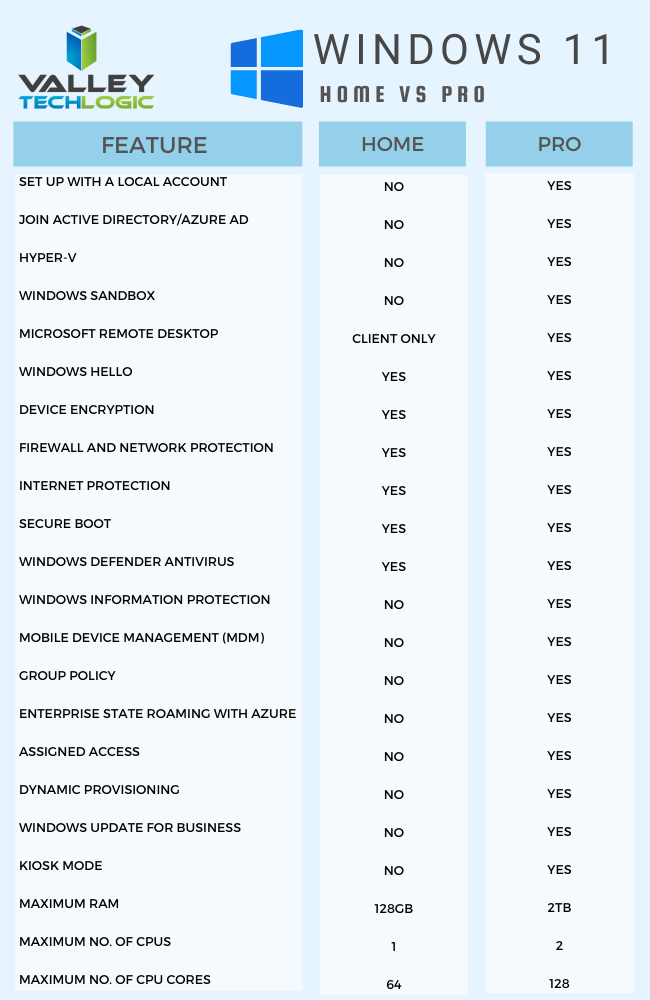
    For business users, who often opt for the pro version, the choice to upgrade can require more thought and planning then simply clicking the upgrade button when it pops up. We’ve made this chart that outlines the differences between Windows 11 Home and Windows 11 Pro.Windows11HomevsProChart

    One other big difference is that going forward Microsoft is requiring home users to tie a Microsoft account to their Windows installation, but this Isn’t a requirement for Pro users, you can just set up your computer with a local account.

    It will be interesting to see what other details are released as we continue to creep closer to the October release. If you’ve got Windows 11 on your radar for your business Valley Techlogic can help with the planning, we’re a certified Microsoft partner and help businesses all over the Central Valley manager their Windows applications, both for PC and server. Learn more today.

    Looking for more to read? We suggest these other articles from our site.

    This article was powered by Valley TechLogic, an IT service provider in Atwater, CA. You can find more information at https://www.valleytechlogic.com/ or on Facebook at https://www.facebook.com/valleytechlogic/ . Follow us on Twitter at https://x.com/valleytechlogic.

  • Have a Dell laptop or computer? This vulnerability is one to watch out for.

    Have a Dell laptop or computer? This vulnerability is one to watch out for.

    Vulnerabilities that can broadly attack major systems or specific retailers are especially problematic. Many of these vulnerabilities are quietly patched before you’re even aware there was a problem but sometimes things can fly under the radar for a while.

    Such is the case in an affected Dell driver that has been pushed out to machines for the last 12 years. It was recently discovered this driver can allow bad actors to possibly gain more access to the affected Dell systems. It’s estimated hundreds of millions of Dell computers, laptops and tablets could have the affected driver and be at risk.

    While it’s not considered critical at the moment because the affected computers would already have to be compromised in some way for it to be used, it’s still problematic because it could make removing malware or other system infections more difficult. These drivers would potentially allow them unrestricted to the affected machines in the event the user is hacked.Tech News #9

    There are currently no recorded cases of this exploit being used, however now that it’s been made public that may change. Researchers have held back the details of the exploit to allow users time to patch, and Dell has issued a security advisory regarding the driver. However, they have not as of writing revoked the affected driver.

    This is another reminder as to the importance of maintaining updates on your machines. Even with security measures in place, no system is perfect. Vulnerabilities can be discovered years later with varying levels of severity. By maintaining patching, you won’t be caught off guard or risk having your machines exploited by a vulnerability.

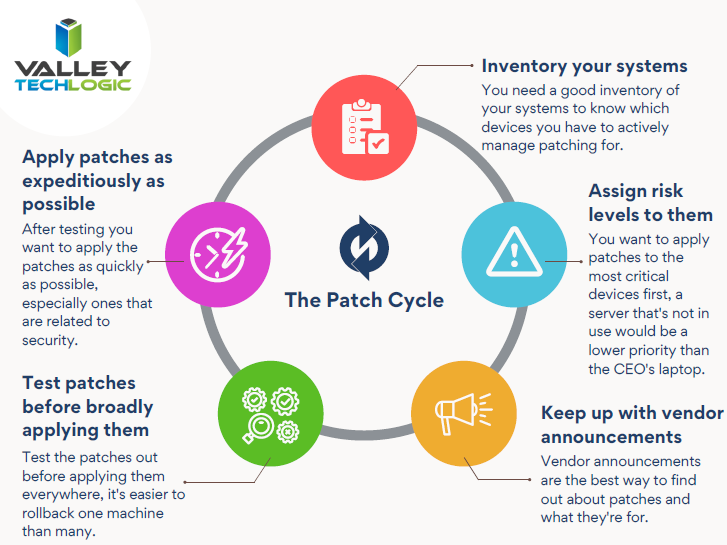
    Here are 5 patching best practices:

    1. Automate. If you can, automate the process. Schedule your patches to happen at a time you won’t be busy working on your computer.
    2. Plan your approach. If you’re managing patching for your business, you want to plan how you’ll approach patching company wide. It may be prudent to patch overnight or patch in waves if your business is open extended hours.
    3. Test patches. Test patches on a single machine before rolling them out company wide, sometimes patches can create problems that might necessitate a rollback and that might hinder your business if everyone in the office is down.
    4. Maintain patch levels. The last thing you want to do is fall seriously behind on patches. Patching will be a lengthy process as you try and catch up, and your machines may be left vulnerable in the interim.
    5. Get Help If You Need It. Patching your home machines is a fairly straight forward process usually but patching from a business perspective can have many intricacies beyond just “apply patches”. When in doubt, leave it up to the professionals.

    If you need help with patching or the myriad of other items that keep your office machines in tip top shape and safe from malware, Valley Techlogic is here for your business. You can schedule a free consultation here.

    Looking for more to read? We suggest these tech articles from the last week.

    This article was powered by Valley TechLogic, an IT provider in Atwater, CA. You can find more information at https://www.valleytechlogic.com/ or on Facebook at https://www.facebook.com/valleytechlogic/ . Follow us on Twitter at https://x.com/valleytechlogic.