Tag: technology services

  • Meeting with your IT provider soon? Here are 5 questions you MUST ask

    Meeting with your IT provider soon? Here are 5 questions you MUST ask

    As a managed IT service provider ourselves, we strongly encourage every business owner to meet with the person and/or business who provides their IT support services at MINIMUM annually (and here are our five reasons why if you’re curious).

    If you already have that annual meeting on the books or are thinking about scheduling it soon to prepare your business for 2025 and beyond, it’s a good idea to go with a few questions that will help you determine if the services you’re receiving are meeting your business’s needs and goals. Lucky for you, today we have the top five questions we would ask if the shoe was on the other foot.

    1. Is our business positioned adequately to ward off cybersecurity threats?
    • Why it’s important: The threat landscape changes rapidly. Ensuring your MSP (Managed Service Provider) is up-to-date with the latest cybersecurity protocols and threat intelligence is critical for safeguarding your data and operations.
    • Follow-up considerations: Inquire about specific measures like endpoint detection, regular patching, and proactive threat monitoring.
    1. Are there new technologies or upgrades we should be considering?
    • Why it’s important: Technology evolves quickly, and new tools can improve productivity, security, and efficiency. Your MSP should keep you informed about beneficial updates or trends.
    • For Example: Ask about cloud services, automation tools, and software that could enhance your business operations.
    1. How are we meeting compliance and regulatory requirements?
    • Why it’s important: Compliance with industry regulations (e.g., GDPR, HIPAA, CCPA, CMMC, NIST) is vital to avoid fines and maintain client trust. Your MSP should ensure your systems align with these standards.
    • Follow-up considerations: Request documentation or reports that show compliance checks and updates.
    1. What was our overall system performance this past year?
    • Why it’s important: Understanding your system’s reliability helps gauge your MSP’s effectiveness and determine if changes are necessary. Consistent performance and minimal downtime are essential for business continuity.
    • Follow-up considerations: Review detailed reports on uptime statistics, issue resolution times, and incident responses. Your MSP should have data available for your review at your meeting.
    1. What is our current backup and disaster recovery (BDR) plan, and has it been tested recently?
    • Why it’s important: A reliable BDR plan is essential for business resilience. Regular testing ensures that it will work in an actual crisis.
    • Follow-up considerations: Verify the frequency of backup tests, ensure that if an outage were to occur your business could be up and running again quickly. If needed, request a simulation test to see how fast the recovery would take and make changes if needed to meet your goals.

    If your annual meeting with your current provider left a lot to be desired, or they dodged having it at all maybe it’s time to make a change. For a limited time, new customers can also take advantage of our holiday offer (see details below).

    Looking for more to read? We suggest these other articles from our site.

    This article was powered by Valley Techlogic, leading provider of trouble free IT services for businesses in California including Merced, Fresno, Stockton & More. You can find more information at https://www.valleytechlogic.com/ or on Facebook at https://www.facebook.com/valleytechlogic/ . Follow us on Twitter at https://x.com/valleytechlogic and LinkedIn at https://www.linkedin.com/company/valley-techlogic-inc/.


  • Our top five strategies for fourth quarter technology planning

    Our top five strategies for fourth quarter technology planning

    The end of the year is nearly here and if your business is anything like ours you might find yourself busier than ever, you may not relish the thought of adding more to an already full to do list but adding these technology related items will put you in a better position this time next year.

    Optimizing your business for technology is more than just purchasing new hardware, in fact some major upgrades have no cost associated with them other than a bit of your time (which we do know is valuable and in short supply).

    Our top three tips that have no cost are:

    1. Take advantage of free security upgrades like Multi-Factor Authentication (MFA). According to InfoSecurity Magazine 90% of attacks can be prevented just by enabling MFA, and enabling it for most accounts just involves a button click.
    2. Evaluate your internet service. You may be overpaying for your current plan or not getting the best service for your money, if you have a legacy plan your internet service might be slower than plans available now. Also, if your contract lapsed a while ago, they might offer significant savings to enroll under another contract. We suggest evaluating your internet service first though before re-signing another contract. In our article from last week, we discuss what to look for when it comes to business internet.
    3. Inventory your existing technology assets. This step will really help you out when it comes to applying our tips for 4 and 5, but it’s also just a good idea. If you don’t know what you have it’s pretty easy for devices to go unaccounted for, and an accounted for device (especially something like a laptop) is a pretty significant threat vector to your business. We suggest creating an inventory worksheet now that includes all of your hardware to start and later on you can look at items such as peripherals which could including networking equipment, monitors etc.

    Of course, some technology upgrades do cost money, but we found making these purchases in quarter four can be really advantageous for a multitude of reasons. One, making technology upgrades now will give you a strong start for next year. Two, there are actually tax benefits you can take advantage of before the end of the year (such as Section 179). Three, you have greater insight into what your budget for spending is because most of us are doing are year-end tallies around this time.

    Our top two tips to make the most out of your technology spending for this year is:

    1. Use that asset list you created to evaluate aging hardware. Aging hardware is risky, they can fail spontaneously and may not have the most up to date security features. Hardware such as an office server that hosts the company backups, or key employee devices that are struggling to keep up with their day-to-day workload are items we suggest replacing ASAP.
    2. Of course, technology services are another area we recommend looking at. Why go into the new year with a service provider you haven’t been thrilled with? Making a change like this now will cement a better 2024 for your business. We have a kit for making the change you can find here.

    If you’re in the Central Valley, Valley Techlogic is also offering for a limited time $100 to any business that takes a meeting with us to hear about our services. See our flyer below to learn more about taking advantage of this offer or you can sign up here to get started.

    Looking for more to read? We suggest these other articles from our site.

    This article was powered by Valley Techlogic, an IT service provider in Atwater, CA. You can find more information at https://www.valleytechlogic.com/ or on Facebook at https://www.facebook.com/valleytechlogic/ . Follow us on Twitter at https://x.com/valleytechlogic.

  • How the “skills gap” is changing the world of IT

    How the “skills gap” is changing the world of IT

    The term “skills gap” has been popping up a lot lately and in a nutshell it’s the refers to the difference between the skills your business needs from its employees and what’s actually available in the marketplace.

    Tech innovations occur so rapidly it would be impossible for any one person to be a master in everything that’s required to maintain the technology in most modern workplaces, there will always be a need to seek out assistance with some component of it whether it be through outsourced help or through automation – or both.

    In a survey by Monster nearly one third of employers agree the skills gap has been growing, and it’s effecting how they’re sourcing and employing candidates. With inflation on the rise employees are also seeking greater compensation for highly in-demand skill sets, which from a budgetary standpoint may be difficult for many employers to grapple with.

    It may be advantageous for employers to offer compensation or incentives to existing employees to increase their existing skillsets or “reskill”. With the many hurdles found in hiring qualified candidates in the current working environment, retention will be a key factor in many businesses being able to stay afloat.

    Automation is another component hiring managers are looking towards, especially in the world of tech.

    1. Backing up data: If you’re a Microsoft 365 customer, backing up your device data is easy with OneDrive.
    2. Email Signature: Still typing your name at the end of every email response? It doesn’t take very long, but across dozens of emails per week it can add up. Setup an email signature in Outlook (with a new email open go to Insert > Signatures) and save that little bit of time with every email.
    3. Paying Bills: Still making manual payments? Why? Setup automatic payments where you can and skip logging in and making that manual payment every month.
    4. Typing Passwords: Not only does typing in a password for everything waste valuable time, it also creates a security risk because an easy to remember password is also potentially an easy to crack password. Try using a password manager like LastPass to create stronger passwords and save time.

    Of course, there are much more advanced automation services available to assist your business, but many will require at least some initial tech know-how or even an on-hand technician available to maintain them.

    The skills gap is also affecting those who rely on short-term technical help to bridge the gap, during a time when it seems like the price of everything is going up so to, is the cost of hiring emergency technical support. Especially when it’s required afterhours.

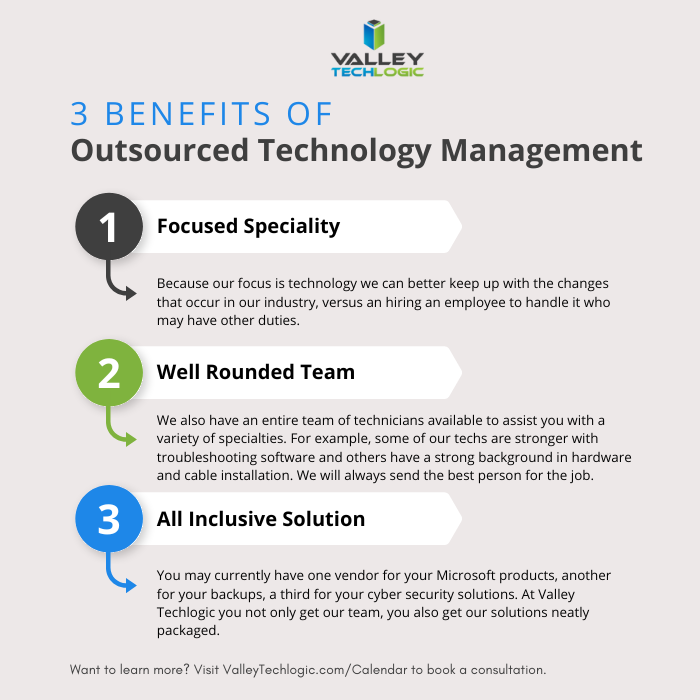
    If after reading this you’re wondering what your best option is, trying to hire someone or relying on expensive emergency support we do want to provide a third option – outsourced IT.

    We’re not unbiased here, but hiring outsourced IT does have a number of benefits in the current hiring climate that you may not have considered. See the chart below for examples:

    Interested in learning more? Schedule a consultation with us today.

    Looking for more to read? We suggest these other articles from our site.

    This article was powered by Valley Techlogic, an IT service provider in Atwater, CA. You can find more information at https://www.valleytechlogic.com/ or on Facebook at https://www.facebook.com/valleytechlogic/ . Follow us on Twitter at https://x.com/valleytechlogic.