Tag: work from home

  • BYOD (Bring Your Own Device) in the workplace, 5 policies to have in place for 2023

    BYOD (Bring Your Own Device) in the workplace, 5 policies to have in place for 2023

    Last week we touched on tips for buying new tech for your business in 2023, but for some offices BYOD (Bring Your Own Device) is the norm.

    What is BYOD? Bring your own device is where an employee uses their personal device (usually a laptop) for work purposes. There are different ways to go about this, for some offices there employees using an already owned device. For others, they can use a device they own but they must log into a virtual machine to do their work. A third option is that the business still purchases the device an employee uses but because they work remotely from home the same rules of BYOD still apply even though it’s a company owned device.

    During the pandemic we saw more articles related to BYOD and remote working and how to still manage a secure workspace even if your employees aren’t coming into the office. Even with workplaces now open again many are operating on a hybrid model and advice surrounding security of devices that don’t stay in one location is still very relevant.

    Business owners themselves also often take their devices home with them at the end of the day and aren’t immune to the same pitfalls that can happen if you don’t have policies in place to help protect your office network and data. BYOD offers work places a lot of flexibility as long as security measures are adhered to.

    Here are our tips for smart BYOD policies to have in 2023:

    1. First and foremost, have a good password policy. Especially for company websites and other logins. See our chart below for what makes a good password.
    2. Determine what data can be accessible from home or a BYOD. Some data should be restricted to in office/office devices only, especially anything client sensitive. You can also utilize a company SharePoint to share files without having them be locally stored on devices.
    3. Have time-based lock-out procedures to limit long sessions, especially if a device is idle. An idle device left in an unfamiliar place is a potential vector for hacker access. Time-based lockouts will make devices used offsite much more secure.
    4. Utilize the same security stack on BYOD as you do on company or office devices. Many cybersecurity tools don’t require devices to be in the same building, it’s a good policy to have your IT provider install the same tools on BYOD and other devices that leave the office. If your company uses Windows you can also consider something like Microsoft’s Intune for easier management of all of your endpoints no matter where they’re being used from.
    5. Have a policy for wiping company data off a BYOD. Especially if the device is employee owned, you shouldn’t assume that it will always be a smooth hand off. Having policies for this in writing is crucial.

    Like we said the first step is having a good password policy is step one to a good BYOD plan for your business, and we might argue it’s the first step in a good security plan overall. Here are our tips on what makes a good password:
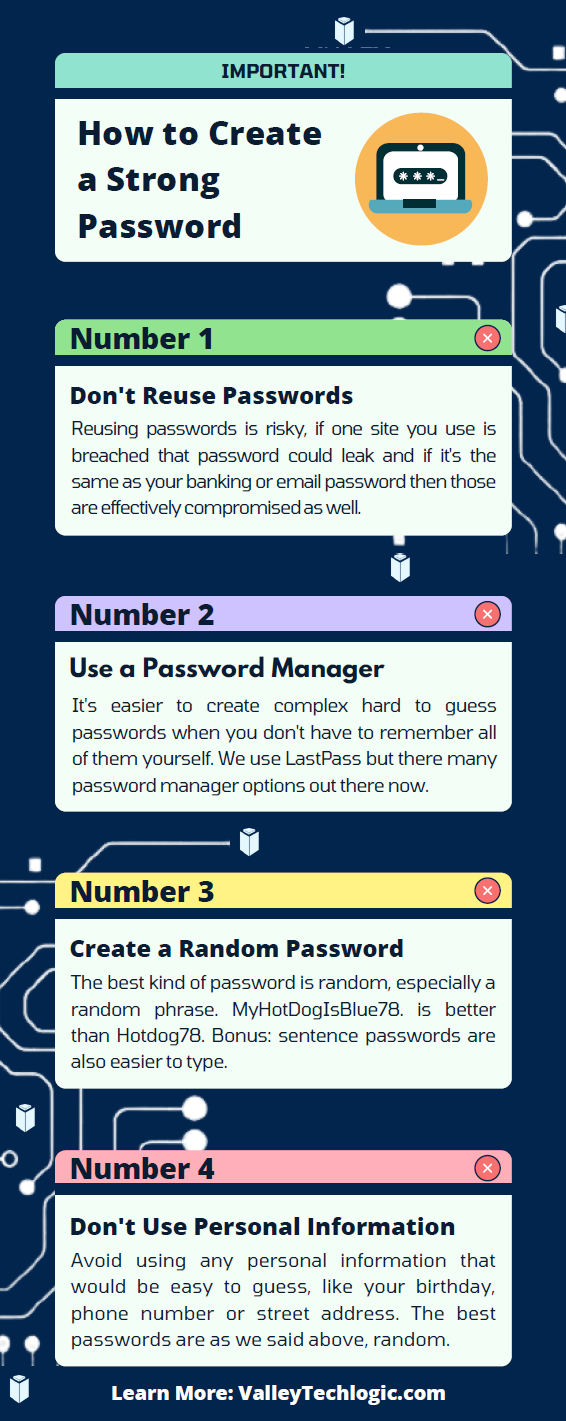
    Click to grab the full size version.

    If you need help with device management in your business, Valley Techlogic can create a plan of action that encompasses both flexibility and security into a package with functionality at the forefront. Reach out today to learn more.

    Looking for more to read? We suggest these other articles from our site.

    This article was powered by Valley Techlogic, an IT service provider in Atwater, CA. You can find more information at https://www.valleytechlogic.com/ or on Facebook at https://www.facebook.com/valleytechlogic/ . Follow us on Twitter at https://x.com/valleytechlogic.

  • Windows 365 and the Pros and Cons of Virtualization in Cloud Computing

    Windows 365 and the Pros and Cons of Virtualization in Cloud Computing

    One of the big announcements that coincided with the news around Windows 11 was the arrival of Windows 365, Microsoft’s new cloud PC product.

    Windows 365 is an easy to use, cross device cloud computing solution. You log into a Windows 10 virtual PC (Windows 11 should be available soon) and it’s already pre-loaded with the Microsoft 365 suite of tools and ready to go.

    The best part is it’s not restricted to whatever device you’re logging into, the Windows 365 instance you log into from work is the same one you can log into from your home device.

    You can even access increased computing power. You can configure a Windows 365 instance that has more processing power than the device you’re logging in from. It also includes one of the main benefits of cloud computing, the ability to easily roll back to a previous instance. Accidentally deleted a file you’ve been working on all day?  Roll back to an earlier instance to easily recover it.

    It’s also beneficial to the security of your business, if you have employees that work from home it can be difficult to manage devices that aren’t under your office network. You can have these employees instead log into their Windows 365 instances and you know that the rules are the same across the board (and that they’re benefitting from the Microsoft 365 advanced security features).

    Pricing for Windows 365 starts at $28 per month for a setup that’s best for low intensity office work all the way up to $162 per month for an 8 Core model with 512 GBs of shortage. Pricing leads us to the discussion of the pros and cons to virtualizing your office.

    5 Pros of Virtualizing Your Office Are:

    1. Increased Availability: As we mentioned, your Windows 365 goes wherever you do. The beauty of the cloud is it’s available everywhere and as most cloud computing products have an uptime guarantee.
    2. Easy to Setup: With Windows 365, many of the applications you use are already preloaded. You can also have your IT team set up the instances ahead of time, so your new employees don’t have to waste a day installing the programs they need to use.
    3. Data Security: This one applies to servers as well but having a cloud backup for both your devices and office server increases your data security through redundancy.
    4. Disaster Recovery: On the same topic, if something happens to the device your employee logs in from or your office server, the data is still safe in the cloud which means little to no downtime.
    5. Efficient: You can apply policies and updates to all of your Windows 365 instances at once, no managing updates one computer at a time.

    The cons you may encounter are:

    1. Start Up Costs: Most of the costs around cloud computing is related to the storage you need, and some of these costs are ongoing. When you buy a device it’s usually a one time purchase, but you also have to think about the costs associated with maintaining the device. With cloud computing, maintenance costs are deferred.
    2. Availability: While most providers have a guaranteed uptime, there can be times where the service is down. Also, your internet connect will matter a great deal when it comes to connecting to your cloud instance. Backups may take longer if you have a poor internet connection at your office.
    3. Limitations: You can spec out any kind of machine you like to fit a specific purpose, but with virtualization you are limited to what’s available and setups for the most common use cases are going to be what’s highly available.

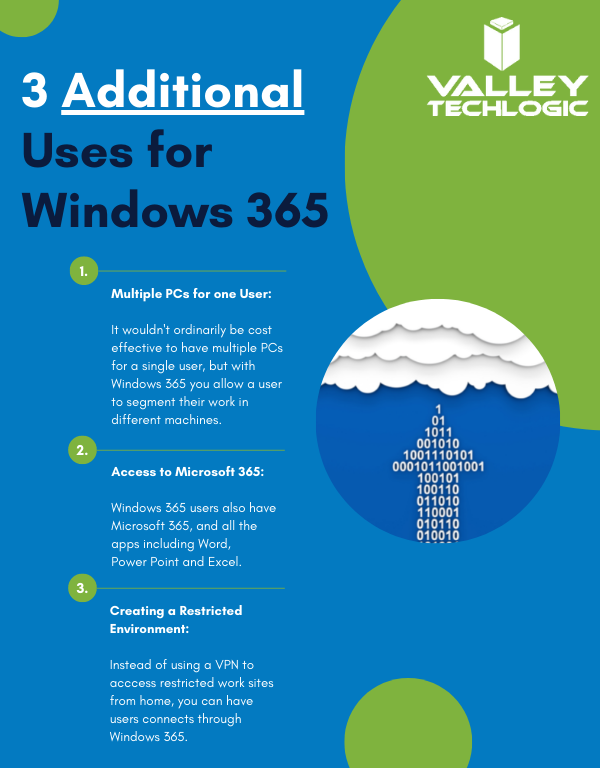
    Here are a few other ways you can use Windows 365 in your business:

    Additional Windows 365 Benefits

    Interested in learning how Valley Techlogic can help your business create a virtualization plan? Learn more today with a quick consultation.

    Looking for more to read? We suggest these other articles from our site.

    This article was powered by Valley TechLogic, an IT service provider in Atwater, CA. You can find more information at https://www.valleytechlogic.com/ or on Facebook at https://www.facebook.com/valleytechlogic/ . Follow us on Twitter at https://x.com/valleytechlogic.

  • 5 Remote Workforce Trends to Follow in 2021

    5 Remote Workforce Trends to Follow in 2021

    There has been a lot of debate surrounding when things will get back to “normal” and what normal will even look like, but one thing we think is here to stay is the remote workforce.

    While many jobs will go back to the office, the benefits of working from home and having a remote work staff cannot be downplayed. For the employees it has meant less time commuting to and from the office leading to an increase in the coveted work/life balance. In addition to that, many have found they can focus better away from the hustle and bustle of a busy office building and for many this has led to an increase in productivity.

    For employers there’s simply less overhead, when staff work from home all the costs associated with maintaining and running an office are no longer a factor. In fact, it’s been speculated what this may mean for the future when it comes to office building spaces and their demand.

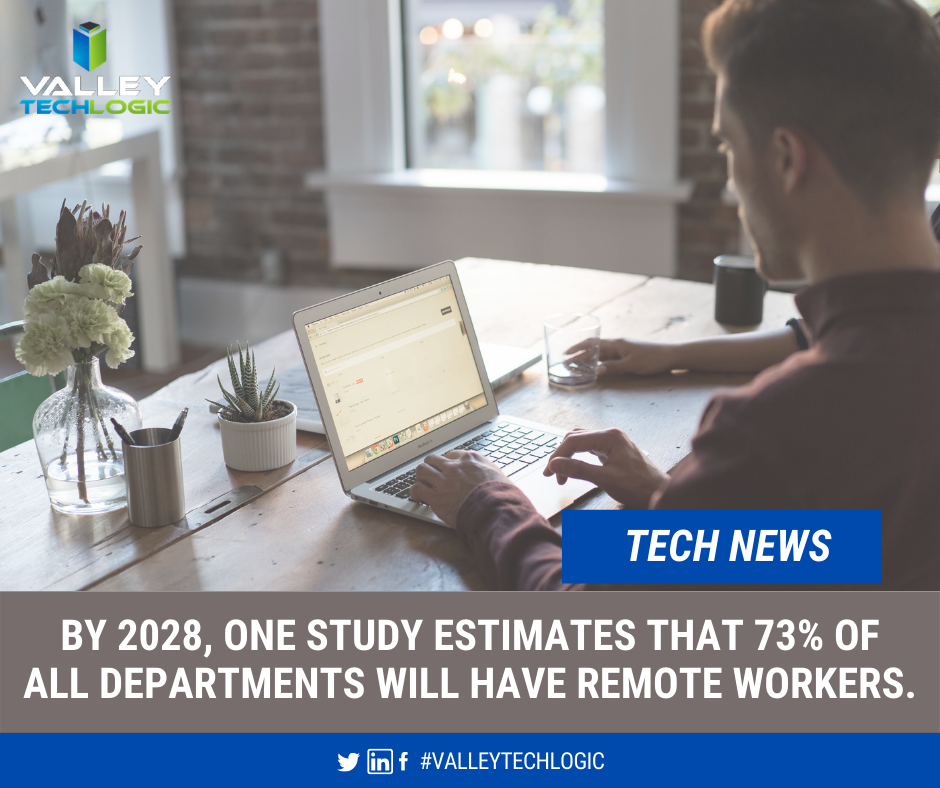
    Tech News About Remote Workers

    There’s no doubt a great many will return to the office, and as the article we linked above mentioned, for those new to working or working in a specific field there’s a great benefit to the on the job learning that can only be facilitated in person.

    If you are finding yourself working from home at the moment, are you making the most of it? What will working from home look like in 2021? Here are 5 trends we think will make 2021 the year that really cements the viability of having a dedicated remote work staff.

    1. Having the ability to select your own work equipment. In an office setting, usually work devices are one size fits all. All the way down to the peripherals you use such as a keyboard and mouse, many employees do not get much say in what’s selected. If you work from home though, you can usually opt to use your own devices or at least your own peripherals. Picking out devices that make sense for the kind of work you do could make your job easier, which in turn will increase your productivity.
    2. Working from anywhere. A remote workforce can work from anywhere, for employers this could mean increased flexibility in hiring. While we’ll always be a proponent for supporting our local economy, sometimes finding the talent you need might be easier when you can cast a wider net.
    3. Virtual meetings aren’t going away. In the same vein as number 2, virtual meetings are here to stay. The flexibility of being able to set a quick meeting to connect with a client or customer that no one must travel for is undeniable.
    4. Online training will make expanding and maintaining your skills easier to do. Online training has always been available and popular, but that popularity has grown. From webinars to online courses, or even mini quizzes to test your existing skills on a whole range of topics. We think increased popularity and availability of online courses is one of the more positive things to come out of last year.
    5. Applications and software driven at assisting the remote workforce. This was a big one, virtual tools aimed at facilitating remote work exploded in popularity last year and we don’t think this trend is going anywhere anytime soon. Zoom and Teams are notable calls out for making remote meetings and classes possible for millions of people, but they’re at the top of a very long list and we expect that list to continue to grow in 2021.

    This is by no means an exhaustive list. There are also some risks associated with the remote workforce we do not want to downplay, however with a team of tech experts behind your business those risks can be greatly mitigated if not eliminated completely.

    Are you still trying to establish your remote workforce? Are there areas that could use some improvement, or you need advice or assistance with the cyber security aspects associated with working from home? Valley Techlogic can assist your business with these topics and more.

    Looking for more to read? We suggest these tech articles from the last week.

    This article was powered by Valley TechLogic, an IT provider in Atwater, CA. You can find more information at https://www.valleytechlogic.com/ or on Facebook at https://www.facebook.com/valleytechlogic/ . Follow us on Twitter at https://x.com/valleytechlogic.
    Looking for IT Services in Fresno, Modesto, Stockton, Ceres, Atwater, Merced, Visalia or Lodi? We cover all these areas and more!

  • Microsoft Teams is changing, can it catch up to Zoom in popularity?

    Microsoft Teams is changing, can it catch up to Zoom in popularity?

    There’s no question that Zoom is a behemoth in the video call making space, from its massive growth back in March to the re-energized vigor as schools across the nation are using it to conduct virtual lessons now in August. Zoom has a commanding 42.8% of the web conferencing market and it doesn’t seem like they’re losing any steam.

    Platforms such as Google, Microsoft and Cisco are trying to re-invent their web conferencing platforms to capture more of that lucrative pie. Today’s article is going to focus on the changes coming to Microsoft Teams as well as its existing features and evaluate whether it might be the better platform for your business.

    Microsoft Teams was released in 2017, it came 6 years off the massive acquisition of Skype by Microsoft (the once popular video chat software now languishes, a shadow of its former glory). Teams solved Microsoft’s problem with Skype being P2P (Peer to Peer) and gave a business facing option to all the companies already using their Office 365 platform.

    Before Zooms rising popularity Microsoft’s main competitor in this space was Google, with Google Hangouts being another popular option in the video conferencing space (now called Google Meet). Google is still an excellent choice, especially for companies who use the Google suite primarily within their businesses. Where Google falters in our eyes may be their habit of constantly pursuing new targets versus improving upon existing services (see the Google Graveyard for more of what we mean).

    Zoom has taken over the market mostly for it’s easy of use, you don’t even need to download it. Also, with zero cost to entry and a paired down UI even those who are less tech savvy can find their way around using it. If you want to set up a meeting with someone all you have to do is send them a link and you’ll be good to go.

    So why would a company want to switch to Teams? Microsoft Teams comes out ahead in the collaboration space, a one-off Zoom meeting is great for external meetings (say a sales call with a potential client) but for meeting with your in-house staff Teams is really the better option.

    Both have scaled up the number of users you can have on a call (100 in the paid for version of Zoom, 5000 on Teams). Both have a good chat system and the privacy enhancing benefit of blocking out your background (although we’d argue Teams does this a little better).

    Credit: Microsoft

    Where Teams comes out ahead for internal use is its integration with Office 365. When you create a new team of users to work collaboratively on the platform, it will create shared versions of One Point, Share Point and Plan. You can also have separate channels so you can easily distinguish who is working on what and organize your work more effectively.

    On top of that, Microsoft is now allowing Teams to have integrations with other applications, including Zoom. Allowing third party applications on the platform could further expand their popularity and allows third party designers to bring new solutions and tools that will greatly expand its usability.

    Microsoft is even allowing users to log into Teams with a personal account as well, encouraging people to use the platform for calls with family and friends. At a time when video conferencing is so crucial to staying connected, it doesn’t hurt to have more options.

    Microsoft Teams is a robust answer to the question of conducting office collaboration and Zoom is the quick and easy option for an impromptu meeting on the fly for colleagues and prospects alike. In our mind when it comes down to which is better for your business between Zoom or Teams, the answer may very well be both.

    Looking for more to read? We suggest these tech articles from the last week.

    This article was powered by Valley TechLogic, an IT provider in Atwater, CA. You can find more information at https://www.valleytechlogic.com/ or on Facebook at https://www.facebook.com/valleytechlogic/ . Follow us on Twitter at https://x.com/valleytechlogic.

    Looking for IT Services in Fresno, Modesto, Stockton, Ceres, Atwater, Merced, Visalia or Lodi? We cover all these areas and more!

  • Taxes & Technology – What Can Help Your Business RIGHT Now

    Taxes & Technology – What Can Help Your Business RIGHT Now

    To say this year has had a lot of twists and turns is an understatement, and for many that includes financial hurdles they couldn’t have foreseen.

    Today we want to cover the topic of business loans that are available for companies struggling in in the onslaught of this current pandemic, as well as tax solutions that will help lighten the load of the business purchases you still need to make even as the current situation rages on.

    Now you may be saying to yourself, aren’t you a technology company? Why are you talking about taxes?

    While this may be true, as a business ourselves AND one that helps businesses of all shapes and sizes, we felt we could offer a new perspective on this topic that you maybe hadn’t considered. As well as our own unique input on how we’re putting these tips into practice.

    Besides that, technology is linked to many different systems, including the financial system. Unless you’re a stickler for mailing things in, it’s hard to argue against the quickness and convenience of electronic filing in most cases as an example.

    With that said let’s start with our initial topic of discussion, PPP funds. PPP or the Paycheck Protection Program has been in the news a lot recently, but what does it cover? And how does it compare to the EIDL (Economic Injury Disaster Loan)?

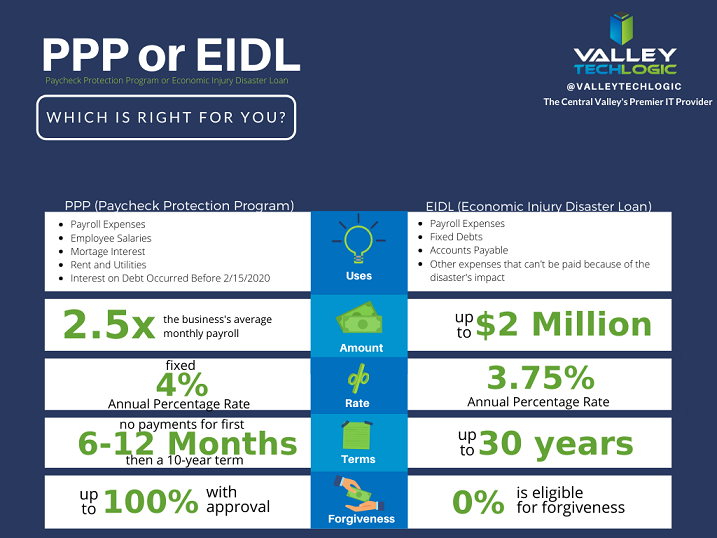
    PPP vs EIDL Chart

    As you can see from our chart, they have different benefits and downsides, and it’s hard to say at first glance what may be right for your business. In either case you’ll probably be adding to the liquidity of your business which will probably help you continue to fund other day to day necessities, including your technology budget. For more information on PPP click here, the Small Business Association will always have the most up to date information on this topic.

    The deadline for applying for PPP is August 8th, so you must hurry if you want to apply for it. While an extension might happen (it did before) why risk it?

    There are also talks in the works by Congress of an additional bill that would forgive PPP loans less than $150k automatically without documentation (basically turning them into grants). You can learn more about this proposed addition to the CARES act here. For many businesses this could make a massive difference in their ability to stay afloat in these difficult times.

    Aside from that if you are planning on a technology upgrade soon, we have a tax tip that may save you thousands on those purchases.

    Every year businesses across the country take advantage of a certain tax deduction called Section 179. To put it briefly, Section 179 allows you to deduct business related expenses of tangible property and equipment. This can include new computers and servers that will allow you to run your business more effectively.

    For example, if you’re still trying to get your at-home work force up and running then it may make sense to furnish those employees with company laptops. They will be significantly safer than using their own devices and it may help them do their jobs much more effectively.

    Or perhaps you need a server you can use as a private cloud so you can conduct your business from home, Section 179 can help with that purchase too. At the end of the year those savings can be lost, or you can reap the benefits of getting your necessary purchases at a significant discount after the tax savings.

    We have updated our Section 179 Guide for 2020, you can learn more here. As always, work with your attorney or accountant when trying to take advantage of these beneficial programs for your business, they will have the best method for applying them to your situation.

    Looking for more to read? We suggest these tech articles from the last week.

    This article was powered by Valley TechLogic, an IT provider in Atwater, CA. You can find more information at https://www.valleytechlogic.com/ or on Facebook at https://www.facebook.com/valleytechlogic/ . Follow us on Twitter at https://x.com/valleytechlogic.

    Looking for IT Services in Fresno, Modesto, Stockton, Ceres, Atwater, Merced, Visalia or Lodi? We cover all these areas and more!


  • Returning to the Office? Here’s What You Need to Know.

    Returning to the Office? Here’s What You Need to Know.

    The last few months have been hectic to say the least. A global pandemic has forced us to reconsider our office norms, when working from home became a necessity rather than a rare occurrence – prior to the pandemic only 1.3% of job postings on ZipRecruiter specified working from home.

    The numbers vary but it’s estimated upwards of 50% of the knowledge-based workforce is working from home right now. Tech workers have had to scramble to adjust their security measures to cover employees on their home networks. In some cases, it still hasn’t been enough (Hacking against corporations surges as employees take computers home – Reuters.)

    Now, as many cities and states begin to open, you may be wondering if it’s time to get back to the office. Here’s our steps for doing it smartly and safely.

    • Evaluating devices that have been used at home thoroughly before introducing them back to the work network. Whether it’s their office device or a home device they normally use at work, you want to make sure it won’t function as a Trojan horse to your organization, inviting malware and/or viruses into your office.
    • Make sure these devices are also updated with any software patches and updates that may have been missed while working from home. You want to make sure they have been fully patched when they return to your network.
    • Consider requesting that everyone update their credentials and re-enforcing any efforts into enabling 2 Factor Authentication(2FA). Employees working from home may have let their work machines be used by family members, or otherwise have left these devices unattended in areas where they may have been accessed by others.
      When returning to work we think it’s a good idea to also have a fresh start when it comes to passwords and other credentials, and if you haven’t been already consider requiring 2FA on work devices and work accounts.
    • Finally, we’ll all have to consider germs going forward and for the considerable future. It’s a good idea to have a plan in place for disinfecting these devices safely and consistently.

    This doesn’t cover everything necessary for returning to work safely, but it’s my hope it gives you a place to start when it comes to the technology side of things.

    Whether you’re returning to work or are still working from home, Valley Techlogic can assist you with these topics and more. Feel free to reach out, our brilliant tech team would be happy to assist you.

    This article was powered by Valley TechLogic, an IT provider in Atwater, CA. You can find more information at https://www.valleytechlogic.com/ or on Facebook at https://www.facebook.com/valleytechlogic/ . Follow us on Twitter at https://x.com/valleytechlogic.

    Looking for IT Services in Fresno, Modesto, Stockton, Ceres, Atwater, Merced, Visalia or Lodi? We cover all these areas and more!

  • What to Look for in a Work from Home Job – and Scams to Avoid

    What to Look for in a Work from Home Job – and Scams to Avoid

    As a service provider we normally tailor our content towards businesses, but as an IT company I feel it’s important to touch on public safety issues and advice from time to time. Now more than ever people are working from home, and jobs of that nature may become more prevalent in our society as a result of the current pandemic.

    Why does allowing employees to work from home make sense for an employer? The first reason is reduced overhead, office buildings and all the expenses associated with them can really add up. The second reason is flexibility, as has been recently highlighted, the more mobile your workforce the more successful you can be given any kind of situation. Third is employee satisfaction, many people are just happier working from home and that can translate to increased motivation towards their job duties.

    What types of jobs can typically be performed from home? Here are our top 10.

    1. Virtual Assistant
    2. Medical Transcriptionist
    3. Translator
    4. Web Developer
    5. Travel Agent
    6. Freelance Writer
    7. Social Media Manager
    8. Data Entry
    9. Call Center Representative
    10. Blogger

    This is by no means an exhaustive list but hopefully provides a jumping off point for those looking to work from home. However, there is one pitfall to looking for a work from home job, and that is scams. Historically work from jobs have been plagued by scams and now more than ever you must be careful. What can you do to avoid a scam when looking for a work from home job?

    • Research – You must do a lot of research into the position, and if it sounds too good to be true it probably is.
    • Ask for References – Ask to speak to others who already work from the company and can share their experience.
    • Finally, really be careful if they ask you to shell out any money to start, a lot of scams in this sector really begin with a high “startup” cost being the gateway to working.

    Working from home can be a life changing event for many people, just do your due diligence and get your resume out there!

    This article was powered by Valley TechLogic, an IT provider in Atwater, CA. You can find more information at https://www.valleytechlogic.com/ or on Facebook at https://www.facebook.com/valleytechlogic/ . Follow us on Twitter at https://x.com/valleytechlogic.