Category: Hardware

Hardware

  • RAID Arrays Explained, What is it and do you need one?

    RAID Arrays Explained, What is it and do you need one?

    RAID arrays or Redundant Array of Independent Disks is a type of storage configuration where your data is saved across multiple hard drives or SSDs. There are a number of benefits to doing this including increased performance and data redundancy. Because your data is saved across multiple drives you have better protection in the event of a drive failure.

    Basically, if one of the drives in your RAID array fails your drives will then go into “rebuild mode” which will allow the remaining drives to recover the data, the failed drive can then be replaced with little downtime for you. A RAID array is not always necessary, we wouldn’t suggest one for regular employee use for example as SSDs are very reliable (especially compared to hard drives with mechanical parts that can fail). You also have the option of cloud storage for devices that don’t have much data to save on a daily basis.

    However, for servers or other systems where data protection is critical, a RAID array is a necessary option to keep that data intact. They are also beneficial for systems that work with very large files as the computer can pull pieces of the file in unison and load them much quicker than a single drive. There are many different configurations for RAID arrays such as:

    1. RAID 0: In the world of data two is one and one is zero, and such is the case with RAID arrays. The first RAID array configuration involves breaking up your data into “stripes” across one or more drives, however it does not provide redundancy like other RAID arrays do. If a drive fails under RAID 0 the data is lost. However, it does improve speeds and can allow you to gain more space on your drives.
    2. RAID 1 provides an exact mirror of your data across multiple drives, which does allow for data redundancy. In the case of a drive failure as long as one drive is functional you will still have access to your data. The pitfall to this is your data storage can only be as big as the largest drive in the array, so if you have a 1 TB drive paired with a 4 TB drive only 1 TB would be usable. This RAID array type also doesn’t really provide a system performance boost, it’s purely a data redundancy setup.
    3. RAID 5 provides good redundancy coverage and improves performance. A RAID 5 array consists of 3 or more drives, this RAID array type splits your data consistently across the board and improves your system performance at the same time. However, for most clients we would suggest the next setup.
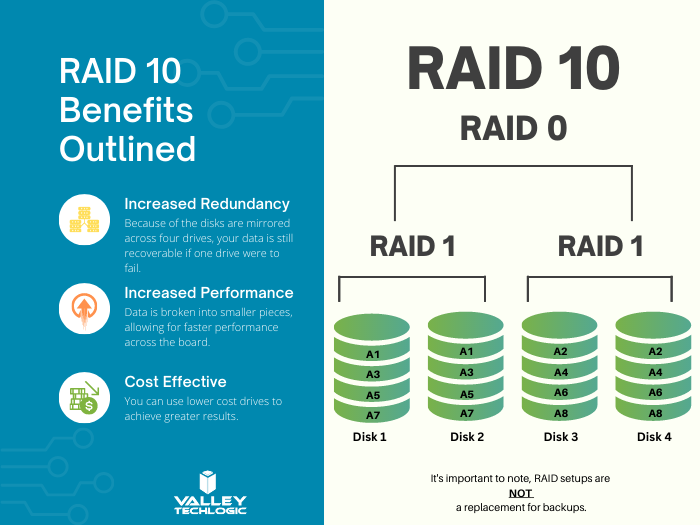
    4. RAID 10 combines two RAID 1 arrays with two RAID 0 arrays to provide both greatly improving performance (that falls in line with the RAID 0 benefit) and greatly increasing redundancy (as you get with a traditional RAID 1 set up) for not much more than you would spend to have a RAID 5 installed. For systems that run software in addition to storing data this is the setup we highly recommend.

    Here are some other benefits of having a RAID 10 setup for your server or systems where data is a high priority:

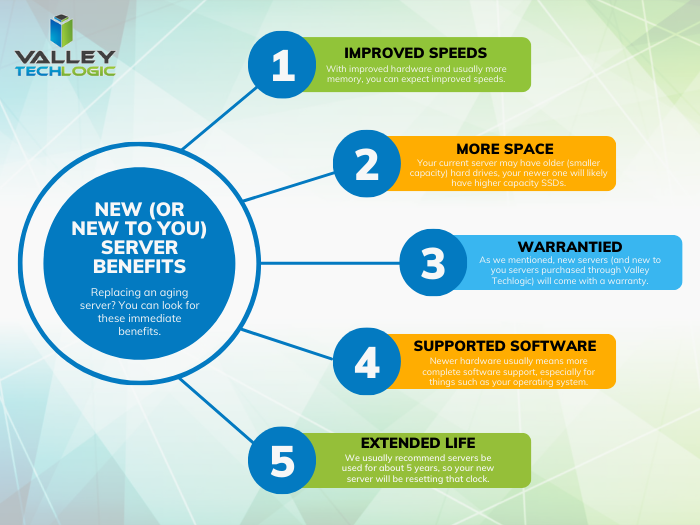
    RAID 10 Benefits ExplainedThere are still other questions that need to be answered beyond just RAID type, like what drive capacity should you be looking for? Would a HDD (Hard Drive Disk) work in this case to have more inexpensive but higher capacity or should you be looking for SDDs (Solid State Drives)?

    These are questions that can be answered by our professional sales team, they’re experts in technical equipment procurement and can help make suggestions and offer buying advice specifically tailored to your business. Learn more today by scheduling a consultation with our sales manager.

    Looking for more to read? We suggest these other articles from our site.

    This article was powered by Valley Techlogic, an IT service provider in Atwater, CA. You can find more information at https://www.valleytechlogic.com/ or on Facebook at https://www.facebook.com/valleytechlogic/ . Follow us on Twitter at https://x.com/valleytechlogic.
  • 5 USB flash drive safety and usage tips, also our 3 recommended drives for 2023

    5 USB flash drive safety and usage tips, also our 3 recommended drives for 2023

    USB flash drives (also known as thumb drives or memory sticks) have grown a lot in the last few years, what was once a handy tool for transporting small files but couldn’t compete with the capacity of CD disks or traditional drives is now available in sizes up to 1 terabyte which makes them a competitive product for even backup purposes.

    While they may have fallen in favor due to cloud services becoming more ubiquitous, many are looking for more tangible ways to backup important files and take them on the go.

    Many users also worry about the safety of these devices. This is because they’re a common vector for drop attacks, which is where a USB drive is left in a conspicuous location for someone to find and try to use not knowing it contains a virus or trojan horse.

    They also can be insecure if left on a desk or somewhere in public. Luckily, there are even options now that offer 2 factor authentication, biometric verification, and encryption. This means even if your flash drive fell into the wrong hands, it would be useless to the thief. You should also be wary of where you plug your flash drive into as the data path is a two way street.

    Here are 5 more safely and usage tips for utilizing a USB flash drive:

    1. Have separate flash drives for work and home. This will reduce the risk of cross-contamination if one of your devices is compromised, it will also make it easier to organize your files.
    2. Be careful where you purchase your flash drives from. There are irreputable sellers online selling fake drives that don’t contain the amount of storage they’re supposed to, or worse they could be infected with malware. Always buy from a reputable source.
    3. Don’t purchase any drives that require software for use. This is unnecessary and again opens up your device to being compromised with malware. USB drives should be “plug and play”.
    4. Think about the physical size of the drive you’re buying. It needs to be able to fit into the device you’re trying to plug it into, and a bulky USB drive may not be compatible with all devices.
    5. Be aware of the lifespan for the device you’re buying. USB flash drives (also solid-state drives and hard drives) have a certain number of write/erase cycles. Longer is better but if you plan to just keep a static backup on it you can get away with a lower number. Typical USB flash drives have 10,000 to 100,000 write/erase cycles.

    If we’ve piqued your interest in USB flash drives, you still might not be sure where or what to buy. There are thousands upon thousands of options but here are three options we can recommend. We have one that fits the bill as a budget friendly option for general use, one that has a slim sturdy form factor, and one that meets the requirements if security is a concern.

    Security conscious.
    Slim form factor.
    Budget friendly.


    All of the options we have selected have USB 3.0 speeds, while this is changing all the time this is the minimum we recommend as of writing. You also want to be aware of what kind of connector you’re looking for. USB-A is the most common but there are options for USB-C, MicroUSB and Lightning connectors on the market. You can also use an adaptor if needed.

    If you need hardware buying advice for your business, including the topic of digital storage, Valley Techlogic is happy to help. We can help you select the best option and offer advice on how to secure it. You can learn more about procurement assistance through Valley Techlogic here or schedule a meeting to find out more about our services.

    Looking for more to read? We suggest these other articles from our site.

    This article was powered by Valley Techlogic, an IT service provider in Atwater, CA. You can find more information at https://www.valleytechlogic.com/ or on Facebook at https://www.facebook.com/valleytechlogic/ . Follow us on Twitter at https://x.com/valleytechlogic.

  • Support will end for Windows Server 2012 in October 2023, pros and cons of upgrading, replacing, or transitioning to the cloud

    Support will end for Windows Server 2012 in October 2023, pros and cons of upgrading, replacing, or transitioning to the cloud

    As promised continuing off the back of last weeks article on Steam ending support for Windows 7 and 8 we wanted to talk about the real elephant in the room for businesses coming up this year, Windows Server 2012 end of life date which will occur October 10th, 2023.

    On that date extended support for Windows Server 2012 will end. So, what does that mean for you? In general, we’ve seen that Windows products no longer receiving support from Microsoft have in an increased risk of cyber threats as hackers launch targeted attacks on these devices. In some cases Microsoft has stepped in to release patches in especially severe cases but it’s not a good idea to count on that.

    You can also expect your vendors will end support for Windows Server 2012 in October if they haven’t already, and it also will cause your business to fall out alignment with compliance to agencies like HIPAA or PCI and others. Without vendor or Microsoft assistance it may be difficult to receive support for these devices if they suddenly fail as well.

    All in all, there’s no good reason to do nothing with this news but many of our clients wonder when it’s time to upgrade, replace or even abandon the notion of an on-premises server altogether by moving their data to the cloud.

    There’s no easy answer to this question, we do have one quick suggestion though if October comes around and you’re still debating your options. If it’s possible to take the “walled garden” approach to any device running an outdated version of Windows, we highly suggest it. What this means is getting to a place where you prevent the device from accessing the internet and only access it with other devices via a firewall or some other means of protection. This will allow you to have a little bandwidth to stretch out making a plan to upgrade, replace or remove it.

    If you do feel like you’re reading to make a decision but need some assistance on which way to go, we do have five tips for when it’s time to replace a server:

    1. Warranty: Warranty is a big concern with servers, most servers have a useful life of 5 years though some manufacturers will offer extended renewals (not generally past 7 years though). Replacing hardware in a server is similar to replacing components of a vehicle, it can add up fast.
    2. Slow Running: If your server is a slog to work with, updating the operating system to a newer addition is not going to improve it.
    3. Expired OS: Having an expired operating system is a good reason to replace the server especially if the operating system was relatively new when the server was purchased.
    4. Storage Capacity: Storage capacity and solid state drive technology continues to improve each year, if you have a server with older hard drives or very small hard drives compared to modern standards it may make sense to start fresh with a new server vs trying to transition new drives into the old one.
    5. Software Requirements: If your software requirements have changed since the server was purchased and your old server can’t run your line of business software either well or at all, that’s a good reason to upgrade to a newer server.

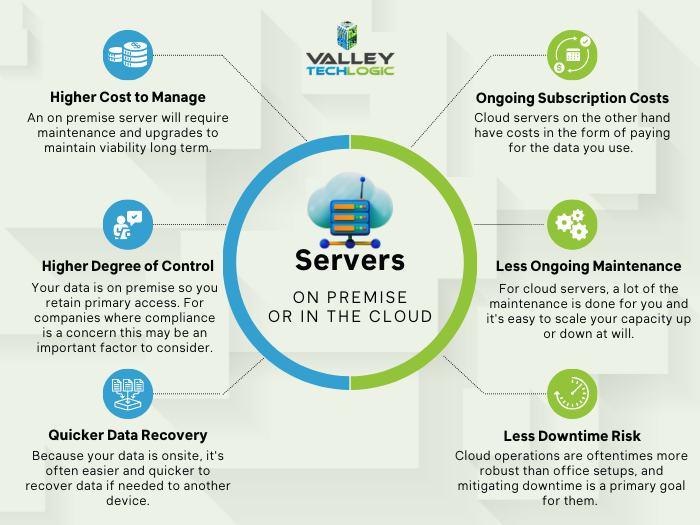
    If you answered no to all of the above then it might be worth considering whether upgrading to a supported Windows server is an option for you. We recommend leaving this task up to the professionals, upgrading a server is not the same as upgrading a laptop or desktop device. If the answer to any of the above questions was yes, then we highly recommend replacing, but should you replace your physical server or switch to the cloud? See our chart below for guidance:

    Cloud or On Premise Server? Still need more help with your Windows Server 2012? Valley Techlogic has been a Microsoft partner since 2004 and we’re experts in all things Windows. Reach out today for a consultation.

    Looking for more to read? We suggest these other articles from our site.

    This article was powered by Valley Techlogic, an IT service provider in Atwater, CA. You can find more information at https://www.valleytechlogic.com/ or on Facebook at https://www.facebook.com/valleytechlogic/ . Follow us on Twitter at https://x.com/valleytechlogic.

  • BYOD (Bring Your Own Device) in the workplace, 5 policies to have in place for 2023

    BYOD (Bring Your Own Device) in the workplace, 5 policies to have in place for 2023

    Last week we touched on tips for buying new tech for your business in 2023, but for some offices BYOD (Bring Your Own Device) is the norm.

    What is BYOD? Bring your own device is where an employee uses their personal device (usually a laptop) for work purposes. There are different ways to go about this, for some offices there employees using an already owned device. For others, they can use a device they own but they must log into a virtual machine to do their work. A third option is that the business still purchases the device an employee uses but because they work remotely from home the same rules of BYOD still apply even though it’s a company owned device.

    During the pandemic we saw more articles related to BYOD and remote working and how to still manage a secure workspace even if your employees aren’t coming into the office. Even with workplaces now open again many are operating on a hybrid model and advice surrounding security of devices that don’t stay in one location is still very relevant.

    Business owners themselves also often take their devices home with them at the end of the day and aren’t immune to the same pitfalls that can happen if you don’t have policies in place to help protect your office network and data. BYOD offers work places a lot of flexibility as long as security measures are adhered to.

    Here are our tips for smart BYOD policies to have in 2023:

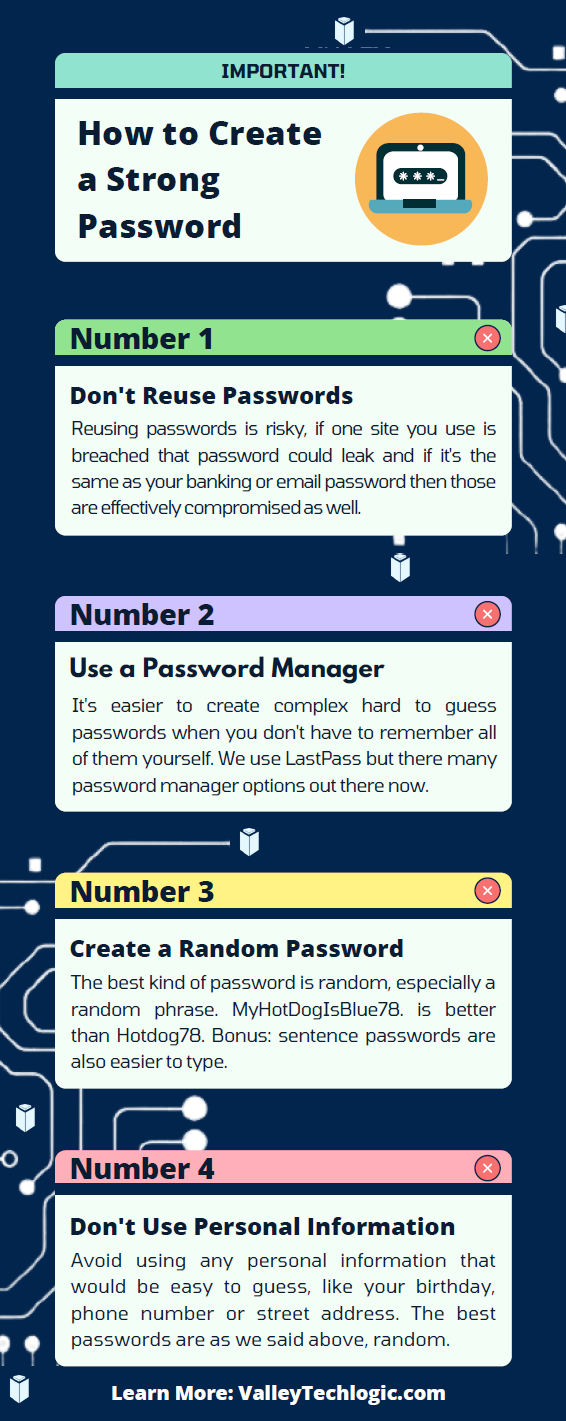
    1. First and foremost, have a good password policy. Especially for company websites and other logins. See our chart below for what makes a good password.
    2. Determine what data can be accessible from home or a BYOD. Some data should be restricted to in office/office devices only, especially anything client sensitive. You can also utilize a company SharePoint to share files without having them be locally stored on devices.
    3. Have time-based lock-out procedures to limit long sessions, especially if a device is idle. An idle device left in an unfamiliar place is a potential vector for hacker access. Time-based lockouts will make devices used offsite much more secure.
    4. Utilize the same security stack on BYOD as you do on company or office devices. Many cybersecurity tools don’t require devices to be in the same building, it’s a good policy to have your IT provider install the same tools on BYOD and other devices that leave the office. If your company uses Windows you can also consider something like Microsoft’s Intune for easier management of all of your endpoints no matter where they’re being used from.
    5. Have a policy for wiping company data off a BYOD. Especially if the device is employee owned, you shouldn’t assume that it will always be a smooth hand off. Having policies for this in writing is crucial.

    Like we said the first step is having a good password policy is step one to a good BYOD plan for your business, and we might argue it’s the first step in a good security plan overall. Here are our tips on what makes a good password:

    Click to grab the full size version.

    If you need help with device management in your business, Valley Techlogic can create a plan of action that encompasses both flexibility and security into a package with functionality at the forefront. Reach out today to learn more.

    Looking for more to read? We suggest these other articles from our site.

    This article was powered by Valley Techlogic, an IT service provider in Atwater, CA. You can find more information at https://www.valleytechlogic.com/ or on Facebook at https://www.facebook.com/valleytechlogic/ . Follow us on Twitter at https://x.com/valleytechlogic.

  • Thinking about buying new tech for your business in 2023? Here are our top 10 tips

    Thinking about buying new tech for your business in 2023? Here are our top 10 tips

    We recently touched on the tax savings benefits for making technology purchases before the new year, however maybe you’re only in the beginning stages of thinking about replacing equipment in your business and aren’t ready to go ahead and buy before 2022 is over.

    We’re a fan of making big technology purchases in bulk when it comes to our clients, instead of a mish mash of devices that all have different warranty times, hardware capabilities and software available to them you have one set of devices that can be managed in much the same way for their entire life span because they all came from the same place at the same time.

    While that Isn’t always achievable, you can accomplish almost the same goal by buying in sections as well. Maybe management devices get replaced first, followed by team 1 and team 2. Just any kind of organizational system to your technology buying beats the technology clutter of having everyone working on something different.

    Of course there are different considerations if your business BYOD (bring your own device) which we’ll touch on next week. Besides trying to make your technology purchases at roughly the same time here are 10 more tips for business technology buying in 2023.

    1. Research is key. Not all laptops for example are created equal (and the same goes for every other device) you want devices that will more than cover the requirements of Windows 10 or 11 and still perform well.
    2. On the same token, look up reviews. Sometimes a product SKU is problematic, it would be bad to read reviews about your chosen laptop having a problem with premature device failure AFTER you’ve bought 10 of them.
    3. Consult your employees. Your employees may have opinions about what is crucial to them in a work device, for example if you have one employee who handles your graphic design they may need extra memory or a better video card added to their particular device to do their job effectively.
    4. Spend a little extra on the extended warranty. You want these devices to last a long time for your business as they’re a big investment, it’s worth it to purchase the extended warranty (Dell offers up to 5 years for example).
    5. Look into what kind of support the company offers if you do encounter a problem. On the same page as the last tip, you want to make sure if one of the devices breaks or encounters a problem you can easily have it fix. Lenovo is another vendor we work with and they offer onsite repair of devices at a low additional cost.
    6. Consider consulting your software vendors. If you use a proprietary software in your business it’s especially important to make sure your chosen device will work with it (especially if we’re talking about replacing an onsite server).
    7. To follow up on that, if you’re considering replacing your server it might be a good time to consider the cloud. Onsite servers are a very expensive investment, we have seen more clients move to the cloud in 2022 than ever before. If your server has come up for replacement it might be worth researching before making that purchase.
    8. If you do want to purchase another onsite server, consider refurbished. Ordinarily we shy away from refurbished but when it comes to servers it can be a smart investment and we’ve found they perform just as well as new, we have saved clients thousands of dollars when they choose this option.
    9. You can choose the cloud for employee devices as well. If you have a BYOD format but still want the uniformity and security of having everyone connect from a similar machine, we recommend Windows 365. It’s a cloud PC your employees would connect to from their current device, it can give them the benefit of using a PC with more powerful hardware if you chose and you can manage these devices under one platform.
    10. Work with your IT provider to take advantage of their partnerships. Finally, if you have an IT provider it’s worth asking if they have partnerships with any vendors that can help you get a better deal. We have partnerships with Dell and Lenovo and utilize them to benefit our clients regularly. You can learn more about that here.

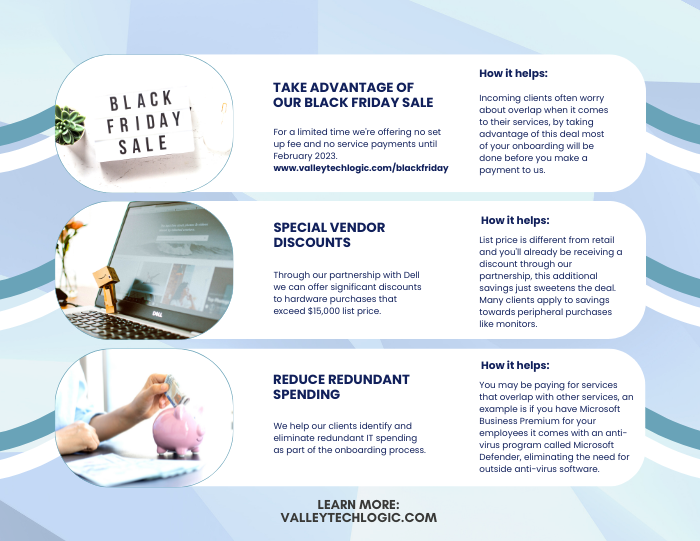
    Here are three ways you can save right now on your technology spending:

    Three additional money savings tips.Procurement services is something we reserve for clients. If you’d like to learn more about how we can help you purchase new devices and maintain them, click here to schedule a consultation.

    Looking for more to read? We suggest these other articles from our site.

    This article was powered by Valley Techlogic, an IT service provider in Atwater, CA. You can find more information at https://www.valleytechlogic.com/ or on Facebook at https://www.facebook.com/valleytechlogic/ . Follow us on Twitter at https://x.com/valleytechlogic.

  • The global chip shortage timeline of events, and when it could end

    The global chip shortage timeline of events, and when it could end

    The global chip shortage is still raging on and it’s effecting more business sectors than you might expect. As a technology provider we’re certainly feeling the pinch when it comes to ordering hardware for our clients. The delays have challenged us to get creative with our clients and we’re coming up with interim solutions until hardware makes it in.

    Some vendors are certainly meeting the needs for computer hardware better than others, so that buffet of choice you may be used to is a thing of the past – at least for the moment. We’re thankful for our channel connections as they give us an edge when ordering that the ordinary consumer may not have.

    We’re not the only ones feeling the pinch though, car manufacturers, appliances, even children’s toys. Consumers are being told they should consider purchasing their children’s wish list items earlier this year, if you wait those electric wish list items may be long gone before December. We’ve even seen it suggested that you may want to consider “dumb” toys such as those made of wood that are unaffected by the chip shortage. Lincoln logs anyone?

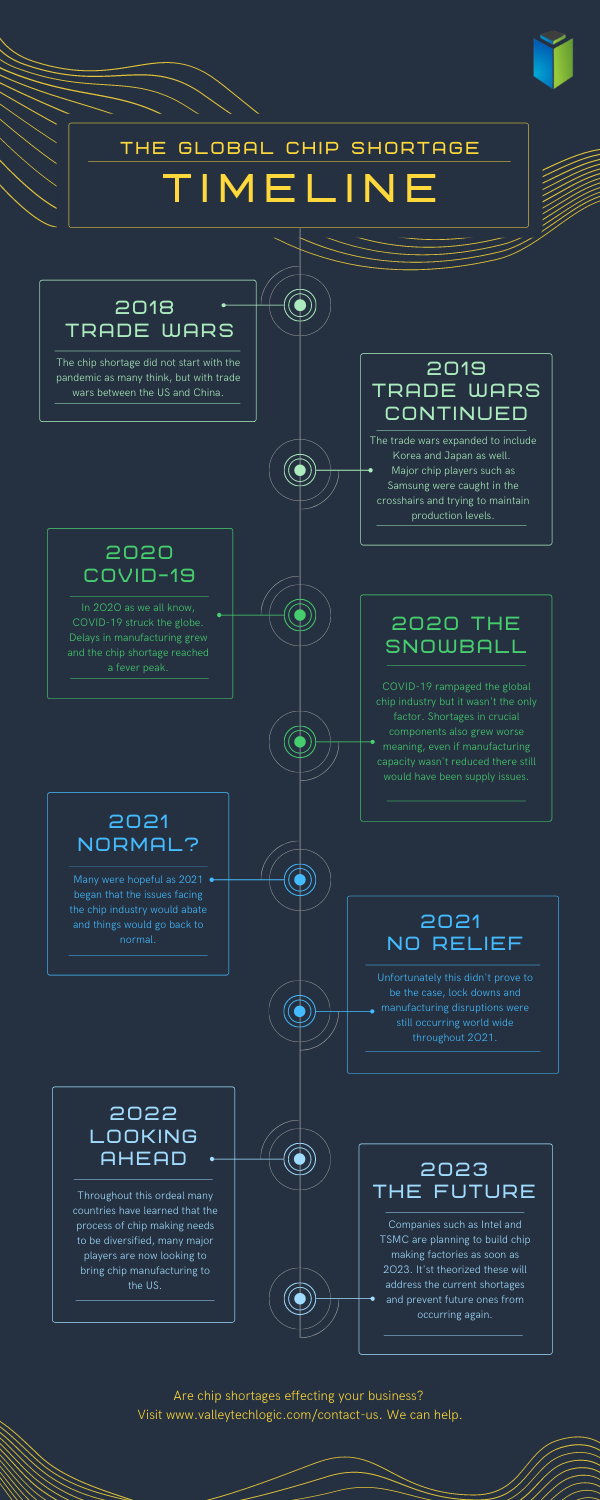
    Here is a simple timeline of events for the chip shortages, which started long before the pandemic in 2018.

    Global Chip Shortage Timeline
    Click to Download the Full Size Version

    As you can see the chip shortages definitely didn’t start with the pandemic, but it did exacerbate the existing problems greatly. Shortages in components, shortages in labor, shipping delays are all contributing to worldwide pains that have even led to products exceeding their MSRP.

    The graphic card market sums up the problem succinctly, with scalpers taking advantage of the low stock to sell cards for hundreds of dollars outside of their MSRP.

    No one can say for sure when the chip shortages will end, but major players such as Intel and chip-making behemoth TSMC are all looking to bring manufacturing state side to help. This would at least cut down on shipping times and if future global trade issues were to occur the US electronic manufacturers would be much better prepared for it.

    These are not permanent fixes though as component shortages are an ever-growing issue that needs to be addressed. We don’t know what a long-term solution will look like but more investments into infrastructure could easy the burden in the short term.

    For more information on the time line of events for the global chip shortage we suggesting reading this article which goes into more details about the timeline of events since 2018 and other global factors that have occurred.

    If you’re having difficult sourcing hardware for your business, Valley Techlogic can help. We have channel connections that allow us priority buying for our clients and should you be interested in partnering with us we can extend those benefits to your business. Reach out today to learn more.

    Looking for more to read? We suggest these other articles from our site.

    This article was powered by Valley TechLogic, an IT service provider in Atwater, CA. You can find more information at https://www.valleytechlogic.com/ or on Facebook at https://www.facebook.com/valleytechlogic/ . Follow us on Twitter at https://x.com/valleytechlogic.
  • Windows 11 system requirements – Will your computer be able to run it?

    Windows 11 system requirements – Will your computer be able to run it?

    Continuing our talking points about Windows 11 (which was officially announced June 24th of this year), we would be remiss to not talk about one very important thing – will your computer be able to run it?

    We know for business owners this question is even more loaded as you consider not only your personal machine(s) but also those of your employees. The initial system requirements looked pretty steep, requiring an 8th Gen processor and other specifications that would have phased out a lot of machines that are perhaps not even very old.

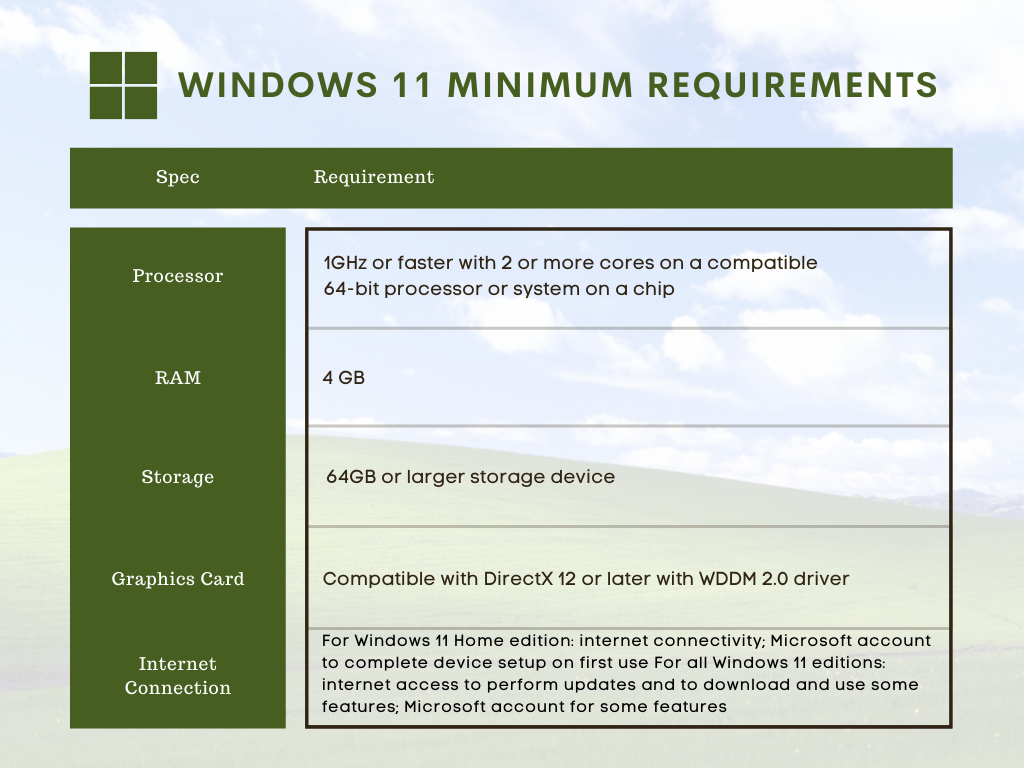
    However, Microsoft has since retracted their initially stated requirements in favor of a more modest range of specs that may still leave some very old machines out of the running but for anyone who’s replaced their computer in the last several years (which we recommend anyways) you should be fine. You can see the requirements in the chart below.

    However, minimum requirements are just one piece of the puzzle. By those markers most computers built in the last 5 years can run Windows 11, but what specs would allow it to run well and allow you to have access to the full benefit of all of the new features? Not only that, as we demand more of our computers we really need to consider optimizing them for our current usage.

    For instance, if you frequently are running out of storage space, or if having a lot of tabs open really bogs down your machine, you may find that the enhanced strain caused by a more demanding operating system could make using your machine a hassle to use. Or even just plain unusable.

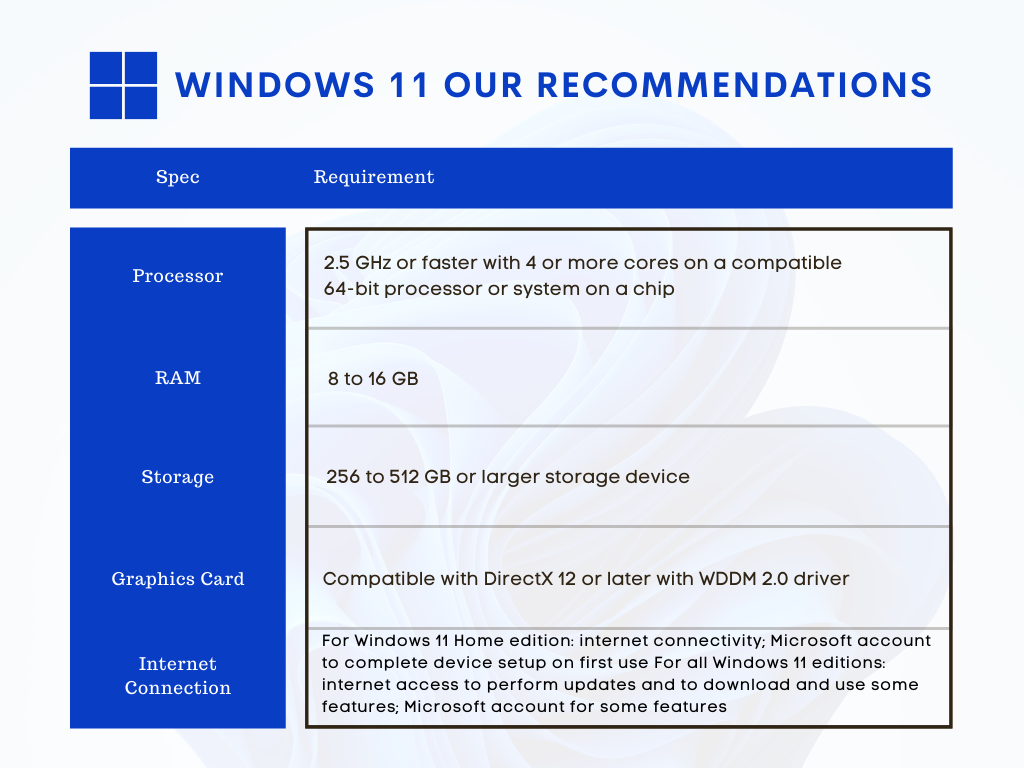
    We decided to list out our recommendations for system requirements that would most benefit when upgraded to Windows 11.

    Windows 11 Our Recommendations

    As you can see some requirements mirrored those set by Microsoft, but we boosted the recommended storage space considerably and also the RAM. When it comes to RAM we really recommend clients lean towards the higher end of the spectrum, 16 GB would be a better option for future proofing your device in our opinion.

    The same goes for the processor, 4 cores is really a bare minimum requirement for a device that runs smoothly and helps you complete your tasks (no matter how demanding).

    Minimum system specs should never be seen as the best option when assessing what level of device will fit your needs, they’re just the base mark software companies must set when considering older devices on the market. The minimum requirements lets consumers know whether what they already have will work with their software.

    Microsoft also has a tool for easily checking to see if your device is ready for Windows 11, PC Health Check, however as of writing it’s currently down as they make changes to it to be in line with the current recommendations they recently set.

    Windows 11 will not be out until later this year and these recommendations may change yet again as they gather data from the version they currently have out in early access. We feel confident our recommendations will hold up and continue to serve as a viable option for anyone in the market for a new PC or laptop.

    If you’re considering upgrading the machines in your business to make them “Windows 11 ready”, we can help. We’re a Microsoft partner and specialize in helping our clients manage their Windows applications and devices on top of a host of other IT services we provide. You can learn more through a free consultation here.

    Looking for more to read? We suggest these tech articles from the last week.

    This article was powered by Valley TechLogic, an IT service provider in Atwater, CA. You can find more information at https://www.valleytechlogic.com/ or on Facebook at https://www.facebook.com/valleytechlogic/ . Follow us on Twitter at https://x.com/valleytechlogic.
  • The Semiconductor Shortage Is Affecting Products Worldwide – When Will It End?

    The Semiconductor Shortage Is Affecting Products Worldwide – When Will It End?

    As we approach the summer and more than a year since the pandemic began, it seems like there is no end to the shortages that seem to be a staple piece of pandemic life.

    The reasons for the various shortages are complex, but mostly fall to issues with production and the stockpiling of products as consumers and businesses alike try to “weather out” the various (and sometimes self-created) storms.

    The shortages are interlinked with each other as well, it doesn’t seem like a shortage in lumber for instance would be tied to the semiconductor shortage but in a way it is. Ramping up production often requires a ramp up in machinery and that machinery is powered by computer chips.

    Consumers are also feeling the shortages when it comes to auto sales, with used cars being worth significantly more than they were pre-pandemic.

    Now in addition to cars, we’re seeing shortages in televisions and refrigerators that also use the chips. Appliance delivery is being backed up for months for some consumers. Homeowners and would be homeowners across the country are feeling the pinch on all sides with shortages in both appliances and lumber.

    Also, not exactly connected to the semiconductor shortage but in the computer sector we’re also seeing shortages with hard drives, driven by the new cryptocurrency Chia.

    While being advertised as an “ecofriendly” crypto, it’s been found that the mining of Chia can burn out a drive in a matter of weeks. Prices of drives are skyrocketing in response (if you’re able to find hard drives to purchase at all).

    In a nutshell, buying a computer right now could be difficult and more expensive.

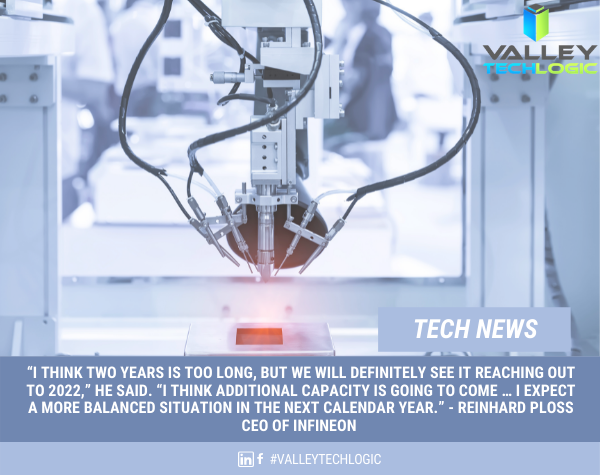
    So, what are chip manufacturers doing about it? The world’s largest chip manufacturer, TSMC (Taiwan Semiconductor Manufacturing Company), has been quoted as saying they expect to catch up to the automotive demand for chips by June. Although some speculate this is highly ambitious.

    Tech News #11

    Beyond the automotive sector, Samsung is considering delaying the release of the latest Galaxy phone series while shortages remain. Manufacturers will have to work with the capacity limits for production by suspending or delaying certain product launches.

    As for the chip manufacturers themselves, it’s expected production will increase eventually while demand may cool as life returns to normal in many sectors of the country. It’s expected a leveling out will occur by 2022 with consumers and business’s alike having to work around the shortages in the meantime.

    If your business needs to replace computers or computer parts, we can help. We have connections that may assist with getting products more expediently than you can get on your own and with closer to normal pricing. Contact us for a consultation here.

    Looking for more to read? We suggest these tech articles from the last week.

    This article was powered by Valley TechLogic, an IT provider in Atwater, CA. You can find more information at https://www.valleytechlogic.com/ or on Facebook at https://www.facebook.com/valleytechlogic/ . Follow us on Twitter at https://x.com/valleytechlogic.

  • Hardware Shortages May Continue Into 2022, So What Can Consumers Do About It?

    Hardware Shortages May Continue Into 2022, So What Can Consumers Do About It?

    COVID related hardware shortages and merchandising shortages in general are not new, since the beginning of the pandemic we have seen shortages in food, toilet paper, cleaning products and even personal protective equipment (PPE) frontline workers desperately needed to stay safe.

    Many of these shortages have been solved by an uptick in production. However, computer and electronic related shortages have been some of the worst hit and so far, the longest lasting with many experts saying we won’t see an end to them until 2022.

    At the beginning of the pandemic as schools closed and many jobs went remote the shortages when it came to laptops and desktops made sense, students and workers needed devices to continue to learn and work on.

    We saw that these shortages were solved when popular PC makers ramped up production and pushed forward new product launches to entice this entirely new market of PC consumers – many of which had abandoned bulkier hardware in favor of small and portable smart phones in years prior. It was common during this time for households to go from a single PC in the home to several.

    Now as we’ve stepped into 2021, we’re seeing shortages when it comes to the components these devices are made of. Especially when it comes to computer chips otherwise known as semi-conductors.

    We’re going to get a little technical here, a semi-conductor (or integrated chip) is a series of electronic circuits printed onto a conducting material, usually silicon. These chips form the brain of your electronic equipment. Tech News #3

    have been reported well before the pandemic hit (and are certainly be making things even worse). These silicon shortages don’t just effect PCs and laptops, cellphones, gaming equipment, even cars.

    Our growing demand for electronics has created the silicon shortage and we don’t as of yet have a solution that would allow us to keep our current breakneck pace when it comes to new electronic product launches. Many solutions center around increasing the longevity of existing products and ending planned obsolescence by allowing outside vendors to fix OEM products without voiding a customer’s warranty (as an example).

    On top of the silicon shortage, Bitcoin and Bitcoin related mining has also seen a resurgence in popularity. Powerful Graphical Processing Units (GPUs) are needed to make Bitcoin mining as efficient and productive as possible and as such we’re seeing GPUs skyrocket in price, many selling for several times their MSRP.

    It’s expected that it will take until 2022 for vendors and factories to catch up and prices to begin to stabilize. If you’re in the market for a new computer or laptop in the interim, you may find yourself in for a wait and a price hike.

    If you run or own a business, having a technology service provide like Valley Techlogic behind you can assist you in your business’s hardware needs. We have special relationships with our vendors and can use those to our customers advantage, saving them both time and money.

    If you’re a business owner located in the Central Valley and your office is due for a hardware upgrade, reach out today to find out what we can do for you.

    Looking for more to read? We suggest these tech articles from the last week.

    This article was powered by Valley TechLogic, an IT provider in Atwater, CA. You can find more information at https://www.valleytechlogic.com/ or on Facebook at https://www.facebook.com/valleytechlogic/ . Follow us on Twitter at https://x.com/valleytechlogic.
  • The future of hard drive storage is coming, what will it mean for the cloud?

    The future of hard drive storage is coming, what will it mean for the cloud?

    By now, most of us have made the jump from mechanical hard drives to solid state drives, and if you haven’t you really should. Faster loading times, less prone to drive failure, and greater bandwidth are just a few of the benefits. Once you switch, you’ll wonder how you ever went so long on mechanical drives.

    But what’s next? There have been fantastical talks of data stored in DNA, which is not so much aimed at consumers (especially not when it currently costs $7,000 to synthesize just 2 MBs of data) but at the Data Capacity Gap. The data capacity gap is a crisis in which the world may run out of data, I know this sounds far fetched but nothing in life is infinite… and this includes our data.

    If you’re wondering how this could be possible just take a look at these worldwide data statistics:

    • In the last two years alone 90% of the world’s data has been created
    • 5 quintillion bytes of data are produced by humans every day
    • 463 exabytes of data will be generated each day by humans as of 2025

    That’s a lot of data, and with all that data comes a need to store it. The main limitation to storing an endless supply of data currently? Chip grade silicon. We don’t want to bore you with the science but there’s an extreme limitation to creating what’s needed to make both data storage and a lot of other components our computers currently use. Including many rare earth elements.

    DNA

    Also just one more tidbit about DNA storage, it’s theorized it could eventually store all the world’s data in one room.

    It’s clear more innovations are needing to keep up with the demands of our online lifestyles, so what is on the horizon for consumers?

    Storage capacity on conventional drives has grown leaps and bounds since the first hard drive was created by IBM in 1956.

    This hard drive, which was shipped with the RAMAC 305 system, was the size of two refrigerators and weighed about a ton. It held 5MB of data, at a cost of $10,000 per megabyte. That makes the $3,500 per MB DNA storage sound like a bargain!

    Now in 2020, 18 and 20TB hard drives are being produced by Seagate, and yes that’s terabyte not gigabyte. While these are aimed at data centers the capacity for storage it’s very clear data storage has increased exponentially since the 1950’s.

    These heat-assisted magnetic recording (HAMR) drives are still mechanical, so as we mentioned at the beginning you would still want to use SSD (Solid State Drives) for your main computing, but it does pose an interesting dilemma in the world of storing your own data.

    At Valley Techlogic, we’re big proponents of the cloud and the safety it presents to our customers. Even with high capacity storage available there are still limitations posed by storing your data yourself, such as the aforementioned drive failure or even your office being subject to a theft or natural disaster.

    However, we don’t believe anything has to be all or nothing. With a competent IT team behind you there are some real benefits to storing your own data, including having immediate access to your data and a faster recovery time for computers in your office.

    In a time when data capacity is still growing and choices are out there, we think the smart choice for most offices is BOTH onsite storage and cloud storage.

    Looking for more to read? We suggest these tech articles from the last week.

    This article was powered by Valley TechLogic, an IT provider in Atwater, CA. You can find more information at https://www.valleytechlogic.com/ or on Facebook at https://www.facebook.com/valleytechlogic/ . Follow us on Twitter at https://x.com/valleytechlogic.

    Looking for IT Services in Fresno, Modesto, Stockton, Ceres, Atwater, Merced, Visalia or Lodi? We cover all these areas and more!