Tag: facebook

  • Children and online safety, how the issue with Roblox highlights the need for more oversight into online services aimed at kids

    Children and online safety, how the issue with Roblox highlights the need for more oversight into online services aimed at kids

    With over a billion registered users (and 380 million active users as of 2024), Roblox propelled itself into the internet zeitgeist in 2006. Its blocky figures and endless options when it came to users customizing games and worlds to fit their imagination was particularly enticing to its core user base which is mostly comprised of children and teens.

    The game has faced controversy in the past, particularly with it’s paid-for currency system “Robux” with a class action lawsuit settled for $10 million in the form of refunds for users that felt ripped off by the online purchases made in the game and many instances of parents noticing their children had made purchases without their consent. Which to be clear is not the fault of the company but highlights the “pay to play” nature of some online platforms even those with a younger user base.

    However, they’ve been in the news recently for much darker allegations. It’s come to light that there are issues with the online platforms moderation when it comes to conversations being had with underaged users and the adults that also frequent the platform.

    Multiple lawsuits have been filed in multiple states alleging Roblox did not go far enough when it comes to protecting its underaged users from predators, with many instances coming to light of an adult engaging with a child online and luring that child to a real-life location where they were harmed.

    Concerned parents want to know what steps are being taken to ensure their children are not being “groomed” in a game that they believed was a safe space and child centric. The company has responded by denying the allegations but also announcing several new features aimed at combating “child endangerment conversations”. This includes using AI to verify conversations for malfeasance and doing more to verify users ages and separate or restrict conversations between adult and underage users.

    It is a mistake, in our opinion, to believe that any online space does not require a parent’s consistent oversight. YouTube’s platform for kids dubbed appropriately “YouTube Kids” made news for the creepy videos that proliferated channels hidden amongst benign children’s programming such as streams of Peppa Pig.

    TikTok, SnapChat and Facebook have also faced lawsuits over not protecting children from predators or having “addictive designs” that kept teens in particular looped into negative cycles involving self-harm or extreme content.

    We don’t believe there’s any online platform where a child should be left unattended, but there are steps you can take to make the internet safer for your children (after all, in today’s digital world avoiding it is difficult to impossible).

    Here are four practical steps parents can take to help protect their children online:

    1. Set Clear Rules and Expectations
      Establish age-appropriate guidelines for internet use. This can include setting screen time limits, deciding which apps and websites are allowed, and agreeing on times when devices must be put away (e.g., during meals or bedtime). Having open conversations about why these rules exist makes kids more likely to follow them.
    1. Use Parental Controls and Privacy Settings
      Take advantage of built-in parental controls on devices, browsers, and apps. These can help block inappropriate content, set time limits, and monitor activity. Make sure your child’s social media accounts are set to private, and review app permissions so personal information isn’t overshared.
    1. Teach Safe Online Behavior
      Educate children about not sharing personal details (like home address, school name, or phone number), being cautious about online friendships, and never meeting strangers in person. Encourage them to think critically about what they post, remind them that once something is online, it’s hard to fully remove.
    1. Stay Involved and Encourage Communication
      Keep an open line of communication so your child feels comfortable coming to you if they encounter something suspicious, scary, or uncomfortable online. Show interest in the games, apps, or websites they use, and when possible, spend time exploring the digital world together.

    At Valley Techlogic we believe in making the online world a safer place, including for the businesses we support and our clients. We will be posting free Back-To-School online safety tips on our Facebook and LinkedIn profiles for the month of September.

    If you’re California local and looking for IT support for your business, you can also learn more about our services through a free consultation today.

    Looking for more to read? We suggest these other articles from our site.

    This article was powered by Valley Techlogic, leading provider of trouble free IT services for businesses in California including Merced, Fresno, Stockton & More. You can find more information at https://www.valleytechlogic.com/ or on Facebook at https://www.facebook.com/valleytechlogic/ . Follow us on X at https://x.com/valleytechlogic and LinkedIn at https://www.linkedin.com/company/valley-techlogic-inc/.

  • Reddit experienced a major outage yesterday, and our 5 tips for what to say to customers when your website goes down

    Reddit experienced a major outage yesterday, and our 5 tips for what to say to customers when your website goes down

    Reddit was down for several hours yesterday due to an “internal systems issue”. While the mobile version of the site fluctuated between being semi usable to being completed down, the desktop version was unusable for nearly five hours.

    Outages like this that occur to major website are a newsworthy event, as users flock to social media to report the outage and speculate on the cause. A fix was implemented and the site slowly came back up just before 7:30 PM Eastern Standard Time. By the time it was back up it had already been reported on by major tech news sites such as the Verge, Apple Insider, TechCrunch and more.

    We’ve discussed outages before on this site because as we just said, they’re newsworthy events, but what about when your company’s website goes down?

    It might be less news worthy than Facebook, Reddit, Amazon, Twitter etc. having an outage but depending on the type of business you’re in it may still be noticeable to your customers if your website has a major outage.

    When something goes wrong there’s often a knee jerk reaction to move along and pretend it never happened, but outages these days often go hand in hand with cyber threat events and moving along mums the word may leave your customers with the wrong idea (and rightfully concerned).

    If you’re in a business sector that saves customer data at all, and there aren’t many that aren’t, it’s always good to be transparent when you have a major outage. Even if your website was down briefly it still might have been noticed by some and it’s best to keep ahead of the rumor mill.

    Here are our five tips for what to say to your customers when your website experiences an outage:

    1. If the outage is ongoing, update your social media. Customers often look to your social media pages for news about your business and this will be the first place many will check to find out what’s going on. You don’t have to cover everything about the outage, a summary of what’s happening and that you’re aware of it will be enough.
    2. Let your customers know how they can reach if you needed (especially if going through your website is how customers usually contact you). Having an email address available specifically for customer concerns is a good idea.
    3. Also send an email proactively, especially if the outage extends longer than a day. Not every user will check social media, sending an email covers the rest of your digital bases for letting customers know.
    4. Be sure to post an update when the issue is resolved. Again, it’s best to stay ahead of your own narrative for outages within your business, posting an update and a brief description of what the issue was is a good idea.
    5. Finally, if your outage was the result of a breach, follow state and country guidelines for notifying customers of any data leaks that may have occurred.

    Your business reputation can be affected by major outages, we wrote an article on how to protect your reputation and recover. You can find it here.

    Providing advice like this is a service that comes with being a Valley Techlogic customer, here are four other benefits to being a Valley Techlogic customer.

    4 Reasons to Choose Valley TechlogicReach out today to learn more.

    Looking for more to read? We suggest these other articles from our site.

    This article was powered by Valley Techlogic, an IT service provider in Atwater, CA. You can find more information at https://www.valleytechlogic.com/ or on Facebook at https://www.facebook.com/valleytechlogic/ . Follow us on Twitter at https://x.com/valleytechlogic.

  • On average, your information is shared 747 times a day according to a new study

    On average, your information is shared 747 times a day according to a new study

    We touched on data brokers and how they buy and sell your data in a previous article, but in an eye opening new study from the Irish Council for Civil Liberties (ICCL) they found that for US-based users their information is shared online with for marketing purposes on average 747 times per day.

    That means about 31 times an hour or once every two minutes your information is being sold or traded for marketing purposes so corporations can make an educated guess as to your buying habits when serving you advertising.

    The study used data from a 30-day feed from Google which can be accessed by industry specific entities but is not made available to the public. While the study was aimed at European internet users, who on average have their information shared 376 times per day, the figures they discovered are startling no matter where you happen to reside.

    The ICCL is pursuing legal action against online ad agencies, describing the real-time bidding (RTB) that’s occurring as a massive data breach and a violation of European data protection laws.

    There are a mishmash of laws aimed at protecting US consumers from having their information sold for online marketing purposes, however with no single comprehensive federal law in place any consumer looking to find recourse if they feel their data has been used illicitly will discover they have an uphill battle ahead of them.

    We all skim the lengthy TOS found when signing up for a service, while putting it out of mind that the cost of many “free” services in our data, but what if the data that’s being sold goes beyond what you’re posting on social media or what you purchased from an online retailer recently?

    With data breaches being a regular occurrence, you may not even be voluntarily opting-in to sharing the information that’s currently being traded about you on the internet and it may go beyond what you would want to have shared.

    Even your private medical data can be up for grabs and being sold by data brokers, for example every year Pfizer spends $12 million buying anonymized data for marketing purposes.

    So as with our article on data brokers we want to give you some tools to protect yourself and protect your data while using the internet. This time we want to give you 3 helpful ideas that will help you discover what’s out there already and how to close the gaps:

    1. Google Alerts : Create alerts with things like your name or social media handle, that way if you’re being mentioned on the internet, you’re instantly alerted to it.
    2. HaveIBeenPwned : You can use this site to see if your email or phone number have been involved in a breach and whether it would be a good idea to update or change that information.
    3. Credit Monitoring: While we don’t want to recommend a specific site as this choice can be somewhat personal, we think credit monitoring is a good idea for everyone these days. It’s so ubiquitous now that even your bank or credit card companies you already use probably have it built into their website.

    Opt out of targeted marketing

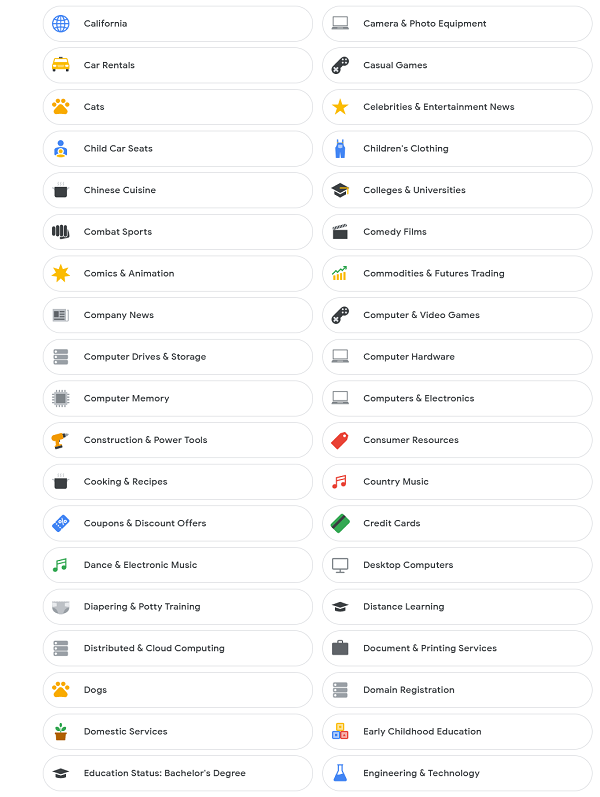
    You also can “opt out” of personalized marketing with your Google account, while that won’t stop your information from being shared and used to try and market it to you with, it will at least make it so those ads aren’t reaching you as often. You may also be shocked to learn what they’ve already compiled about your interests.

    List of interests
    The lists that are compiled on your interests can be quite comprehensive.

    Google Isn’t the only one who offers this option, iPhone users can also opt out as well as users of social media sites such as Facebook and Instagram.

    Concerns over data protection aren’t limited to just consumers, businesses should also take steps to protect their data and that of their employees. If you’d like to learn how Valley Techlogic can help you secure your data learn more with a quick consultation.

    Looking for more to read? We suggest these other articles from our site.

    This article was powered by Valley TechLogic, an IT service provider in Atwater, CA. You can find more information at https://www.valleytechlogic.com/ or on Facebook at https://www.facebook.com/valleytechlogic/ . Follow us on Twitter at https://x.com/valleytechlogic.

  • Yesterday, Facebook experienced their worst outage since 2008

    Yesterday, Facebook experienced their worst outage since 2008

    Yesterday if you were trying to login to Facebook, Instagram, WhatsApp or even Oculus VR you wouldn’t have had much luck. Facebook experienced their worst outage since 2008 (when a bug caused the site to be down for an entire day). They were down for just over 6 hours as a world that suddenly found themselves with more time on their hands speculated why.

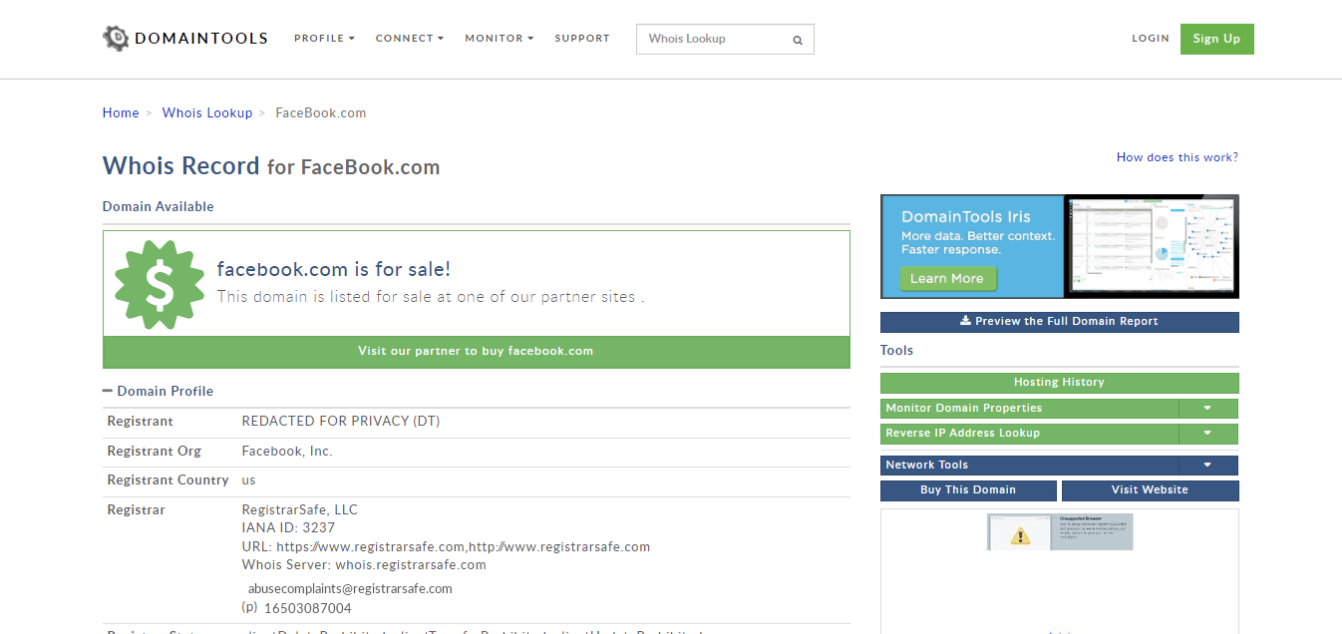
    For a brief period, the domain Facebook.com was even for sale if you performed a search for the domain on a domain name search website.

    While many thought it could be an attack on their networks, such as what’s been happening in the VoIP sector lately, others speculated the outage was related to the fire Facebook has been under lately for their business practices.

    On Sunday, Facebook whistleblower Frances Haugen – a former Facebook project manager – went public on how Facebooks policies prioritize profits over their user’s wellbeing. She was the person responsible for the massive data dump that showed Facebook’s algorithms even optimize for hate speech. She noted these problems also exist at Google and Pinterest, other companies she’s performed similar duties for, but that the problem is much worst at Facebook.

    Mark Zuckerberg Meme
    There have been no shortage of memes taking shots at Facebook founder Mark Zuckerberg following the outage.

    Hearings begin this week analyzing the whistleblower findings, particularly as they relate to children on these sites. Amid the controversy Facebook has shelved plans for an Instagram Kids app, though Facebook claims the delay is so they can better analyze the needs of children and parents before moving forward with the app.

    The main crux of the case has to do with both the deluge of data and how major players such as Facebook (and likely beyond) serve that data to their users. It’s a tricky situation because you don’t want to stifle free speech but promoting hate speech and negative imagery, especially to vulnerable audiences such as children, is also wrong.

    There is so much more to the case then we can get to here but suffice to say hearings such as these play an important role in how we as a society consume and regulate data.

    Back to the topic at hand though, after being down for 6 hours Facebook finally emerged although they did so with little in the way of answers as to why their domains were down to the first place. They’ve issued an apology for the outage but beyond that silence.

    Experts who have weighed in speculate the issue had to do with Facebooks DNS (Domain Name System), and anonymous comments that have surfaced from employees said they don’t think the downtime was caused by an attack.

    Some reports have even said during the outage functions inside Facebook offices ground to a halt, with some employees being unable to even use their keycards which could have also contributed to the lengthy delay in fixing the problem.

    Outages such as these should cause even smaller businesses to take a hard look at their technology practices. If Facebook, with the resources they have available, can be brought to a standstill for hours over potentially a small issue such as DNS how would your business fare when faced with a similar issue?

    Downtime adds up, but it doesn’t have to. Having a partner in technology like Valley Techlogic is the number one way your business can avoid the hassle, expense, and embarrassment of lengthy downtime. Find out more today.

    Looking for more to read? We suggest these other articles from our site.

    This article was powered by Valley TechLogic, adns, n IT service provider in Atwater, CA. You can find more information at https://www.valleytechlogic.com/ or on Facebook at https://www.facebook.com/valleytechlogic/ . Follow us on Twitter at https://x.com/valleytechlogic.

  • Top 10 Tips for Managing Your Social Media Presence

    Top 10 Tips for Managing Your Social Media Presence

    As a technology service provider, we don’t think it’s much of a leap to weigh in on the topic of social media, there are many technical aspects that come with managing your business’s presence on all the various social media platforms. You may be asking yourself if it’s worth the effort or which ones would be the best fit for your business – or even how to go about setting them up in the first place.

    We have to be honest that we’re somewhat “green” to this space ourselves, having only dived into it within the last year in earnest. However, I think this gives us a unique perspective as we’re not claiming to be experts. We use and have grown within the social media space this year and these are our tips for getting started.

    1. Claim Your Business. Whether you plan to move forward with a platform or not, we recommend claiming your business identity on as many of the networks as you can, by doing this you can ensure your business name is not taken by someone else later on.
    2. Start And/Or Finish Filling Out Google My Business. While not a social media account per se, Google My Business is a crucial advertising tool that allows visitors to reach not only your website but also all of your social media accounts through a Google search. It is important to maintain this account with valid information.
    3. Fully Fill Out Your Profile Pages. As with Google My Business, it’s important to fully establish the profile before jumping into posting content. The more information about your business you can provide the better.
    4. Decide Which Platforms to Focus Your Efforts. Not every platform is a good fit for every business, you need to go to where your customers are. We recommend LinkedIn and Facebook as good places to start but depending on your business sector platforms such as Instagram or Twitter may net you a good response as well. Even TikTok may be worth the effort for your business depending on your overall audience.
    5. Post Regularly. You should set a schedule and stick to it when it comes to sharing content on social media, these platforms reward regular activity by focusing more eyes (and potential customers) at business’s who utilize their platforms consistently.
    6. Share Things About Your Business. Customers like to get an “inside look” into the inner workings of the business’s they’re thinking about engaging with, especially in the business-to-business sector. Share things like company events and photos to engage with your audience on a personal level.
    7. Share Custom Content. Another idea for content is to share things you make or blogs you post. Both Google and the social media platforms reward custom made content.
    8. Invite People You Know to Like Your Page. When first starting out it’s a good idea to invite customers and colleagues to like your social media pages, this allows them to receive the updates you post and helps you begin building an audience.
    9. Consider Paid Activity. We don’t suggest trying this off the bat but once your page is somewhat established, you might consider paid ads through these platforms to drive the content you’re creating and sharing to an even wider audience.
    10. Engage With Your Audience. Our final tip is just to remind you to always engage with your audience, responding to comments not only lets you form a connection with potential clients but it also shows that your business is proactive and responsive.

    We also found this article on Facebook statistics really helpful when it comes to evaluating Facebook in particular. Facebook falls just behind YouTube and Google on having the most web traffic, but that’s still hundreds of millions of users.

    One bonus tip, many of us don’t consider YouTube to be a social media application, but it really is. Not only can you connect with your audience on a personal level through video, it’s also connected to Google as they own it. Building up a business YouTube account can also lead to more traffic from Google.

    We hope these tips help with getting started in social media, while outside our normal scope if your business would like advice on this topic or on any of regular service topics feel free to reach out.

    Looking for more to read? We suggest these tech articles from the last week.

    This article was powered by Valley TechLogic, an IT provider in Atwater, CA. You can find more information at https://www.valleytechlogic.com/ or on Facebook at https://www.facebook.com/valleytechlogic/ . Follow us on Twitter at https://x.com/valleytechlogic.

  • Your Information Was Leaked in a Major Breach, Now What?

    Your Information Was Leaked in a Major Breach, Now What?

    In what seemed to be major news for only a brief period of time, over 500 million Facebook account details were leaked last week. The data included things like profile names, Facebook ID numbers, email addresses, and phone numbers. While this data may be online in other forms the combined data together makes it a treasure trove for phishers and scammers.

    The colossal total of 533 million accounts was accessed by hackers exploiting a bug in a Facebook address book contacts import feature. It was confirmed by Facebook that the exploit was patched in August 2019, but it is unclear how many times the bug was used before then. The information featured users from 106 different countries. News Tip About Hackers

    It’s clear from Facebook’s response that this data has been out there for a while, and no one knows how it’s currently being utilized by bad actors to phish and scam people. It hasn’t been released that password data was a part of the breach, but it’s still our recommendation that you change your password any time you hear news of a major breach from a service you utilize. As well as making sure you use different passwords for different sites (if you don’t already).

    But what else can you do? Here are our 5 tips to protect yourself after a breach occurs with a service you use or have used in the past.

    1. Keep an Eye Out for An Alert from The Company Affected. We feel companies should be duty bound to let their users know if a breach has occurred. You should keep an eye out for an email detailing the steps they have taken to protect your data after a breach, what may have been compromised, and what you should do to protect yourself.
    2. Monitor Your Financials. If the breach happened within a financial institution you utilize, or even one we all utilize by default (such as the Equifax breach) you want to take the time to monitor your financials for suspicious activity. Many banking and credit card issuers offer free credit reporting as part of their services now. You can even freeze your credit to be extra sure but keep in mind if you do try to open a new credit card or loan the freeze will affect you as well.
    3. Change Your Passwords. We recommend changing passwords if a major breach has occurred even if the business confirms no password data was leaked, you really can never be too careful. If you need help remembering your passwords for various sites as well as creating stronger passwords, we recommend our article on the top 3 password managers we recommend.
    4. Be Extra Wary of Suspicious Emails. Following a data leak, phishers and scammers will use this newly obtained information to try and reach out and trick you into handing over your financial or other personal information. They may have names of relatives or other people you know to utilize and try to get you to send them money. If you receive a suspicious email it is best to report it to your email provider.
    5. File Your Taxes Early. If your social security number was stolen as part of a breach, you may want to be prepared to file your taxes as soon as possible to avoid having your tax refund stolen by scammers.

    In addition to these five tips if the company that was breached offers assistance in the form of either monitoring your credit or tips on how to safeguard your account, we recommend accepting their offer. Data breaches occur so often now that the public is desensitized but they are still a threat that should be treated seriously.

    Data breaches that affect businesses are a different animal entirely. There is much more to monitor and safeguard and it is not something you should try to tackle alone. Valley Techlogic is experienced in helping businesses recover from data breaches and we can help you recover your data and protect it from further attacks. Visit here to schedule a free consultation to learn more.

    Looking for more to read? We suggest these tech articles from the last week.

    This article was powered by Valley TechLogic, an IT provider in Atwater, CA. You can find more information at https://www.valleytechlogic.com/ or on Facebook at https://www.facebook.com/valleytechlogic/ . Follow us on Twitter at https://x.com/valleytechlogic.

  • Is Your Internet Provider Keeping You Safe?

    Is Your Internet Provider Keeping You Safe?

    In terms of internet security, we often think of what we as individuals can do, like good password security or not opening email attachments. Or what companies who hold our data can do, like notifying us of a breach or having their own measures in place to avoid one in the first place. When it comes to our internet providers, we often think about the internet speeds they provide us and having consistent uptime.

    What about security though? What measures are in places (or not) to keep us safe while using the very thing that connects us all together?

    At the beginning of April, sites like Facebook and Google came to a grinding halt for hours. It wasn’t a hack or a bug, it was a problem with the internet data routing standard known as Border Gateway Protocol, or BGP.

    BGP disruptions usually happen by accident, but they can also be caused by large-scale spying or data interception. Denial of service attacks can be another culprit.

    BGP is like the map the internet uses to connect everything. All our traffic is routed through gateways to various hubs around the world. Or it should be that straightforward. In reality, every ISP provider can decide which routes to take, and not all of them are good.

    Cloudflare, who specializes in Internet Security among other things, has launched the website ISBGPSafeYet. Using this website will test your ISP by offering a legitimate route and an invalid route to load two pages.

    If it catches the invalid route and only loads the page offered by the legitimate route, then your ISP has BGP protections in place. If it loads both they fail.

    While we can’t change the problems with BGP overnight, public awareness is always a good thing. If your ISP fails the test, reach out to them and give them your opinion! Together we can make the internet a safer place for us all to use.

    This article was powered by Valley TechLogic, an IT provider in Atwater, CA. You can find more information at https://www.valleytechlogic.com/ or on Facebook at https://www.facebook.com/valleytechlogic/ . Follow us on Twitter at https://x.com/valleytechlogic.