Tag: tech buying advice

  • 5 USB flash drive safety and usage tips, also our 3 recommended drives for 2023

    5 USB flash drive safety and usage tips, also our 3 recommended drives for 2023

    USB flash drives (also known as thumb drives or memory sticks) have grown a lot in the last few years, what was once a handy tool for transporting small files but couldn’t compete with the capacity of CD disks or traditional drives is now available in sizes up to 1 terabyte which makes them a competitive product for even backup purposes.

    While they may have fallen in favor due to cloud services becoming more ubiquitous, many are looking for more tangible ways to backup important files and take them on the go.

    Many users also worry about the safety of these devices. This is because they’re a common vector for drop attacks, which is where a USB drive is left in a conspicuous location for someone to find and try to use not knowing it contains a virus or trojan horse.

    They also can be insecure if left on a desk or somewhere in public. Luckily, there are even options now that offer 2 factor authentication, biometric verification, and encryption. This means even if your flash drive fell into the wrong hands, it would be useless to the thief. You should also be wary of where you plug your flash drive into as the data path is a two way street.

    Here are 5 more safely and usage tips for utilizing a USB flash drive:

    1. Have separate flash drives for work and home. This will reduce the risk of cross-contamination if one of your devices is compromised, it will also make it easier to organize your files.
    2. Be careful where you purchase your flash drives from. There are irreputable sellers online selling fake drives that don’t contain the amount of storage they’re supposed to, or worse they could be infected with malware. Always buy from a reputable source.
    3. Don’t purchase any drives that require software for use. This is unnecessary and again opens up your device to being compromised with malware. USB drives should be “plug and play”.
    4. Think about the physical size of the drive you’re buying. It needs to be able to fit into the device you’re trying to plug it into, and a bulky USB drive may not be compatible with all devices.
    5. Be aware of the lifespan for the device you’re buying. USB flash drives (also solid-state drives and hard drives) have a certain number of write/erase cycles. Longer is better but if you plan to just keep a static backup on it you can get away with a lower number. Typical USB flash drives have 10,000 to 100,000 write/erase cycles.

    If we’ve piqued your interest in USB flash drives, you still might not be sure where or what to buy. There are thousands upon thousands of options but here are three options we can recommend. We have one that fits the bill as a budget friendly option for general use, one that has a slim sturdy form factor, and one that meets the requirements if security is a concern.


    Security conscious.
    Slim form factor.
    Budget friendly.


    All of the options we have selected have USB 3.0 speeds, while this is changing all the time this is the minimum we recommend as of writing. You also want to be aware of what kind of connector you’re looking for. USB-A is the most common but there are options for USB-C, MicroUSB and Lightning connectors on the market. You can also use an adaptor if needed.

    If you need hardware buying advice for your business, including the topic of digital storage, Valley Techlogic is happy to help. We can help you select the best option and offer advice on how to secure it. You can learn more about procurement assistance through Valley Techlogic here or schedule a meeting to find out more about our services.

    Looking for more to read? We suggest these other articles from our site.

    This article was powered by Valley Techlogic, an IT service provider in Atwater, CA. You can find more information at https://www.valleytechlogic.com/ or on Facebook at https://www.facebook.com/valleytechlogic/ . Follow us on Twitter at https://x.com/valleytechlogic.

  • Need computers for your office? Purchasing before the New Year could save your business a ton of money

    Need computers for your office? Purchasing before the New Year could save your business a ton of money

    Every year we promote the tax savings benefits of Section 179 to our clients, new clients are often not aware that the computer hardware (and even some software) they use in their business is a tax deductible expense. Making these purchases before year end saves them a boat load of money on the next years tax bill and effectively works as a discount on the equipment they need.

    What is Section 179? Section 179 is an immediate tax saving deduction on any depreciable asset – such as vehicles, hardware and software. Rather than depreciating these items in future tax years and having to track that, you can benefit from lowering your liability right now.

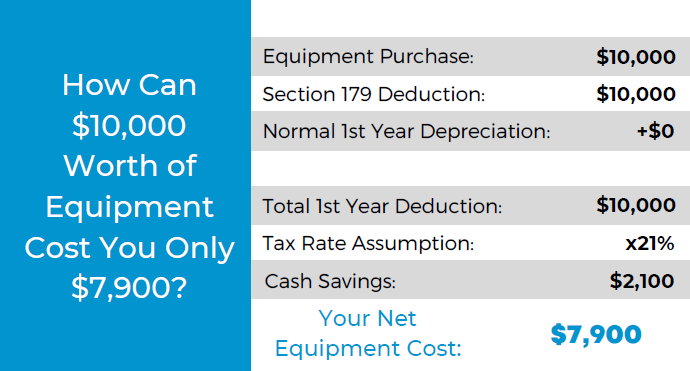
    This especially helps our clients when making larger technology purchases such as replacing aging servers. A new server can easily run $10,000 or more, but when you factor in the benefit of Section 179 it makes for a sizeable discount on a purchase of that size.

    The maximum discount for 2022 is $1,080,000, so the sky is the limit no matter what size purchase you’re planning to make. To maximize the benefits however, we do find that making these purchases at the end of the year is the most beneficial as you see the deduction much sooner when rolled into the next years taxes.

    Here’s a chart on what a $10,000 purchase would look like after utilizing Section 179:

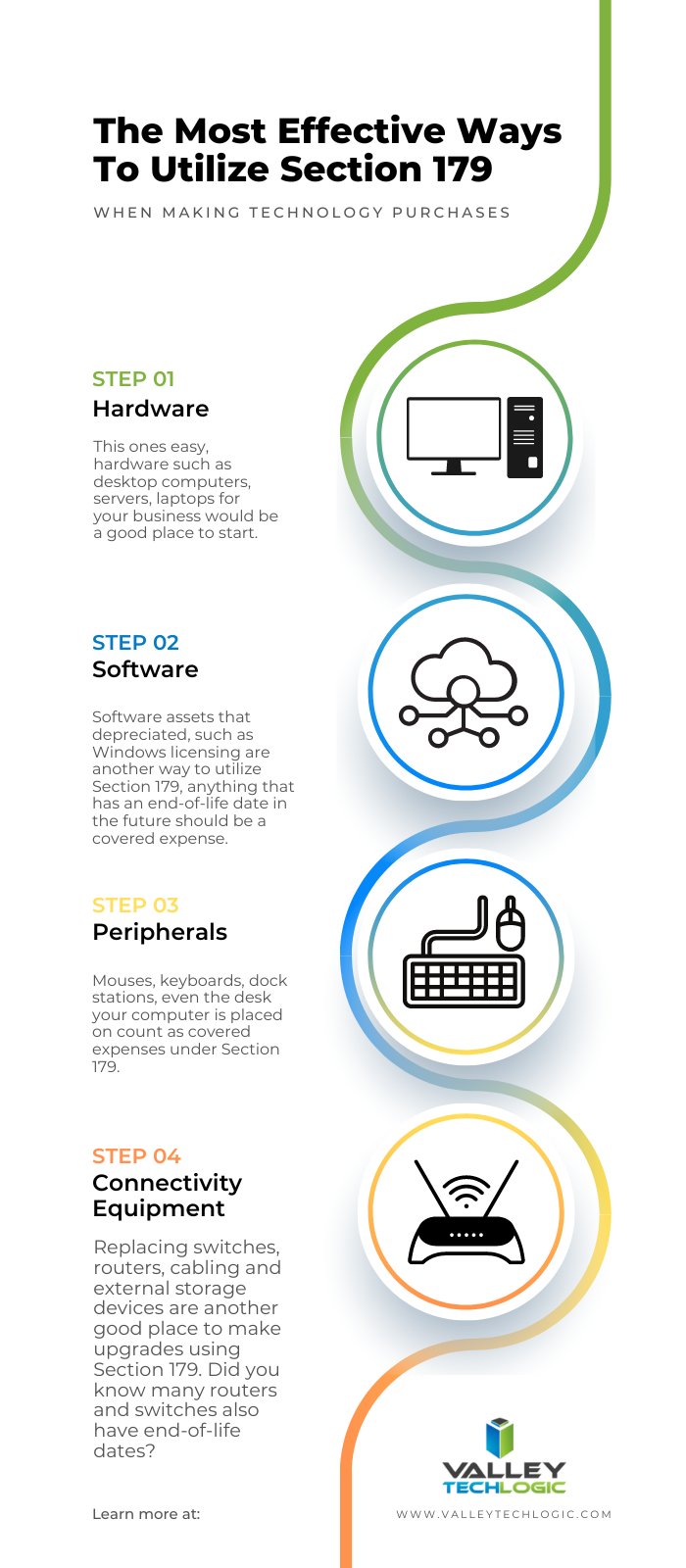
    Of course, every business set up is different and just looking at the numbers may not give you enough of an idea of how you can use Section 179 in your business, so we also made this chart of things our clients often look to do before the year ends that may be an inspiration to you as well.

    Software is a great way to use Section 179 this year in particular, with Windows 7 and 8 for desktops and Windows Server 2012 all losing mainstream support access in 2023.

    While you’re looking to upgrade your Windows software you will probably also want to consider new hardware, the useful life expectancy for computer hardware and servers is around 5 years with typical use and any machines that came from the factory with Windows 7 or Windows Server 2012 installed will be well past that window.

    You may also not know that Microsoft has announced it will no longer allow updates for their Office suite of software on outdated machines, so the time is ticking to get those upgrades done before your office staff loses the ability to use Office software on their devices. You can learn more about the updates coming from Microsoft in 2023 with our free guide here.

    If you’re looking for assistance in procuring technology solutions for your business, Valley Techlogic can help. We have partnerships with Microsoft, Dell, and Lenovo as well as other technology vendors and can help you replace aging equipment easily before time runs out on the benefits of Section 179 this year. Reach out today to learn more.

    Looking for more to read? We suggest these other articles from our site.

    This article was powered by Valley Techlogic, an IT service provider in Atwater, CA. You can find more information at https://www.valleytechlogic.com/ or on Facebook at https://www.facebook.com/valleytechlogic/ . Follow us on Twitter at https://x.com/valleytechlogic.
  • It’s starting to feel like summer and that means rising temperatures and the potential for rolling blackouts – 3 ways to protect your devices during a power outage

    It’s starting to feel like summer and that means rising temperatures and the potential for rolling blackouts – 3 ways to protect your devices during a power outage

    While summer won’t officially start in the Northern Hemisphere until June 21st, Memorial Day week often marks the “unofficial” start of summer for many and May in general is when many states start to see rising temperatures – especially with the effects of climate changes causing record highs across the country.

    For California – and in particular the Central Valley where we’re located – rolling blackouts are a common occurrence as temperatures begin to rise, and these sudden unexpected power outages can damage expensive equipment that’s not properly protected.

    Sometimes power companies will give some notice of when an outage will be occurring in your area and in this case, we recommend unplugging what you can as that’s a surefire way to protect your equipment if an unexpected power surge were to occur.

    However, blackouts are often random and so we recommend the following preventative measures:

    1. Surge Protectors – A quality surge protector is a must have for every device on your office network, and not all surge protectors are created equal. Surge protectors always list a joule rating which tells you how much power they can absorb without failing, for computers we recommend a surge protector with a joule rating of at least a 1000.
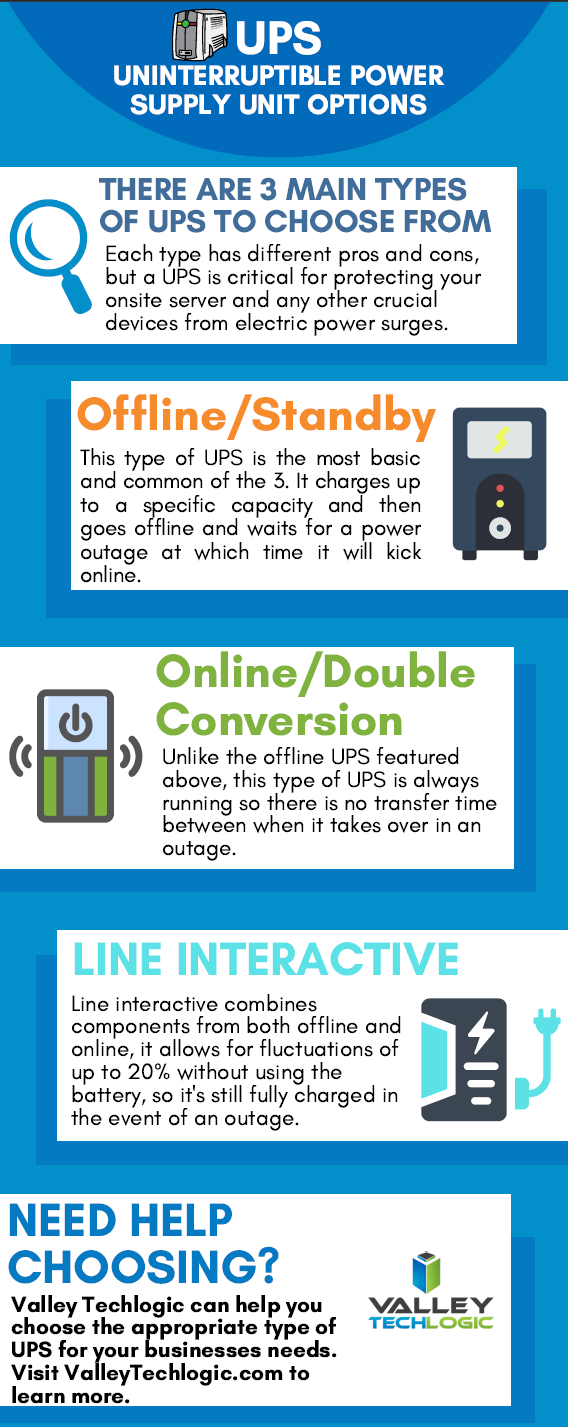
    2. UPS (Uninterruptible Power Supply) – Next on the list is a UPS, this is a battery backup for your devices and for your office server in particular a must have item. When choosing a UPS, you want to ask yourself if you’re looking for something with enough power to let you safely turn your device off or if you wanted something that would keep your device online for days in an extended outage. We also created a short guide found below to what else you should look for when choosing a UPS.
    3. Power Generators – Finally power generators could be necessary for certain office scenarios, an automatic standby generator will be a big investment but if it’s mission critical your office power stay intact during a rolling blackout it could be worth it.

    Also here is our guide on what to look for in a UPS:

    UPS Choices Chart

    We’ve been talking about the power side of rolling blackouts and how an electric surge could potentially damage your devices but there’s also another thing to consider, your data.

    If a power outage occurs suddenly, anything that hasn’t been saved could be lost. If you’re a Microsoft 365 customer, you will have the benefit of the short-term backups they provide for your office documents (if you’ve ever had your computer restart while working on something and have experienced the profound relief seeing that “Recovered” documents bar you’ll know what we’re talking about).

    If you’re not a Microsoft 365 customer or you’re worried about data corruption or your service backups failing (or maybe your server Isn’t being backed up at all) we suggest talking to us about what your options are.

    We offer our clients our triple layer backup solution TechVault. Not only will we back up your onsite data, but we will also create a cloud copy that is updated every 15 minutes and an archival copy that is virtually impenetrable to bad actors.

    Want to learn more? Schedule a quick consultation with one of our sales representatives today.

    Looking for more to read? We suggest these other articles from our site.

    This article was powered by Valley TechLogic, an IT service provider in Atwater, CA. You can find more information at https://www.valleytechlogic.com/ or on Facebook at https://www.facebook.com/valleytechlogic/ . Follow us on Twitter at https://x.com/valleytechlogic.