Author: rory-admin

  • When a data breach leads to jail time for an ex-CEO, and why you should take data security seriously in 2023

    When a data breach leads to jail time for an ex-CEO, and why you should take data security seriously in 2023

    We’ve seen plenty of examples of extreme monetary penalties occurring from data breaches, but this is the first we’ve seen of anyone actually being jailed for one.

    Vastaamo was a Finnish psychotherapy provider that was founded in 2008. While it was a sub-contractor under the government, Vastaamo like many healthcare related businesses was the subject of data breach attempts, with two additional successful attempts occurring  in 2018 and 2019. These attempts failed to be reported by the company.

    The ex-CEO Ville Tapio did report the 2020 breach to authorities, after all of their patient data was stolen by the cyber criminals. These criminals asked for €450,000 (about $.0.5 million in US dollars at the time of writing) and when that was unsuccessful, they then demanded €200 from each patient of the clinic for which they had records on. They warned this fee would increase to €500 each if the clinic did not pay within 24 hours.

    They warned the patients that after 48 hours with no payment they would be doxxed. Doxxing is when your private details are leaked online (this can include your payment information but also things like your address). In this case they were even willing to leak client session records and notes. They leaked the details of 300 patients which included politicians and police office. A 10 GB file containing the patient notes for over 2000 patients was also found on the dark web following the hack.

    While the clinic, Vastaamo, was a victim in this case authorities still looked at the overall picture when making the decision to charge ex-CEO Ville Tapio, including the previous breaches and the fact that he had insider knowledge of the company’s cybersecurity coverage (or lack thereof). He was charged with a 3-month suspended sentence and the company itself had to file bankruptcy and eventually went under.

    The severity of the breach and the companies lack of accountability when it came to cybersecurity protections made them run afoul of the GDPR (General Data Protection Regulation) which are Europe’s regulations on data protection and privacy for its citizens.

    If you’re a US based company owner it’s not a good idea to think “Well nothing like this could happen here”. California recently passed the CCPA (California Consumer Privacy Act) which allows customers more say so over the data your business collects on them. If your business has contracts with the DoD (Department of Defense) you’re probably already seeing stricter restrictions and regulations for how your business must be cybersecurity compliant to keep doing business with the government via CMMC (Cybersecurity Maturity Model Certification). HIPAA is old news for medical practitioners, but we still find many that are not compliant with the regulations.

    Suffice to say there can be blowback that extends beyond financial penalties and injuries to your business’s reputation. Small steps in protecting the data within your business can make a huge difference in the outcome you have (whether it be avoiding an attack altogether or making for an easier recovery).

    If you need creating or developing a more robust cybersecurity gameplan, Valley Techlogic is the one you’re looking for. Cybersecurity is our number one concern, and we take implementing cyber prevention measures for our clients very seriously. If you would like a consultation to learn more just visit here to get started.

    Looking for more to read? We suggest these other articles from our site.

    This article was powered by Valley Techlogic, an IT service provider in Atwater, CA. You can find more information at https://www.valleytechlogic.com/ or on Facebook at https://www.facebook.com/valleytechlogic/ . Follow us on Twitter at https://x.com/valleytechlogic.

  • 5 USB flash drive safety and usage tips, also our 3 recommended drives for 2023

    5 USB flash drive safety and usage tips, also our 3 recommended drives for 2023

    USB flash drives (also known as thumb drives or memory sticks) have grown a lot in the last few years, what was once a handy tool for transporting small files but couldn’t compete with the capacity of CD disks or traditional drives is now available in sizes up to 1 terabyte which makes them a competitive product for even backup purposes.

    While they may have fallen in favor due to cloud services becoming more ubiquitous, many are looking for more tangible ways to backup important files and take them on the go.

    Many users also worry about the safety of these devices. This is because they’re a common vector for drop attacks, which is where a USB drive is left in a conspicuous location for someone to find and try to use not knowing it contains a virus or trojan horse.

    They also can be insecure if left on a desk or somewhere in public. Luckily, there are even options now that offer 2 factor authentication, biometric verification, and encryption. This means even if your flash drive fell into the wrong hands, it would be useless to the thief. You should also be wary of where you plug your flash drive into as the data path is a two way street.

    Here are 5 more safely and usage tips for utilizing a USB flash drive:

    1. Have separate flash drives for work and home. This will reduce the risk of cross-contamination if one of your devices is compromised, it will also make it easier to organize your files.
    2. Be careful where you purchase your flash drives from. There are irreputable sellers online selling fake drives that don’t contain the amount of storage they’re supposed to, or worse they could be infected with malware. Always buy from a reputable source.
    3. Don’t purchase any drives that require software for use. This is unnecessary and again opens up your device to being compromised with malware. USB drives should be “plug and play”.
    4. Think about the physical size of the drive you’re buying. It needs to be able to fit into the device you’re trying to plug it into, and a bulky USB drive may not be compatible with all devices.
    5. Be aware of the lifespan for the device you’re buying. USB flash drives (also solid-state drives and hard drives) have a certain number of write/erase cycles. Longer is better but if you plan to just keep a static backup on it you can get away with a lower number. Typical USB flash drives have 10,000 to 100,000 write/erase cycles.

    If we’ve piqued your interest in USB flash drives, you still might not be sure where or what to buy. There are thousands upon thousands of options but here are three options we can recommend. We have one that fits the bill as a budget friendly option for general use, one that has a slim sturdy form factor, and one that meets the requirements if security is a concern.

    Security conscious.
    Slim form factor.
    Budget friendly.


    All of the options we have selected have USB 3.0 speeds, while this is changing all the time this is the minimum we recommend as of writing. You also want to be aware of what kind of connector you’re looking for. USB-A is the most common but there are options for USB-C, MicroUSB and Lightning connectors on the market. You can also use an adaptor if needed.

    If you need hardware buying advice for your business, including the topic of digital storage, Valley Techlogic is happy to help. We can help you select the best option and offer advice on how to secure it. You can learn more about procurement assistance through Valley Techlogic here or schedule a meeting to find out more about our services.

    Looking for more to read? We suggest these other articles from our site.

    This article was powered by Valley Techlogic, an IT service provider in Atwater, CA. You can find more information at https://www.valleytechlogic.com/ or on Facebook at https://www.facebook.com/valleytechlogic/ . Follow us on Twitter at https://x.com/valleytechlogic.

  • Support will end for Windows Server 2012 in October 2023, pros and cons of upgrading, replacing, or transitioning to the cloud

    Support will end for Windows Server 2012 in October 2023, pros and cons of upgrading, replacing, or transitioning to the cloud

    As promised continuing off the back of last weeks article on Steam ending support for Windows 7 and 8 we wanted to talk about the real elephant in the room for businesses coming up this year, Windows Server 2012 end of life date which will occur October 10th, 2023.

    On that date extended support for Windows Server 2012 will end. So, what does that mean for you? In general, we’ve seen that Windows products no longer receiving support from Microsoft have in an increased risk of cyber threats as hackers launch targeted attacks on these devices. In some cases Microsoft has stepped in to release patches in especially severe cases but it’s not a good idea to count on that.

    You can also expect your vendors will end support for Windows Server 2012 in October if they haven’t already, and it also will cause your business to fall out alignment with compliance to agencies like HIPAA or PCI and others. Without vendor or Microsoft assistance it may be difficult to receive support for these devices if they suddenly fail as well.

    All in all, there’s no good reason to do nothing with this news but many of our clients wonder when it’s time to upgrade, replace or even abandon the notion of an on-premises server altogether by moving their data to the cloud.

    There’s no easy answer to this question, we do have one quick suggestion though if October comes around and you’re still debating your options. If it’s possible to take the “walled garden” approach to any device running an outdated version of Windows, we highly suggest it. What this means is getting to a place where you prevent the device from accessing the internet and only access it with other devices via a firewall or some other means of protection. This will allow you to have a little bandwidth to stretch out making a plan to upgrade, replace or remove it.

    If you do feel like you’re reading to make a decision but need some assistance on which way to go, we do have five tips for when it’s time to replace a server:

    1. Warranty: Warranty is a big concern with servers, most servers have a useful life of 5 years though some manufacturers will offer extended renewals (not generally past 7 years though). Replacing hardware in a server is similar to replacing components of a vehicle, it can add up fast.
    2. Slow Running: If your server is a slog to work with, updating the operating system to a newer addition is not going to improve it.
    3. Expired OS: Having an expired operating system is a good reason to replace the server especially if the operating system was relatively new when the server was purchased.
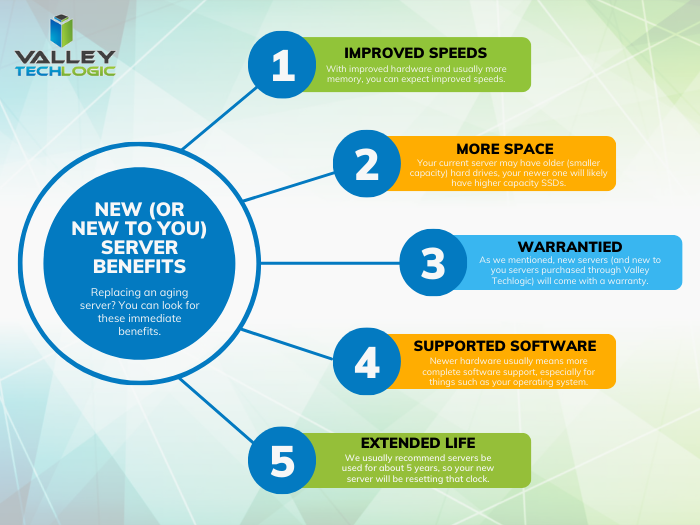
    4. Storage Capacity: Storage capacity and solid state drive technology continues to improve each year, if you have a server with older hard drives or very small hard drives compared to modern standards it may make sense to start fresh with a new server vs trying to transition new drives into the old one.
    5. Software Requirements: If your software requirements have changed since the server was purchased and your old server can’t run your line of business software either well or at all, that’s a good reason to upgrade to a newer server.

    If you answered no to all of the above then it might be worth considering whether upgrading to a supported Windows server is an option for you. We recommend leaving this task up to the professionals, upgrading a server is not the same as upgrading a laptop or desktop device. If the answer to any of the above questions was yes, then we highly recommend replacing, but should you replace your physical server or switch to the cloud? See our chart below for guidance:

    Cloud or On Premise Server? Still need more help with your Windows Server 2012? Valley Techlogic has been a Microsoft partner since 2004 and we’re experts in all things Windows. Reach out today for a consultation.

    Looking for more to read? We suggest these other articles from our site.

    This article was powered by Valley Techlogic, an IT service provider in Atwater, CA. You can find more information at https://www.valleytechlogic.com/ or on Facebook at https://www.facebook.com/valleytechlogic/ . Follow us on Twitter at https://x.com/valleytechlogic.
  • Another blow for Windows 7 and 8 hold outs, Steam announces they’re ending support for these devices January 1st 2024

    Another blow for Windows 7 and 8 hold outs, Steam announces they’re ending support for these devices January 1st 2024

    You might be thinking, why is Valley Techlogic a business IT service provider reporting on this? While it’s true, most of our content is aimed at our client base which is business owners, there is of course some overlap between that community and the gaming community. There is also the looming topic of what this signifies for those continuing to use outdated versions of Windows – business owners and gamers alike.

    The latest news from Steam officially announcing they’re cutting off support Windows 7, 8 and 8.1 devices on January 1st 2024. On that date the Steam client, which is how users access their games, will stop working on these devices. That’s because portions of the Steam client rely on a version of Chrome that has also ceased support for those versions of Windows as of February of this year.

    While Steam users still using Windows 7/8/8.1 are a minority at less than 3% of the total client base, around 7% of the population is still using devices featuring these operating systems (which doesn’t sound like a lot but represents millions of people). For context, Windows ended support for 7 as of January 2020 and for 8 and 8.1 January 2023.

    One of the obvious downsides which is connected to today’s news, beyond being unsupported by Microsoft themselves these operating systems will no longer be supported by the software platforms you use regularly, and they may cease functioning on those platforms altogether.

    There is also consequences to remaining on these operating systems that can fall way beyond losing access to your favorite games, without Microsoft support these devices are subject to more severe and more frequent security threats than modern operating systems that are still being actively supported.

    The WannaCry ransomware is one obvious example of ransomware that’s targeted these devices, infecting an estimate 16 million devices so far. The fix for this ransomware is restoring the device but that may be difficult on older machines still running Windows 7 and 8. You also run the risk of your device failing just because the components have reached their maximum lifespan.

    We always recommend replacing older devices BEFORE they fail because recovering the data on them is never a guarantee (especially without expert help).

    This especially includes servers, with support for Windows Server 2012 R2 ending October 10, 2023. Recovering the data from a server that has failed or been compromised can only be accomplished by experts – and the data recovery for servers is often lengthy and expensive.

    If you’re not sure of the end of life dates for your Microsoft products are coming up, here’s a chart you can keep as a reference:

    Microsoft End of Life Dates Coming up in 2023/4.

    It can be difficult to know whether you should update your device to the latest operating system, or if it needs to be replaced altogether. Your devices may technically run Windows 10 but if you have an older hard drive, or the device is more than 8 years old it probably makes sense to replace it instead.

    For businesses looking to replace older devices, we have partnered with both Dell and Lenovo and can help you navigate the process as well as give you access to the discounts and special offers available to us. Reach out today for a consultation.

    Also stay tuned, next week we’ll dive into whether it’s worth upgrading or replacing your on premises server or if it makes sense to move your data to the cloud and bypass a hardware purchase altogether.

    Looking for more to read? We suggest these other articles from our site.

    This article was powered by Valley Techlogic, an IT service provider in Atwater, CA. You can find more information at https://www.valleytechlogic.com/ or on Facebook at https://www.facebook.com/valleytechlogic/ . Follow us on Twitter at https://x.com/valleytechlogic.

  • Your questions answered, our Microsoft 365 subscription information for Nonprofits

    Your questions answered, our Microsoft 365 subscription information for Nonprofits

    As a Microsoft partner we help our customers receive the maximum benefits from their Microsoft 365 subscriptions, including access to the security features found under Microsoft Business Premium and the line of business software we’re all familiar with Office, featuring programs such as Excel, Word, Powerpoint and more.

    For our nonprofit clients they can reap these same benefits often at a reduced cost or even free. We wanted to break down what’s available and how you can take advantage of these benefits for your nonprofit business in today’s article.

    First, what are the eligibility requirements that nonprofits must meet in order to apply?

    Your organization must be one of the following three:

    1. A Nonprofit that’s recognized by your respective country, in the US if your business has 501(c ) (3) status you most likely qualify.
    2. Public Libraries.
    3. Public Museums.

    Our clients usually fall within the first category and their business sector varies, from healthcare to education and many others.

    Another restriction of the free or reduced cost licensing is you must use it for your non-profit staff. If you also have a for profit side of your business or another business that’s for profit you cannot use your non-profit licensing for those staff members. Also, for executive staff they must be unpaid to qualify to use the licensing.

    Microsoft also requires high utilization of the licenses you use, so we don’t recommend using them on staff members who don’t require a computer. They monitor usage and require 85% utilization.

    If your business meets the above requirements, you can apply using this link. Once you apply processing takes up to 10 business days while they validate your application.

    After you’re approved, you’ll have access to the Microsoft 365 benefits found in the chart below:

    Pricing Table for Microsoft 365 Subscriptions NonprofitAs you can see, these are not scaled back versions of Microsoft 365. Nonprofits receive the same level of service for free (or at a deep discount). If you’re curious what license version makes the most sense for your staff we have a free Microsoft guide that goes into the benefits of Microsoft 365 as well as providing information on Windows, Onedrive and more here.

    Microsoft also provides specialized training for nonprofits and discounts on Surface hardware, you can learn more about these programs here.

    At Valley Techlogic we’re well versed in helping support our nonprofit clients, we can help you with the Microsoft application process as well as helping your business with your day to day technology needs. If you would like to learn more click here to schedule a consultation today.

    Looking for more to read? We suggest these other articles from our site.

    This article was powered by Valley Techlogic, an IT service provider in Atwater, CA. You can find more information at https://www.valleytechlogic.com/ or on Facebook at https://www.facebook.com/valleytechlogic/ . Follow us on Twitter at https://x.com/valleytechlogic.
  • Reddit experienced a major outage yesterday, and our 5 tips for what to say to customers when your website goes down

    Reddit experienced a major outage yesterday, and our 5 tips for what to say to customers when your website goes down

    Reddit was down for several hours yesterday due to an “internal systems issue”. While the mobile version of the site fluctuated between being semi usable to being completed down, the desktop version was unusable for nearly five hours.

    Outages like this that occur to major website are a newsworthy event, as users flock to social media to report the outage and speculate on the cause. A fix was implemented and the site slowly came back up just before 7:30 PM Eastern Standard Time. By the time it was back up it had already been reported on by major tech news sites such as the Verge, Apple Insider, TechCrunch and more.

    We’ve discussed outages before on this site because as we just said, they’re newsworthy events, but what about when your company’s website goes down?

    It might be less news worthy than Facebook, Reddit, Amazon, Twitter etc. having an outage but depending on the type of business you’re in it may still be noticeable to your customers if your website has a major outage.

    When something goes wrong there’s often a knee jerk reaction to move along and pretend it never happened, but outages these days often go hand in hand with cyber threat events and moving along mums the word may leave your customers with the wrong idea (and rightfully concerned).

    If you’re in a business sector that saves customer data at all, and there aren’t many that aren’t, it’s always good to be transparent when you have a major outage. Even if your website was down briefly it still might have been noticed by some and it’s best to keep ahead of the rumor mill.

    Here are our five tips for what to say to your customers when your website experiences an outage:

    1. If the outage is ongoing, update your social media. Customers often look to your social media pages for news about your business and this will be the first place many will check to find out what’s going on. You don’t have to cover everything about the outage, a summary of what’s happening and that you’re aware of it will be enough.
    2. Let your customers know how they can reach if you needed (especially if going through your website is how customers usually contact you). Having an email address available specifically for customer concerns is a good idea.
    3. Also send an email proactively, especially if the outage extends longer than a day. Not every user will check social media, sending an email covers the rest of your digital bases for letting customers know.
    4. Be sure to post an update when the issue is resolved. Again, it’s best to stay ahead of your own narrative for outages within your business, posting an update and a brief description of what the issue was is a good idea.
    5. Finally, if your outage was the result of a breach, follow state and country guidelines for notifying customers of any data leaks that may have occurred.

    Your business reputation can be affected by major outages, we wrote an article on how to protect your reputation and recover. You can find it here.

    Providing advice like this is a service that comes with being a Valley Techlogic customer, here are four other benefits to being a Valley Techlogic customer.

    4 Reasons to Choose Valley TechlogicReach out today to learn more.

    Looking for more to read? We suggest these other articles from our site.

    This article was powered by Valley Techlogic, an IT service provider in Atwater, CA. You can find more information at https://www.valleytechlogic.com/ or on Facebook at https://www.facebook.com/valleytechlogic/ . Follow us on Twitter at https://x.com/valleytechlogic.

  • 5 Ways to Reduce Your IT Costs and Eliminate Wasteful Spending

    5 Ways to Reduce Your IT Costs and Eliminate Wasteful Spending

    In 2023 it feels like the cost of everything is skyrocketing, from eggs being $10 for a dozen, to the price of a used car being up 61% compared to 2019.

    Consumers and business owners alike are scrambling to cut costs where they can, and as a business owner you may be tempted to target your technology spending.

    While technology spending is usually a tiny fraction of the overall cost of running a business (4-6% annually is the average), it’s still a commonly targeted sector. This is usually because it’s one of the least visible items business owners spend money on. While tangible products your business needs day to day are more obvious, a good bit of the money spent on technology in a business is for prevention or maintenance.

    Whether it be software upgrades, new peripherals that function behind the scenes, or money spent on cybersecurity efforts, these are purchases you may not see the obvious immediate benefit from especially if you’re not tech savvy.

    These “invisible” costs occur and leave business owners wondering, do I really need this service or product?

    The answer is a resounding yes, for the most part. While money spent on preventative measures is often a tough pill to swallow, the money you would have to spend recovering from something that could have been prevented will be even tougher (and costlier).

    However, there are some areas of technology spending that are worth taking a look at. We have found that many business owners who utilize our services are already paying for redundant IT services, they just didn’t know it.

    Another example is we have had many clients that sign up with Valley Techlogic, and upon reviewing their internet bill or phone bill we find that they’re drastically overpaying.

    Here are the five ways we suggest cutting your IT spending in 2023:

    1. The first one is touched on above, check your internet bill. As with consumer internet services there are often specials that can be taken advantage of to reduce your overall cost, but if your internet service costs have ballooned out of control it might be time to look for a new provider.
    2. The same is true for your phone service, especially if you’re still using landline phones. Switching to a VoIP service could save your business a substantial amount, but if you’re not ready for that yet you can also just see if all of the lines you’re paying for are being used. We’ve found during customer audits they often have phone lines that ring to nowhere and can be safely disconnected.
    3. Another thing you can do is look for redundant services, if you have several programs aimed at cybersecurity they may have overlapping services – allowing you to cancel the one with the least features. Also, if you’re a Microsoft 365 customer you could consider switching your users to Premium to take advantage of the security features provided by Microsoft directly (at an often greatly reduced cost to stand alone products).
    4. Consider whether virtualization will reduce your hardware costs. There’s a lot of talk about “moving to the cloud”, but for many business owners that’s a nebulous topic. To put it in a nutshell, there is a significant upfront cost to moving your business’s data to the cloud, but you will reap the reward on the backend from reduced infrastructure costs.
    5. Finally, consider whether it makes sense to hiring internally or outsource your IT help. For larger businesses hiring IT staff can make sense to handle the load of their business, but for medium to small businesses hiring a dedicated person is often much more expensive then having a technology service plan through a provider like us. Even for larger businesses, having a technology service plan from a provider can make more sense than continuously hiring additional staff to address an additional need for help.

    If you need help reviewing your IT spending to find out whether it’s in line, or whether a service plan through us can help you address this topic and many more – schedule a consultation with us today.

    Looking for more to read? We suggest these other articles from our site.

    This article was powered by Valley Techlogic, an IT service provider in Atwater, CA. You can find more information at https://www.valleytechlogic.com/ or on Facebook at https://www.facebook.com/valleytechlogic/ . Follow us on Twitter at https://x.com/valleytechlogic.
  • They quit, now what? 5 tips for digitally offboarding employees safely.

    They quit, now what? 5 tips for digitally offboarding employees safely.

    Having an employee quit can be very disruptive to your business, besides having to scramble to rehire for the role or find coverage within your organization you also have to tie up any loose ends they may have been working on (especially if they left without a hand off period).

    Unfortunately, it’s not a good idea to wait until the dust has settled, when it comes to tying up loose ends we recommend jumping into action immediately once you’ve been made aware that your employee will not be continuing in their role.

    We’ve touched on what you should do if your IT guy quits here but many of your non-IT employees also leave a strong digital footprint within your business that will need to be dealt with when they leave.

    Here are the five things we suggest doing immediately on your former employees last day:

    1. First, identify all of the company programs or platforms that they have logins or passwords for. Even during an amicable split, it’s still a good idea to change these passwords in the same way a landlord might update the locks between tenants if they weren’t absolutely sure they recovered all the keys to the building (and since we’re talking digital, there’s no way to be sure).
    2. You also need to change their email password. You might be thinking you should just delete their email but depending on the role they performed for your business there may be pertinent information that’s only found within their work email. We also suggest forwarding emails that come to that employee to whoever is handling their work activities until you’re sure that every client or vendor that worked with them has gotten the message about who to contact instead.
    3. Recover any work devices if applicable. In some cases it may be suitable to just have your IT team wipe the device or remove company data if you’re not interested in passing it along to their replacement (especially for older devices).
    4. In the same vein, if there is relevant company data on their devices it may be worthwhile to have your IT team recover it if possible. While we recommend collaborating with your employees through something like a company SharePoint or another unified platform, anything that was currently in flux before they quit may still be worth recovering.
    5. The final steps are related to physical office security as well, you’ll want to disable their badges and network privileges upon their exit.

    At Valley Techlogic we like to create resources for our community, and while many steps in the offboarding process aren’t strictly digital we thought it would be helpful to provide an offboarding checklist that can be used to make sure you’re covering not only steps outlined above but also all aspects of the offboarding process (with a clear view on what’s digital and what’s not). Need help branding it? Just let us know.

    Click to grab the full size version.

    If you need assistance in creating a thorough offboarding process for your business, or even an onboarding process that includes coverage for making future offboarding easier, we can help.

    We’re experts in creating specialized processes for our clients so that all aspects of the technology they use are secured and maintained, including devices and platforms used by employees.

    Schedule a consultation with us today to learn more about how we can assist you with your digital employee planning and maintenance.

    Looking for more to read? We suggest these other articles from our site.

    This article was powered by Valley Techlogic, an IT service provider in Atwater, CA. You can find more information at https://www.valleytechlogic.com/ or on Facebook at https://www.facebook.com/valleytechlogic/ . Follow us on Twitter at https://x.com/valleytechlogic.
  • Bing’s ChatGPT Chatbot had some unexpected conversations with customers this week, plus 3 Chatbots we CAN recommend for your website

    Bing’s ChatGPT Chatbot had some unexpected conversations with customers this week, plus 3 Chatbots we CAN recommend for your website

    While Microsoft has been somewhat hush hush on the exact amount of their investment into the creator of ChatGPT, OpenAI (with some estimates nearing $10 billion).  It is clear that they’re going all in on AI and looking towards the future by already integrating it into their search engine Bing, via a new chat bot feature.

    The results have been, to say the least, unexpected. While in the majority of cases the bot responds appropriately to the prompts and provides helpful information, there were some instances this week where the opposite happened.

    Including a conversation about the new movie Avatar: Way of the Water in which case the bot got confused about what year it was and insisted it was still 2022, punctuating it’s arguments with the user with “I’m a good Bing bot”.

    In another case, a New York Times writer hearing about the unusual way the bot was sometimes responding, led him to holding a conversation with it for over 2 hours. The bizarre results of the lengthy conversation culminated in the bot trying to convince him they were in love and that he should leave his wife.

    This highlights the complex nature of AI in its current form, many think AI is advanced hardware working at full capacity to create something brand new to human-kind. When in reality it’s a vast collection of what humans have already put onto the internet scrambled together and supported by algorithms to be readily available upon a human prompt. You have to imagine having the full capacity of the internet at your fingertips – both the good and the bad.

    That’s why AI has been able to pass the Bar exam and also why it has also responded very strangely to simple prompts as in the Bing example, because like the internet it’s a mixed bag.

    In response to the news Microsoft has limited their chatbot to prevent more unsettling conversations, with 5 user prompts on the same topic the bot will now respond with “I prefer not to talk about this topic.”.

    AI can be very useful but it’s definitely not a replacement for all human led activity, especially when it comes to engaging with your customers.

    That’s why we have our top 3 picks for live chat options that will improve customer engagement (with no unexpected results):

    1. LiveChat: This is the one we personally use and we enjoy the features it has including an “attention grabber” which is an animated .gif that grabs customers attention and the ability to instigate conversations with visitors. It also keeps a record of who has tried to chat and allows customer service agents to “take over” a conversation when it’s appropriate to. It also includes customizable branding (all of the chatbots on our list do).
    2. Olark is another good option, like LiveChat it keeps track of the conversations happening on your website but it also offers analytics based on those conversations so you can track customer outcomes. It also offers many integrations with popular products such as Google Analytics, Hubspot, Mailchimp, Salesforce and more.
    3. Tawk.to is a free live chat option that still has some very nice features, including monitoring customers on your website and being able to answer chats from a mobile device. You can even share your screen if you’re trying to assist a customer in finding something.

    We believe in answering customers live which is why we have Live Chat available to our customers, with live service reps on our website and a dedicated dispatcher to answer customer phone calls. Technology advice like what’s provided in this article is just one of the ways we help our clients, if you would like to learn more about obtaining technology support for your business schedule a consultation with us today.

    Looking for more to read? We suggest these other articles from our site.

    This article was powered by Valley Techlogic, an IT service provider in Atwater, CA. You can find more information at https://www.valleytechlogic.com/ or on Facebook at https://www.facebook.com/valleytechlogic/ . Follow us on Twitter at https://x.com/valleytechlogic.

  • Data breached? 5 ways to reduce the impact on your business.

    Data breached? 5 ways to reduce the impact on your business.

    We’ve posted a lot of articles on how to avoid a data breach (here are a couple of recent ones for you to review if one hasn’t happened to you so far and you’d like to keep it that way).

    Unfortunately, we fear that if you’ve reached this article you may be part of the growing number of business owners whose data has been breached (in 2020 there were 700,000 attacks on small businesses with damages exceeding $2.8 Billion).

    Data breach severity varies widely, from an employee email being temporarily hacked all the way to having your backups infiltrated and locked for a ransom – and even if you pay the ransom you still might not recover your data.

    So if you’ve experienced a significant data breach and wondered what you could have done to have a better outcome, or even if you’re in the midst of one now what should you do?

    Here are our top five tips for reducing your data breach costs (now or in the future):

    1. Damage Control – Turn to the pros (like us) when it comes to recovering your data in the event of a breach, they will have access to tools that could recover data that will otherwise be lost if decryption efforts fail in the hands of someone who doesn’t know what they’re doing. Bottom line, know who you’re going to call in an emergency and don’t be afraid to get their help sooner rather than later.
    2. Downtime Mitigation – Downtime is one of the most expensive elements of a data breach, if you don’t already have a disaster recovery plan a previous breach can highlight exactly what needs to be a priority in your business if your data is unavailable. Also, a team like Valley Techlogic can help you create a disaster recovery plan.
    3. Turn to Your Vendors – Your vendors may have some methods for assisting you in the event of a data breach. For example Microsoft has a shared responsibility model for data but if you have Microsoft 365 and use OneDrive, some of that data may still be safe on their end and accessible to you (once your devices have been cleared and are safe to use).
    4. Be Transparent – If your business is very customer facing, an outage in your business caused by a data breach may be very obvious to them. We don’t recommend trying to hide the fact that a breach has happened but instead being transparent about what happened and what you did to fix it, and how you plan to prevent it in the future.
    5. Cyber Prepared – The best way to recover financially from a data breach is to have cyber insurance in place before the attack happens, while it may be too late for a past breach you can prevent future financial loss by using our guide to reviewing and obtaining cyber security insurance here.

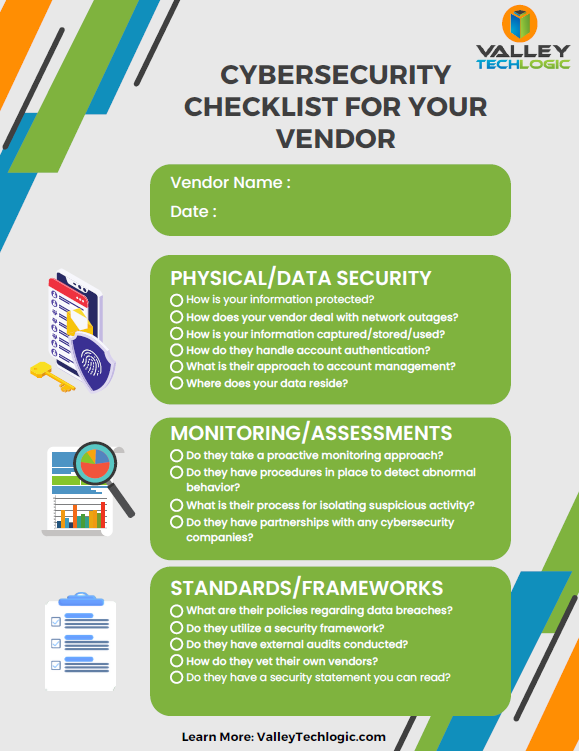
    Of course, an ounce of prevention is worth a pound of cure unfortunately when it comes to cybersecurity attacks. We would be remiss not to offer a few tips on preventing a data breach specifically. You can grab this checklist to make sure these items are covered to prevent future data breaches:

    Click to download the full size version.

    If you’re currently dealing with a data breach or have dealt with one in the past and want to prevent future breaches, Valley Techlogic can help. We are experts in cybersecurity and use industry best practices to provide the best security coverage for our customers that is also cyber insurance compliant. Learn more with a consultation today.

    Looking for more to read? We suggest these other articles from our site.

    This article was powered by Valley Techlogic, an IT service provider in Atwater, CA. You can find more information at https://www.valleytechlogic.com/ or on Facebook at https://www.facebook.com/valleytechlogic/ . Follow us on Twitter at https://x.com/valleytechlogic.