Category: Business

Business

  • We’re halfway through 2025, our top 10 blogs of the year so far

    We’re halfway through 2025, our top 10 blogs of the year so far

    June marks the halfway mark through the year, and what a year it’s been so far – with the innovations in AI to major changes to the global economy via tariffs and more, these are our top 10 blogs of the year so far.

    1. Are you all in on AI or approaching it more moderately? The perils of not strategizing your AI roll out (May 23, 2025)
      Examines the pros and cons of diving straight into AI vs. a cautious approach, highlighting the risks of rolling out AI without a solid business strategy.
      🔗 https://www.valleytechlogic.com/2025/05/are-you-all-in-on-ai-or-approaching-it-more-moderately-the-perils-of-not-strategizing-your-ai-roll-out/
    2. 5 Ways A Managed Service Provider Helps You Predict Future Technology Spending** (May 16, 2025)
      Explores how MSPs help businesses plan proactively by forecasting growth, mapping lifecycles, and avoiding surprise vendor costs.
      🔗 https://www.valleytechlogic.com/2025/05/title-5-ways-a-managed-service-provider-helps-you-predict-future-technology-spending/
    3. Best of Cybersecurity: 5 Must‑Read Blogs to Protect Your Business (May 9, 2025)
      A curated roundup of their top cybersecurity posts, offering actionable advice on phishing, disaster recovery, and more.
      🔗 https://www.valleytechlogic.com/2025/05/best-of-cybersecurity-5-must-read-blogs-to-protect-your-business/
    4. 5 Signs It’s Time to Switch Your IT Provider (And How to Choose the Right One) (May 2, 2025)
      Identifies inside signs you might be outgrowing your current provider and gives practical tips for selecting a better fit.
      🔗 https://www.valleytechlogic.com/2025/05/5-signs-its-time-to-switch-your-it-provider-and-how-to-choose-the-right-one/
    5. Out of file space? 8 space saving tips for your PC or laptop (April 25, 2025)
      A concise how‑to guide with actionable steps to clear disk space and boost device performance.
      🔗 https://www.valleytechlogic.com/2025/04/out-of-file-space-8-space-saving-tips-for-your-pc-or-laptop/
    6. Received a Facebook copyright infringement email or message? You’re not alone… (April 17, 2025)
      Breaks down a fake Facebook scam aiming to harvest information and explains how to spot and avoid it.
      🔗 https://www.valleytechlogic.com/2025/04/received-a-facebook-copyright-infringement-email-or-message-youre-not-alone-the-evolution-of-the-facebook-copyright-scam-and-how-to-avoid-falling-for-it/
    7. Make the Most of Your Microsoft 365 Subscriptions: 7 Productivity Hacks You Might Be Missing (April 11, 2025)
      Introduces under‑the‑radar features in Microsoft 365 to elevate productivity and streamline team collaboration.
      🔗 https://www.valleytechlogic.com/2025/04/make-the-most-of-your-microsoft-365-subscriptions-7-productivity-hacks-you-might-be-missing/
    8. The 7 most common network issues and how to fix them (September 2024)
      Lists key connectivity issues—from slow Wi-Fi to firewall misconfigurations—and offers diagnostic and repair steps.
      🔗 https://www.valleytechlogic.com/2024/09/7-common-network-issues-and-fixes/
    9. Windows 10 reaches EOL October 2025, and those who don’t upgrade may have to pay (January 3, 2025)
      Highlights Windows 10’s EOL in October 2025 and explains Microsoft’s new fee-based Extended Security Updates program.
      🔗 https://www.valleytechlogic.com/2025/01/windows-10-reaches-eol-october-2025-and-those-who-dont-upgrade-may-have-to-pay/
    10. Is Starlink still the best choice for rural or remote internet? We discuss your options for internet in 2025 (May 30, 2025)
      Evaluates Starlink alongside DSL, fixed wireless, cellular, and cable, covering speed, cost, and suitability for remote businesses.
      🔗 https://www.valleytechlogic.com/2025/05/is-starlink-still-the-best-choice-for-rural-or-remote-internet-we-discuss-your-options-for-internet-in-2025/

    At Valley Techlogic, we cover a wide range of topics on our blog just like we cover a wide range of support topics for our clients through our IT managed service plans. If you’re in the market for IT support for your business – why not learn what Valley Techlogic can do for you?
    Looking for more to read? We suggest these other articles from our site.

    This article was powered by Valley Techlogic, leading provider of trouble free IT services for businesses in California including Merced, Fresno, Stockton & More. You can find more information at https://www.valleytechlogic.com/ or on Facebook at https://www.facebook.com/valleytechlogic/ . Follow us on X at https://x.com/valleytechlogic and LinkedIn at https://www.linkedin.com/company/valley-techlogic-inc/.


  • Viral video showcases AI theft detection in real time, everything you need to know about AI enhanced security cameras

    Viral video showcases AI theft detection in real time, everything you need to know about AI enhanced security cameras

    In a recent video posted to TikTok, AI surveillance software vendor Veesion showcased their AI theft detection in real time. The video shows someone in an aisle of a store pocketing items while the camera accurately detects the movement as “item in pocket”. You can see another person in the background and it accurately detects that they’re walking while it’s simultaneously monitoring the first individual highlighting the systems ability to focus on multiple activities at the same time.

    Deterring theft has been a primary concern for those who make investments in physical security like security cameras (it’s estimated visible cameras decrease theft by 25%), but reviewing footage is usually something that occurs after the fact and is a time-consuming process for employees and law enforcement. With recent AI enhancements to cameras, suspicious activities can be monitored in real time and acted upon in the moment.

    Here at Valley Techlogic we work with a number of camera vendors who have also touted the benefits of their AI solutions. One of our primary security camera solution partners, Avigilon, showcases cameras that can detect certain movements, look for suspicious objects or even integrate with sensors that detect smoke or water intrusions. If you’re in the market for a new system here are some AI-centric features, you should be asking about in 2025:

    1. Real-time Threat Detection and Alerting: AI algorithms can analyze video footage in real-time to detect unusual activities, such as a person loitering, trespassing, or engaging in suspicious behavior. This allows for immediate alerts to security personnel, who can respond more quickly to potential threats.
    2. Facial Recognition: AI can enable facial recognition technology, which can identify individuals in real-time. This is especially useful for verifying authorized personnel or spotting persons of interest in high-security areas, providing an additional layer of protection.
    3. Object Detection: AI can help detect specific objects or vehicles, like unattended bags, weapons, or parked cars in no-parking zones. This can help prevent criminal activity, such as theft or vandalism, by detecting potentially dangerous situations early on.
    4. Smart Motion Detection: Traditional motion sensors may generate false alarms due to animals or environmental changes. AI-powered systems can distinguish between human movement and irrelevant motion, significantly reducing false positives and improving the accuracy of alerts.
    5. Behavioral Analysis: AI can track and analyze behavior patterns over time, learning normal activities and flagging deviations. For example, if someone is walking in an area they shouldn’t be or exhibiting aggressive behavior, the system can trigger an alert to inform security about potential risks.

    We provide installation services as well as offering our new security camera maintenance plan to protect your investment for the long term. If you are in the market for a new security camera solution or are looking to maintain the cameras you already have, Valley Techlogic is able to provide a complementary walkthrough and proposal (no cost to you even if you decide not to go with our solution). Schedule your consultation today to learn more.

    Looking for more to read? We suggest these other articles from our site.

    This article was powered by Valley Techlogic, leading provider of trouble free IT services for businesses in California including Merced, Fresno, Stockton & More. You can find more information at https://www.valleytechlogic.com/ or on Facebook at https://www.facebook.com/valleytechlogic/ . Follow us on X at https://x.com/valleytechlogic and LinkedIn at https://www.linkedin.com/company/valley-techlogic-inc/.

  • 5 technology predictions for 2025 (and where to invest your tech spend in the New Year)

    5 technology predictions for 2025 (and where to invest your tech spend in the New Year)

    2024 was a busy year in technology, with a lot of the focus shifted to continuing advancements in AI, which job openings even being available for those who can craft the perfect prompt. 2025 is likely to bring even more focus this way, but what other advancements in technology should your business be focusing on in the new year? Here are our predictions:

    1. 5G capability: 5G is not a minor upgrade to 4G, 5G is 10 to 100 times faster and has a fraction of the latency (under 5 milliseconds vs 60-98 milliseconds for 4G – an eternity when it comes to page loading times). 5G also has much greater capacity which will make providing network access to areas previously underserved or underrepresented by cable companies possible.
    2. Edge computing: In conjunction with AI, edge computing brings data much closer to the source. Rather than accessing your data solely from the cloud, edge computing involves having a “edge gateway server” act as the middleman and brings more of your data closer to home, while prioritizing that only the most sensitive or critical data is uploaded to cloudz. AI ties it all together for seamless access on the users end. This is especially important as IoT (Internet of Things) devices become more ubiquitous even in workspaces, as it reduces latency to devices with less processing power.
    3. Zero-trust Architecture: Zero trust was previously thought as an insurmountable hurdle to the day-to-day user experience, making things inaccessible and acting as a roadblock to completing even simple tasks. Now companies have come around to the notion that not every user needs admin level access and the only roadblock it presents is in front of bad actors trying to gain entry to your company data. Simple solutions such as continuous monitoring for threats, enabling MFA and least privileged access are easier than ever to implement for low or no cost to your business.
    4. Quantum Computing: Often dubbed the final evolution in computing capacity – quantum computing advancements will continue to progress in 2025 with it being predicted that the technology will become more readily available to the general public sometime in the future. While it would be difficult to cover what quantum computing is in this snippet – what it will be able to do is enable us to solve complex in seconds, and improve and optimize many other aspects of computing as we know them today.
    5. Artificial Intelligence: As we mentioned, AI advancements were abound in 2024 and this will continue to be the case in 2025. As more advanced generative models are released and AI-powered automation becomes common place in workspaces it will be something to watch in the coming months, especially for business owners looking to use it strategically within their company.

    At Valley Techlogic we try to stay at the forefront of emerging technologies, including AI. We are Microsoft partners and can make recommendations for utilizing Microsoft’s Co-pilot in your business, as well as helping you navigate technology solutions for your business in 2025. Investing some of your tech spend into a partnership with us in 2025 will help your business reach new heights (we guarantee it). Reach out today to learn more and also take advantage of our end of the year offer.

    Looking for more to read? We suggest these other articles from our site.

    This article was powered by Valley Techlogic, leading provider of trouble free IT services for businesses in California including Merced, Fresno, Stockton & More. You can find more information at https://www.valleytechlogic.com/ or on Facebook at https://www.facebook.com/valleytechlogic/ . Follow us on Twitter at https://x.com/valleytechlogic and LinkedIn at https://www.linkedin.com/company/valley-techlogic-inc/.
  • The 6 roles you would you need to fill to match the services delivered by an outsourced IT vendor

    The 6 roles you would you need to fill to match the services delivered by an outsourced IT vendor

    Has your business grown to the point you’re now looking to improve the IT solutions you have available, including possibly adding additional staff? Or maybe you’re currently the go-to person for providing technical support for your users (we see this a lot) and you’re realizing you need additional help to ensure things continue to run smoothly.

    It can be difficult to determine whether it makes sense to bring onboard additional in-house resources or if it’s perhaps a better idea to outsource the task to a company whose sole purpose is providing those services. When considering your options here are the six roles you would need to fill to match the services provided by an outsourced IT service provider as well as their average salary requirements:

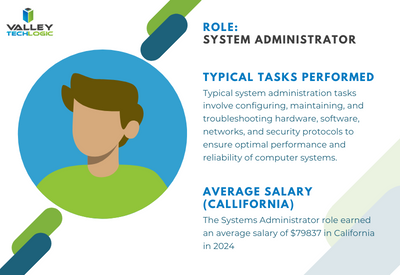
    Systems Administrator: Responsible for the overall maintenance, configuration, and reliable operation of computer systems and networks within the organization. They ensure that systems are secure, updated, and performing optimally.


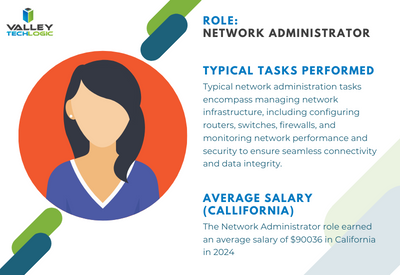
    Network Administrator: Manages and maintains the organization’s network infrastructure, including LAN, WAN, and internet connectivity. They oversee network security, troubleshoot network issues, and optimize network performance.


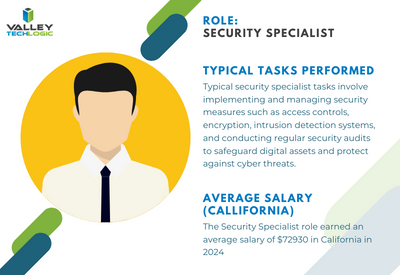
    Security Specialist/Analyst: Focuses on protecting the organization’s IT assets
    from security breaches, cyber threats, and unauthorized access. They implement security measures such as firewalls, intrusion detection systems, and encryption protocols, and they monitor for security incidents.


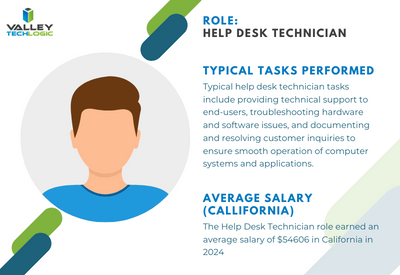
    Help Desk/Support Technician: Provides frontline technical support to end-users, troubleshooting hardware and software issues, resolving technical problems, and providing guidance on IT-related queries. They may also handle user account management and software installations.


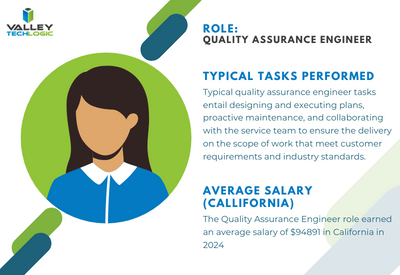
    Quality Assurance (QA) Engineer: Tests software applications and systems to ensure they meet quality standards, functional requirements, and performance expectations. QA engineers identify bugs, conduct regression testing, and contribute to software quality improvement efforts.


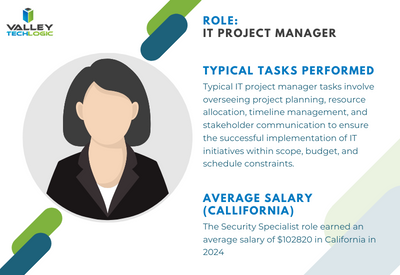
    IT Project Manager: Oversees IT projects from initiation to completion, ensuring they are delivered on time, within budget, and according to specifications. Project managers coordinate resources, manage risks, and communicate project status to stakeholders


    To contrast, with a managed IT service solution you’re usually looking at a fraction of the cost of the salary for just one of these staff members while still having access to all of these roles individually to support your business. Additionally, you won’t need to worry about the hiring process or all of the overhead that comes with hiring new employees.

    We can’t say what the right choice is for your business, and for some businesses it’s not an either-or situation. Sometimes it makes sense to hire one onsite staff member as a go to person while still outsourcing to provide better coverage and meet your long-term technology improvement goals.

    We can’t speak for other providers but for Valley Techlogic we have plans available to cover a variety of technology setups, whether we’re offering a co-managed solution and working alongside an existing staff resource or whether we’re taking over the technology side of your business in it’s entirety so you can focus on everything else. Learn more today.

    Looking for more to read? We suggest these other articles from our site.

    This article was powered by Valley Techlogic, an IT service provider in Atwater, CA. You can find more information at https://www.valleytechlogic.com/ or on Facebook at https://www.facebook.com/valleytechlogic/ . Follow us on Twitter at https://x.com/valleytechlogic.

  • 10 Questions Your New IT Provider Should Be Asking YOU During Onboarding

    10 Questions Your New IT Provider Should Be Asking YOU During Onboarding

    Much of our content is focused on what you should be asking your existing or future IT provider – from what services they cover, what cyber security protections they offer and how they will deploy their solutions to meet the needs of your specific office environment.

    The flipside of the coin though is the information they need to gather from you to best meet your needs, and if your IT provider hasn’t asked you any of the following questions, we would definitely consider that a red flag. How can their solution be tailored to your needs if they have no idea what those needs are?

    Here are the top 10 questions your IT provider should be asking you during onboarding or in your first year of service with them:

    1. What specialized business software do you use? As an IT provider it’s important we establish a relationship with your existing software vendors (especially for specialized business software) early on to help manage these tools on your behalf.
    2. How many devices does your business have? How many are used outside the office? This is a dual question with one purpose, we need to know about these devices so we’re making sure to cover the basic support items needed to keep them running, including backups and updates. Devices used remotely also need to be counted but the setup for those may involve getting in touch with those employees directly to deploy the solutions we use.
    3. How many servers do you have (including virtual machines)? Again, if we don’t know about it, we cannot support it and we even find in our client assessments they may have servers running that they weren’t even aware of. Any device on your network that’s internet connected and not receiving regular maintenance is a potential threat vector and we can make recommendations to discontinuing devices not in use.
    4. What was something your previous IT vendor provided that you would like us to continue? Regardless of the reasons you may have for switching IT providers (and if you’re thinking about doing so but aren’t sure how to get started, we have a kit available to help) there were probably some aspects of the service they provided that you feel were beneficial. This might include a certain kind of reporting they provided or a preference for how meetings are conducted. It’s good to establish the groundwork for continuing these preferences early on so your new provider can adapt routines to meet these preferences.
    5. What was something your previous IT vendor did that you did not like? Again, it helps us to know what your experiences have been in engaging with IT vendors and how we can best support your business. Maybe you didn’t like how they went about billing you for services or how they handled ticketing, whatever it was its invaluable information for your new provider.
    6. What projects do you have in the works? Whether it’s just an idea or something that was started and never finished, your new IT provider will want to help you meet your project goals.
    7. Do you have any cyber security frameworks or compliance goals your business must meet? Whether it be HIPAA, CMMC or you would just like to beef up your cyber security in 2024, it’s good to discuss this topic individually especially if your organization must meet specific cyber security requirements.
    8. Who provides your telecom and internet services? Networking support and phone maintenance is often included in many technology plans, it is helpful for us to know who provides these services for you. If you’re not happy with the current providers we can also offer recommendations for alternative solutions and we have even helped customers save money on these bills if we find they’re being overcharged.
    9. How often would you like to meet to discuss the services we provide for your company and any upcoming goals? At Valley Techlogic we host what we call a Technology Business Review (TBR) at the minimum annually, but we can also have these more frequently if the client desires.
    10. What minimum service requirements would you like us to adhere to? Whether it be our response time to tickets, how often we provide updates or specific tools you would like us to provide or help your company utilize – ideally your IT vendor will tailor your plan to YOU.

    Which is something Valley Techlogic does for our clients, our IT service plans are tailored to meet our clients’ needs and their specific setups. If you would like to learn more you can get started here.

    Looking for more to read? We suggest these other articles from our site.

    This article was powered by Valley Techlogic, an IT service provider in Atwater, CA. You can find more information at https://www.valleytechlogic.com/ or on Facebook at https://www.facebook.com/valleytechlogic/ . Follow us on Twitter at https://x.com/valleytechlogic.

  • 5 Reasons to have an annual meeting with your IT service provider and how to make the most of it

    5 Reasons to have an annual meeting with your IT service provider and how to make the most of it

    If you’re a small business owner and you work with an outsourced IT provider you’re not alone, statistics vary but it’s estimated up to 60% of small businesses utilize a third-party resource for their IT.

    This can look different depending on your particular size and needs, for some businesses it can look like support for existing IT staff, for other businesses their entire IT needs are shifted onto a third party IT resource. There is no one size fits all solution, the needs of your business are unique and your IT support provider should be a resource for helping you grow your business and keep up with the technology demands of modern work places.

    That is why it’s so important you meet with your IT team at the minimum annually, although we really could make a strong argument for quarterly (especially during times of intense growth or change within your business). Keeping them in the loop allows them to provide for your business adequately and on the opposite end you can learn about their recommendations for your business, which are often times free or low-cost solutions and improvements to your technology infrastructure and security.

    Even for recommendations that carry a cost you can plan for these things in advance rather than having it come up as an unpleasant surprise later on, an example would be let’s say their reporting has discovered your on-premises server is struggling to keep up with your demand or even showing signs of failure. This could be talked about in a meeting ahead of time but instead it might become a major headache when the server fails spontaneously and has to be replaced on the spot. Maybe you would have thought about making the move to the cloud this year or could have planned out your hardware purchases to coincide with more favorable timing, you’ll never know but hindsight is 20/20 and you will probably make a different choice going forward.

    So, what are the 5 reasons to have an annual meeting with your IT service provider?

    1. Future Planning: As we outlined in the scenario above, having this meeting allows you to create a plan for the year ahead. If your business has a busy season (most of us do) you can schedule any maintenance or downtime during the off-season. You can plan out hardware purchasing, software upgrades, cybersecurity improvements and more.
    2. Review Documentation: Your annual meeting is also a great time to review any reports your IT service provider has created for your business. At Valley Techlogic we’re constantly tracking items we’re doing on the back end for our clients, the regular maintenance, our 24/7 cyber security monitoring, backup and data services we provide just to name a few.
    3. Project Planning: We also suggest touching on any projects you would like to complete, such as switching out your traditional landline system to VoIP, security cameras (if they provide that service) and any installation or infrastructure projects. Even if you’re not ready to commit to them now, keeping your IT provider in the loop will allow them to plan for these projects on their end as well and keep them in mind when doing their own scheduling.
    4. Service Delivery Improvements: Whether you’re currently happy with your IT providers’ services or not, are they aware of it? Your annual meeting is a great time to review the services you have with your provider and whether they’re currently meeting your expectations (if they’re not, maybe it’s time to make a change and our Switching IT providers kit can help you do it).
    5. Reviewing Past Work: In the same vein, this annual meeting should also be used for reviewing the work they have done for you this last year and any follow-up requests. Despite all the tools and widgets we use in the IT industry, we’re still not omnipresent and sometimes a request is better delivered verbally. They will probably have in their meeting notes items they wish to go over and revisit to make sure you were satisfied with the outcome as well.

    We could address even more benefits of having this an annual meeting with your provider but these five will greatly improve the services they’re able to provide for your business and get you the most value out of the service you’re paying for.

    If you’re working with an IT service provider who doesn’t give you the option of meeting annually, it would be our recommendation you look for a new provider. Our Switching IT Provider’s kit makes it easy to switch (we even provide you with a template letter for discontinuing your service) and if you’re looking for an IT service provider who makes meeting with clients regularly a priority, than why not give Valley Techlogic a shot by clicking here or the image below.

    Looking for more to read? We suggest these other articles from our site.

    This article was powered by Valley Techlogic, an IT service provider in Atwater, CA. You can find more information at https://www.valleytechlogic.com/ or on Facebook at https://www.facebook.com/valleytechlogic/ . Follow us on Twitter at https://x.com/valleytechlogic.

  • Can outsourcing your IT save you time and money? 4 proven benefits to outsourcing your IT

    Can outsourcing your IT save you time and money? 4 proven benefits to outsourcing your IT

    Where and how to spend your technology budget is often a constrained topic for our clients and prospects, often the need to improve things is apparent by the time they’re having a discussion with us but there’s still a hesitancy that’s difficult to overcome.

    Investing in your business requires a lot of thought and consideration even when it’s a topic you know well, but for many the topic of IT is a somewhat intimidating subject even during the best of times. When IT is causing you woes it can feel like an insurmountable task to evaluate a solution to solve it given how many different paths there are to take.

    Is it hardware being finicky or failing, a recent cyber scare, ongoing data loss causing you consternation and keeping you up at night? Even minor technology conflicts such as keeping up with ongoing maintenance or replacing a device for an employee can demand hours of research and head banging and still not land you in a place where you feel totally confident in your choices.

    If you have an IT person in your company or one you work with it can still be difficult to keep up with it all in modern workplaces. Devices fail, the maintenance is never ending, and choices will have to be made. There is no one and done solution to it but outsourcing your IT to a company who does this as their bread and butter can not only save you a lot of time and hassle – it can even save you money.

    It may seem counterintuitive as there will be a cost to outsourcing your IT, but there is no avoiding making an investment when it comes to technology in 2024. Below are 5 proven benefits to outsourcing your IT.

    1. No hiring, training, or managing additional staff: Anyone who’s been involved in onboarding a new employee knows what a time sink it is, from the initial search to interviews to training. With a provider like Valley Techlogic we handle hiring and training technical staff members and have a rigid standard for those we work with so only the best people represent the face of our business to our clients.
    2. Teamwork and combined experience: IT like many other career paths covers a whole spectrum of knowledge that would be impossible for one person to master in totality. We have a team of qualified people who specialize in a wide variety of topics and decades of combined experience. For many small businesses hiring for all of these roles would be extremely cost prohibitive but under one service plan with us you have access to our full team.
    3. Many solutions under one umbrella: We also invest heavily in solutions that we provide to our clients, again for one flat monthly fee. Many of these solutions are not available other than through a provider like us and are beyond your typical anti-virus solutions that only scratch the surface. Ongoing, real-time monitoring and threat detection. Backup solutions that include immutable access (so they cannot be tampered with) and more real-time your needs exactly: We tailor our plans to fit your needs exactly and can scale up or down with you. We base our solutions on how many users we’re supporting, so as you grow our plan will grow with you providing exactly the right amount of coverage.
    4. Ongoing risk prevention: Our plans include all of your IT maintenance, so if something is amiss such as a device failing, we can offer our recommendation for replacing it before it becomes an issue – this is especially noteworthy when it comes to critical devices such as an onsite server.

    In total if you looked at each facet of a solution like ours compared to trying to invest time or money to replicate it bit by bit on your own, the costs would be exorbitant. This is why we see so many businesses who have inadequate solutions for IT and who try to cut corners, this is not a category where you should try to go it alone.

    Reach out today to learn more about what Valley Techlogic can do for your specific business by clicking here or the image below.

    Looking for more to read? We suggest these other articles from our site.

    This article was powered by Valley Techlogic, an IT service provider in Atwater, CA. You can find more information at https://www.valleytechlogic.com/ or on Facebook at https://www.facebook.com/valleytechlogic/ . Follow us on Twitter at https://x.com/valleytechlogic.

  • 10 Microsoft 365 tools you need to take advantage of TODAY

    10 Microsoft 365 tools you need to take advantage of TODAY

    Most of our clients are Microsoft 365 customers and enjoy the tools and applications they receive through their Microsoft 365 subscription. Many of these same clients were long time Office customers and were already familiar with the software benefits – such as Word, Office, Outlook, Powerpoint and Excel. These are staple products in the business community and chances are if you’ve been in business long enough you’ve had some exposure to them throughout your career.

    We have had clients who miss the days when Office was a standalone product only. While you still can purchase Office 2021 for a one-time fee, many have to weigh the value of a pretty substantial upfront cost when purchasing for many employees for a product that will at some point expire vs the subscription model that is now favored by many software companies. This is a discussion onto itself, but in a nutshell many clients choose to go with a Microsoft 365 subscription.

    There is an obvious benefit to doing so right off the bat if you choose to go with Microsoft 365 Business Premium, the security benefits of this plan are well known and touted throughout the technology industry as being the crème de la crème of security suites for Windows machines.

    However, there are many benefits to your Microsoft 365 subscription that many users are not even aware of. Microsoft 365 is much more than just an Office subscription – your plan comes with business utility programs that can make organizing and running your business better.

    Here are 10 tools you can take advantage of TODAY if you have a Microsoft 365 subscription:

    1. Microsoft OneNote: OneNote is Microsoft’s digital notetaking app, it’s a step way above NotePad with the ability to organize multiple notes (with colored tabs) and collaborate and share your notes with other.
    2. Microsoft Intune: Intune allows you to control and manage all of the Microsoft endpoints within your business from one place. This one might need an IT pro when it comes to setup and management but once you get it going it really can simplify many IT tasks for your team.
    3. Microsoft Forms: Did you know that you can create surveys, quizzes and polls with a Microsoft product? You can with forms, you can even export the data to Excel and share the forms you create on your website or social media platforms.
    4. Microsoft List: With Microsoft 365 you don’t have to go off platform when it comes to managing even the somewhat more mundane aspects of your business, Microsoft Lists is Microsoft’s solution for keeping track of well, everything. Also just like with Forms you’re able to export these lists to Excel with a click of a button.
    5. Microsoft Bookings: Microsoft Bookings is Microsoft solutions to having a public calendar where clients or colleagues can book a meeting with you, and it’s tied right to your Outlook calendar. Another benefit of Bookings is it can be added to your website for prospective clients to book time with you and eliminating the cost of an outside calendar application.
    6. Microsoft To Do: If you or your employees struggle with staying on task, Microsoft To Do is the solution for you. You can plan out your days in advance and Microsoft To Do will be your one stop place for keeping things on track.
    7. Microsoft Viva: Microsoft Viva is an addition to Microsoft Teams that adds a lot of functionality not usually found in a chat program, Microsoft Viva is a multi-faceted platform but in a nutshell it allows you to set goals for your business, provide training to your employees and see insights into their workday, as well as offering them to provide feedback to you all in the Teams application they already use.
    8. Microsoft Streams: If you already use Teams for your video conference calls then you’re familiar with how reliable Microsoft is when it comes to video streaming. Microsoft Stream takes that a step further and allows you to broadcast video outside your organization with up to 1000 participants.
    9. Microsoft Power BI: Microsoft Power BI provides a snapshot of your business’s data in the form of charts and graphs, so you can see how the data your business creates evolves and changes over time.
    10. Microsoft Planner: Finally, we bring it all home with Microsoft Planner, it’s exactly what you would expect it to be a simple visual tool for planning out meetings, business goals, marketing pitches and more all found at your fingertips with your Microsoft 365 subscription.

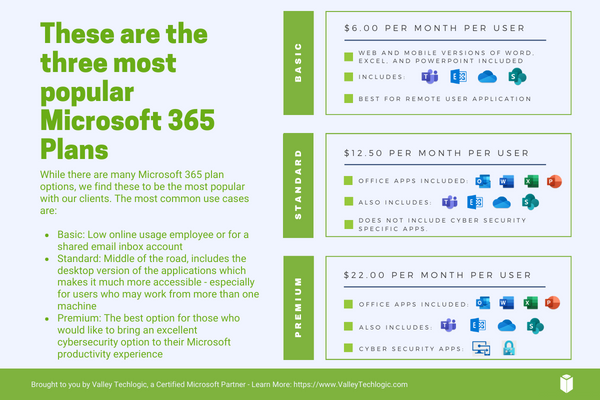
    Of course, if you’re considering signing up for Microsoft 365, you do have to take the cost into account. Here are the costs for the most popular plans (these costs factor in a discount for committing to an annual subscription, the costs are approximately 20% higher when you choose a monthly term).

    Interested in learning more about Microsoft 365? Valley Techlogic is a Microsoft partner, and we can walk you through the process of buying and making the most of your new subscription. Learn more today with a consultation.

    Looking for more to read? We suggest these other articles from our site.

    This article was powered by Valley Techlogic, an IT service provider in Atwater, CA. You can find more information at https://www.valleytechlogic.com/ or on Facebook at https://www.facebook.com/valleytechlogic/ . Follow us on Twitter at https://x.com/valleytechlogic.

  • Internet service terminologies explained and our top 10 recommendations for business internet

    Internet service terminologies explained and our top 10 recommendations for business internet

    If you’ve ever shopped for internet service for your home or business, you’re probably aware that it’s a little difficult to tell what you’re really buying due to the marketing efforts most providers have that are more about wooing you with their “blazing fast speeds” or “reliable up times” and less about explaining the actual service.

    In today’s article we aim to change all that by dispelling some notions that having a higher download speed is better (for businesses especially upload really matters) or that all the bells and whistles providers try to sell you are really worth it. For example, you’re not saving money if you sign up for a phone plan with your internet service if your office currently utilizes a VoIP solution – you’re just spending money on a service you don’t want or need.

    Speed and reliability do matter but it’s a good idea to look at the whole picture, let’s start with download speed.

    Internet speeds can come in two forms, symmetrical where the download and upload speeds are the same or asymmetrical where one speed (typically download) is higher. Download speeds matter when you’re trying to receive data to you. So, downloading files, web surfing, viewing videos etc. Asymmetrical internet service is typically less expensive than symmetrical internet service. That’s because it’s easier for a provider to service you with data than to take your data and send it somewhere else.

    For most businesses, download speeds are not as important. The files you receive are typically smaller and you’re not using the internet for gaming, or movie watching which are activities that benefit from a higher download speed.

    Upload speeds affect the data your device is sending, so sending files, uploading backups, video conferencing, all of these are directly affected by your upload speeds.

    Most of the time, internet service being marked as “business internet” is symmetrical and comes with a higher cost. It may be tempting to save money and just get your business connected with an asymmetrical consumer internet plan, but you may pay for it in the form of reduced reliability and impingement on your backups (which can have a catastrophic effect in a disaster recovery scenario).

    It also might feel like you’re getting ripped off if the plan with 1000 Mbps down and 10 Mbps up is a fourth of the cost of that 50 / 50 asymmetrical business plan – but for businesses the upload speed is often the thing that really matters.

    We’ve also found that for business internet users internet companies will allow you to be on your own circuit. To break this down, typical internet service is daisy chained. This means that your connection is connected to your neighbor’s connection which is connected to their neighbor’s connection – and so on and so forth. If one of your neighbors decides to download 3 terabytes of video one day your internet speeds will suffer.

    When you’re on your own circuit, the only one who can change the effectiveness of your internet connection is you.

    Another thing to consider is the type of internet, most people are familiar with cable which has been around for decades but there are actually more options available now. Such as:

    1. Fiber: This is similar to cable but can be seen as an upgrade, usually higher speeds are available via a fiber connection. It might also be helpful to note that many traditional cable providers (Comcast, Spectrum, AT&T etc) actually utilize fiber now in many cases and are in the process of upgrading lines all across the United States.
    2. DSL: If you’re more rural, DSL is often the only thing available to you and can be a viable solution if your office is small and/or does not utilize much data.
    3. Wireless: Similar to your phone service, wireless technology has grown leaps and bounds over the years and the speeds can often be comparable to cable. Wireless is a great option for businesses who have larger or outdoor facilities to provide internet services to employees who may be working further away from the main office.
    4. Satellite: This is another great option for rural businesses, there can be a higher cost to initiate service, but the speeds will be much better than those found with DSL.

    You can also consider merging some of these services for greater reliability. For example, we’ve helped clients acquire a symmetrical fiber plan that includes a free wireless backup. While the internet plan we choose was extremely reliable, that extra piece of mind that even if they had an outage to the primary internet service, they would still be able to connect via the wireless backup was something they didn’t know they needed but really appreciated having.

    Here are a few other tips when looking for a business internet service plan:

    Need assistance in selecting a provider or with looking for a new internet provider? Valley Techlogic can help, as we mentioned this is just a snapshot of some of the perks of being a Valley Techlogic client which includes expert tech advice, support and technology service, project planning and more. Set up a meeting with our expert sales consultant today to learn more.

    Looking for more to read? We suggest these other articles from our site.

    This article was powered by Valley Techlogic, an IT service provider in Atwater, CA. You can find more information at https://www.valleytechlogic.com/ or on Facebook at https://www.facebook.com/valleytechlogic/ . Follow us on Twitter at https://x.com/valleytechlogic.

  • Maximizing your tax deduction potential with Section 179

    Maximizing your tax deduction potential with Section 179

    It’s September which means we’re almost to the fourth quarter where most businesses look ahead towards end of year activities, it’s not unusual for us to see an increased interest in locking down new equipment and upgrades before year end.

    Each year we begin promoting the benefits of Section 179, you can learn more about it in our updated guide for 2023 or continue reading.

    In a nutshell, Section 179 is a tax savings benefit that allows you to deduct the cost of equipment you use for work from your (in some cases up to 100% of the total cost) from your tax expenses. When used correctly, this means you can purchase upgrades for your business and receive that money right back into your business when you file the following year.

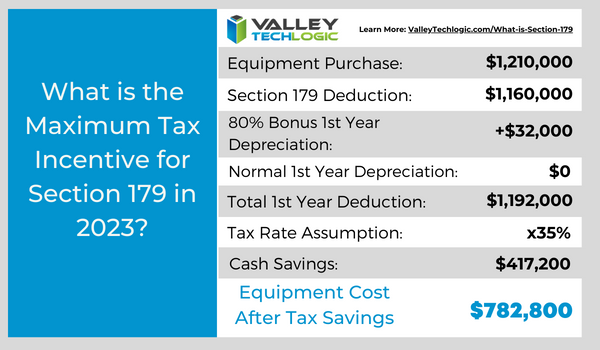
    Section 179 is a permanent part of the tax code here in the United States but that doesn’t mean it’s static. Each year the deduction limits are adjusted for inflation. You can see on the chart below what this year’s limits are.

    You can choose to take the deduction in one lump sum or take a deduction for depreciation each year instead – it’s completely up to you.

    What equipment or technology purchases qualify for Section 179?

    1. New Equipment: This includes computers (as long as they’re used in your business at least 50 of the time), servers, backup devices, phone system hardware and more.
    2. Components: Such as hard drives and solid-state drives, RAM, video cards, monitors and more.
    3. Refurbished Equipment: You don’t have to buy new equipment to qualify for Section 179, in fact if you’re in the market for a new server and have been debating new vs refurbished, we have an article where we weigh in here. Equipment can also be financed or leased and still qualify.
    4. Software: If you’re looking to purchase software upgrades for your business this year – such as upgrading an older copy of Windows to the latest version – these would also qualify.
    5. Professional Services: Even professional services like ours can possibly be deducted under Section 179.

    We find many businesses are looking to make purchases before the year end because that’s when a clearer picture of their financials is available but be warned. For a purchase to qualify in 2023 these purchases must be made before December 31st. Even if the purchase was planned as part of this year’s budget, if it’s purchased January or later it will not count for this year’s taxes.

    If you’re looking for the exact math on a potential purchase and the savings you will net, we can recommend this calculator, it has been updated for 2023. It’s also important to note that the ceiling for your particular business is your net income, you cannot deduct more money than you made that year, however you can carry the deduction forward to the next year.

    We’ve spent some time discussing what does qualify under Section 179, but what about what doesn’t? The following items would not qualify under Section 179:

    1. Intangible Assets: This would include things like patents or copyrights as an example.
    2. Land: You cannot purchase land and claim a deduction for Section 179.
    3. Purchased from family: Unfortunately, you cannot claim purchases that are made through a family member. Even if the product itself would normally qualify, if the item was purchased through a sibling, parent’s or spouses’ separate business it will not qualify.

    Interested in making technology upgrades in your business and utilizing Section 179 in 2023? Valley Techlogic can help, we offer procurement services as well as technology solutions that are covered by this very useful tax code. Learn more today by scheduling a consultation.

    Looking for more to read? We suggest these other articles from our site.

    This article was powered by Valley Techlogic, an IT service provider in Atwater, CA. You can find more information at https://www.valleytechlogic.com/ or on Facebook at https://www.facebook.com/valleytechlogic/ . Follow us on Twitter at https://x.com/valleytechlogic.