Category: Business

Business

  • How the “skills gap” is changing the world of IT

    How the “skills gap” is changing the world of IT

    The term “skills gap” has been popping up a lot lately and in a nutshell it’s the refers to the difference between the skills your business needs from its employees and what’s actually available in the marketplace.

    Tech innovations occur so rapidly it would be impossible for any one person to be a master in everything that’s required to maintain the technology in most modern workplaces, there will always be a need to seek out assistance with some component of it whether it be through outsourced help or through automation – or both.

    In a survey by Monster nearly one third of employers agree the skills gap has been growing, and it’s effecting how they’re sourcing and employing candidates. With inflation on the rise employees are also seeking greater compensation for highly in-demand skill sets, which from a budgetary standpoint may be difficult for many employers to grapple with.

    It may be advantageous for employers to offer compensation or incentives to existing employees to increase their existing skillsets or “reskill”. With the many hurdles found in hiring qualified candidates in the current working environment, retention will be a key factor in many businesses being able to stay afloat.

    Automation is another component hiring managers are looking towards, especially in the world of tech.

    1. Backing up data: If you’re a Microsoft 365 customer, backing up your device data is easy with OneDrive.
    2. Email Signature: Still typing your name at the end of every email response? It doesn’t take very long, but across dozens of emails per week it can add up. Setup an email signature in Outlook (with a new email open go to Insert > Signatures) and save that little bit of time with every email.
    3. Paying Bills: Still making manual payments? Why? Setup automatic payments where you can and skip logging in and making that manual payment every month.
    4. Typing Passwords: Not only does typing in a password for everything waste valuable time, it also creates a security risk because an easy to remember password is also potentially an easy to crack password. Try using a password manager like LastPass to create stronger passwords and save time.

    Of course, there are much more advanced automation services available to assist your business, but many will require at least some initial tech know-how or even an on-hand technician available to maintain them.

    The skills gap is also affecting those who rely on short-term technical help to bridge the gap, during a time when it seems like the price of everything is going up so to, is the cost of hiring emergency technical support. Especially when it’s required afterhours.

    If after reading this you’re wondering what your best option is, trying to hire someone or relying on expensive emergency support we do want to provide a third option – outsourced IT.

    We’re not unbiased here, but hiring outsourced IT does have a number of benefits in the current hiring climate that you may not have considered. See the chart below for examples:
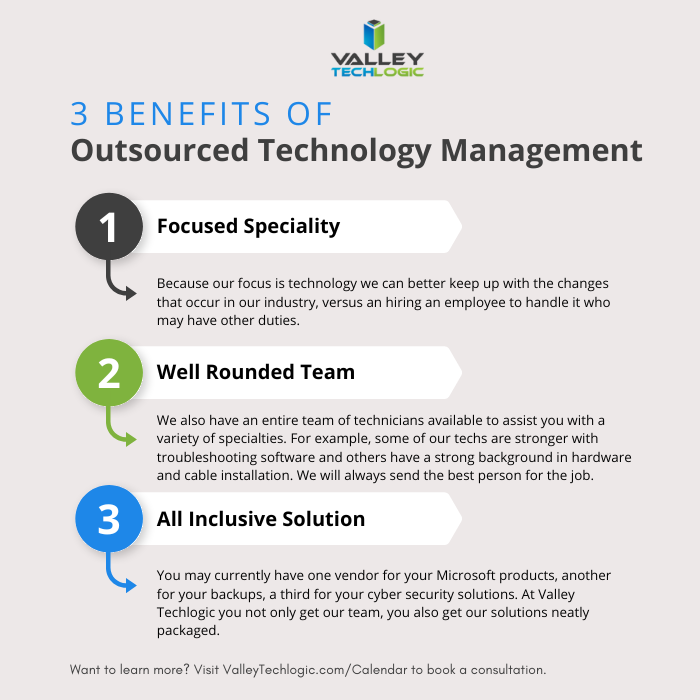
    Interested in learning more? Schedule a consultation with us today.

    Looking for more to read? We suggest these other articles from our site.

    This article was powered by Valley Techlogic, an IT service provider in Atwater, CA. You can find more information at https://www.valleytechlogic.com/ or on Facebook at https://www.facebook.com/valleytechlogic/ . Follow us on Twitter at https://x.com/valleytechlogic.


  • 5 Ways You Can Prepare Your Technology (and Your Employees) to Return to the Office

    5 Ways You Can Prepare Your Technology (and Your Employees) to Return to the Office

    Whether your employees are still mostly remote, or you’ve moved into a hybrid setup, many employers are looking to return to business as usual as COVID numbers drop and speculation increases that we’re moving into the endemic phase of this illness.

    We covered this topic much earlier in the pandemic, and we still agree with the advice we gave for prepping employee devices before bringing them back into the company network. We’re all aware of the waffling opinion about whether offices are really necessary or remote work is the wave of the future.

    For some businesses the collaboration that occurs in person just couldn’t be replicated remotely, while others found that their employees were even more productive when not subjected to the hustle and bustle of office life. These choices are best made on an individual company and even individual employee basis.

    We do think it’s a good idea to offer some more sound technology advice for returning to the office, even if you’re only considering the idea for now.

    1. Check on your office network: If your office has been mostly unused the past couple of years, or only lightly used, it may be a good idea to make sure your network can still support your whole workforce. Employees coming in the first day and being unable to get online would be a poor way to kick things off.
    2. Think about your existing technology structure as well: Has a server become unreliable in the time you’ve been away, or your current backup solution handles small uploads fine, but your entire staff would overload it? It’s a good idea to perform these upgrades before welcoming employees back.
    3. Don’t switch the current workflow all at once: If there are systems in place that have been working throughout your time spent remote, don’t immediately switch back to “how things used to be”. It’s a good idea to evaluate whether the new systems and processes are perhaps better than the old ones too.
    4. Also be sure to check incoming devices before allowing them on the company network: As we said in our previous article, devices that have been allowed outside of the office should be checked prior to coming back and logging into sensitive work systems. Hackers know how to bide their time so just because a device hasn’t shown any signs of malware doesn’t mean there is no malware.
    5. Finally, now is the best time to bring in new assistance: An event such as returning to the office, or moving offices marks a great time to bring in technical assistance. A technical provider can help you get past where you are to where you want to be.

    Is your office planning to stay hybrid or continue remote? Even if you’re not returning back to the office – now or ever – we’ve created this template of online safety tips your employees should keep in mind. Whether it’s with a company device if you allow it to be used personally during off hours or just for keeping their home network safe (because malware can spread).

    Click to download the full printable version.

    In the office, remote or anything in between, Valley Techlogic can assist you with getting the most from the technology you use to facilitate running your business. Learn more with a free 10 minute consultation.

    Looking for more to read? We suggest these other articles from our site.

    This article was powered by Valley TechLogic, IT service provider in Atwater, CA. You can find more information at https://www.valleytechlogic.com/ or on Facebook at https://www.facebook.com/valleytechlogic/ . Follow us on Twitter at https://x.com/valleytechlogic.

  • The 5G rollout and the concern over C-band has caused some airlines to cancel flights

    The 5G rollout and the concern over C-band has caused some airlines to cancel flights

    Even though major carriers AT&T and Verizon scaled back their 5G rollout scheduled for yesterday, some flights were cancelled or rerouted anyways due to the concerns that 5G could cause airline equipment to malfunction.

    AT&T and Verizon turned on sections of their C-band 5G networks across the US on Wednesday but have agreed to hold off on enabling it directly near airports for now. However, concerns still arouse that interference could occur for aircraft that use the same C-band frequency for their radar altimeters which they use in low visibility conditions.

    It’s estimated that 62% of our current airport fleet have altimeters equipped that will not be affected by the 5G rollout. Severe flight delays are still occurring across the country and also for international inbound flights, and there delays are compounded by the effects the Omnicron COVID variant has had on flights.

    The C-band 5G rollout has been delayed several times as carriers tried to negotiate with the Federal Aviation Administration (FAA) over their concerns. AT&T and Verizon have also agreed to run their towers at low voltages near airports initially so adjustments can be made to aircraft altimeters.

    C-band 5G will change data availability for mobile devices dramatically. It’s better equipped to handle bandwidth traffic at much higher speeds. It can be 10 times as fast as 4G in some scenarios and could make faster internet availability possible for those in rural areas.

    This band of 5G (also known as the “goldilocks band”) also performs better across longer distances than previous iterations. Verizon and AT&T has had a “low band” 5G option that covered large distances but only at the same speeds as 4G, or it could cover a very small area at the desired 5G speeds. The C-band variation of 5G can maintain it’s faster speeds across distances and through buildings.

    As our society continues to become more decentralized, 5G will enable more users faster access to the web on their devices no matter where they’re logging in from. It’s not surprising AT&T and Verizon bid $81 billion dollars for access to the C-band spectrum when it came up for auction.

    3G4G5G Differences Chart

    It’s not available to everyone at the moment though, Wednesdays rollout occurred in several major metropolitan cities. You also need a 5G capable device to access the 5G network, to see if you’re currently using the upgraded 5G look for a 5G+ or 5GuW symbol on your phone.

    How can the US fix concerns surrounding the 5G C-band and aircraft interference? France has successfully rolled out 5G without causing issues for airlines, they’ve ensured that 5G towers were tilted away from flight paths, they also use a slightly slower C-band spectrum to ensure aircraft safety.

    The current plan is for 5G to operate on the 3.7 and 3.98 GHz while flight radar typically operates on 4.2 to 4.4 GHz frequency band – leaving only a very small buffer. In Europe, 5G operates on the 3.4 to 3.8 GHz frequency band which still allows for vastly increased speeds over 4G but a much larger buffer against the aircraft radar frequency.

    Many of our customers currently take advantage of mobile data plans for their remote offices or while on the go. If you would like assistance navigating internet options for your business, Valley Techlogic can help.  Schedule a quick consultation with us today to learn more.

    Looking for more to read? We suggest these other articles from our site.

    This article was powered by Valley TechLogic, IT service provider in Atwater, CA. You can find more information at https://www.valleytechlogic.com/ or on Facebook at https://www.facebook.com/valleytechlogic/ . Follow us on Twitter at https://x.com/valleytechlogic.

  • Looking for a new IT provider? Here’s a checklist to start with

    Looking for a new IT provider? Here’s a checklist to start with

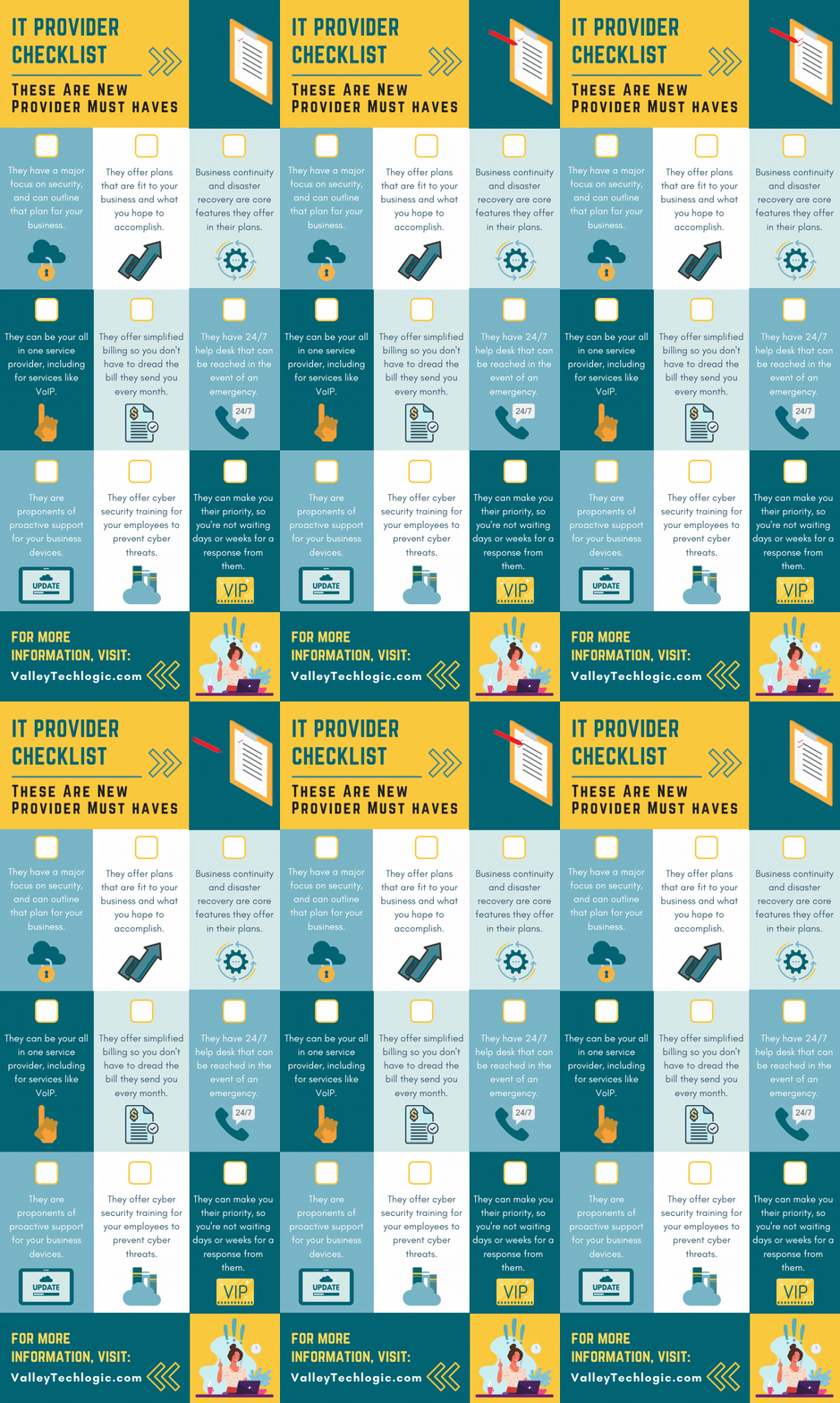
    As an IT provider ourselves we have some thoughts – okay a lot of thoughts – on what makes a good one.

    It’s an unfortunate fact that many of our clients came to us after being failed, sometimes catastrophically, by their previous provider. While we service a large portion of the Central California area, we know many readers fall outside this region and we thought it would be helpful to provide a printable and online capable checklist for the top 9 things to look for in an IT provider.

    The items found on this checklist are simple enough you could even have it handy while you interview new provider options. If the answers to any of these questions are a “no” or even hesitancy, we suggest you continue looking. Items like security, disaster recovery and responsiveness to requests are hard stops when it comes to choosing a provider that will best support your business.

    If your old IT service provider left you in the lurch during a disaster, why would you risk choosing a new provider that can’t guarantee that the same thing won’t happen again?

    You also want to make sure they believe in proactive maintenance. When choosing a new provider and paying for their services the last thing you want to have happen is that you’re still the person responsible for maintaining your own IT. Paying their bill every month while still slogging through updates on workstations yourself would just be salt in the wound. We think this should be an included part of any full coverage service plan.

    Speaking of full coverage plans, at Valley Techlogic we believe in unified billing. This means when you choose us all of your IT services are contained under our one billing umbrella. We manage their IT subscriptions, their VoIP plans – everything is designed to be as hassle free as possible. While not all providers operate the same as we do in this regard, we (and our clients) think of it as a positive feature.

    Migrating from your previous provider can also be an intimidating time for any business owner, this person or business had access to all of your sensitive systems and if things ended on a sour note, you may be feeling unsure whether your data and systems are safe.

    We wrote a comprehensive guide on what to do when your IT guy (or IT provider) suddenly quits, you can find it here. The topics are applicable whether they quit or were fired by you. It’s our suggestion you don’t try to manage this on your own, locking down access and recovering credentials is really best left to the professionals.

    If your business is located in Central California (Sacramento, Stockton, Modesto, Fresno, Merced and everywhere in between) and you’re looking for a new IT service provider, Valley Techlogic meets all of the criteria found in the above checklist and more. Reach out today to learn more.

    Looking for more to read? We suggest these other articles from our site.

    This article was powered by Valley TechLogic, an IT service provider in Atwater, CA. You can find more information at https://www.valleytechlogic.com/ or on Facebook at https://www.facebook.com/valleytechlogic/ . Follow us on Twitter at https://x.com/valleytechlogic.

  • Your IT Guy Quit, Now What?

    Your IT Guy Quit, Now What?

    Your relationship with your IT person can be a somewhat fragile dichotomy, sure you’re friendly with them and they’re probably a great person (you chose/hired them after all).

    But for many small business owners they couldn’t really tell you what this person does beyond making the computers “work”. You hired them for their skills and those skills should exist outside the realm of what you could manage for your own IT (though many owners try).

    So, if they quit, you’re suddenly in the lurch. You have all these systems that were being maintained by one individual that are now in limbo as you try to figure out what to do next, perhaps even trying to entice them to come back.

    For any new person you bring on, the relics of your old IT person may haunt them for them for the entirety of their tenure with you. When you’re just one person trying to manage many systems and users, documenting as you go can feel like a lost cause – especially during the busy times.

    That’s also supposing the split was amicable. If it was not, the damage can be difficult to recover from. We always recommend business owners maintain access to their own systems and never let themselves be completely cut off from the admin side of things no matter how capable your IT person is. Recovering those accounts can be difficult to impossible depending on the system in question.

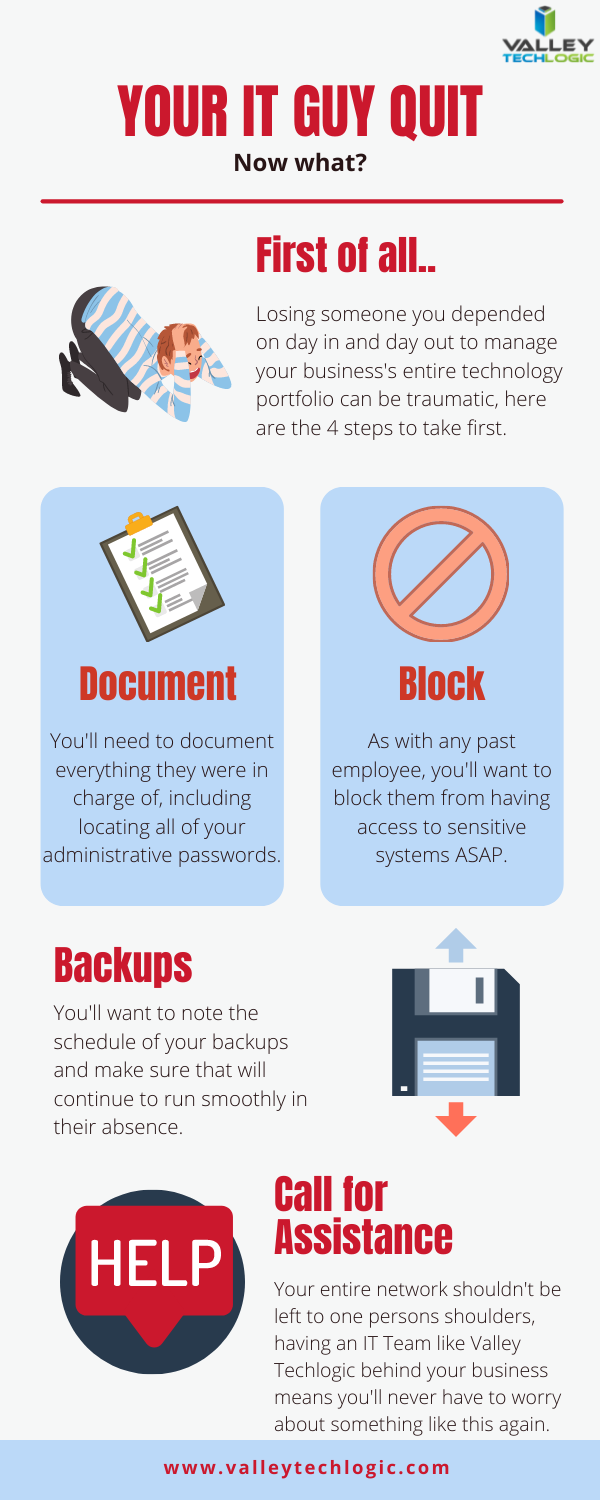
    That leads us to our list of the top 4 things you should do as soon as your IT person quits.

    First 4 things to do when your IT person quits

    As we say in our infographic, leaving the entirety of your technology support to one person can be a dicey proposition. That’s where our co-managed solution comes in.

    In a co-managed scenario, you keep your IT guy, and we work with him to offload some of the tasks that may be bogging him down day to day. We also will bring our tools that we have honed and perfected across nearly two decades in the business to improve your processes.

    This includes better documentation, better reporting, and just overall better transparency so you as a business owner can have a bird’s eye view into this process that is so important to the continued success of your business.

    The added bonus to lightening their load is that they can then focus on activities that will move your business forward, such as projects that had been on hold because there just wasn’t time or activities that can actually grow your business.

    For example, they can address aging hardware issues that there just hasn’t been time for in the past that are holding your business back and representing a cybersecurity threat. We can even help with sourcing. Technology is a necessary component in the success of any business no matter what category or size – if yours is stuck in the past it’s going to curtail your efforts to grow your business.

    If your IT person just quit and you’re thinking you would rather have a competent IT team managing your technology, we have a plan for that as well. Our managed IT department plan is all encompassing and includes all of the support you will need, 24/7. You can learn more by taking a quick consultation with us here.


    Looking for more to read? We suggest these tech articles from the last week.

    This article was powered by Valley TechLogic, an IT service provider in Atwater, CA. You can find more information at https://www.valleytechlogic.com/ or on Facebook at https://www.facebook.com/valleytechlogic/ . Follow us on Twitter at https://x.com/valleytechlogic.
  • The third stimulus package is expected to pass soon, what does it mean for businesses?

    The third stimulus package is expected to pass soon, what does it mean for businesses?

    The third stimulus package (dubbed The American Rescue Plan of 2021) is expected to go to the House today for a final vote – in fact by the time this article goes live it may have already – and then it is expected to be signed into law by President Biden.

    We’re all aware of the stipulations this has for individuals, with many receiving a third wave of stimulus payments in the form of $1400 for every adult and child that meets the current income criteria as well as many expecting an increase to the Child Tax Credit, but what in this bill is specifically outlined for businesses?

    The first stimulus packages included notable relief in the form of the forgivable Paycheck Protection Program (or PPP) loans. These loans offered businesses 24 weeks of paycheck protection for their employees so they could remain in business and keep their staff even as their businesses were subject to widespread closures.

    Earlier in the year we covered the benefits of the PPP and how it compared to the Economic Injury Disaster Loan (EIDL) program here.

    The American Rescue Plan Stimulus bill also includes many provisions for businesses just like the first two packages did, including the following:

    • $1.25 billion for shuttered venue operators
    • $7.25 billion for the Paycheck Protection Program (PPP)
    • $15 billion for targeted Economic Injury Disaster Loan (EIDL) advance payments
    • $25 billion for restaurants, bars, and other eligible providers of food and drink
    • And $175 million to create a “community navigator” pilot program to increase awareness of and participation in COVID-19 relief programs for business owners currently lacking access

    The Paycheck Protection Program in particular has allocated over $662 billion to businesses since being established 11 months ago, and there is sill $284 billion in funding available.

    However, the new stimulus bill did not extend the window for applying. If your business meets the criteria and you’re considering applying for this program you must do so by March 31st of this year at which time the window is scheduled to close for good.

    The current bill also has a clause to make it more available for not-for-profit businesses by including a new category entitled “additional covered nonprofit entity,” we suggest meeting with your accountant or tax preparer if you think this may apply to your business.

    If your business requires greater aid than the PPP provides for and you have no more than 300 employees, the EIDL program may be a better fit for you. An additional $15 billion in funding to that program will be made available in the next round of stimulus. This loan program applies to your business if you suffered a 30% or more loss in revenue during any 8 week period between March 2nd, 2020 and December 31st, 2021.

    There is much more to it than we can go over here but we again suggest meeting with your accountant or tax preparer if your business suffered a loss during in the 12 months since COVID-19 began (which probably applies to many if not all of us) and think one of these programs could help your business on the path to recovery and economic growth.

    Looking for more to read? We suggest these tech articles from the last week.

    This article was powered by Valley TechLogic, an IT provider in Atwater, CA. You can find more information at https://www.valleytechlogic.com/ or on Facebook at https://www.facebook.com/valleytechlogic/ . Follow us on Twitter at https://x.com/valleytechlogic.

  • 5 Remote Workforce Trends to Follow in 2021

    5 Remote Workforce Trends to Follow in 2021

    There has been a lot of debate surrounding when things will get back to “normal” and what normal will even look like, but one thing we think is here to stay is the remote workforce.

    While many jobs will go back to the office, the benefits of working from home and having a remote work staff cannot be downplayed. For the employees it has meant less time commuting to and from the office leading to an increase in the coveted work/life balance. In addition to that, many have found they can focus better away from the hustle and bustle of a busy office building and for many this has led to an increase in productivity.

    For employers there’s simply less overhead, when staff work from home all the costs associated with maintaining and running an office are no longer a factor. In fact, it’s been speculated what this may mean for the future when it comes to office building spaces and their demand.

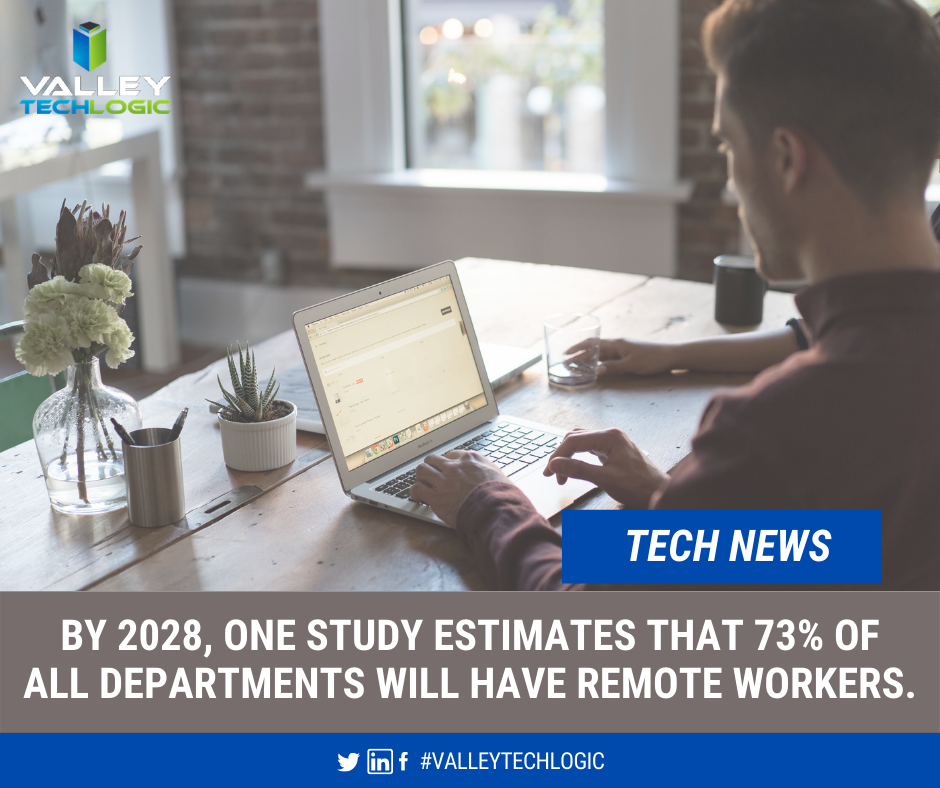
    Tech News About Remote Workers

    There’s no doubt a great many will return to the office, and as the article we linked above mentioned, for those new to working or working in a specific field there’s a great benefit to the on the job learning that can only be facilitated in person.

    If you are finding yourself working from home at the moment, are you making the most of it? What will working from home look like in 2021? Here are 5 trends we think will make 2021 the year that really cements the viability of having a dedicated remote work staff.

    1. Having the ability to select your own work equipment. In an office setting, usually work devices are one size fits all. All the way down to the peripherals you use such as a keyboard and mouse, many employees do not get much say in what’s selected. If you work from home though, you can usually opt to use your own devices or at least your own peripherals. Picking out devices that make sense for the kind of work you do could make your job easier, which in turn will increase your productivity.
    2. Working from anywhere. A remote workforce can work from anywhere, for employers this could mean increased flexibility in hiring. While we’ll always be a proponent for supporting our local economy, sometimes finding the talent you need might be easier when you can cast a wider net.
    3. Virtual meetings aren’t going away. In the same vein as number 2, virtual meetings are here to stay. The flexibility of being able to set a quick meeting to connect with a client or customer that no one must travel for is undeniable.
    4. Online training will make expanding and maintaining your skills easier to do. Online training has always been available and popular, but that popularity has grown. From webinars to online courses, or even mini quizzes to test your existing skills on a whole range of topics. We think increased popularity and availability of online courses is one of the more positive things to come out of last year.
    5. Applications and software driven at assisting the remote workforce. This was a big one, virtual tools aimed at facilitating remote work exploded in popularity last year and we don’t think this trend is going anywhere anytime soon. Zoom and Teams are notable calls out for making remote meetings and classes possible for millions of people, but they’re at the top of a very long list and we expect that list to continue to grow in 2021.

    This is by no means an exhaustive list. There are also some risks associated with the remote workforce we do not want to downplay, however with a team of tech experts behind your business those risks can be greatly mitigated if not eliminated completely.

    Are you still trying to establish your remote workforce? Are there areas that could use some improvement, or you need advice or assistance with the cyber security aspects associated with working from home? Valley Techlogic can assist your business with these topics and more.

    Looking for more to read? We suggest these tech articles from the last week.

    This article was powered by Valley TechLogic, an IT provider in Atwater, CA. You can find more information at https://www.valleytechlogic.com/ or on Facebook at https://www.facebook.com/valleytechlogic/ . Follow us on Twitter at https://x.com/valleytechlogic.
    Looking for IT Services in Fresno, Modesto, Stockton, Ceres, Atwater, Merced, Visalia or Lodi? We cover all these areas and more!

  • The average cost of hiring IT support staff examined

    The average cost of hiring IT support staff examined

    When you’re talking about IT for businesses there’s a wide range of normal, for some businesses their normal is having in-house IT staff. For many though their IT operational needs are such that having a dedicated staff devoted to the job just doesn’t make financial sense.

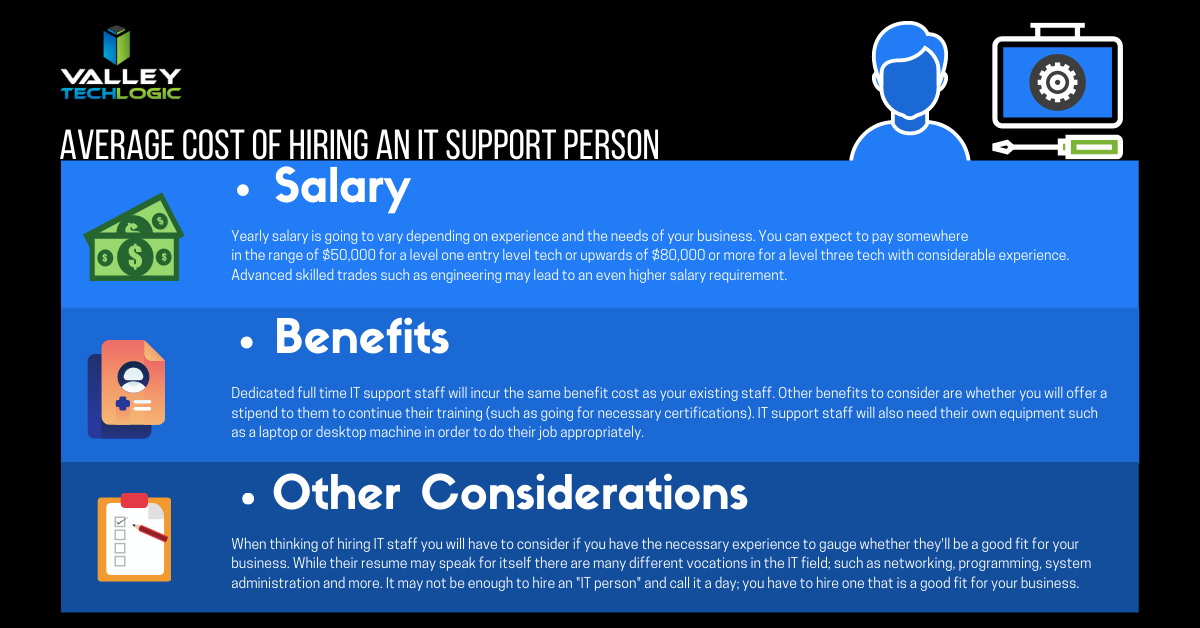
    Average Cost of an IT Support Person
    Click to see the full size version.

    If you look at our chart you can see that the cost of hiring one IT person is quite significant. You also must overcome the usual hiring hurdle of just finding the right person in the first place and dedicating your time to that task is something that should definitely be taken into consideration.

    The benefit of an IT support plan is someone else is doing that job for you, with the right company behind your business you will have an entire team of experienced techs available to you without having to pay a yearly salary for each one.

    Some technology service providers even offer flat monthly cost plans that come with generous or even unlimited support included. We’re proud to be one such company that offer plans that eliminate many of the billing headaches surrounding outsourcing your IT for our clients.

    While our own plans are multifaceted and cover project work, onsite and help desk support, cybersecurity and more – you may be asking what types of plans are usually available in the marketplace.

    1. Full Managed IT Department Support – This is what we offer, we cover everything you could need that’s IT related.
    2. Managed Support Services – This is where remote and help desk support is available but not onsite. Good for getting back into locked email accounts but not ideal for complicated IT issues.
    3. Managed Software as a Service (SAAS) – This is a managed service for one particular type of software. Notable examples include Google Apps, Salesforce, ZenDesk and DocuSign.
    4. Managed Networks and Infrastructure – VPNs would fall into this category, as would managed cloud services such as Amazon Web Services (AWS).
    5. Business Intelligence and Data Analytics – Consulting services that help you with your web presence and the best ways to apply technology to your business would fall into this category of managed services.

    These aren’t the only examples of IT support plans, but we feel they’re the most notable.

    Many small or medium sized business owners also avoid the issue entirely by doing their own IT. We wrote about why that may not make smart business sense here, but in a nutshell it comes down to how much you really value your time and whether your efforts spent there are the best use of it.

    We can offer advice on what the best fit is for your particular business, if you’d like to book a free 10 minute consultation you can find our calendar here. We’re offering easy virtual appointments and even if you don’t choose us, we can help you leave with a plan.

    Looking for more to read? We suggest these tech articles from the last week.

    This article was powered by Valley TechLogic, an IT provider in Atwater, CA. You can find more information at https://www.valleytechlogic.com/ or on Facebook at https://www.facebook.com/valleytechlogic/ . Follow us on Twitter at https://x.com/valleytechlogic.

    Looking for IT Services in Fresno, Modesto, Stockton, Ceres, Atwater, Merced, Visalia or Lodi? We cover all these areas and more!

  • Does doing your own IT as a business owner really make sense? We did the math.

    Does doing your own IT as a business owner really make sense? We did the math.

    Business owners have a lot on their shoulders, especially in 2020. Delegating is no easy thing, painstakingly raising a business from the ground up lends itself to naturally being very protective over it.

    There can even be a sense of pride in doing things yourself for as long as you can. Each time you must hire out for a job you previously did yourself there can be a sting to it, as well as a feeling that you’re giving up control (which you are, but it’s a good thing!). We know nothing can feel more worrisome about losing control over than the IT systems that power your business.

    The thought of hiring someone else to do your IT for you can feel like handing over the keys to your kingdom. When it comes to your data and the systems you and your employees work on, keeping these things afloat is often synonymous with keeping your business running.

    While there might be something nice about not spending a weekend on a downed system or having to phone your internet provider yourself when your networks down, is it really worth the concerns that might arise from it not being in your sole control?

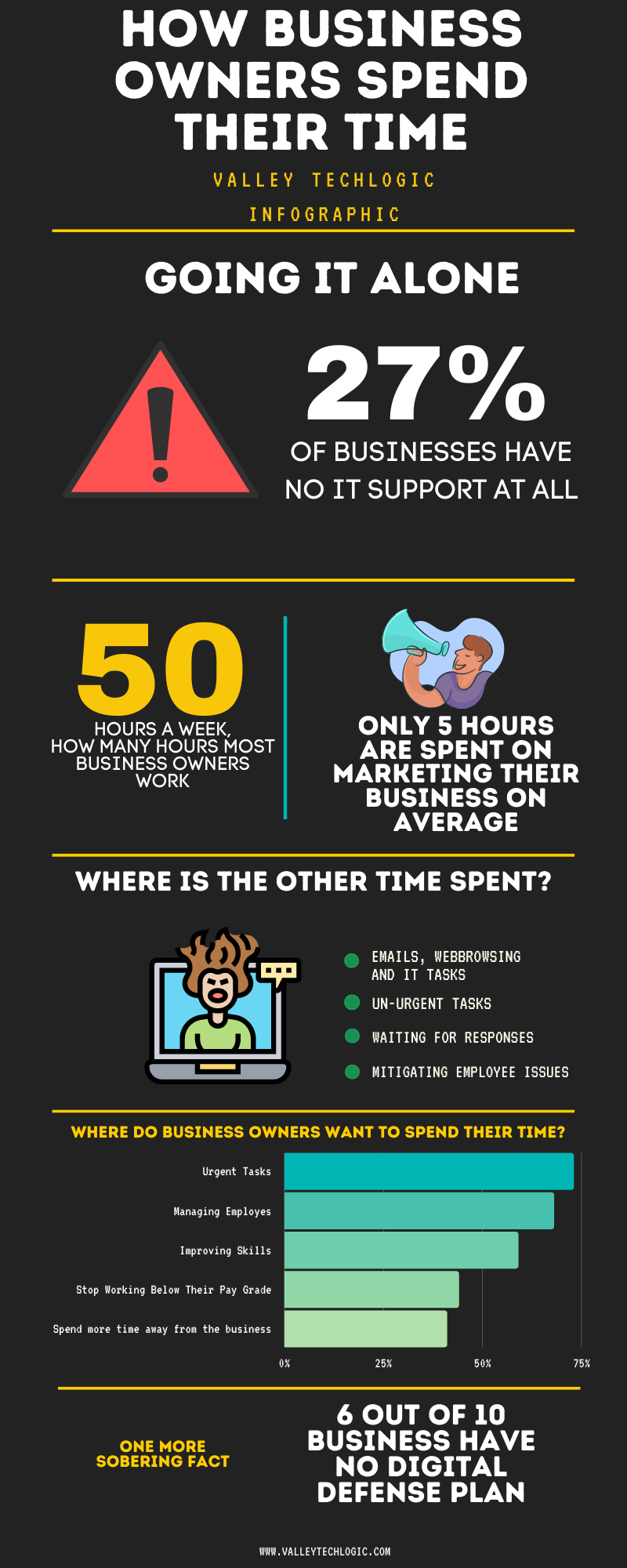
    The statistics say yes. Just take a look at this graphic.

    Doing Your Own IT Chart

    As you can see, business owners are working hard but aren’t spending their time where they would ideally want to. When you get bogged down with the everyday minutia you can lose sight of what made your business the success it is, the effort poured into actually building it.

    Also, while we don’t want to question anyone’s IT prowess if that isn’t your day job there could be things that are overlooked. Cyber security is something we write about a lot here and for good reason, thinking your business won’t be a target for any given reason is just wrong.

    Hackers are opportunists and if there is an opportunity for them to get into your business, they’re going to take it. IT professionals have all the tools necessary to thwart them at their disposal, but they can only do implement them when they’re part of your team.

    As with all things that are recommended to you, it’s good to have an open mind and a critical. These are important decisions you are making for your business after all.

    If you’re located in the Central Valley and would like to have a consultation to find out what your options are, we’d be more than happy to go over them with you.

    Looking for more to read? We suggest these tech articles from the last week.

    This article was powered by Valley TechLogic, an IT provider in Atwater, CA. You can find more information at https://www.valleytechlogic.com/ or on Facebook at https://www.facebook.com/valleytechlogic/ . Follow us on X at https://x.com/valleytechlogic.

    Looking for IT Services in Fresno, Modesto, Stockton, Ceres, Atwater, Merced, Visalia or Lodi? We cover all these areas and more!

  • On the Fence About Outsourced IT? Here are the Top 5 Reasons to Consider it.

    On the Fence About Outsourced IT? Here are the Top 5 Reasons to Consider it.

    Now as a provider of outsourced IT we’re considerably biased, but we also know the value outsourcing some or all of your IT can provide to your business. We wanted to touch on the top reasons you should consider utilizing outsourced IT in your business.

    First though we would be remiss if we didn’t go over the variety of outsourced IT available on the market. From a single person who helps on a contractor like basis to full scale operations that are the same as having an entire IT department, the differences in what’s out there is vast and there’s something available for every business.

    To decide on what variety is right for you, you need to consider what your businesses needs are. Do you already have an IT team and just need some additional assistance with routine tasks hamstringing your business currently? Are you utilizing the “a wish and a prayer” model by having no IT at all? NOT a good idea by the way.

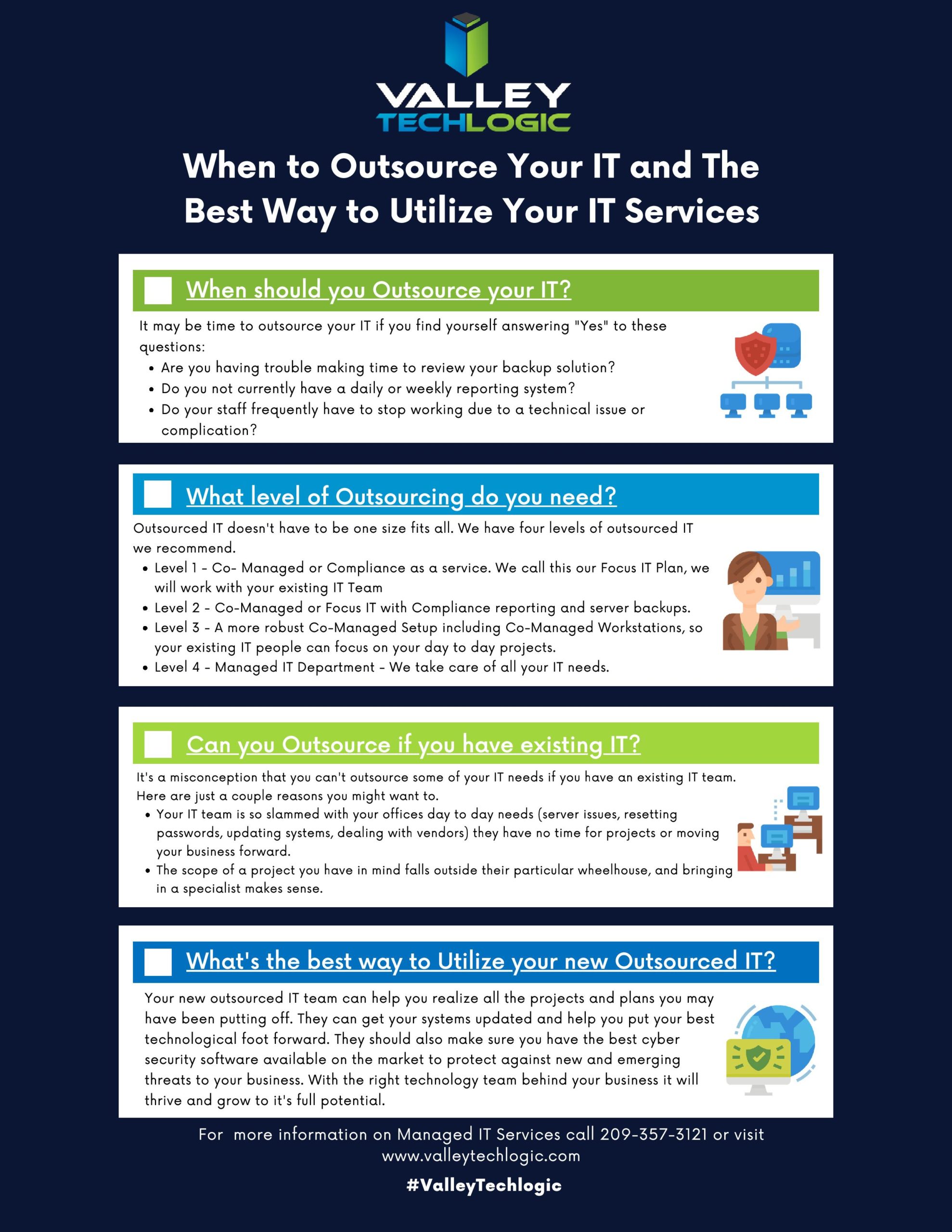
    We developed this chart to help businesses figure out what kind and what level of outsourcing they may need.

    When to Outsource Chart

    In addition to our chart here are 5 examples of how outsourced IT can bring your business to the next level.

    1. Is the cabling in your office currently a nightmare? Do you walk into the server closet and find yourself wondering if it’s up to code or perhaps even a fire hazard? This is one project no one wants to tackle but once it’s done, you’ll wonder how you went so long without it.
    2. Your IT team is great, but they’re so bogged down with the day to day minutia they don’t have time to bring your business to the next level. Do you have upgrades that have been on the back burner forever? Or perhaps they just don’t have time to maintain your backups as well as you would like. Outsourced IT can fill in the gap and give you the footing you need expand your business.
    3. Remote IT, setting this up right can feel like an impossible task. Maybe your workers are regularly stuck unable to do their job due to login issues, or you just aren’t sure how to approach the topic of cyber security with your employees working from home. Outsourced IT can be the extra hands you need to get it going right.
    4. Perhaps you’ve been telling yourself, who needs IT? You’ve gotten by this far without it. We’re sorry to say, that’s just luck, and you don’t want to hang your business on continuing to stay lucky.
    5. Training new IT staff is difficult and expensive, with an experienced IT provider you don’t need to worry about that and can instead focus on your core business.

    This is in no way an exhaustive list of all the ways we think outsourcing IT could be a smart choice for your business. One thing we do want to mention is to vet the company you choose to outsource to carefully, you’re trusting them with your data and network after all.

    Choose a company with good reviews and references and one that guarantees the work they do. Also, if you’re thinking about switching IT providers it’s okay to vet the new company before letting the old one know you’ll be moving on.

    If you need more advice or assistance on this or other technology topics, reach out! At Valley Techlogic we’re here to help.

    Looking for more to read? We suggest these tech articles from the last week.

    This article was powered by Valley TechLogic, an IT provider in Atwater, CA. You can find more information at https://www.valleytechlogic.com/ or on Facebook at https://www.facebook.com/valleytechlogic/ . Follow us on Twitter at https://x.com/valleytechlogic.

    Looking for IT Services in Fresno, Modesto, Stockton, Ceres, Atwater, Merced, Visalia or Lodi? We cover all these areas and more!