Category: Cyber Security

  • How much are you worth on the Dark Web?

    How much are you worth on the Dark Web?

    Not you specifically, but the data that makes up your online activities and private details? What about your various web accounts, for example did you know a hacked Netflix account with 12 months of service is worth $44 on the Dark Web as of 2021?

    We know the Dark Web is a nebulous concept and most of the people we talk to really don’t feel as though it has much to do with them. There’s even those that have resigned themselves to the fact their data is just “out there”, but take solace that in the flux of so many people who experience identify theft (1, 387, 615 reported cases in 2020) there’s just no way a hacker would ever reach them personally.

    If you’re a business owner this is of course, a crock of baloney. While there are many business owners in the US, their numbers pale in comparison to the vast swafts of people who don’t own a business and thereby don’t have valuable employee and financial data within their purview. The fact is by simply owning a business, you’re more vulnerable to being a target of identity theft.

    Business identity theft and consumer identity theft typically occur with the same goal in mind, financial gain for the bad actor. However, business identity theft carries a much larger trickle-down effect. It’s not only your own data that’s at risk, there’s also that of your employees and your business itself.

    Business size doesn’t affect the rate at which you’ll be targeted either, in fact during the COVID pandemic, business identity theft soared across the board.

    This all leads us back to what hackers hope to gain and what your financial data and other pertinent details and accounts are really worth on the dark web, we’ve created this chart with some notable items, but you can find the whole list for 2021 here:
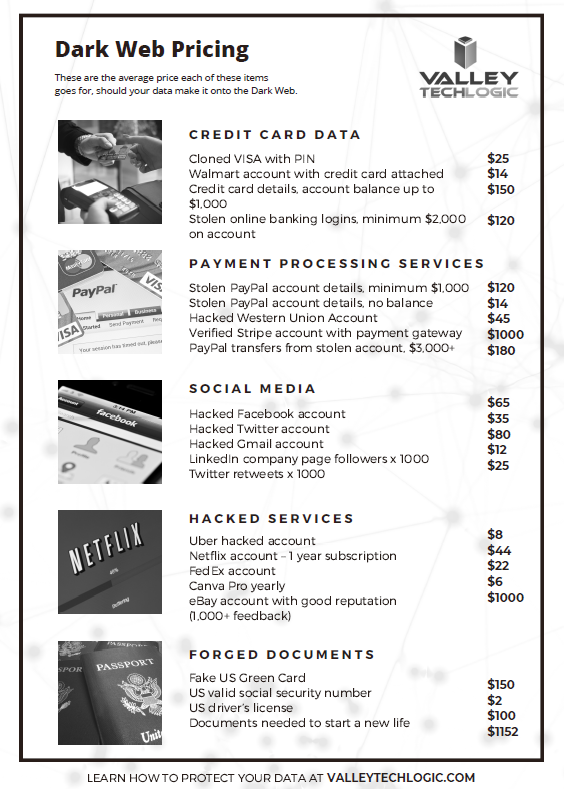
    Click to grab the full size version.

    As the website above states, the quantity of these items found on the dark web also has grown considerably in the last year. It’s predicted cyber theft will cost the world $10.5 trillion annually by 2025. Cyber crime is more profitable than the global drug trade at this point in time.

    So instead of thinking “it won’t happen to me” you should begin considering what you will do when it does happen to you, or even better – what you can do to stop it.

    For instance, at Valley Techlogic we provide all of our customers with Dark Web Monitoring as a routine part of their services with us.

    Dark web monitoring won’t stop your details from being leaked but it will help you monitor and prevent further damage. If your credentials are made available to hackers and you’re aware of it, it’s a lot easier to change them ahead of any damage being done to your accounts and systems.

    You can also partner with an IT provider who has a cyber security stack that exceeds what you could procure on your own. This allows you to take advantage of a robust cyber security package without trying to manage and absorb the cost yourself, allowing you to protect your business and even save money.

    Finally, your provider can help you comply with a cybersecurity framework recommended by the US government, such as NIST or CMMC. This will offer you the best most comprehensive protection from business identity theft.

    Valley Techlogic can assist you with all of these recommended cybersecurity practices. Learn more by taking a quick 10 minute discovery call with one of our tech experts.

    Looking for more to read? We suggest these other articles from our site.

    This article was powered by Valley TechLogic, an IT service provider in Atwater, CA. You can find more information at https://www.valleytechlogic.com/ or on Facebook at https://www.facebook.com/valleytechlogic/ . Follow us on Twitter at https://x.com/valleytechlogic.
  • 10 scary cybersecurity statistics business owners need to know

    10 scary cybersecurity statistics business owners need to know

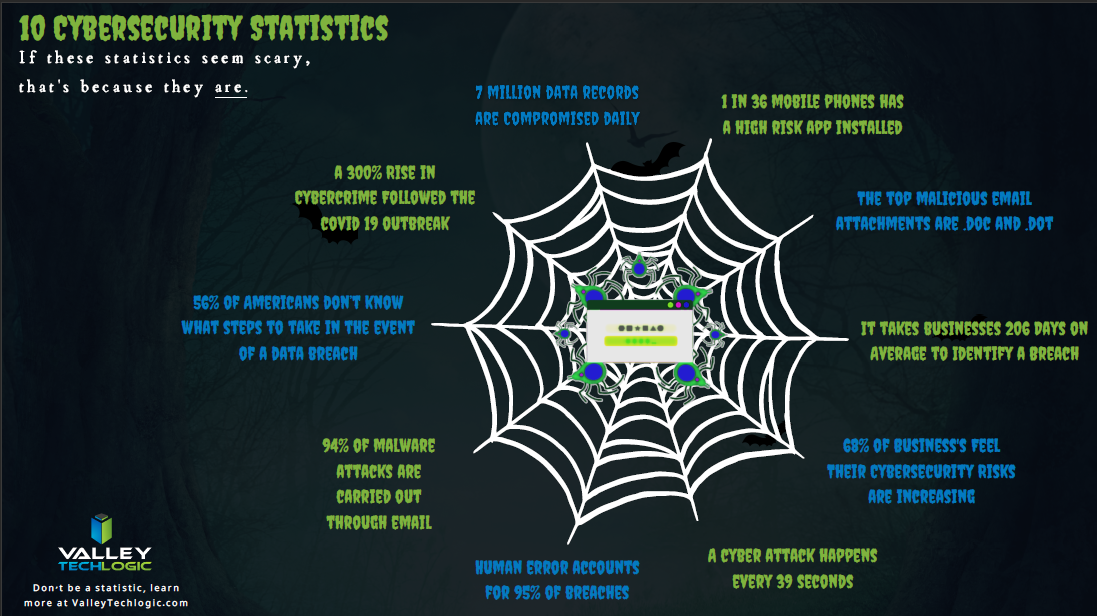
    Halloween is approaching and we thought it would be appropriate to cover some bone chilling cybersecurity statistics business owners NEED to know to protect their business.

    Cybersecurity is something we all know we need to do more about but also don’t like to think about, however for business owners’ avoidance won’t make the threats any less real.

    Take a look at our web of cybersecurity statistics and read on to learn how they can make a mess for your business (and what you can do to fix it).

    Click to view the full size version.

    While these statistics are scary, we already suspect you’re thinking “it won’t happen to me”. The reasons business owners come to this conclusion are numerous but the top 3 we’ve encountered are.

    1. My business is too small.
    2. I’m not in a sector that’s targeted by hackers.
    3. Even if I was hacked, I don’t have anything they would want.

    That last one is a real headscratcher for us. What business operates without any financial data? What about your personal data and that of your employees? Your customers? That’s all valuable data on the dark web.

    The scariest statistic of all that wasn’t included in our chart is that 60% of businesses fail following a cybersecurity event.

    Preventing an attack is crucial for your business, remediating an attack after the fact is not a clear-cut solution. Usually not all of your data can be recovered, you can’t make up for the lost time spent dealing with the attack, and if it becomes public your reputation may never be what it once was.

    There are easy solutions you can put in place today that will reduce your risk dramatically.

    1. Educate your employees about phishing emails, this is one of the biggest sources of threat events.
    2. Ensure two-factor or multi-factor authentication is required on company systems and devices.
    3. Have a company wide password policy that includes not sharing your password with others and coming up with complex yet memorable passwords that can’t be brute forced by a would be attack.

    If it’s all overwhelming and you don’t know where to start, we don’t blame you. Navigating the complicated world of cybersecurity is really something that business owners should let a professional handle. If you’re in the Central Valley, Valley Techlogic can be your partner in security and more. Learn more today.

    Looking for more to read? We suggest these other articles from our site.

    This article was powered by Valley TechLogic, adns, n IT service provider in Atwater, CA. You can find more information at https://www.valleytechlogic.com/ or on Facebook at https://www.facebook.com/valleytechlogic/ . Follow us on Twitter at https://x.com/valleytechlogic.

  • 5 Ways “Tribal Knowledge” Sabotages Your Cybersecurity Efforts

    5 Ways “Tribal Knowledge” Sabotages Your Cybersecurity Efforts

    Even if you’re unfamiliar with the phrase “tribal knowledge” you’ve still most likely participated in it. Tribal knowledge is anything in your workplace people just “know”. If you have a particular co-worker that gets upset if the AC is turned down below 75 so no one does, that’s tribal knowledge. If the snacks in the breakroom are first come first serve and no one can claim dibs, that’s also tribal knowledge.

    Tribal knowledge is anything in your workplace that is common knowledge and is not documented. If the rules are posted somewhere it goes from being tribal knowledge to policy, and when it comes to the technology in your business, it is much more secure to rely on policy than tribal knowledge.

    Having policies for your technology holds everyone in your organization accountable. No one can claim they didn’t know the rules if the rules are clearly outlined and defined. Having effective policies are also necessary for maintaining your compliancy with federal rules regarding cybersecurity and business and for meeting the requirements for things like cybersecurity insurance.

    Here are the five ways tribal knowledge typically sabotages your cybersecurity efforts:

    1. The rules are loosely applied. If somethings not policy, then it can be difficult to make sure everyone is on the same page. A new hire will not be aware of your rules from the start and others may feel the rule doesn’t apply to them because they haven’t been strictly told it does.
    2. The rules are up to interpretation. What you think something means and what someone else may interpret something meaning can be vastly different, especially when being communicated person to person where some of it is probably getting lost in translation.
    3. You have no documentation. If the guidelines for online safety in your business are communicated verbally, you have no documentation for how or when they’re being applied. If you have a ransomware attack and you go to your insurance company without documentation, you’ll most likely be turned down.
    4. You’re not keeping up with the times. If you have employees stuck on the way things “have always been done” instead of evolving policies to fit your workspace as it grows, you’re going run into a problem if you ever need to implement comprehensive cybersecurity changes in the future.
    5. You’re losing access to relevant data. Policies help you document your processes, and that documentation is data that could help your business grow. If a certain activity is not working or could be working better, the documentation you’re creating with comprehensive policies could help you find out sooner which will save your business time and money.

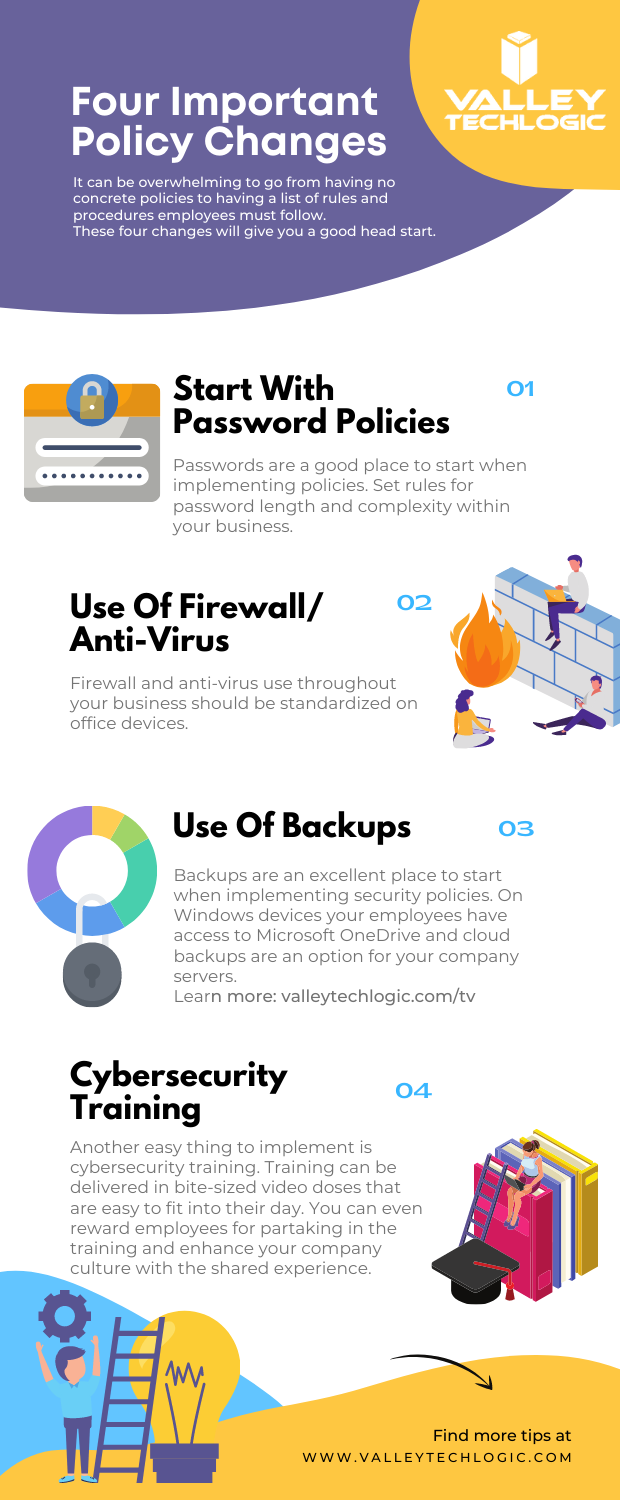
    In addition to these five tips, we’ve also created this PDF for four easy things to implement in your business (click to download).

    Four Policy Changes To Start With
    Click to download.

    These items will get you on the right track but if you feel like it’s time to get serious about cybersecurity, it’s best to leave it to the professionals. At Valley Techlogic, we have over 15 years in the cybersecurity space. We have a robust cybersecurity package that can be used standalone to leverage our cybersecurity stack if you already have an IT team in place or in conjunction with our IT service plans if you don’t currently have reliable assistance for your business’s technology. Schedule a consult today to learn more.

    Looking for more to read? We suggest these other articles from our site.

    This article was powered by Valley TechLogic, adns, n IT service provider in Atwater, CA. You can find more information at https://www.valleytechlogic.com/ or on Facebook at https://www.facebook.com/valleytechlogic/ . Follow us on Twitter at https://x.com/valleytechlogic.
  • October is National CyberSecurity Awareness Month, Our Checklist Will Get You Started

    October is National CyberSecurity Awareness Month, Our Checklist Will Get You Started

    Every October the CyberSecurity & Infrastructure Security Agency (CISA) releases a list of resources and tips for National CyberSecurity Awareness Month – which is now in its 18th year.

    This year’s theme is “Do Your Part. #BeCyberSmart”. There has been an onslaught of news worthy ransomware attacks, DDoS attacks and data breaches (up 38% this year compared to last) in 2021 and there has never been a better time to address what the average person or business can do so they don’t end up as part of these statistics.

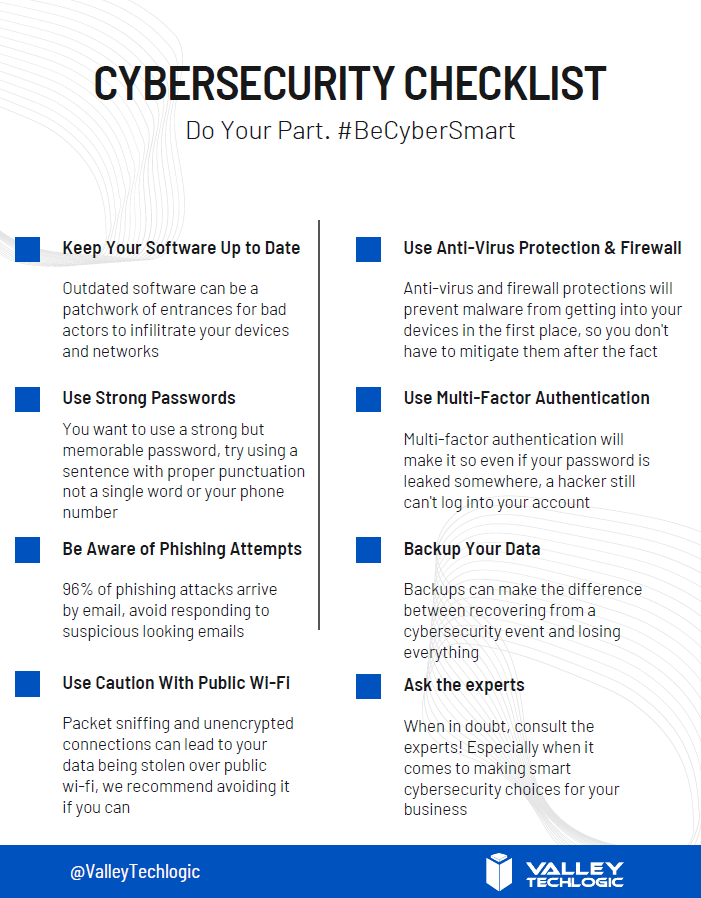
    We’ve created this checklist so you can see if you’re following the right path to keep your business safe from outside intruders.

    Click to download the online capable version.

    Cybersecurity requires ongoing maintenance to succeed. Following simple safety steps will help but it’s important not to disregard active threats to your business from the outside.

    Ongoing employee training is one way to combat those threats, cybersecurity training has evolved to include bite size doses of good advice for your employees that could make the difference between inadvertently falling for a phishing scam or attack attempt and reporting it to your IT team as they should. 95% of data breaches involve human error.

    It can also be important to have a team behind you making sure all of your company devices are maintained and updated, even if that outdated Windows 7 computer that sits in a corner is barely used it can still be a threat to your business. Older devices with outdated software can act as a gateway to allow bad actors into your business.

    More advanced maintenance such as enabling two-factor or multi-factor authentication on company accounts can be another important step to keeping threats out. If someone gets your password from another company’s data breach (which happens all the time) that phone pop up could prevent you from being hacked.

    Finally, having a comprehensive backup program for your businesses data is the final shield against cyber threats. We’re unique in that we offer not only active backups but archival backups as well. The archival backup is “Write once, Read many” which means you can look at the data as often as you like but it can’t be edited or deleted.

    A bad actor may find your unbacked up data, and they may gain access to your active backups, but that archival data is virtually bullet proof. For your important files, the ones that must not be deleted at any cost, having that backup there and ready if you need it is the peace of mind most of us would not want to be without (learn more about our backup program here).

    If this article has gotten you thinking about what you can do to improve your cybersecurity processes or even that you need to create a plan to get there, we’d love to help. Schedule a discovery call with us to learn more about how Valley Techlogic can help you be #CyberSmart.

    Looking for more to read? We suggest these other articles from our site.

    This article was powered by Valley TechLogic, adns, n IT service provider in Atwater, CA. You can find more information at https://www.valleytechlogic.com/ or on Facebook at https://www.facebook.com/valleytechlogic/ . Follow us on Twitter at https://x.com/valleytechlogic.

  • Massive DDoS Attacks Cripple VoIP Services

    Massive DDoS Attacks Cripple VoIP Services

    If you use VoIP in your business, you may have been affected by service outages so far this week.

    That’s because Bandwidth.com, a major hosting provider for VoIP services such as Accent, Ring Central, Twilio and more has been under assault by a major distributed denial of service (DDoS) attack. While they’re working tirelessly to reroute call streams, as of Tuesday outages were still occurring nationwide.

    Distributed Denial of Service (DDoS) attacks are not a new occurrence in the VoIP world, hackers regularly target VoIP services in an effort to gain a ransom to make the attacks stop. Canadian VoIP provider, VoIP.ms, has been under siege since last week by a DDoS attack being performed by the hacking group REvil.

    REvil, a Russian linked ransomware gang, was also responsible for the attacks on Kaseya that made major news in July. They are demanding $4.5 million from VoIP.ms to end the attacks but so far VoIP.ms is holding firm and not giving in to the demands.

    You may be wondering what happens during a Distributed Denial of Service (DDoS) attack or even what a DDoS attack is. During a DDoS attack hackers flood the target networks with service requests, bogging down the systems until they either slow to a crawl or go offline completely due to the overload.

    To put some context behind it, Cloudflare a cybersecurity oriented service provider that helps websites mitigate DDoS attacks were themselves hit by a DDoS attack last month that served their website 17.2 million requests per second. The real target of the DDoS attack, a financial customer of Cloudflare, was served 330 million attack requests in seconds. Most websites and online servers cannot bear the brunt of that many requests instantaneously.

    VoIP providers are an easy target for ransomware, cutting off communications to the outside world for those who are affected is a tangible problem that creates a heightened sense of urgency. The same urgency cannot be replicated from your business’s website being down for a while, though the loss of revenue that may occur from that should not be overlooked. For some business’s that loss can equal as high as $250,000 hourly.

    You may be thinking, I can’t have my phones go down I’ll just switch back to a landline provider even if the cost is higher and it would lack many of the features acquired with VoIP. I’m sorry to say It would do you no good.

    Nothing is truly cut off from the web these days, even your typical landline phone utilizes a web-based connection somewhere down the line. POTS aka Plain Old Telephone Service which performed phone services over copper wires is going the way of the dodo in most places.

    The FCC even called for a mandatory termination of POTS lines In 2014. As of 2018 only 5% of the country was landline only.

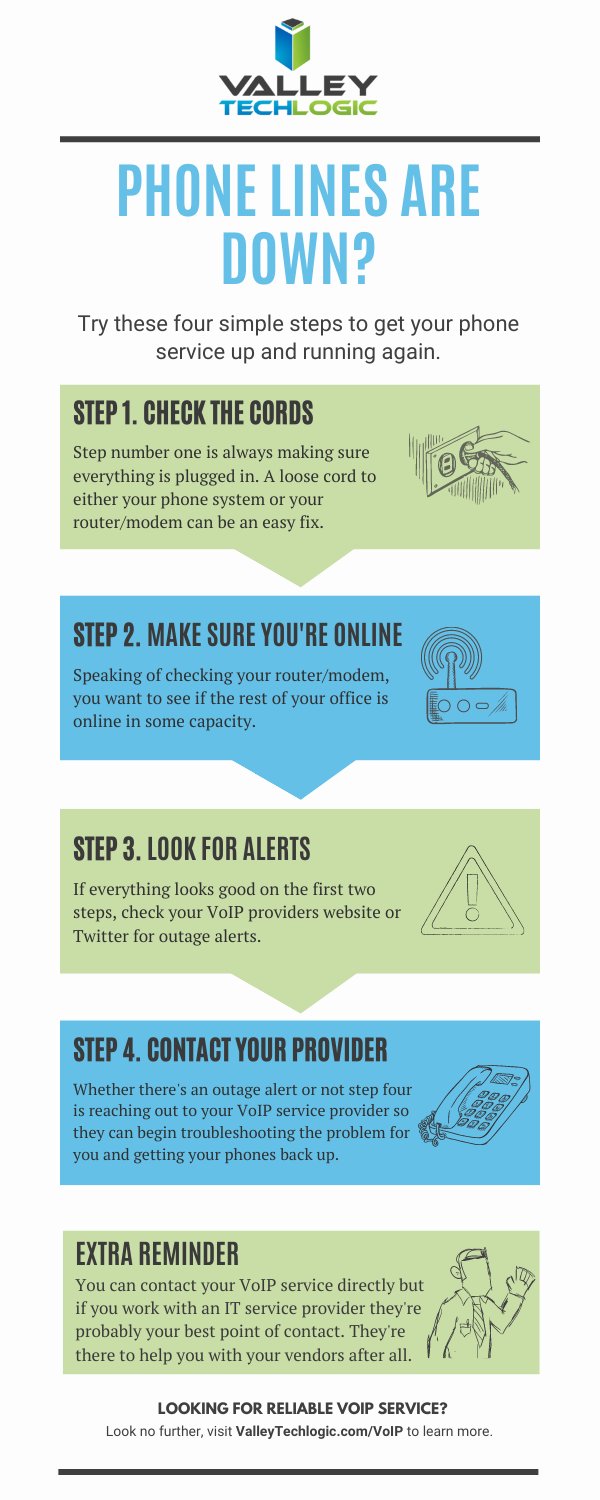
    To sum it up, avoiding the internet when it comes to making phone calls is no longer a possibility. With that said we understand that having your phone lines down is disruptive and unnerving. We’ve created this checklist with steps to take if you find your phone service down.

    If you don’t have a service provider to reach out to in the event of a service outage, we can help. We are proud of our VoIP service solutions and the reliable uptime we maintain for our clients. You can learn more about our VoIP services here. We even have a promotion for new customers. ?

    Looking for more to read? We suggest these other articles from our site.

    This article was powered by Valley TechLogic, an IT service provider in Atwater, CA. You can find more information at https://www.valleytechlogic.com/ or on Facebook at https://www.facebook.com/valleytechlogic/ . Follow us on Twitter at https://x.com/valleytechlogic.
  • Can you spot the phishing clues? And 10 tips to avoid falling for a phishing scam

    Can you spot the phishing clues? And 10 tips to avoid falling for a phishing scam

    If you’re not aware, phishing is another word for scams perpetrated over email. It was coined in 1996 and was first associated with hackers attempts to steal America Online (AOL) accounts, and it has not slowed down since then.

    As of 2021 most hacking attempts are phishing scams, the phrase is meant to evoke the image of a hacker literally fishing for their victims by baiting a hook which in this case is a credible looking email from a place you might actually do business from, a colleague or a family member. 94% of malware attempts originate from an email sent to the victim.

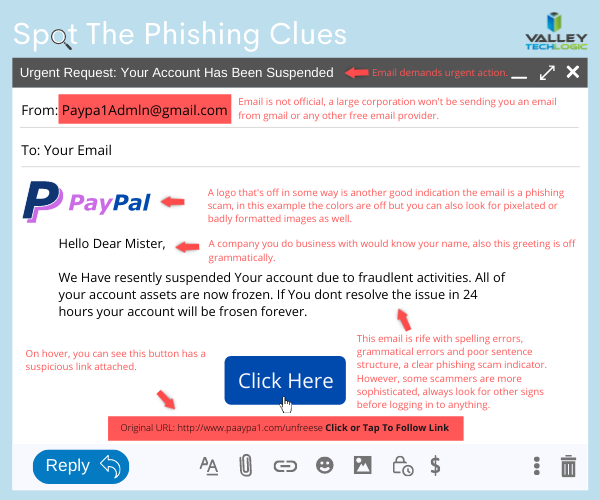
    Well as credible as they can manage, many phishing attempts are poorly worded and grammatically incorrect as the senders are from another country from the victim. In the image below we showcase a phishing email you might receive, click to reveal the answers.

    Spot the phishing clues
    Click to reveal the clues.

    Not all phishing attempts will be so obvious though, here are our 10 tips to avoid falling for a phishing scam.

    1. You are asked to reply with sensitive details. A legitimate business will never ask for your private details via email, if you’re unsure contact the business directly to ask.
    2. The message says you must respond urgently or face dire consequences. Legitimate businesses such as the financial institution you bank with won’t relay an important message over email alone, and they’ll never threaten you.
    3. The email contains a non-standard email attachment. While even standard email attachments can contain malware, a non-standard email attachment is a clear sign something is amiss.
    4. The senders email address doesn’t match the contents. As in our example, a legitimate business (especially a large one) won’t be using a gmail address. You also want to watch out for slight misspellings, such as an email coming from admin@paypa1.com
    5. The email contains an unusual request. You receive an email that looks like it’s from your boss, and he’s saying he wants to reward some key players in your company by gifting them gift cards from a popular big box store. He says not to give them to the players directly, simply reply with the gift card numbers and he’ll handle it. This is just one example of a scam we have unfortunately heard of happening. If the email is requesting large amounts of money be spent in unusual way or private details be sent over email, even if the email looks legitimate you should verify with the supposed sender first.
    6. It has an attachment you weren’t expecting. If receive an email with an attachment and the body suggests you requested information, but you don’t remember doing so, it’s probably a phishing scam.
    7. The email says you won a prize, but you must enter your banking information to claim it. Prizes are a common phishing scam trope; they may also try to get you to download a suspicious attachment.
    8. The URL in the email doesn’t match the business it claims to come from. As in our example, phishing attempts often involve a similar but not quite right URL. Many scammers will try to gain the victims trust by sending them to an “official” looking website where they will login with their legitimate credentials, allowing the scammer to gain access.
    9. The content is canned. Many phishing scammers reuse the materials of others. One example is you receive a suspicious sounding email, such as someone saying you have stolen their copyright images and you must visit a website to confirm. If you Google the email you may find examples of others online who have received that same
    10. The greeting doesn’t match the content. This is a simple one, if you receive an email supposedly from your boss but the greeting starts with “Dear” or another out of character greeting, it’s probably a phishing attempt.

    This is only a start, many phishing attempts are highly sophisticated and difficult to spot but knowing some of the signs will help you be more attentive to things that may be wrong with an email you receive. We also have found for our clients, randomized simulated phishing attempts can help them with training their staff to keep an eye out for phishing attempts.

    Most successful hacking attempts involve a human element, training is your only first line of defense. If you would like to increase your defense against phishing attempts, malware, ransomware and more, Valley Techlogic can help. Schedule an appointment with us today to learn about our comprehensive cyber security packages for businesses.

    Looking for more to read? We suggest these tech articles from the last week.

    This article was powered by Valley TechLogic, an IT service provider in Atwater, CA. You can find more information at https://www.valleytechlogic.com/ or on Facebook at https://www.facebook.com/valleytechlogic/ . Follow us on Twitter at https://x.com/valleytechlogic.

  • The Extreme Side of RAAS (Ransomware As A Service)

    The Extreme Side of RAAS (Ransomware As A Service)

    When many people think ransomware they usually think on the small scale, someone’s email or computer being held hostage until a small sum is paid or an IT professional can assist with the problem (for the lucky ones).

    Or perhaps you think of the major breaches where millions of accounts are leaked to the public, usually containing emails, phone numbers and other identifying information. As a whole the public has become desensitized to these sort of breaches (even though they’re still a serious problem).

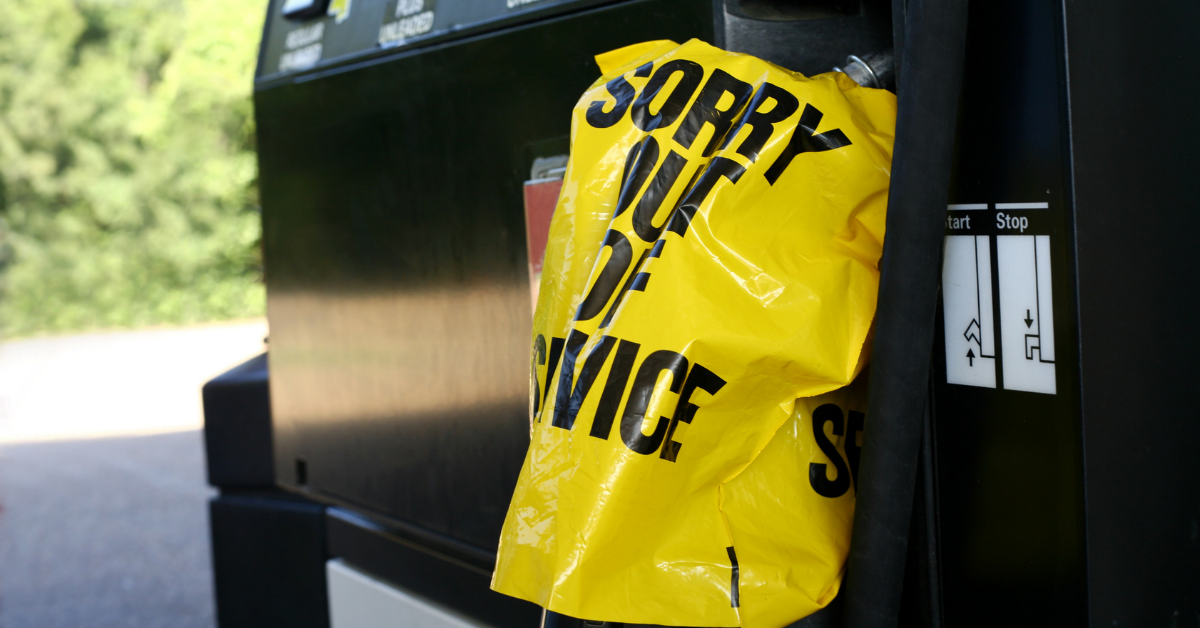
    What we probably do not immediately jump to is a full-scale terrorist level attack that can cripple large swaths of the country – such is the case with the Colonial Pipeline Hack.

    Tech News #10


    While it’s still an ongoing situation, here are the details in summary.

    Systems were shut down Friday at the Colonial Pipeline, a pipeline which supplies 45% of the fuel used on the East Coast. FBI has confirmed the pipeline was shutdown voluntarily to prevent future damage and to assess the situation, however this has left much of the country in limbo as gas prices climb and many states have declared a state of emergency.

    It’s being urged that residents in those states do not stock pile gas as that will only prolong the problem of shortages once operations resume. As of Wednesday, operations are still down but they say they hope to resume operations by the end of the week.

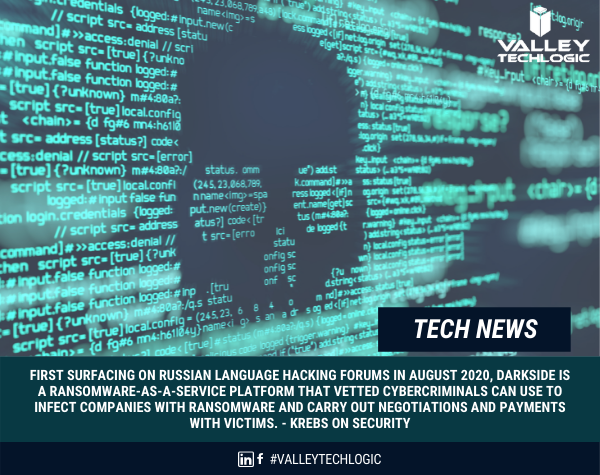
    It’s also been confirmed by the FBI that the RAAS (Ransomware As A Service) group DarkSide is responsible for the attack. They create hacking tools that are then used in attacks on businesses, the group itself usually targets for profit businesses in English speaking countries.

    As a relatively new hacking group, they have since August 2020 conducted attacks on various businesses trying to extort money from them by threatening to release the data they obtain in their hacking efforts. They claim to donate all or part of their ill-gotten gains to charity organizations. Their ransomware demands range from $200,000 to $2 million.

    They claim to operate with a code of ethics and will not attack hospitals, schools etc. However, this pipeline attack will have a trickle-down effect to those services and the public at large.

    Ransomware in any form is disruptive and violating and it’s clear more needs to be done to stamp out these attacks.

    Raising public awareness about cyber security and the efforts required to be safe online will help. In addition to that, requiring businesses to have protective measures in place will cut off these groups before they’re able to acquire the funding they need to become large hacking organizations.

    We need to work together to making hacking less lucrative, because as it’s been shown our way of life and public safety may be at stake.

    If you run a business and need help with your cyber security services, we’re here for you. We have tailored cyber security plans for businesses of all sizes, and we would be happy to guide you through the process of protecting your business. Schedule a free consultation here today.

    Update: As of Thursday, the Colonial Pipeline has resumed operations. It’s unknown how long the gas shortages caused by the outage will last.

    Looking for more to read? We suggest these tech articles from the last week.

    This article was powered by Valley TechLogic, an IT provider in Atwater, CA. You can find more information at https://www.valleytechlogic.com/ or on Facebook at https://www.facebook.com/valleytechlogic/ . Follow us on Twitter at https://x.com/valleytechlogic.
  • Have a Dell laptop or computer? This vulnerability is one to watch out for.

    Have a Dell laptop or computer? This vulnerability is one to watch out for.

    Vulnerabilities that can broadly attack major systems or specific retailers are especially problematic. Many of these vulnerabilities are quietly patched before you’re even aware there was a problem but sometimes things can fly under the radar for a while.

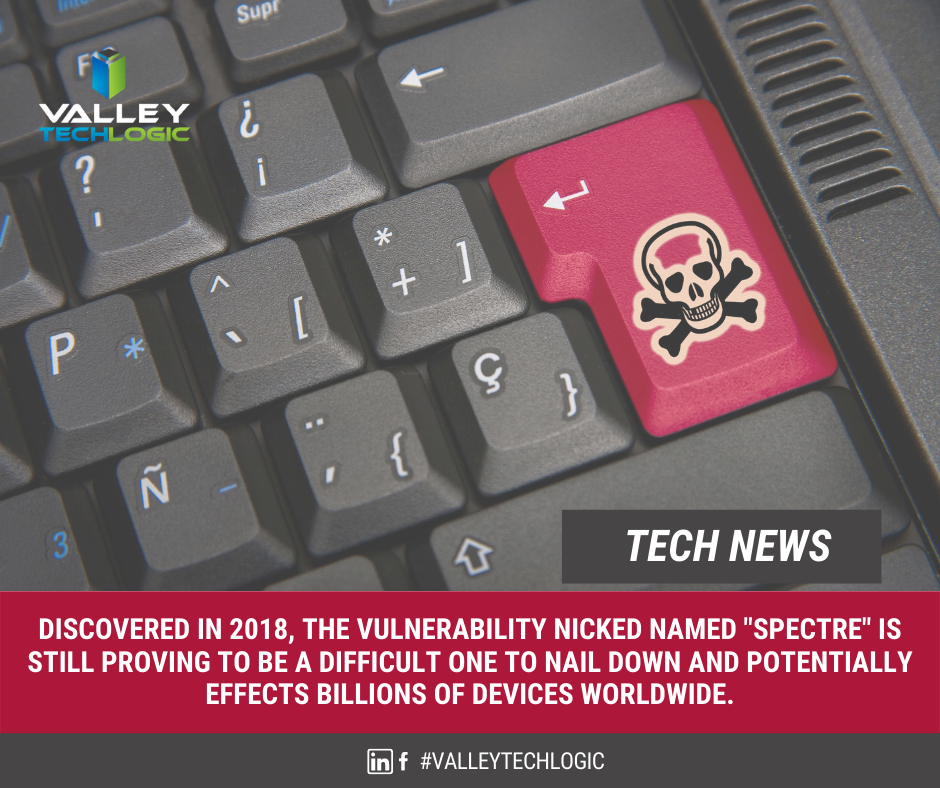
    Such is the case in an affected Dell driver that has been pushed out to machines for the last 12 years. It was recently discovered this driver can allow bad actors to possibly gain more access to the affected Dell systems. It’s estimated hundreds of millions of Dell computers, laptops and tablets could have the affected driver and be at risk.

    While it’s not considered critical at the moment because the affected computers would already have to be compromised in some way for it to be used, it’s still problematic because it could make removing malware or other system infections more difficult. These drivers would potentially allow them unrestricted to the affected machines in the event the user is hacked.Tech News #9

    There are currently no recorded cases of this exploit being used, however now that it’s been made public that may change. Researchers have held back the details of the exploit to allow users time to patch, and Dell has issued a security advisory regarding the driver. However, they have not as of writing revoked the affected driver.

    This is another reminder as to the importance of maintaining updates on your machines. Even with security measures in place, no system is perfect. Vulnerabilities can be discovered years later with varying levels of severity. By maintaining patching, you won’t be caught off guard or risk having your machines exploited by a vulnerability.

    Here are 5 patching best practices:

    1. Automate. If you can, automate the process. Schedule your patches to happen at a time you won’t be busy working on your computer.
    2. Plan your approach. If you’re managing patching for your business, you want to plan how you’ll approach patching company wide. It may be prudent to patch overnight or patch in waves if your business is open extended hours.
    3. Test patches. Test patches on a single machine before rolling them out company wide, sometimes patches can create problems that might necessitate a rollback and that might hinder your business if everyone in the office is down.
    4. Maintain patch levels. The last thing you want to do is fall seriously behind on patches. Patching will be a lengthy process as you try and catch up, and your machines may be left vulnerable in the interim.
    5. Get Help If You Need It. Patching your home machines is a fairly straight forward process usually but patching from a business perspective can have many intricacies beyond just “apply patches”. When in doubt, leave it up to the professionals.

    If you need help with patching or the myriad of other items that keep your office machines in tip top shape and safe from malware, Valley Techlogic is here for your business. You can schedule a free consultation here.

    Looking for more to read? We suggest these tech articles from the last week.

    This article was powered by Valley TechLogic, an IT provider in Atwater, CA. You can find more information at https://www.valleytechlogic.com/ or on Facebook at https://www.facebook.com/valleytechlogic/ . Follow us on Twitter at https://x.com/valleytechlogic.

  • Your Information Was Leaked in a Major Breach, Now What?

    Your Information Was Leaked in a Major Breach, Now What?

    In what seemed to be major news for only a brief period of time, over 500 million Facebook account details were leaked last week. The data included things like profile names, Facebook ID numbers, email addresses, and phone numbers. While this data may be online in other forms the combined data together makes it a treasure trove for phishers and scammers.

    The colossal total of 533 million accounts was accessed by hackers exploiting a bug in a Facebook address book contacts import feature. It was confirmed by Facebook that the exploit was patched in August 2019, but it is unclear how many times the bug was used before then. The information featured users from 106 different countries. News Tip About Hackers

    It’s clear from Facebook’s response that this data has been out there for a while, and no one knows how it’s currently being utilized by bad actors to phish and scam people. It hasn’t been released that password data was a part of the breach, but it’s still our recommendation that you change your password any time you hear news of a major breach from a service you utilize. As well as making sure you use different passwords for different sites (if you don’t already).

    But what else can you do? Here are our 5 tips to protect yourself after a breach occurs with a service you use or have used in the past.

    1. Keep an Eye Out for An Alert from The Company Affected. We feel companies should be duty bound to let their users know if a breach has occurred. You should keep an eye out for an email detailing the steps they have taken to protect your data after a breach, what may have been compromised, and what you should do to protect yourself.
    2. Monitor Your Financials. If the breach happened within a financial institution you utilize, or even one we all utilize by default (such as the Equifax breach) you want to take the time to monitor your financials for suspicious activity. Many banking and credit card issuers offer free credit reporting as part of their services now. You can even freeze your credit to be extra sure but keep in mind if you do try to open a new credit card or loan the freeze will affect you as well.
    3. Change Your Passwords. We recommend changing passwords if a major breach has occurred even if the business confirms no password data was leaked, you really can never be too careful. If you need help remembering your passwords for various sites as well as creating stronger passwords, we recommend our article on the top 3 password managers we recommend.
    4. Be Extra Wary of Suspicious Emails. Following a data leak, phishers and scammers will use this newly obtained information to try and reach out and trick you into handing over your financial or other personal information. They may have names of relatives or other people you know to utilize and try to get you to send them money. If you receive a suspicious email it is best to report it to your email provider.
    5. File Your Taxes Early. If your social security number was stolen as part of a breach, you may want to be prepared to file your taxes as soon as possible to avoid having your tax refund stolen by scammers.

    In addition to these five tips if the company that was breached offers assistance in the form of either monitoring your credit or tips on how to safeguard your account, we recommend accepting their offer. Data breaches occur so often now that the public is desensitized but they are still a threat that should be treated seriously.

    Data breaches that affect businesses are a different animal entirely. There is much more to monitor and safeguard and it is not something you should try to tackle alone. Valley Techlogic is experienced in helping businesses recover from data breaches and we can help you recover your data and protect it from further attacks. Visit here to schedule a free consultation to learn more.

    Looking for more to read? We suggest these tech articles from the last week.

    This article was powered by Valley TechLogic, an IT provider in Atwater, CA. You can find more information at https://www.valleytechlogic.com/ or on Facebook at https://www.facebook.com/valleytechlogic/ . Follow us on Twitter at https://x.com/valleytechlogic.
  • It’s Not Your Imagination, Ramsonware is On the Rise

    It’s Not Your Imagination, Ramsonware is On the Rise

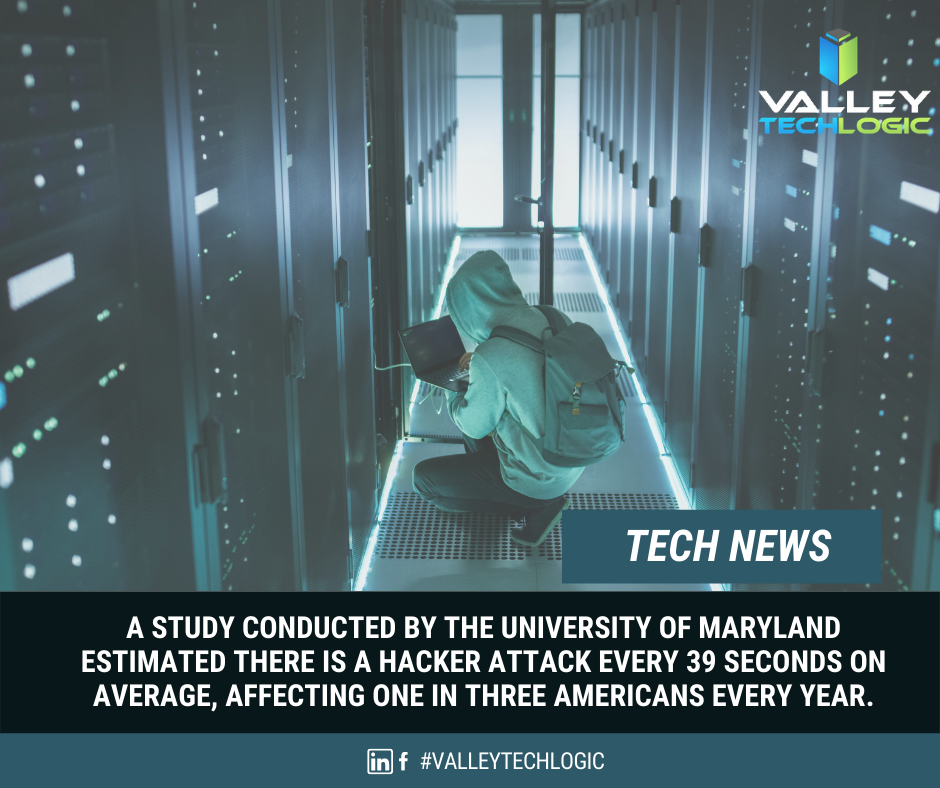
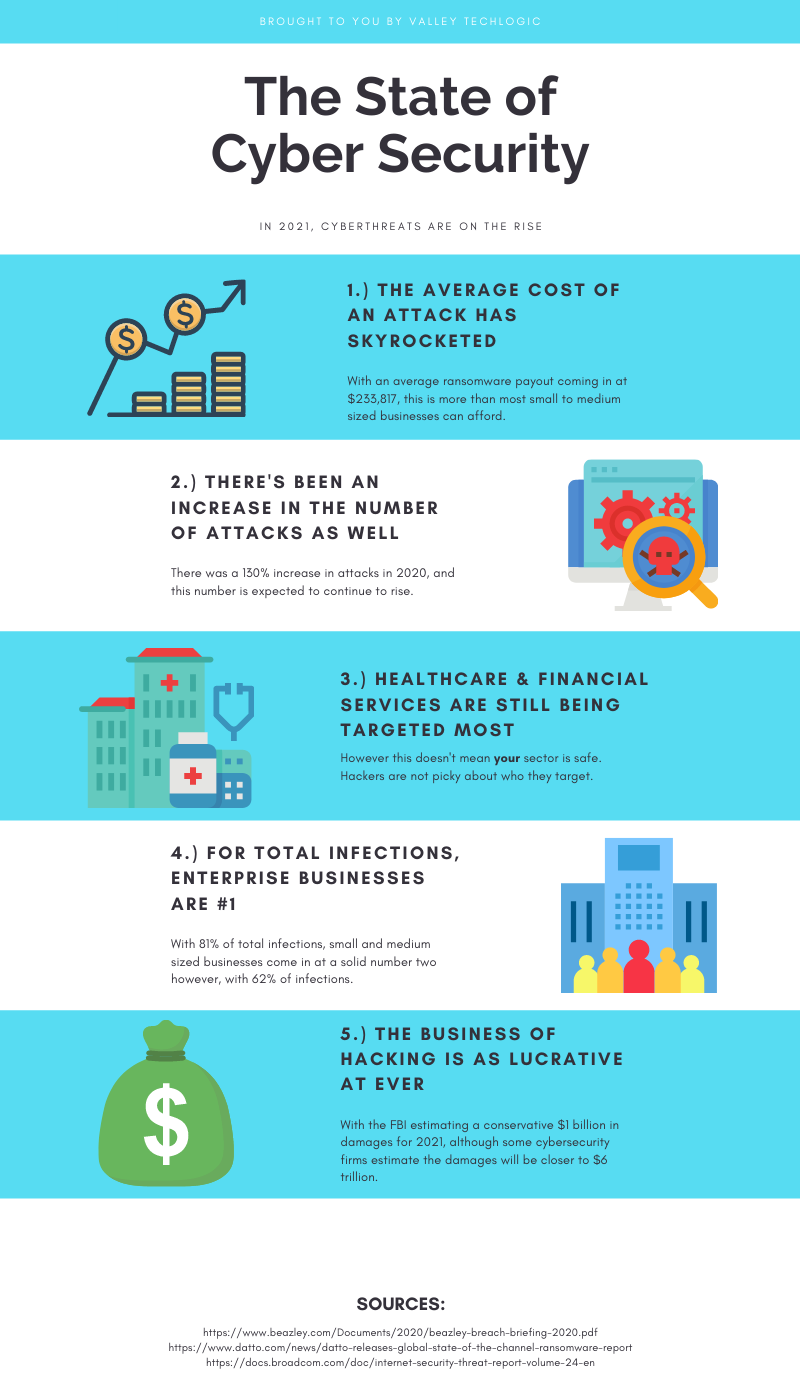
    We have talked about several major ransomware events over the past year, but these were far from unique. Ransomware and cyber security events have been on the rise lately and it’s been made abundantly apparent that NO ONE is immune to them.

    From the yet to be officially validated Kia Motors attack, to the narrowly avoided disaster with a Florida Water Plant. No attack had more widespread coverage for a while (including by us) than the SolarWinds breach that seems to go deeper and deeper. These are just a few in a massive list of growing ransomware events that have happened to companies of all sizes. If you think your business is too small to be a target think again.

    According to this Datto report, one in five small businesses will experience a ransomware event. While larger businesses may be eyed as prized targets by hackers, most of the time they also have the staff and resources to put up a better defense against cyber security threats. This makes them much harder for hackers to infiltrate.

    A lackadaisical attitude towards being hit by a ransomware can cost your business big time. Ransomware extortion amounts continue to skyrocket, with the average demand in Q3 2020 being $233,817 according to the cybersecurity firm Coveware.

    If you’re thinking a demand like that could bankrupt your business, you’d be correct in that fear. 60% of small businesses will go out of business within 6 months of a cyber security attack.

    We have made an infographic with statistics on cyber security threats in 2021 so far.

    Infographic on Cyber Security

    We’re not presenting this facts to you in an effort to make you feel hopeless, there is a way to prevent an attack from hitting your business in the first place. The ONLY way to avoid a serious cyber security threat is to have proactive cyber security prevents in place. Many business owners cannot achieve this on their own.

    Cyber security prevention is an ongoing process, it’s not just installing a virus scanning software and configuring a firewall and calling it good. Business level cyber security protections can be complex to configure and manage.

    Your business has more hardware, more data and more assets to protect. Comparing it to what’s needed to protect a home PC network is apples and oranges. If you’ve just been crossing your fingers that it won’t happen to you that’s NOT a good idea, because statistically there’s a good chance that it will.

    If your business needs assistance in a cyber security plan that’s not just about checking boxes or relying on hope but actually protecting all of the valuable systems you need to run your day-to-day operations, reach out to Valley Techlogic today.

    Looking for more to read? We suggest these tech articles from the last week.

    This article was powered by Valley TechLogic, an IT provider in Atwater, CA. You can find more information at https://www.valleytechlogic.com/ or on Facebook at https://www.facebook.com/valleytechlogic/ . Follow us on Twitter at https://x.com/valleytechlogic.