Tag: 2fa

  • October is Cybersecurity Awareness Month, now in its 18th year

    October is Cybersecurity Awareness Month, now in its 18th year

    We’re announcing this a bit late, but we did want to touch on this annual event (now in its 18th year). Every year CISA (Cybersecurity and Infrastructure Security Agency) releases new resources that are free to download and share for Cybersecurity Awareness Month. The theme this year is “See Yourself in Cyber” and we appreciate the effort to help everyone understand that cybersecurity measures are up to all of us to maintain.

    So many cybersecurity measures feel very passive, you’re protected by your anti-virus or firewall automatically. Your IT team helps you navigate any issues that make come up. For businesses, advanced cybersecurity threat protection can detect a threat just from activities that fall outside the norm (like your computer being online at three in the morning) and send you a warning.

    Unfortunately, hackers are always trying to circumvent these automatic measures no matter how advanced they become. The human element is still the biggest cybersecurity threat to your network and business. That’s why acknowledging we all have a role to play in preventing cyber threats is so important.

    CISA recommends four important steps we all need to take online:

    1. Think Before You Click: Before you click on that link in an email or download an attachment, do a little research. Is the sender who you expect it to be? Phishing emails are still the #1-way users are hacked.
    2. Update Your Software: This is good common-sense advice; most patches also include important security updates and it doesn’t take very long to install them (and for Windows devices you can even have them run automatically).
    3. Use Strong Passwords: This is another easy one and if you use one of our password manager recommendations, it’s even easier to create stronger passwords that you don’t have to manually remember.
    4. Enable Multi-Factor Authentication: This is CISA’s fourth tip for this year and lucky for you we have a guide for this too.

    These tips may seem simple, but they will be hugely beneficial to preventing a cyber threat for you, your business or your employees. However, you can take it a step further and engage with cyber security training.

    You may be wondering what that would look like, well you’re in luck. We have a sample training session right here for you to review with your employees:
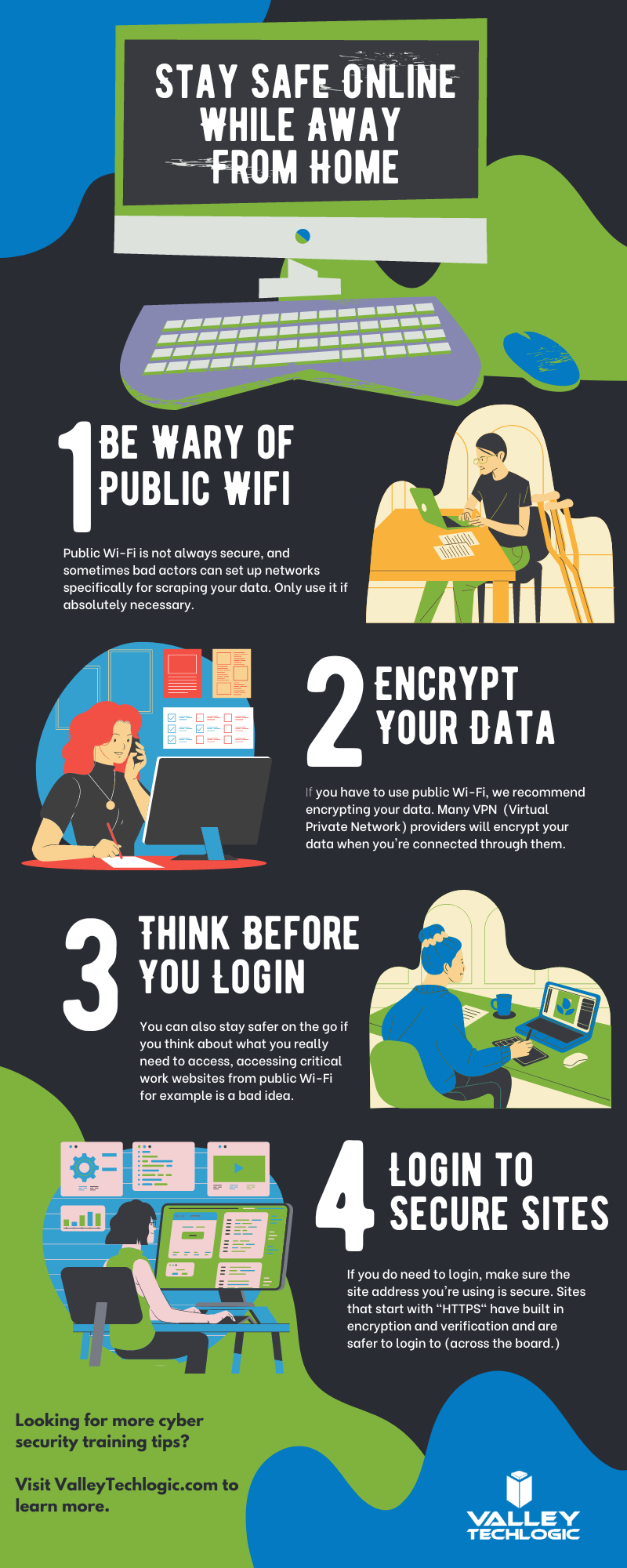
    This is just a quick sample lesson; through our partner we have bite sized lessons that include video that you and your team can take to beef up your cybersecurity knowledge. They average 2-3 minutes long with a quick quiz at the end to make sure the knowledge was absorbed, and you can even see your employees average scores to see how everyone is doing.

    If you incentivize taking this training it will not only be a team building opportunity, it will also help your business stay safe from cyber security threats. If you’d like to learn more about cybersecurity training or stepping up your cybersecurity measures in your business (including the aforementioned advanced cyber threat detection) reach out today for a consultation.

    Looking for more to read? We suggest these other articles from our site.

    This article was powered by Valley Techlogic, an IT service provider in Atwater, CA. You can find more information at https://www.valleytechlogic.com/ or on Facebook at https://www.facebook.com/valleytechlogic/ . Follow us on Twitter at https://x.com/valleytechlogic.
  • Our UPDATED Guide to MFA (Multi-Factor Authentication)

    Our UPDATED Guide to MFA (Multi-Factor Authentication)

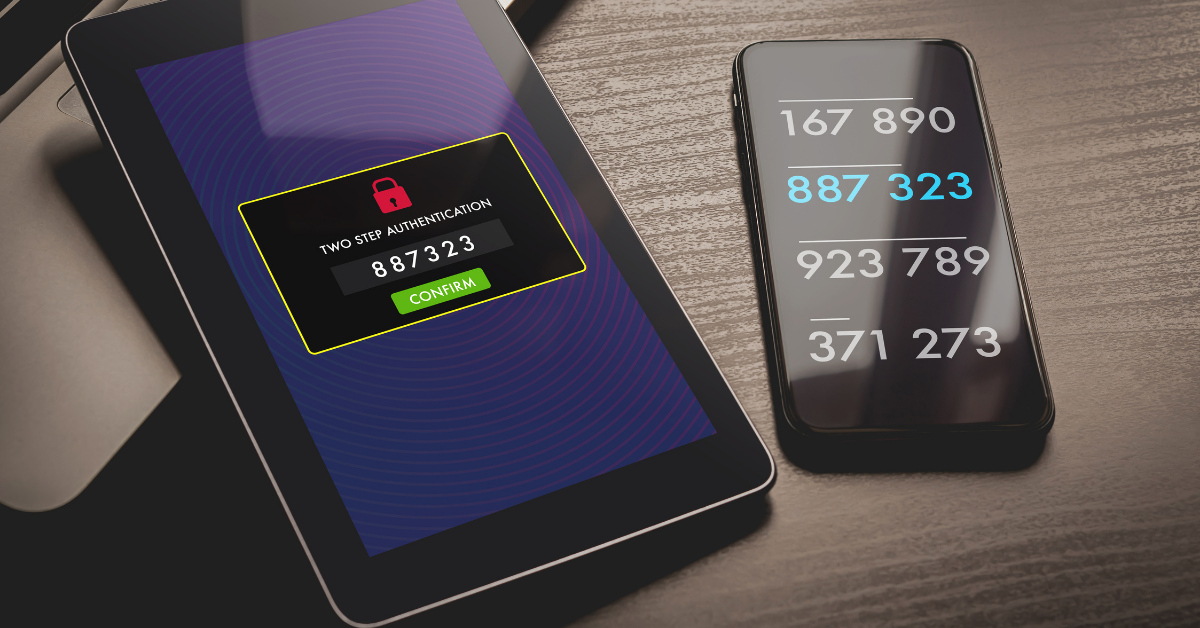
    Last year we had an article on our top picks for 2-factor authentication and we’ve touched on what makes a good password before. We thought it would be a good idea to refresh our advice on this topic and combine our tips into one easy to revisit guide.

    One thing that we surprising haven’t recommended often before but would like to now is implementing Microsoft 365 2-factor authentication on your account. We utilize Microsoft products heavily in our business and we find many of our clients are the same, Microsoft software solutions are deeply woven into their day-to-day business activities. You can find our quick guide to implementing it in last week’s article here.

    We’ve also touched on how implementing 2-factor on your Google account could decrease your odds of your account being hacked by half. In many cases it really is as easy as implementing the built in 2-factor settings in the accounts you utilize and you may not even need to install a 2-factor authentication software, you can simply have the codes texted to your mobile device.

    Since this is a guide though we still want to give you a recommendation on that though, for us we’ve utilized Microsoft’s authenticator program for the most part. We also found that Google’s Authenticator and Authy’s Authenticator mobile apps are very easy to use as well.

    It can be a little more convenient to have the 2-factor codes in one place, so you don’t have to request a code be texted every time you login (especially if you have a lot of different login’s you use throughout your workday).

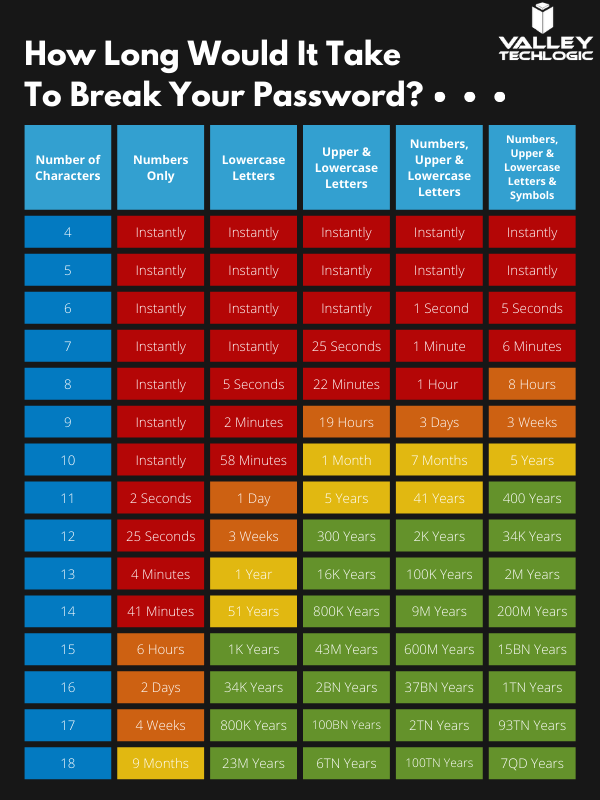
    You may be asking yourself at this point, what’s wrong with just my plain old password? You may have typing it in down to muscle memory and you don’t have to retrieve a code from anywhere. Well, this chart on how long it can take a crack a password based on specific criteria will tell you why:

    How long would it take to break your password?

    Of course, the more complex your password is the greater the difficulty in cracking it, that brings us to our next bit of advice – utilize a password manager and have stronger (and varied) passwords.

    Across the board for Valley Techlogic our employees are using LastPass, we like that it’s cross device and cross platform and enjoy the warnings and alerts it gives us if a password has been possibly compromised or if we’re trying to reuse a password we’ve used before.

    However, any reputable password manager is going to be a big improvement over reusing simple passwords or trying to remember complicated ones.

    Even with a password manager, your passwords being compromised online is the main reason you should consider enabling 2-factor or multi-factor on your accounts. You can have strong varied passwords and your passwords may be leaked due a breach that’s outside your control. Webpages are hacked all the time, and if your banking password is part of a data breach it can then become available to bad actors on the dark web.

    With 2-factor enabled however, it won’t matter if they have your password as they would still need your authenticator program or your mobile device to login to the account. We think it’s worth the (very slight) inconvenience of a few seconds to have that level of security.

    If you’re security conscious and want to go even further, you can also use a security token to lock your device (highly recommended for sensitive work devices). That means the device is useless without the security token to be able to unlock it.

    Enabling multi-factor authentication across your business uniformly can be an uphill battle, but it is one we have experience with here at Valley Techlogic. As security regulations increase, this simple change will make a huge difference in your cybersecurity compliance level. Learn more today with a quick consultation.

    Looking for more to read? We suggest these other articles from our site.

    This article was powered by Valley TechLogic, an IT service provider in Atwater, CA. You can find more information at https://www.valleytechlogic.com/ or on Facebook at https://www.facebook.com/valleytechlogic/ . Follow us on Twitter at https://x.com/valleytechlogic.

  • If you enabled 2-factor authentication on your Google account recently, your odds of being hacked dropped by half

    If you enabled 2-factor authentication on your Google account recently, your odds of being hacked dropped by half

    Google began requiring 2-factor authentication on some user accounts this past year, and while there’s always some inconvenience involved in making that switch the benefits definitely outweigh it.

    Google enrolled 150 million members in the last three months of 2021 in their 2-factor authentication program, and they’ve found that instances of accounts being hacked dropped by half for those users.

    Google utilizes two-step verification, or 2SV which involves having a login challenge beyond a simple password entry. This may be a message in Google’s own authenticator application or a hardware security key depending on user preference.

    Google said in their blog post on the topic, “This decrease speaks volumes to how effective having a second form of verification can be in protecting your data and personal information, turn on 2SV (or we will!), as it makes all the difference in the event your password is compromised.” Indicating Google’s plan to initiate the requirement across the board in the near future.

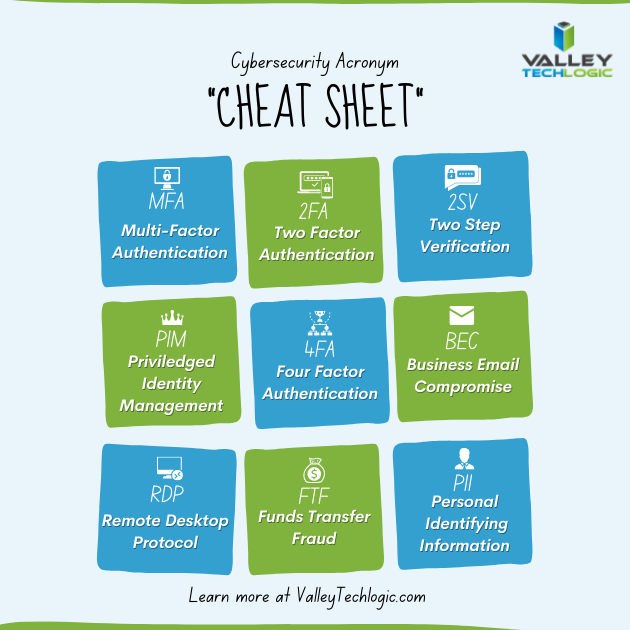
    The hesitancy with users to utilize such an effective security measure seems to stem from inconsistent implementation as well as a general lack of education on the topic. We thought it would be helpful to present this “cheat sheet” on multi-factor authentication and other cybersecurity acronyms.

    Cybersecurity Acronym Cheat SheetWith breaches being ever more common, having that additional step past just a password before a hacker can access your account can make all the difference. A password you use across multiple website (which is also a bad idea) may be leaked without you even being aware of it, and the prompt from a multi-factor authentication application may even be your first clue that your accounts are being accessed by someone other than yourself.

    Google’s own authenticator is found on the Play Store and the Apple App Store and is a solid option, however we suggest users use whatever they feel most comfortable with or whatever is offered by the the websites they frequent (especially for important sites like banking or for work related web portals).

    To add to your security effectiveness, we suggest using a password manager as well so you can work on having more varied passwords – especially for sites that don’t currently offer multi-factor authentication as an option.

    If you’d like tangible security, hardware security keys are a good option and many of them have widespread support for your online accounts such as email, social media, or even your password manager (adding another layer).

    Your devices also probably come with multi-factor security options built in, we’ve been pleased with the implementation of Windows Hello for Windows devices (even when we’re bleary eyed in the early morning, it always seems to recognize us). Fingerprint scanners for mobile devices have also come a long way and is a pretty convenient (and secure) way to keep access to your phone limited to just you.

    If you’re a business owner in the Central Valley and want to embark on the process of enabling multi-factor authentication within your business, Valley Techlogic can help. Our security experts can help you with enabling multi-factor authentication within your business as well help you meet your cybersecurity compliance goals. Reach out to us today to learn more.

    Looking for more to read? We suggest these other articles from our site.

    This article was powered by Valley TechLogic, IT service provider in Atwater, CA. You can find more information at https://www.valleytechlogic.com/ or on Facebook at https://www.facebook.com/valleytechlogic/ . Follow us on Twitter at https://x.com/valleytechlogic.
  • Cyber Insurance – What you can do to ensure your business will be covered in 2022

    Cyber Insurance – What you can do to ensure your business will be covered in 2022

    Last month we released our new cyber insurance report which is an in depth look into this topic, but we wanted to touch on what we’re specifically seeing so far in 2022 in today’s article because from what we’re seeing in from our clients and in the industry – cyber insurance requirements are on the rise.

    If you’re new to cyber insurance or aren’t sure what’s covered under this sort of policy, for most insurance providers cyber insurance offers coverage for technology related disasters. This could include a cybersecurity event such as ransomware or a data breach but depending on your level of policy it might also include IT related downtime not related to cybersecurity such as internet outages. You may even see coverage for specific device issues, such as the loss of an office server that’s critical for day-to-day operations.

    When it comes to the cybersecurity related coverage what many people don’t realize is it’s not only meant for covering your own losses, but also the potential loss incurred by your customers. If you have a data breach, your cyber insurance coverage will cover the cost of any litigation brought by your customers and it may also cover items such as on-going credit monitoring if their PII (personal identifying information) was exposed in the data breach your company suffered.

    It can be easy to feel detached from a loss you haven’t suffered yet. To put some perspective to, it during the Anthem data breach in 2015 when involved 80 million patient records, their costs to notify their customers (which HIPAA regulations stipulate must be done by snail mail) exceeded $40 million in just postage. That’s not even taking into consideration all of the other costs associated with that breach.

    They’re a major corporation, so again it may be difficult to imagine yourself in those shoes, but even for small companies the average costs are as high as $200,000 per breach. Also, if you’re hit with a ransom and think you can just pay it and get out intact, think again. Many times, even if you receive the de-encryption key from the hackers your data may still be lost.

    It’s not surprising that insurance providers are looking at this and wondering how they can alleviate some of the risk they’re taking providing insurance to customers going forward. The requirements are increasing, even for us as a technology provider for businesses we’re seeing longer forms that we’re assisting our customers with when they go to acquire a new cyber insurance policy.

    These longer forms are featuring more difficult questions as well. We have made cybersecurity a staple feature of our plans so our customers are in a good place for obtaining a cyber insurance policy, but the truth is if cybersecurity has been on the back burner for your business, you may have a difficult time in 2022 and beyond finding an insurer that’s willing to cover you.

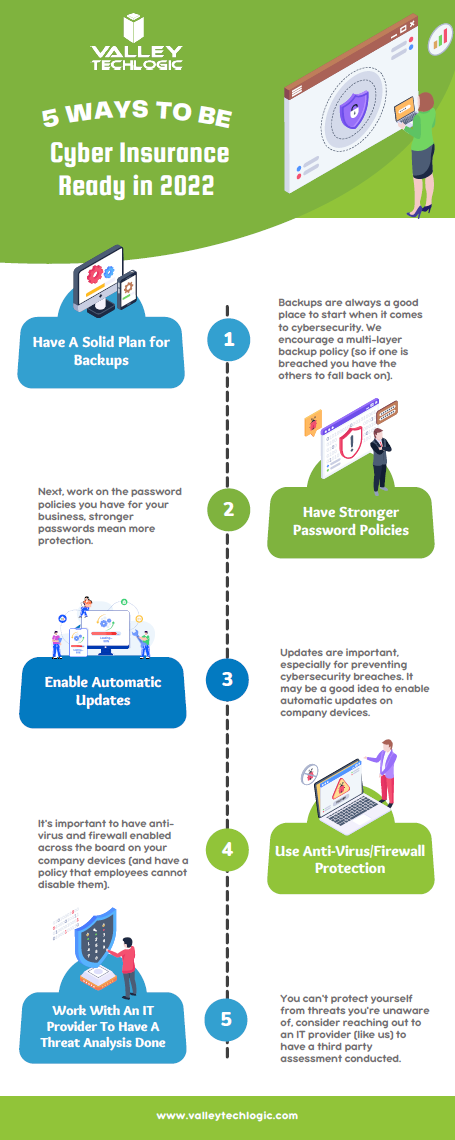
    As an idea of where to start before you go to obtain a cyber insurance policy, we’ve created this checklist of items you can begin to work on to put your business in a better position this year.

    Be Cyber Insurance Ready in 2022
    Click to grab the full size version.

    Many of the items listed are easy for even someone who’s not very tech savvy to tackle, but if you’d really like to protect your business from hackers this year, we suggest teaming up with a tech provider like Valley Techlogic.

    Cybersecurity is a core focus for our business, we will match your business with a cybersecurity framework that makes sense – for example CMMC for defense contractors, HIPAA for healthcare providers, NIST or CIS for small and medium sizes businesses of any industry – and use that framework to have a concrete game plan for making sure your networks and devices are impenetrable to bad actors. Learn more today with a quick consultation

    Looking for more to read? We suggest these other articles from our site.

    This article was powered by Valley TechLogic, IT service provider in Atwater, CA. You can find more information at https://www.valleytechlogic.com/ or on Facebook at https://www.facebook.com/valleytechlogic/ . Follow us on Twitter at https://x.com/valleytechlogic.

  • LastPass say they didn’t leak your password, however some users still received alarming alerts

    LastPass say they didn’t leak your password, however some users still received alarming alerts

    Yesterday, a number of LastPass users received alarming alerts in their email inbox that their passwords – including their master password – had been compromised. The news quickly spread across the internet, starting with forums, and then making its way to Twitter where it was picked up by larger news outlets.

    LastPass immediately denied that a breach had occurred within their organization and at first indicated that the alerts were happening to users who were the victims of “credential shuffling”. That means these users had reused their passwords on other websites who may have had a breach in the past, and now bots trolling the internet for compromised accounts have stumbled upon their password vault credentials.

    This didn’t end up being the case either, but it is a good reminder NOT to password shuffle, especially with the master password for your password vault (if any password should be unique – it should be that one).

    As of this morning LastPass determined that the alerts were sent in error by systems that were set up to be too stringent. They’ve indicated they now adjusted the alerts systems so inaccurate alerts will not be sent again. They also clarified that they don’t store user passwords on their own servers, and that they work on a “zero knowledge” security model which means they are not able to see your master password at all.

    The fact that this news took off in a flash may be indicative of the heightened awareness users have around the security of their data, especially those who currently use a password manager as part of their security repertoire. Even if the alerts occurred in error that may be cold comfort to the scare those users experienced.

    To us, it’s a reminder that the best cybersecurity efforts are multi-layered. We believe it’s equal parts implementation of security measures, monitoring of those measures, and behavioral changes on the part of the users.

    Even if the alerts that occurred yesterday were the result of a system issue not a security issue, we think the users that responded had the right idea when they chose to investigate. It’s also a good idea to change your password if you get a security alert, even if it turns out to be a false alarm. It won’t hurt anything to take that extra step to protect yourself, the old adage “Better Safe Than Sorry” rings especially true when it comes to cybersecurity threats.

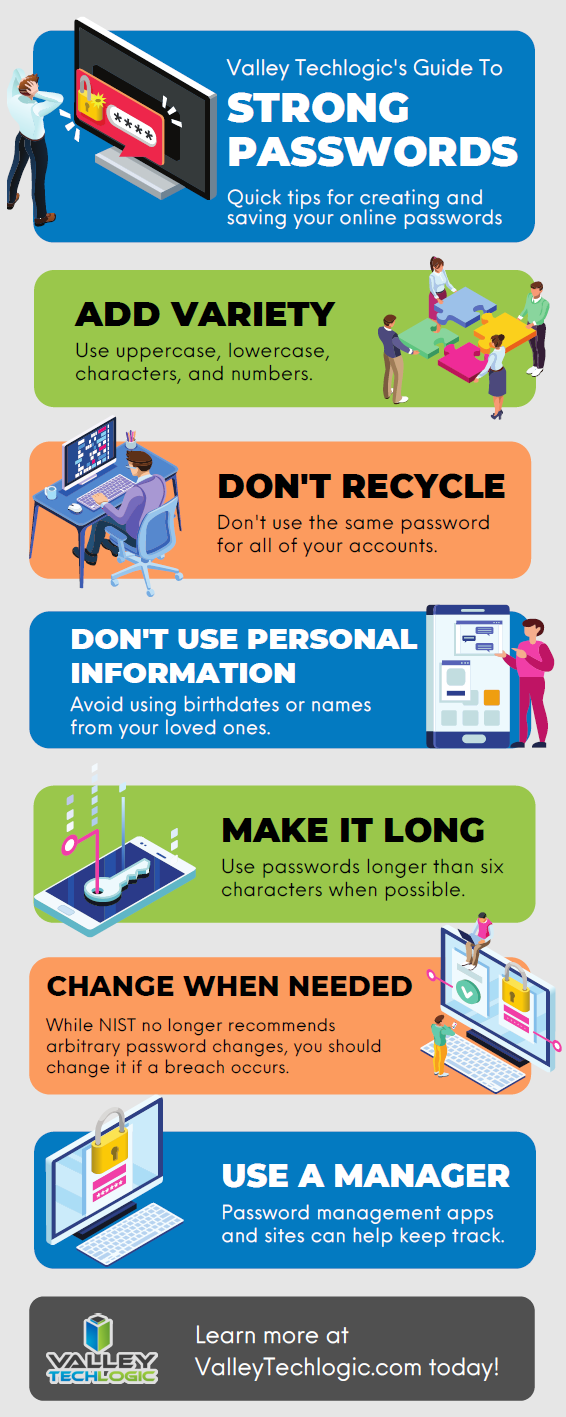
    We created this resource on the topic of good password hygiene that you can keep to review, or even pass along to your co-workers/employees.

    Small Version of the Strong Password IG
    Click to view the full size.

    Finally, even if the unthinkable occurs and your passwords are leaked, again a multi-layered approach will protect you. You should enable 2-factor/multi-factor authentication when and where you can. So if someone does get your password somehow, they still will be blocked from logging in.

    If the security measures in your workplace aren’t up to snuff or you’re interested in cybersecurity training for your employees, Valley Techlogic can help. Boosting the security measures for your business and providing a digestible cybersecurity training program for your employees is included as part of our technology service plans. Schedule a free consultation with us today to learn more.

    Looking for more to read? We suggest these other articles from our site.

    This article was powered by Valley TechLogic, IT service provider in Atwater, CA. You can find more information at https://www.valleytechlogic.com/ or on Facebook at https://www.facebook.com/valleytechlogic/ . Follow us on Twitter at https://x.com/valleytechlogic.

  • Business Email Compromise (BEC) and Phishing – How Do You Combat It?

    Business Email Compromise (BEC) and Phishing – How Do You Combat It?

    Business email compromise (BEC) and phishing are not new ways to scam, as soon as email rose to popularity as a dominant form of communications scammers saw a lucrative window and took advantage.

    Before we explain how to avoid it we should explain what Business Email Compromise (BEC) is. BEC is when a legitimate business is sent an email that looks like it’s coming from another legitimate business, but it’s not. It’s actually a scammer spoofing that email identity. This is the most popular form of phishing but it’s far from the only version. Scammers can even spoof your own domain, so an email looks like it’s coming from within your own organization.

    How do you combat something so insidious? The top way is training, by training yourself and your employees properly on what to look for then you can avoid these scams which cost people located in the US $57 million last year.

    Here are some of the things we look for when determining is an email is a phishing attempt.

    1. It may contain a generic greeting such as “Hello sir or madam” or “Hi Dear” a company you do business with or a person you know would probably know your name.
    2. The email mentions some kind of fraudulent activity on your account and has a link asking you to confirm your private details to unlock or otherwise reinstate your account. This is a VERY common scam.
    3. The links in the email are NOT from the business the email is purporting to be when you hover over them.
    4. The email may contain spelling errors and sentences that sound strange grammatically.
    5. The logos in the email may be of a poor resolution because these scammers do not have access to the real company assets.
    6. The email is coming from a CEO or President of a large organization and is asking you to wire money in exchange for a lump sum in return later. These emails may not have spelling errors or strange links but ask yourself – would any CEO or President of a large company be asking you to wire them money?

    That last one is key, if all the obvious methods of detection fail you may have to rely on just asking yourself if the request in the email makes sense. If the email looks like it is coming from someone you know personally, reach out to them via phone or in person to ask about it. Most of the time, victims who have had their emails compromised or spoofed have no idea it’s even going on.

    Beyond training on knowing what to look for in a phishing email these are our top 3 things to protect yourself from scams across the board.

    1. Keep the software on your devices completely up to date.
    2. Use Multi-factor or 2 Factor Authentication on your accounts.
    3. Backup your data regularly so on the off chance something happens, you’re covered.

    If you receive an email you suspect is a phishing attempt, the best thing to do is not respond to it and report it. You can report suspected phishing emails to the FTC here.

    For businesses located in the Central Valley, we offer cyber security training as part of our managed service plans (which includes comprehensive training on how to avoid phishing attacks).

    Phishing training available

    Looking for more to read? We suggest these tech articles from the last week.

    This article was powered by Valley TechLogic, an IT provider in Atwater, CA. You can find more information at https://www.valleytechlogic.com/ or on Facebook at https://www.facebook.com/valleytechlogic/ . Follow us on Twitter at https://x.com/valleytechlogic.

    Looking for IT Services in Fresno, Modesto, Stockton, Ceres, Atwater, Merced, Visalia or Lodi? We cover all these areas and more!