Tag: Azure

  • AWS vs Azure, what is your best option when choosing a cloud platform?

    AWS vs Azure, what is your best option when choosing a cloud platform?

    We’ve had articles in the past about why you should consider making the move from on-premises to the cloud, but we’ve never specifically addressed which provider you should consider when making this move.

    For many, AWS (Amazon Web Services) and Azure are the main players that they look to when making the jump the cloud. Brand recognition is obviously there for both choices, as well as a history of impeccable uptime. Uptime is a very important factor, obviously you want your data to be available when and how you need it, but there are more things to consider.

    First, let’s look at the players. AWS has been around since 2006 and offers a “pay as you go” model, which means you pay only for the data you actually use. Many of us are familiar with the webstore Amazon, and you’d probably be surprised to learn AWS is a much bigger venture for Amazon, with 74% of their profit coming from AWS.

    Azure was launched in 2010 and is also pay as you go. However, how they differ is that Azure actually lets users access their data through a virtual machine on a Virtual Hard Desk (VHD). This means their interface is slightly more user friendly from the start. For a similar interface in AWS you must rent an EC2 (their version of a virtual machine). EC2 is more customizable but Azures Virtual Machine may more easily work with existing Cloud computing tools.

    Both are similar in that they offer scalable storage solutions; however, their object size restrictions vary slightly, with AWS having a 5 TB object size limit and Azure having a 4.75 TB limit. For most of our customers this would be a very negligible difference, however.

    Both do an excellent job of securing your data, in AWS you customize your security settings on setup. With Azure, they use Microsoft’s Cloud Defender services which are similar to the Windows Defender services you probably already utilize.

    AWS has a dashboard that may be easier to use if it’s your first-time using cloud services when it comes to looking for documentation on how to use the service. Where Azure has them beat though is that Azure keeps all of your user account and information in one place. So, depending on which kind of information you’re looking for, you may prefer one over the other.

    If customizing your cloud experience via code is something you’re after, you probably want to stick with AWS. Through their SageMaker system you can utilize their artificial intelligence (AI) tools to develop a very specific and unique experience when it comes to tracking data, making modifications, and applying updates.

    Azure on the other hand has opted for a “Codeless” interface, even someone with zero coding knowledge can drag and drop pieces to customize their cloud’s AI interface.

    Of course, from a base level you can look at what operating system these are compatible with. AWS is more compatible with Linux while Azure offers compatibility through .net with Linux, Windows and MacOS.

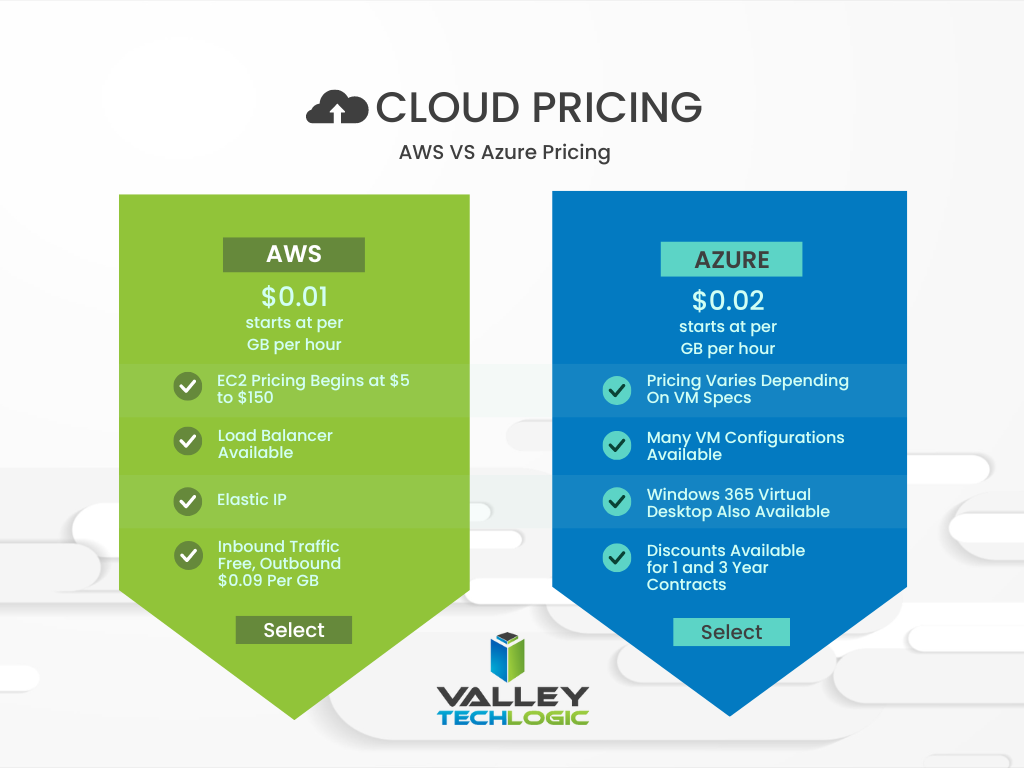
    In a nutshell, these two cloud behemoths are more alike than different but there are some factors that depending on your particular business sector or goals may lead you to shift one way or the other. We also want to spend a moment addressing a pricing breakdown for both AWS and Azure. You can see their pricing models in the chart below. We also want to note that both provide a free introductory period so you can test their services before committing to a plan.
    Are you considering a move to the cloud and aren’t sure which provider to go with, or even how to make it happen? Valley Techlogic can help. We’re experts in cloud computing and have managed many customer cloud migrations. Reach out today to schedule a free consultation.

    Looking for more to read? We suggest these other articles from our site.

    This article was powered by Valley Techlogic, an IT service provider in Atwater, CA. You can find more information at https://www.valleytechlogic.com/ or on Facebook at https://www.facebook.com/valleytechlogic/ . Follow us on Twitter at https://x.com/valleytechlogic.

  • AWS had an outage this week that took out many top websites and is causing delivery issues for Amazon

    AWS had an outage this week that took out many top websites and is causing delivery issues for Amazon

    Amazon Web Services (AWS) is so prevalent in their cloud services they could be considered an internet backbone. Their cloud computing network is so ubiquitous with online web hosting it would be difficult to find a business that doesn’t utilize their service for some or all of their online hosting requirements.

    So, when an outage occurs on their networks the effects are far reaching and severe. This week’s outage lasted five hours and effected major players – such as Netflix, Southwest Airlines, the Associated Press, Delta and more. The outage mostly occurred on the east coast but even Amazon’s own e-commerce site was affected, which may cause delays in some deliveries as Christmas shopping is in full swing.

    This outage echo’s the Facebook outage that happened on October 4th  in that there is a ripple effect that occurs when these large providers have an outage. This instance is also similar in that, like with Facebook, there has been no word as of posting as to why yesterday’s outage even happened.

    The outage didn’t just affect big businesses either, many smaller businesses that utilize AWS for their company hosting found themselves locked out services necessary to complete their job duties. It points to the issues that can occur when all of our information is locked into just a few centralized places.

    When the internet was first established it was originally designed to be a decentralized network. No one business was meant to control most of it, that was so no single point failure could level it. Now “Big Tech” has eroded that goal and it will be difficult to undo the current state of things.

    It’s hard to argue though that AWS Isn’t a convenient service to use, they have streamlined the cloud computing process where many others have sought to make it convoluted for the end user, they have flexible payment options and it’s accessible on demand. When you compare it to Azure, who groups users under a domain (making it difficult to access the one you need) and is slower when it comes to large data transfers unless you have a premium subscription, it’s easy to see why many businesses choose AWS.

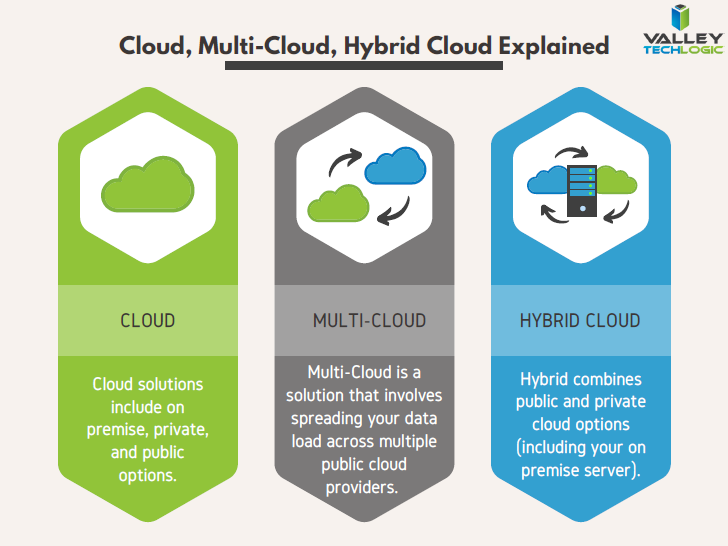
    Still, diversifying our networks would help protect us from outages such as these and major breaches. If you’re a business looking into cloud solutions, you might consider the Multicloud Redundancy approach.  What this means is you might have some of your data and services hosted by AWS and some hosted by another provider.

    Another option is hybrid cloud. Hybrid cloud is when you have a mixture of on premises storage (such as your office server), private cloud services and public cloud services (like AWS).

    Chart of cloud solution options
    Click to view the full size version.

    At Valley Techlogic we utilize AWS, but we also take the hybrid cloud approach. In fact, our backup program TechVault utilizes three different methods of storing your data. In this world of uncertainty when it comes to cybersecurity attacks and online outages that you have no control over, diversity is key.

    If you would like to learn more about TechVault or need help with your cloud service choices, reach out to us today.

    Looking for more to read? We suggest these other articles from our site.

    This article was powered by Valley TechLogic, IT service provider in Atwater, CA. You can find more information at https://www.valleytechlogic.com/ or on Facebook at https://www.facebook.com/valleytechlogic/ . Follow us on Twitter at https://x.com/valleytechlogic.

  • Your data is safer in the cloud, period.

    Your data is safer in the cloud, period.

    Speaking in absolutes is not usually a good idea, but in the case of data storage we feel the onus is on us to speak plainly – and it’s the plain truth that your data is safer in the cloud.

    It’s natural to be hesitant to move everything into the cloud, especially when it really wasn’t that long ago in the grand scheme of things that all data was stored in filing cabinets. Safely tucked away and (hopefully) properly indexed to be pulled out as needed.

    Sure, we didn’t have to worry about malware with paper files, but theft and natural disasters were the enemy of on premises paper documents. Or just the ravages of time wreaking havoc on plain paper and ink. You also had to make sure to shred important documents and not just trash them lest they fall into the wrong hands.

    With the advent of computers most of our data moved to our personal computers and it greatly elevated our ability to communicate that data to others. Multi-million-dollar transactions can be easily completed by simply emailing a proposal and contract. Billing information, medical documents, all of the private information about an individual or business is often times found online and is available to be pulled up when needed.

    But this ease of information is also it’s downfall. Old fashioned robberies where thieves would break into brick-and-mortar establishments and steal private information to then be used to create false identities and/or use payment details for their own benefit have now been replaced with often a single user attacking a small business’s online accounts. They can dismantle everything that business has built in days or even hours and make recovering difficult or even impossible.

    That’s not even taking to account that a single on-premises server is just as vulnerable to fire or flood damage as your filing cabinet is. A singed or waterlogged hard drive has no more usefulness than the same data contained in a charred or dripping stack of papers.

    Like with many things in life this problem is solved by working together with others, and that’s where cloud data solutions come in. It’s still your data and we, like you, think it should have the same level of accessibility as it does when it’s on your personal computer or even a paper file on your desk.

    With the high-speed internet most of us have in our homes and offices downloading files from the cloud is often a nearly instantaneous click of a button and then you’re working on the file you were last night. Make a mistake a few hours in? Another benefit of the cloud is you can often times roll back to an earlier version.

    The cloud can sound nebulous but it’s not, it’s just using the resources of companies that put their whole stake into safeguarding data. Their existence as a business is in keeping your data safe, companies that fail at that task don’t stay in business long.

    It’s really not that different than utilizing the services of the power company for all of your power, or your local ISP for all of your networking needs. These services work best when they’re maintained by companies that dedicate themselves to the task and can provide a high level of continuity.

    And there are some major players in the game, players that have been in the business of data and even computers themselves as a whole for decades. At Valley Techlogic we greatly utilize the power of Microsoft’s cloud service – One Drive – to collaborate within our business. It’s even paved the way for our remote employees to maintain productivity with the whole team without missing a beat. The default storage capacity is 1 Terabyte (TB) which is more than most users will ever need.

    If our office ever burned down with no one inside, we can state with the utmost confidence it would not affect our ability to do business. Could you say the same?

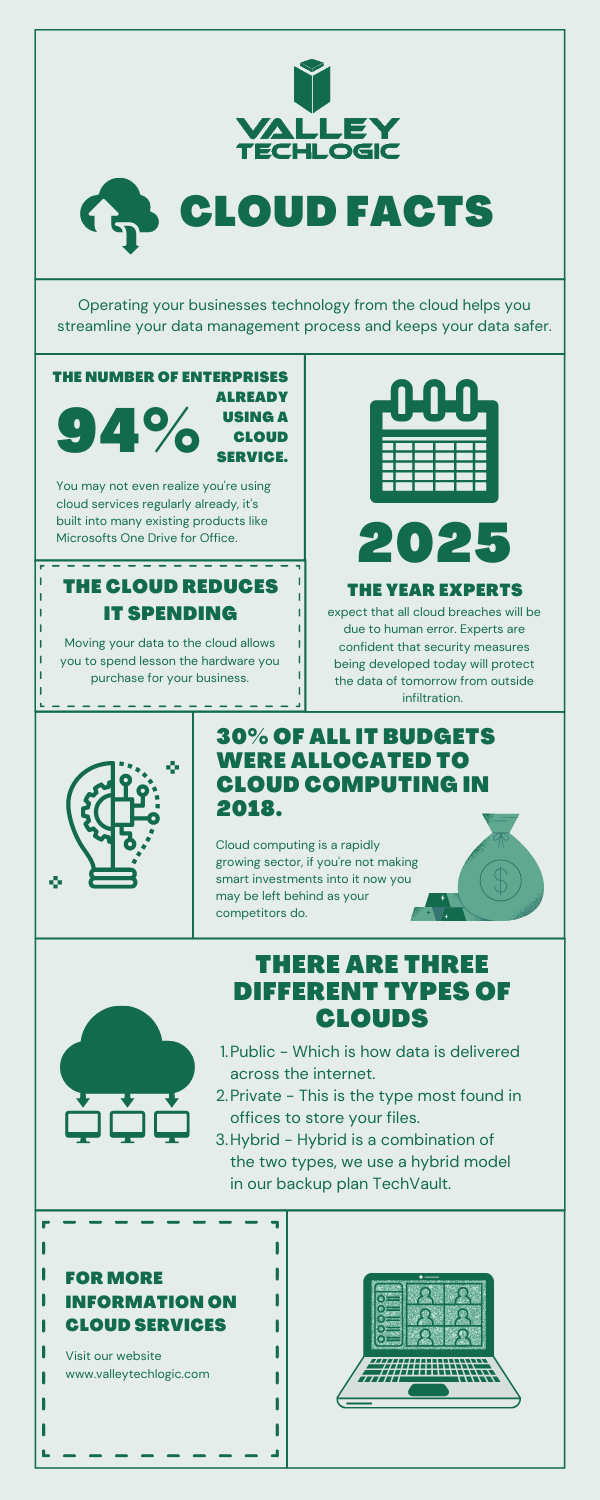
    Cloud Data Facts

    If you’re considering a move to the cloud for your business, we can help. Backups and data recovery solutions are a keystone piece of all of our service plans, learn more today.

    Looking for more to read? We suggest these other articles from our site.

    This article was powered by Valley TechLogic, an IT service provider in Atwater, CA. You can find more information at https://www.valleytechlogic.com/ or on Facebook at https://www.facebook.com/valleytechlogic/ . Follow us on Twitter at https://x.com/valleytechlogic.
  • Windows 365 has been announced, and it could change workplaces as we know it.

    Windows 365 has been announced, and it could change workplaces as we know it.

    On July 14, 2021, Microsoft held their annual Inspire summit, a conference for Microsoft partners to be given inside information about what the year ahead will look like in the world of Microsoft products and how they can leverage changes and features for their clients.

    This year’s event issued in some big changes, all aimed at what Microsoft has dubbed the “Hybrid Workplace”. It’s clear Microsoft is betting that remote work is here to stay, at least partially.

    While Teams and it’s various new and exciting integrations seemed to take center stage in the event offerings, we want to talk about another massive announcement – Windows 365.

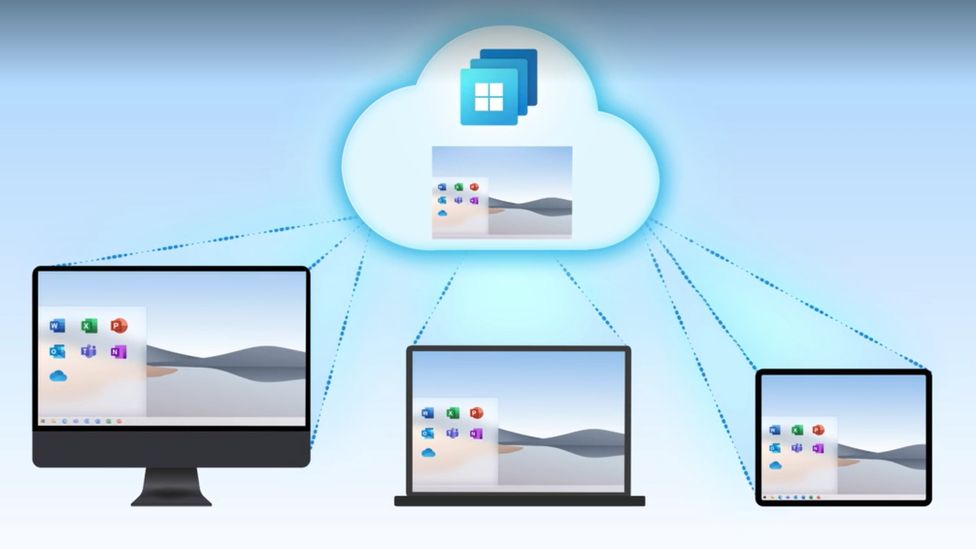
    Microsoft is going all in on cloud computing with Windows 365, and while it won’t be replacing Azure Virtual Desktop which will still be a staple in enterprise applications especially where security is especially crucial – it will offer extreme flexibility for businesses with a remote or hybrid workforce.

    Windows 365 Will Work On Any Device

    In the product demo we attended we were shown Windows 365 machines will be capable of lightning-fast data speeds across Microsoft’s networks. Users will also be given the ability to adapt the virtual computer on the fly from an easy to use and navigate interface that let’s you manage all of your active Windows 365 subscriptions.

    They will even offer recommendations based on the usage on these virtual desktops. For example, if one user is always running out of RAM you can perform the upgrade right then and there, instantly.

    The models pricing will be based on use and the virtual computers specs, but pricing hasn’t been made available yet. These virtual desktops will even have the option of including all of Microsoft 365’s product offerings such as Outlook, Excel, Word and more.

    The most intriguing part Isn’t just the functionality of these desktops, which looks impressive. It’s the flexibility of just where and how you use them.

    Windows 365 can purportedly be used across devices, that means not just laptops and desktops but even smart phones and tablets. You can use the web client but there’s also a browser option which could be a game changer for those with slow or unreliable internet connection speeds.

    If you think security features are limited to Azure Virtual Desktop you would also be wrong, Windows 365 will have two factor authentication built in and allow you to tie the virtual machine instance to the user’s phone. When they go to log in they will be prompted to allow the login via the registered phone. This is a necessary aspect for business’s who have been struggling to implement cybersecurity features in their business, especially when it comes to their remote workforce.

    Their Windows 365 virtual desktop will also be cross platform and save the user’s instance. If your employee is working from home three days a week and from the office two days a week, they can use their virtual desktop to remain on track because their work will be saved and ready to go no matter where they are logging in from.

    At Valley Techlogic we have long been a proponent of cloud computing and have implemented creative cloud solutions for our clients. We are excited to see where Windows 365 is going and to have the chance to bring this offering to our customers.

    Are you looking to implement Windows 365 or other cloud offerings such as backups in your business? Valley Techlogic is a dedicated Microsoft partner, and creator of the triple layer backup program TechVault. Schedule a consultation today to learn more.

    Looking for more to read? We suggest these tech articles from the last week.

    This article was powered by Valley TechLogic, an IT service provider in Atwater, CA. You can find more information at https://www.valleytechlogic.com/ or on Facebook at https://www.facebook.com/valleytechlogic/ . Follow us on Twitter at https://x.com/valleytechlogic.

  • What to Do When a Service You Use is Down; 5 Tips on How to Survive a Tech Outage

    What to Do When a Service You Use is Down; 5 Tips on How to Survive a Tech Outage

    If you were using any Microsoft products on Monday (March 15th) you may have been party to the outage that took down services such as Office 365 and Teams worldwide.

    The outage was caused by an Azure authentication error (you can learn more here) and lasted roughly 14 hours. Whether you experienced this particular outage or not we have all experienced an outage that took out a tech service that is critical to doing our job or supporting the systems we use every day.

    Here are our top 5 tips to surviving a tech outage that is impacting your business:

    1. First of all, don’t panic. Outages are normal in the tech world, and sometimes even necessary if it’s a planned downtime event. Usually planned events will occur at times that are less inconvenient for most workplaces (late at night typically), and you will probably get some kind of notice, so you know to expect it.

    2. Determine that the outage is outside of your control. If a service is down, it’s a good idea to determine whether it’s on your end or truly due to the service provider. If it’s a popular well-known service (such as in the Microsoft case) you can usually check Google as an outage will be news. Another good place to check is their social media pages to see if there’s any mention of the outage by their team; Twitter especially seems to be the place many businesses convey outage news.

    3. If you’ve come to the conclusion it’s not on your end, reach out to their customer service. They may be swamped if it’s a large outage but if it’s just something to do with your particular instance they can probably assist you in getting back up. If you have a technology service provider you work with they can help manage this task for you.

    4. Reach out to your tech team if you have one. If you have an in-house tech team or a technology service provider behind your business, they can troubleshoot the outage for you and determine next best steps to getting your services back up.

    5. Check the post-outage documentation. It often helps to know why an outage occurred, especially if it was due to an update that may have changed things within the service.

    Outages are a good case in point for having a tech team behind your business, they can help navigate the issue for you and if your case does need to be escalated, they will know exactly who to contact.

    If you’re on your own trying and to Google fixes it can often lead you down a rabbit hole where the recommendations may not even be relevant to your particular instance.

    In general, we don’t recommend trying to navigate severe issues on your own, especially if the affected program host critical data or systems for your business. The “fix” you try may be worse than the problem that was causing the outage in the first place.


    If you have been looking for a team that can support your business in navigating tech outages and more, Valley Techlogic is a seasoned technical service provider and we have plans that can fit every business. You can learn more by booking a free consultation here.

    Looking for more to read? We suggest these tech articles from the last week.

    This article was powered by Valley TechLogic, an IT provider in Atwater, CA. You can find more information at https://www.valleytechlogic.com/ or on Facebook at https://www.facebook.com/valleytechlogic/ . Follow us on Twitter at https://x.com/valleytechlogic.