Tag: cybersecurity tips

  • Be careful what you download, malware has made it to Google Adwords

    Be careful what you download, malware has made it to Google Adwords

    Downloading applications from trustworthy sources is something that has been drilled into most of us as internet safety 101, and many of us would consider the top link on Google to be a trustworthy source.

    However, hackers are now taking advantage of that and pushing ads that contain their malware disguised as legitimate applications.

    Initially reported on by cybersecurity firm Cyble last month, their report found that a malware called “Rhadamanthys Stealer” is being spread through Google Ads that allegedly lead the user to download Zoom, Notepad++, AnyDesk and more.

    This malware is also being spread the typical way through email when attached to a PDF. It makes it clear that there is no one way to spread malware and that users need to be vigilante when downloading anything – whether that be a typical .exe or email file attachment.

    The goal is usually financial, with the hacker either “ransoming” the users device or merely spying in the background as they collect data they can sell or use to steal financial credentials. The attempts at stealing data may even be multifaceted and include all three.

    So how can you protect yourself? The first is in knowing how it works, Google ads has requirements for posting so these bad actors are placing ads for legitimate looking “front page” sites that mimic what you were looking for, which then immediately redirects you to the one containing malware.

    So one clue would be if the URL drastically changes during your browsing (and paying attention to the URL and knowing the URL you were trying to reach would squash this attempt altogether). In many cases you can confirm a sites true URL through Wikipedia and it’s a good idea to save it if it’s a site you visit regularly.

    Another way to block these is exceedingly simple, just utilize an ad block on your browser. Ad blocks block Google advertisements as well, so your research will be more likely to contain legitimate results. Many ad block extensions will also block popups too.

    Google has also offered their own advice on blocking “malvertising” and have included a way to report illegitimate websites. It goes without saying these sites are in violation of Googles advertising rules, which include rules against auto-redirects.

    As it becomes increasingly harder to avoid malware infections, many offices are scrambling with how to best protect office devices from being unintentionally used as a threat vector. Employee training is still your best protection but as this article illustrates, even tech savvy employees may have a difficult time avoiding all threats.

    That’s where a Valley Techlogic service plan comes in, we offer proactive cybersecurity protection in the following ways:
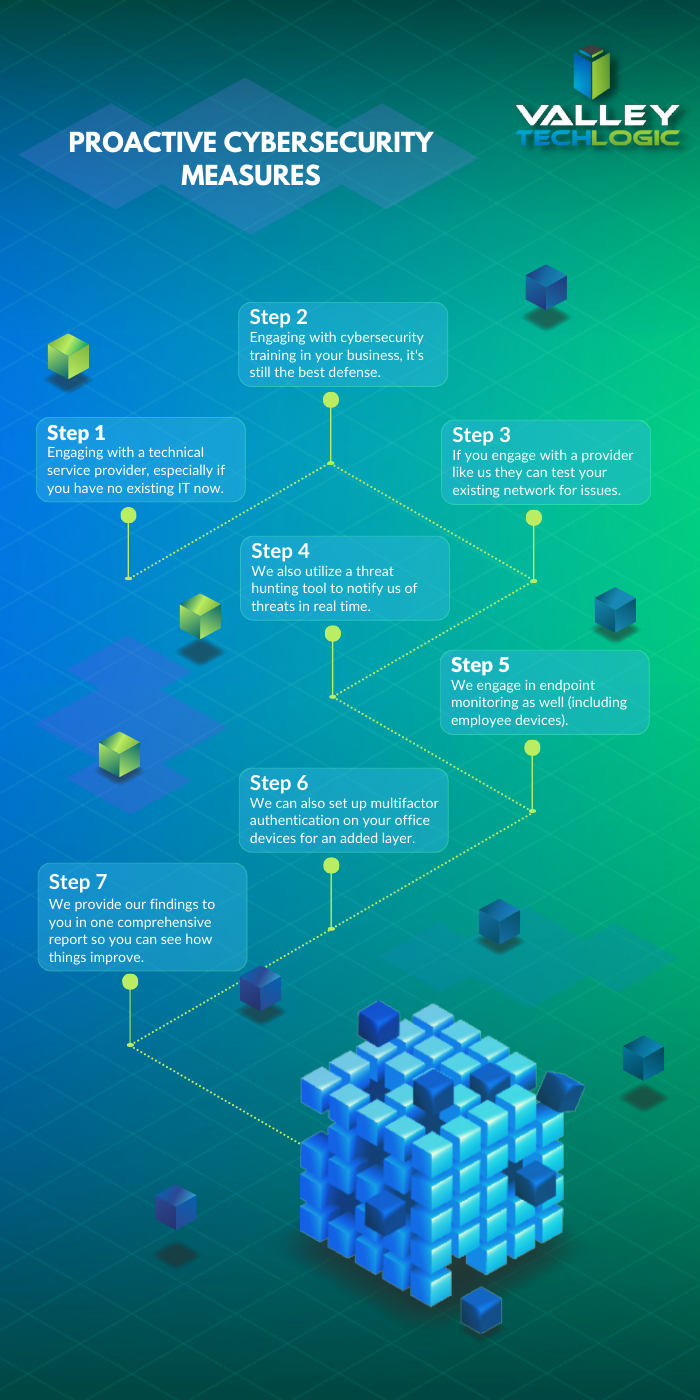
    Proactive Cybersecurity through Valley Techlogic

    If you would like to learn more, schedule a consult with us today and we’ll go over how we can help your business increase your cyberthreat awareness and protection capabilities.

    Looking for more to read? We suggest these other articles from our site.

    This article was powered by Valley Techlogic, an IT service provider in Atwater, CA. You can find more information at https://www.valleytechlogic.com/ or on Facebook at https://www.facebook.com/valleytechlogic/ . Follow us on Twitter at https://x.com/valleytechlogic.

  • 10 Holiday Shopping Tips for Safer Online Shopping

    10 Holiday Shopping Tips for Safer Online Shopping

    The holiday season is upon us and with Thanksgiving around the corner many are anticipating doing some holiday shopping the day after during Black Friday.

    In previous years stores seemed to open earlier and earlier, creeping into Thanksgiving itself to allow buyers who really wanted those deals to snatch them up before their competition (if they were willing to sacrifice some time with family). Many felt this was unfair to employees and with the pandemic that activity has been scaled back so now most businesses are closed on Thanksgiving.

    That doesn’t stop you from shopping on Thanksgiving if you want to however, with online buying growing in popularity year over year “Black Friday” sales occur all over the internet at a wide variety of retailers – and even a wide variety of dates outside of the traditional day after Thanksgiving.

    Still, the main event is typically when the best sales occur with retailers holding back their “door buster” items until midnight on Friday as they do in traditional retail spaces.

    If you’re going to be hitting up those sales this year we have 8 tips for safer shopping online while you do so, and two bonus tips related to getting the best deal while you’re at it.

    1. Make sure the URL is what you expect it to be. Phishing emails may try to take advantage of those looking to get a good deal by misdirecting you to a site with a similar URL that can collect your payment information. Look for any misspellings such as Paypale or Wallmart instead of Paypal and Walmart.
    2. The same goes for products that may be found on multiple vendors. Hint, no one is going to sell a top of the line laptop for $25. If a price seems like it’s too good to be true, it probably is.
    3. Even if the website is legit, the product might not be. Sites like Amazon or Ebay allow private vendors to sell on their site, and this sometimes includes scammers. Look out again for pricing that seems too good to be true or product reviews that don’t match the product you’re trying to buy.
    4. Also read the small print. You want to make sure you’re buying that Xbox you’ve been looking for, not just the box it comes in.
    5. As always, watch out for popups. If you’re browsing for a specific product a loved one requested you may hit sites that try to scam you with malicious software delivered via popups. Letting your browser block all popups unless specifically allowed is a good idea.
    6. Make sure the website is HTTPS not just HTTP. HTTPS is a layer of encryption that protects your payment information when checking out through a website.
    7. If you’re buying from a vendor you’ve never purchased from before, keep an eye on your bank or credit card account. You want to catch any potentially suspicious activity early so you can report it.
    8. Also look for online reviews. Using Trustpilot or just doing a Google search before buying is a good idea, it will help you avoid scams and retailers that are a nightmare to deal with.
    9. Bonus Tip: Use a browser extension like Honey or one your credit card or bank account offers to automatically apply coupons or even get cashback on purchases. Searching for coupon codes is a hassle, however do keep in mind they’re offering you these discounts in lieu of information on your purchase making habits.
    10. Bonus Tip: For Black Friday specifically you can see the deals major online retailers will have ahead of time in the circulars collected by com . That way you can strategically plan your online shopping before the clock hits midnight this Friday.

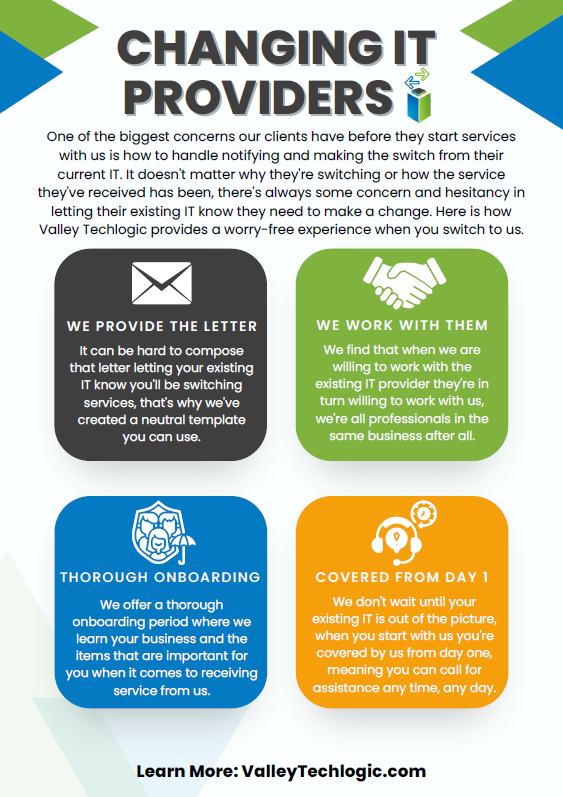
    Speaking of Black Friday, if you have been in the market for technology services for your business then look no further. We’re offering the best deal we have ever offered for new customers. In our last blog we listed four reasons to consider a service plan with Valley Techlogic. Here are four ways we will make switching easy in 2023.Click to view the full size version.Learn more about taking advantage of our Black Friday sale today.

    Looking for more to read? We suggest these other articles from our site.

    This article was powered by Valley Techlogic, an IT service provider in Atwater, CA. You can find more information at https://www.valleytechlogic.com/ or on Facebook at https://www.facebook.com/valleytechlogic/ . Follow us on Twitter at https://x.com/valleytechlogic.

  • Our Five Best FREE Resources Ranked

    Our Five Best FREE Resources Ranked

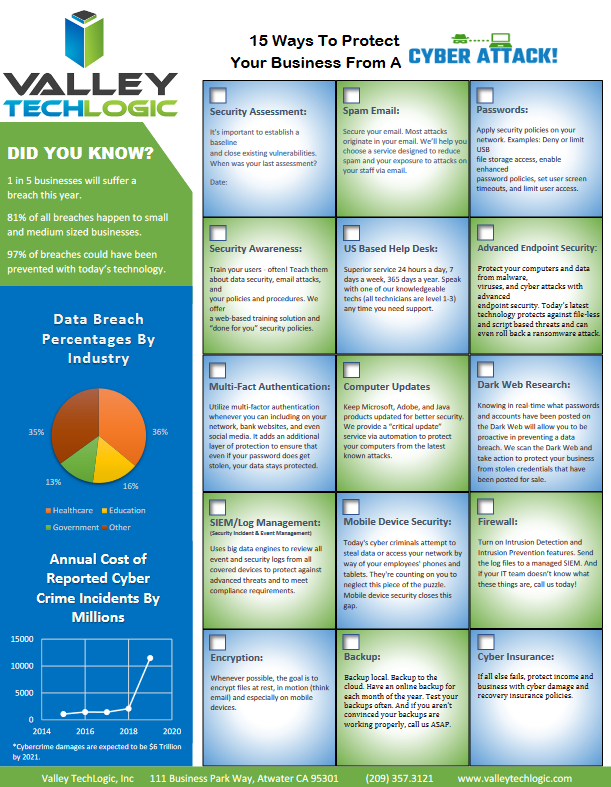
    At Valley Techlogic we believe educating our community on internet safety and providing concrete goals for businesses in our area to help improve their cybersecurity measures whether or not they’re covered by a Valley Techlogic plan is a valuable resource our company can provide to make us all a little safer online.

    We’ve provided quite a few free resources and reports over the years, and we couldn’t help but notice which ones really have struck a cord with our audience.

    Here are our top five free resources and reports, ranked by popularity. Bonus, you can grab all of these right from this page, still absolutely free.?

    #5 The Data Contingency Planning Report

    Our Data Contingency Report tells you EXACTLY what you need to have a solid plan for backing up your business’s files. Click to grab the report now instantly.

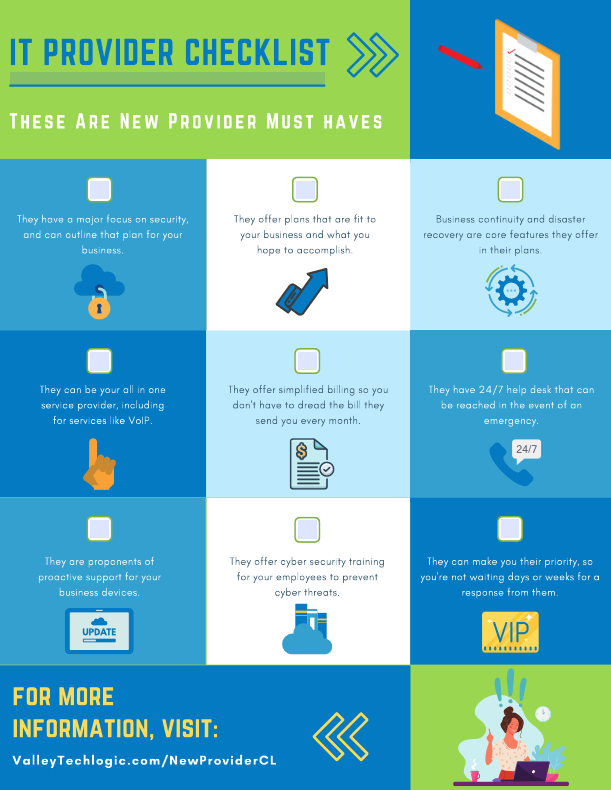
    #4 The New IT Provider Checklist

    Our New IT Provider Checklist lets you check off the MUST have for your new IT provider. If they don’t cover one or more of these items, you should keep looking.

    #3 Our Section 179 Guide

    Our Section 179 helps you get the best tax benefits from the tech purchases you make for your business. We’ll have the updated 2022 version available later this year.

    #2 Our Cyber Security Framework Overview Report

    Our Cyber Security Framework Overview Report goes over in plain text a number of popular frameworks, CMMC, HIPAA and more.

    #1 Our Cyber Security Checklist

    By far our most popular resource, this no nonsense checklist gets straight to the point on what you need to be fully covered from cyber threats.

    To receive these resources and more, reach out to us to be added to our mailing list. That way you’ll be the first to receive tech tips, free reports and resources and more.

    Looking for more to read? We suggest these other articles from our site.

    This article was powered by Valley TechLogic, IT service provider in Atwater, CA. You can find more information at https://www.valleytechlogic.com/ or on Facebook at https://www.facebook.com/valleytechlogic/ . Follow us on Twitter at https://x.com/valleytechlogic.

  • 10 scary cybersecurity statistics business owners need to know

    10 scary cybersecurity statistics business owners need to know

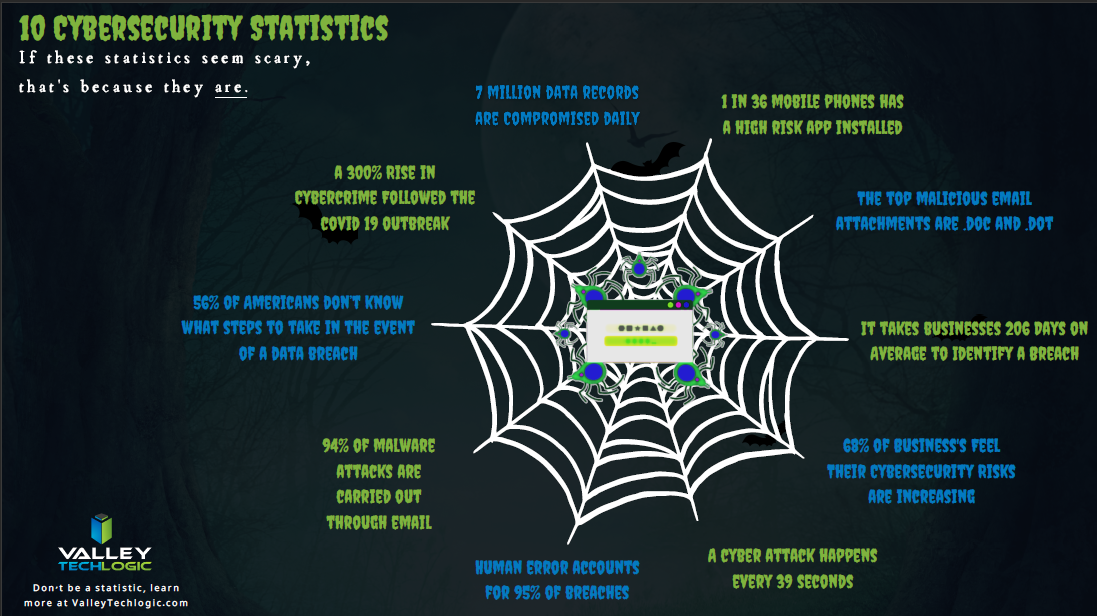
    Halloween is approaching and we thought it would be appropriate to cover some bone chilling cybersecurity statistics business owners NEED to know to protect their business.

    Cybersecurity is something we all know we need to do more about but also don’t like to think about, however for business owners’ avoidance won’t make the threats any less real.

    Take a look at our web of cybersecurity statistics and read on to learn how they can make a mess for your business (and what you can do to fix it).

    Click to view the full size version.

    While these statistics are scary, we already suspect you’re thinking “it won’t happen to me”. The reasons business owners come to this conclusion are numerous but the top 3 we’ve encountered are.

    1. My business is too small.
    2. I’m not in a sector that’s targeted by hackers.
    3. Even if I was hacked, I don’t have anything they would want.

    That last one is a real headscratcher for us. What business operates without any financial data? What about your personal data and that of your employees? Your customers? That’s all valuable data on the dark web.

    The scariest statistic of all that wasn’t included in our chart is that 60% of businesses fail following a cybersecurity event.

    Preventing an attack is crucial for your business, remediating an attack after the fact is not a clear-cut solution. Usually not all of your data can be recovered, you can’t make up for the lost time spent dealing with the attack, and if it becomes public your reputation may never be what it once was.

    There are easy solutions you can put in place today that will reduce your risk dramatically.

    1. Educate your employees about phishing emails, this is one of the biggest sources of threat events.
    2. Ensure two-factor or multi-factor authentication is required on company systems and devices.
    3. Have a company wide password policy that includes not sharing your password with others and coming up with complex yet memorable passwords that can’t be brute forced by a would be attack.

    If it’s all overwhelming and you don’t know where to start, we don’t blame you. Navigating the complicated world of cybersecurity is really something that business owners should let a professional handle. If you’re in the Central Valley, Valley Techlogic can be your partner in security and more. Learn more today.

    Looking for more to read? We suggest these other articles from our site.

    This article was powered by Valley TechLogic, adns, n IT service provider in Atwater, CA. You can find more information at https://www.valleytechlogic.com/ or on Facebook at https://www.facebook.com/valleytechlogic/ . Follow us on Twitter at https://x.com/valleytechlogic.
  • 5 Ways “Tribal Knowledge” Sabotages Your Cybersecurity Efforts

    5 Ways “Tribal Knowledge” Sabotages Your Cybersecurity Efforts

    Even if you’re unfamiliar with the phrase “tribal knowledge” you’ve still most likely participated in it. Tribal knowledge is anything in your workplace people just “know”. If you have a particular co-worker that gets upset if the AC is turned down below 75 so no one does, that’s tribal knowledge. If the snacks in the breakroom are first come first serve and no one can claim dibs, that’s also tribal knowledge.

    Tribal knowledge is anything in your workplace that is common knowledge and is not documented. If the rules are posted somewhere it goes from being tribal knowledge to policy, and when it comes to the technology in your business, it is much more secure to rely on policy than tribal knowledge.

    Having policies for your technology holds everyone in your organization accountable. No one can claim they didn’t know the rules if the rules are clearly outlined and defined. Having effective policies are also necessary for maintaining your compliancy with federal rules regarding cybersecurity and business and for meeting the requirements for things like cybersecurity insurance.

    Here are the five ways tribal knowledge typically sabotages your cybersecurity efforts:

    1. The rules are loosely applied. If somethings not policy, then it can be difficult to make sure everyone is on the same page. A new hire will not be aware of your rules from the start and others may feel the rule doesn’t apply to them because they haven’t been strictly told it does.
    2. The rules are up to interpretation. What you think something means and what someone else may interpret something meaning can be vastly different, especially when being communicated person to person where some of it is probably getting lost in translation.
    3. You have no documentation. If the guidelines for online safety in your business are communicated verbally, you have no documentation for how or when they’re being applied. If you have a ransomware attack and you go to your insurance company without documentation, you’ll most likely be turned down.
    4. You’re not keeping up with the times. If you have employees stuck on the way things “have always been done” instead of evolving policies to fit your workspace as it grows, you’re going run into a problem if you ever need to implement comprehensive cybersecurity changes in the future.
    5. You’re losing access to relevant data. Policies help you document your processes, and that documentation is data that could help your business grow. If a certain activity is not working or could be working better, the documentation you’re creating with comprehensive policies could help you find out sooner which will save your business time and money.

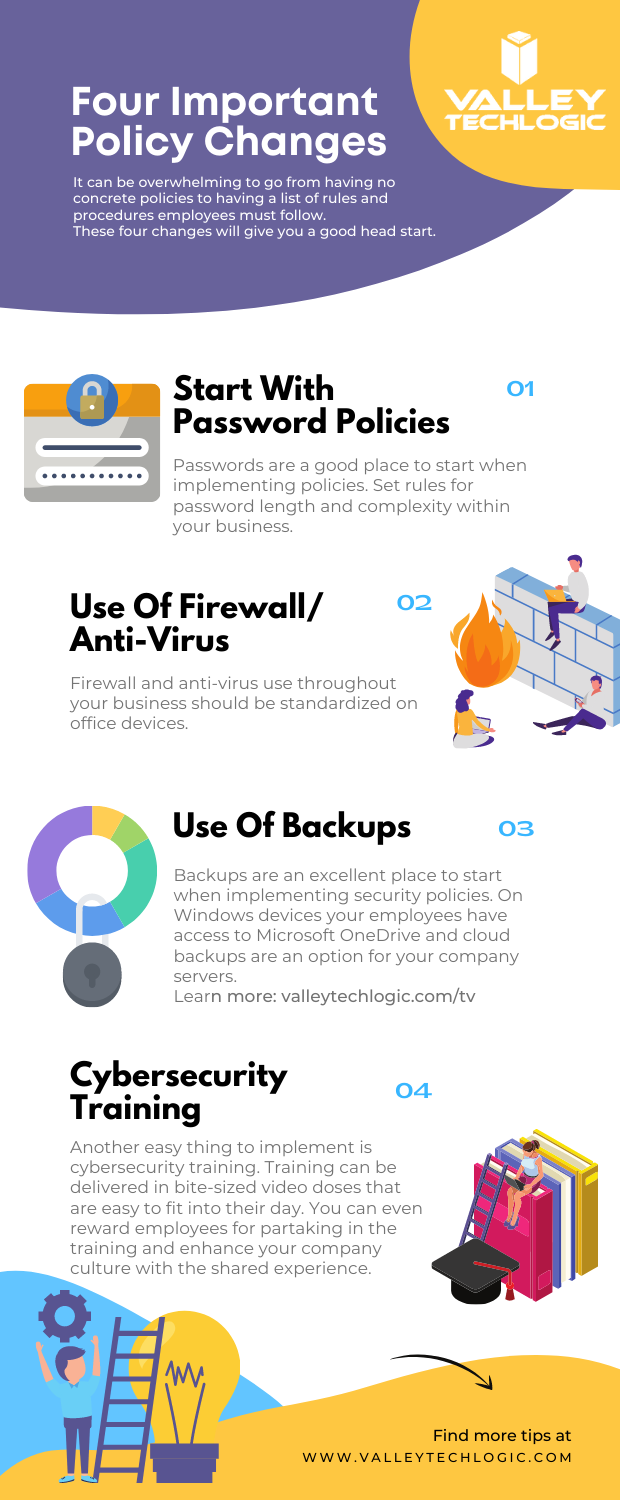
    In addition to these five tips, we’ve also created this PDF for four easy things to implement in your business (click to download).

    Four Policy Changes To Start With
    Click to download.

    These items will get you on the right track but if you feel like it’s time to get serious about cybersecurity, it’s best to leave it to the professionals. At Valley Techlogic, we have over 15 years in the cybersecurity space. We have a robust cybersecurity package that can be used standalone to leverage our cybersecurity stack if you already have an IT team in place or in conjunction with our IT service plans if you don’t currently have reliable assistance for your business’s technology. Schedule a consult today to learn more.

    Looking for more to read? We suggest these other articles from our site.

    This article was powered by Valley TechLogic, adns, n IT service provider in Atwater, CA. You can find more information at https://www.valleytechlogic.com/ or on Facebook at https://www.facebook.com/valleytechlogic/ . Follow us on Twitter at https://x.com/valleytechlogic.