Tag: cybersecurity training

  • BEC Scams are becoming increasingly more common, and the payouts more lucrative

    BEC Scams are becoming increasingly more common, and the payouts more lucrative

    BEC or Business Email Compromise is a type of phishing scam where the target of the scam receives an email purporting to be someone they know, like a vendor they work with or a colleague. These scams are so common place that the Federal Bureau of Investigation even has a guide to protecting yourself from them.

    We’ve even written before on how to spot a typical BEC email and a few ways to combat it, but we would like to circle back to this topic now as we creep into what is typically a very busy time for most business owners – the fourth quarter.

    You may or may not be surprised to learn that BEC attacks rose in the fourth quarter last year and we’re not anticipating 2023 to be any different. 2022 even saw a rise in the ever popular “as-a-service” variant of attacks which means would be bad actors could enact their attacks with little actual effort on their part.

    The technical know-how required for these attacks is also low, with some of them being as simple as just a variant on your normal phishing scheme but with the end goal being a direct payout rather than the user’s credentials or private information.

    CISA (Cybersecurity and Infrastructure Security Agency) even reported on Russian state sponsored bad actors specifically targeting defense contractors using Microsoft 365 with their BEC schemes. Imitating Microsoft support is not a new scam, and like always you should be wary about any support person reaching out to you directly asking for your credentials, but the single-minded focus of this particular scam put government agencies like CISA and the FBI on red alert.

    When we say these scams are becoming more lucrative, we definitely mean it, with it being estimated BEC victims lost 2.74 billion dollars in 2022 which was $300 million more than 2021. Like with most cyber attacks we anticipate they’ll continue to rise.

    So how do you protect yourself from a Business Email Compromise scam in 2023?

    1. Don’t overshare online. BEC is a social engineering scam, so the less information that’s readily available about you on the internet the less able a scammer is to pretend to be someone you know.
    2. Forward emails instead of replying to them. As with normal phishing these scams are perpetrated over email. Forwarding emails forces you to type out the email address (thereby guaranteeing it goes to the right person). BEC attacks usually involve spoofing an email address or simply choosing a domain that’s similar to one you may be use to corresponding but having a slight misspelling or rewording.
    3. In the same vein, check the sender’s email address before responding at all. You may be able to simply block the scammer when you discover they’re trying to imitate someone else by verifying the email address is incorrect.
    4. Secure your own domain against domain spoofing. Many times, the attack is coming from “inside the house”. A very common BEC scam involves one of your employees receiving an email that looks like it’s from you or someone high up in your organization, except it’s not. Registering the domains you use for email will help protect against this very common variety of this scam.
    5. Again, in the same vein as our last tip, use a domain that you’ve registered instead of a free email service. It might be tempting to keep using the Gmail address you’ve always used to avoid paying for a domain and email services, but it greatly increases your risk of a BEC attack being successful. Using a free email service allows attackers to create a new email with your name to then tell those you know you just “got a new email”. It would be very difficult to prove this is false without talking to you directly.

    Many of the defense strategies against a BEC attack involve employee training.  Attackers may not target you directly as the business owner when it’s easier to get to you (and your business) through a weaker link – often employees who don’t have the strategies available to avoid these kinds of scams.

    Luckily, Valley Techlogic provides security training as part of our service packages. Below is a list of some of the training topics we cover for our clients:
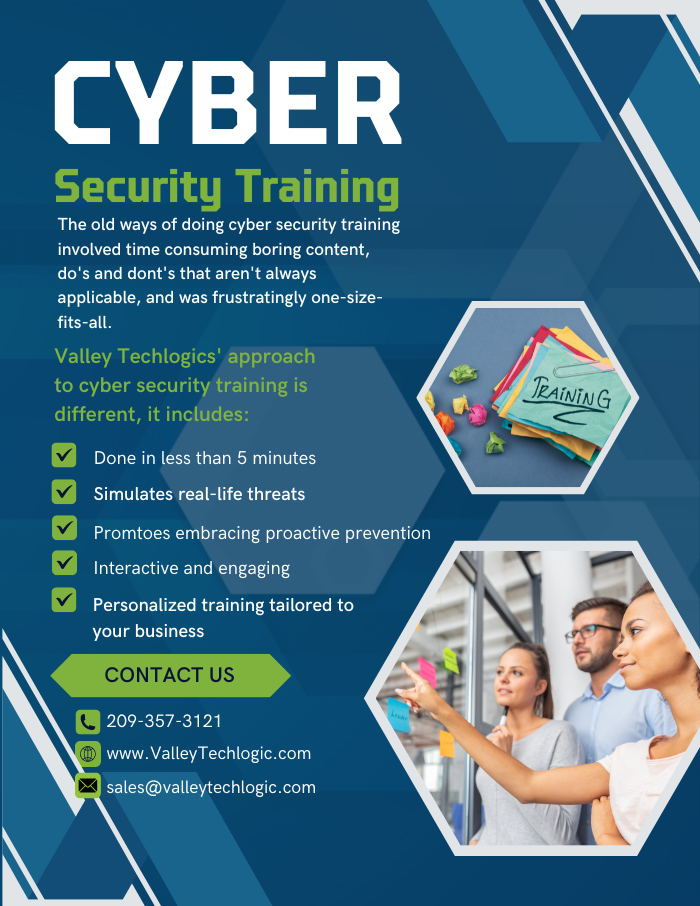
    Cyber security training is quick and is one of the easiest and most effective ways to have an overall safer environment for your business. Learn more about Cyber Security Training through Valley Techlogic as well as other the other cyber security services we offer today through a quick consultation.

    Looking for more to read? We suggest these other articles from our site.

    This article was powered by Valley Techlogic, an IT service provider in Atwater, CA. You can find more information at https://www.valleytechlogic.com/ or on Facebook at https://www.facebook.com/valleytechlogic/ . Follow us on Twitter at https://x.com/valleytechlogic.

  • ChatGPT is allowing even novice wannabe hackers to construct their own malware

    ChatGPT is allowing even novice wannabe hackers to construct their own malware

    ChatGPT is a power AI chatbot that allows the user to communicate a question to it and receive a very thorough answer on any topic the user can dream up. Created by OpenAI and already fielding massive investment offers even from companies like Microsoft, they’ve had a ton of buzz in the news both positive and negative.

    It first came under scrutiny when it became apparent the tool was great for generating lots of content quickly, including articles that students could use and submit (though the quality of these articles can vary greatly).

    This is because tools like ChatGPT scrub great swaths of the internet for their content. Whether it’s being asked to write a paper on the Civil War or generate a Picasso-esque picture, it takes the prompt and quickly compiles the database of knowledge it has built up from data readily available online and provides the user with what they’ve asked for.

    There has been a lot of discussion around the future of AI and the ramifications of copyright, particularly when it comes to original written works or art, but today we’d like to focus on ChatGPT’s scripting capabilities and the potential pros and cons.

    As leaders in the IT space we were already aware of the buzz around ChatGPT’s scripting capabilities, with some programmers praising it’s ability to create simple scripts and the potential it had to make aspects of their jobs easier. While others lamented what it meant for the programming role as a whole or whether the code output was really “up to snuff” especially when used in real world applications.

    It’s become clear there’s a niche for ChatGPT in creating low level tools, but this unfortunately also includes malware and encryption scripts – which often aren’t very complicated and easily deployed via phishing type scams.

    As reported by Axios, there is already evidence that hackers are using ChatGPT in the creation of malware or in improving their existing attempts to create new malware scripts. There is also evidence that it’s being used by less technically inclined people to create malware they otherwise would not be able to make.

    OpenAI has made statements that they are looking to improve their product and prevent it from being abused, in the interim we would advise users to be especially cautious when clicking on links or downloading files. We wrote an article on how to spot phishing clues online that might be worth a review.

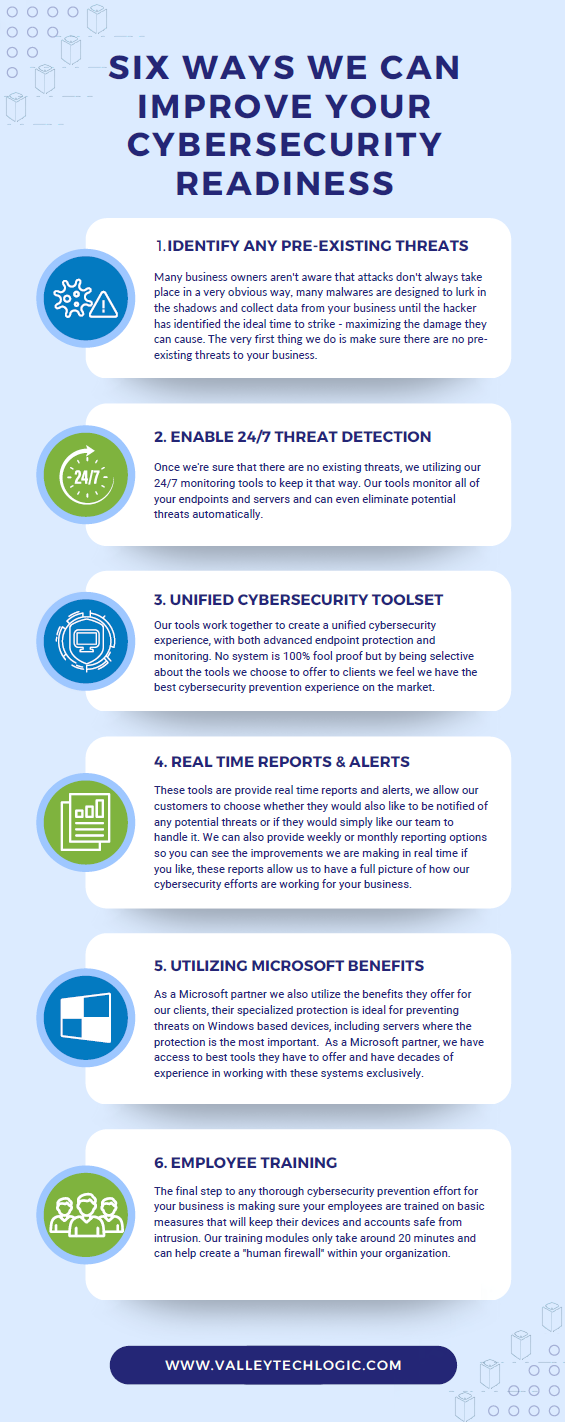
    For businesses who have made getting serious about cybersecurity a primary goal in 2023, here are 6 ways Valley Techlogic can help.

    Click to grab the full size version.

    Looking to learn more? Schedule a quick consultation with us today or take advantage of our 2-hour free service offer to experience our commitment to quality service for yourself.

    Looking for more to read? We suggest these other articles from our site.

    This article was powered by Valley Techlogic, an IT service provider in Atwater, CA. You can find more information at https://www.valleytechlogic.com/ or on Facebook at https://www.facebook.com/valleytechlogic/ . Follow us on Twitter at https://x.com/valleytechlogic.
  • October is Cybersecurity Awareness Month, now in its 18th year

    October is Cybersecurity Awareness Month, now in its 18th year

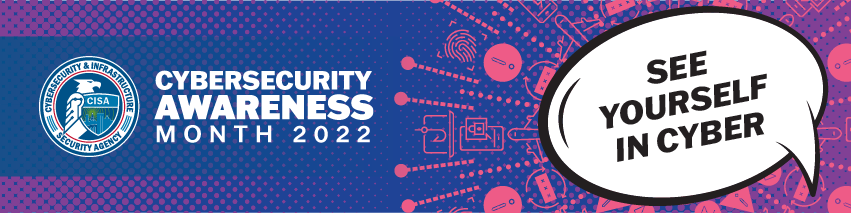
    We’re announcing this a bit late, but we did want to touch on this annual event (now in its 18th year). Every year CISA (Cybersecurity and Infrastructure Security Agency) releases new resources that are free to download and share for Cybersecurity Awareness Month. The theme this year is “See Yourself in Cyber” and we appreciate the effort to help everyone understand that cybersecurity measures are up to all of us to maintain.

    So many cybersecurity measures feel very passive, you’re protected by your anti-virus or firewall automatically. Your IT team helps you navigate any issues that make come up. For businesses, advanced cybersecurity threat protection can detect a threat just from activities that fall outside the norm (like your computer being online at three in the morning) and send you a warning.

    Unfortunately, hackers are always trying to circumvent these automatic measures no matter how advanced they become. The human element is still the biggest cybersecurity threat to your network and business. That’s why acknowledging we all have a role to play in preventing cyber threats is so important.

    CISA recommends four important steps we all need to take online:

    1. Think Before You Click: Before you click on that link in an email or download an attachment, do a little research. Is the sender who you expect it to be? Phishing emails are still the #1-way users are hacked.
    2. Update Your Software: This is good common-sense advice; most patches also include important security updates and it doesn’t take very long to install them (and for Windows devices you can even have them run automatically).
    3. Use Strong Passwords: This is another easy one and if you use one of our password manager recommendations, it’s even easier to create stronger passwords that you don’t have to manually remember.
    4. Enable Multi-Factor Authentication: This is CISA’s fourth tip for this year and lucky for you we have a guide for this too.

    These tips may seem simple, but they will be hugely beneficial to preventing a cyber threat for you, your business or your employees. However, you can take it a step further and engage with cyber security training.

    You may be wondering what that would look like, well you’re in luck. We have a sample training session right here for you to review with your employees:

    This is just a quick sample lesson; through our partner we have bite sized lessons that include video that you and your team can take to beef up your cybersecurity knowledge. They average 2-3 minutes long with a quick quiz at the end to make sure the knowledge was absorbed, and you can even see your employees average scores to see how everyone is doing.

    If you incentivize taking this training it will not only be a team building opportunity, it will also help your business stay safe from cyber security threats. If you’d like to learn more about cybersecurity training or stepping up your cybersecurity measures in your business (including the aforementioned advanced cyber threat detection) reach out today for a consultation.

    Looking for more to read? We suggest these other articles from our site.

    This article was powered by Valley Techlogic, an IT service provider in Atwater, CA. You can find more information at https://www.valleytechlogic.com/ or on Facebook at https://www.facebook.com/valleytechlogic/ . Follow us on Twitter at https://x.com/valleytechlogic.
  • 5 of the Most Important Cybersecurity Training Topics to Cover with Your Employees

    5 of the Most Important Cybersecurity Training Topics to Cover with Your Employees

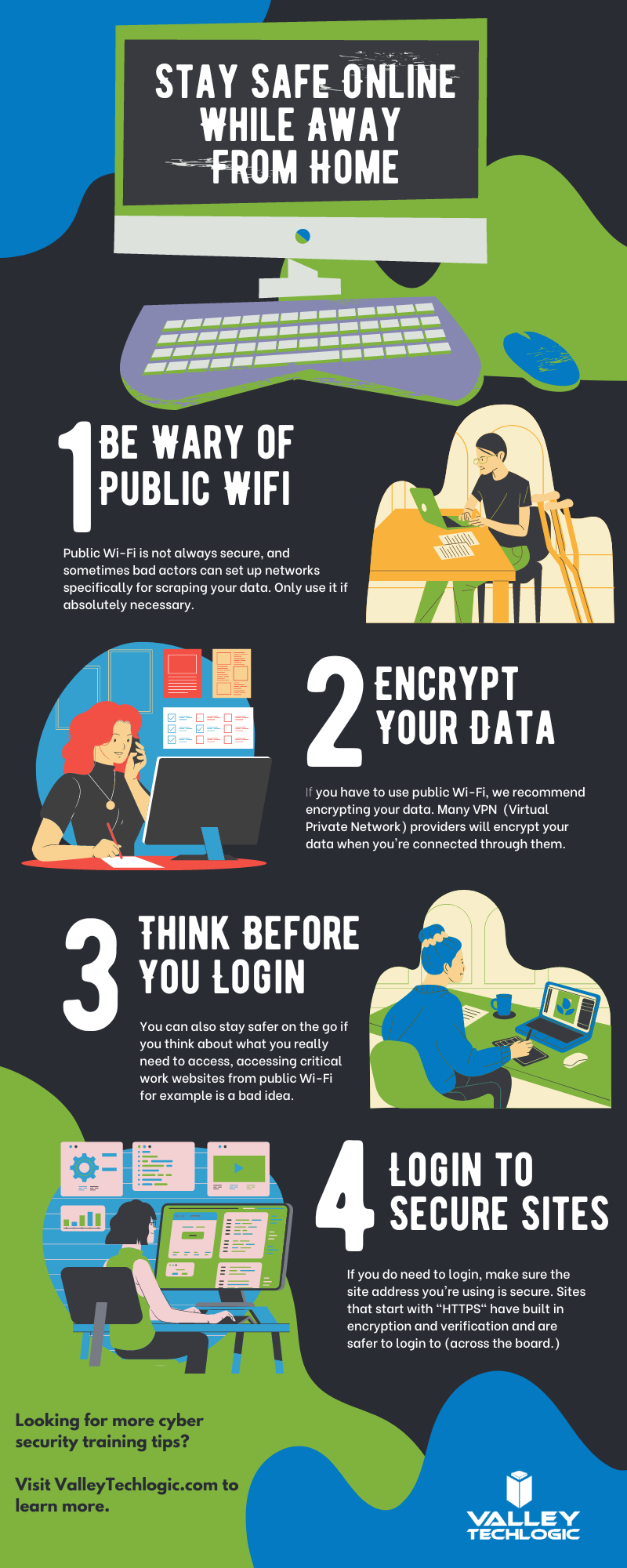
    We’ve discussed cybersecurity training before and its importance in preventing the number 1 cause of cybersecurity disasters – human error.

    We offer cybersecurity training as a core feature in our tech care plans, but many topics you can (and should) cover yourself with your employees. There couple be rules that specifically apply to your business sector; like HIPAA for healthcare or CMMC for Department of Defense contractors.

    Maybe you’ve experienced a cybersecurity attack before and after the dust settled you came up with a game plan specifically to prevent it from happening again. If it hasn’t happened to you yet, it’s a mistake to assume it never will. In 2021 42% of businesses experienced a cyberattack. It’s a numbers game most won’t win without preventions in place.

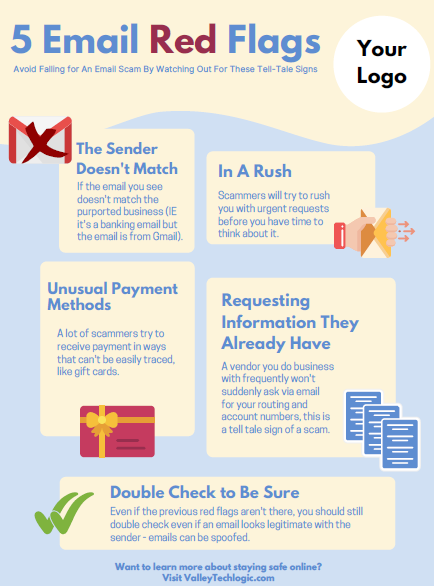
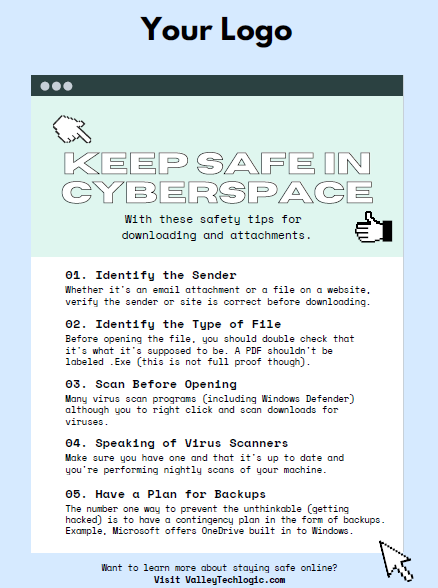
    To start, we want to offer these posters we’ve created on two common cybersecurity threat topics, email and malicious attachments. These posters are free for you to print and brand to use in your office or send as a reminder, and these are two excellent places to start when you’re looking to beef up your office security.

    Click to grab the full size version.
    Click to grab the full size version.

    Here are five more training topics all workplaces should also cover:

    1. Like our posters above, email security and having strict guidelines for attachments and downloads is one key thing to focus on in your cybersecurity training efforts.
    2. It’s also important to provide guidance for internet usage while at work. Many employers try to digitally lock this down, but these efforts are usually met with annoyance and disdain from employees and are often in vain. Instead of arbitrarily trying to block everything with software we suggest having guidance about what’s appropriate for work devices (and what Isn’t). We also suggest noting that even if a website looks legitimate it may not be, so they should be wary of sites that ask you to download something or enter private credentials.
    3. This comes to the next topic which is practicing good safety hygiene with work devices. Three easy steps are: Locking your computer when you walk away, only downloading software from work authorized sites, and keeping your device up to date with patching and software updates. They may need assistance with the third step so it’s a good idea to have your IT provider manage workstations if you’re able to (this is something Valley Techlogic providers for all clients).
    4. The fourth step is protecting company data. If you’re employees have to interact with documents that are confidential in nature you should have rules for the sharing of those documents, as well as a comprehensive plan for backing them up safety.
    5. Finally, you should provide guidance on passwords and multi-factor authentication. Having a rule in your workplace that for work accounts they must have multi-factor enabled (or have your IT team enable it across the board) will drastically improve your office’s online safety. We have guidance for this topic here.

    It can feel overwhelming to have all of these topics to cover with your employees, but we cannot overstate how important it is to cover these topics with your employees, even if you think they’re things they should already “know”.

    At Valley Techlogic we have partnered with a platform that not only provides cybersecurity training resources, but it also allows you the ability to create your own training modules. You can even cover topics that fall outside the cybersecurity spectrum. We can also work with your business to assist you in the creation of these training modules, if you would like to learn more schedule a consultation with our sales manager Annette today!

    Looking for more to read? We suggest these other articles from our site.

    This article was powered by Valley Techlogic, an IT service provider in Atwater, CA. You can find more information at https://www.valleytechlogic.com/ or on Facebook at https://www.facebook.com/valleytechlogic/ . Follow us on Twitter at https://x.com/valleytechlogic.

  • Can you spot the phishing clues? And 10 tips to avoid falling for a phishing scam

    Can you spot the phishing clues? And 10 tips to avoid falling for a phishing scam

    If you’re not aware, phishing is another word for scams perpetrated over email. It was coined in 1996 and was first associated with hackers attempts to steal America Online (AOL) accounts, and it has not slowed down since then.

    As of 2021 most hacking attempts are phishing scams, the phrase is meant to evoke the image of a hacker literally fishing for their victims by baiting a hook which in this case is a credible looking email from a place you might actually do business from, a colleague or a family member. 94% of malware attempts originate from an email sent to the victim.

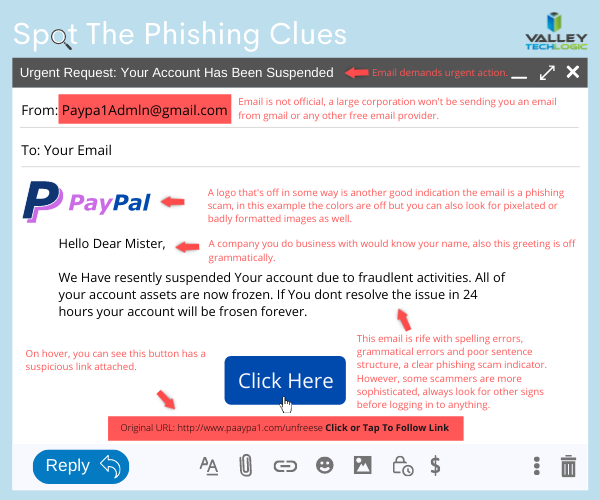
    Well as credible as they can manage, many phishing attempts are poorly worded and grammatically incorrect as the senders are from another country from the victim. In the image below we showcase a phishing email you might receive, click to reveal the answers.

    Spot the phishing clues
    Click to reveal the clues.

    Not all phishing attempts will be so obvious though, here are our 10 tips to avoid falling for a phishing scam.

    1. You are asked to reply with sensitive details. A legitimate business will never ask for your private details via email, if you’re unsure contact the business directly to ask.
    2. The message says you must respond urgently or face dire consequences. Legitimate businesses such as the financial institution you bank with won’t relay an important message over email alone, and they’ll never threaten you.
    3. The email contains a non-standard email attachment. While even standard email attachments can contain malware, a non-standard email attachment is a clear sign something is amiss.
    4. The senders email address doesn’t match the contents. As in our example, a legitimate business (especially a large one) won’t be using a gmail address. You also want to watch out for slight misspellings, such as an email coming from admin@paypa1.com
    5. The email contains an unusual request. You receive an email that looks like it’s from your boss, and he’s saying he wants to reward some key players in your company by gifting them gift cards from a popular big box store. He says not to give them to the players directly, simply reply with the gift card numbers and he’ll handle it. This is just one example of a scam we have unfortunately heard of happening. If the email is requesting large amounts of money be spent in unusual way or private details be sent over email, even if the email looks legitimate you should verify with the supposed sender first.
    6. It has an attachment you weren’t expecting. If receive an email with an attachment and the body suggests you requested information, but you don’t remember doing so, it’s probably a phishing scam.
    7. The email says you won a prize, but you must enter your banking information to claim it. Prizes are a common phishing scam trope; they may also try to get you to download a suspicious attachment.
    8. The URL in the email doesn’t match the business it claims to come from. As in our example, phishing attempts often involve a similar but not quite right URL. Many scammers will try to gain the victims trust by sending them to an “official” looking website where they will login with their legitimate credentials, allowing the scammer to gain access.
    9. The content is canned. Many phishing scammers reuse the materials of others. One example is you receive a suspicious sounding email, such as someone saying you have stolen their copyright images and you must visit a website to confirm. If you Google the email you may find examples of others online who have received that same
    10. The greeting doesn’t match the content. This is a simple one, if you receive an email supposedly from your boss but the greeting starts with “Dear” or another out of character greeting, it’s probably a phishing attempt.

    This is only a start, many phishing attempts are highly sophisticated and difficult to spot but knowing some of the signs will help you be more attentive to things that may be wrong with an email you receive. We also have found for our clients, randomized simulated phishing attempts can help them with training their staff to keep an eye out for phishing attempts.

    Most successful hacking attempts involve a human element, training is your only first line of defense. If you would like to increase your defense against phishing attempts, malware, ransomware and more, Valley Techlogic can help. Schedule an appointment with us today to learn about our comprehensive cyber security packages for businesses.

    Looking for more to read? We suggest these tech articles from the last week.

    This article was powered by Valley TechLogic, an IT service provider in Atwater, CA. You can find more information at https://www.valleytechlogic.com/ or on Facebook at https://www.facebook.com/valleytechlogic/ . Follow us on Twitter at https://x.com/valleytechlogic.
  • 3 Reasons You Want to Offer Cyber Security Training to Your Employees

    3 Reasons You Want to Offer Cyber Security Training to Your Employees

    Our blog is no stranger to the topic of cyber security. We’ve covered recent breaches, malware, and easy things you can do to stay safe on the internet and keep your devices free of viruses.

    But what about the human element? It’s estimated that 90% of data breaches are caused by human error. We know that sounds high and you may be thinking how that can be possible.

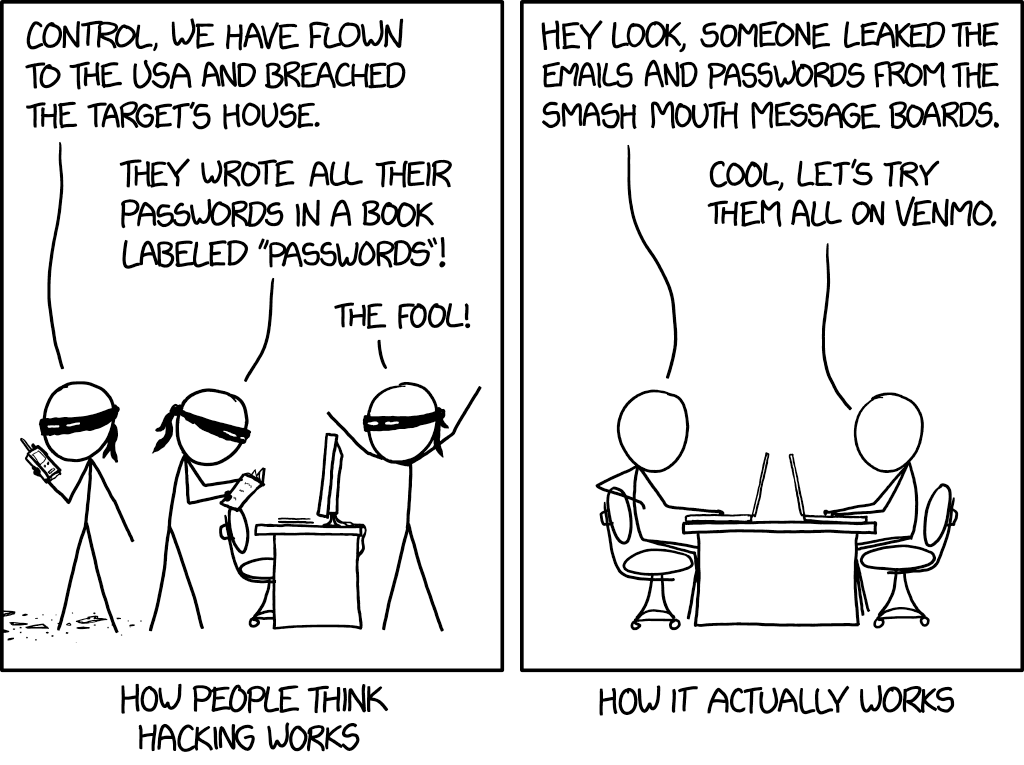
    How hacking works
    Credit to xkcd.

    We’re all aware of the trope of the genius hacker who can hack someone’s machine without them knowing AND without them doing anything on their side. For the most part this is just not true. There are ways for them to access your machine undetected by you, but most of the time you will be involved in some way

    An example would be a sneaky malware attached to innocuous looking file (like an executable disguised as a PDF that looks like it’s coming from a coworker or friend whose email they spoofed). Examples like this are exactly how most bad actors are getting into the victim’s system.

    What’s worse, they may not act right away. They may wait weeks or months gathers as much data as possible before striking, so they don’t just take YOU down but your business as well.

    Another way is shown in the above comic, if a data breach happens on a site you frequent they will have your credentials for that site. The hacker will then go on to try those credentials on other sites such as email providers and banking websites.

    This is why cyber security training is so important, you can have the best software in place to try to mitigate the human element, but bad actors will always be doing their very best to thwart that software. Having your team prepared properly is the only way to fully protect you and your business from a cyber-attack.

    That training will cover topics such as good password hygiene (vary your passwords!) or how to use 2 factor authentication as just two examples. Some cyber security training providers will even conduct simulated phishing attempts so you can see first hand how easy it is to fall victim to one and how to avoid it.

    To sum it up here are the 3 reasons we think cyber security training is a great idea.

    1. It protects your business. Your employees will make the right choices if they receive a sketchy email or link to download something (such as forwarding it to your IT team instead of clicking on it).
    2. It will make the software and programs you have in place for cyber security already more effective if your employees know how to properly use them (instead of possibly ignoring or even bypassing them).
    3. It will allow you and your employees to stay up to date on recent or emerging threats so if there is something out there that is hard to avoid, you will know how to handle it.

    You may be wondering where to go for cyber security training, and to be honest the best place to start is your IT Team. They should be taking the time to explain the systems they’re putting in place and how to use them in layman’s terms for you and your team.

    We even create free resources for our clients such as our one page cyber security checklist (found here).

    Your IT Team may even have a recommendation for the best online training you and your employees can attend. Two that we have personally worked with are ID Agent and Breach Secure Now. They both offer online training and even dark web monitoring.

    In whatever way you go about it making cyber security training a necessary element in your business is taking a proactive stance against cyber-attacks.

    Looking for more to read? We suggest these tech articles from the last week.

    This article was powered by Valley TechLogic, an IT provider in Atwater, CA. You can find more information at https://www.valleytechlogic.com/ or on Facebook at https://www.facebook.com/valleytechlogic/ . Follow us on Twitter at https://x.com/valleytechlogic.
    Looking for IT Services in Fresno, Modesto, Stockton, Ceres, Atwater, Merced, Visalia or Lodi? We cover all these areas and more!