Tag: data safety

  • 5 USB flash drive safety and usage tips, also our 3 recommended drives for 2023

    5 USB flash drive safety and usage tips, also our 3 recommended drives for 2023

    USB flash drives (also known as thumb drives or memory sticks) have grown a lot in the last few years, what was once a handy tool for transporting small files but couldn’t compete with the capacity of CD disks or traditional drives is now available in sizes up to 1 terabyte which makes them a competitive product for even backup purposes.

    While they may have fallen in favor due to cloud services becoming more ubiquitous, many are looking for more tangible ways to backup important files and take them on the go.

    Many users also worry about the safety of these devices. This is because they’re a common vector for drop attacks, which is where a USB drive is left in a conspicuous location for someone to find and try to use not knowing it contains a virus or trojan horse.

    They also can be insecure if left on a desk or somewhere in public. Luckily, there are even options now that offer 2 factor authentication, biometric verification, and encryption. This means even if your flash drive fell into the wrong hands, it would be useless to the thief. You should also be wary of where you plug your flash drive into as the data path is a two way street.

    Here are 5 more safely and usage tips for utilizing a USB flash drive:

    1. Have separate flash drives for work and home. This will reduce the risk of cross-contamination if one of your devices is compromised, it will also make it easier to organize your files.
    2. Be careful where you purchase your flash drives from. There are irreputable sellers online selling fake drives that don’t contain the amount of storage they’re supposed to, or worse they could be infected with malware. Always buy from a reputable source.
    3. Don’t purchase any drives that require software for use. This is unnecessary and again opens up your device to being compromised with malware. USB drives should be “plug and play”.
    4. Think about the physical size of the drive you’re buying. It needs to be able to fit into the device you’re trying to plug it into, and a bulky USB drive may not be compatible with all devices.
    5. Be aware of the lifespan for the device you’re buying. USB flash drives (also solid-state drives and hard drives) have a certain number of write/erase cycles. Longer is better but if you plan to just keep a static backup on it you can get away with a lower number. Typical USB flash drives have 10,000 to 100,000 write/erase cycles.

    If we’ve piqued your interest in USB flash drives, you still might not be sure where or what to buy. There are thousands upon thousands of options but here are three options we can recommend. We have one that fits the bill as a budget friendly option for general use, one that has a slim sturdy form factor, and one that meets the requirements if security is a concern.


    Security conscious.
    Slim form factor.
    Budget friendly.


    All of the options we have selected have USB 3.0 speeds, while this is changing all the time this is the minimum we recommend as of writing. You also want to be aware of what kind of connector you’re looking for. USB-A is the most common but there are options for USB-C, MicroUSB and Lightning connectors on the market. You can also use an adaptor if needed.

    If you need hardware buying advice for your business, including the topic of digital storage, Valley Techlogic is happy to help. We can help you select the best option and offer advice on how to secure it. You can learn more about procurement assistance through Valley Techlogic here or schedule a meeting to find out more about our services.

    Looking for more to read? We suggest these other articles from our site.

    This article was powered by Valley Techlogic, an IT service provider in Atwater, CA. You can find more information at https://www.valleytechlogic.com/ or on Facebook at https://www.facebook.com/valleytechlogic/ . Follow us on Twitter at https://x.com/valleytechlogic.

  • They quit, now what? 5 tips for digitally offboarding employees safely.

    They quit, now what? 5 tips for digitally offboarding employees safely.

    Having an employee quit can be very disruptive to your business, besides having to scramble to rehire for the role or find coverage within your organization you also have to tie up any loose ends they may have been working on (especially if they left without a hand off period).

    Unfortunately, it’s not a good idea to wait until the dust has settled, when it comes to tying up loose ends we recommend jumping into action immediately once you’ve been made aware that your employee will not be continuing in their role.

    We’ve touched on what you should do if your IT guy quits here but many of your non-IT employees also leave a strong digital footprint within your business that will need to be dealt with when they leave.

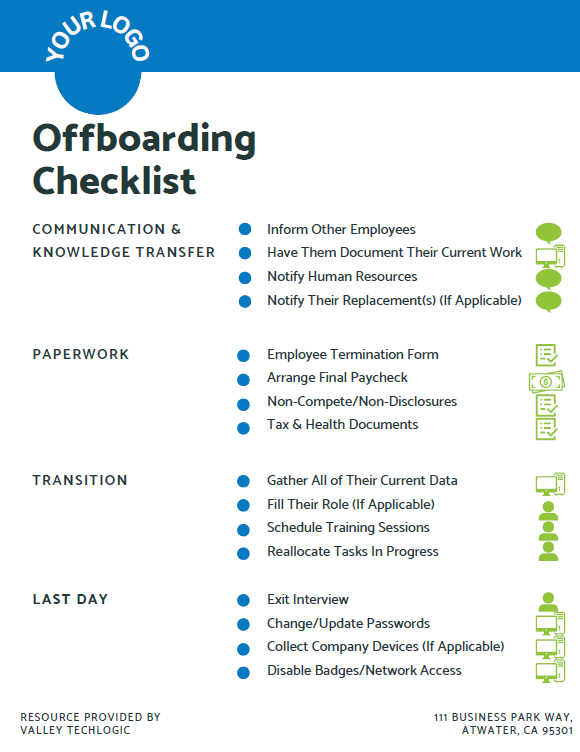
    Here are the five things we suggest doing immediately on your former employees last day:

    1. First, identify all of the company programs or platforms that they have logins or passwords for. Even during an amicable split, it’s still a good idea to change these passwords in the same way a landlord might update the locks between tenants if they weren’t absolutely sure they recovered all the keys to the building (and since we’re talking digital, there’s no way to be sure).
    2. You also need to change their email password. You might be thinking you should just delete their email but depending on the role they performed for your business there may be pertinent information that’s only found within their work email. We also suggest forwarding emails that come to that employee to whoever is handling their work activities until you’re sure that every client or vendor that worked with them has gotten the message about who to contact instead.
    3. Recover any work devices if applicable. In some cases it may be suitable to just have your IT team wipe the device or remove company data if you’re not interested in passing it along to their replacement (especially for older devices).
    4. In the same vein, if there is relevant company data on their devices it may be worthwhile to have your IT team recover it if possible. While we recommend collaborating with your employees through something like a company SharePoint or another unified platform, anything that was currently in flux before they quit may still be worth recovering.
    5. The final steps are related to physical office security as well, you’ll want to disable their badges and network privileges upon their exit.

    At Valley Techlogic we like to create resources for our community, and while many steps in the offboarding process aren’t strictly digital we thought it would be helpful to provide an offboarding checklist that can be used to make sure you’re covering not only steps outlined above but also all aspects of the offboarding process (with a clear view on what’s digital and what’s not). Need help branding it? Just let us know.

    Click to grab the full size version.

    If you need assistance in creating a thorough offboarding process for your business, or even an onboarding process that includes coverage for making future offboarding easier, we can help.

    We’re experts in creating specialized processes for our clients so that all aspects of the technology they use are secured and maintained, including devices and platforms used by employees.

    Schedule a consultation with us today to learn more about how we can assist you with your digital employee planning and maintenance.

    Looking for more to read? We suggest these other articles from our site.

    This article was powered by Valley Techlogic, an IT service provider in Atwater, CA. You can find more information at https://www.valleytechlogic.com/ or on Facebook at https://www.facebook.com/valleytechlogic/ . Follow us on Twitter at https://x.com/valleytechlogic.

  • Data breached? 5 ways to reduce the impact on your business.

    Data breached? 5 ways to reduce the impact on your business.

    We’ve posted a lot of articles on how to avoid a data breach (here are a couple of recent ones for you to review if one hasn’t happened to you so far and you’d like to keep it that way).

    Unfortunately, we fear that if you’ve reached this article you may be part of the growing number of business owners whose data has been breached (in 2020 there were 700,000 attacks on small businesses with damages exceeding $2.8 Billion).

    Data breach severity varies widely, from an employee email being temporarily hacked all the way to having your backups infiltrated and locked for a ransom – and even if you pay the ransom you still might not recover your data.

    So if you’ve experienced a significant data breach and wondered what you could have done to have a better outcome, or even if you’re in the midst of one now what should you do?

    Here are our top five tips for reducing your data breach costs (now or in the future):

    1. Damage Control – Turn to the pros (like us) when it comes to recovering your data in the event of a breach, they will have access to tools that could recover data that will otherwise be lost if decryption efforts fail in the hands of someone who doesn’t know what they’re doing. Bottom line, know who you’re going to call in an emergency and don’t be afraid to get their help sooner rather than later.
    2. Downtime Mitigation – Downtime is one of the most expensive elements of a data breach, if you don’t already have a disaster recovery plan a previous breach can highlight exactly what needs to be a priority in your business if your data is unavailable. Also, a team like Valley Techlogic can help you create a disaster recovery plan.
    3. Turn to Your Vendors – Your vendors may have some methods for assisting you in the event of a data breach. For example Microsoft has a shared responsibility model for data but if you have Microsoft 365 and use OneDrive, some of that data may still be safe on their end and accessible to you (once your devices have been cleared and are safe to use).
    4. Be Transparent – If your business is very customer facing, an outage in your business caused by a data breach may be very obvious to them. We don’t recommend trying to hide the fact that a breach has happened but instead being transparent about what happened and what you did to fix it, and how you plan to prevent it in the future.
    5. Cyber Prepared – The best way to recover financially from a data breach is to have cyber insurance in place before the attack happens, while it may be too late for a past breach you can prevent future financial loss by using our guide to reviewing and obtaining cyber security insurance here.

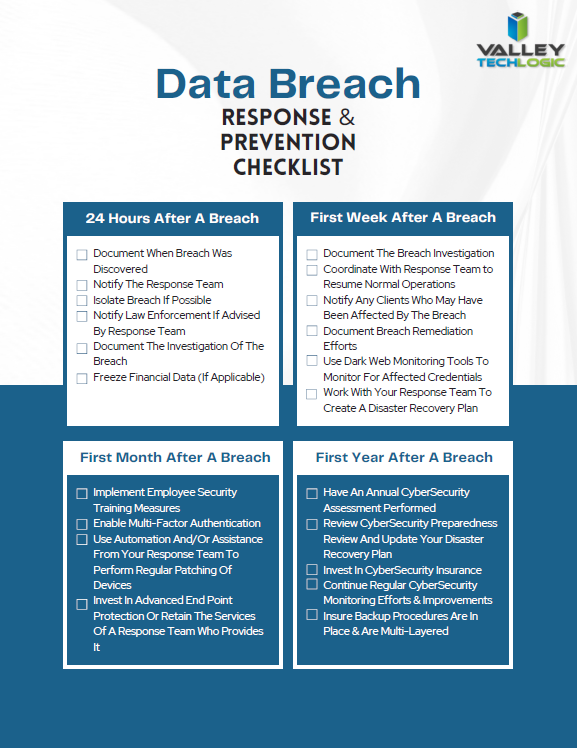
    Of course, an ounce of prevention is worth a pound of cure unfortunately when it comes to cybersecurity attacks. We would be remiss not to offer a few tips on preventing a data breach specifically. You can grab this checklist to make sure these items are covered to prevent future data breaches:

    Click to download the full size version.

    If you’re currently dealing with a data breach or have dealt with one in the past and want to prevent future breaches, Valley Techlogic can help. We are experts in cybersecurity and use industry best practices to provide the best security coverage for our customers that is also cyber insurance compliant. Learn more with a consultation today.

    Looking for more to read? We suggest these other articles from our site.

    This article was powered by Valley Techlogic, an IT service provider in Atwater, CA. You can find more information at https://www.valleytechlogic.com/ or on Facebook at https://www.facebook.com/valleytechlogic/ . Follow us on Twitter at https://x.com/valleytechlogic.