Tag: google

  • More data breach woes for LastPass and our recommendations for you on how to deal with it

    More data breach woes for LastPass and our recommendations for you on how to deal with it

    We’ve posted about LastPass data breaches before but at that time it was purported to be a false alarm according to the company, the news on this most recent breach is that it’s real and that LastPass users should be concerned.

    The data breach in question happened in August but LastPass is just now revealing the details on what was stolen and the scope of breach. At the time of the hack LastPass was again saying that it was a false alarm but that wasn’t true and “backup customer vault data” was accessed during the August incident.

    This backup vault data included both unencrypted data such as website URLs and encrypted data such as website usernames and passwords. Having both details will allow hackers to easily put two and two together to access customer accounts.

    With that said because the data for usernames and passwords is still encrypted LastPass has let customers know their data is still safe, as they say it can only be unencrypted with their unique encryption key that is derived from your master password. User master passwords are not accessible due to their “Zero Knowledge” architecture.

    With this architecture no one, not even LastPass themselves, has access to a user’s master password. LastPass requires that master passwords be 12 characters long so even if the hackers who accessed this data attempt to brute force individual passwords it would still be difficult to impossible, with LastPass themselves estimating it would take “millions of years using generally-available password-cracking technology”.

    LastPass users should still be on the lookout for phishing attempts in the upcoming days however, even if your data is safe bad actors may still use the news of this breach to attempt to trick users into revealing their data. You should never share your password details with anyone, especially your master password. LastPass will never ask you for your password information.

    Also some additional advice for business owners who may own websites from Google, because the URLs in this breach were not encrypted they may include some that you didn’t want publicly accessible. John Mueller a SEO expert at Google recommends reviewing any website URLs you may have that may inadvertently leak data for your business, including customer form data.

    We still believe password managers are a security benefit to both consumers and businesses alike. They’re one small part of increasing overall cybersecurity awareness and safety and fall under the larger spectrum of increasing user education and accountability.

    We’ve posted about proper password safety and advice on avoiding phishing attacks, but here are the top 5 things you can enable in your business today to improve your cybersecurity safety in 2023.
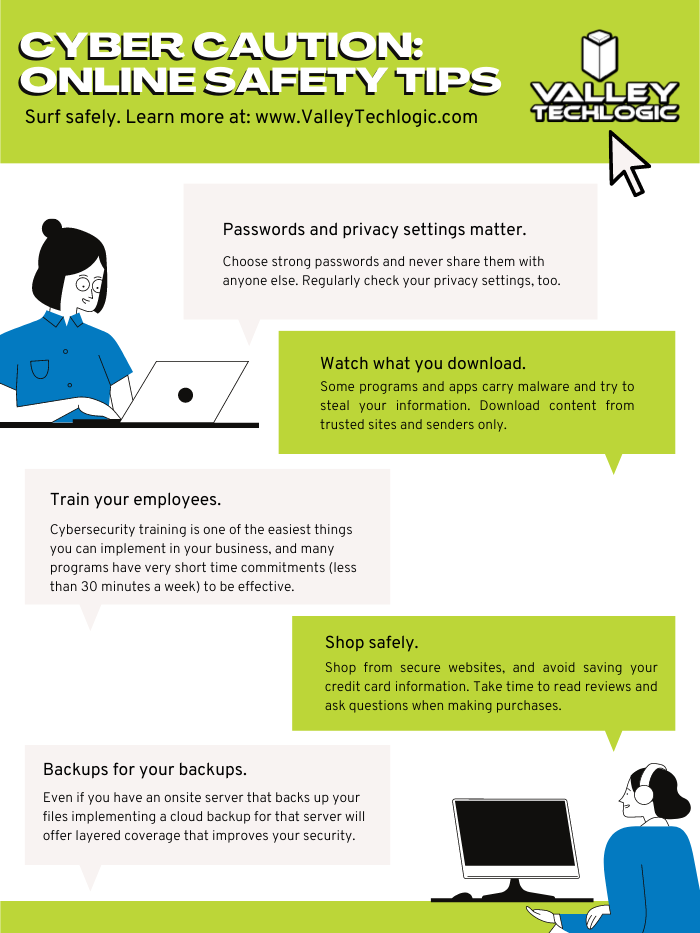
    Internet Safety InfographicIf news of breaches make you nervous and you aren’t sure if your business is prepared from a cybersecurity standpoint, Valley Techlogic can help. We consider ourselves to be a premier provider of cybersecurity services for businesses in our area and beyond. We can help your business by covering your endpoints, setting up secure backups, virus and malware scanning and prevention and more. Schedule a consultation today.

    Looking for more to read? We suggest these other articles from our site.

    This article was powered by Valley Techlogic, an IT service provider in Atwater, CA. You can find more information at https://www.valleytechlogic.com/ or on Facebook at https://www.facebook.com/valleytechlogic/ . Follow us on Twitter at https://x.com/valleytechlogic.

  • Google blocked the largest DDoS attack ever, peaking at 46 million requests per second

    Google blocked the largest DDoS attack ever, peaking at 46 million requests per second

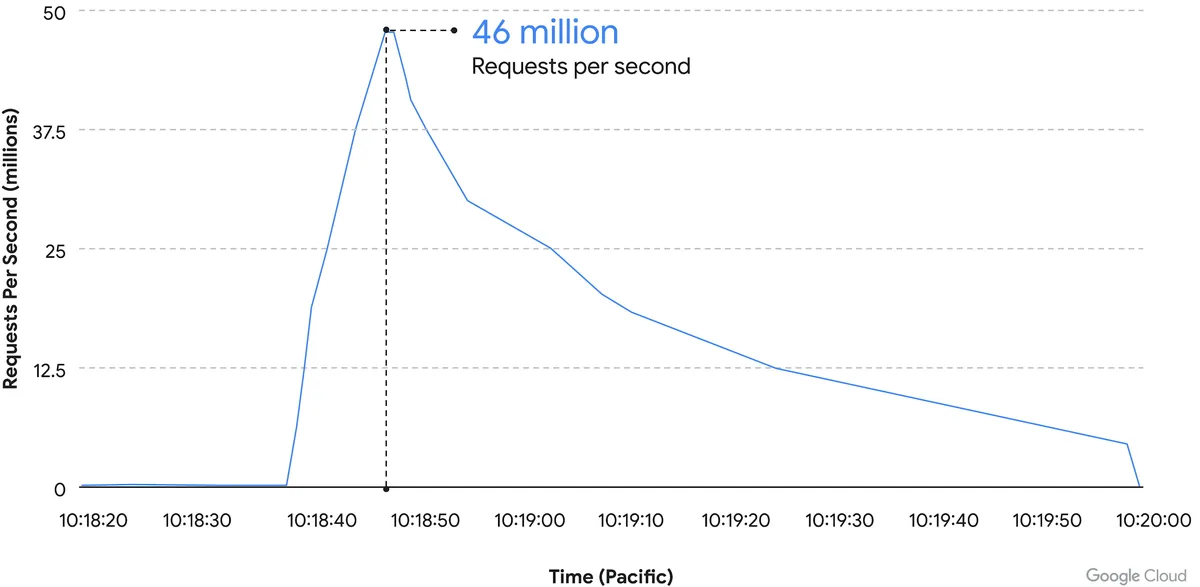
    While it’s just now being reported on, the DDoS attack on Google Cloud occurred on June 1st and lasted for 69 minutes – reaching a peak of 46 million requests per second.

    Source: Google Cloud

    We’ve covered Distributed Denial of Service (DDoS) attacks before in this blog, but the scale of this one is mind boggling. It’s nearly twice the size of Cloudflare DDoS attack from last year around this same time, which peaked at 26 million requests per second (sent from just over 5000 devices).

    If you’re wondering where the devices used in these attacks originate from, the answer in this case is unsecured devices. Specifically compromised Mikrotik routers.

    There’s been a number of articles regarding possible compromises to the Mikrotik brand of router including one instance that involved over 200,000 devices. Many in the security space wondered if there would be a fallout from that and now, we have our answer.

    However, what’s more impressive is not the scale of this attack, but the fact that it was successfully blocked by Google.

    Botnet attacks of this nature are not rare, it’s difficult to say exactly how many attacks occur per day but it has been noted they’re on the rise since the Russian invasion of Ukraine. A botnet is essentially an assembly of compromised devices that are used to attack a target. DDoS attacks are one of the most common uses, but they’re also used for phishing, cryptomining, or to bruteforce passwords just to name a few. The largest botnet ever recorded belonged to Russian BredoLab and consisted of 30,000,000 devices.

    Would be bad actors can even purchase DDoS as a service for as little as $5 per hour which should give you an indication how prevalent and common they are as an attack vector.

    Google blocked this attack by leveraging their Cloud Armor product, a network security service directly aimed at preventing DDoS attacks. If they were looking for a powerful case study for the effectiveness of this product, we can think of no better example then effectively blocking the largest DDoS attack in history (so far).

    Part of blocking a DDoS attack is early detection. DDoS attacks ramp up, if you can detect an incoming flux of peculiar traffic to your network you can block the attack before it’s able to scale up and cripple your network.

    Besides blocking potential attacks, the other side of the coin is not becoming an unwilling participant in a botnet through a compromised device in your home or business.

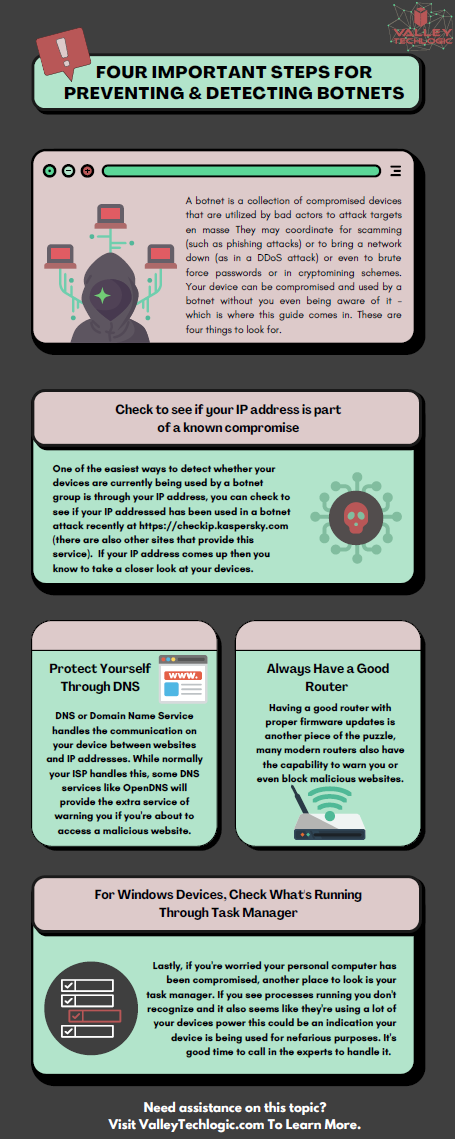
    The sinister part of it is you may not even be aware your device is compromised and it’s not just mobile devices and personal computers that can be affected, even IoT (Internet of Things) devices can be hacked. There are a few things you can do to prevent your devices from being taken over by hackers as we outline in the chart below:

    If your business needs assistance with protecting from any potential attacks or making sure your devices stay uncompromised, Valley Techlogic can help. All of our plans include robust cybersecurity protections at no additional charge, including assisting in your cyber security training goals (after all, human error is the #1 cause of data breaches). Schedule a consultation today to learn more.

    Looking for more to read? We suggest these other articles from our site.

    This article was powered by Valley Techlogic, an IT service provider in Atwater, CA. You can find more information at https://www.valleytechlogic.com/ or on Facebook at https://www.facebook.com/valleytechlogic/ . Follow us on Twitter at https://x.com/valleytechlogic.
  • On average, your information is shared 747 times a day according to a new study

    On average, your information is shared 747 times a day according to a new study

    We touched on data brokers and how they buy and sell your data in a previous article, but in an eye opening new study from the Irish Council for Civil Liberties (ICCL) they found that for US-based users their information is shared online with for marketing purposes on average 747 times per day.

    That means about 31 times an hour or once every two minutes your information is being sold or traded for marketing purposes so corporations can make an educated guess as to your buying habits when serving you advertising.

    The study used data from a 30-day feed from Google which can be accessed by industry specific entities but is not made available to the public. While the study was aimed at European internet users, who on average have their information shared 376 times per day, the figures they discovered are startling no matter where you happen to reside.

    The ICCL is pursuing legal action against online ad agencies, describing the real-time bidding (RTB) that’s occurring as a massive data breach and a violation of European data protection laws.

    There are a mishmash of laws aimed at protecting US consumers from having their information sold for online marketing purposes, however with no single comprehensive federal law in place any consumer looking to find recourse if they feel their data has been used illicitly will discover they have an uphill battle ahead of them.

    We all skim the lengthy TOS found when signing up for a service, while putting it out of mind that the cost of many “free” services in our data, but what if the data that’s being sold goes beyond what you’re posting on social media or what you purchased from an online retailer recently?

    With data breaches being a regular occurrence, you may not even be voluntarily opting-in to sharing the information that’s currently being traded about you on the internet and it may go beyond what you would want to have shared.

    Even your private medical data can be up for grabs and being sold by data brokers, for example every year Pfizer spends $12 million buying anonymized data for marketing purposes.

    So as with our article on data brokers we want to give you some tools to protect yourself and protect your data while using the internet. This time we want to give you 3 helpful ideas that will help you discover what’s out there already and how to close the gaps:

    1. Google Alerts : Create alerts with things like your name or social media handle, that way if you’re being mentioned on the internet, you’re instantly alerted to it.
    2. HaveIBeenPwned : You can use this site to see if your email or phone number have been involved in a breach and whether it would be a good idea to update or change that information.
    3. Credit Monitoring: While we don’t want to recommend a specific site as this choice can be somewhat personal, we think credit monitoring is a good idea for everyone these days. It’s so ubiquitous now that even your bank or credit card companies you already use probably have it built into their website.

    Opt out of targeted marketing

    You also can “opt out” of personalized marketing with your Google account, while that won’t stop your information from being shared and used to try and market it to you with, it will at least make it so those ads aren’t reaching you as often. You may also be shocked to learn what they’ve already compiled about your interests.

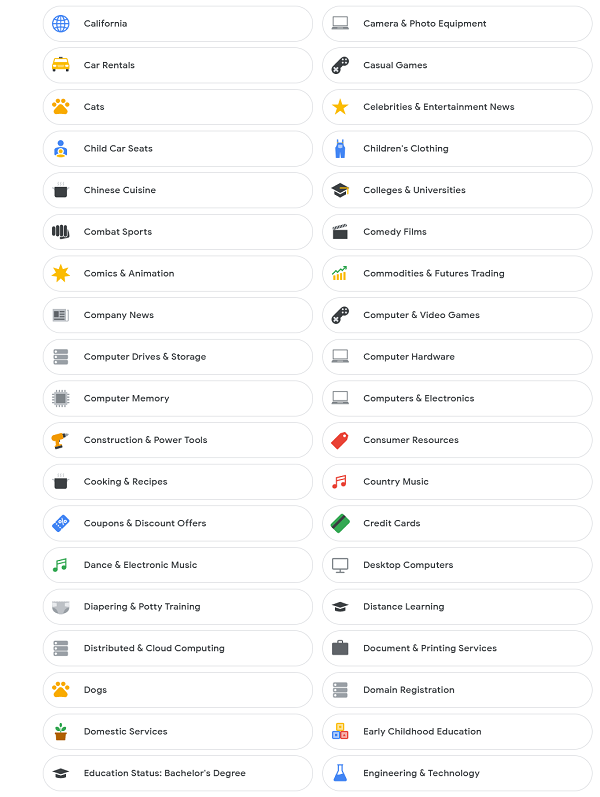
    List of interests
    The lists that are compiled on your interests can be quite comprehensive.

    Google Isn’t the only one who offers this option, iPhone users can also opt out as well as users of social media sites such as Facebook and Instagram.

    Concerns over data protection aren’t limited to just consumers, businesses should also take steps to protect their data and that of their employees. If you’d like to learn how Valley Techlogic can help you secure your data learn more with a quick consultation.

    Looking for more to read? We suggest these other articles from our site.

    This article was powered by Valley TechLogic, an IT service provider in Atwater, CA. You can find more information at https://www.valleytechlogic.com/ or on Facebook at https://www.facebook.com/valleytechlogic/ . Follow us on Twitter at https://x.com/valleytechlogic.

  • If you enabled 2-factor authentication on your Google account recently, your odds of being hacked dropped by half

    If you enabled 2-factor authentication on your Google account recently, your odds of being hacked dropped by half

    Google began requiring 2-factor authentication on some user accounts this past year, and while there’s always some inconvenience involved in making that switch the benefits definitely outweigh it.

    Google enrolled 150 million members in the last three months of 2021 in their 2-factor authentication program, and they’ve found that instances of accounts being hacked dropped by half for those users.

    Google utilizes two-step verification, or 2SV which involves having a login challenge beyond a simple password entry. This may be a message in Google’s own authenticator application or a hardware security key depending on user preference.

    Google said in their blog post on the topic, “This decrease speaks volumes to how effective having a second form of verification can be in protecting your data and personal information, turn on 2SV (or we will!), as it makes all the difference in the event your password is compromised.” Indicating Google’s plan to initiate the requirement across the board in the near future.

    The hesitancy with users to utilize such an effective security measure seems to stem from inconsistent implementation as well as a general lack of education on the topic. We thought it would be helpful to present this “cheat sheet” on multi-factor authentication and other cybersecurity acronyms.

    Cybersecurity Acronym Cheat SheetWith breaches being ever more common, having that additional step past just a password before a hacker can access your account can make all the difference. A password you use across multiple website (which is also a bad idea) may be leaked without you even being aware of it, and the prompt from a multi-factor authentication application may even be your first clue that your accounts are being accessed by someone other than yourself.

    Google’s own authenticator is found on the Play Store and the Apple App Store and is a solid option, however we suggest users use whatever they feel most comfortable with or whatever is offered by the the websites they frequent (especially for important sites like banking or for work related web portals).

    To add to your security effectiveness, we suggest using a password manager as well so you can work on having more varied passwords – especially for sites that don’t currently offer multi-factor authentication as an option.

    If you’d like tangible security, hardware security keys are a good option and many of them have widespread support for your online accounts such as email, social media, or even your password manager (adding another layer).

    Your devices also probably come with multi-factor security options built in, we’ve been pleased with the implementation of Windows Hello for Windows devices (even when we’re bleary eyed in the early morning, it always seems to recognize us). Fingerprint scanners for mobile devices have also come a long way and is a pretty convenient (and secure) way to keep access to your phone limited to just you.

    If you’re a business owner in the Central Valley and want to embark on the process of enabling multi-factor authentication within your business, Valley Techlogic can help. Our security experts can help you with enabling multi-factor authentication within your business as well help you meet your cybersecurity compliance goals. Reach out to us today to learn more.

    Looking for more to read? We suggest these other articles from our site.

    This article was powered by Valley TechLogic, IT service provider in Atwater, CA. You can find more information at https://www.valleytechlogic.com/ or on Facebook at https://www.facebook.com/valleytechlogic/ . Follow us on Twitter at https://x.com/valleytechlogic.

  • On June 24th, 2021 Microsoft introduced Windows 11, a free upgrade to Windows 10

    On June 24th, 2021 Microsoft introduced Windows 11, a free upgrade to Windows 10

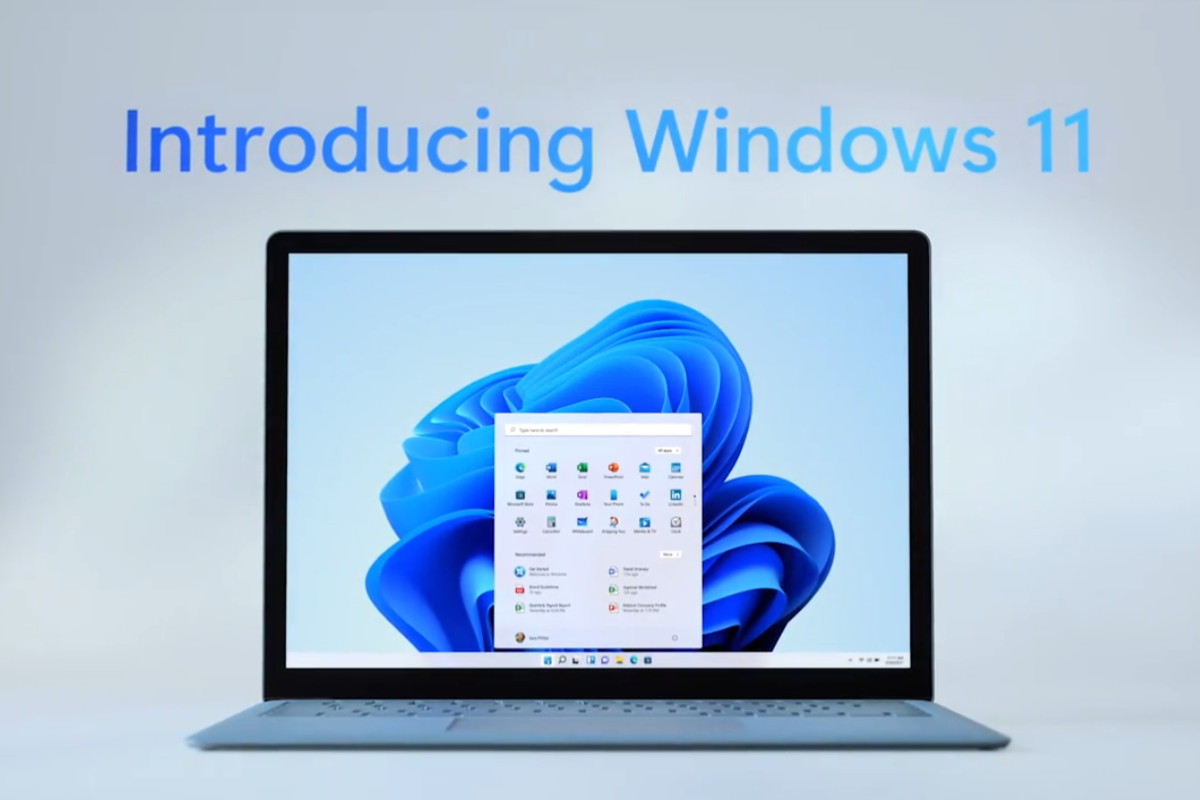
    Yesterday, June 24th 2021 Microsoft unveiled Windows 11. While they struggled to get the live stream going (it went down several times during the unveiling) Windows 11 itself still had an impressive range of features, many of which we think will shake the PC industry as we know it.

    To start, they revealed that Windows 11 will be faster than past versions and updates will be 40% smaller. These features are a nod to what came later in the stream in our opinion. Faster and more agile seems to be the name of the game with Windows 11.

    Windows 11 will have many user adaptive features, including window “snapping” that will allow users to arrange their desktop environment exactly how they like. They showcased grids that had even 4 or 5 squares of varying sizes. If you dock your laptop to a second monitor then remove it, it will even “remember” your setup when you plug it back in.

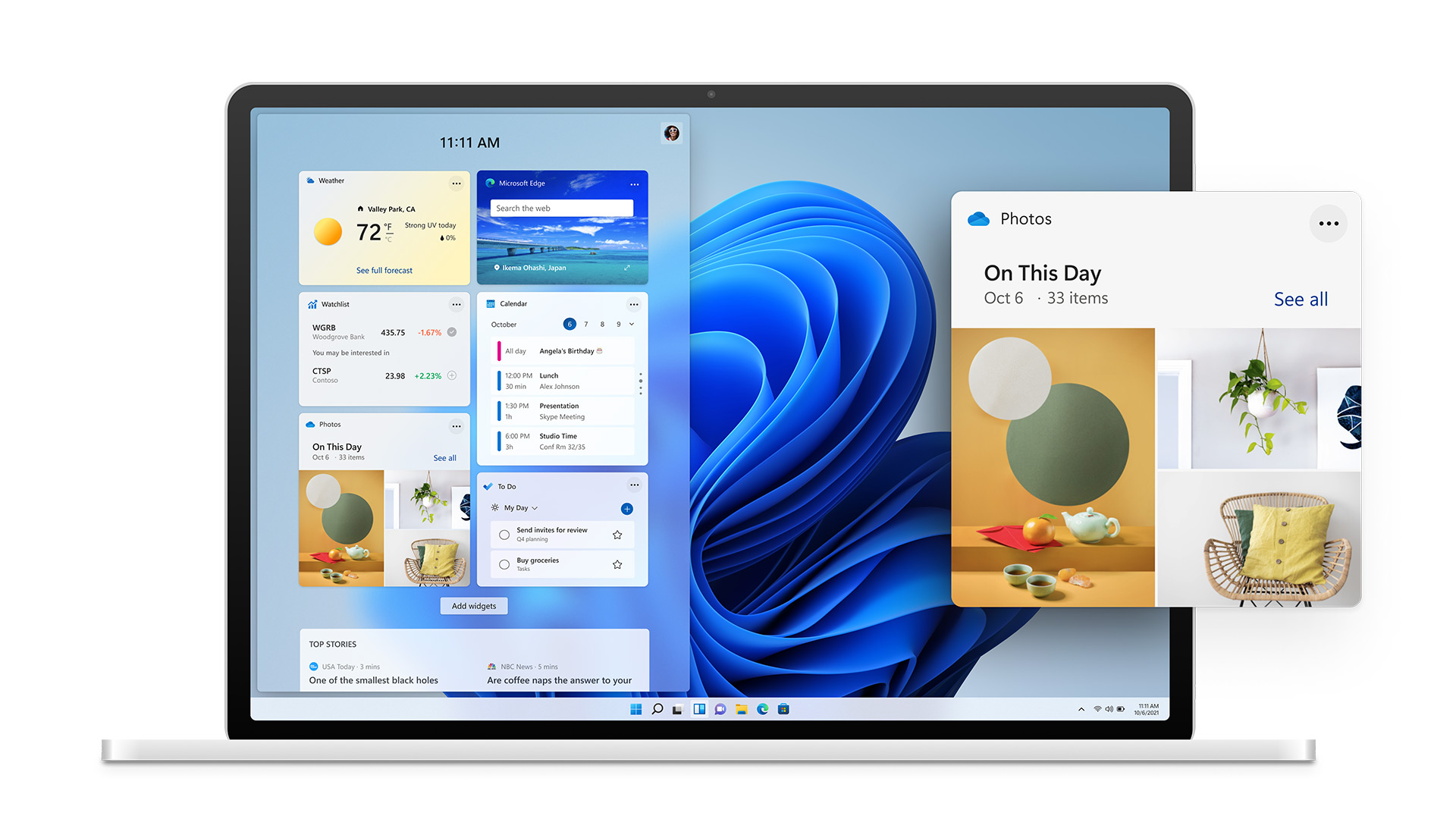
    Also, in the same vein is the new widgets feature that will show users a custom set of data specific to them and how they’re using their device. If you’re sensing that Microsoft is aiming to bridge the gap between PC and mobile devices with Windows 11, you wouldn’t be wrong. With it’s slick appearance widgets seem to be a much improved version of the the “Interest feature” that was released to Windows 10 in April.

    Windows 11 Widgets

    Speaking of bridging the gap between PC and mobile devices, one of the biggest ways Microsoft is aiming to do that is by allowing Android applications to downloaded and used on Windows 11 PCs. We plan to do a deep dive on this later on when more is known, but Android applications will be available in the Microsoft store powered by Amazon’s Appstore.

    The combined efforts of these two tech behemoths seems like a move squarely aimed at taking a piece of Google’s mobile pie – and a large pie at that with the Android phone market making up 72% of the market share as of 2021.

    Converting mobile users to PC seems to have been a concerted effort of Microsoft for a while now and it will be interesting to see what effort merging their various services together (Xbox will also be more accessible through Windows 11 with the addition of Xbox Game Pass for PC being expanded upon) will have on those efforts.

    They also plan on making the Microsoft store more accessible for developers, who if they bring their own eCommerce solution will not even have to share a cut with Microsoft.

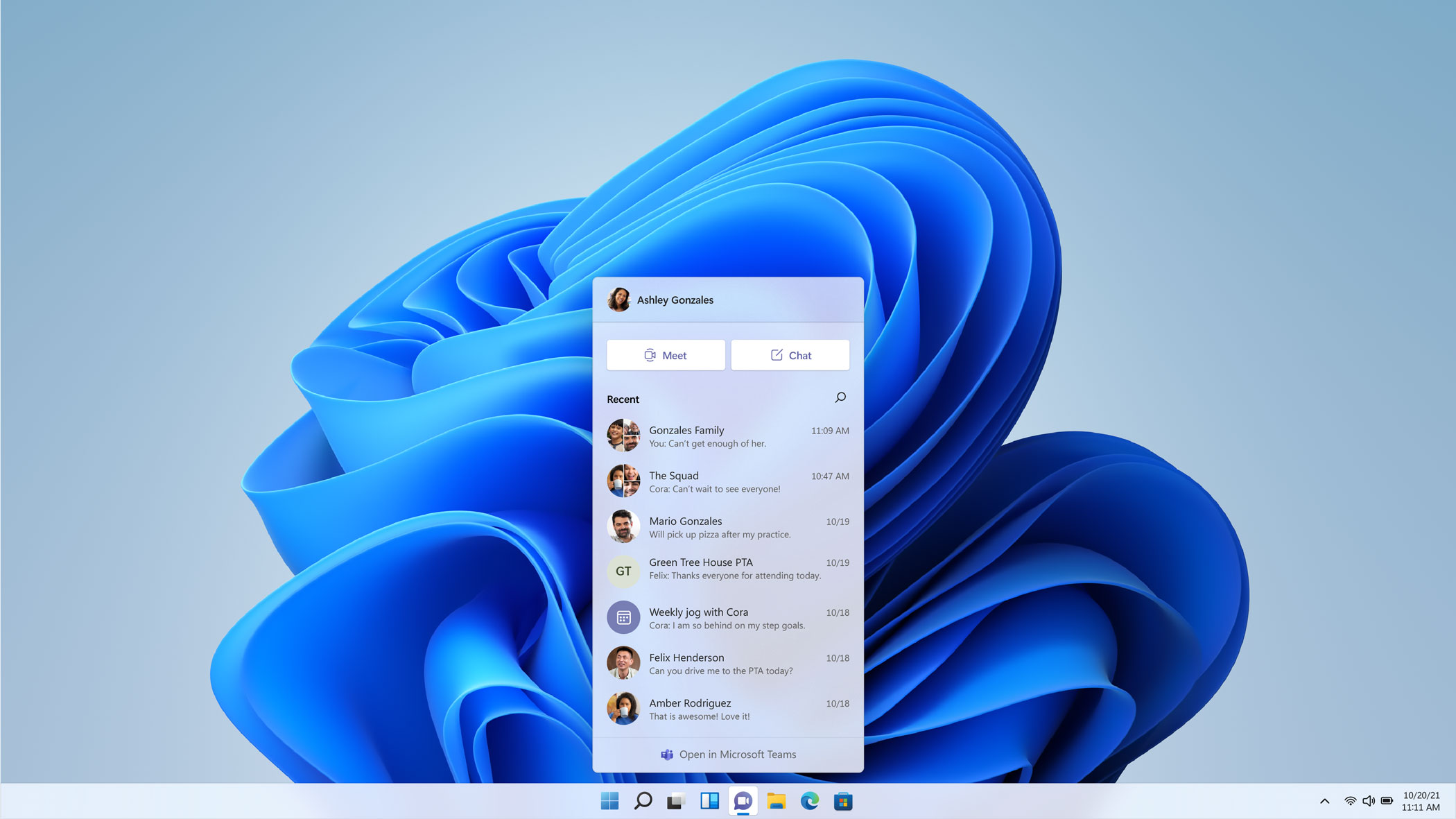
    We haven’t even touched on Microsoft 11’s appearance, which seems much sleeker and perhaps slight Apple-esque with the slim task bar with centered icons. One of those center icons was a built in Microphone mute button, which Microsoft used as a segue to announce Teams as a built in Windows 11 integration.

    Microsoft Teams Windows 11

    With that we only assume Microsoft is moving away from Skype and trying to make a move that again takes aim at a competitor, namely Zoom. Teams will even work across non-Microsoft platforms including iOS. We’re eager to see what features are added to Teams as not too much was showcased in this demo.

    There’s not currently a release date set for Windows 11 other than later this year, but the speculation is it will be released sometime in October which would fall in line with Microsoft’s typical major update release schedule.

    We’ll be following this topic closely, as a Microsoft partner new Window’s releases can be both an exciting yet daunting prospect for our customers. If your business needs assistance in getting your office “Windows 11 ready”, we can help. Schedule a free consultation here.

    Looking for more to read? We suggest these tech articles from the last week.

    This article was powered by Valley TechLogic, an IT provider in Atwater, CA. You can find more information at https://www.valleytechlogic.com/ or on Facebook at https://www.facebook.com/valleytechlogic/ . Follow us on Twitter at https://x.com/valleytechlogic.
  • The Massive Internet Outage and The Human Error Behind It

    The Massive Internet Outage and The Human Error Behind It

    A number of major websites were down yesterday morning, including Google, Amazon, Reddit and Twitch. The outage lasted for an hour and even broke services such as Twitter’s emoji.

    The outage occurred through Fastly which is a cloud computing provider and highlights how interconnected (and sensitive) the world wide web really is.

    The error occurred with something called the Content Delivery Network (CDN) which is a geographically distributed network of proxy services and data centers. They came about when performance bottlenecks in the 90’s were causing slowdowns, especially as use exploded.

    By distributing the load it allowed for the faster connectivity and increased bandwidth we enjoy today, along with better reliability. CDN nodes are deployed at multiple locations, and while the entire internet won’t go down if one is affected, as yesterday proves it can still cause significant issues.

    So, what caused yesterday’s issue in the first place?

    Believe it or not the thing that brought down all those major players was actually a customer error. A dormant bug in Fastly’s code reared it’s head on Tuesday when a customer changed updated their settings.

    This setting change (which was a valid configuration) triggered a specific circumstance which activated the bug and caused Fastly servers to begin reporting errors throughout 85% of their network.

    Fastly claims they detected the error within one minute which allowed them to contain the incident within an hour. They say they should have anticipated this error could occur in their messaging on the incident. Fastly maintains one of the largest CDN’s on the internet.

    While it was a relatively short outage, the cost to the websites that were down is still staggering, Early estimates indicated Amazon alone could have lost $32 million in sales.

    This outage indicates how truly disruptive technology related downtime is. Even for small business’s the costs can be extreme. Look at our chart below to see just how much downtime costs can add up.

    A Chart With Downtime Costs

    We know these numbers seem extreme, but if you tally up potential sales lost and the cost of just running your business during an outage – it really can add up fast.

    If you’d like to learn more about what downtime really costs you, as well as how to prevent it, we have a free report on this topic you can find here.

    We help the business’s we support prevent unnecessarily downtime every day. If you’re finding yourself navigating this and other technical problems – we can help. Visit our plan page to see if Valley Techlogic could be a good fit for your business.

    Looking for more to read? We suggest these tech articles from the last week.

    This article was powered by Valley TechLogic, an IT provider in Atwater, CA. You can find more information at https://www.valleytechlogic.com/ or on Facebook at https://www.facebook.com/valleytechlogic/ . Follow us on Twitter at https://x.com/valleytechlogic.

  • Our Top 3 Ways to Get MORE from Your Business’s Technology

    Our Top 3 Ways to Get MORE from Your Business’s Technology

    Most of us rely heavily on technology to accomplish our goals, whether it be at work or at home. Computers have made so many things in life more accessible, from learning to banking to downtime (though too much idle scrolling is the antithesis of productivity).

    But have you ever stopped to think if you’re really getting the most from the technology Tech News Graphicyou use? Often we get stuck in a rut and don’t really explore what else may be out there. Your favorite tried and true software or add on has never let you down, right?

    There’s nothing wrong with using things you know and love, and most importantly trust. Any new addition to your stack should be vetted thoroughly. Especially software applications, if it looks sketchy or seems to be too good to be true then it probably is.

    So, what are the 3 things we as a technology provider recommend when it comes to getting more productivity and convenience from the technology you use every day?

    1. The first is built right into your Windows 10 operating system. With Windows 10 you can create multiple desktops with the Task View setting. Hitting the Windows Key + Tab will bring up the menu and from there you can go about creating an unlimited number of Windows Virtual Desktops (or at least as many as your RAM will support). You can organize your day through these virtual desktops, having one for work and one for your lunchbreak.
    2. Make use of the virtual calendars available to you. Whether it be through Google or Outlook, or even a source such as Calendly which makes it easy to schedule with clients and even sends text message reminders. Virtual calendars can help you organize your week, month or even year. The popup reminders will make sure you don’t miss an important meeting or event.
    3. We will always recommend utilizing automatic backups. OneDrive is built in to Windows and comes with 5 GBs of free storage. For just $2 a month you can bump that up to 50 GBs, we think it’s a small price to pay for the piece of mind it provides. If you’re working with a technology provider your backups should be one of their main priorities. Having a thoughtful and thorough backup program in place can mean the difference between getting back to work quicly and losing it all in a disaster recovery situation.

    On top of these ways to get more productivity and usefulness out of your technology, your technology provider can also help you understand the benefit and scope of the tools they are providing for your business.

    They will probably have their own stack of software they recommend and may even have tools they themselves use that they can recommend for you and your staff. It’s a good idea to have an understanding of the systems that power your business and keep it running smoothly.

    It’s our belief that transparent processes and thorough reporting helps our clients make informed choices within their business. If you would like some recommendations on tools that may help increase the usefulness of your technology, we’d be happy to help.

    Looking for more to read? We suggest these tech articles from the last week.

    This article was powered by Valley TechLogic, an IT provider in Atwater, CA. You can find more information at https://www.valleytechlogic.com/ or on Facebook at https://www.facebook.com/valleytechlogic/ . Follow us on Twitter at https://x.com/valleytechlogic.

  • Microsoft Teams is changing, can it catch up to Zoom in popularity?

    Microsoft Teams is changing, can it catch up to Zoom in popularity?

    There’s no question that Zoom is a behemoth in the video call making space, from its massive growth back in March to the re-energized vigor as schools across the nation are using it to conduct virtual lessons now in August. Zoom has a commanding 42.8% of the web conferencing market and it doesn’t seem like they’re losing any steam.

    Platforms such as Google, Microsoft and Cisco are trying to re-invent their web conferencing platforms to capture more of that lucrative pie. Today’s article is going to focus on the changes coming to Microsoft Teams as well as its existing features and evaluate whether it might be the better platform for your business.

    Microsoft Teams was released in 2017, it came 6 years off the massive acquisition of Skype by Microsoft (the once popular video chat software now languishes, a shadow of its former glory). Teams solved Microsoft’s problem with Skype being P2P (Peer to Peer) and gave a business facing option to all the companies already using their Office 365 platform.

    Before Zooms rising popularity Microsoft’s main competitor in this space was Google, with Google Hangouts being another popular option in the video conferencing space (now called Google Meet). Google is still an excellent choice, especially for companies who use the Google suite primarily within their businesses. Where Google falters in our eyes may be their habit of constantly pursuing new targets versus improving upon existing services (see the Google Graveyard for more of what we mean).

    Zoom has taken over the market mostly for it’s easy of use, you don’t even need to download it. Also, with zero cost to entry and a paired down UI even those who are less tech savvy can find their way around using it. If you want to set up a meeting with someone all you have to do is send them a link and you’ll be good to go.

    So why would a company want to switch to Teams? Microsoft Teams comes out ahead in the collaboration space, a one-off Zoom meeting is great for external meetings (say a sales call with a potential client) but for meeting with your in-house staff Teams is really the better option.

    Both have scaled up the number of users you can have on a call (100 in the paid for version of Zoom, 5000 on Teams). Both have a good chat system and the privacy enhancing benefit of blocking out your background (although we’d argue Teams does this a little better).

    Credit: Microsoft

    Where Teams comes out ahead for internal use is its integration with Office 365. When you create a new team of users to work collaboratively on the platform, it will create shared versions of One Point, Share Point and Plan. You can also have separate channels so you can easily distinguish who is working on what and organize your work more effectively.

    On top of that, Microsoft is now allowing Teams to have integrations with other applications, including Zoom. Allowing third party applications on the platform could further expand their popularity and allows third party designers to bring new solutions and tools that will greatly expand its usability.

    Microsoft is even allowing users to log into Teams with a personal account as well, encouraging people to use the platform for calls with family and friends. At a time when video conferencing is so crucial to staying connected, it doesn’t hurt to have more options.

    Microsoft Teams is a robust answer to the question of conducting office collaboration and Zoom is the quick and easy option for an impromptu meeting on the fly for colleagues and prospects alike. In our mind when it comes down to which is better for your business between Zoom or Teams, the answer may very well be both.

    Looking for more to read? We suggest these tech articles from the last week.

    This article was powered by Valley TechLogic, an IT provider in Atwater, CA. You can find more information at https://www.valleytechlogic.com/ or on Facebook at https://www.facebook.com/valleytechlogic/ . Follow us on Twitter at https://x.com/valleytechlogic.

    Looking for IT Services in Fresno, Modesto, Stockton, Ceres, Atwater, Merced, Visalia or Lodi? We cover all these areas and more!

  • Is Your Internet Provider Keeping You Safe?

    Is Your Internet Provider Keeping You Safe?

    In terms of internet security, we often think of what we as individuals can do, like good password security or not opening email attachments. Or what companies who hold our data can do, like notifying us of a breach or having their own measures in place to avoid one in the first place. When it comes to our internet providers, we often think about the internet speeds they provide us and having consistent uptime.

    What about security though? What measures are in places (or not) to keep us safe while using the very thing that connects us all together?

    At the beginning of April, sites like Facebook and Google came to a grinding halt for hours. It wasn’t a hack or a bug, it was a problem with the internet data routing standard known as Border Gateway Protocol, or BGP.

    BGP disruptions usually happen by accident, but they can also be caused by large-scale spying or data interception. Denial of service attacks can be another culprit.

    BGP is like the map the internet uses to connect everything. All our traffic is routed through gateways to various hubs around the world. Or it should be that straightforward. In reality, every ISP provider can decide which routes to take, and not all of them are good.

    Cloudflare, who specializes in Internet Security among other things, has launched the website ISBGPSafeYet. Using this website will test your ISP by offering a legitimate route and an invalid route to load two pages.

    If it catches the invalid route and only loads the page offered by the legitimate route, then your ISP has BGP protections in place. If it loads both they fail.

    While we can’t change the problems with BGP overnight, public awareness is always a good thing. If your ISP fails the test, reach out to them and give them your opinion! Together we can make the internet a safer place for us all to use.

    This article was powered by Valley TechLogic, an IT provider in Atwater, CA. You can find more information at https://www.valleytechlogic.com/ or on Facebook at https://www.facebook.com/valleytechlogic/ . Follow us on Twitter at https://x.com/valleytechlogic.