Tag: malware

  • Hackers and the holidays, US government warns ransomware doesn’t take days off

    Hackers and the holidays, US government warns ransomware doesn’t take days off

    As you prepare to take some time off to enjoy with your families (especially if a certain health crisis kept the festivities to a minimum in 2020) it’s important to take some steps to make sure your business is still protected in your absence.

    The Cybersecurity and Infrastructure Security Agency (CISA) issued an advisory yesterday to businesses and consumers alike, warning that hackers often take advantages of holidays and other times people may let their guard down to wreak more havoc.

    The advisory included a warning of a possible increase on the following cyber threat events:

    1. Phishing attacks: That email from your Aunt Beth seeing if you’re going to bring the green bean casserole with a “Google Form” to check it off may not be what it seems to be.
    2. Fraudulent site spoofing: Especially for sites that may be seeing increased traffic due to holiday shopping (Black Friday anyone?).
    3. Unencrypted financial transactions: An easy way to check, is to look for the S in HTTPS, don’t enter your financial data into unencrypted websites.

    Beyond attacks aimed at individuals, attacks aimed at businesses also tend to rise during the holidays and on weekends.

    Such was the case for the attack on Kaseya, which occurred over Fourth of July weekend in 2021, and the Colonial Pipeline hack happened during Mother’s Day weekend the same year. Hackers realize there is less coverage on the weekend and during Holidays and they have taken advantage of it to great success.

    It’s not just large businesses that are a target either, many wannabe hackers have day jobs too and more time on their hands during the holidays to target businesses that could be local to them. That includes yours.

    So, here’s a list of things to check off before you leave the office this week to enjoy some well deserved time off.
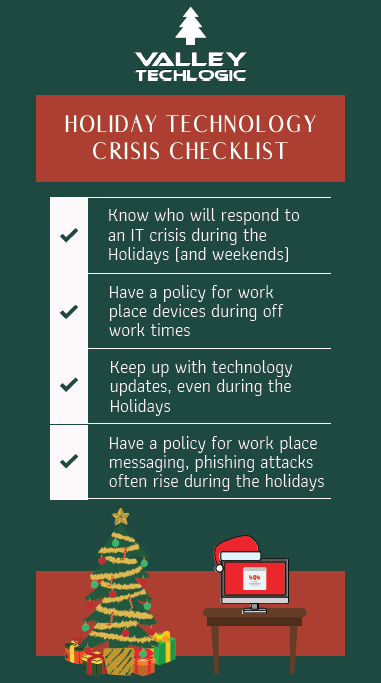
    Holiday Crisis Checklist
    Click to view the full size version.

    As you can see, our number one recommendation is knowing who is going to cover your business if a cyber event does happen while everyone is home for the holidays. If you try to think of who that person is and you either come up empty or maybe it’s you, that’s a problem.

    Another problem is if your normal IT coverage is on a one time or break fix solution basis. The service you normally use could either be too swamped themselves to help you during the holidays, or maybe they’re taking time off too and are simply unavailable to help you.

    This is where having a contract with a technology service provider could really save the day during a crisis. When you have a contract with a business to provide your technology services, they’re bound by the service level agreement (SLA) you sign at the start of service. They will be better equipped to help your business if there’s a crisis – even during the holidays.

    If you’re in the Fresno, Modesto, Sacramento or anywhere else in the Central Valley and aren’t really sure who you would turn to if a technology crisis occurred during the holidays, Valley Techlogic is here for you. Learn more today.

    Looking for more to read? We suggest these other articles from our site.

    This article was powered by Valley TechLogic, IT service provider in Atwater, CA. You can find more information at https://www.valleytechlogic.com/ or on Facebook at https://www.facebook.com/valleytechlogic/ . Follow us on Twitter at https://x.com/valleytechlogic.
  • Can you spot the phishing clues? And 10 tips to avoid falling for a phishing scam

    Can you spot the phishing clues? And 10 tips to avoid falling for a phishing scam

    If you’re not aware, phishing is another word for scams perpetrated over email. It was coined in 1996 and was first associated with hackers attempts to steal America Online (AOL) accounts, and it has not slowed down since then.

    As of 2021 most hacking attempts are phishing scams, the phrase is meant to evoke the image of a hacker literally fishing for their victims by baiting a hook which in this case is a credible looking email from a place you might actually do business from, a colleague or a family member. 94% of malware attempts originate from an email sent to the victim.

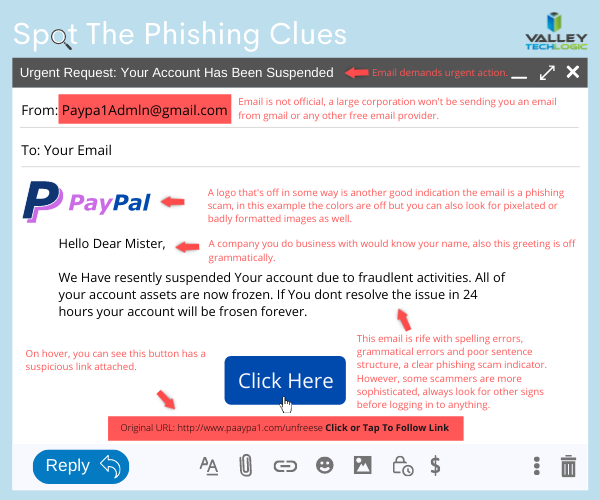
    Well as credible as they can manage, many phishing attempts are poorly worded and grammatically incorrect as the senders are from another country from the victim. In the image below we showcase a phishing email you might receive, click to reveal the answers.

    Spot the phishing clues
    Click to reveal the clues.

    Not all phishing attempts will be so obvious though, here are our 10 tips to avoid falling for a phishing scam.

    1. You are asked to reply with sensitive details. A legitimate business will never ask for your private details via email, if you’re unsure contact the business directly to ask.
    2. The message says you must respond urgently or face dire consequences. Legitimate businesses such as the financial institution you bank with won’t relay an important message over email alone, and they’ll never threaten you.
    3. The email contains a non-standard email attachment. While even standard email attachments can contain malware, a non-standard email attachment is a clear sign something is amiss.
    4. The senders email address doesn’t match the contents. As in our example, a legitimate business (especially a large one) won’t be using a gmail address. You also want to watch out for slight misspellings, such as an email coming from admin@paypa1.com
    5. The email contains an unusual request. You receive an email that looks like it’s from your boss, and he’s saying he wants to reward some key players in your company by gifting them gift cards from a popular big box store. He says not to give them to the players directly, simply reply with the gift card numbers and he’ll handle it. This is just one example of a scam we have unfortunately heard of happening. If the email is requesting large amounts of money be spent in unusual way or private details be sent over email, even if the email looks legitimate you should verify with the supposed sender first.
    6. It has an attachment you weren’t expecting. If receive an email with an attachment and the body suggests you requested information, but you don’t remember doing so, it’s probably a phishing scam.
    7. The email says you won a prize, but you must enter your banking information to claim it. Prizes are a common phishing scam trope; they may also try to get you to download a suspicious attachment.
    8. The URL in the email doesn’t match the business it claims to come from. As in our example, phishing attempts often involve a similar but not quite right URL. Many scammers will try to gain the victims trust by sending them to an “official” looking website where they will login with their legitimate credentials, allowing the scammer to gain access.
    9. The content is canned. Many phishing scammers reuse the materials of others. One example is you receive a suspicious sounding email, such as someone saying you have stolen their copyright images and you must visit a website to confirm. If you Google the email you may find examples of others online who have received that same
    10. The greeting doesn’t match the content. This is a simple one, if you receive an email supposedly from your boss but the greeting starts with “Dear” or another out of character greeting, it’s probably a phishing attempt.

    This is only a start, many phishing attempts are highly sophisticated and difficult to spot but knowing some of the signs will help you be more attentive to things that may be wrong with an email you receive. We also have found for our clients, randomized simulated phishing attempts can help them with training their staff to keep an eye out for phishing attempts.

    Most successful hacking attempts involve a human element, training is your only first line of defense. If you would like to increase your defense against phishing attempts, malware, ransomware and more, Valley Techlogic can help. Schedule an appointment with us today to learn about our comprehensive cyber security packages for businesses.

    Looking for more to read? We suggest these tech articles from the last week.

    This article was powered by Valley TechLogic, an IT service provider in Atwater, CA. You can find more information at https://www.valleytechlogic.com/ or on Facebook at https://www.facebook.com/valleytechlogic/ . Follow us on Twitter at https://x.com/valleytechlogic.

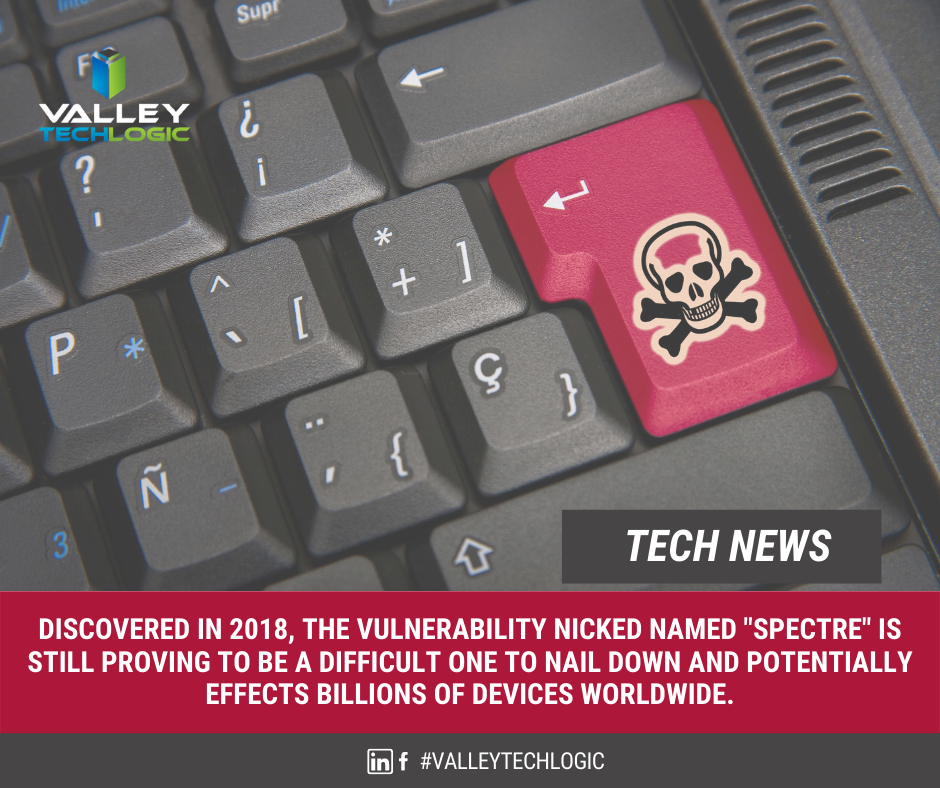
  • Have a Dell laptop or computer? This vulnerability is one to watch out for.

    Have a Dell laptop or computer? This vulnerability is one to watch out for.

    Vulnerabilities that can broadly attack major systems or specific retailers are especially problematic. Many of these vulnerabilities are quietly patched before you’re even aware there was a problem but sometimes things can fly under the radar for a while.

    Such is the case in an affected Dell driver that has been pushed out to machines for the last 12 years. It was recently discovered this driver can allow bad actors to possibly gain more access to the affected Dell systems. It’s estimated hundreds of millions of Dell computers, laptops and tablets could have the affected driver and be at risk.

    While it’s not considered critical at the moment because the affected computers would already have to be compromised in some way for it to be used, it’s still problematic because it could make removing malware or other system infections more difficult. These drivers would potentially allow them unrestricted to the affected machines in the event the user is hacked.Tech News #9

    There are currently no recorded cases of this exploit being used, however now that it’s been made public that may change. Researchers have held back the details of the exploit to allow users time to patch, and Dell has issued a security advisory regarding the driver. However, they have not as of writing revoked the affected driver.

    This is another reminder as to the importance of maintaining updates on your machines. Even with security measures in place, no system is perfect. Vulnerabilities can be discovered years later with varying levels of severity. By maintaining patching, you won’t be caught off guard or risk having your machines exploited by a vulnerability.

    Here are 5 patching best practices:

    1. Automate. If you can, automate the process. Schedule your patches to happen at a time you won’t be busy working on your computer.
    2. Plan your approach. If you’re managing patching for your business, you want to plan how you’ll approach patching company wide. It may be prudent to patch overnight or patch in waves if your business is open extended hours.
    3. Test patches. Test patches on a single machine before rolling them out company wide, sometimes patches can create problems that might necessitate a rollback and that might hinder your business if everyone in the office is down.
    4. Maintain patch levels. The last thing you want to do is fall seriously behind on patches. Patching will be a lengthy process as you try and catch up, and your machines may be left vulnerable in the interim.
    5. Get Help If You Need It. Patching your home machines is a fairly straight forward process usually but patching from a business perspective can have many intricacies beyond just “apply patches”. When in doubt, leave it up to the professionals.

    If you need help with patching or the myriad of other items that keep your office machines in tip top shape and safe from malware, Valley Techlogic is here for your business. You can schedule a free consultation here.

    Looking for more to read? We suggest these tech articles from the last week.

    This article was powered by Valley TechLogic, an IT provider in Atwater, CA. You can find more information at https://www.valleytechlogic.com/ or on Facebook at https://www.facebook.com/valleytechlogic/ . Follow us on Twitter at https://x.com/valleytechlogic.
  • It’s Not Your Imagination, Ramsonware is On the Rise

    It’s Not Your Imagination, Ramsonware is On the Rise

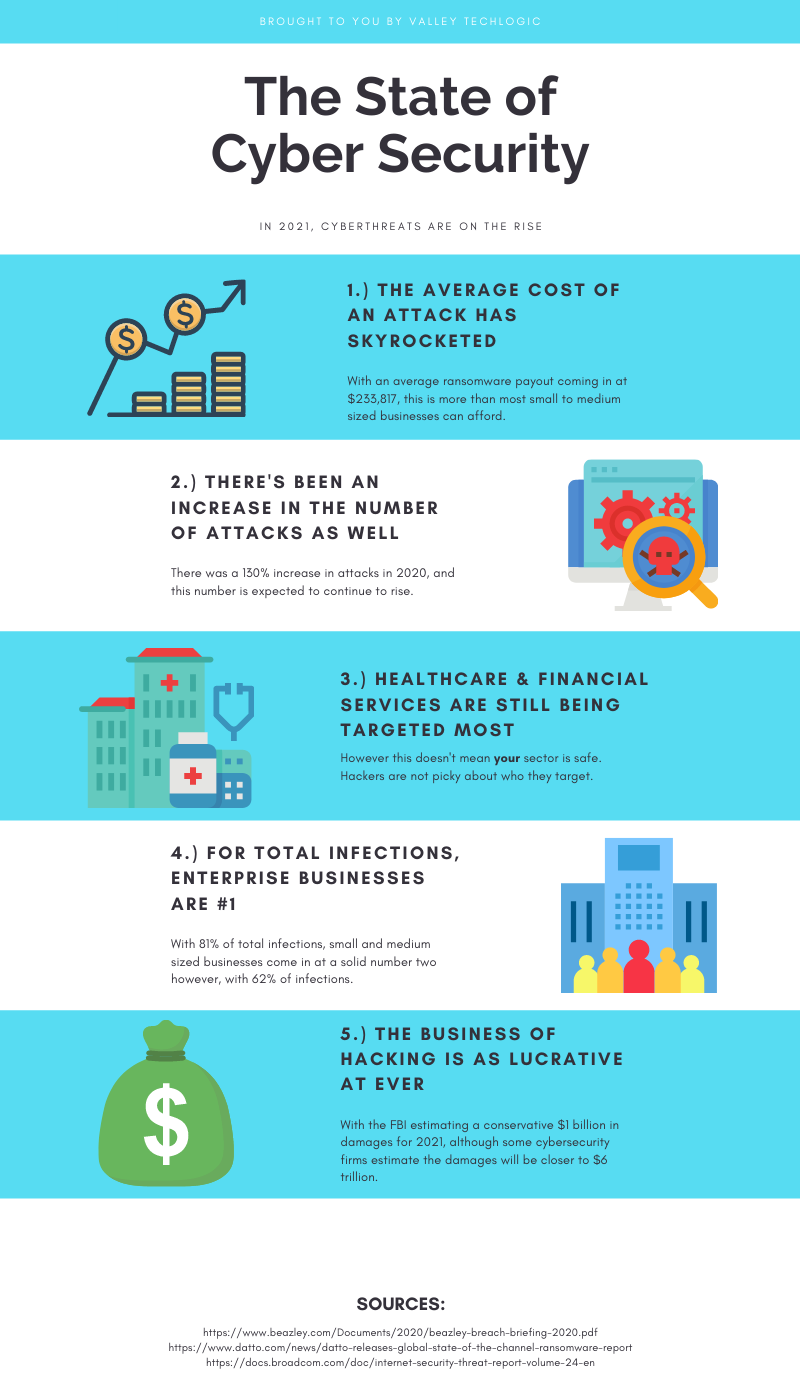
    We have talked about several major ransomware events over the past year, but these were far from unique. Ransomware and cyber security events have been on the rise lately and it’s been made abundantly apparent that NO ONE is immune to them.

    From the yet to be officially validated Kia Motors attack, to the narrowly avoided disaster with a Florida Water Plant. No attack had more widespread coverage for a while (including by us) than the SolarWinds breach that seems to go deeper and deeper. These are just a few in a massive list of growing ransomware events that have happened to companies of all sizes. If you think your business is too small to be a target think again.

    According to this Datto report, one in five small businesses will experience a ransomware event. While larger businesses may be eyed as prized targets by hackers, most of the time they also have the staff and resources to put up a better defense against cyber security threats. This makes them much harder for hackers to infiltrate.

    A lackadaisical attitude towards being hit by a ransomware can cost your business big time. Ransomware extortion amounts continue to skyrocket, with the average demand in Q3 2020 being $233,817 according to the cybersecurity firm Coveware.

    If you’re thinking a demand like that could bankrupt your business, you’d be correct in that fear. 60% of small businesses will go out of business within 6 months of a cyber security attack.

    We have made an infographic with statistics on cyber security threats in 2021 so far.

    Infographic on Cyber Security

    We’re not presenting this facts to you in an effort to make you feel hopeless, there is a way to prevent an attack from hitting your business in the first place. The ONLY way to avoid a serious cyber security threat is to have proactive cyber security prevents in place. Many business owners cannot achieve this on their own.

    Cyber security prevention is an ongoing process, it’s not just installing a virus scanning software and configuring a firewall and calling it good. Business level cyber security protections can be complex to configure and manage.

    Your business has more hardware, more data and more assets to protect. Comparing it to what’s needed to protect a home PC network is apples and oranges. If you’ve just been crossing your fingers that it won’t happen to you that’s NOT a good idea, because statistically there’s a good chance that it will.

    If your business needs assistance in a cyber security plan that’s not just about checking boxes or relying on hope but actually protecting all of the valuable systems you need to run your day-to-day operations, reach out to Valley Techlogic today.

    Looking for more to read? We suggest these tech articles from the last week.

    This article was powered by Valley TechLogic, an IT provider in Atwater, CA. You can find more information at https://www.valleytechlogic.com/ or on Facebook at https://www.facebook.com/valleytechlogic/ . Follow us on Twitter at https://x.com/valleytechlogic.

  • The Solar Winds Rabbit Hole: What’s happened and what’s next?

    The Solar Winds Rabbit Hole: What’s happened and what’s next?

    In most situations where a massive hack or breach has occurred, trying to get a handle on what has been compromised or even what is still compromised can be a challenge.

    It’s unfortunately been our experience that in most cases things almost end up being worse than they initially look. Hackers are smart and if they can remain in your systems for a long time, they can get more to either use against you in a ransomware attempt or even leave breadcrumb behind to get back in your systems and hit you again.

    This is why we will always say prevention is key, but sometimes despite your very best efforts a breach occurs. We think this is certainly what has happened in the case of the massive Solar Winds breach that is still being unraveled weeks later.

    CyberSecurity NewsEven detection’s put in place by the NSA failed to detect this hack in time, and as of this week Microsoft was even included in it as it’s been exposed that some of their source code was revealed in the breach.

    Hackers grow more and more sophisticated by the day and it requires a full-scale team effort to prevent your business from either an attack aimed at it specifically, or as the case has been with Microsoft, being looped into a breach that’s occurring to a vendor you may use.

    Attacks from foreign bodies aren’t even very rare, international hacker networks are taking a growing lead in cyberwarfare. While most of these attacks are acts of espionage, if the payoff is lucrative enough hackers will strike anywhere.

    It’s unknown what the real damage from the Solar Winds hack will end up being, or what if anything will come from the exposure of Microsoft source code, but we think this should serve as a wakeup call to anyone who doesn’t take the topic of cybersecurity seriously.

    Here are some things you can begin to do to make your business more secure in 2021.

    1. Have a Hardware Firewall like SonicWall. A hardware firewall makes it easier to have universal rules for your whole network versus having to configure rules for each device.
    2. Enable Core Isolation and Trusted Platform Module (TPM) on your Windows 10 Devices. These protocols will work in tandem to help stop malware and ransomware on your Windows 10 Devices.
    3. Also Enable Group Policy Settings with the Group Policy Editor. With group policy settings you can stop employees from doing things like opening attachments or random .exe files. You can also use group policy to prevent unknown USB devices from being used on work devices. Basically, group policy can prevent a lot of the activities that lead to ransomware or malware in the first place.
    4. Use Next Level Multi-Factor Authentication with a Hardware Key. We believe strongly in Multi-Factor Authentication (MFA) and the next step to that could be introducing the use of hardware keys to your business, a hardware key is a token that won’t allow you to unlock a device without it. Most hardware keys will also work in conjunction with software MFA like LastPass.
    5. You should Vet your Vendors, Even the “Bigger” Ones. As this Solar Winds breach has shown us, big or small a breach can happen to anyone. While you’re working on handling cybersecurity on your end you should also question the vendors you use as to what their cybersecurity policies are and what their plan is if a breach were to occur.

    This is by no means an exhaustive list but like we usually say, starting is a great first step. If you’d like an information packet of the Cyber Security services Valley Techlogic can provide, reach out to us today! Our comprehensive Cyber Security plan addresses all these topics and many more.

    Looking for more to read? We suggest these tech articles from the last week.

    This article was powered by Valley TechLogic, an IT provider in Atwater, CA. You can find more information at https://www.valleytechlogic.com/ or on Facebook at https://www.facebook.com/valleytechlogic/ . Follow us on Twitter at https://x.com/valleytechlogic.
    Looking for IT Services in Fresno, Modesto, Stockton, Ceres, Atwater, Merced, Visalia or Lodi? We cover all these areas and more!

  • 3 Reasons You Want to Offer Cyber Security Training to Your Employees

    3 Reasons You Want to Offer Cyber Security Training to Your Employees

    Our blog is no stranger to the topic of cyber security. We’ve covered recent breaches, malware, and easy things you can do to stay safe on the internet and keep your devices free of viruses.

    But what about the human element? It’s estimated that 90% of data breaches are caused by human error. We know that sounds high and you may be thinking how that can be possible.

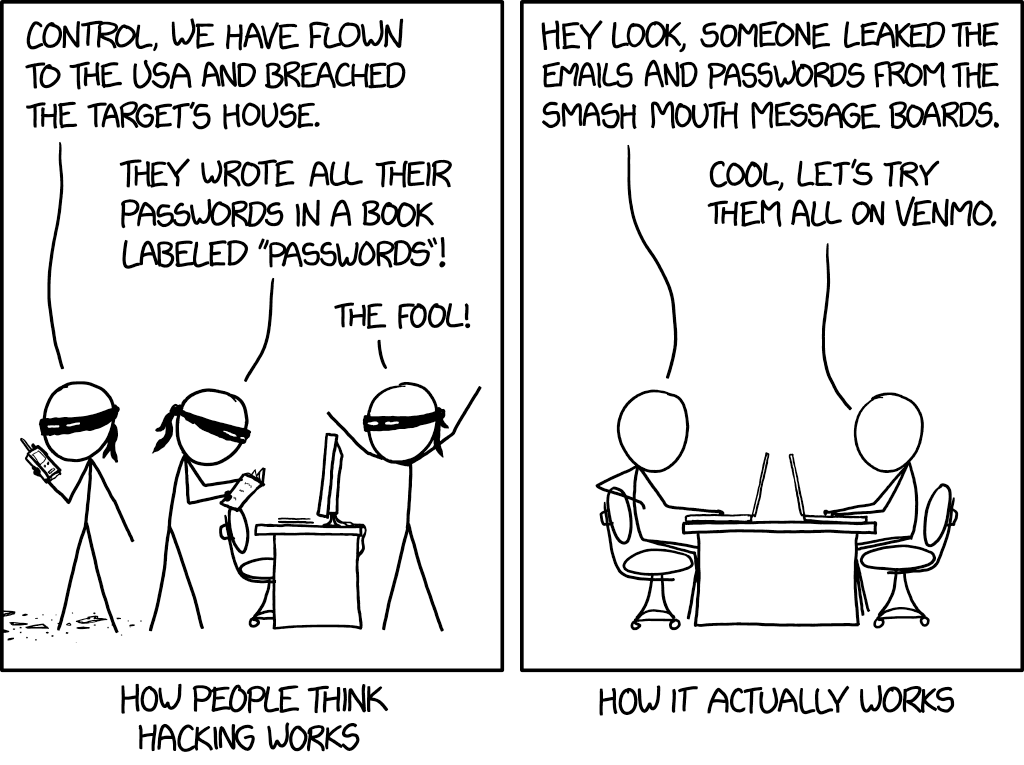
    How hacking works
    Credit to xkcd.

    We’re all aware of the trope of the genius hacker who can hack someone’s machine without them knowing AND without them doing anything on their side. For the most part this is just not true. There are ways for them to access your machine undetected by you, but most of the time you will be involved in some way

    An example would be a sneaky malware attached to innocuous looking file (like an executable disguised as a PDF that looks like it’s coming from a coworker or friend whose email they spoofed). Examples like this are exactly how most bad actors are getting into the victim’s system.

    What’s worse, they may not act right away. They may wait weeks or months gathers as much data as possible before striking, so they don’t just take YOU down but your business as well.

    Another way is shown in the above comic, if a data breach happens on a site you frequent they will have your credentials for that site. The hacker will then go on to try those credentials on other sites such as email providers and banking websites.

    This is why cyber security training is so important, you can have the best software in place to try to mitigate the human element, but bad actors will always be doing their very best to thwart that software. Having your team prepared properly is the only way to fully protect you and your business from a cyber-attack.

    That training will cover topics such as good password hygiene (vary your passwords!) or how to use 2 factor authentication as just two examples. Some cyber security training providers will even conduct simulated phishing attempts so you can see first hand how easy it is to fall victim to one and how to avoid it.

    To sum it up here are the 3 reasons we think cyber security training is a great idea.

    1. It protects your business. Your employees will make the right choices if they receive a sketchy email or link to download something (such as forwarding it to your IT team instead of clicking on it).
    2. It will make the software and programs you have in place for cyber security already more effective if your employees know how to properly use them (instead of possibly ignoring or even bypassing them).
    3. It will allow you and your employees to stay up to date on recent or emerging threats so if there is something out there that is hard to avoid, you will know how to handle it.

    You may be wondering where to go for cyber security training, and to be honest the best place to start is your IT Team. They should be taking the time to explain the systems they’re putting in place and how to use them in layman’s terms for you and your team.

    We even create free resources for our clients such as our one page cyber security checklist (found here).

    Your IT Team may even have a recommendation for the best online training you and your employees can attend. Two that we have personally worked with are ID Agent and Breach Secure Now. They both offer online training and even dark web monitoring.

    In whatever way you go about it making cyber security training a necessary element in your business is taking a proactive stance against cyber-attacks.

    Looking for more to read? We suggest these tech articles from the last week.

    This article was powered by Valley TechLogic, an IT provider in Atwater, CA. You can find more information at https://www.valleytechlogic.com/ or on Facebook at https://www.facebook.com/valleytechlogic/ . Follow us on Twitter at https://x.com/valleytechlogic.
    Looking for IT Services in Fresno, Modesto, Stockton, Ceres, Atwater, Merced, Visalia or Lodi? We cover all these areas and more!

  • QSnatch Malware and the Safety of Network Attached Storage (NAS)

    QSnatch Malware and the Safety of Network Attached Storage (NAS)

    The QSnatch malware was first detected in October of last year, the goal of it appears to be in most cases to grab the credentials of the Network Attached Storage (NAS) it infects. It was also determined it has the capability to download further instructions from online servers, making it an extremely versatile malware.

    In October it was reported that 7000 devices had been infected with this malware, however recently it was confirmed by CISA that in June of 2020 that had jumped to 62,000 devices, making it clear this malware is now being used more prolifically. We also have learned more about its capabilities. That includes:

    • Credential scraper
    • SSH Backdoor – This allows the hacker to execute code on the device
    • Exfiltration – When run it allows QSnatch to steal a predetermined list of files
    • CGI Password Logger – This allows the malware to install a fake version of your device’s login page, allowing them to steal your credentials
    • Webshell functionality for remote access

    That seems like a scary list of abilities and makes it clear that enacting security measures in all your devices but especially those that contain important data is imperative.

    If you already use NAS you probably know the benefits, but for those that don’t or are considering it here is what’s beneficial about employing NAS devices in your organization:

    1. More storage space, in most cases NAS devices are used instead of or in addition to regular servers.
    2. Private cloud, a NAS device can be used to have a private cloud network in your business or even your home.
    3. Media Servers, there are many NAS devices especially aimed as functioning as a media server.
    4. Automated backups, a NAS device can function as your backup device or in addition to your primary backup device for more redundancy.
    5. Lower costs, NAS devices tend to be much cheaper than traditional servers.

    This is just a small list of the benefits but as with most devices there are specific measures required to keep them safe from a cyber-attack. This includes having a good plan for password security in your business – a hacker getting the password to one of these devices may be handing them the keys to the kingdom.

    Also, as the name implies this is “network” attached storage, so you must have a secure network in place. You also want to make sure you’re regularly updating the firmware for this and any other devices you use.

    Network attached storage devices are an excellent option for many businesses, as long as the proper protocols are followed to keep it safe.

    Looking for more to read? We suggest these tech articles from the last week.

    This article was powered by Valley TechLogic, an IT provider in Atwater, CA. You can find more information at https://www.valleytechlogic.com/ or on Facebook at https://www.facebook.com/valleytechlogic/ . Follow us on Twitter at https://x.com/valleytechlogic.
    Looking for IT Services in Fresno, Modesto, Stockton, Ceres, Atwater, Merced, Visalia or Lodi? We cover all these areas and more!

  • This Malware is on Fire – Literally

    This Malware is on Fire – Literally

    There is a new malware out there that can trick your phones power brick into catching on fire.

    Cellphones and fires are not a new phenomenon, we all remember the debacle that was the Samsung Note 7. Due to the so called “aggressive” battery design, phones worldwide were exploding. This led to a swift recall and caused quite a dent in their public image.

    However, the fires being started right now are at no fault to the manufacturers and not tied to a single brand. A recently discovered malware being called by the lab that discovered it “BadPower” is causing cellphone power bricks across various brands to start on fire.

    Melted Cellphone
    An example of one of the affected phones. Attribution Nathanial Stern via Flickr

    It works by tricking the adapter into sending more electricity to the phone then it can handle, which over time will melt the internal components and start a fire. Xuanwu labs tested the BadPower malware with 35 different power bricks and they discovered 18 of those were vulnerable to the attack.

    What’s even worse, if your phone fell victim to this attack there would be no external signs that it was happening, your power brick would just start on fire.

    As with many things the solution to this problem is a firmware update provided by your cellphone manufacturer and this is yet another solid reminder to always keep the software on your devices updated.

    Cellphones are not the only things vulnerable to attacks that may damage hardware. While most malware on computers is directed at stealing information, it’s technically possible for a malware to cause your personal computer to overheat, thereby damaging its CPU.

    We may be entering a new age of malicious malware that’s aimed purely at destruction and not of the financial kind that we’re accustomed to.

    In this case the best defense is a good offense, and if you’re a business located in the Central Valley, Valley Techlogic would love to be your strategic partner in protecting your business. Reach out today for a free cyber security assessment, in less than 30 minutes over the phone we can give you a place to start.

    If you’re not ready for the assessment, we also have our free one-page cyber security checklist that was recently updated for 2020. We think it’s a great resource for your business.

    Looking for more to read? We suggest these tech articles from the last week.

    This article was powered by Valley TechLogic, an IT provider in Atwater, CA. You can find more information at https://www.valleytechlogic.com/ or on Facebook at https://www.facebook.com/valleytechlogic/ . Follow us on Twitter at https://x.com/valleytechlogic.

    Looking for IT Services in Fresno, Modesto, Stockton, Ceres, Atwater, Merced, Visalia or Lodi? We cover all these areas and more!


  • Returning to the Office? Here’s What You Need to Know.

    Returning to the Office? Here’s What You Need to Know.

    The last few months have been hectic to say the least. A global pandemic has forced us to reconsider our office norms, when working from home became a necessity rather than a rare occurrence – prior to the pandemic only 1.3% of job postings on ZipRecruiter specified working from home.

    The numbers vary but it’s estimated upwards of 50% of the knowledge-based workforce is working from home right now. Tech workers have had to scramble to adjust their security measures to cover employees on their home networks. In some cases, it still hasn’t been enough (Hacking against corporations surges as employees take computers home – Reuters.)

    Now, as many cities and states begin to open, you may be wondering if it’s time to get back to the office. Here’s our steps for doing it smartly and safely.

    • Evaluating devices that have been used at home thoroughly before introducing them back to the work network. Whether it’s their office device or a home device they normally use at work, you want to make sure it won’t function as a Trojan horse to your organization, inviting malware and/or viruses into your office.
    • Make sure these devices are also updated with any software patches and updates that may have been missed while working from home. You want to make sure they have been fully patched when they return to your network.
    • Consider requesting that everyone update their credentials and re-enforcing any efforts into enabling 2 Factor Authentication(2FA). Employees working from home may have let their work machines be used by family members, or otherwise have left these devices unattended in areas where they may have been accessed by others.
      When returning to work we think it’s a good idea to also have a fresh start when it comes to passwords and other credentials, and if you haven’t been already consider requiring 2FA on work devices and work accounts.
    • Finally, we’ll all have to consider germs going forward and for the considerable future. It’s a good idea to have a plan in place for disinfecting these devices safely and consistently.

    This doesn’t cover everything necessary for returning to work safely, but it’s my hope it gives you a place to start when it comes to the technology side of things.

    Whether you’re returning to work or are still working from home, Valley Techlogic can assist you with these topics and more. Feel free to reach out, our brilliant tech team would be happy to assist you.

    This article was powered by Valley TechLogic, an IT provider in Atwater, CA. You can find more information at https://www.valleytechlogic.com/ or on Facebook at https://www.facebook.com/valleytechlogic/ . Follow us on Twitter at https://x.com/valleytechlogic.

    Looking for IT Services in Fresno, Modesto, Stockton, Ceres, Atwater, Merced, Visalia or Lodi? We cover all these areas and more!

  • 10 Tips for Staying Safe Online When Working from Home

    Woman working at desk

    In light of the ongoing health crisis many of us are placed in the unusual position of working from home. While you may have concerns about keeping up your usual level of productivity and being able to communicate effectively with your coworkers while working in separate places there may be one issue flying under the radar, how do you stay safe online while working from home?

    It’s unfortunately not a given, in many work places you have an IT team that maintains (or should!) a high level of security for your office computers and network. These same measures are not in place on your home network or on your home computer.

    With so many of us working from home hackers may be seeing this as an opportunity to access your company’s private data via unsecured personal computers and home networks. These 10 tips will prevent this from happening.

    1. Don’t reuse passwords. If you’re able to choose your own work passwords it’s important they’re varied, if hackers get access to one of your accounts and you use the same password for everything then they have access to all of them.
    2. Practice good password safety. It’s imperative that passwords for your work accounts follow good password safety practices. Hackers may be able to use your work accounts to access the rest of your company’s data. If you set your own password make sure it follows the rules of 16 characters in length, mixing characters and avoiding dictionary words if possible.
      Also destroy any written copies of your password, real life phishing exists! Use a password manager like LastPass instead.
    3. Secure your home network. It’s shocking how many home networks don’t have a password at all, or if they do it’s a single word with no mixed characters or even your router’s default password.
      This is not a good idea! Hackers can use your network to access your home machine, and from there it may be game over. Like the tip above practice good password safety when it comes to your router’s password.
    4. Enable 2-factor authentication if it’s available to you. Many laptops these days feature security measures such as facial recognition or fingerprint readers that will help keep your device safe. Don’t forget to enable the same feature on your phone!
    5. Speaking of 2-factor authentication. You may find that your workplace uses 2-factor authentication to secure the applications you use on a daily basis to do your job, if they don’t bring it up! This will further prevent people from accessing your company data.
    6. Install updates. At work your IT team is probably installing updates for you, on your home device you’re responsible for doing so. In general, you shouldn’t be ignoring updates but while accessing your company accounts it’s even more important.
    7. Practice good online safety. The security measures enabled on your company network may prevent a total takeover in the case of someone accidentally downloading malware, this is not so at home.
      Don’t open attachments from senders you don’t know. Be careful which websites you visit, and always have your firewall enabled!
    8. Be careful with public networks. During this time, it might be tempting to get out and at least work outside at a café or somewhere with public Wi-Fi. However, this public Wi-Fi may leave your machine vulnerable, especially if you’re not practicing some of the safety measures above.
    9. Make sure your work is backed up. You’ll probably need some help from your IT team for this one but ensure the work you’re doing is backed up to your office servers or saved in some way. Recovering lost data from your home machine alone may be more difficult.
    10. Last but not least, use an anti-virus software. Find out which anti-virus software your company IT team recommends, or if you need a recommendation reach out to us. It’s extremely important for staying safe online.

    We hope these tips help. For those not working remotely or for tips on staying safe while in public right now, we recommend referring to the CDC Website for the most up to date information: https://www.cdc.gov/coronavirus/2019-ncov/index.html

    This article was powered by Valley TechLogic, an IT provider in Atwater, CA. You can visit us on Facebook at https://www.facebook.com/valleytechlogic/ . Follow us on Twitter at https://twitter.com/valleytechlogic.