Tag: tech support

  • Proactive vs Reactive Tech Care – Why Tackling Things as They Spring Up Can Backfire BIG

    Proactive vs Reactive Tech Care – Why Tackling Things as They Spring Up Can Backfire BIG

    As a technology service provider, it’s probably a given that we believe in proactive maintenance. We believe being proactive is less costly both in lost revenue and lost time (and time is money so it’s doubling down when a technology outage occurs).

    Many clients are afraid to replace aging hardware, these systems represent a big investment for them typically and they want to get the most “bang for their buck” out of systems they spent thousands of dollars on. They’re also used to how these machines operate and aren’t sure if newer machines will really represent a quality of life upgrade for them.

    There’s also the fear that replacing hardware will be a protracted situation, where transferring files, setup etc. may result in the one thing we all fear most in the business world – downtime.

    This is generally not the case, most of the time switching out systems is an easy seamless process that’s completed in less than a couple of hours or even during a lunch break. Switching out a server can be more time consuming but at Valley Techlogic we perform those upgrades after hours so as not to inconvenience our clients. We can also keep your existing server running as we get the replacement up and going in most cases (and is another reason it’s a good idea to perform these upgrades before a hardware failure occurs).

    Proactive maintenance also applies to software, whether it be updating existing software or finding a new solution for a software product that’s no longer available. Replacing aging hardware and aging software often go hand in hand, with clients keeping a system around that’s functionally way past it’s prime but is necessary to run a line of business software that’s no longer available.

    This is a risky endeavor, machines running Windows 7 or Windows Server 2012 or older are no longer being updated by Microsoft and represent a literal threat vector to which bad actors can infiltrate your business. The same goes for other aging devices that are no longer receiving firmware updates, such as routers and peripherals like smart switches that connect to the internet.

    At Valley Techlogic we are utilizing tools that track the age of equipment and whether it’s been recently updated, that way we can make recommendations to our clients ahead of time when equipment has reached its end of life.

    In many businesses, operating on a “run-to-failure” basis makes sense, if you’re in manufacturing for example repairing large, expensive equipment for as long as you can to maximize your ROI is a smart business practice. However, anyone would agree that replacing equipment that’s become unsafe is absolutely crucial.

    That’s why we operate on a proactive model, in the technology world aging hardware that can’t be updated is a risk to your business whether it be from unintended downtime or a cyber security threat.

    Here are some other items we’re also proactive about for our clients:
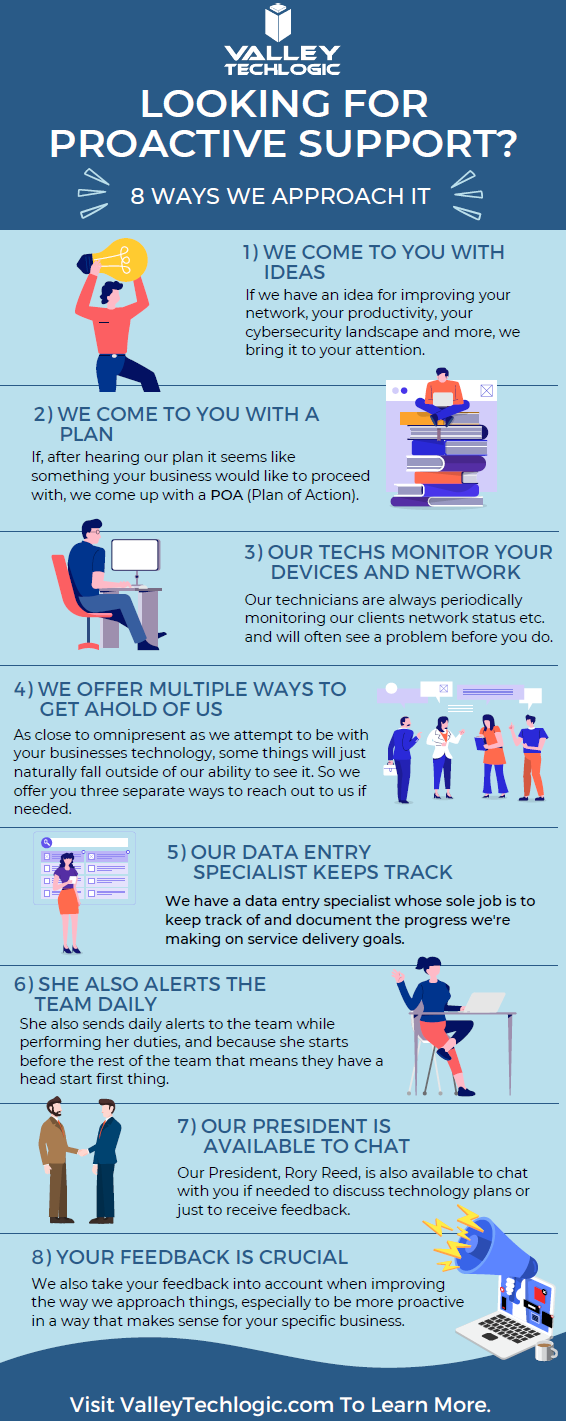
    Click to view the full size version.

    If you would like to learn more about obtaining a proactive technology service plan for your business, just request a consultation. We’ll even give you your first service call on the house (up to 2 hours) which we can use to evaluate your existing devices and offer our recommendations. Learn more today.

    Looking for more to read? We suggest these other articles from our site.

    This article was powered by Valley Techlogic, an IT service provider in Atwater, CA. You can find more information at https://www.valleytechlogic.com/ or on Facebook at https://www.facebook.com/valleytechlogic/ . Follow us on Twitter at https://x.com/valleytechlogic.

  • 10 ways to get the most out of your outsourced IT

    10 ways to get the most out of your outsourced IT

    Whether you currently have an outsourced IT resource or you’re considering one (which by the way Valley Techlogic can help with that), you may be wondering how to make the most of the service you’re paying for.

    First let’s describe what we mean by outsourced IT, any personnel resource that’s not directly hired by your organization is outsourced, and with IT specifically there are providers that will provide you access to their entire team for a singular fee (which is often times lower than the cost of hiring one full time person would be).

    Another example is you do have in-house IT personnel, but they’re overwhelmed and unable to keep up with he demand of your organization, or there are projects that fall outside their scope of expertise. In either of these cases, it can make sense to contract with an IT provider to fill in the gaps.

    A third scenario is you have regulatory factors within your business sector and need specialized support to meet those requirements. It can be cost prohibitive as a singular organization to acquire the protections needed but an IT provider is able to share that cost across many clients, which in turn lessens the cost for you and provides the other benefits of outsourced IT as an added bonus.

    There may be a misconception that “outsourced” always means “outside the US”, at Valley Techlogic our technicians are local and able to assist our clients onsite as needed on top of providing remote support. It’s a good idea to ask that question of your provider, especially if they will be handling all of your IT.

    Now that we’ve covered what it means to outsource your IT, here are ten ways to make the most of the services you’re paying for:

    1. Reducing redundancy. You may have redundant IT services you’re paying for, we can identify those services and remove them.
    2. Increased cybersecurity protection. To sum a complicated topic up simply, outsourcing your IT to a provider like Valley Techlogic means you will probably have access to advanced cybersecurity solutions that you may not have otherwise had access to.
    3. Backup for your backups. You hopefully already have a backup plan in place (if you don’t we can help with that too) but are you always sure it’s running appropriately? Part of our daily quality assurance checks is making sure all of our client’s backups are performing optimally.
    4. More time for your existing IT personnel. If you already have IT personnel, they may be swamped just with your day-to-day tasks, if you outsource your IT you can lessen the load so they can focus on business forward activities.
    5. Less time spent down. Downtime is expensive for businesses, your outsourced IT resource should be focusing on eliminating as much downtime as possible due to outages, hardware malfunctions, etc.
    6. Procurement assistance included. Procuring hardware has been more difficult lately due to chip shortages and other delays, our resources for procurement become your resources and we can help you source the equipment you need at possibly a better value.
    7. 24/7 support. Even if you have existing IT staff it’s not realistic to expect them to be on call 24/7, with Valley Techlogic we have a team of technicians, and someone is always available to take your call.
    8. Bring it all under one umbrella. Similar to number one, we can bring all of your IT spending under one umbrella. This includes your Microsoft spending because we’re a dedicated Microsoft partner.
    9. Expert advice. We don’t just provide expert services; we also provide expert advice to our clients on improving their technology and efficiency.
    10. Increased consistency. We usually find with new clients that there’s a lot to do in the beginning, but as we onboard our software and tools and regulate tasks such as performing updates and backup maintenance, the technology process becomes more consistent and reliable for them going forward as a result.

    If you’ve never outsourced your IT before, or have and it didn’t go well you may be wary about trying again with another provider. We value creating a smooth transition to our services for our customers, but we also know sometimes you just need to try something out before committing to it.

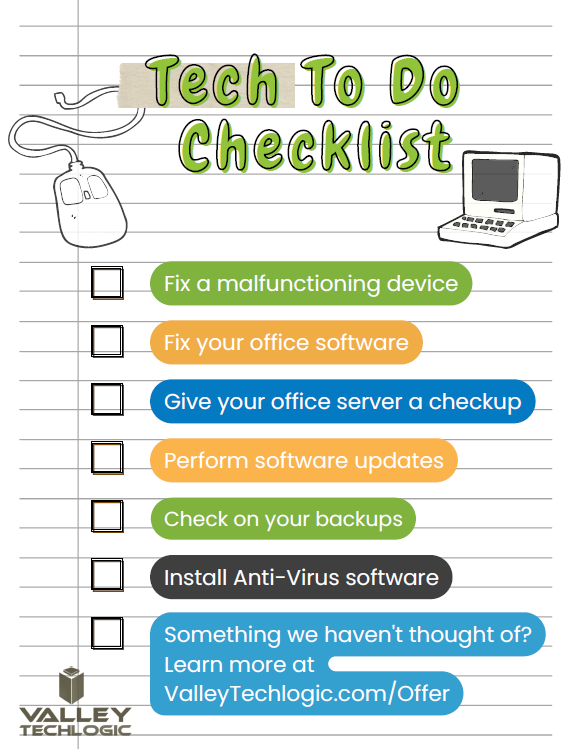
    That’s why we’re offering 2 hours of service free to qualified businesses. Here’s a list of ideas for what we could tackle 2 hours on the table, we’re confident our technicians could complete any one of these tasks for you in 2 hours.

    Click to grab the full size printable version.

    Ready to learn more? Claim your 2 hours here or schedule a consultation with us today.

    Looking for more to read? We suggest these other articles from our site.

    This article was powered by Valley Techlogic, an IT service provider in Atwater, CA. You can find more information at https://www.valleytechlogic.com/ or on Facebook at https://www.facebook.com/valleytechlogic/ . Follow us on Twitter at https://x.com/valleytechlogic.

  • Why “DIY” IT is a bad idea as a business owner

    Why “DIY” IT is a bad idea as a business owner

    We get it, handing over any part of your business to someone who’s not you can be stressful and unnerving. You painstakingly grew your business to where it is today. You may still be personally vetting every new member who walks through your door.  Hiring technical staff can be an arduous process so it’s just made sense so far to learn the ropes yourself to keep devices up and running (and as maintained as possible).

    The problem is, you’re one person with a finite amount of time. By the time cracks start to show it’s often too late, things like server failure or a malware attack can cripple your ability to run your day-to-day operations and fixing it may fall outside the scope of your abilities, making it necessary to bring in emergency help (often at a premium).

    If you survived one round of that you may have vowed to find IT help, but even with a clear indicator of why you need it recently at hand it may still seem like a waste of time or money, and you talked yourself out of it. You may have been doing things yourself for years, what are the odds something catastrophic would happen again any time soon?

    Unfortunately, pretty good. As the famous quote by Joyce Brothers goes, “If you change nothing, nothing changes.”

    So, we thought we would give you some food for thought about other reasons (besides potential disaster) you should consider outsourcing your IT:

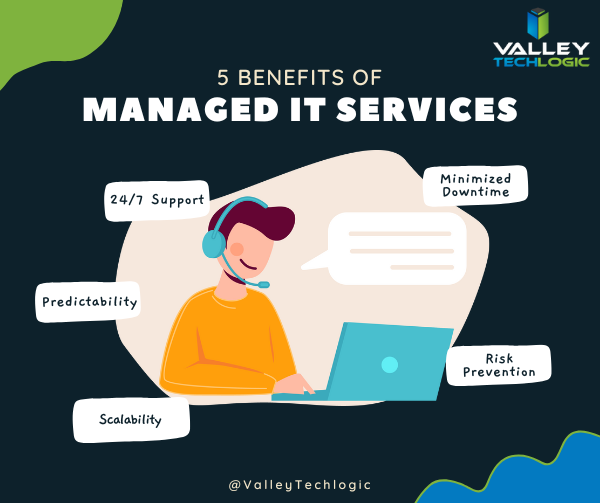
    1. 24/7 Support: This one’s easy, with a Valley Techlogic service plan 24/7 support emergency support is available to you – at no additional cost and no more late nights for you.
    2. Minimized Downtime: Time is money, and with a service plan from us you will spend less time troubleshooting problems and more time on your business.
    3. Predictability: We utilize best in class software to maintain a consistent technical environment for all of our clients, including managing computer updates, anti-virus software and more.
    4. Risk Prevention: Speaking of anti-virus, our cyber security approach doesn’t just help you recover from a cyber threat – it helps prevent one from happening in the first place.
    5. Scalability: This is a big one if you’ve been doing your own IT. We have service plans to fit both businesses who already have an available IT resource or those who want us to be their primary IT – with flexibility to change if needed

    As you can see, many commonsense features are built into all of our plans, but we do offer customization as far as how much or how little we do for your business. If you would like to remain as the primary IT resource, we have co-managed plans so you can still benefit from our solutions and proactive maintenance while still remaining the lead IT person.

    If after utilizing us for a while you’ve reached a point where you would like us to handle it all, we can then change your plan to our “managed IT department” where we are your go to resource for everything IT, your users can even call us if there’s a problem and we’ll take care of it.

    Whichever plan you choose, you’ll still always be “in the know” thanks to our comprehensive reporting and annual or bi-annual Technology Business Review (TBR) meetings where we go over how things are going and formulate a plan together to continue improving the service to fit your needs.

    Interested in learning more? Schedule a consultation with us today.

    Looking for more to read? We suggest these other articles from our site.

    This article was powered by Valley Techlogic, an IT service provider in Atwater, CA. You can find more information at https://www.valleytechlogic.com/ or on Facebook at https://www.facebook.com/valleytechlogic/ . Follow us on Twitter at https://x.com/valleytechlogic.