Tag: IT services

  • Hiring a tech vs outsourcing, a cost breakdown

    Hiring a tech vs outsourcing, a cost breakdown

    If you’ve realized you need additional IT support for your business but are on the fence about which route to take, hiring IT staff or outsourcing your needs to an IT service provider the choice can be difficult.

    Many of our clients reach us because they have been using an unreliable IT support service, their existing IT staff left, or sometimes because they’ve somehow gotten by with no IT at all but realize that needs to change.

    We also frequently have clients who are utilizing a person in their office who is “tech savvy” but is not IT, it can be quite expensive to hire an IT professional with the experience needed to perform the variety of duties needed work on items such as cybersecurity improvements, hardware upgrades, software deployments and more.

    Here are some benefits of hiring in house IT staff:

    1. They’re already at your office so there’s no waiting for IT support to show up.
    2. They will be well versed on your systems since in many cases they will be the one who set them up in the first place.
    3. They should be pre-emptively taking care of updates that will keep your business more secure.

    On the other hand, here are the benefits of outsourcing your IT:

    1. The cost is usually much lower than hiring personnel.
    2. You get many experts for one price, no matter how well versed your IT person is they can’t be an expert in everything.
    3. You get software tools that may be otherwise unavailable to a single business or not cost effective to purchase.
    4. Round the clock service and monitoring, many IT service providers including us offer 24/7 support.
    5. You will have an agreement with them that spells out the level of service you’re supposed to receive.

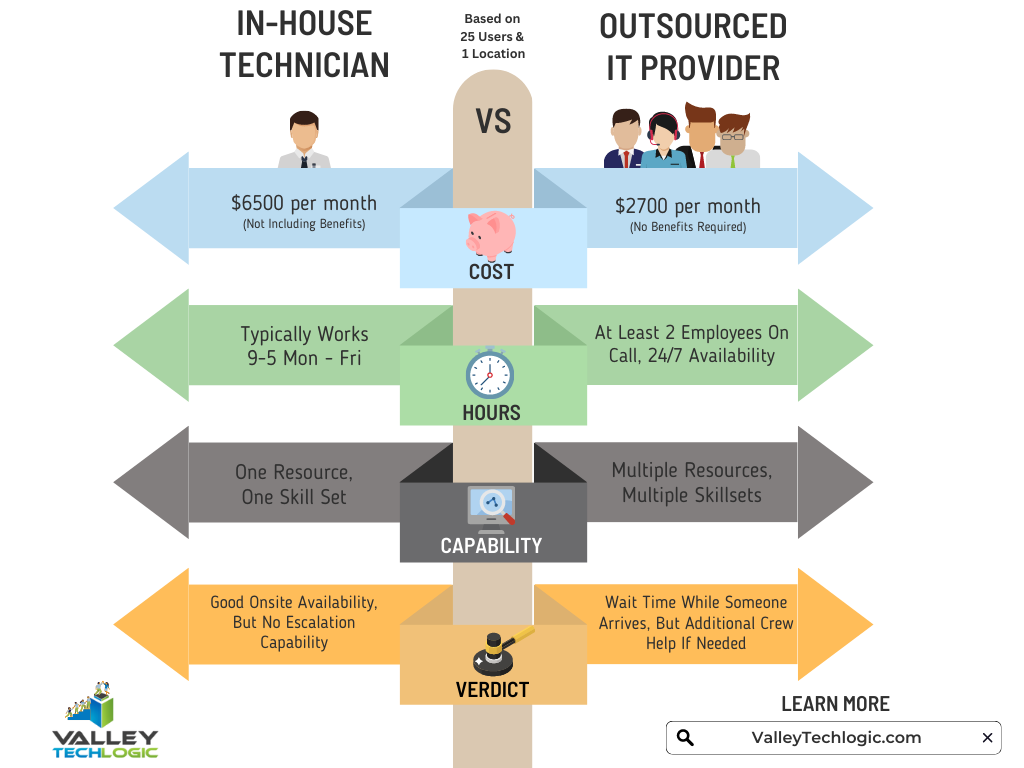
    It’s a difficult choice and only you know whether your business would greatly benefit from having in-house staff or whether outsourcing your IT is your best option. As you weigh your options we created this chart with the average baseline cost for an in-house IT person vs. an IT service plan with us.
    However, as we mentioned many of our clients are utilizing an in-house resource already, these tech savvy staff are usually performing the day-to-day activities such as patching and password resets but may be missing crucial items such as cybersecurity prevention or maintaining (or even starting) backups.

    For clients like these we recommend our co-managed plan option. With our co-managed plan we work directly with the staff already performing your IT duties, if there’s an issue they call us directly and we pass on a cost savings to you.

    We do that because usually by working with a staff member that already knows your systems we can bypass a lot of the early troubleshooting that occurs, and that staff member usually still handles minor day to day tech related activities.

    If you would like to learn more about our co-managed plan options just reach out today for a consultation.

    Looking for more to read? We suggest these other articles from our site.

    This article was powered by Valley Techlogic, an IT service provider in Atwater, CA. You can find more information at https://www.valleytechlogic.com/ or on Facebook at https://www.facebook.com/valleytechlogic/ . Follow us on Twitter at https://x.com/valleytechlogic.

  • How the “skills gap” is changing the world of IT

    How the “skills gap” is changing the world of IT

    The term “skills gap” has been popping up a lot lately and in a nutshell it’s the refers to the difference between the skills your business needs from its employees and what’s actually available in the marketplace.

    Tech innovations occur so rapidly it would be impossible for any one person to be a master in everything that’s required to maintain the technology in most modern workplaces, there will always be a need to seek out assistance with some component of it whether it be through outsourced help or through automation – or both.

    In a survey by Monster nearly one third of employers agree the skills gap has been growing, and it’s effecting how they’re sourcing and employing candidates. With inflation on the rise employees are also seeking greater compensation for highly in-demand skill sets, which from a budgetary standpoint may be difficult for many employers to grapple with.

    It may be advantageous for employers to offer compensation or incentives to existing employees to increase their existing skillsets or “reskill”. With the many hurdles found in hiring qualified candidates in the current working environment, retention will be a key factor in many businesses being able to stay afloat.

    Automation is another component hiring managers are looking towards, especially in the world of tech.

    1. Backing up data: If you’re a Microsoft 365 customer, backing up your device data is easy with OneDrive.
    2. Email Signature: Still typing your name at the end of every email response? It doesn’t take very long, but across dozens of emails per week it can add up. Setup an email signature in Outlook (with a new email open go to Insert > Signatures) and save that little bit of time with every email.
    3. Paying Bills: Still making manual payments? Why? Setup automatic payments where you can and skip logging in and making that manual payment every month.
    4. Typing Passwords: Not only does typing in a password for everything waste valuable time, it also creates a security risk because an easy to remember password is also potentially an easy to crack password. Try using a password manager like LastPass to create stronger passwords and save time.

    Of course, there are much more advanced automation services available to assist your business, but many will require at least some initial tech know-how or even an on-hand technician available to maintain them.

    The skills gap is also affecting those who rely on short-term technical help to bridge the gap, during a time when it seems like the price of everything is going up so to, is the cost of hiring emergency technical support. Especially when it’s required afterhours.

    If after reading this you’re wondering what your best option is, trying to hire someone or relying on expensive emergency support we do want to provide a third option – outsourced IT.

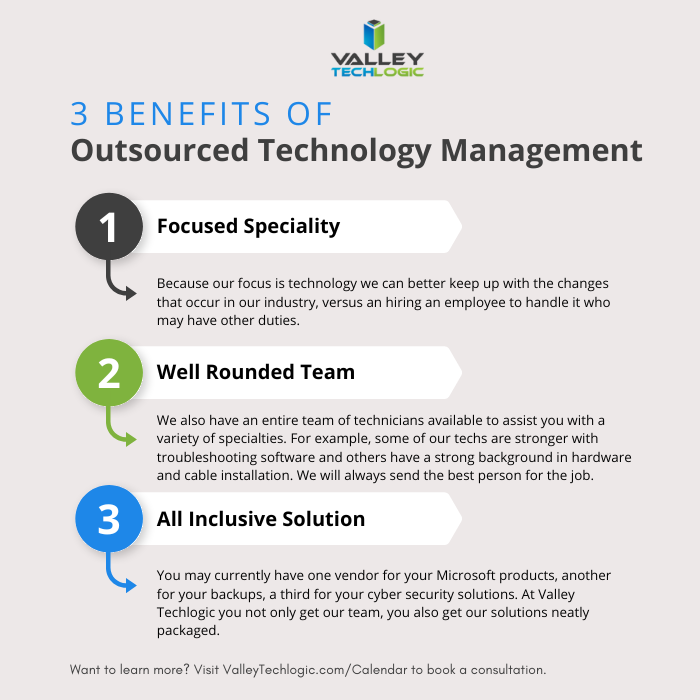
    We’re not unbiased here, but hiring outsourced IT does have a number of benefits in the current hiring climate that you may not have considered. See the chart below for examples:

    Interested in learning more? Schedule a consultation with us today.

    Looking for more to read? We suggest these other articles from our site.

    This article was powered by Valley Techlogic, an IT service provider in Atwater, CA. You can find more information at https://www.valleytechlogic.com/ or on Facebook at https://www.facebook.com/valleytechlogic/ . Follow us on Twitter at https://x.com/valleytechlogic.

  • Is it time to call in the reinforcements? 5 benefits to co-managed IT services

    Is it time to call in the reinforcements? 5 benefits to co-managed IT services

    For many small to medium sized businesses, they have one go-to person for their IT needs. This person knows the business inside and out and whether they were in IT to start or just discovered they had an affinity for it, they are a reliable resource the rest of your team depends on when something goes wrong.

    The downside is they’re just one person. It’s a minor disruption if they call out sick or take a vacation, if they were to quit that minor disruption turns major. It’s tenuous to rely on a single person for such an important task alone.

    Even if you ran your business for years without anyone being in charge of IT, how dependent were you on technology at that point compared to now? Year over year, spending on technology for small businesses continues to grow (the average being between $10,000 to $49,000 for per year).

    Technology spending is an investment you make in your businesses future and having reliable support to utilize that investment is key to making sure that the effort, time and money spent on it is not wasted.

    The employee you have in charge of technology for your business is also an investment, and they may have felt they needed more help and support as your business has grown but may have felt unsure how to make that request. It’s difficult for employees to let their bosses know they feel overwhelmed without worrying that it’ll lead to them appearing inadequate.

    The truth is for most businesses, technology has a lot of moving parts. You most likely have a team that relies on devices to do their job and if multiple things go wrong simultaneously, one single person can’t be in two or more places at once. That’s a lot of pressure for your IT person, and a lot of downtime for the employees stuck waiting for their turn.

    You also can’t expect one person to be good at all things, your IT person may be great at fixing the company website when it’s down or troubleshooting network errors, but you could be calling in reinforcements already (at an exorbitant rate) when something outside their wheelhouse is on the fritz.

    We’ve spent a lot of time talking about why you should consider co-managed IT without outright saying it, but here’s are 5 ways co-managed IT can help your business:

    1. Access to 24/7 emergency support. It’s unfair to expect your IT person to be on call around the clock 24/7 365, but with a co-managed solution emergency support is usually included.
    2. Access to a variety of skills. A co-managed solution will have a team of people who have a varied skill set, so when you call in for support, you’ll have the right person for the job the first time (minimizing your downtime).
    3. Access to software solutions. Your co-managed provider will have access to software solutions that would otherwise be too expensive to procure for your business alone, but because they’re providing it for many clients the cost for you is much more reasonable (or even free).
    4. More hands-on deck. As we said, your IT person can’t be in two places at once. If they’re knee deep in something, we can be that extra help that you need, and they’ll appreciate.
    5. Much less expensive then bringing on an additional person. Finally, the cost of a co-managed plan is going to be much less expensive than the cost of hiring an additional person.

    Co Managed IT Services

    In fact, at Valley Techlogic we have a plan tailored for co-managed situations. If many of the things in this article rang true for you and you’d like to learn more, simply book a consultation with us today.

    Looking for more to read? We suggest these other articles from our site.

    This article was powered by Valley TechLogic, an IT service provider in Atwater, CA. You can find more information at https://www.valleytechlogic.com/ or on Facebook at https://www.facebook.com/valleytechlogic/ . Follow us on Twitter at https://x.com/valleytechlogic.
  • 5 Ways “Tribal Knowledge” Sabotages Your Cybersecurity Efforts

    5 Ways “Tribal Knowledge” Sabotages Your Cybersecurity Efforts

    Even if you’re unfamiliar with the phrase “tribal knowledge” you’ve still most likely participated in it. Tribal knowledge is anything in your workplace people just “know”. If you have a particular co-worker that gets upset if the AC is turned down below 75 so no one does, that’s tribal knowledge. If the snacks in the breakroom are first come first serve and no one can claim dibs, that’s also tribal knowledge.

    Tribal knowledge is anything in your workplace that is common knowledge and is not documented. If the rules are posted somewhere it goes from being tribal knowledge to policy, and when it comes to the technology in your business, it is much more secure to rely on policy than tribal knowledge.

    Having policies for your technology holds everyone in your organization accountable. No one can claim they didn’t know the rules if the rules are clearly outlined and defined. Having effective policies are also necessary for maintaining your compliancy with federal rules regarding cybersecurity and business and for meeting the requirements for things like cybersecurity insurance.

    Here are the five ways tribal knowledge typically sabotages your cybersecurity efforts:

    1. The rules are loosely applied. If somethings not policy, then it can be difficult to make sure everyone is on the same page. A new hire will not be aware of your rules from the start and others may feel the rule doesn’t apply to them because they haven’t been strictly told it does.
    2. The rules are up to interpretation. What you think something means and what someone else may interpret something meaning can be vastly different, especially when being communicated person to person where some of it is probably getting lost in translation.
    3. You have no documentation. If the guidelines for online safety in your business are communicated verbally, you have no documentation for how or when they’re being applied. If you have a ransomware attack and you go to your insurance company without documentation, you’ll most likely be turned down.
    4. You’re not keeping up with the times. If you have employees stuck on the way things “have always been done” instead of evolving policies to fit your workspace as it grows, you’re going run into a problem if you ever need to implement comprehensive cybersecurity changes in the future.
    5. You’re losing access to relevant data. Policies help you document your processes, and that documentation is data that could help your business grow. If a certain activity is not working or could be working better, the documentation you’re creating with comprehensive policies could help you find out sooner which will save your business time and money.

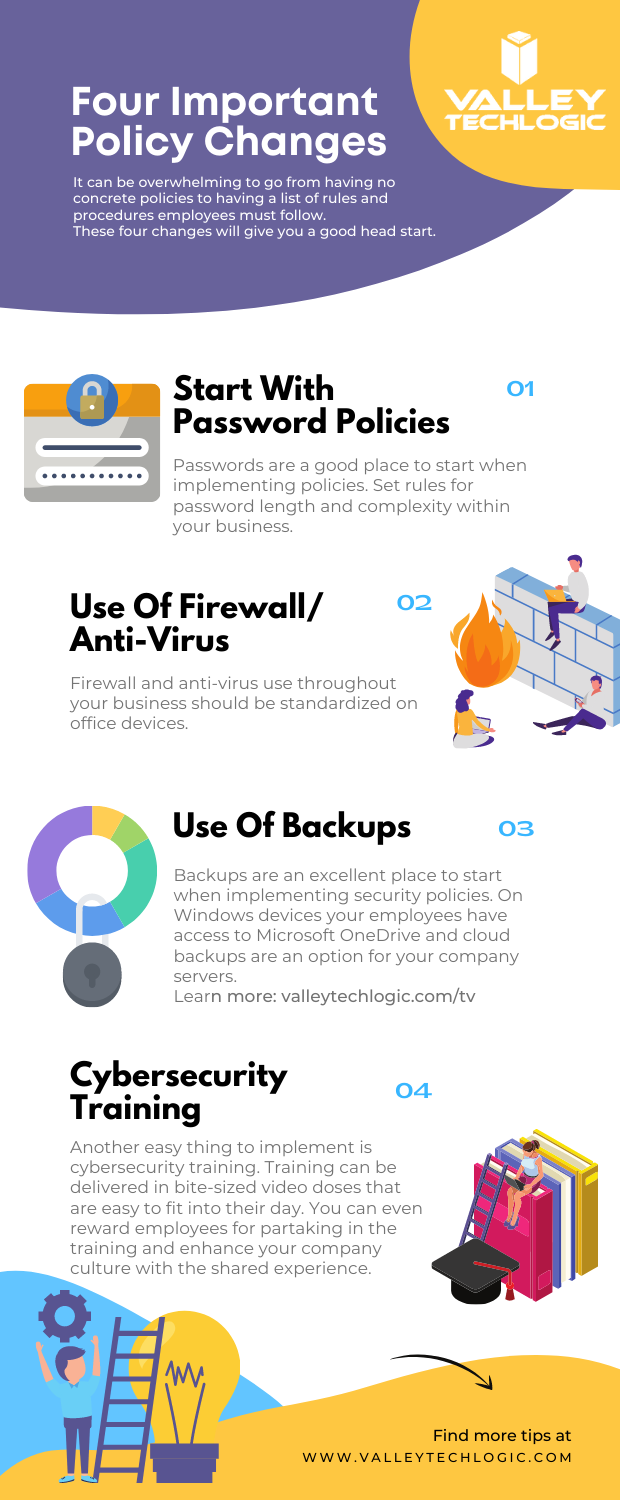
    In addition to these five tips, we’ve also created this PDF for four easy things to implement in your business (click to download).

    Four Policy Changes To Start With
    Click to download.

    These items will get you on the right track but if you feel like it’s time to get serious about cybersecurity, it’s best to leave it to the professionals. At Valley Techlogic, we have over 15 years in the cybersecurity space. We have a robust cybersecurity package that can be used standalone to leverage our cybersecurity stack if you already have an IT team in place or in conjunction with our IT service plans if you don’t currently have reliable assistance for your business’s technology. Schedule a consult today to learn more.

    Looking for more to read? We suggest these other articles from our site.

    This article was powered by Valley TechLogic, adns, n IT service provider in Atwater, CA. You can find more information at https://www.valleytechlogic.com/ or on Facebook at https://www.facebook.com/valleytechlogic/ . Follow us on Twitter at https://x.com/valleytechlogic.

  • Looking for a new IT provider? Here’s a checklist to start with

    Looking for a new IT provider? Here’s a checklist to start with

    As an IT provider ourselves we have some thoughts – okay a lot of thoughts – on what makes a good one.

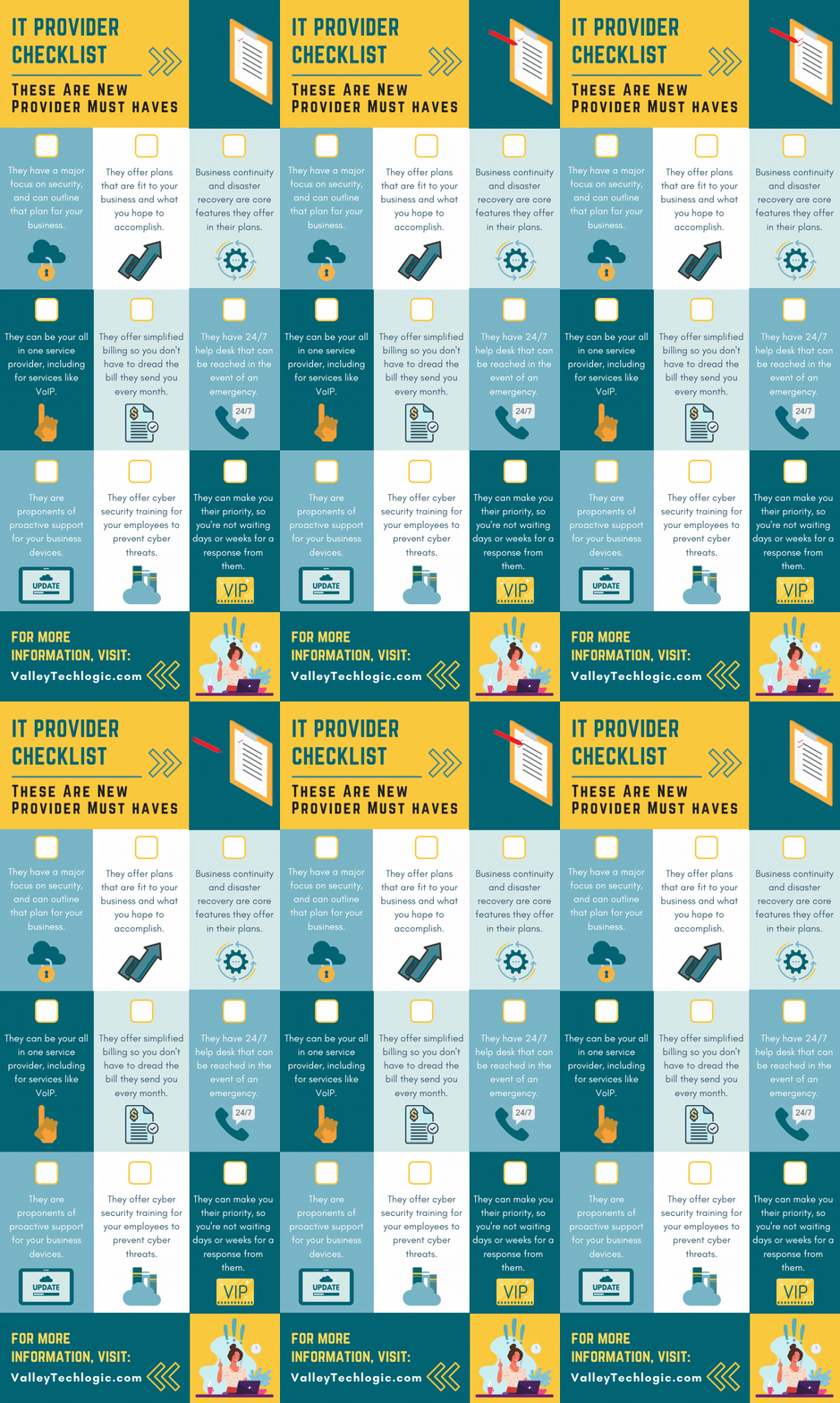
    It’s an unfortunate fact that many of our clients came to us after being failed, sometimes catastrophically, by their previous provider. While we service a large portion of the Central California area, we know many readers fall outside this region and we thought it would be helpful to provide a printable and online capable checklist for the top 9 things to look for in an IT provider.

    The items found on this checklist are simple enough you could even have it handy while you interview new provider options. If the answers to any of these questions are a “no” or even hesitancy, we suggest you continue looking. Items like security, disaster recovery and responsiveness to requests are hard stops when it comes to choosing a provider that will best support your business.

    If your old IT service provider left you in the lurch during a disaster, why would you risk choosing a new provider that can’t guarantee that the same thing won’t happen again?

    You also want to make sure they believe in proactive maintenance. When choosing a new provider and paying for their services the last thing you want to have happen is that you’re still the person responsible for maintaining your own IT. Paying their bill every month while still slogging through updates on workstations yourself would just be salt in the wound. We think this should be an included part of any full coverage service plan.

    Speaking of full coverage plans, at Valley Techlogic we believe in unified billing. This means when you choose us all of your IT services are contained under our one billing umbrella. We manage their IT subscriptions, their VoIP plans – everything is designed to be as hassle free as possible. While not all providers operate the same as we do in this regard, we (and our clients) think of it as a positive feature.

    Migrating from your previous provider can also be an intimidating time for any business owner, this person or business had access to all of your sensitive systems and if things ended on a sour note, you may be feeling unsure whether your data and systems are safe.

    We wrote a comprehensive guide on what to do when your IT guy (or IT provider) suddenly quits, you can find it here. The topics are applicable whether they quit or were fired by you. It’s our suggestion you don’t try to manage this on your own, locking down access and recovering credentials is really best left to the professionals.

    If your business is located in Central California (Sacramento, Stockton, Modesto, Fresno, Merced and everywhere in between) and you’re looking for a new IT service provider, Valley Techlogic meets all of the criteria found in the above checklist and more. Reach out today to learn more.

    Looking for more to read? We suggest these other articles from our site.

    This article was powered by Valley TechLogic, an IT service provider in Atwater, CA. You can find more information at https://www.valleytechlogic.com/ or on Facebook at https://www.facebook.com/valleytechlogic/ . Follow us on Twitter at https://x.com/valleytechlogic.
  • Does doing your own IT as a business owner really make sense? We did the math.

    Does doing your own IT as a business owner really make sense? We did the math.

    Business owners have a lot on their shoulders, especially in 2020. Delegating is no easy thing, painstakingly raising a business from the ground up lends itself to naturally being very protective over it.

    There can even be a sense of pride in doing things yourself for as long as you can. Each time you must hire out for a job you previously did yourself there can be a sting to it, as well as a feeling that you’re giving up control (which you are, but it’s a good thing!). We know nothing can feel more worrisome about losing control over than the IT systems that power your business.

    The thought of hiring someone else to do your IT for you can feel like handing over the keys to your kingdom. When it comes to your data and the systems you and your employees work on, keeping these things afloat is often synonymous with keeping your business running.

    While there might be something nice about not spending a weekend on a downed system or having to phone your internet provider yourself when your networks down, is it really worth the concerns that might arise from it not being in your sole control?

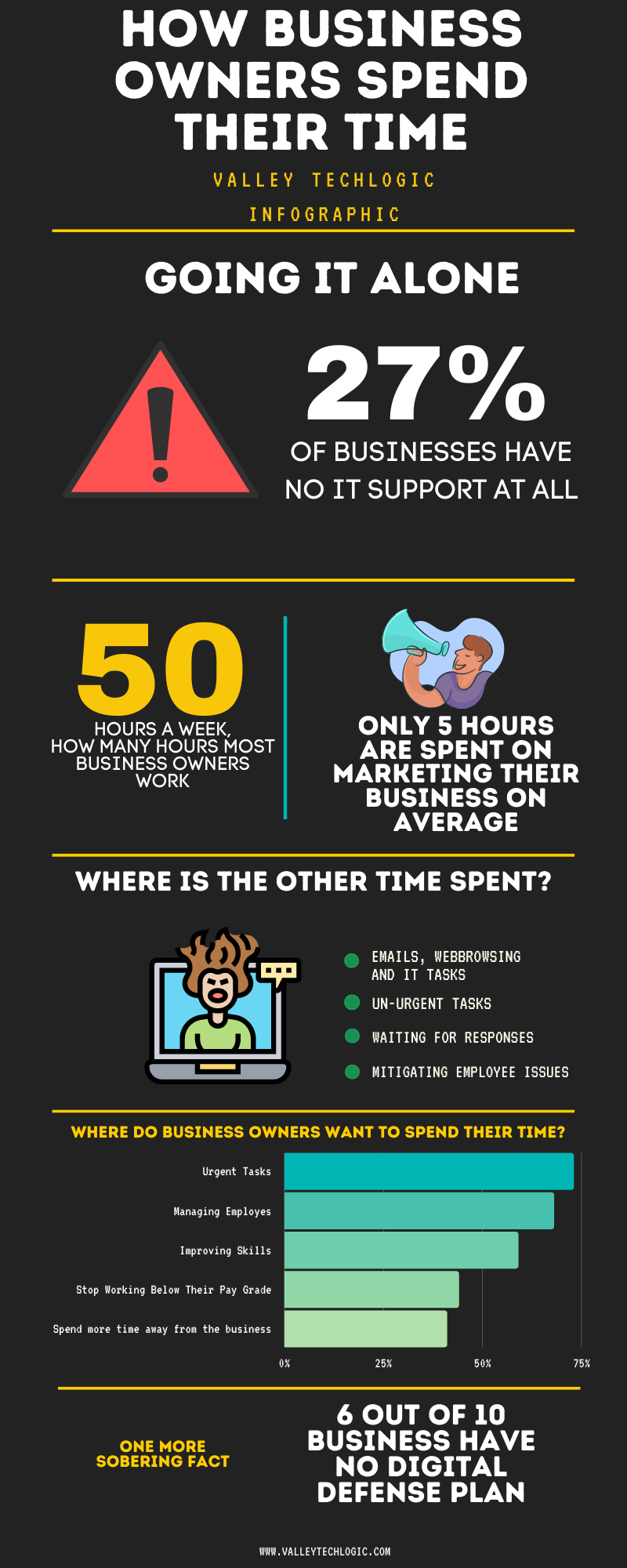
    The statistics say yes. Just take a look at this graphic.

    Doing Your Own IT Chart

    As you can see, business owners are working hard but aren’t spending their time where they would ideally want to. When you get bogged down with the everyday minutia you can lose sight of what made your business the success it is, the effort poured into actually building it.

    Also, while we don’t want to question anyone’s IT prowess if that isn’t your day job there could be things that are overlooked. Cyber security is something we write about a lot here and for good reason, thinking your business won’t be a target for any given reason is just wrong.

    Hackers are opportunists and if there is an opportunity for them to get into your business, they’re going to take it. IT professionals have all the tools necessary to thwart them at their disposal, but they can only do implement them when they’re part of your team.

    As with all things that are recommended to you, it’s good to have an open mind and a critical. These are important decisions you are making for your business after all.

    If you’re located in the Central Valley and would like to have a consultation to find out what your options are, we’d be more than happy to go over them with you.

    Looking for more to read? We suggest these tech articles from the last week.

    This article was powered by Valley TechLogic, an IT provider in Atwater, CA. You can find more information at https://www.valleytechlogic.com/ or on Facebook at https://www.facebook.com/valleytechlogic/ . Follow us on X at https://x.com/valleytechlogic.

    Looking for IT Services in Fresno, Modesto, Stockton, Ceres, Atwater, Merced, Visalia or Lodi? We cover all these areas and more!