Author: rory-admin

  • Thinking about buying new tech for your business in 2023? Here are our top 10 tips

    Thinking about buying new tech for your business in 2023? Here are our top 10 tips

    We recently touched on the tax savings benefits for making technology purchases before the new year, however maybe you’re only in the beginning stages of thinking about replacing equipment in your business and aren’t ready to go ahead and buy before 2022 is over.

    We’re a fan of making big technology purchases in bulk when it comes to our clients, instead of a mish mash of devices that all have different warranty times, hardware capabilities and software available to them you have one set of devices that can be managed in much the same way for their entire life span because they all came from the same place at the same time.

    While that Isn’t always achievable, you can accomplish almost the same goal by buying in sections as well. Maybe management devices get replaced first, followed by team 1 and team 2. Just any kind of organizational system to your technology buying beats the technology clutter of having everyone working on something different.

    Of course there are different considerations if your business BYOD (bring your own device) which we’ll touch on next week. Besides trying to make your technology purchases at roughly the same time here are 10 more tips for business technology buying in 2023.

    1. Research is key. Not all laptops for example are created equal (and the same goes for every other device) you want devices that will more than cover the requirements of Windows 10 or 11 and still perform well.
    2. On the same token, look up reviews. Sometimes a product SKU is problematic, it would be bad to read reviews about your chosen laptop having a problem with premature device failure AFTER you’ve bought 10 of them.
    3. Consult your employees. Your employees may have opinions about what is crucial to them in a work device, for example if you have one employee who handles your graphic design they may need extra memory or a better video card added to their particular device to do their job effectively.
    4. Spend a little extra on the extended warranty. You want these devices to last a long time for your business as they’re a big investment, it’s worth it to purchase the extended warranty (Dell offers up to 5 years for example).
    5. Look into what kind of support the company offers if you do encounter a problem. On the same page as the last tip, you want to make sure if one of the devices breaks or encounters a problem you can easily have it fix. Lenovo is another vendor we work with and they offer onsite repair of devices at a low additional cost.
    6. Consider consulting your software vendors. If you use a proprietary software in your business it’s especially important to make sure your chosen device will work with it (especially if we’re talking about replacing an onsite server).
    7. To follow up on that, if you’re considering replacing your server it might be a good time to consider the cloud. Onsite servers are a very expensive investment, we have seen more clients move to the cloud in 2022 than ever before. If your server has come up for replacement it might be worth researching before making that purchase.
    8. If you do want to purchase another onsite server, consider refurbished. Ordinarily we shy away from refurbished but when it comes to servers it can be a smart investment and we’ve found they perform just as well as new, we have saved clients thousands of dollars when they choose this option.
    9. You can choose the cloud for employee devices as well. If you have a BYOD format but still want the uniformity and security of having everyone connect from a similar machine, we recommend Windows 365. It’s a cloud PC your employees would connect to from their current device, it can give them the benefit of using a PC with more powerful hardware if you chose and you can manage these devices under one platform.
    10. Work with your IT provider to take advantage of their partnerships. Finally, if you have an IT provider it’s worth asking if they have partnerships with any vendors that can help you get a better deal. We have partnerships with Dell and Lenovo and utilize them to benefit our clients regularly. You can learn more about that here.

    Here are three ways you can save right now on your technology spending:

    Three additional money savings tips.Procurement services is something we reserve for clients. If you’d like to learn more about how we can help you purchase new devices and maintain them, click here to schedule a consultation.

    Looking for more to read? We suggest these other articles from our site.

    This article was powered by Valley Techlogic, an IT service provider in Atwater, CA. You can find more information at https://www.valleytechlogic.com/ or on Facebook at https://www.facebook.com/valleytechlogic/ . Follow us on Twitter at https://x.com/valleytechlogic.


  • 10 Holiday Shopping Tips for Safer Online Shopping

    10 Holiday Shopping Tips for Safer Online Shopping

    The holiday season is upon us and with Thanksgiving around the corner many are anticipating doing some holiday shopping the day after during Black Friday.

    In previous years stores seemed to open earlier and earlier, creeping into Thanksgiving itself to allow buyers who really wanted those deals to snatch them up before their competition (if they were willing to sacrifice some time with family). Many felt this was unfair to employees and with the pandemic that activity has been scaled back so now most businesses are closed on Thanksgiving.

    That doesn’t stop you from shopping on Thanksgiving if you want to however, with online buying growing in popularity year over year “Black Friday” sales occur all over the internet at a wide variety of retailers – and even a wide variety of dates outside of the traditional day after Thanksgiving.

    Still, the main event is typically when the best sales occur with retailers holding back their “door buster” items until midnight on Friday as they do in traditional retail spaces.

    If you’re going to be hitting up those sales this year we have 8 tips for safer shopping online while you do so, and two bonus tips related to getting the best deal while you’re at it.

    1. Make sure the URL is what you expect it to be. Phishing emails may try to take advantage of those looking to get a good deal by misdirecting you to a site with a similar URL that can collect your payment information. Look for any misspellings such as Paypale or Wallmart instead of Paypal and Walmart.
    2. The same goes for products that may be found on multiple vendors. Hint, no one is going to sell a top of the line laptop for $25. If a price seems like it’s too good to be true, it probably is.
    3. Even if the website is legit, the product might not be. Sites like Amazon or Ebay allow private vendors to sell on their site, and this sometimes includes scammers. Look out again for pricing that seems too good to be true or product reviews that don’t match the product you’re trying to buy.
    4. Also read the small print. You want to make sure you’re buying that Xbox you’ve been looking for, not just the box it comes in.
    5. As always, watch out for popups. If you’re browsing for a specific product a loved one requested you may hit sites that try to scam you with malicious software delivered via popups. Letting your browser block all popups unless specifically allowed is a good idea.
    6. Make sure the website is HTTPS not just HTTP. HTTPS is a layer of encryption that protects your payment information when checking out through a website.
    7. If you’re buying from a vendor you’ve never purchased from before, keep an eye on your bank or credit card account. You want to catch any potentially suspicious activity early so you can report it.
    8. Also look for online reviews. Using Trustpilot or just doing a Google search before buying is a good idea, it will help you avoid scams and retailers that are a nightmare to deal with.
    9. Bonus Tip: Use a browser extension like Honey or one your credit card or bank account offers to automatically apply coupons or even get cashback on purchases. Searching for coupon codes is a hassle, however do keep in mind they’re offering you these discounts in lieu of information on your purchase making habits.
    10. Bonus Tip: For Black Friday specifically you can see the deals major online retailers will have ahead of time in the circulars collected by com . That way you can strategically plan your online shopping before the clock hits midnight this Friday.

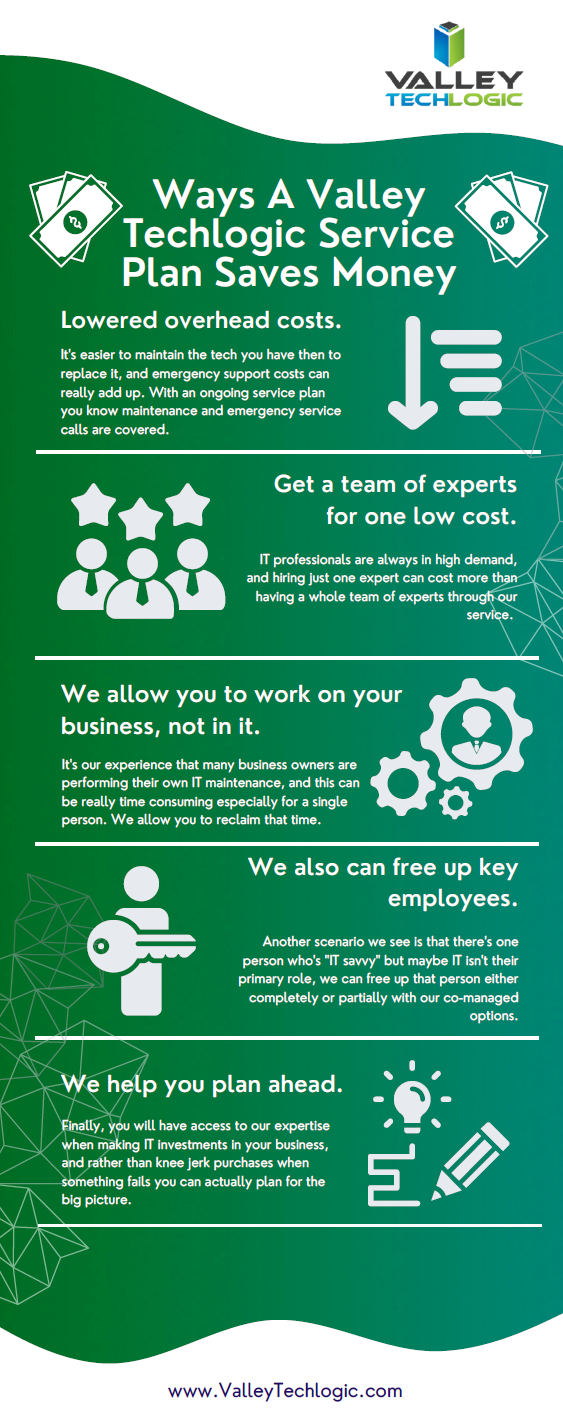
    Speaking of Black Friday, if you have been in the market for technology services for your business then look no further. We’re offering the best deal we have ever offered for new customers. In our last blog we listed four reasons to consider a service plan with Valley Techlogic. Here are four ways we will make switching easy in 2023.Click to view the full size version.Learn more about taking advantage of our Black Friday sale today.

    Looking for more to read? We suggest these other articles from our site.

    This article was powered by Valley Techlogic, an IT service provider in Atwater, CA. You can find more information at https://www.valleytechlogic.com/ or on Facebook at https://www.facebook.com/valleytechlogic/ . Follow us on Twitter at https://x.com/valleytechlogic.
  • Black Friday Isn’t just for consumer purchases, business owners can take advantage as well with these tech deals

    Black Friday Isn’t just for consumer purchases, business owners can take advantage as well with these tech deals

    The holidays are rapidly approaching and with Thanksgiving and Black Friday this week we thought it would be a good idea to offer some tips when it comes to Black Friday shopping for your business.

    If you aren’t aware, “Black Friday” is the day following Thanksgiving when retailers offer deep discounts to entice buyers who are holiday shopping. These discounts also occur on technology purchases with laptops being a popular item.

    We’re Dell and Lenovo partners here at Valley Techlogic, and both have their holiday deals live now but things are selling out fast. Dell has laptops and desktops available as well as some peripherals. Lenovo even has a handy page for their Black Friday allowing buyers to sort by what they’re looking for easily.

    Another retailer you can look to for some Black Friday specials for your business is Best Buy. Following the trend this year they’ve also released some of their Black Friday specials earlier this year and would be a great place to look for a laptop or computer monitor.

    It also goes without saying that Amazon is a great place to look for those holiday tech deals, particularly when it comes to peripherals. If you have a business account with them you may even see better pricing then on your regular consumer account, it’s always worth checking.

    If you’re looking to buy in bulk, particularly if you’re also taking advantage of Section 179 this year, then we’ve got you covered. As we mentioned we have partnerships with both Dell and Lenovo and not only can we take advantage of their Black Friday pricing on your behalf, we can also work with our sales representatives to possibly secure a discount on top of that for larger purchases.

    The deals don’t stop at hardware, many software vendors will also offer deals for Black Friday especially in the creative space. Adobe Creative Cloud is 40% off this month and allows you access to Photoshop, Premier Pro and more.

    If you’re been looking for a new webhost Hostinger also has their hosting 80% off (hosting starting at $2.50 per month).

    We’ve also seen deals on VPNs and anti-virus software, though we recommend coordinating with your tech team on whether or not those are worth taking advantage of for your business.

    This year, we’ve decided to join in on the action and offer our own Black Friday Special, for five businesses that sign up we’ll be waving our setup fees and any payments until January 1st, 2023.

    Click to grab the full size version.

    If your current IT support has left something to be desired, why not start 2023 off on a better foot? Here are four ways we support our clients that differ from our competitors:itWe also make switching easy with our white glove hand off service, we will work directly with your current IT to make for a seamless transition. We can even provide a template for the letter you can send to discontinue your current service. What are you waiting for? Sign up today as this deal ends November 30th!

    Looking for more to read? We suggest these other articles from our site.

    This article was powered by Valley Techlogic, an IT service provider in Atwater, CA. You can find more information at https://www.valleytechlogic.com/ or on Facebook at https://www.facebook.com/valleytechlogic/ . Follow us on Twitter at https://x.com/valleytechlogic.

  • Need computers for your office? Purchasing before the New Year could save your business a ton of money

    Need computers for your office? Purchasing before the New Year could save your business a ton of money

    Every year we promote the tax savings benefits of Section 179 to our clients, new clients are often not aware that the computer hardware (and even some software) they use in their business is a tax deductible expense. Making these purchases before year end saves them a boat load of money on the next years tax bill and effectively works as a discount on the equipment they need.

    What is Section 179? Section 179 is an immediate tax saving deduction on any depreciable asset – such as vehicles, hardware and software. Rather than depreciating these items in future tax years and having to track that, you can benefit from lowering your liability right now.

    This especially helps our clients when making larger technology purchases such as replacing aging servers. A new server can easily run $10,000 or more, but when you factor in the benefit of Section 179 it makes for a sizeable discount on a purchase of that size.

    The maximum discount for 2022 is $1,080,000, so the sky is the limit no matter what size purchase you’re planning to make. To maximize the benefits however, we do find that making these purchases at the end of the year is the most beneficial as you see the deduction much sooner when rolled into the next years taxes.

    Here’s a chart on what a $10,000 purchase would look like after utilizing Section 179:

    Of course, every business set up is different and just looking at the numbers may not give you enough of an idea of how you can use Section 179 in your business, so we also made this chart of things our clients often look to do before the year ends that may be an inspiration to you as well.

    Software is a great way to use Section 179 this year in particular, with Windows 7 and 8 for desktops and Windows Server 2012 all losing mainstream support access in 2023.

    While you’re looking to upgrade your Windows software you will probably also want to consider new hardware, the useful life expectancy for computer hardware and servers is around 5 years with typical use and any machines that came from the factory with Windows 7 or Windows Server 2012 installed will be well past that window.

    You may also not know that Microsoft has announced it will no longer allow updates for their Office suite of software on outdated machines, so the time is ticking to get those upgrades done before your office staff loses the ability to use Office software on their devices. You can learn more about the updates coming from Microsoft in 2023 with our free guide here.

    If you’re looking for assistance in procuring technology solutions for your business, Valley Techlogic can help. We have partnerships with Microsoft, Dell, and Lenovo as well as other technology vendors and can help you replace aging equipment easily before time runs out on the benefits of Section 179 this year. Reach out today to learn more.

    Looking for more to read? We suggest these other articles from our site.

    This article was powered by Valley Techlogic, an IT service provider in Atwater, CA. You can find more information at https://www.valleytechlogic.com/ or on Facebook at https://www.facebook.com/valleytechlogic/ . Follow us on Twitter at https://x.com/valleytechlogic.
  • 5 Ways to Establish your Business Presence Online

    5 Ways to Establish your Business Presence Online

    New Twitter owner and billionaire Elon Musk recently announced he may be opening up the “Blue Check” for $8 a month, rather than the rigorous process you had to go through to potentially get it before.

    For most platforms, establishing your business is not a simple monthly charge. It can take time and effort to build an audience on social media or gain traffic for your website. Luckily, the effort you put into one often helps the others, and you don’t need to be an SEO expert to get started.

    The average person spends 8 hours a day doing digital activities, there is no shortage of time or eyes to view the content you create but it is a competitive market now (it’s estimated 252,000 new websites are created daily).

    How do we definite an online presence? It’s not merely existing online, while just having a website or social media page may get you traffic you can still do things to increase that traffic. Your online presence has three key components: visibility, credibility, and reputation.

    Yes, even reputation is a factor that comes in when you’re trying to get your website “ranked” on Google. By ranked we mean having a place in search engine results when a potential customer types in a keyword phrase.

    You want to protect your online reputation by posting content that is relevant to your business, if you’re in refrigerator sales the bulk of your content should be about refrigerators not the latest trendy outwear for the 2023 season. Trying to gain traffic by “tricking’ people into clicking will reduce your reputation and your ability to creep up in the search engine results.

    On a similar note, credibility is another factor and you can greatly amplify that by connecting with other websites in the form of “backlinks”, basically they link to your website and you link to theirs. In our refrigeration example, if you sell refrigerators but don’t repair them sharing links with another business that does would improve your businesses credibility online and give you a boost from whatever traffic that other business sends your way.

    Finally, visibility is what happens when you combine your efforts in improving your reputation and credibility online by posting and sharing valuable content to your audience. There’s a world of difference that happens traffic wise when you appear on the first page of Google vs the 2nd page and beyond.

    It doesn’t stop with optimizing your website though, here are 10 other things to work on to improve your online presence and give your business a boost in traffic that could lead to a boost in customer conversions:

    1. Have an easy to navigate site: The first is a no brainer, if your website is clunky or slow to load people won’t stick around to see what you’re selling. Google has a page speed tool that can give you some insight on how your website stacks up.
    2. Start a blog: If you’re not currently writing a blog (like this) then you’re missing out on a weekly (or daily, or monthly, whatever works for your schedule) injection of new keywords to your website. Landing pages are great but they’re one and done, you can strengthen your online presence by adding new content about your business through a blog.
    3. Post on social media too: You don’t need to be on every social media platform, some may not be relevant to your business. We encourage you to think about the platforms where your customers are likely to be, and then post daily on those platforms. You can create simple marketing graphics with a tool like Canva which practically does the work for you.
    4. Use hashtags too: Hashtags allow you to connect your content to people who enjoy the same content or are interested in a specific topic. Going back to our refrigerator example, if there’s a new model from a popular brand then using that brand name as a hashtag could make sense in the announcement post about it.
    5. Don’t ignore business directories: If you’re struggling to find a way to share links with other websites, starting with the free business directories is one of the best ways to improve your online presence and have your business linked from somewhere else. Start with the big traffic sites like Google My Business, Facebook, and Bing.

    Wondering what makes a good website? Here are 6 bonus tips:

    Click to view the full size version.

    Trying to work on your online presence can be difficult if the technology you use in your business Isn’t up to the task. Imagine taking the time to write out that first blog post and your computer crashes, you may be done with it before you even get started.

    Valley Techlogic can help you with your technology goals, and having a service plan with us is like working on any of the topics we covered in this blog, you will see a net overall improvement across the board. Learn more with a free consultation today.

    Looking for more to read? We suggest these other articles from our site.

    This article was powered by Valley Techlogic, an IT service provider in Atwater, CA. You can find more information at https://www.valleytechlogic.com/ or on Facebook at https://www.facebook.com/valleytechlogic/ . Follow us on Twitter at https://x.com/valleytechlogic.

  • October is Cybersecurity Awareness Month, now in its 18th year

    October is Cybersecurity Awareness Month, now in its 18th year

    We’re announcing this a bit late, but we did want to touch on this annual event (now in its 18th year). Every year CISA (Cybersecurity and Infrastructure Security Agency) releases new resources that are free to download and share for Cybersecurity Awareness Month. The theme this year is “See Yourself in Cyber” and we appreciate the effort to help everyone understand that cybersecurity measures are up to all of us to maintain.

    So many cybersecurity measures feel very passive, you’re protected by your anti-virus or firewall automatically. Your IT team helps you navigate any issues that make come up. For businesses, advanced cybersecurity threat protection can detect a threat just from activities that fall outside the norm (like your computer being online at three in the morning) and send you a warning.

    Unfortunately, hackers are always trying to circumvent these automatic measures no matter how advanced they become. The human element is still the biggest cybersecurity threat to your network and business. That’s why acknowledging we all have a role to play in preventing cyber threats is so important.

    CISA recommends four important steps we all need to take online:

    1. Think Before You Click: Before you click on that link in an email or download an attachment, do a little research. Is the sender who you expect it to be? Phishing emails are still the #1-way users are hacked.
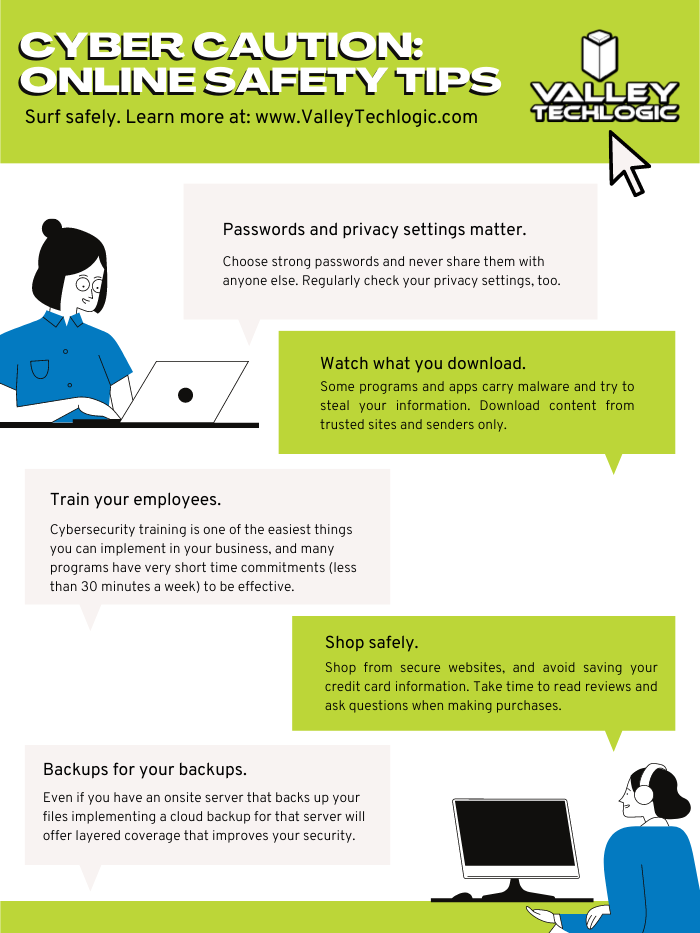
    2. Update Your Software: This is good common-sense advice; most patches also include important security updates and it doesn’t take very long to install them (and for Windows devices you can even have them run automatically).
    3. Use Strong Passwords: This is another easy one and if you use one of our password manager recommendations, it’s even easier to create stronger passwords that you don’t have to manually remember.
    4. Enable Multi-Factor Authentication: This is CISA’s fourth tip for this year and lucky for you we have a guide for this too.

    These tips may seem simple, but they will be hugely beneficial to preventing a cyber threat for you, your business or your employees. However, you can take it a step further and engage with cyber security training.

    You may be wondering what that would look like, well you’re in luck. We have a sample training session right here for you to review with your employees:

    This is just a quick sample lesson; through our partner we have bite sized lessons that include video that you and your team can take to beef up your cybersecurity knowledge. They average 2-3 minutes long with a quick quiz at the end to make sure the knowledge was absorbed, and you can even see your employees average scores to see how everyone is doing.

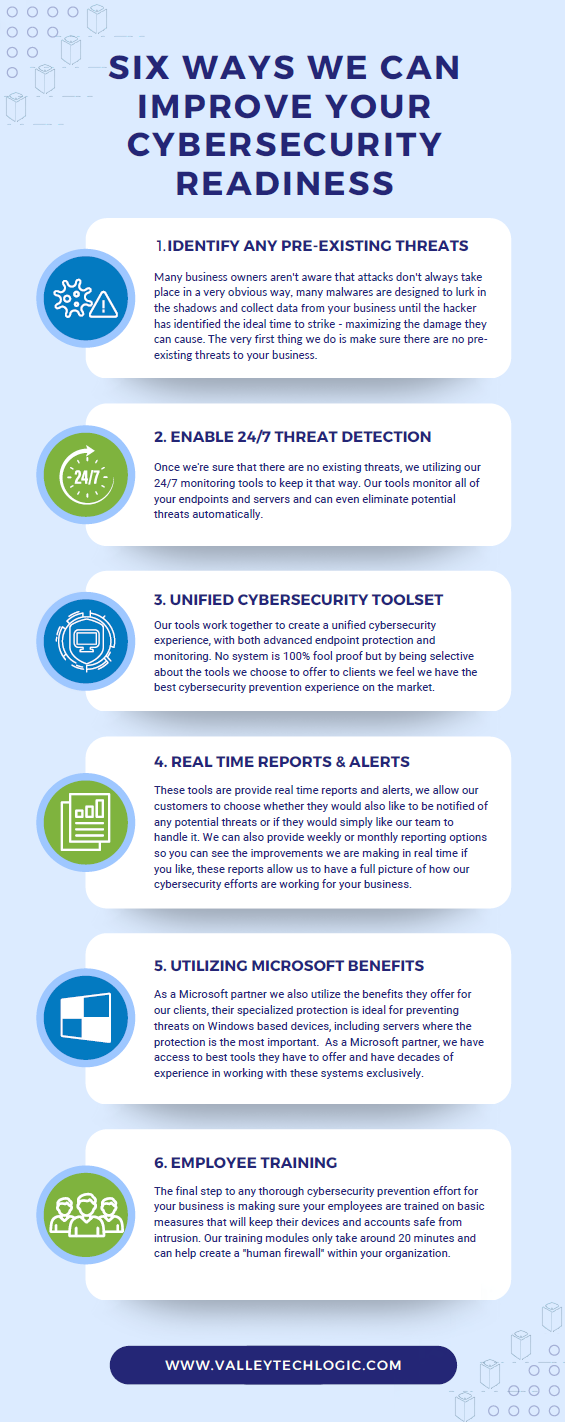
    If you incentivize taking this training it will not only be a team building opportunity, it will also help your business stay safe from cyber security threats. If you’d like to learn more about cybersecurity training or stepping up your cybersecurity measures in your business (including the aforementioned advanced cyber threat detection) reach out today for a consultation.

    Looking for more to read? We suggest these other articles from our site.

    This article was powered by Valley Techlogic, an IT service provider in Atwater, CA. You can find more information at https://www.valleytechlogic.com/ or on Facebook at https://www.facebook.com/valleytechlogic/ . Follow us on Twitter at https://x.com/valleytechlogic.
  • Windows Server 2012 and Server 2012 R2 are approaching end-of-life, what should you do?

    Windows Server 2012 and Server 2012 R2 are approaching end-of-life, what should you do?

    Upgrading your personal computer with the latest Windows can come with some challenges and hesitancy due to changes that are made to every new consumer and business version of Windows for personal computers.

    UI changes and increased specifications both come to the forefront for our customers when making these changes, but for servers that decision process feels even more fraught with danger.

    On October 9th, 2023, Windows Server 2012 and 2012 R2 will be in their end-of-life. What this means is it will no longer be a primarily supported product by Microsoft, who understandably needs to focus their time and energy supporting more current products. What it means for customers still utilizing Windows Server 2012 (or 2012 R2) is that their servers may not receive crucial support updates that often prevent things like your server malfunctioning, software working as intended, or even security updates.

    With just under a year to go that gives you time to consider your options when upgrading to a more current software, or if it makes sense to pay for extended support through Microsoft.

    The Extended Security Updates (or ESU) program does not include any feature updates, the only updates your server will receive will be security updates only, and to expand on that further that will only be important or critical security updates.

    This may mean your server is still vulnerable to intrusion although much less so than devices going unpatched. Often times a device ending support is a green light to hackers to begin working on breaching these older devices now that they’re less secure.

    That problem is not unique to Microsoft either, even smaller devices such as routers or switches can fall under end-of-life and no longer receive critical security patches. Just look at the recent Cisco zero-day security announcement and their stance. They will not be patching the outdated routers to prevent security intrusion; the expectation is that customers that own those routers will need to upgrade to ensure their business is safe.

    There are some factors to consider however when it comes to upgrading your Windows serve, see our chart below:

    Five Considerations to Take When Replacing Your Windows Server

    The chart assumes an ideal scenario of either performing the update on a newly purchased server or taking the server offline temporarily. Performing an in-place Windows Server update can be risky and is best left for the professionals to decide whether it’s possible in each unique scenario.

    Purchasing a new server if your current server is too out of date to run the current version of Windows Server is tricky as well, there are more factors to consider with a machine that supports your entire business than with a device that’s only utilized by one or two employees.

    It’s also important no matter which avenue you take that you’ve properly backed up the existing server, if something were to go wrong not having that backup could mean losing all of your data. Which in many cases, is a catastrophic event.

    If we haven’t convinced you yet we’ll say it plainly, this is not a job that should be attempted by someone who’s just “computer savvy”. Upgrading your server requires an expert’s knowledge to execute in a timely manner and without losing your company data. Valley Techlogic can be that expert hand, learn more today with a free consultation.

    Looking for more to read? We suggest these other articles from our site.

    This article was powered by Valley Techlogic, an IT service provider in Atwater, CA. You can find more information at https://www.valleytechlogic.com/ or on Facebook at https://www.facebook.com/valleytechlogic/ . Follow us on Twitter at https://x.com/valleytechlogic.

  • 2023 is coming, is your business CMMC ready?

    2023 is coming, is your business CMMC ready?

    For some Department of Defense (DoD) contractors, CMMC or Cybersecurity Maturity Model Certification compliance may be a looming figure that they’ve yet to address. If you’re one of the ones currently making headway on it, you may not be certain which level you need to reach for your business.

    CMMC version 2.0 was announced last November, and it seems as if that’s going to be the de facto model going forward. In version one there were 5 levels of CMMC compliance, which have now been reduced to 3. To put it simply, level 1 of the program remained the same, levels 2 and 3 were combined and levels 4 and 5 were also combined.

    This means if you were previously aiming for level 2 in the previous version of the program, you will now need to address topics in level 3 to be compliant.

    Level one or the Foundational Level is meant for who do not handle Federal Contract Information (FCI) data. The checklist features just 17 items, and your compliance is self-attested which means you do not need to have a formal CMMC testing done to be compliant with the program.

    Many DoD contractors though will fall into level 2 or the Advanced Level due to their handling of Controlled Unclassified Information (CUI), level 2 features 110 controls. All of CMMCs level 2 controls originate from NIST SP 800-171.

    With the announcement of version 2.0 it was also announced the additional CMMC specific controls would be removed. If your business has already been working towards compliance with NIST before CMMC was announced you’re in a perfect position to work towards your CMMC compliance goals.

    While 2.0 has not yet been signed into law, it was announced by the Pentagon last April that CMMC language would begin to start showing up in DoD contractors starting July 2023 – so the clock is definitely ticking if your business will be vying for those contracts.

    A small portion of businesses will be required to undertake the rigorous task of being compliant with level 3 of CMMC, or the Expert Level. It’s based on NIST-800-171 and 172 and has 134 requirements at the time of writing, many of which require specialized equipment and software.

    For both levels 2 and 3, audits will be required through the CMMC Accreditation Body (recently renamed Cyber-AB). Cyber-AB is an independent auditing body and we’ve been told the wait times to be audited are lengthy, though this will get a little better as the program gains more auditors. It’s still a good idea to make sure your business is ready and meets the compliance standards though especially as CMMC regulations continue to be rolled out ahead of the official release. You don’t want to be caught needing that proof of compliance to meet your contract requirements and not having it.

    The DoD has also indicated it would take a contractors level of CMMC compliance into consideration when choosing for their contracts – so not being compliant may not just put your existing contracts at risk it could cost you new ones as well.

    We have several articles explaining the levels and controls in more detail, here are our articles on levels one, two and three.

    If you’ve barely scratched the surface in your organization, you can still make changes that will put you in a better position when you begin to tackle it in earnest. Many of the requirements, especially those found in level one, is common sense advice for being safer online. You (and your employees) can work on these five items first:

    If after reviewing the information, you feel like you just need a hand to either cement cybersecurity processes you already have in place or have a partner in your CMMC goals, Valley Techlogic can help.

    We have firsthand knowledge of the CMMC program and helping clients become CMMC certified. Our tools will help you meet the requirements necessary and quickly get your business ready for the audit process.

    Make an appointment today for a free consultation to learn more.

    Looking for more to read? We suggest these other articles from our site.

    This article was powered by Valley Techlogic, an IT service provider in Atwater, CA. You can find more information at https://www.valleytechlogic.com/ or on Facebook at https://www.facebook.com/valleytechlogic/ . Follow us on Twitter at https://x.com/valleytechlogic.
  • 10 ways to get the most out of your outsourced IT

    10 ways to get the most out of your outsourced IT

    Whether you currently have an outsourced IT resource or you’re considering one (which by the way Valley Techlogic can help with that), you may be wondering how to make the most of the service you’re paying for.

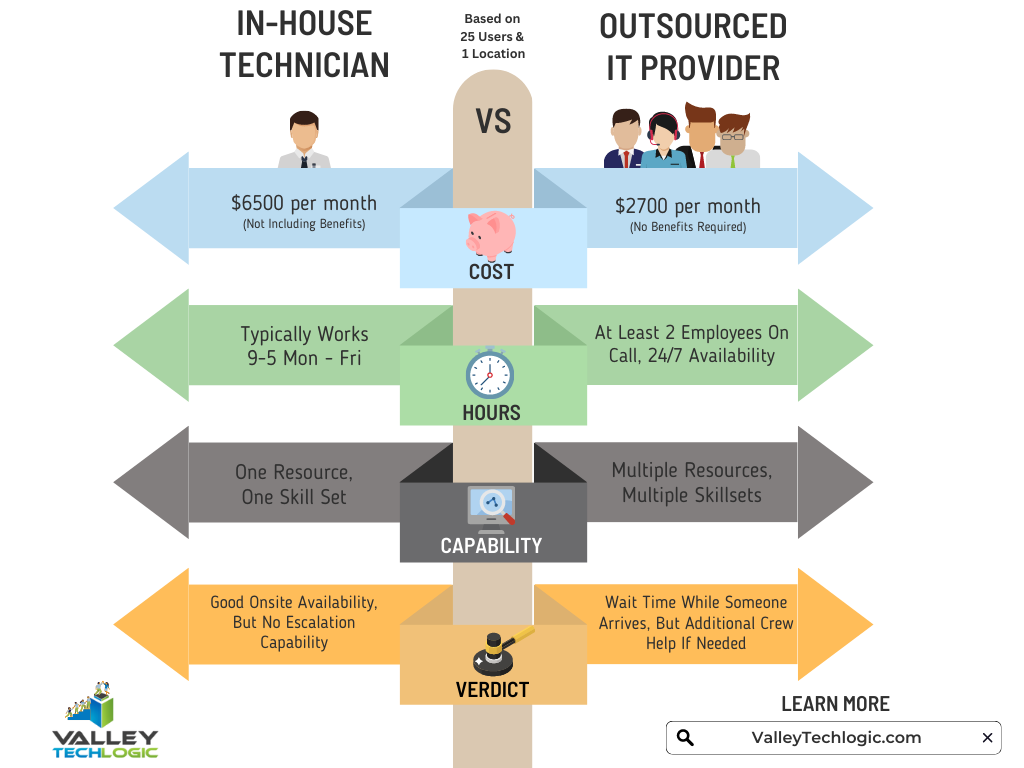
    First let’s describe what we mean by outsourced IT, any personnel resource that’s not directly hired by your organization is outsourced, and with IT specifically there are providers that will provide you access to their entire team for a singular fee (which is often times lower than the cost of hiring one full time person would be).

    Another example is you do have in-house IT personnel, but they’re overwhelmed and unable to keep up with he demand of your organization, or there are projects that fall outside their scope of expertise. In either of these cases, it can make sense to contract with an IT provider to fill in the gaps.

    A third scenario is you have regulatory factors within your business sector and need specialized support to meet those requirements. It can be cost prohibitive as a singular organization to acquire the protections needed but an IT provider is able to share that cost across many clients, which in turn lessens the cost for you and provides the other benefits of outsourced IT as an added bonus.

    There may be a misconception that “outsourced” always means “outside the US”, at Valley Techlogic our technicians are local and able to assist our clients onsite as needed on top of providing remote support. It’s a good idea to ask that question of your provider, especially if they will be handling all of your IT.

    Now that we’ve covered what it means to outsource your IT, here are ten ways to make the most of the services you’re paying for:

    1. Reducing redundancy. You may have redundant IT services you’re paying for, we can identify those services and remove them.
    2. Increased cybersecurity protection. To sum a complicated topic up simply, outsourcing your IT to a provider like Valley Techlogic means you will probably have access to advanced cybersecurity solutions that you may not have otherwise had access to.
    3. Backup for your backups. You hopefully already have a backup plan in place (if you don’t we can help with that too) but are you always sure it’s running appropriately? Part of our daily quality assurance checks is making sure all of our client’s backups are performing optimally.
    4. More time for your existing IT personnel. If you already have IT personnel, they may be swamped just with your day-to-day tasks, if you outsource your IT you can lessen the load so they can focus on business forward activities.
    5. Less time spent down. Downtime is expensive for businesses, your outsourced IT resource should be focusing on eliminating as much downtime as possible due to outages, hardware malfunctions, etc.
    6. Procurement assistance included. Procuring hardware has been more difficult lately due to chip shortages and other delays, our resources for procurement become your resources and we can help you source the equipment you need at possibly a better value.
    7. 24/7 support. Even if you have existing IT staff it’s not realistic to expect them to be on call 24/7, with Valley Techlogic we have a team of technicians, and someone is always available to take your call.
    8. Bring it all under one umbrella. Similar to number one, we can bring all of your IT spending under one umbrella. This includes your Microsoft spending because we’re a dedicated Microsoft partner.
    9. Expert advice. We don’t just provide expert services; we also provide expert advice to our clients on improving their technology and efficiency.
    10. Increased consistency. We usually find with new clients that there’s a lot to do in the beginning, but as we onboard our software and tools and regulate tasks such as performing updates and backup maintenance, the technology process becomes more consistent and reliable for them going forward as a result.

    If you’ve never outsourced your IT before, or have and it didn’t go well you may be wary about trying again with another provider. We value creating a smooth transition to our services for our customers, but we also know sometimes you just need to try something out before committing to it.

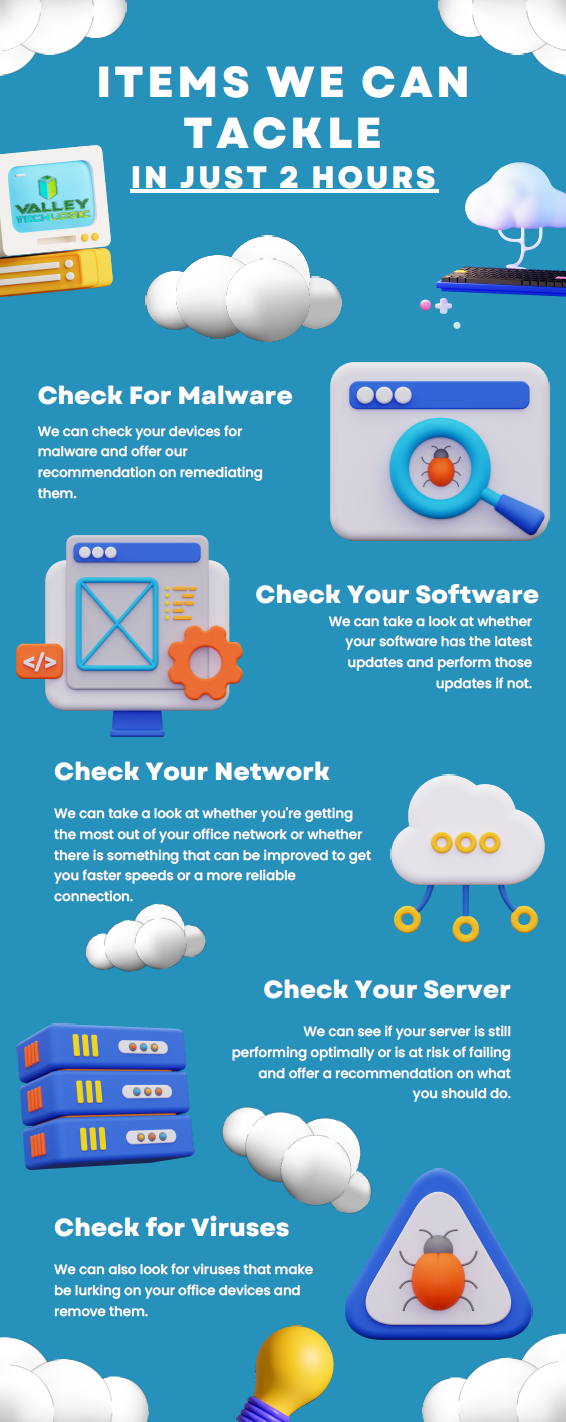
    That’s why we’re offering 2 hours of service free to qualified businesses. Here’s a list of ideas for what we could tackle 2 hours on the table, we’re confident our technicians could complete any one of these tasks for you in 2 hours.

    Click to grab the full size printable version.

    Ready to learn more? Claim your 2 hours here or schedule a consultation with us today.

    Looking for more to read? We suggest these other articles from our site.

    This article was powered by Valley Techlogic, an IT service provider in Atwater, CA. You can find more information at https://www.valleytechlogic.com/ or on Facebook at https://www.facebook.com/valleytechlogic/ . Follow us on Twitter at https://x.com/valleytechlogic.

  • Our top 10 safety tips for mobile devices

    Our top 10 safety tips for mobile devices

    There’s a popular misconception that mobile devices are somehow more resistant to hacking and cyberthreats than PCs (personal computers) or other standalone devices, this Isn’t exactly true.

    In today’s age, anything connected to the internet can be tampered with or hacked. The age of the “Internet of Things” (IoT) is here and there have even been cases of web connected devices like appliances being hacked and used to gain access to data within your household or office.

    Your cell phone or tablet are really just smaller computers. Whether you have an Android phone or tablet or stick to Apple products, you still need to take precautions when visiting websites or opening emails and attachments as you do with your laptop or desktop. Plus, because these devices are much more portable you even should take extra precautions when taking it out in public.

    Here are our top 10 safety tips for mobile devices:

    1. Always lock your phone when you’re not using it. Setting up a pin, facial recognition or fingerprint recognition will also add another layer of security.
    2. Keep your software up to date. Just like with computer updates, phone OS updates often include important security patches to keep your device safe.
    3. Only download applications from secure sources. Questionable applications can lead to your phone being compromised, and even with applications from a known good source (like the Google Play Store or the Apple Store) only give them as many permissions as they need to function and no more.
    4. Install an Antivirus on your phone. Many may not know antivirus software Isn’t limited to computers, but there are antivirus solutions for computers that will include a phone version bundled together.
    5. Be careful with public Wi-Fi. Open public networks are open to everyone – including hackers who are able to see everyone who’s connected. Only use them if absolutely necessary.
    6. Same goes for public phone charging. Hackers can tamper with or even setup fake cellphone charging stations in a scheme known at “juice jacking”, when you plug your phone in it installs malware on your device. If you need extra battery power, consider carrying a power bank with you.
    7. Just like with your PC, vary your passwords. It can be more difficult to create good passwords on your phone, luckily the same applications like LastPass (our recommended password manager) you use on your PC for password management also have mobile versions.
    8. On the upside 2FA is even easier on a phone than a PC. Many 2FA applications like Google Authenticator are cellphone based, making 2FA even easier to use on your phone.
    9. Be careful what data you save to your phone. Many of us save our payment information to our phones for easier checkout but if your phone is compromised (or stolen) than all that information is now in the hands of a bad actor. It’s might be worth reconsidering saving that information, especially details for something like your bank account or anything that can’t be easily changed.
    10. If you are going to take some risks (like using public Wi-Fi) consider a VPN. Virtual Private Networks (VPN) can encrypt your data, making it a little safer to use public Wi-FI.

    We also have some safety tips for your IoTs devices in this chart:

    Click to view the full size version.

    If you have mobile devices connected to your business’s office network, it’s worth evaluating whether there is any risk involved for your business. There are network security solutions that will apply the same rules for mobile devices as it does for PCs, meaning even if a compromised cellphone connects you will still have protection from the rest of your network being infected. If you’d like to learn more schedule a consultation with us today.

    Looking for more to read? We suggest these other articles from our site.

    This article was powered by Valley Techlogic, an IT service provider in Atwater, CA. You can find more information at https://www.valleytechlogic.com/ or on Facebook at https://www.facebook.com/valleytechlogic/ . Follow us on Twitter at https://x.com/valleytechlogic.