Tag: business technology

  • Maximizing your tax deduction potential with Section 179

    Maximizing your tax deduction potential with Section 179

    It’s September which means we’re almost to the fourth quarter where most businesses look ahead towards end of year activities, it’s not unusual for us to see an increased interest in locking down new equipment and upgrades before year end.

    Each year we begin promoting the benefits of Section 179, you can learn more about it in our updated guide for 2023 or continue reading.

    In a nutshell, Section 179 is a tax savings benefit that allows you to deduct the cost of equipment you use for work from your (in some cases up to 100% of the total cost) from your tax expenses. When used correctly, this means you can purchase upgrades for your business and receive that money right back into your business when you file the following year.

    Section 179 is a permanent part of the tax code here in the United States but that doesn’t mean it’s static. Each year the deduction limits are adjusted for inflation. You can see on the chart below what this year’s limits are.
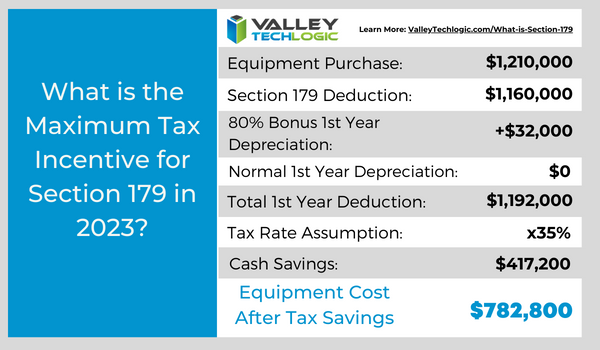
    You can choose to take the deduction in one lump sum or take a deduction for depreciation each year instead – it’s completely up to you.

    What equipment or technology purchases qualify for Section 179?

    1. New Equipment: This includes computers (as long as they’re used in your business at least 50 of the time), servers, backup devices, phone system hardware and more.
    2. Components: Such as hard drives and solid-state drives, RAM, video cards, monitors and more.
    3. Refurbished Equipment: You don’t have to buy new equipment to qualify for Section 179, in fact if you’re in the market for a new server and have been debating new vs refurbished, we have an article where we weigh in here. Equipment can also be financed or leased and still qualify.
    4. Software: If you’re looking to purchase software upgrades for your business this year – such as upgrading an older copy of Windows to the latest version – these would also qualify.
    5. Professional Services: Even professional services like ours can possibly be deducted under Section 179.

    We find many businesses are looking to make purchases before the year end because that’s when a clearer picture of their financials is available but be warned. For a purchase to qualify in 2023 these purchases must be made before December 31st. Even if the purchase was planned as part of this year’s budget, if it’s purchased January or later it will not count for this year’s taxes.

    If you’re looking for the exact math on a potential purchase and the savings you will net, we can recommend this calculator, it has been updated for 2023. It’s also important to note that the ceiling for your particular business is your net income, you cannot deduct more money than you made that year, however you can carry the deduction forward to the next year.

    We’ve spent some time discussing what does qualify under Section 179, but what about what doesn’t? The following items would not qualify under Section 179:

    1. Intangible Assets: This would include things like patents or copyrights as an example.
    2. Land: You cannot purchase land and claim a deduction for Section 179.
    3. Purchased from family: Unfortunately, you cannot claim purchases that are made through a family member. Even if the product itself would normally qualify, if the item was purchased through a sibling, parent’s or spouses’ separate business it will not qualify.

    Interested in making technology upgrades in your business and utilizing Section 179 in 2023? Valley Techlogic can help, we offer procurement services as well as technology solutions that are covered by this very useful tax code. Learn more today by scheduling a consultation.

    Looking for more to read? We suggest these other articles from our site.

    This article was powered by Valley Techlogic, an IT service provider in Atwater, CA. You can find more information at https://www.valleytechlogic.com/ or on Facebook at https://www.facebook.com/valleytechlogic/ . Follow us on Twitter at https://x.com/valleytechlogic.

  • Looking to up your online platform game? These 5 tools will help you run your online business better

    Looking to up your online platform game? These 5 tools will help you run your online business better

    If you’re running a business in 2023 you know that having an online presence is often the key to growth (and if you need advice on that we’ve written about it before), but how much of your workflow is presently in the digital workspace?

    We still see plenty of businesses that are still working off pen and paper, eschewing digital files for a wall of file cabinets and communicating via fax rather than email (did you know that you can receive fax via email now)?

    There’s nothing wrong with being old school, but it can slow down the kind of progress you’re hoping to make with your business. Nowadays, people expect an instantaneous response to their questions or concerns and if you’re not used to communicating that way it can cause them to look for a service that will, and automation can cement workflows that would otherwise be hit or miss when left up to an individual (like your marketing efforts via email).

    In a nutshell, it’s a good idea to bring as much of your business into the digital world as you possibly can. That doesn’t mean you can’t keep the techniques that helped you build your client base in the first place – but throwing a modern digital spin on them may help you reach more clients AND impress them.

    So, what are the five tools you should be looking into when it comes to upping your technological game?

    1. First there are marketing tools, such as a CRM (Customer Relationship Management). Beyond being a handy client database, many CRMs provide automated processes for tracking activities with those clients (such as phone calls or emails). It’s also a collaborative tool for your employees, if your employee Susan is wondering if Client A was called last week, she can just check the CRM rather than ask everyone in the office.
    2. Website building tools are also another great option for expanding your business, especially if you don’t currently have a website. It doesn’t have to be a complicated or expensive process, depending on your needs it could be as simple as a one page informational that includes items like your location, hours, and contact information. Making sure your business can be found in a web search is an important part of attracting new customers.
    3. If you’re still handling paper checks for all of your transactions and are left waiting for payments to come in the mail, we ask – why? Online payment processing options have grown dramatically, and they could not be easier to use, for you OR your clients. We think it’s always a good idea to give people more options to give you their money as well.
    4. Branding for your business doesn’t have to be complicated. If you have a company logo that’s really all you need to get started using tools like Canva or Adobe Express. There are many pre-loaded templates for you to use to advertise your business, you just add your logo and download to post on your social media pages (we’ve written about improving your social media presence as well).
    5. Communication tools are another big area you can improve your business technologically, not just with your clients but with your employees as well. Online meetings grew in popularity in the last few years, and we think they’re still an excellent way to keep in touch with clients who might otherwise not want to expend the time or effort on an in-person meeting. You can also use chat programs to touch base with employees without interrupting their workflow with a phone call or visit to their office. We use Microsoft Teams here at Valley Techlogic but there are many great and versatile options available now.

    Of course, the best way to improve your business’ technological prowess is to engage with a technical provider that can knows the ins and outs of today’s modern technology and can best support your efforts to grow your business. That’s where Valley Techlogic comes in.

    Interested in learning more? Schedule a consultation with us today.

    Looking for more to read? We suggest these other articles from our site.

    This article was powered by Valley Techlogic, an IT service provider in Atwater, CA. You can find more information at https://www.valleytechlogic.com/ or on Facebook at https://www.facebook.com/valleytechlogic/ . Follow us on Twitter at https://x.com/valleytechlogic.

  • Patch Management 101 – From Neglected to Automated; 5 Tips for Managing Patching in your Business

    Patch Management 101 – From Neglected to Automated; 5 Tips for Managing Patching in your Business

    If we asked a new client what they had in place for patching most of them would answer in one of two ways. Either they’re “pretty sure” patching is happening regularly, or they know patches have mostly been ignored for quite some time.

    Regardless of how they answered, the outcome is usually the same. We usually inherit managing systems that are way behind on patches. That’s because patching doesn’t start out being an automated easy process for most businesses, there is some effort required to get into a good patching process established.

    If patching is left up to employees for their devices, it’s typical for the “Remind Me Later” to become the permanent option when it comes to patching. Depending on their level within your company this can either be a bad idea to very risky (though any device can act as a threat vector when it’s connected to your network). If a device that has admin level access is unpatched and it’s basically handing the keys to your kingdom over to bad actors.

    That’s because many patches are released specifically to address an active security concern. While functionality and quality of life improvements are also addressed via patching, active security concern patches can be released with little notice and should not be ignored.

    We’re also aware many users have a negative association with patching, especially if they’ve installed patches in the past and encountered bugs or issues. While these patches can be rolled back, it may not be simple to do so especially if your machine hasn’t been set up that way.

    There’s also patches for IoT (Internet of Things) and peripheral devices that aren’t as simple as clicking “Update Now”. Many times, patching these devices involves going to the companies website, downloading the patch, and manually installing it. With routers in particular patches are typically released to address a very serious security threat. We reported on a series of Netgear routers which when unpatched could easily be taken over by an intruder.

    Now that we’ve established why patching is important, here are five ways to make it more manageable:

    1. Create an Inventory of Devices Within Your Business: To manage consistent patching across the board you first need to know what you have. It’s a good idea to keep an inventory of all your devices (even peripherals or handheld devices like tablets).
    2. Create Consistency for Work Devices: For devices you or your employees work on, like laptops and desktops, it’s a good idea to try and maintain consistency. Meaning if you’re applying a patch to one of them you should apply it to all of them. That way it’s not a mishmash of various updates across your business. This will also make it much easier to troubleshoot any issues.
    3. Make Sure They’re Running the Latest OS (Operating System) Too: For Windows devices, it’s also important to keep them up to date with the latest OS version. Windows will discontinue patches for operating systems that have reached end-of-life. This doesn’t mean they no longer require patching; in fact, these devices are often targeted by hackers specifically because they can no longer be maintained.
    4. Also, for Windows Devices Have a Group Policy for Patching: This is an advanced tip, but you or your current IT provider can setup a group policy to make sure patches are occurring on a schedule for Windows devices.
    5. Work With a Professional to Create a Patching Plan: Patching is part of ongoing maintenance, and it can be difficult to address it on your own. At Valley Techlogic patching management is provided under every monthly service plan with us.

    Here is a mini report on how Valley Techlogic addresses patching management (as well as other routine maintenance items):

    Interested in learning more? Schedule a consultation with us today.

    Looking for more to read? We suggest these other articles from our site.

    This article was powered by Valley Techlogic, an IT service provider in Atwater, CA. You can find more information at https://www.valleytechlogic.com/ or on Facebook at https://www.facebook.com/valleytechlogic/ . Follow us on Twitter at https://x.com/valleytechlogic.
  • Technology that you can build on, supporting your construction business through tech

    Technology that you can build on, supporting your construction business through tech

    We’re continuing from last week where we touched on how technology integrates with the field of dentistry, we want to switch gears from a business sector that helps us maintain our tooth structure to one that helps us maintain our societal structure. We’re looking at how technology can help those in the construction.

    Our construction clients are used to taking on big projects and creating comprehensive plans for tackling those projects with their teams. They aren’t always nailed down to one location, being out in the field and having employees logging in from remote offsite locations is part of their norm.

    Documentation is important for the work they do. They often have a dedicated server that keeps track of all the reports that come with having a construction business. Planning data, financials, insurance information – all of that must be available at a click of a button so they can run their business as smoothly as possible.

    If you’re in construction, ask yourself if any of these tech related items would be applicable to your business:

    1. Slow or non-existent internet on work sites. As we mentioned above, your employees aren’t logging in from one location, they go where the work is that day. You need support for your connectivity that’s flexible for the way you do business.
    2. Equipment that goes “missing”. Like us, you have expensive equipment that needs monitoring and logging. Our construction clients need solutions for making sure their equipment doesn’t “walk off” the job site. Security cameras solutions with the ability to save and review the data they collect are crucial for these clients.
    3. Regulatory compliance concerns. If you work in the government sector (or would like to) you’re probably aware of the ongoing attempt to secure our national data through CMMC (Cybersecurity Maturity Model Certification).

      There’s also the documentation you must do for every portion of your business, because if something goes wrong you need that documentation to back you up. If your documentation goes missing or can’t be retrieved because an outdated server has “malfunctioned”, or your backup solution was inadequate – it can spell trouble for your business.

    The long and short of it is, having a technology solution that supports your business is as crucial as having supports structures in a building to keep it from collapsing. A pillar may not look like much on it’s own but it could be the only thing keeping back a catastrophic collapse.

    At Valley Techlogic, we see ourselves as the pillar that not only keeps your technology equipment running as it should, but also keeps out any intrusions to your business (17.7% of all cyber attacks are aimed at your business model which is second only to the financial sector).

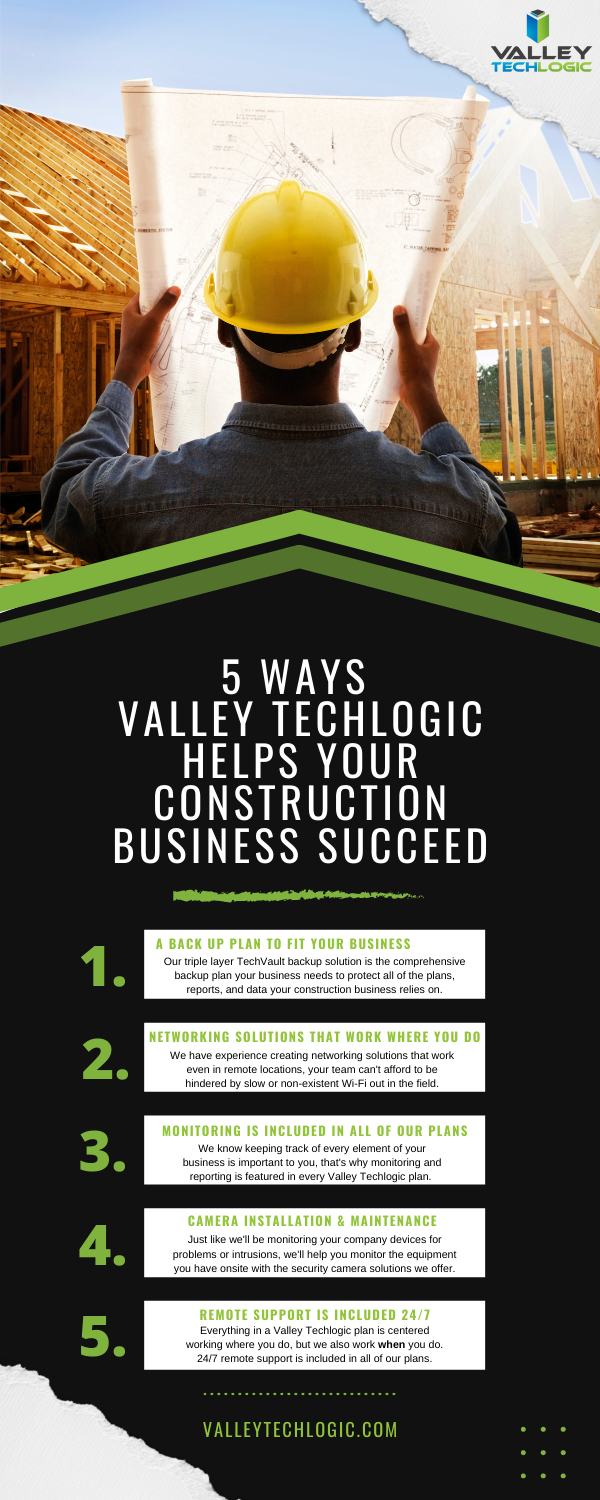
    Here is a chart with 5 ways Valley Techlogic specifically supports our construction clients:

    5 Ways VTL Supports Your Construction Business

    Still on the fence? Why not have a conversation with us directly, book a quick consultation with us here.

    Looking for more to read? We suggest these other articles from our site.

    This article was powered by Valley TechLogic, an IT service provider in Atwater, CA. You can find more information at https://www.valleytechlogic.com/ or on Facebook at https://www.facebook.com/valleytechlogic/ . Follow us on Twitter at https://x.com/valleytechlogic.

  • We have updated our most popular resource for 2022 and have an offer you won’t want to pass up

    We have updated our most popular resource for 2022 and have an offer you won’t want to pass up

    As an IT service provider, we’re passionate about cybersecurity because we see the effects having inadequate coverage can have on businesses first hand.

    The devastation that can occur after a cyber attack is staggering, we’ve given you the statistics before, such as:

    1. The cost of cybercrime is predicted to hit $10.5 trillion by 2025
    2. Cryptojacking cases quadrupled in 2021, but the hackers don’t make very much (less than $6 per day), however that doesn’t stop them from trying to gain access to your machines
    3. It takes on average 287 for cybersecurity teams to detect and contain a data breach
    4. Phishing is involved in 36% of data breaches (can you identify the signs of a phishing email?)
    5. DDoS (Distributed Denial-of-Service) attacks are skyrocketing, with 9.75 million occurring in 2021

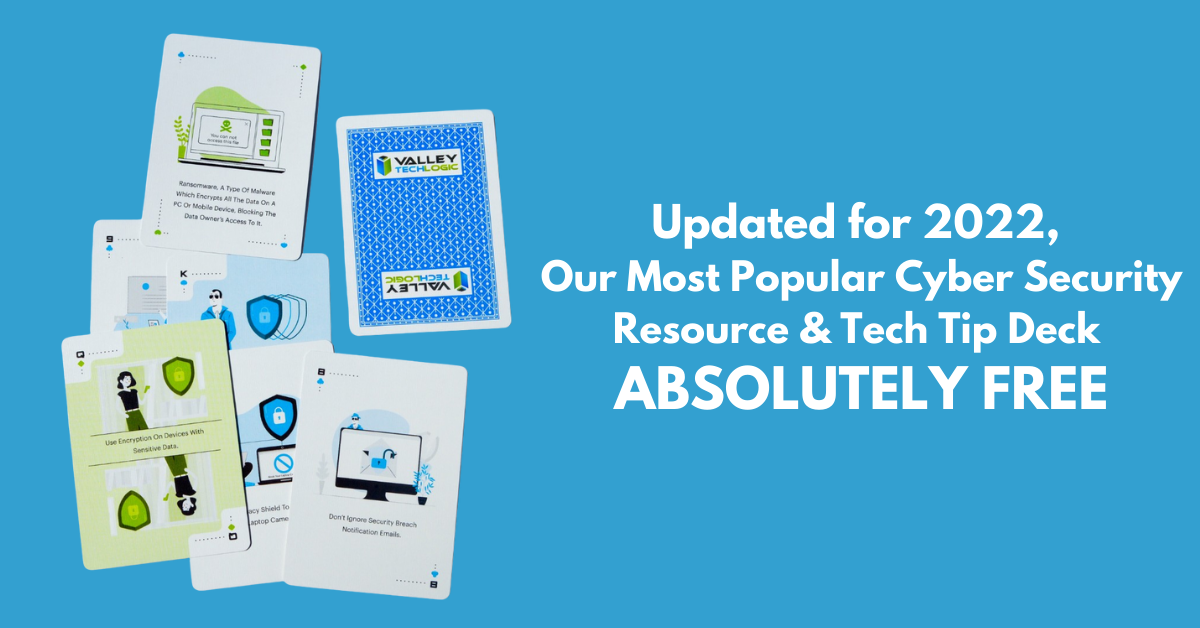
    That’s why we’re thrilled to announce the release of our Tech Tip Card Deck, our deck contains 56 tips for getting your cybersecurity house in order with custom art representing each tip. Best of all, the deck is absolutely free to business owners in our area.

    Beyond providing comprehensive technical support, we also want to support our community in staying safe online. If you’re a business owner in Central Valley and would like to have a set of our card deck for yourself, simply visit TechTipCards.com and request one today and we’ll get it shipped out to you ASAP.

    We don’t believe technology has to be intimidating, each bite sized tip featured in the deck is easy to understand and easy to implement and will create real results for the online safety of yourself, your employees, and your business.

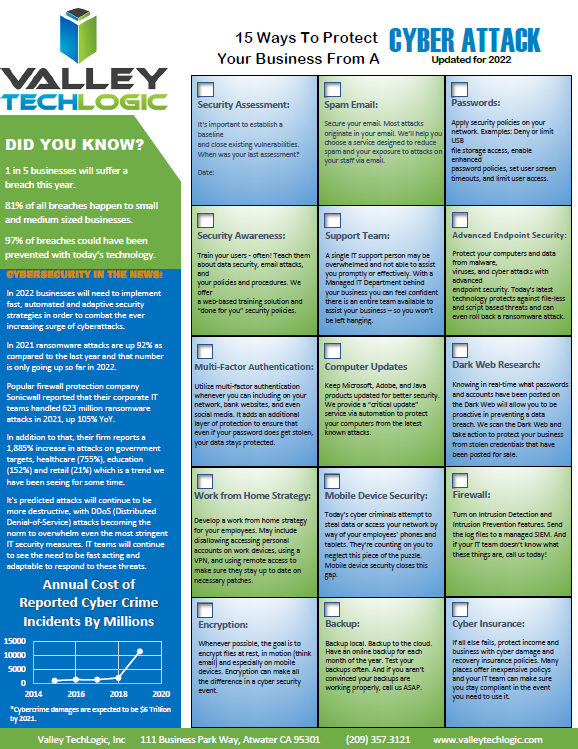
    To up the offer even more, we have updated our most popular for 2022 and are also offering it to you right here, right now. Simply grab it below.


    Valley Techlogics Cybersecurity Checklist
    Click to grab the full size version.

    Both of these are just a small showcase of what’s in store, we know for most people repetition is the key to success. We plan to deliver weekly content including thought provoking reports, eye catching resources that can even be customized for your office, and tech advice that can greatly impact and improve your use of technology within your business.

    If you’d like to learn more, again visit TechTipCards.com or reach out to us for a free consultation today.

    Looking for more to read? We suggest these other articles from our site.

    This article was powered by Valley TechLogic, an IT service provider in Atwater, CA. You can find more information at https://www.valleytechlogic.com/ or on Facebook at https://www.facebook.com/valleytechlogic/ . Follow us on Twitter at https://x.com/valleytechlogic.
  • High Tech Holidays – Five Ways Technology Can Make Your Holiday Season Easier

    High Tech Holidays – Five Ways Technology Can Make Your Holiday Season Easier

    We’re right in the middle of the holiday season right now, and we thought the best gift we could give to you (our readers) is some advice straight from the tech experts on how to use technology to make your holiday season easier.

    We have five tips to utilize technology for an efficient and fun holiday season.

    1. Long Distance Calls Don’t Have to Be Expensive: If your phone is stuck in the past make it your New Years resolution to change that. VoIP for home and businesses will save you money on traditional telecom costs, even when Aunt Brenda talks your ear off.
    2. Utilize The Cloud for All Those Photos and Christmas Cards: Skip hauling boxes of cards and photos up to the attic after the holiday season, scan and store those precious memories digitally in the cloud. Bonus, you never have to worry about a roof leak or other disaster ruining them.
    3. Designate a Network for Your Guests: For modern routers, giving out your Wi-Fi password to all your guests is no longer needed. You can activate a “Guest Network” in your router settings with its own password and name, and then turn it off when everyone goes home. You can even give your temporary network holiday themed names like “Winter WonderLAN” or “FalalaLAN”.
    4. Flying? Use a Fare Tracker: If your flight plans can be somewhat flexible, utilizing online fare trackers will be your best bet in saving you a lot of money this holiday season. They will help you figure out when the best time to purchase those tickets is. In the same vein, you can utilize price trackers for gifts you purchase online too.
    5. Get a Head Start on New Year’s Resolutions – Tech Edition: Another thing to consider is making some good tech hygiene a part of your New Year’s resolution. While you make changes in 2022 to make yourself healthier and happier, make your devices healthier too by keeping them up to date with security patches and updates (especially with vulnerabilities such as Log4J running amok).

    We hope these tips help you have a happy holiday at home. For your business, the holidays may represent a time of stress as you wonder if you’ll have coverage for the technology in your business or if your current service provider will be available to take your calls and service requests.

    At Valley Techlogic, we are dedicated to our customers success. We offer after hours, weekend and holiday support – usually at no additional cost for customers who have one of our service plans. Also, for the rest of December we’re offering one month FREE to new customers.

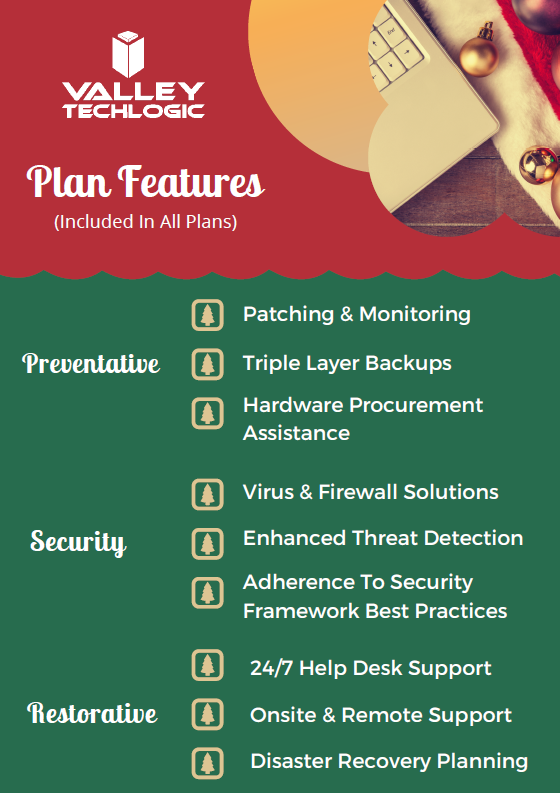
    To learn more about the kind of benefits you receive as a Valley Techlogic customer, we’ve created this chart:

    Click to see the full size version.

    As you can see, all of your preventative maintenance is covered under a Valley Techlogic service plan. This may even free up time for you if you’re a business owner who’s been handling a lot of these items yourself, which during the holiday season is invaluable. If you’d like to learn more schedule a quick consultation with us today. Happy Holidays!

    Looking for more to read? We suggest these other articles from our site.

    This article was powered by Valley TechLogic, IT service provider in Atwater, CA. You can find more information at https://www.valleytechlogic.com/ or on Facebook at https://www.facebook.com/valleytechlogic/ . Follow us on Twitter at https://x.com/valleytechlogic.
  • 10 Common Tech Questions & Our No-Nonsense Answers

    10 Common Tech Questions & Our No-Nonsense Answers

    We write about a lot of different topics in this blog but today we wanted to take the time as a technology provider to answer the questions that are really at the forefront of our clients’ minds, both from a business standpoint and just from an everyday standpoint.Tech News Number 7

    We’ll be covering our top 5 general technology questions and our top 5 business technology questions as of posting this blog. If you have a question that you’re struggling to get answered – and we all know the rabbit hole Google can send us down trying to search for an answer – don’t hesitate to reach out. Chances are we might have the answer!

    Now onto the general questions first.

    1. How do I keep my Laptop battery in tip-top shape? A good rule of thumb is to keep your laptops lithium-ion battery running longer you’ll want to keep them from overheating, not let them discharge fully to 0% before charging, and not leave them plugged in while they’re at 100% constantly. Batteries have a finite life span but taking care of them will make them last longer, this advice applies to devices like cellphones as well.
    2. Do I actually have to eject a thumb drive or USB device? The short answer is yes, the long answer is because when you go to eject your device your PC finishes up tasks related to that device to improve overall performance. Removing it without ejecting it first may lead to corrupt or unusable data. It’s an easy step so don’t skip it.
    3. What happens when I see a warning on a site I use that it’s been hacked or compromised? If your browser is warning you about a site you’re trying to visit we recommend proceeding with caution, it could be that their security certificates are just expired but it also might be that the site has actually been compromised and visiting it or entering data into it might lead to your own system being compromised as well.
    4. Why does resetting my router sometimes magically fix my internet? Your router is a technology device the same as all your other ones, and sometimes a reboot is all that’s needed to get it back to working as intended. You want to wait at least 10 seconds to plug it back in to allow the capacitors inside it to discharge completely and ensure your reset works as intended.
    5. Do hackers really care about my information? All information has the potential to be valuable on the dark web or other nefarious sections of the internet. It may not seem like a big deal if your name, phone number or email are leaked online but they can use this information to get to the accounts they really want (like your financial accounts). It’s always a good idea to safeguard your information and employ good password practices.

    That covers the general questions we see a lot, what about ones specifically for businesses? Technology and business go hand-in-hand and these are the questions that come up the most.

    1. Do my vendors have to work with my other vendors when it comes to the technology I use? If they care about your business many vendors will try to assist clients as they navigate all the various systems you use to conduct your everyday business, but many will charge a fee to do so and some may refuse.
    2. How do I know if I’m spending too much on technology? New gadgets and software solutions come out every day, it would be impossible for anyone to buy or subscribe to them all. At the same time, it’s unreasonable to believe any piece of hardware will last forever or your business won’t outgrow a software that previously performed adequately. It’s a good idea to try and set a reasonable budget and have your IT team work with you to stay within that budget.
    3. Are backups really necessary? Yes, you may not know how necessary a file is until you go to look for it and it’s gone. Important contracts and records are just a couple of things your business can’t afford to leave to chance, we recommend complete system backups so you never have to worry about losing anything important.
    4. Will my team actually use it? If you’re thinking about giving a specific software or tech solution a try a good question to ask if whether your team has the training required to use it, and why it would be beneficial to your business. One example is two-factor authentication. We know businesses can receive a lot of pushback from their employees when they go to implement this, but the benefits drastically outweigh the hassle it may seemingly pose. Proper training is key when implementing any new technology measures within your business.
    5. How does it benefit the business? It can be hard if you’re not someone who works in the IT field or has a pretty good level of familiarity with it to know how implementing new solutions will benefit your business. That’s why it’s always our recommendation to reach out to someone who does, whether that be your in-house team or a technology provider you’re comfortable with.

    If your business needs help answering these or any other technology related questions, Valley Techlogic is here to help. You can schedule a no-obligation consultation here. If we missed any questions feel free to reach out to our live chat and let us know, we would love to add them to our next article.

    Looking for more to read? We suggest these tech articles from the last week.

    This article was powered by Valley TechLogic, an IT provider in Atwater, CA. You can find more information at https://www.valleytechlogic.com/ or on Facebook at https://www.facebook.com/valleytechlogic/ . Follow us on Twitter at https://x.com/valleytechlogic.

  • The average cost of hiring IT support staff examined

    The average cost of hiring IT support staff examined

    When you’re talking about IT for businesses there’s a wide range of normal, for some businesses their normal is having in-house IT staff. For many though their IT operational needs are such that having a dedicated staff devoted to the job just doesn’t make financial sense.

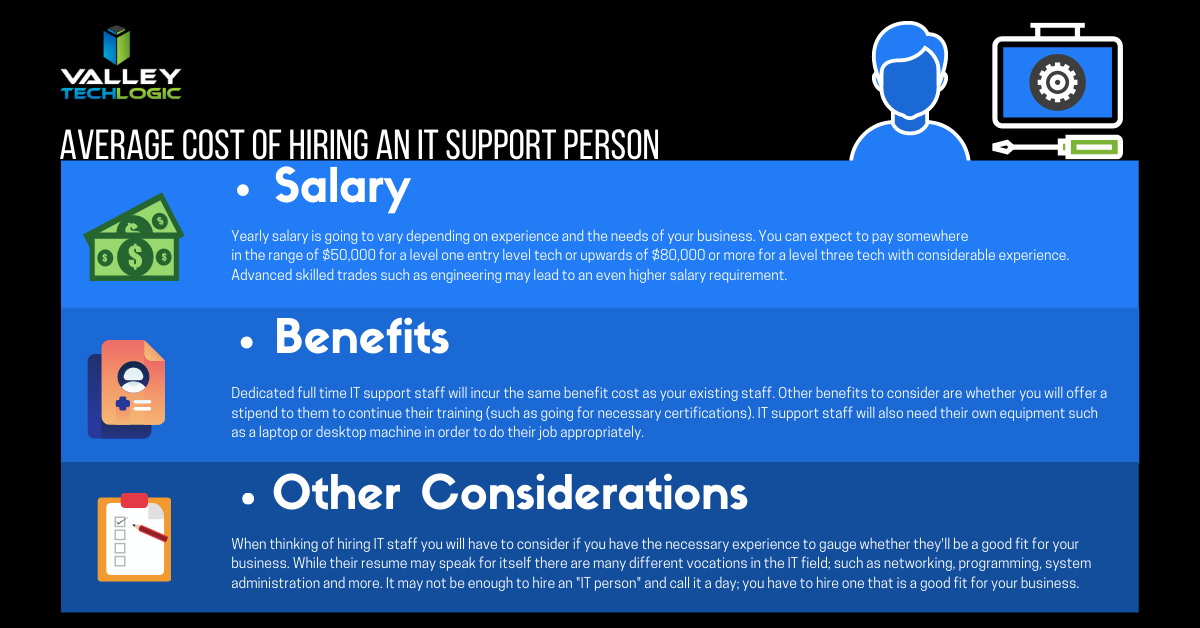
    Average Cost of an IT Support Person
    Click to see the full size version.

    If you look at our chart you can see that the cost of hiring one IT person is quite significant. You also must overcome the usual hiring hurdle of just finding the right person in the first place and dedicating your time to that task is something that should definitely be taken into consideration.

    The benefit of an IT support plan is someone else is doing that job for you, with the right company behind your business you will have an entire team of experienced techs available to you without having to pay a yearly salary for each one.

    Some technology service providers even offer flat monthly cost plans that come with generous or even unlimited support included. We’re proud to be one such company that offer plans that eliminate many of the billing headaches surrounding outsourcing your IT for our clients.

    While our own plans are multifaceted and cover project work, onsite and help desk support, cybersecurity and more – you may be asking what types of plans are usually available in the marketplace.

    1. Full Managed IT Department Support – This is what we offer, we cover everything you could need that’s IT related.
    2. Managed Support Services – This is where remote and help desk support is available but not onsite. Good for getting back into locked email accounts but not ideal for complicated IT issues.
    3. Managed Software as a Service (SAAS) – This is a managed service for one particular type of software. Notable examples include Google Apps, Salesforce, ZenDesk and DocuSign.
    4. Managed Networks and Infrastructure – VPNs would fall into this category, as would managed cloud services such as Amazon Web Services (AWS).
    5. Business Intelligence and Data Analytics – Consulting services that help you with your web presence and the best ways to apply technology to your business would fall into this category of managed services.

    These aren’t the only examples of IT support plans, but we feel they’re the most notable.

    Many small or medium sized business owners also avoid the issue entirely by doing their own IT. We wrote about why that may not make smart business sense here, but in a nutshell it comes down to how much you really value your time and whether your efforts spent there are the best use of it.

    We can offer advice on what the best fit is for your particular business, if you’d like to book a free 10 minute consultation you can find our calendar here. We’re offering easy virtual appointments and even if you don’t choose us, we can help you leave with a plan.

    Looking for more to read? We suggest these tech articles from the last week.

    This article was powered by Valley TechLogic, an IT provider in Atwater, CA. You can find more information at https://www.valleytechlogic.com/ or on Facebook at https://www.facebook.com/valleytechlogic/ . Follow us on Twitter at https://x.com/valleytechlogic.
    Looking for IT Services in Fresno, Modesto, Stockton, Ceres, Atwater, Merced, Visalia or Lodi? We cover all these areas and more!

  • On the Fence About Outsourced IT? Here are the Top 5 Reasons to Consider it.

    On the Fence About Outsourced IT? Here are the Top 5 Reasons to Consider it.

    Now as a provider of outsourced IT we’re considerably biased, but we also know the value outsourcing some or all of your IT can provide to your business. We wanted to touch on the top reasons you should consider utilizing outsourced IT in your business.

    First though we would be remiss if we didn’t go over the variety of outsourced IT available on the market. From a single person who helps on a contractor like basis to full scale operations that are the same as having an entire IT department, the differences in what’s out there is vast and there’s something available for every business.

    To decide on what variety is right for you, you need to consider what your businesses needs are. Do you already have an IT team and just need some additional assistance with routine tasks hamstringing your business currently? Are you utilizing the “a wish and a prayer” model by having no IT at all? NOT a good idea by the way.

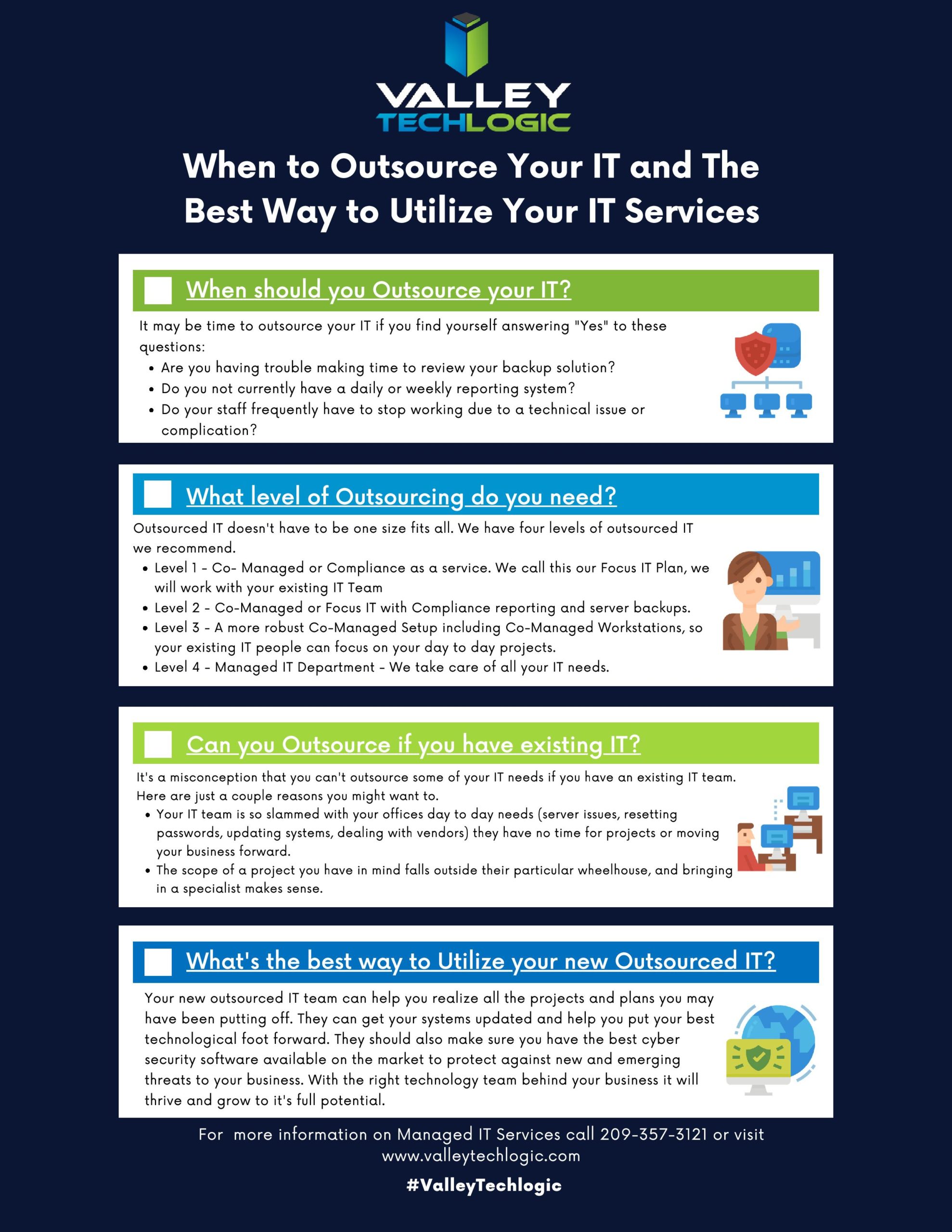
    We developed this chart to help businesses figure out what kind and what level of outsourcing they may need.

    When to Outsource Chart

    In addition to our chart here are 5 examples of how outsourced IT can bring your business to the next level.

    1. Is the cabling in your office currently a nightmare? Do you walk into the server closet and find yourself wondering if it’s up to code or perhaps even a fire hazard? This is one project no one wants to tackle but once it’s done, you’ll wonder how you went so long without it.
    2. Your IT team is great, but they’re so bogged down with the day to day minutia they don’t have time to bring your business to the next level. Do you have upgrades that have been on the back burner forever? Or perhaps they just don’t have time to maintain your backups as well as you would like. Outsourced IT can fill in the gap and give you the footing you need expand your business.
    3. Remote IT, setting this up right can feel like an impossible task. Maybe your workers are regularly stuck unable to do their job due to login issues, or you just aren’t sure how to approach the topic of cyber security with your employees working from home. Outsourced IT can be the extra hands you need to get it going right.
    4. Perhaps you’ve been telling yourself, who needs IT? You’ve gotten by this far without it. We’re sorry to say, that’s just luck, and you don’t want to hang your business on continuing to stay lucky.
    5. Training new IT staff is difficult and expensive, with an experienced IT provider you don’t need to worry about that and can instead focus on your core business.

    This is in no way an exhaustive list of all the ways we think outsourcing IT could be a smart choice for your business. One thing we do want to mention is to vet the company you choose to outsource to carefully, you’re trusting them with your data and network after all.

    Choose a company with good reviews and references and one that guarantees the work they do. Also, if you’re thinking about switching IT providers it’s okay to vet the new company before letting the old one know you’ll be moving on.

    If you need more advice or assistance on this or other technology topics, reach out! At Valley Techlogic we’re here to help.

    Looking for more to read? We suggest these tech articles from the last week.

    This article was powered by Valley TechLogic, an IT provider in Atwater, CA. You can find more information at https://www.valleytechlogic.com/ or on Facebook at https://www.facebook.com/valleytechlogic/ . Follow us on Twitter at https://x.com/valleytechlogic.

    Looking for IT Services in Fresno, Modesto, Stockton, Ceres, Atwater, Merced, Visalia or Lodi? We cover all these areas and more!

  • Taxes & Technology – What Can Help Your Business RIGHT Now

    Taxes & Technology – What Can Help Your Business RIGHT Now

    To say this year has had a lot of twists and turns is an understatement, and for many that includes financial hurdles they couldn’t have foreseen.

    Today we want to cover the topic of business loans that are available for companies struggling in in the onslaught of this current pandemic, as well as tax solutions that will help lighten the load of the business purchases you still need to make even as the current situation rages on.

    Now you may be saying to yourself, aren’t you a technology company? Why are you talking about taxes?

    While this may be true, as a business ourselves AND one that helps businesses of all shapes and sizes, we felt we could offer a new perspective on this topic that you maybe hadn’t considered. As well as our own unique input on how we’re putting these tips into practice.

    Besides that, technology is linked to many different systems, including the financial system. Unless you’re a stickler for mailing things in, it’s hard to argue against the quickness and convenience of electronic filing in most cases as an example.

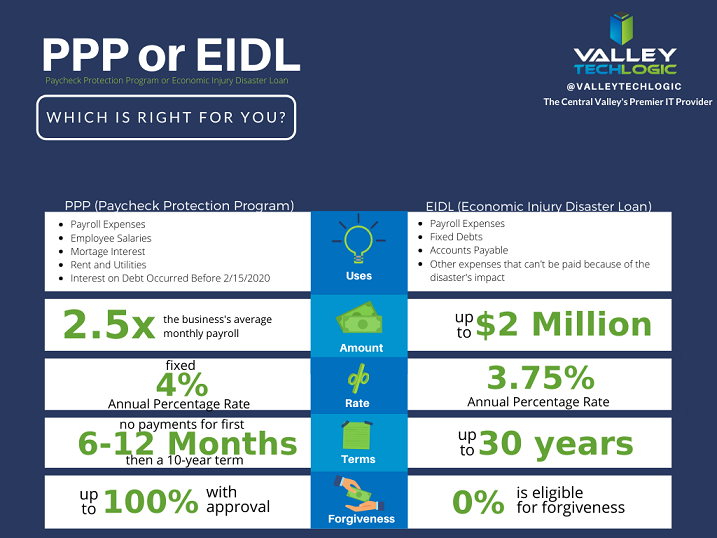
    With that said let’s start with our initial topic of discussion, PPP funds. PPP or the Paycheck Protection Program has been in the news a lot recently, but what does it cover? And how does it compare to the EIDL (Economic Injury Disaster Loan)?

    PPP vs EIDL Chart

    As you can see from our chart, they have different benefits and downsides, and it’s hard to say at first glance what may be right for your business. In either case you’ll probably be adding to the liquidity of your business which will probably help you continue to fund other day to day necessities, including your technology budget. For more information on PPP click here, the Small Business Association will always have the most up to date information on this topic.

    The deadline for applying for PPP is August 8th, so you must hurry if you want to apply for it. While an extension might happen (it did before) why risk it?

    There are also talks in the works by Congress of an additional bill that would forgive PPP loans less than $150k automatically without documentation (basically turning them into grants). You can learn more about this proposed addition to the CARES act here. For many businesses this could make a massive difference in their ability to stay afloat in these difficult times.

    Aside from that if you are planning on a technology upgrade soon, we have a tax tip that may save you thousands on those purchases.

    Every year businesses across the country take advantage of a certain tax deduction called Section 179. To put it briefly, Section 179 allows you to deduct business related expenses of tangible property and equipment. This can include new computers and servers that will allow you to run your business more effectively.

    For example, if you’re still trying to get your at-home work force up and running then it may make sense to furnish those employees with company laptops. They will be significantly safer than using their own devices and it may help them do their jobs much more effectively.

    Or perhaps you need a server you can use as a private cloud so you can conduct your business from home, Section 179 can help with that purchase too. At the end of the year those savings can be lost, or you can reap the benefits of getting your necessary purchases at a significant discount after the tax savings.

    We have updated our Section 179 Guide for 2020, you can learn more here. As always, work with your attorney or accountant when trying to take advantage of these beneficial programs for your business, they will have the best method for applying them to your situation.

    Looking for more to read? We suggest these tech articles from the last week.

    This article was powered by Valley TechLogic, an IT provider in Atwater, CA. You can find more information at https://www.valleytechlogic.com/ or on Facebook at https://www.facebook.com/valleytechlogic/ . Follow us on Twitter at https://x.com/valleytechlogic.
    Looking for IT Services in Fresno, Modesto, Stockton, Ceres, Atwater, Merced, Visalia or Lodi? We cover all these areas and more!