Tag: cyber threats

  • October is Cybersecurity Awareness Month, now in its 18th year

    October is Cybersecurity Awareness Month, now in its 18th year

    We’re announcing this a bit late, but we did want to touch on this annual event (now in its 18th year). Every year CISA (Cybersecurity and Infrastructure Security Agency) releases new resources that are free to download and share for Cybersecurity Awareness Month. The theme this year is “See Yourself in Cyber” and we appreciate the effort to help everyone understand that cybersecurity measures are up to all of us to maintain.

    So many cybersecurity measures feel very passive, you’re protected by your anti-virus or firewall automatically. Your IT team helps you navigate any issues that make come up. For businesses, advanced cybersecurity threat protection can detect a threat just from activities that fall outside the norm (like your computer being online at three in the morning) and send you a warning.

    Unfortunately, hackers are always trying to circumvent these automatic measures no matter how advanced they become. The human element is still the biggest cybersecurity threat to your network and business. That’s why acknowledging we all have a role to play in preventing cyber threats is so important.

    CISA recommends four important steps we all need to take online:

    1. Think Before You Click: Before you click on that link in an email or download an attachment, do a little research. Is the sender who you expect it to be? Phishing emails are still the #1-way users are hacked.
    2. Update Your Software: This is good common-sense advice; most patches also include important security updates and it doesn’t take very long to install them (and for Windows devices you can even have them run automatically).
    3. Use Strong Passwords: This is another easy one and if you use one of our password manager recommendations, it’s even easier to create stronger passwords that you don’t have to manually remember.
    4. Enable Multi-Factor Authentication: This is CISA’s fourth tip for this year and lucky for you we have a guide for this too.

    These tips may seem simple, but they will be hugely beneficial to preventing a cyber threat for you, your business or your employees. However, you can take it a step further and engage with cyber security training.

    You may be wondering what that would look like, well you’re in luck. We have a sample training session right here for you to review with your employees:
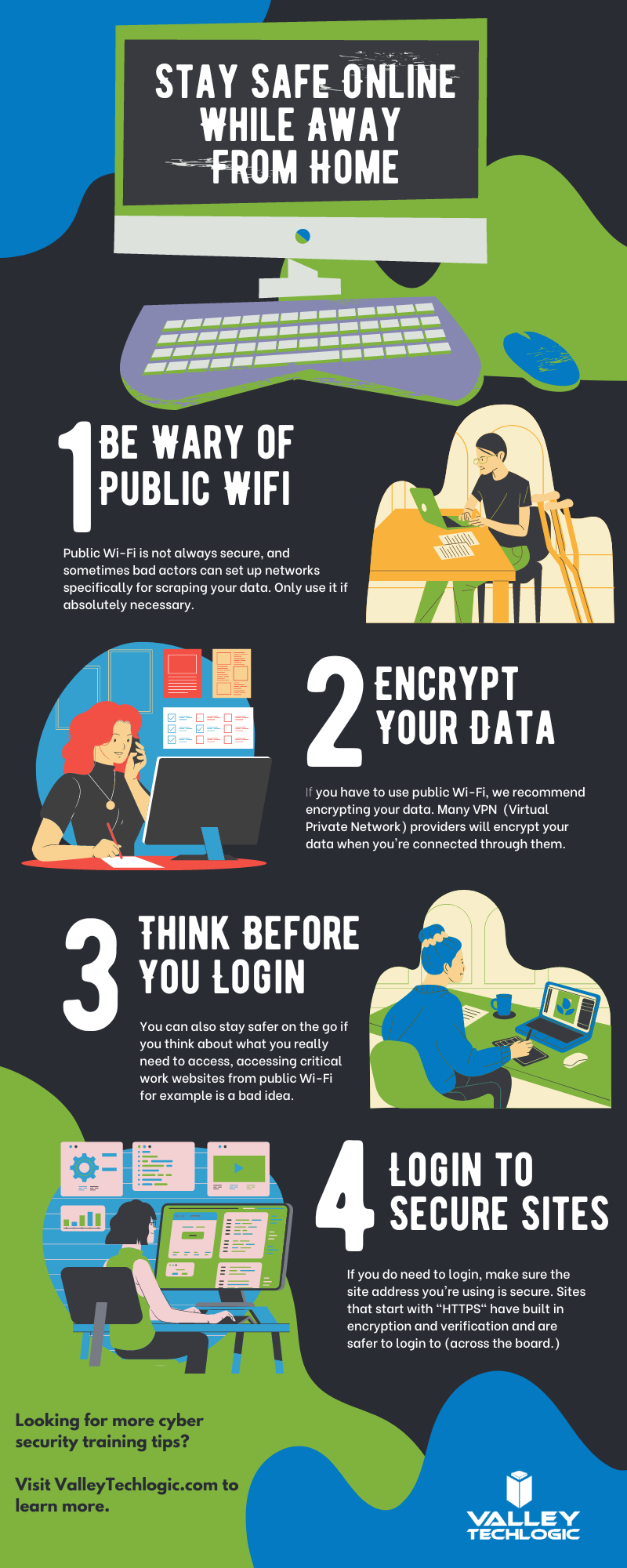
    This is just a quick sample lesson; through our partner we have bite sized lessons that include video that you and your team can take to beef up your cybersecurity knowledge. They average 2-3 minutes long with a quick quiz at the end to make sure the knowledge was absorbed, and you can even see your employees average scores to see how everyone is doing.

    If you incentivize taking this training it will not only be a team building opportunity, it will also help your business stay safe from cyber security threats. If you’d like to learn more about cybersecurity training or stepping up your cybersecurity measures in your business (including the aforementioned advanced cyber threat detection) reach out today for a consultation.

    Looking for more to read? We suggest these other articles from our site.

    This article was powered by Valley Techlogic, an IT service provider in Atwater, CA. You can find more information at https://www.valleytechlogic.com/ or on Facebook at https://www.facebook.com/valleytechlogic/ . Follow us on Twitter at https://x.com/valleytechlogic.

  • College shuttered after 157 years due to ransomware attack

    College shuttered after 157 years due to ransomware attack

    While ransomware wasn’t the only thing behind the decision to close Lincoln College, located in rural Illinois and established in 1865, it was the final blow after taking substantial financial losses due to the COVID-19 pandemic.

    The school, which had survived through the Spanish Flu, the Great Depression, two world wars and even a fire in 1912 will close its doors for good on May 13th, 2022.

    The ransomware attack which occurred in December 2021 crippled their recruiting and fundraising efforts for two months, not being resolved until March 2022 as a statement on the school’s website reads.

    “Furthermore, Lincoln College was a victim of a cyberattack in December 2021 that thwarted admissions activities and hindered access to all institutional data, creating an unclear picture of Fall 2022 enrollment projections. All systems required for recruitment, retention, and fundraising efforts were inoperable.

    Fortunately, no personal identifying information was exposed. Once fully restored in March 2022, the projections displayed significant enrollment shortfalls, requiring a transformational donation or partnership to sustain Lincoln College beyond the current semester.”

    The school made attempts to avoid the closure, but the efforts came too late, and we’re sorry to say they’re far from unique in being a school that was targeted by a cyberattack. According to this report over 1043 schools suffered ransomware attacks in 2021.

    Cyber criminals don’t think twice when targeting schools, hospitals, and infrastructure that’s needed by the community. We reported on the on Colonial Pipeline hack that created a major disruption at gas stations across eastern US last May.

    Schools and hospitals are appealing targets because investing in cyber security measures is not generally a priority and they often store large amounts of PII (Personal Identifying Information) in their systems.

    Many senators have taken note of this and have called on the Department of Homeland Security to instate measures that would bolster the security of our schools, especially K-12.

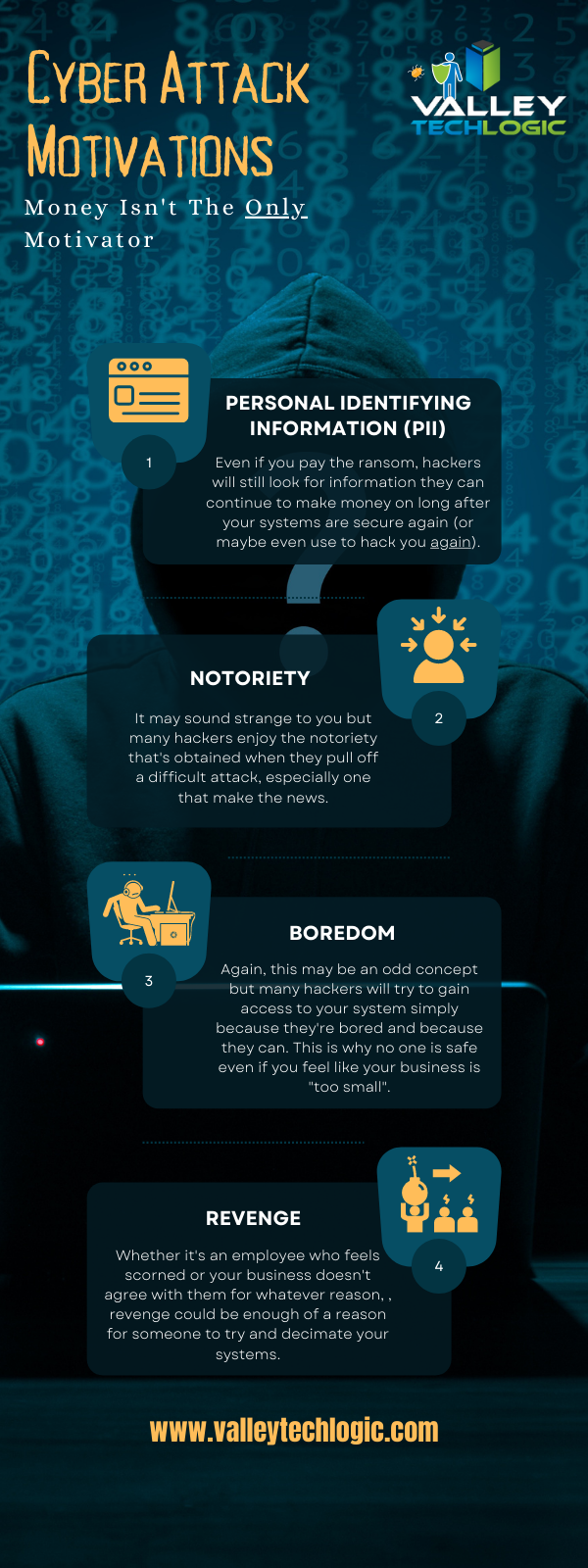
    A ransomware payment isn’t the only thing attackers stand to gain when they successfully infiltrate a network, here’s a chart with the way hackers “double dip” from during their attacks:

    Hacker Motivations Infographic

    In the end Lincoln College did choose to pay the ransom to gain control of their systems again, but it sadly made no difference in saving the college.

    60% of businesses close within 6 months following a ransomware attack, and only half businesses have a cyber response plan available to quickly respond to an attack. The slow response time will only add insult to injury as you try to get back on your feet and as we’ve seen in this case, it can be fatal to your business.

    Valley Techlogic can help you not only have a contingency plan in place, but also help you enact cyber security measures in your business that will prevent an attack from occurring in the first place. Learn more today through a quick consultation.

    Looking for more to read? We suggest these other articles from our site.

    This article was powered by Valley TechLogic, an IT service provider in Atwater, CA. You can find more information at https://www.valleytechlogic.com/ or on Facebook at https://www.facebook.com/valleytechlogic/ . Follow us on Twitter at https://x.com/valleytechlogic.
  • We have updated our most popular resource for 2022 and have an offer you won’t want to pass up

    We have updated our most popular resource for 2022 and have an offer you won’t want to pass up

    As an IT service provider, we’re passionate about cybersecurity because we see the effects having inadequate coverage can have on businesses first hand.

    The devastation that can occur after a cyber attack is staggering, we’ve given you the statistics before, such as:

    1. The cost of cybercrime is predicted to hit $10.5 trillion by 2025
    2. Cryptojacking cases quadrupled in 2021, but the hackers don’t make very much (less than $6 per day), however that doesn’t stop them from trying to gain access to your machines
    3. It takes on average 287 for cybersecurity teams to detect and contain a data breach
    4. Phishing is involved in 36% of data breaches (can you identify the signs of a phishing email?)
    5. DDoS (Distributed Denial-of-Service) attacks are skyrocketing, with 9.75 million occurring in 2021

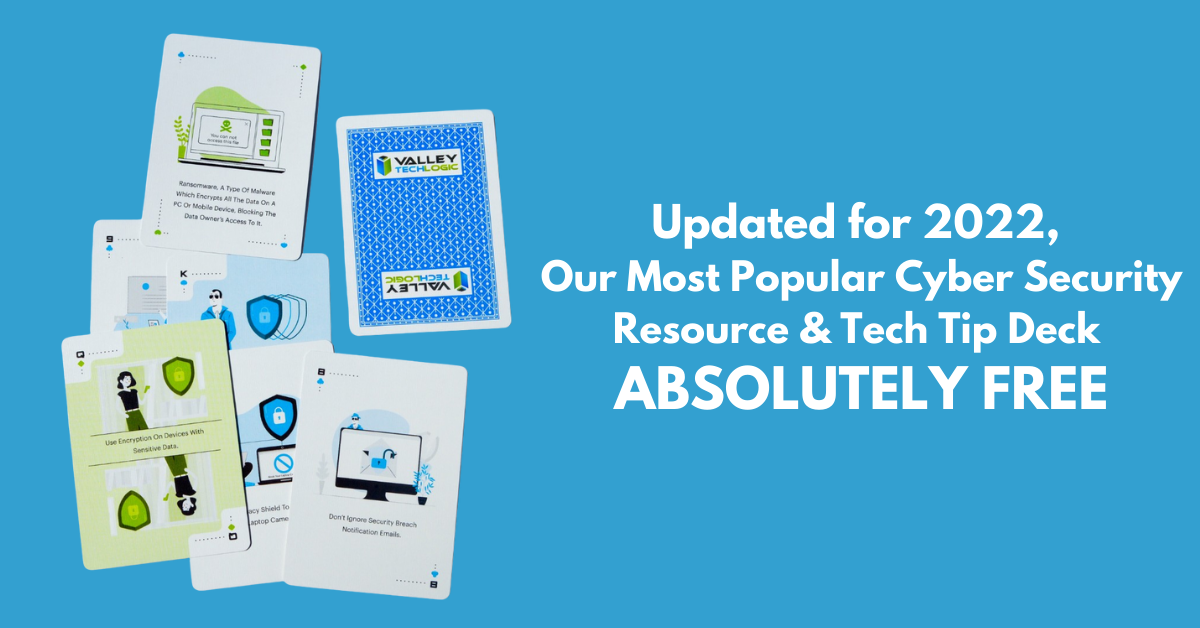
    That’s why we’re thrilled to announce the release of our Tech Tip Card Deck, our deck contains 56 tips for getting your cybersecurity house in order with custom art representing each tip. Best of all, the deck is absolutely free to business owners in our area.

    Beyond providing comprehensive technical support, we also want to support our community in staying safe online. If you’re a business owner in Central Valley and would like to have a set of our card deck for yourself, simply visit TechTipCards.com and request one today and we’ll get it shipped out to you ASAP.

    We don’t believe technology has to be intimidating, each bite sized tip featured in the deck is easy to understand and easy to implement and will create real results for the online safety of yourself, your employees, and your business.

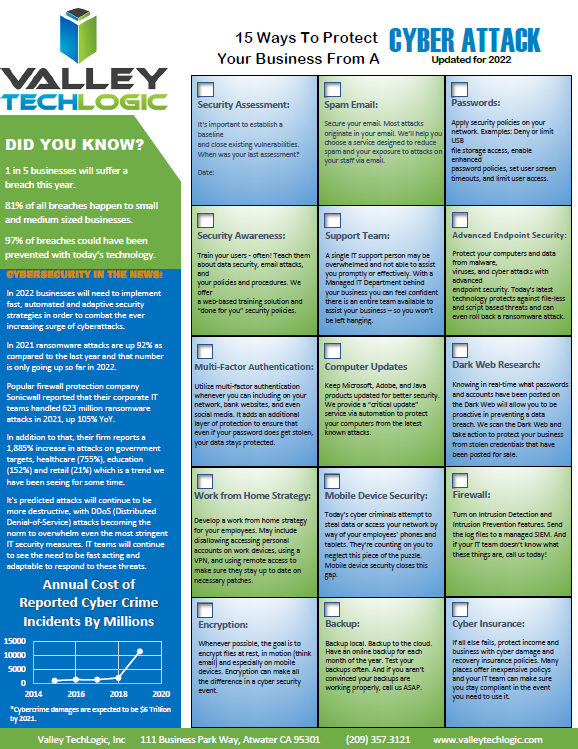
    To up the offer even more, we have updated our most popular for 2022 and are also offering it to you right here, right now. Simply grab it below.


    Valley Techlogics Cybersecurity Checklist
    Click to grab the full size version.

    Both of these are just a small showcase of what’s in store, we know for most people repetition is the key to success. We plan to deliver weekly content including thought provoking reports, eye catching resources that can even be customized for your office, and tech advice that can greatly impact and improve your use of technology within your business.

    If you’d like to learn more, again visit TechTipCards.com or reach out to us for a free consultation today.

    Looking for more to read? We suggest these other articles from our site.

    This article was powered by Valley TechLogic, an IT service provider in Atwater, CA. You can find more information at https://www.valleytechlogic.com/ or on Facebook at https://www.facebook.com/valleytechlogic/ . Follow us on Twitter at https://x.com/valleytechlogic.

  • As we feared, Ukraine-Russia crisis leads to a surge in cyber attacks

    As we feared, Ukraine-Russia crisis leads to a surge in cyber attacks

    As we’re nearing a month into the conflict between Russia and the Ukraine, cyber warfare between the two countries is reaching an all time peak. We covered the topic of Ukraine’s “IT Army” recently in this blog, and we mentioned growing concerns we’ve seen from users that there may be a spill over effect when it comes to cyber threats.

    Cyberwarfare was inevitable as conflicts on the ground continue on, and as Russian hackers feel the “pinch” of the effects of sanctions imposed against Russia, we may see an uptick in financial scams. Especially as both countries have turned to cryptocurrency which can often be used as a safe haven for financial transactions taking place outside the public eye. In the case of Russia it’s being used to try and liquidate funds out of the country and in the case of the Ukraine they’re using crypto to bolster support for their economy.

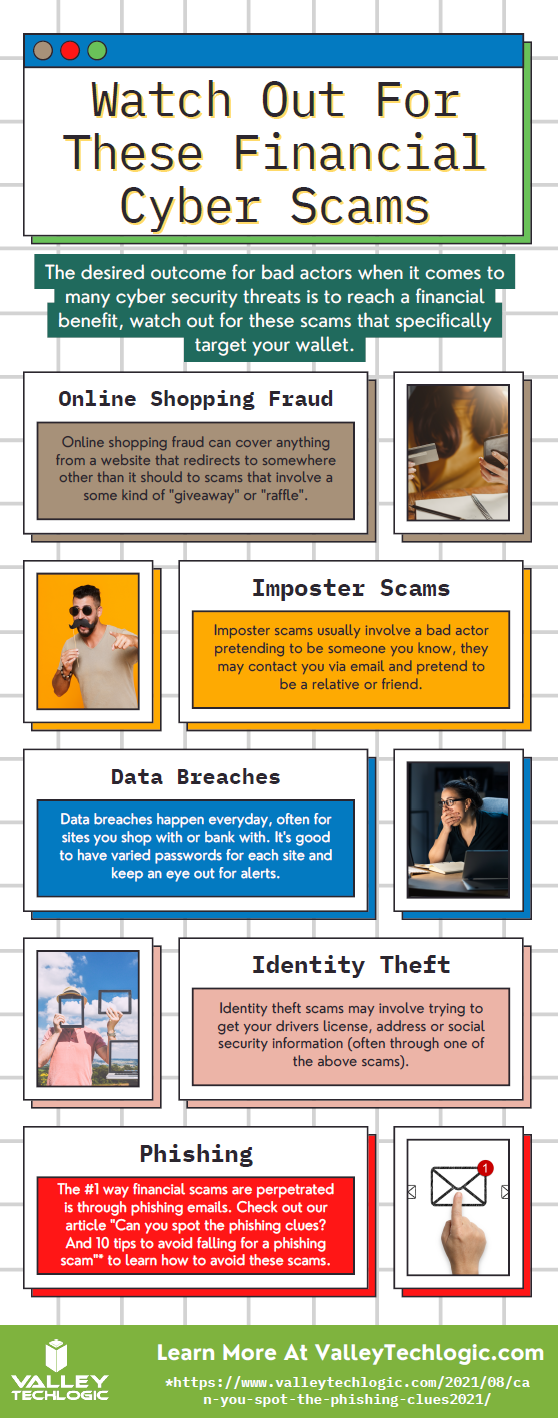
    We have created this chart for the types of financial scams we think may increase in the coming days (though it should be noted, financial scams were already up 70% in 2021).

    Cyber Financial Scams Chart
    Click to download the full size version.

    However, hackers have also represented a beacon in the war of information currently happening between Russia and the Ukraine. Ukraine’s “IT Army” is now over 400,000 people strong, with hackers from all over the world lending their support digitally in Ukraine’s effort to protect their democracy.

    DDoS attacks on government sites with Russian origins as well as document leaks – which includes a 360k file data dump from a Russian federal agency – are continuing to happen regularly. It’s estimate that over 90% of exposed Russian cloud databases have been compromised at this point.

    Also, with access being restricted to sites like Twitter and other social media platforms being restricted in Russia, Squad303 is a website that was created by a group of Polish programmers that can help foreigners relay information to Russian citizens. The website founders say that over 7 million text messages and 2 million emails have been sent through the site so far.

    We again want to say we don’t know what the outcome of this conflict will be, but it seems clear that consumers and businesses should be wary of the ripple effects that will occur throughout the cyber sector, possibly for years to come.

    Business owners who still believe they’re “too small” to be a target should be wary that proceeding with out cybersecurity protections may make them the low hanging fruit for hackers reacting to a state of desperation. Cybersecurity protections are a worthwhile investment in your future and the peace of mind in questionable times is priceless.

    At Valley Techlogic, we’re experts in the field of cybersecurity. We can perform an evaluation of your business and tell you where you are now and where you need to be to not worry that your business is “ripe for picking”. Schedule a consultation today to learn more.

    Looking for more to read? We suggest these other articles from our site.

    This article was powered by Valley TechLogic, IT service provider in Atwater, CA. You can find more information at https://www.valleytechlogic.com/ or on Facebook at https://www.facebook.com/valleytechlogic/ . Follow us on Twitter at https://x.com/valleytechlogic.
  • Cyber Insurance – What you can do to ensure your business will be covered in 2022

    Cyber Insurance – What you can do to ensure your business will be covered in 2022

    Last month we released our new cyber insurance report which is an in depth look into this topic, but we wanted to touch on what we’re specifically seeing so far in 2022 in today’s article because from what we’re seeing in from our clients and in the industry – cyber insurance requirements are on the rise.

    If you’re new to cyber insurance or aren’t sure what’s covered under this sort of policy, for most insurance providers cyber insurance offers coverage for technology related disasters. This could include a cybersecurity event such as ransomware or a data breach but depending on your level of policy it might also include IT related downtime not related to cybersecurity such as internet outages. You may even see coverage for specific device issues, such as the loss of an office server that’s critical for day-to-day operations.

    When it comes to the cybersecurity related coverage what many people don’t realize is it’s not only meant for covering your own losses, but also the potential loss incurred by your customers. If you have a data breach, your cyber insurance coverage will cover the cost of any litigation brought by your customers and it may also cover items such as on-going credit monitoring if their PII (personal identifying information) was exposed in the data breach your company suffered.

    It can be easy to feel detached from a loss you haven’t suffered yet. To put some perspective to, it during the Anthem data breach in 2015 when involved 80 million patient records, their costs to notify their customers (which HIPAA regulations stipulate must be done by snail mail) exceeded $40 million in just postage. That’s not even taking into consideration all of the other costs associated with that breach.

    They’re a major corporation, so again it may be difficult to imagine yourself in those shoes, but even for small companies the average costs are as high as $200,000 per breach. Also, if you’re hit with a ransom and think you can just pay it and get out intact, think again. Many times, even if you receive the de-encryption key from the hackers your data may still be lost.

    It’s not surprising that insurance providers are looking at this and wondering how they can alleviate some of the risk they’re taking providing insurance to customers going forward. The requirements are increasing, even for us as a technology provider for businesses we’re seeing longer forms that we’re assisting our customers with when they go to acquire a new cyber insurance policy.

    These longer forms are featuring more difficult questions as well. We have made cybersecurity a staple feature of our plans so our customers are in a good place for obtaining a cyber insurance policy, but the truth is if cybersecurity has been on the back burner for your business, you may have a difficult time in 2022 and beyond finding an insurer that’s willing to cover you.

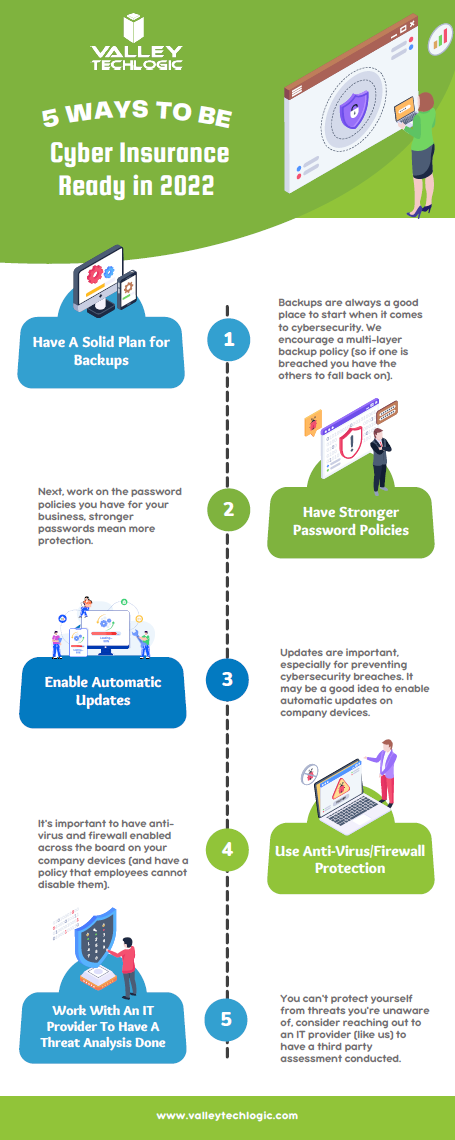
    As an idea of where to start before you go to obtain a cyber insurance policy, we’ve created this checklist of items you can begin to work on to put your business in a better position this year.

    Be Cyber Insurance Ready in 2022
    Click to grab the full size version.

    Many of the items listed are easy for even someone who’s not very tech savvy to tackle, but if you’d really like to protect your business from hackers this year, we suggest teaming up with a tech provider like Valley Techlogic.

    Cybersecurity is a core focus for our business, we will match your business with a cybersecurity framework that makes sense – for example CMMC for defense contractors, HIPAA for healthcare providers, NIST or CIS for small and medium sizes businesses of any industry – and use that framework to have a concrete game plan for making sure your networks and devices are impenetrable to bad actors. Learn more today with a quick consultation

    Looking for more to read? We suggest these other articles from our site.

    This article was powered by Valley TechLogic, IT service provider in Atwater, CA. You can find more information at https://www.valleytechlogic.com/ or on Facebook at https://www.facebook.com/valleytechlogic/ . Follow us on Twitter at https://x.com/valleytechlogic.

  • Routers and Their Safety – How to Easily Improve Your Network

    Routers and Their Safety – How to Easily Improve Your Network

    It was recently reported by ZDnet (https://www.zdnet.com/article/unpatched-vulnerability-identified-in-79-netgear-router-models/) that 79 Netgear routers from as far back at 2007 and across 758 different firmware versions had an unpatched vulnerability that would let a hacker take over the device remotely.

    We rely on routers as our literal gateway to the internet – so how can you be sure the one you’re using is safe? Also, how can you keep it that way?

    As the above article has shown one of the ways is just to be cognizant of news regarding the devices you use. An emergency patch was issued, and a more permanent patch is planned for later this month. Even if you normally shy away from the nitty gritty technical aspects of any news cycle it’s a good idea to keep an eye out for news regarding your specific devices.

    It’s always a good idea to keep up to date on patches for all your devices. In the case of routers these normally come in the form of firmware updates.

    This may seem intimidating but here are the steps for making sure your routers firmware is up to date.

    1. Type your routers IP address into the search bar of your preferred web browser to access it’s web portal. It’s usually on the box or even on the router itself, it can also be found here (https://whatsmyrouterip.com).
    2. Enter your username and password. If this is your first-time logging in again the information can usually be found on the router itself. This is also a good time to change the password!
    3. Locate the firmware or update tab. The location may vary depending on which model router you have, referring to the instructions of your router is probably a good idea.
    4. Go to your router manufacture’s website to find the firmware update file. You can usually find it by searching for your routers model on their site.
    5. Download the update and apply it through the router’s web portal. Again, the router’s web portal is found by it’s IP address.
    6. Reboot the router to ensure the update is applied.

    By following these steps, you can be sure your router has the most up to date software version and is the most protected from bugs and malware.

    What if you can’t find a firmware update for your router? If it’s a newer model there may not be one out yet, however if your router is on the older side it may have reached it’s end of life. Every brand is different, Cisco for example has a policy of supporting routers on the software side for 3 years and the hardware side for 5 years.

    Most technical companies will provide advance notice if they have a product reaching end of life. It’s a good idea to keep track of this information for all your devices, as a device that’s not receiving regular updates may be less safe to use on the internet.

    This article was powered by Valley TechLogic, an IT provider in Atwater, CA. You can find more information at https://www.valleytechlogic.com/ or on Facebook at https://www.facebook.com/valleytechlogic/ . Follow us on Twitter at https://x.com/valleytechlogic.
    Looking for IT Services in Fresno, Modesto, Stockton, Ceres, Atwater, Merced, Visalia or Lodi? We cover all these areas and more!