Tag: disaster recovery

  • The day the world stopped (for Windows users anyways)

    The day the world stopped (for Windows users anyways)

    Unless you’ve been living under a rock for the past week, you’re probably well aware of the worldwide outage that occurred last Friday effecting millions of Windows users and causing disruptions for airlines, healthcare facilities, banks and more.

    CrowdStrike, a cybersecurity technology company that provides endpoint protection and cyberattack response services to numerous Fortune 500 companies was behind the outage which was linked to a software glitch.

    The update that was pushed out Friday was supposed to just enable sensors on Windows devices to detect new potential threats, but instead knocked systems offline around the world. CrowdStrike utilizes an update mechanism they call “Rapid Response Content” which is supposed to react to threats in real time and push updates out to respond to those threats. As we know, time is of the essence with cybersecurity especially with Zero Day attacks.

    Instead of addressing threats though, a defect in the update caused an outage that has cost airlines in particular $860 million in losses during the course of the outage. Airlines even resorted to writing flight times on whiteboard in airports for travelers who had no access to flight information during the outage. Affected devices all displayed the infamous blue screen of death.

    Photo courtesy of Reddit user u/New_Fault_1002.

    It’s also being reported that cyber insurers are expected to only cover 10 to 20 percent of the costs associated with this outage, leaving much of the financial burden on companies still trying to recover from the disruption the outage caused to their business.

    The bittersweet news behind this outage is that companies with cloud facing options for their data recovered much more easily than businesses dependent on physical devices. For the example the healthcare sector, which despite the overwhelming coverage airports have received was the hardest hit with $1.94 billion in losses anticipated so far. Companies that could access unaffected devices to reach the data they had stored in the cloud were able to resume business as usual much quicker than those dependent on hard copy data found only on their Windows devices.

    CrowdStrike has pledged to keep an outage created by an update glitch from happening again by taking a more staggered approach to their updates by not having every user receive the same update all at once and also by having a more thorough process to vet updates before they go live.

    However, the fate of the company and its ability to rebound after such a critical failure is unknown at this point and they’re not winning any favors with a measly $10 gift card being offered as a “sorry” for the outage.

    For us at Valley Techlogic, the outcome of relying on having all of your “data eggs” in one basket is unsurprising. We have long been proponents of taking a layered approach to backups, two is good and three is better. Our backup service, TechVault, is included with all our service plans. If you would like to learn more, reach out today for a consultation.

    Looking for more to read? We suggest these other articles from our site.

    This article was powered by Valley Techlogic, leading provider of trouble free IT services for businesses in California including Merced, Fresno, Stockton & More. You can find more information at https://www.valleytechlogic.com/ or on Facebook at https://www.facebook.com/valleytechlogic/ . Follow us on Twitter at https://x.com/valleytechlogic and LinkedIn at https://www.linkedin.com/company/valley-techlogic-inc/.

  • Inclement weather, solar flares, earthquakes – how disaster proof is your businesses technology?

    Inclement weather, solar flares, earthquakes – how disaster proof is your businesses technology?

    We’ve written quite a bit about cyber security disasters and disaster recovery in that context (here are just a couple options Why every business needs a documented backup and disaster recovery strategy and Data Breached? 5 ways to reduce the impact on your business), but what about a disaster that’s truly out of your hands?

    Depending on where you live there are different types of types of disasters to worry about, and some disasters such as solar flares or geomagnetic storms are a global concern.

    While it’s been hyped by certain news outlets that a solar storm of spectacular magnitude could wipe out our global network and cause nationwide blackouts, solar events of the level required to cause mass destruction are spectacularly rare. Nasa rates solar flare levels on a scale that includes B Class which is the smallest, through C, M and X class which is the biggest. Within each scale there is a rating from 1-9 for the first three levels of solar flares and X class flares can be rated up to 17.

    X-class flares actually occur fairly frequently, with there being 11 so far in 2023 at the time of writing. These flares are strong enough to disrupt satellite signals or deliver a minor dose of radiation to passengers on an airplane when they occur.

    The best defense against solar events such as these is to advocate for improving our electricity grids, above ground electricity components are the most vulnerable if a significant solar flare were to occur. We do want to stress again though that an event of that nature would be exceedingly rare.

    Let’s now take a look at events that are much more common, such as inclement weather or for California based businesses such as ours, earthquakes.

    While you most likely have insurance that would cover your physical property including your office building, hardware and office furniture, it might be important to ask your insurance broker if it will also cover intangible assets.

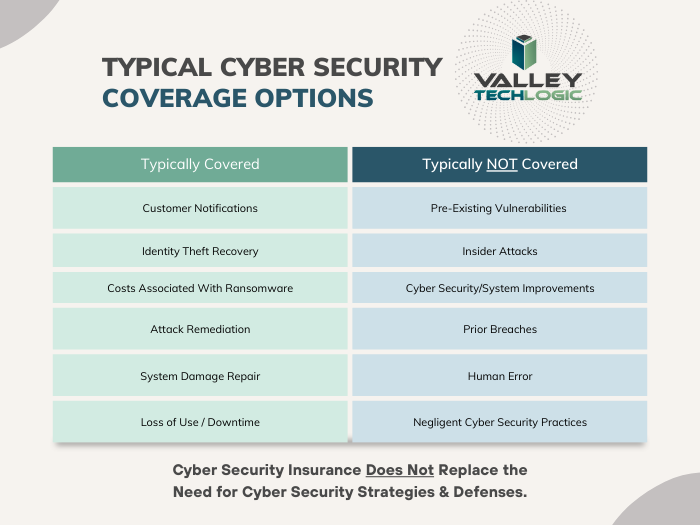
    It is likely you’ll need a cyber liability policy to provide coverage for your data, below is a chart for what we typically see is covered (and not covered) by cyber liability coverage.

    As you can see most cyber liability policies cover business interruptions and data loss even if the cause is not cyber security related. What’s often not covered is events that fall within your control (such as the human element we’re always mentioning when it comes to common hacking techniques such as phishing).

    Another good way to protect your data from disaster events that may impact your business is to have most of your data located off premises in the cloud.

    While the cloud is often construed as a nebulous concept, really hosting your data in the cloud just means it’s on a server somewhere else. If your on-premises server is subject to catastrophic system failure for any reason, the cloud copy of your data would be safe.

    There are many low cost or free cloud options you can take advantage of for your data, we have a guide to the best way to use the free OneDrive storage that comes with your Microsoft 365 subscription here.

    Also, if you work with a managed IT provider such as Valley Techlogic, backups and backup maintenance is often included as part of your service plan. We have information about our own back program, TechVault.

    If disaster proofing your business in 2024 is on your to-do list, why not collaborate with us? We have experience in creating plans for businesses to make sure we avoid all preventable downtime and to protect your data from catastrophic events. If you’ve already suffered a data breach or other system outage and need assistance in data recovery that is also a service Valley Techlogic can provide. Reach out today for more information.

    Looking for more to read? We suggest these other articles from our site.

    This article was powered by Valley Techlogic, an IT service provider in Atwater, CA. You can find more information at https://www.valleytechlogic.com/ or on Facebook at https://www.facebook.com/valleytechlogic/ . Follow us on Twitter at https://x.com/valleytechlogic.

  • RAID Arrays Explained, What is it and do you need one?

    RAID Arrays Explained, What is it and do you need one?

    RAID arrays or Redundant Array of Independent Disks is a type of storage configuration where your data is saved across multiple hard drives or SSDs. There are a number of benefits to doing this including increased performance and data redundancy. Because your data is saved across multiple drives you have better protection in the event of a drive failure.

    Basically, if one of the drives in your RAID array fails your drives will then go into “rebuild mode” which will allow the remaining drives to recover the data, the failed drive can then be replaced with little downtime for you. A RAID array is not always necessary, we wouldn’t suggest one for regular employee use for example as SSDs are very reliable (especially compared to hard drives with mechanical parts that can fail). You also have the option of cloud storage for devices that don’t have much data to save on a daily basis.

    However, for servers or other systems where data protection is critical, a RAID array is a necessary option to keep that data intact. They are also beneficial for systems that work with very large files as the computer can pull pieces of the file in unison and load them much quicker than a single drive. There are many different configurations for RAID arrays such as:

    1. RAID 0: In the world of data two is one and one is zero, and such is the case with RAID arrays. The first RAID array configuration involves breaking up your data into “stripes” across one or more drives, however it does not provide redundancy like other RAID arrays do. If a drive fails under RAID 0 the data is lost. However, it does improve speeds and can allow you to gain more space on your drives.
    2. RAID 1 provides an exact mirror of your data across multiple drives, which does allow for data redundancy. In the case of a drive failure as long as one drive is functional you will still have access to your data. The pitfall to this is your data storage can only be as big as the largest drive in the array, so if you have a 1 TB drive paired with a 4 TB drive only 1 TB would be usable. This RAID array type also doesn’t really provide a system performance boost, it’s purely a data redundancy setup.
    3. RAID 5 provides good redundancy coverage and improves performance. A RAID 5 array consists of 3 or more drives, this RAID array type splits your data consistently across the board and improves your system performance at the same time. However, for most clients we would suggest the next setup.
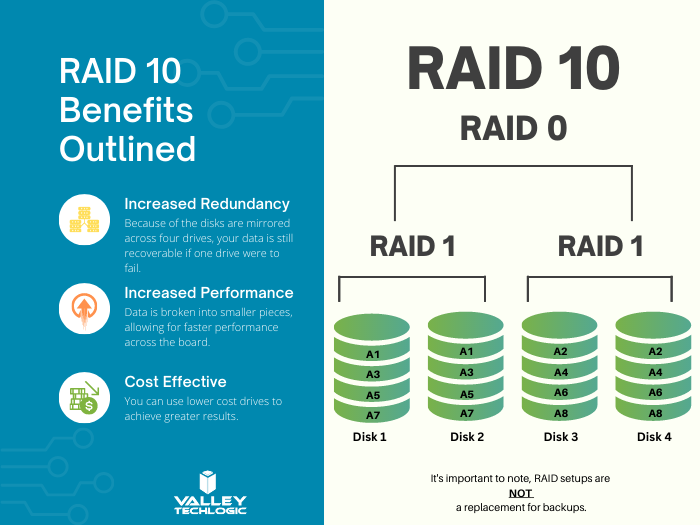
    4. RAID 10 combines two RAID 1 arrays with two RAID 0 arrays to provide both greatly improving performance (that falls in line with the RAID 0 benefit) and greatly increasing redundancy (as you get with a traditional RAID 1 set up) for not much more than you would spend to have a RAID 5 installed. For systems that run software in addition to storing data this is the setup we highly recommend.

    Here are some other benefits of having a RAID 10 setup for your server or systems where data is a high priority:

    RAID 10 Benefits ExplainedThere are still other questions that need to be answered beyond just RAID type, like what drive capacity should you be looking for? Would a HDD (Hard Drive Disk) work in this case to have more inexpensive but higher capacity or should you be looking for SDDs (Solid State Drives)?

    These are questions that can be answered by our professional sales team, they’re experts in technical equipment procurement and can help make suggestions and offer buying advice specifically tailored to your business. Learn more today by scheduling a consultation with our sales manager.

    Looking for more to read? We suggest these other articles from our site.

    This article was powered by Valley Techlogic, an IT service provider in Atwater, CA. You can find more information at https://www.valleytechlogic.com/ or on Facebook at https://www.facebook.com/valleytechlogic/ . Follow us on Twitter at https://x.com/valleytechlogic.

  • Western Digital suffers a ransomware attack, with hackers requesting an 8 figure sum and leaking image from internal meeting

    Western Digital suffers a ransomware attack, with hackers requesting an 8 figure sum and leaking image from internal meeting

    Western Digital is a well-known name in the data production and storage industry. Established in 1970, they were one of the original players in the process of making semiconductors and they have a storied history that began with calculator chips, included a bankruptcy as well as being at the forefront of floppy disc creation in the 1980’s to eventually the hard drives they became known for in the 1990’s. Chances are good you have had a Western Digital drive in one of your devices (you may even have one now).

    Despite being leaders in the digital storage industry, they’ve unfortunately proven no one is immune when it comes to ransomware attacks. While this story emerged mid-April (and the attack occurred March 26) we have an update as the hacker group “BlackCat” taunts Western Digital by leaking an internal video conference on the topic just this week. They leaked an image from the meeting on social media coyly dubbing the people included “the finest threat hunters Western Digital has to offer”. A clear mockery of their attempts to remediate the threat thus far.

    The hacker group is clearly trying to up the ante to get the company to fork over the ransom they’ve requested, a sum reportedly coming in at an eye watering 8 figures. For context a typical ransomware payment paid out by a business in Quarter 1 of 2022 was $228, 125. For individuals payouts hover around $6000. In a nutshell, ransomware is a lucrative business for those with unscrupulous motives.

    To make matters worse, it’s been reported that the group BlackCat has access to multiple Western Digital systems. Meaning this attack was well orchestrated and highly effective at not only making their data vulnerable but creating a disruption to all parts of their business. Western Digital has reported requested the services of outside security and forensic experts to try and recover what they can but needless to say this is an expensive lesson for their business both in money and time lost as well as their reputation in the technical industry.

    You would think being a leader in data storage that their backup recovery process would be flawless, unfortunately when hackers gain domain level access even the best laid plans for your data can go out the window. That’s why Valley Techlogic offers a multi-pronged approach to backups.

    Many clients like the idea that all their data is at their fingertips within their on-premises server. The server itself serves as a physical reminder that their data is ready and available when they need it.

    Unfortunately, having your data all in one place is not a good idea. Other than ransomware attacks such as this, it also leaves your business vulnerable if your server fails for whatever reason. We’ve seen it before; many clients aren’t expecting their servers to just give out or for something like a fire or other disaster to affect them and when it happens, they’re left scrambling. The process to recover from scratch is not always guaranteed and even if a recovery is possible, it can take as long as 3 months to get back mostly to where you were. Generally, a 100% recovery is not possible in these instances.

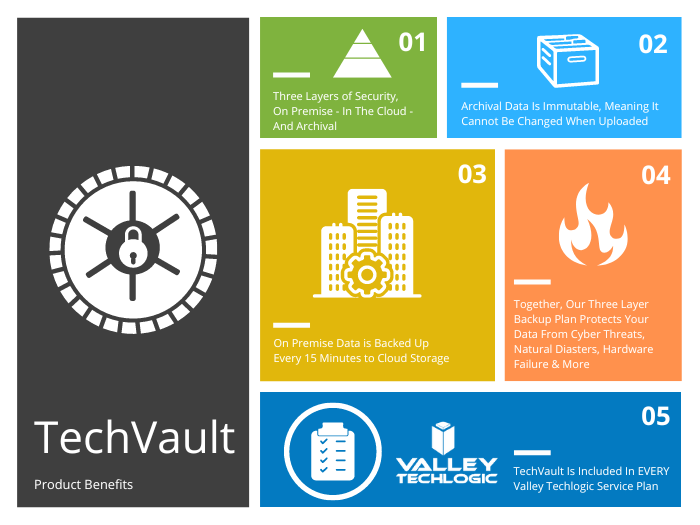
    That’s why at Valley Techlogic our backup solution TechVault is available and used by each of our clients. We have this chart on the benefits of our TechVault solution.

    You can also learn more about it by visiting here. If the Western Digital breach has left you concerned for the safety of your data, or you would just like more information on our backup solution you can request a consultation with our expert sales staff here.

    Looking for more to read? We suggest these other articles from our site.

    This article was powered by Valley Techlogic, an IT service provider in Atwater, CA. You can find more information at https://www.valleytechlogic.com/ or on Facebook at https://www.facebook.com/valleytechlogic/ . Follow us on Twitter at https://x.com/valleytechlogic.

  • Reddit experienced a major outage yesterday, and our 5 tips for what to say to customers when your website goes down

    Reddit experienced a major outage yesterday, and our 5 tips for what to say to customers when your website goes down

    Reddit was down for several hours yesterday due to an “internal systems issue”. While the mobile version of the site fluctuated between being semi usable to being completed down, the desktop version was unusable for nearly five hours.

    Outages like this that occur to major website are a newsworthy event, as users flock to social media to report the outage and speculate on the cause. A fix was implemented and the site slowly came back up just before 7:30 PM Eastern Standard Time. By the time it was back up it had already been reported on by major tech news sites such as the Verge, Apple Insider, TechCrunch and more.

    We’ve discussed outages before on this site because as we just said, they’re newsworthy events, but what about when your company’s website goes down?

    It might be less news worthy than Facebook, Reddit, Amazon, Twitter etc. having an outage but depending on the type of business you’re in it may still be noticeable to your customers if your website has a major outage.

    When something goes wrong there’s often a knee jerk reaction to move along and pretend it never happened, but outages these days often go hand in hand with cyber threat events and moving along mums the word may leave your customers with the wrong idea (and rightfully concerned).

    If you’re in a business sector that saves customer data at all, and there aren’t many that aren’t, it’s always good to be transparent when you have a major outage. Even if your website was down briefly it still might have been noticed by some and it’s best to keep ahead of the rumor mill.

    Here are our five tips for what to say to your customers when your website experiences an outage:

    1. If the outage is ongoing, update your social media. Customers often look to your social media pages for news about your business and this will be the first place many will check to find out what’s going on. You don’t have to cover everything about the outage, a summary of what’s happening and that you’re aware of it will be enough.
    2. Let your customers know how they can reach if you needed (especially if going through your website is how customers usually contact you). Having an email address available specifically for customer concerns is a good idea.
    3. Also send an email proactively, especially if the outage extends longer than a day. Not every user will check social media, sending an email covers the rest of your digital bases for letting customers know.
    4. Be sure to post an update when the issue is resolved. Again, it’s best to stay ahead of your own narrative for outages within your business, posting an update and a brief description of what the issue was is a good idea.
    5. Finally, if your outage was the result of a breach, follow state and country guidelines for notifying customers of any data leaks that may have occurred.

    Your business reputation can be affected by major outages, we wrote an article on how to protect your reputation and recover. You can find it here.

    Providing advice like this is a service that comes with being a Valley Techlogic customer, here are four other benefits to being a Valley Techlogic customer.

    4 Reasons to Choose Valley TechlogicReach out today to learn more.

    Looking for more to read? We suggest these other articles from our site.

    This article was powered by Valley Techlogic, an IT service provider in Atwater, CA. You can find more information at https://www.valleytechlogic.com/ or on Facebook at https://www.facebook.com/valleytechlogic/ . Follow us on Twitter at https://x.com/valleytechlogic.

  • Cyber Insurance – What you can do to ensure your business will be covered in 2022

    Cyber Insurance – What you can do to ensure your business will be covered in 2022

    Last month we released our new cyber insurance report which is an in depth look into this topic, but we wanted to touch on what we’re specifically seeing so far in 2022 in today’s article because from what we’re seeing in from our clients and in the industry – cyber insurance requirements are on the rise.

    If you’re new to cyber insurance or aren’t sure what’s covered under this sort of policy, for most insurance providers cyber insurance offers coverage for technology related disasters. This could include a cybersecurity event such as ransomware or a data breach but depending on your level of policy it might also include IT related downtime not related to cybersecurity such as internet outages. You may even see coverage for specific device issues, such as the loss of an office server that’s critical for day-to-day operations.

    When it comes to the cybersecurity related coverage what many people don’t realize is it’s not only meant for covering your own losses, but also the potential loss incurred by your customers. If you have a data breach, your cyber insurance coverage will cover the cost of any litigation brought by your customers and it may also cover items such as on-going credit monitoring if their PII (personal identifying information) was exposed in the data breach your company suffered.

    It can be easy to feel detached from a loss you haven’t suffered yet. To put some perspective to, it during the Anthem data breach in 2015 when involved 80 million patient records, their costs to notify their customers (which HIPAA regulations stipulate must be done by snail mail) exceeded $40 million in just postage. That’s not even taking into consideration all of the other costs associated with that breach.

    They’re a major corporation, so again it may be difficult to imagine yourself in those shoes, but even for small companies the average costs are as high as $200,000 per breach. Also, if you’re hit with a ransom and think you can just pay it and get out intact, think again. Many times, even if you receive the de-encryption key from the hackers your data may still be lost.

    It’s not surprising that insurance providers are looking at this and wondering how they can alleviate some of the risk they’re taking providing insurance to customers going forward. The requirements are increasing, even for us as a technology provider for businesses we’re seeing longer forms that we’re assisting our customers with when they go to acquire a new cyber insurance policy.

    These longer forms are featuring more difficult questions as well. We have made cybersecurity a staple feature of our plans so our customers are in a good place for obtaining a cyber insurance policy, but the truth is if cybersecurity has been on the back burner for your business, you may have a difficult time in 2022 and beyond finding an insurer that’s willing to cover you.

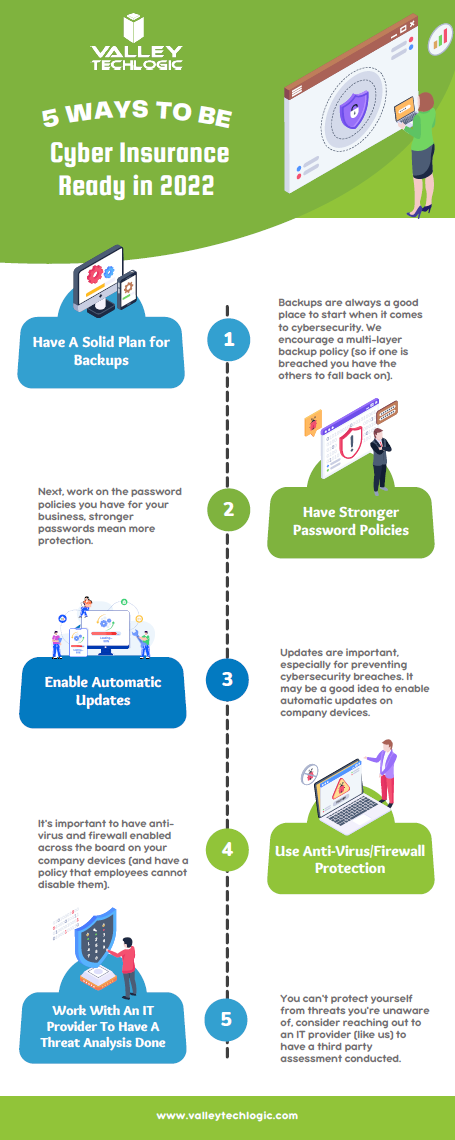
    As an idea of where to start before you go to obtain a cyber insurance policy, we’ve created this checklist of items you can begin to work on to put your business in a better position this year.

    Be Cyber Insurance Ready in 2022
    Click to grab the full size version.

    Many of the items listed are easy for even someone who’s not very tech savvy to tackle, but if you’d really like to protect your business from hackers this year, we suggest teaming up with a tech provider like Valley Techlogic.

    Cybersecurity is a core focus for our business, we will match your business with a cybersecurity framework that makes sense – for example CMMC for defense contractors, HIPAA for healthcare providers, NIST or CIS for small and medium sizes businesses of any industry – and use that framework to have a concrete game plan for making sure your networks and devices are impenetrable to bad actors. Learn more today with a quick consultation

    Looking for more to read? We suggest these other articles from our site.

    This article was powered by Valley TechLogic, IT service provider in Atwater, CA. You can find more information at https://www.valleytechlogic.com/ or on Facebook at https://www.facebook.com/valleytechlogic/ . Follow us on Twitter at https://x.com/valleytechlogic.

  • Five Must Have Features in a Business Continuity Plan

    Five Must Have Features in a Business Continuity Plan

    While business continuity plans should cover topics that extend beyond the realm of technology, it makes sense that technology naturally moves to the forefront when much of the focus of a good business continuity plan focuses on the ability to perform business functions as normal.

    Business continuity is defined as “”the capability of an organization to continue the delivery of products or services at pre-defined acceptable levels following a disruptive incident”, and disruptive event can have many meanings. It could be a natural disaster, a cyberthreat, or even a short-term outage situation like if your office loses power or internet access.

    You should have plans for both short-term and long-term outages written into your plan. However some studies have shown that as high as 51% of businesses globally do not have a business continuity plan in place at all, and what’s worse – only 10% of businesses who experience a disaster and do not have a business continuity plan survive.

    Who should make plans for your business if not you? If you have no continuity plan in place you may find that you’re scrambling to make decisions under duress and attempting to delegate to third party vendors who have their bottom line in mind, not yours.

    So, how do you start in creating that plan? The first step is to have an honest look at your businesses risk factors. This includes environmental factors, does your area face brown outs when the heat starts to peak in the summer? Or snow that prevents employees from reaching the office in the winter at times?

    Maybe there are some things that are individual to you, such as touch and go internet access in your office building or phonelines that are less than reliable. Do you have a server on its last legs that’s been acting finicky? Its eventual failure should be written into your continuity plan.

    You also need to look at your cyber risks, if your employees aren’t being training on cybersecurity safety then that’s a huge factor that must be addressed and planned for. You need to ask yourself what you would do if your data was breached, or an employee email was compromised.

    It’s overwhelming but as with most things starting the process is the hardest part and having a candid look at your business could mean eliminating certain risk factors (like moving data away from the server on it’s last legs into a cloud solution).

    You may even find ways to make your business more efficient, if you know brown outs are common where your office building is located in the summer perhaps you would make a plan to have employees work from home more during that time. Or having your internet service provider address the issue of frequent outages rather than just rolling with them as they occur.

    All in all, these are the five things we would suggest you focus on as you make your business continuity plan:

    1. Technology – How will employees continue to work if your office operations have been waylaid.
    2. Power – If power goes out what kind of backup plan will you need to have in place, such as a generator to keep your server online.
    3. Communications – Do you have a standard way with communicating with your employees? If you need to get a message out quickly to all of them, could you presently do that?
    4. Vendors – Inform your vendors of the provisions you’ve put in place in case a disaster were to occur, and inquire what plans they have in place on their end (because a disaster for them could be a disaster for you).
    5. Data Protection – Most businesses require an online presence to continuing operations, you will need provisions for if your data is compromised or inaccessible. At Valley Techlogic we suggest having a multi-layer backup approach, so if one backup is compromised you will have the others to fall back on.

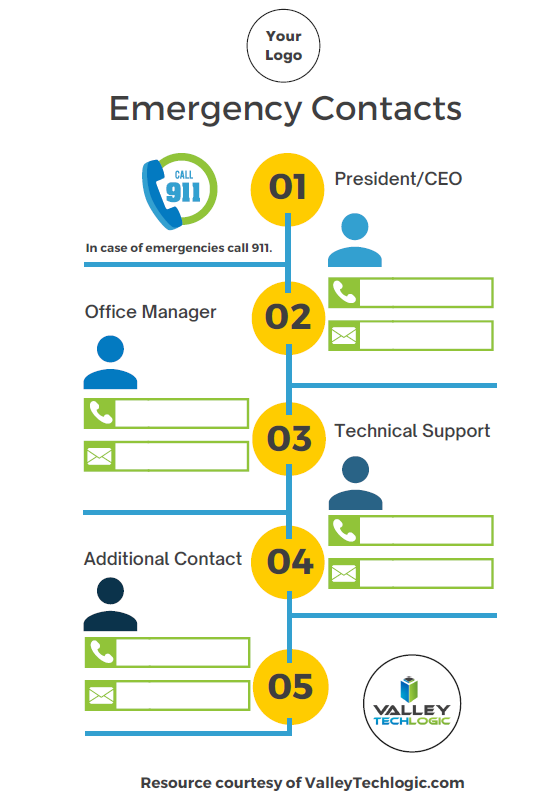
    To get you started, we’ve prepared this emergency contact worksheet for your employees. You can fill in who they should begin to reach out to and what steps they should take if an emergency occurs. If you would like us to personalize it with your logo just let us know.

    Click to grab the full size version for your business. Need it personalized? Contact us.

    Valley Techlogic can help you to begin establishing a business continuity plan and also help you with mitigating risks to your business, learn more today.

    Looking for more to read? We suggest these other articles from our site.

    This article was powered by Valley TechLogic, IT service provider in Atwater, CA. You can find more information at https://www.valleytechlogic.com/ or on Facebook at https://www.facebook.com/valleytechlogic/ . Follow us on Twitter at https://x.com/valleytechlogic.

  • DDoS Attack or Not? Yesterday’s Outage Left Many Systems Down for Hours

    DDoS Attack or Not? Yesterday’s Outage Left Many Systems Down for Hours

    Yesterday, an outage stemming from T-Mobile left many major systems down. Affected websites included T-Mobile itself, Instagram, Comcast, Sprint and Chase Bank. Was it a massive DDoS attack or just a server misconfiguration as they’re claiming?

    First, it’s probably a good idea to explain what a DDoS attack or Distributed Denial-of-Service attack is and what it aims to do.

    A DDoS attack is a cyber attack where the perpetrator or group of perpetrators seeks to make a server or network unavailable by attacking its connection to the internet. They typically do this by flooding the affected systems with traffic, overloading them and causing them to go down.

    These attacks can happen to a single computer, an office, or even on a global scale. The website https://digitalattackmap.com/ attempts to track these DDoS attacks on a global level, however it’s somewhat controversial among cyber security experts as they question the veracity of it’s data.

    Many time these outages are made apparent by the website https://downdetector.com/ which accurately tracked the cascading wave of websites that went down in yesterdays event.

    Down Detector is a reliable source for tracking whether the connection issues you’re having are stemming from your network or the website or service you’re trying to access is truly down.

    So, was yesterday’s event a DDoS attack or just an error? The public will probably never know. However as cyber crime continues to ramp up – purported to be a $6 trillion dollar industry by 2021 – it’s a good idea to have the best protections in place so you and your business don’t fall victim.

    A DDoS attack aimed at your systems may expose other vulnerabilities, and the downtime alone can be costly. If your IT team isn’t adequately prepared to defend against this or any of the other varieties of cyber attacks plaguing the technology market, it might be time for a new team.

    This article was powered by Valley TechLogic, an IT provider in Atwater, CA. You can find more information at https://www.valleytechlogic.com/ or on Facebook at https://www.facebook.com/valleytechlogic/ . Follow us on Twitter at https://x.com/valleytechlogic.

    Looking for IT Services in Fresno, Modesto, Stockton, Ceres, Atwater, Merced, Visalia or Lodi? We cover all these areas and more!