Tag: microsoft

  • What is a reply all “email storm” and how can you prevent it?

    What is a reply all “email storm” and how can you prevent it?

    In 2016 the UK’s National Health Service (NHS) experienced an email storm that crashed their email system and resulted in snowball effect of 168 million emails being sent in a short period of time.

    The cause? A new IT contractor for the company sent out a test email company-wide (the NHS employs 1.2 million people and 840 thousand of them received the test email). Many of them replied to it, wondering why they were receiving such an email using the “reply all” function and it snowballed from there into an email chain of epic proportions, an email storm.

    This email storm crashed their system and angered their employees. What they may not have known is that email storms have been occurring practically since email became the de facto method of communication for businesses around the world. The first one reported by major news and nicknamed “Bedlam” experienced by Microsoft occurred in 1997 resulted in 23 million emails sent in 7 hours, much less than the one experienced by the NHS but the amount of data generated by that storm (an estimated 295 gigabytes) was significant for the time period and the event was highly disruptive.

    Email storms have even hit US government entities like the state department and NASA, the latter of which practically led to the re-institution of the Cybersecurity and Infrastructure Security Agency (CISA) after it’s funding was cut by DOGE.

    So, you may be wondering, what does this have to do with you and your business? Well hopefully we’ve made it clear that email storms can happen to anyone, really at any time, and that they’re highly disruptive. The data generated by large email storms is not significantly different than the data generated by DDoS (Dedicated Denial of Service) attacks although it’s almost always an unintentional consequence of an employee or contractor sending a simple email company wide. What can you do as a business owner to prevent this from happening?

    1. Limit “Reply All” Permissions
    • What to do: Use email settings to restrict who can use the “Reply All” function, especially in large distribution lists.
    • Why it helps: Prevents unnecessary mass replies that trigger storms, especially when someone replies to hundreds or thousands of recipients.
    1. Use BCC for Large Email Lists
    • What to do: Add recipients to the BCC (blind carbon copy) field instead of the “To” or “CC” fields.
    • Why it helps: If people can’t see who else received the email, they can’t reply to everyone, avoiding the risk of a chain reaction.
    1. Implement Group Email Safeguards
    • What to do: Configure email servers (like Microsoft Exchange or Google Workspace) to throttle or block emails sent to large groups when too many replies occur in a short time.
    • Why it helps: Automated tools can detect a storm and shut it down before it escalates.

    While these common sense strategies can be enacted by anyone, managing email is a tricky topic overall. From setup to protections against spam or phishing, having a technology provider like Valley Techlogic can help you strategically create email policies that work and keep your business safe. Learn more today through a consultation.
    Looking for more to read? We suggest these other articles from our site.

    This article was powered by Valley Techlogic, leading provider of trouble free IT services for businesses in California including Merced, Fresno, Stockton & More. You can find more information at https://www.valleytechlogic.com/ or on Facebook at https://www.facebook.com/valleytechlogic/ . Follow us on X at https://x.com/valleytechlogic and LinkedIn at https://www.linkedin.com/company/valley-techlogic-inc/.


  • Make the Most of Your Microsoft 365 Subscriptions: 7 Productivity Hacks You Might Be Missing

    Make the Most of Your Microsoft 365 Subscriptions: 7 Productivity Hacks You Might Be Missing

    Microsoft 365 is packed with powerful tools designed to help businesses stay productive, collaborative, and organized—but many users barely scratch the surface of what’s available. If you’re only using Microsoft 365 for email and basic file storage, you’re likely leaving a lot of value on the table.

    Here are 7 productivity hacks to help you get the most out of your Microsoft 365 subscription:

    1. Use Microsoft Search to Navigate Faster

    Microsoft Search is a powerful, built-in tool across Outlook, OneDrive, SharePoint, and Teams that helps you quickly find emails, files, conversations, and even people in your organization. Instead of digging through folders or threads, type a keyword into the search bar—Microsoft Search will pull relevant results instantly from across all connected apps.

    Pro Tip: You can even search using natural language—like “files shared by John last week”—to find what you need faster.

    1. Streamline Repetitive Tasks with Power Automate

    Power Automate (formerly Microsoft Flow) lets you create custom workflows between apps to save time and reduce manual work. You can automate common tasks like saving email attachments to OneDrive, posting Teams alerts when a SharePoint list is updated, or sending approval requests.

    Example: Set up a flow to automatically notify your team in Teams when a new file is uploaded to a project folder.

    1. Collaborate in Real-Time with Co-Authoring

    Microsoft 365 makes real-time collaboration seamless. Whether you’re in Word, Excel, or PowerPoint, multiple users can work on a document at the same time. Changes are saved automatically and version history lets you review or restore earlier versions with ease.

    Bonus: Use @mentions in comments to get a colleague’s attention instantly.

    1. Organize Your Thoughts with OneNote

    OneNote is the hidden gem of Microsoft 365. Use it to capture meeting notes, brainstorming ideas, project plans, and more. Notebooks are searchable, can be shared across your team, and sync across all your devices.

    Use Case: Create a shared notebook for your team to store agendas, meeting recaps, and to-do lists in one central place.

    1. Turn Emails into Tasks with Microsoft To Do and Outlook Integration

    If your inbox is your to-do list, Microsoft To Do can help bring order to the chaos. With seamless integration into Outlook, you can flag emails to automatically turn them into actionable tasks.

    Tip: Use the My Day feature in To Do to focus only on what you need to accomplish today.

    1. Secure Your Data with Built-In Tools

    Microsoft 365 comes with strong security features that are often underused. Data Loss Prevention (DLP), sensitivity labels, and multi-factor authentication (MFA) can all help keep your data protected without requiring advanced setup.

    Security Tip: Admins should regularly review security and compliance reports in the Microsoft 365 Security Center to stay ahead of potential issues.

    1. Integrate Third-Party Apps into Teams

    Microsoft Teams isn’t just for chat and video calls—it’s a hub for productivity. You can integrate hundreds of apps directly into your Teams channels, from project management tools like Trello and Asana to CRM systems and custom Power Apps.

    Efficiency Hack: Pin your most-used apps to the sidebar for easy access during daily work.

    Whether you’re a power user or just getting started, Microsoft 365 has tools to help you work smarter—not harder. With a little exploration and some setup, you can automate workflows, improve collaboration, and protect your data—all within the apps you already use.

    Need help unlocking Microsoft 365’s full potential for your team? Contact Valley Techlogic today and let’s optimize your digital workspace together.

    Looking for more to read? We suggest these other articles from our site.

    This article was powered by Valley Techlogic, leading provider of trouble free IT services for businesses in California including Merced, Fresno, Stockton & More. You can find more information at https://www.valleytechlogic.com/ or on Facebook at https://www.facebook.com/valleytechlogic/ . Follow us on X at https://x.com/valleytechlogic and LinkedIn at https://www.linkedin.com/company/valley-techlogic-inc/.

  • Support will end for Windows Server 2012 in October 2023, pros and cons of upgrading, replacing, or transitioning to the cloud

    Support will end for Windows Server 2012 in October 2023, pros and cons of upgrading, replacing, or transitioning to the cloud

    As promised continuing off the back of last weeks article on Steam ending support for Windows 7 and 8 we wanted to talk about the real elephant in the room for businesses coming up this year, Windows Server 2012 end of life date which will occur October 10th, 2023.

    On that date extended support for Windows Server 2012 will end. So, what does that mean for you? In general, we’ve seen that Windows products no longer receiving support from Microsoft have in an increased risk of cyber threats as hackers launch targeted attacks on these devices. In some cases Microsoft has stepped in to release patches in especially severe cases but it’s not a good idea to count on that.

    You can also expect your vendors will end support for Windows Server 2012 in October if they haven’t already, and it also will cause your business to fall out alignment with compliance to agencies like HIPAA or PCI and others. Without vendor or Microsoft assistance it may be difficult to receive support for these devices if they suddenly fail as well.

    All in all, there’s no good reason to do nothing with this news but many of our clients wonder when it’s time to upgrade, replace or even abandon the notion of an on-premises server altogether by moving their data to the cloud.

    There’s no easy answer to this question, we do have one quick suggestion though if October comes around and you’re still debating your options. If it’s possible to take the “walled garden” approach to any device running an outdated version of Windows, we highly suggest it. What this means is getting to a place where you prevent the device from accessing the internet and only access it with other devices via a firewall or some other means of protection. This will allow you to have a little bandwidth to stretch out making a plan to upgrade, replace or remove it.

    If you do feel like you’re reading to make a decision but need some assistance on which way to go, we do have five tips for when it’s time to replace a server:

    1. Warranty: Warranty is a big concern with servers, most servers have a useful life of 5 years though some manufacturers will offer extended renewals (not generally past 7 years though). Replacing hardware in a server is similar to replacing components of a vehicle, it can add up fast.
    2. Slow Running: If your server is a slog to work with, updating the operating system to a newer addition is not going to improve it.
    3. Expired OS: Having an expired operating system is a good reason to replace the server especially if the operating system was relatively new when the server was purchased.
    4. Storage Capacity: Storage capacity and solid state drive technology continues to improve each year, if you have a server with older hard drives or very small hard drives compared to modern standards it may make sense to start fresh with a new server vs trying to transition new drives into the old one.
    5. Software Requirements: If your software requirements have changed since the server was purchased and your old server can’t run your line of business software either well or at all, that’s a good reason to upgrade to a newer server.

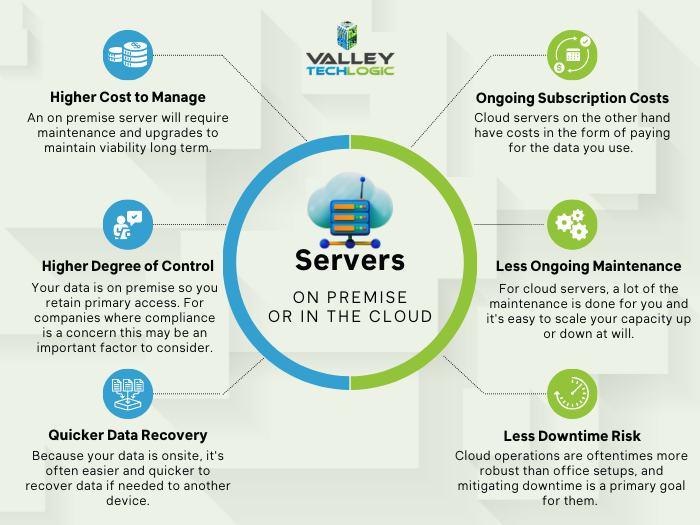
    If you answered no to all of the above then it might be worth considering whether upgrading to a supported Windows server is an option for you. We recommend leaving this task up to the professionals, upgrading a server is not the same as upgrading a laptop or desktop device. If the answer to any of the above questions was yes, then we highly recommend replacing, but should you replace your physical server or switch to the cloud? See our chart below for guidance:

    Cloud or On Premise Server? Still need more help with your Windows Server 2012? Valley Techlogic has been a Microsoft partner since 2004 and we’re experts in all things Windows. Reach out today for a consultation.

    Looking for more to read? We suggest these other articles from our site.

    This article was powered by Valley Techlogic, an IT service provider in Atwater, CA. You can find more information at https://www.valleytechlogic.com/ or on Facebook at https://www.facebook.com/valleytechlogic/ . Follow us on Twitter at https://x.com/valleytechlogic.

  • Bing’s ChatGPT Chatbot had some unexpected conversations with customers this week, plus 3 Chatbots we CAN recommend for your website

    Bing’s ChatGPT Chatbot had some unexpected conversations with customers this week, plus 3 Chatbots we CAN recommend for your website

    While Microsoft has been somewhat hush hush on the exact amount of their investment into the creator of ChatGPT, OpenAI (with some estimates nearing $10 billion).  It is clear that they’re going all in on AI and looking towards the future by already integrating it into their search engine Bing, via a new chat bot feature.

    The results have been, to say the least, unexpected. While in the majority of cases the bot responds appropriately to the prompts and provides helpful information, there were some instances this week where the opposite happened.

    Including a conversation about the new movie Avatar: Way of the Water in which case the bot got confused about what year it was and insisted it was still 2022, punctuating it’s arguments with the user with “I’m a good Bing bot”.

    In another case, a New York Times writer hearing about the unusual way the bot was sometimes responding, led him to holding a conversation with it for over 2 hours. The bizarre results of the lengthy conversation culminated in the bot trying to convince him they were in love and that he should leave his wife.

    This highlights the complex nature of AI in its current form, many think AI is advanced hardware working at full capacity to create something brand new to human-kind. When in reality it’s a vast collection of what humans have already put onto the internet scrambled together and supported by algorithms to be readily available upon a human prompt. You have to imagine having the full capacity of the internet at your fingertips – both the good and the bad.

    That’s why AI has been able to pass the Bar exam and also why it has also responded very strangely to simple prompts as in the Bing example, because like the internet it’s a mixed bag.

    In response to the news Microsoft has limited their chatbot to prevent more unsettling conversations, with 5 user prompts on the same topic the bot will now respond with “I prefer not to talk about this topic.”.

    AI can be very useful but it’s definitely not a replacement for all human led activity, especially when it comes to engaging with your customers.

    That’s why we have our top 3 picks for live chat options that will improve customer engagement (with no unexpected results):

    1. LiveChat: This is the one we personally use and we enjoy the features it has including an “attention grabber” which is an animated .gif that grabs customers attention and the ability to instigate conversations with visitors. It also keeps a record of who has tried to chat and allows customer service agents to “take over” a conversation when it’s appropriate to. It also includes customizable branding (all of the chatbots on our list do).
    2. Olark is another good option, like LiveChat it keeps track of the conversations happening on your website but it also offers analytics based on those conversations so you can track customer outcomes. It also offers many integrations with popular products such as Google Analytics, Hubspot, Mailchimp, Salesforce and more.
    3. Tawk.to is a free live chat option that still has some very nice features, including monitoring customers on your website and being able to answer chats from a mobile device. You can even share your screen if you’re trying to assist a customer in finding something.

    We believe in answering customers live which is why we have Live Chat available to our customers, with live service reps on our website and a dedicated dispatcher to answer customer phone calls. Technology advice like what’s provided in this article is just one of the ways we help our clients, if you would like to learn more about obtaining technology support for your business schedule a consultation with us today.

    Looking for more to read? We suggest these other articles from our site.

    This article was powered by Valley Techlogic, an IT service provider in Atwater, CA. You can find more information at https://www.valleytechlogic.com/ or on Facebook at https://www.facebook.com/valleytechlogic/ . Follow us on Twitter at https://x.com/valleytechlogic.

  • Data breached? 5 ways to reduce the impact on your business.

    Data breached? 5 ways to reduce the impact on your business.

    We’ve posted a lot of articles on how to avoid a data breach (here are a couple of recent ones for you to review if one hasn’t happened to you so far and you’d like to keep it that way).

    Unfortunately, we fear that if you’ve reached this article you may be part of the growing number of business owners whose data has been breached (in 2020 there were 700,000 attacks on small businesses with damages exceeding $2.8 Billion).

    Data breach severity varies widely, from an employee email being temporarily hacked all the way to having your backups infiltrated and locked for a ransom – and even if you pay the ransom you still might not recover your data.

    So if you’ve experienced a significant data breach and wondered what you could have done to have a better outcome, or even if you’re in the midst of one now what should you do?

    Here are our top five tips for reducing your data breach costs (now or in the future):

    1. Damage Control – Turn to the pros (like us) when it comes to recovering your data in the event of a breach, they will have access to tools that could recover data that will otherwise be lost if decryption efforts fail in the hands of someone who doesn’t know what they’re doing. Bottom line, know who you’re going to call in an emergency and don’t be afraid to get their help sooner rather than later.
    2. Downtime Mitigation – Downtime is one of the most expensive elements of a data breach, if you don’t already have a disaster recovery plan a previous breach can highlight exactly what needs to be a priority in your business if your data is unavailable. Also, a team like Valley Techlogic can help you create a disaster recovery plan.
    3. Turn to Your Vendors – Your vendors may have some methods for assisting you in the event of a data breach. For example Microsoft has a shared responsibility model for data but if you have Microsoft 365 and use OneDrive, some of that data may still be safe on their end and accessible to you (once your devices have been cleared and are safe to use).
    4. Be Transparent – If your business is very customer facing, an outage in your business caused by a data breach may be very obvious to them. We don’t recommend trying to hide the fact that a breach has happened but instead being transparent about what happened and what you did to fix it, and how you plan to prevent it in the future.
    5. Cyber Prepared – The best way to recover financially from a data breach is to have cyber insurance in place before the attack happens, while it may be too late for a past breach you can prevent future financial loss by using our guide to reviewing and obtaining cyber security insurance here.

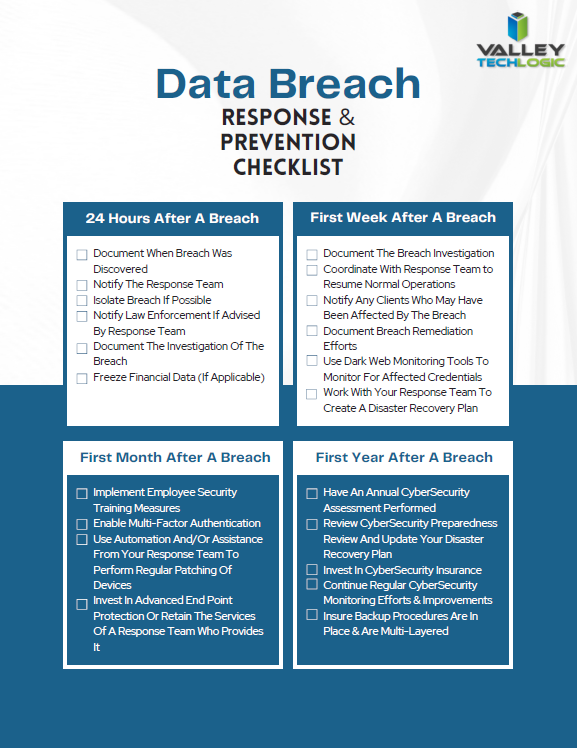
    Of course, an ounce of prevention is worth a pound of cure unfortunately when it comes to cybersecurity attacks. We would be remiss not to offer a few tips on preventing a data breach specifically. You can grab this checklist to make sure these items are covered to prevent future data breaches:

    Click to download the full size version.

    If you’re currently dealing with a data breach or have dealt with one in the past and want to prevent future breaches, Valley Techlogic can help. We are experts in cybersecurity and use industry best practices to provide the best security coverage for our customers that is also cyber insurance compliant. Learn more with a consultation today.

    Looking for more to read? We suggest these other articles from our site.

    This article was powered by Valley Techlogic, an IT service provider in Atwater, CA. You can find more information at https://www.valleytechlogic.com/ or on Facebook at https://www.facebook.com/valleytechlogic/ . Follow us on Twitter at https://x.com/valleytechlogic.

  • New Year’s resolutions for business tech in 2023

    New Year’s resolutions for business tech in 2023

    The new year is upon us and with that comes the opportunity to make needed changes to outdated technology within your business.

    Our clients are usually split on when they want to make changes – for some it’s that mad dash towards the end of the year and for others it’s the fresh mindset that comes after the 1st of January. There really is no wrong answer when it comes to a tech refresh and any move you make will have lasting benefits that increased security protection and less chance of an outage bringing your office to a standstill.

    This can mean hardware or software upgrades but usually means both, and with Windows Server 2012’s end-of-life date occurring in October of this year we anticipate there will be many trying to replace their primary office server before that time. If you have a server current running Windows Server 2012 it probably will also need to be replaced (keep in mind the 2012 reflects the year it came out, so even if you bought your server a few years later it will still be older than the 5 year recommended lifespan for most servers).

    We don’t want to only focus on servers though, here are a few other New Years technology resolutions you can make for 2023:

    1. Move away from software that has reached end-of-life or is no longer supported. Windows Server 2012 Isn’t the only operating system that has recently reached end-of-life, Windows 7 is also no longer supported by Microsoft. Even peripherals such as switches or networking gear such as routers can have end-of-life events and will no longer be updated by the manufacturers.
    2. On the same token, consider moving more to the cloud. More and more of our clients are moving away from traditional in office servers by switching to online storage. There can be an upfront cost to doing this but it’s still often less than purchasing a brand new server if your existing one is on the outs. As a bonus all future maintenance will then fall to your cloud provider.
    3. Increase your security measures in the New Year. There’s no better time than the beginning of the year to begin tackling cyber security measures you wanted to put in place last Year over year the risks continue to increase so why not begin 2023 knowing your business is safe from a cybersecurity attack?
    4. Again in the same realm, begin or strengthen employee training on technology topics. As your employees come back from the holidays why not implement short training measures (our tool takes just 15-20 minutes a week) that could drastically reduce your risk?
    5. Finally, don’t let fear of a recession slow your growth. You may be shying away from making hardware purchases due to fear of a recession, but if existing outdated hardware is already slowing your business down from the productivity level you hope to have not replacing it soon could do more harm than good.

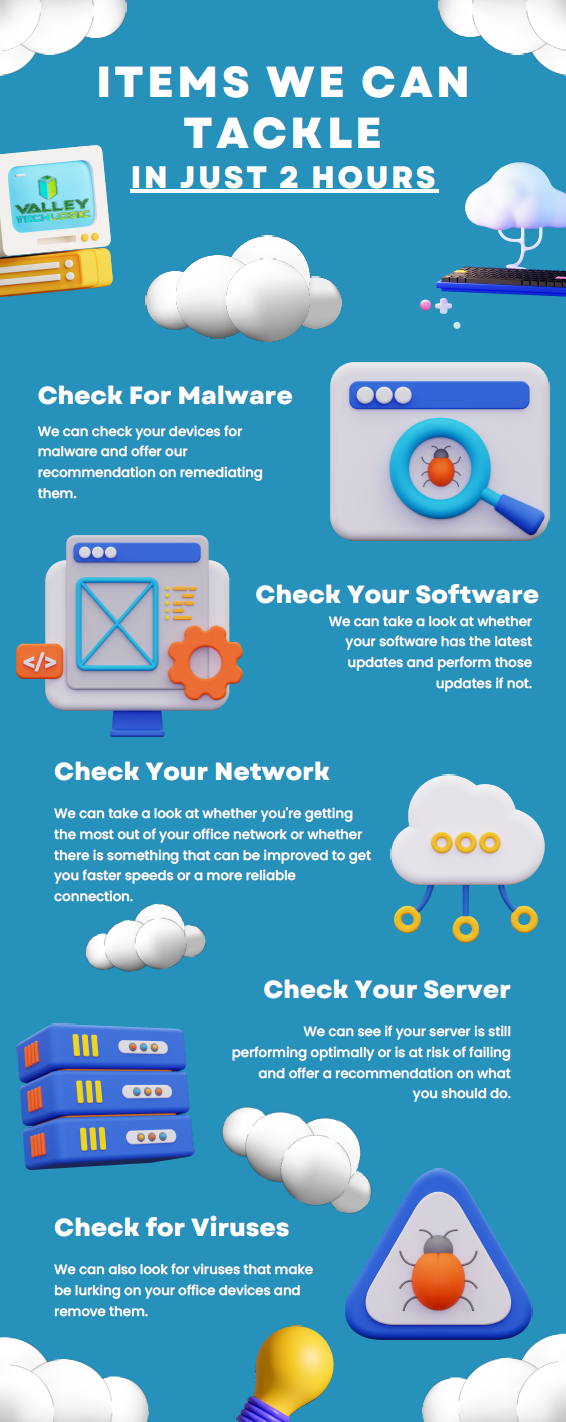
    If you’re not sure where to start with any of these topics, we can help. We’re currently offering a 2-hour service call absolutely free.

    Here are a few ways we suggest using this service call to put your business in a better position in 2023:

    Click to view the full size version.

    If you would like to learn more about our free service call offer, or would like a consultation on our services you can book one here today.

    Looking for more to read? We suggest these other articles from our site.

    This article was powered by Valley Techlogic, an IT service provider in Atwater, CA. You can find more information at https://www.valleytechlogic.com/ or on Facebook at https://www.facebook.com/valleytechlogic/ . Follow us on Twitter at https://x.com/valleytechlogic.

  • BYOD (Bring Your Own Device) in the workplace, 5 policies to have in place for 2023

    BYOD (Bring Your Own Device) in the workplace, 5 policies to have in place for 2023

    Last week we touched on tips for buying new tech for your business in 2023, but for some offices BYOD (Bring Your Own Device) is the norm.

    What is BYOD? Bring your own device is where an employee uses their personal device (usually a laptop) for work purposes. There are different ways to go about this, for some offices there employees using an already owned device. For others, they can use a device they own but they must log into a virtual machine to do their work. A third option is that the business still purchases the device an employee uses but because they work remotely from home the same rules of BYOD still apply even though it’s a company owned device.

    During the pandemic we saw more articles related to BYOD and remote working and how to still manage a secure workspace even if your employees aren’t coming into the office. Even with workplaces now open again many are operating on a hybrid model and advice surrounding security of devices that don’t stay in one location is still very relevant.

    Business owners themselves also often take their devices home with them at the end of the day and aren’t immune to the same pitfalls that can happen if you don’t have policies in place to help protect your office network and data. BYOD offers work places a lot of flexibility as long as security measures are adhered to.

    Here are our tips for smart BYOD policies to have in 2023:

    1. First and foremost, have a good password policy. Especially for company websites and other logins. See our chart below for what makes a good password.
    2. Determine what data can be accessible from home or a BYOD. Some data should be restricted to in office/office devices only, especially anything client sensitive. You can also utilize a company SharePoint to share files without having them be locally stored on devices.
    3. Have time-based lock-out procedures to limit long sessions, especially if a device is idle. An idle device left in an unfamiliar place is a potential vector for hacker access. Time-based lockouts will make devices used offsite much more secure.
    4. Utilize the same security stack on BYOD as you do on company or office devices. Many cybersecurity tools don’t require devices to be in the same building, it’s a good policy to have your IT provider install the same tools on BYOD and other devices that leave the office. If your company uses Windows you can also consider something like Microsoft’s Intune for easier management of all of your endpoints no matter where they’re being used from.
    5. Have a policy for wiping company data off a BYOD. Especially if the device is employee owned, you shouldn’t assume that it will always be a smooth hand off. Having policies for this in writing is crucial.

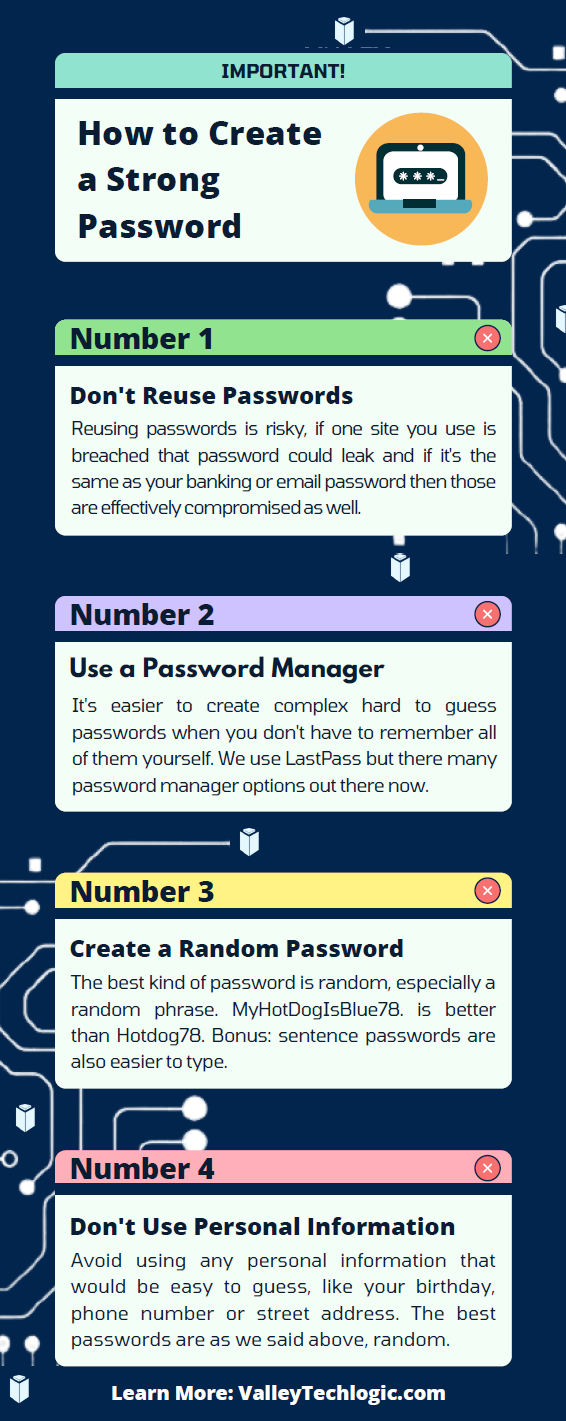
    Like we said the first step is having a good password policy is step one to a good BYOD plan for your business, and we might argue it’s the first step in a good security plan overall. Here are our tips on what makes a good password:

    Click to grab the full size version.

    If you need help with device management in your business, Valley Techlogic can create a plan of action that encompasses both flexibility and security into a package with functionality at the forefront. Reach out today to learn more.

    Looking for more to read? We suggest these other articles from our site.

    This article was powered by Valley Techlogic, an IT service provider in Atwater, CA. You can find more information at https://www.valleytechlogic.com/ or on Facebook at https://www.facebook.com/valleytechlogic/ . Follow us on Twitter at https://x.com/valleytechlogic.

  • Thinking about buying new tech for your business in 2023? Here are our top 10 tips

    Thinking about buying new tech for your business in 2023? Here are our top 10 tips

    We recently touched on the tax savings benefits for making technology purchases before the new year, however maybe you’re only in the beginning stages of thinking about replacing equipment in your business and aren’t ready to go ahead and buy before 2022 is over.

    We’re a fan of making big technology purchases in bulk when it comes to our clients, instead of a mish mash of devices that all have different warranty times, hardware capabilities and software available to them you have one set of devices that can be managed in much the same way for their entire life span because they all came from the same place at the same time.

    While that Isn’t always achievable, you can accomplish almost the same goal by buying in sections as well. Maybe management devices get replaced first, followed by team 1 and team 2. Just any kind of organizational system to your technology buying beats the technology clutter of having everyone working on something different.

    Of course there are different considerations if your business BYOD (bring your own device) which we’ll touch on next week. Besides trying to make your technology purchases at roughly the same time here are 10 more tips for business technology buying in 2023.

    1. Research is key. Not all laptops for example are created equal (and the same goes for every other device) you want devices that will more than cover the requirements of Windows 10 or 11 and still perform well.
    2. On the same token, look up reviews. Sometimes a product SKU is problematic, it would be bad to read reviews about your chosen laptop having a problem with premature device failure AFTER you’ve bought 10 of them.
    3. Consult your employees. Your employees may have opinions about what is crucial to them in a work device, for example if you have one employee who handles your graphic design they may need extra memory or a better video card added to their particular device to do their job effectively.
    4. Spend a little extra on the extended warranty. You want these devices to last a long time for your business as they’re a big investment, it’s worth it to purchase the extended warranty (Dell offers up to 5 years for example).
    5. Look into what kind of support the company offers if you do encounter a problem. On the same page as the last tip, you want to make sure if one of the devices breaks or encounters a problem you can easily have it fix. Lenovo is another vendor we work with and they offer onsite repair of devices at a low additional cost.
    6. Consider consulting your software vendors. If you use a proprietary software in your business it’s especially important to make sure your chosen device will work with it (especially if we’re talking about replacing an onsite server).
    7. To follow up on that, if you’re considering replacing your server it might be a good time to consider the cloud. Onsite servers are a very expensive investment, we have seen more clients move to the cloud in 2022 than ever before. If your server has come up for replacement it might be worth researching before making that purchase.
    8. If you do want to purchase another onsite server, consider refurbished. Ordinarily we shy away from refurbished but when it comes to servers it can be a smart investment and we’ve found they perform just as well as new, we have saved clients thousands of dollars when they choose this option.
    9. You can choose the cloud for employee devices as well. If you have a BYOD format but still want the uniformity and security of having everyone connect from a similar machine, we recommend Windows 365. It’s a cloud PC your employees would connect to from their current device, it can give them the benefit of using a PC with more powerful hardware if you chose and you can manage these devices under one platform.
    10. Work with your IT provider to take advantage of their partnerships. Finally, if you have an IT provider it’s worth asking if they have partnerships with any vendors that can help you get a better deal. We have partnerships with Dell and Lenovo and utilize them to benefit our clients regularly. You can learn more about that here.

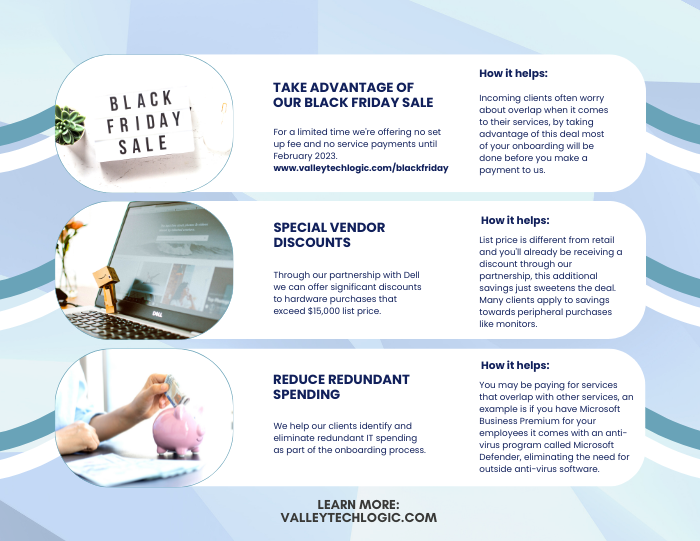
    Here are three ways you can save right now on your technology spending:

    Three additional money savings tips.Procurement services is something we reserve for clients. If you’d like to learn more about how we can help you purchase new devices and maintain them, click here to schedule a consultation.

    Looking for more to read? We suggest these other articles from our site.

    This article was powered by Valley Techlogic, an IT service provider in Atwater, CA. You can find more information at https://www.valleytechlogic.com/ or on Facebook at https://www.facebook.com/valleytechlogic/ . Follow us on Twitter at https://x.com/valleytechlogic.

  • Need computers for your office? Purchasing before the New Year could save your business a ton of money

    Need computers for your office? Purchasing before the New Year could save your business a ton of money

    Every year we promote the tax savings benefits of Section 179 to our clients, new clients are often not aware that the computer hardware (and even some software) they use in their business is a tax deductible expense. Making these purchases before year end saves them a boat load of money on the next years tax bill and effectively works as a discount on the equipment they need.

    What is Section 179? Section 179 is an immediate tax saving deduction on any depreciable asset – such as vehicles, hardware and software. Rather than depreciating these items in future tax years and having to track that, you can benefit from lowering your liability right now.

    This especially helps our clients when making larger technology purchases such as replacing aging servers. A new server can easily run $10,000 or more, but when you factor in the benefit of Section 179 it makes for a sizeable discount on a purchase of that size.

    The maximum discount for 2022 is $1,080,000, so the sky is the limit no matter what size purchase you’re planning to make. To maximize the benefits however, we do find that making these purchases at the end of the year is the most beneficial as you see the deduction much sooner when rolled into the next years taxes.

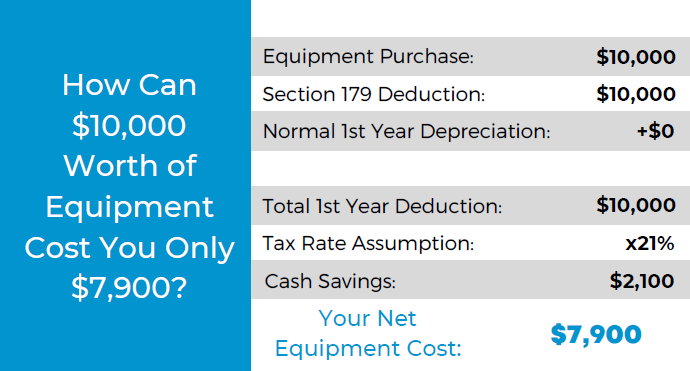
    Here’s a chart on what a $10,000 purchase would look like after utilizing Section 179:

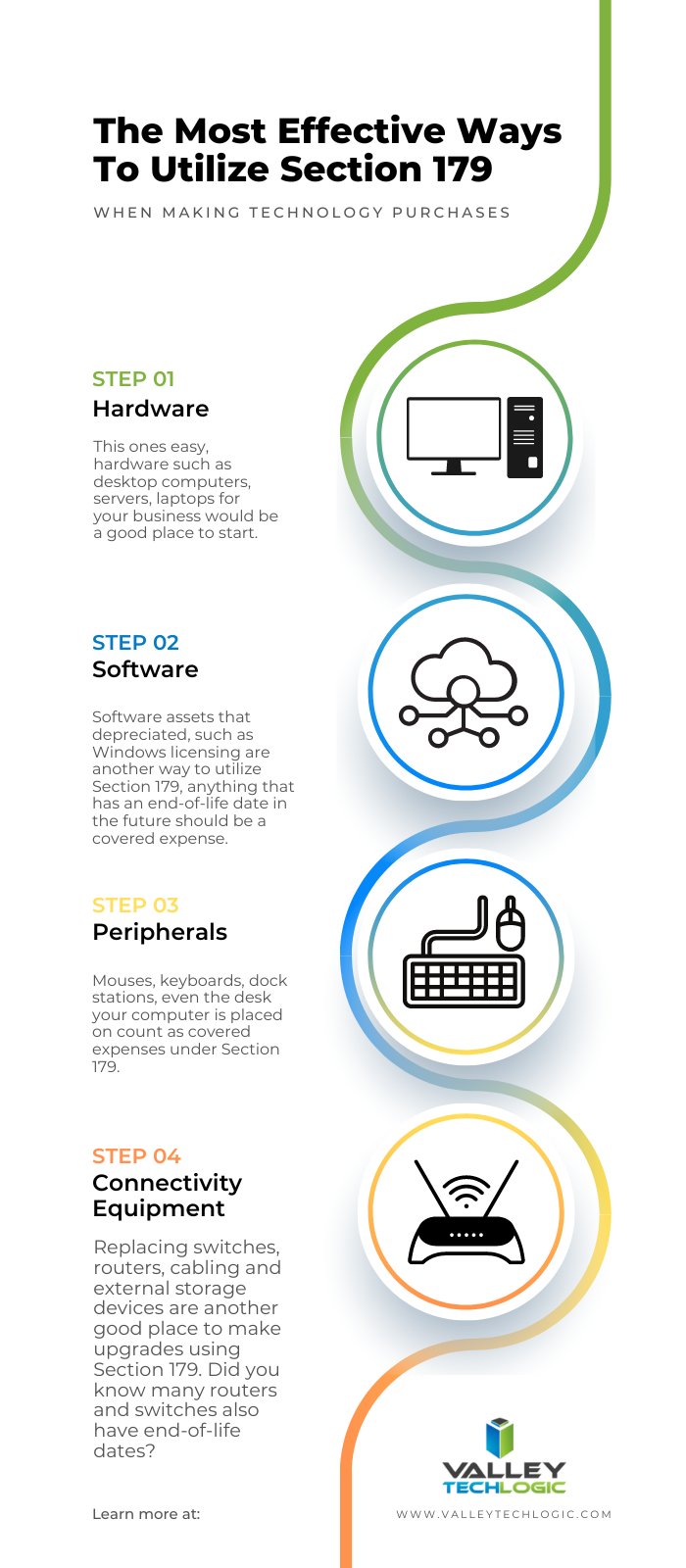
    Of course, every business set up is different and just looking at the numbers may not give you enough of an idea of how you can use Section 179 in your business, so we also made this chart of things our clients often look to do before the year ends that may be an inspiration to you as well.

    Software is a great way to use Section 179 this year in particular, with Windows 7 and 8 for desktops and Windows Server 2012 all losing mainstream support access in 2023.

    While you’re looking to upgrade your Windows software you will probably also want to consider new hardware, the useful life expectancy for computer hardware and servers is around 5 years with typical use and any machines that came from the factory with Windows 7 or Windows Server 2012 installed will be well past that window.

    You may also not know that Microsoft has announced it will no longer allow updates for their Office suite of software on outdated machines, so the time is ticking to get those upgrades done before your office staff loses the ability to use Office software on their devices. You can learn more about the updates coming from Microsoft in 2023 with our free guide here.

    If you’re looking for assistance in procuring technology solutions for your business, Valley Techlogic can help. We have partnerships with Microsoft, Dell, and Lenovo as well as other technology vendors and can help you replace aging equipment easily before time runs out on the benefits of Section 179 this year. Reach out today to learn more.

    Looking for more to read? We suggest these other articles from our site.

    This article was powered by Valley Techlogic, an IT service provider in Atwater, CA. You can find more information at https://www.valleytechlogic.com/ or on Facebook at https://www.facebook.com/valleytechlogic/ . Follow us on Twitter at https://x.com/valleytechlogic.

  • Windows Server 2012 and Server 2012 R2 are approaching end-of-life, what should you do?

    Windows Server 2012 and Server 2012 R2 are approaching end-of-life, what should you do?

    Upgrading your personal computer with the latest Windows can come with some challenges and hesitancy due to changes that are made to every new consumer and business version of Windows for personal computers.

    UI changes and increased specifications both come to the forefront for our customers when making these changes, but for servers that decision process feels even more fraught with danger.

    On October 9th, 2023, Windows Server 2012 and 2012 R2 will be in their end-of-life. What this means is it will no longer be a primarily supported product by Microsoft, who understandably needs to focus their time and energy supporting more current products. What it means for customers still utilizing Windows Server 2012 (or 2012 R2) is that their servers may not receive crucial support updates that often prevent things like your server malfunctioning, software working as intended, or even security updates.

    With just under a year to go that gives you time to consider your options when upgrading to a more current software, or if it makes sense to pay for extended support through Microsoft.

    The Extended Security Updates (or ESU) program does not include any feature updates, the only updates your server will receive will be security updates only, and to expand on that further that will only be important or critical security updates.

    This may mean your server is still vulnerable to intrusion although much less so than devices going unpatched. Often times a device ending support is a green light to hackers to begin working on breaching these older devices now that they’re less secure.

    That problem is not unique to Microsoft either, even smaller devices such as routers or switches can fall under end-of-life and no longer receive critical security patches. Just look at the recent Cisco zero-day security announcement and their stance. They will not be patching the outdated routers to prevent security intrusion; the expectation is that customers that own those routers will need to upgrade to ensure their business is safe.

    There are some factors to consider however when it comes to upgrading your Windows serve, see our chart below:

    Five Considerations to Take When Replacing Your Windows Server

    The chart assumes an ideal scenario of either performing the update on a newly purchased server or taking the server offline temporarily. Performing an in-place Windows Server update can be risky and is best left for the professionals to decide whether it’s possible in each unique scenario.

    Purchasing a new server if your current server is too out of date to run the current version of Windows Server is tricky as well, there are more factors to consider with a machine that supports your entire business than with a device that’s only utilized by one or two employees.

    It’s also important no matter which avenue you take that you’ve properly backed up the existing server, if something were to go wrong not having that backup could mean losing all of your data. Which in many cases, is a catastrophic event.

    If we haven’t convinced you yet we’ll say it plainly, this is not a job that should be attempted by someone who’s just “computer savvy”. Upgrading your server requires an expert’s knowledge to execute in a timely manner and without losing your company data. Valley Techlogic can be that expert hand, learn more today with a free consultation.

    Looking for more to read? We suggest these other articles from our site.

    This article was powered by Valley Techlogic, an IT service provider in Atwater, CA. You can find more information at https://www.valleytechlogic.com/ or on Facebook at https://www.facebook.com/valleytechlogic/ . Follow us on Twitter at https://x.com/valleytechlogic.