Tag: tech tips

  • It’s starting to feel like summer and that means rising temperatures and the potential for rolling blackouts – 3 ways to protect your devices during a power outage

    It’s starting to feel like summer and that means rising temperatures and the potential for rolling blackouts – 3 ways to protect your devices during a power outage

    While summer won’t officially start in the Northern Hemisphere until June 21st, Memorial Day week often marks the “unofficial” start of summer for many and May in general is when many states start to see rising temperatures – especially with the effects of climate changes causing record highs across the country.

    For California – and in particular the Central Valley where we’re located – rolling blackouts are a common occurrence as temperatures begin to rise, and these sudden unexpected power outages can damage expensive equipment that’s not properly protected.

    Sometimes power companies will give some notice of when an outage will be occurring in your area and in this case, we recommend unplugging what you can as that’s a surefire way to protect your equipment if an unexpected power surge were to occur.

    However, blackouts are often random and so we recommend the following preventative measures:

    1. Surge Protectors – A quality surge protector is a must have for every device on your office network, and not all surge protectors are created equal. Surge protectors always list a joule rating which tells you how much power they can absorb without failing, for computers we recommend a surge protector with a joule rating of at least a 1000.
    2. UPS (Uninterruptible Power Supply) – Next on the list is a UPS, this is a battery backup for your devices and for your office server in particular a must have item. When choosing a UPS, you want to ask yourself if you’re looking for something with enough power to let you safely turn your device off or if you wanted something that would keep your device online for days in an extended outage. We also created a short guide found below to what else you should look for when choosing a UPS.
    3. Power Generators – Finally power generators could be necessary for certain office scenarios, an automatic standby generator will be a big investment but if it’s mission critical your office power stay intact during a rolling blackout it could be worth it.

    Also here is our guide on what to look for in a UPS:

    UPS Choices Chart

    We’ve been talking about the power side of rolling blackouts and how an electric surge could potentially damage your devices but there’s also another thing to consider, your data.

    If a power outage occurs suddenly, anything that hasn’t been saved could be lost. If you’re a Microsoft 365 customer, you will have the benefit of the short-term backups they provide for your office documents (if you’ve ever had your computer restart while working on something and have experienced the profound relief seeing that “Recovered” documents bar you’ll know what we’re talking about).

    If you’re not a Microsoft 365 customer or you’re worried about data corruption or your service backups failing (or maybe your server Isn’t being backed up at all) we suggest talking to us about what your options are.

    We offer our clients our triple layer backup solution TechVault. Not only will we back up your onsite data, but we will also create a cloud copy that is updated every 15 minutes and an archival copy that is virtually impenetrable to bad actors.

    Want to learn more? Schedule a quick consultation with one of our sales representatives today.

    Looking for more to read? We suggest these other articles from our site.

    This article was powered by Valley TechLogic, an IT service provider in Atwater, CA. You can find more information at https://www.valleytechlogic.com/ or on Facebook at https://www.facebook.com/valleytechlogic/ . Follow us on Twitter at https://x.com/valleytechlogic.
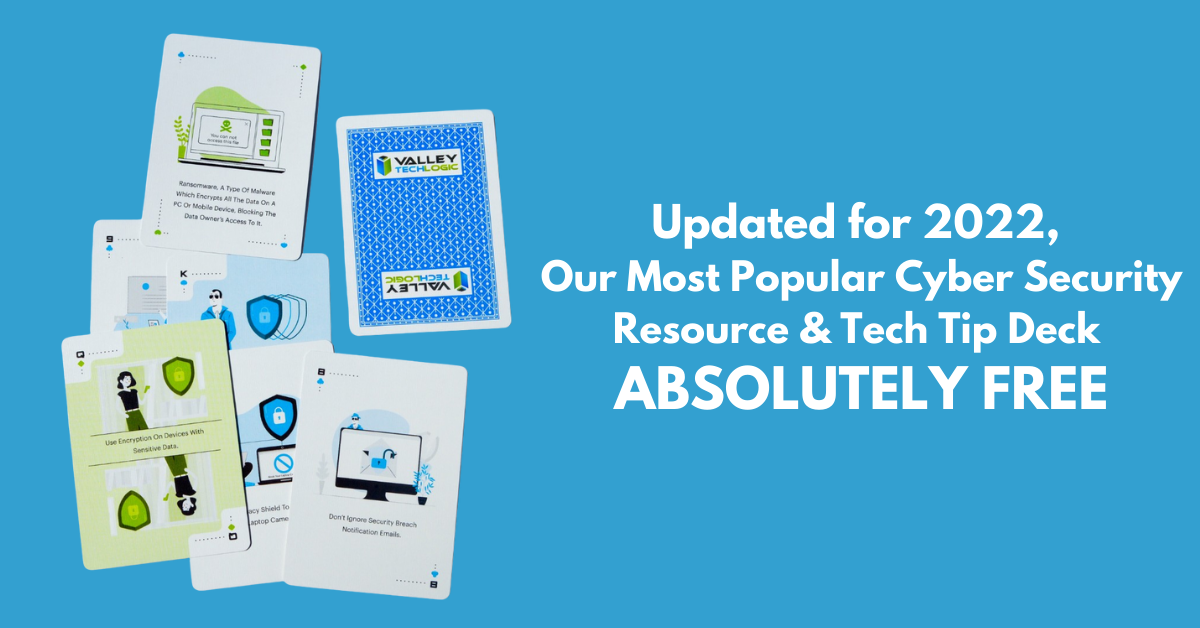

  • We have updated our most popular resource for 2022 and have an offer you won’t want to pass up

    We have updated our most popular resource for 2022 and have an offer you won’t want to pass up

    As an IT service provider, we’re passionate about cybersecurity because we see the effects having inadequate coverage can have on businesses first hand.

    The devastation that can occur after a cyber attack is staggering, we’ve given you the statistics before, such as:

    1. The cost of cybercrime is predicted to hit $10.5 trillion by 2025
    2. Cryptojacking cases quadrupled in 2021, but the hackers don’t make very much (less than $6 per day), however that doesn’t stop them from trying to gain access to your machines
    3. It takes on average 287 for cybersecurity teams to detect and contain a data breach
    4. Phishing is involved in 36% of data breaches (can you identify the signs of a phishing email?)
    5. DDoS (Distributed Denial-of-Service) attacks are skyrocketing, with 9.75 million occurring in 2021

    That’s why we’re thrilled to announce the release of our Tech Tip Card Deck, our deck contains 56 tips for getting your cybersecurity house in order with custom art representing each tip. Best of all, the deck is absolutely free to business owners in our area.

    Beyond providing comprehensive technical support, we also want to support our community in staying safe online. If you’re a business owner in Central Valley and would like to have a set of our card deck for yourself, simply visit TechTipCards.com and request one today and we’ll get it shipped out to you ASAP.

    We don’t believe technology has to be intimidating, each bite sized tip featured in the deck is easy to understand and easy to implement and will create real results for the online safety of yourself, your employees, and your business.

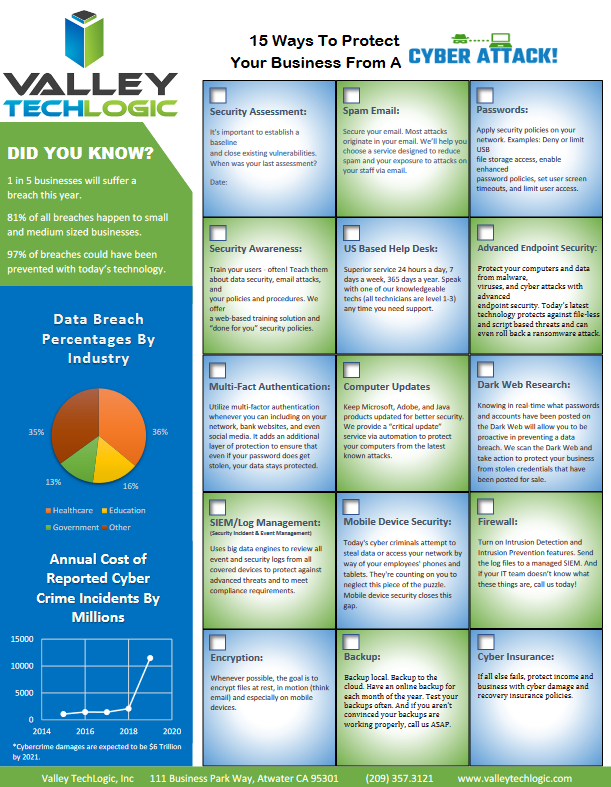
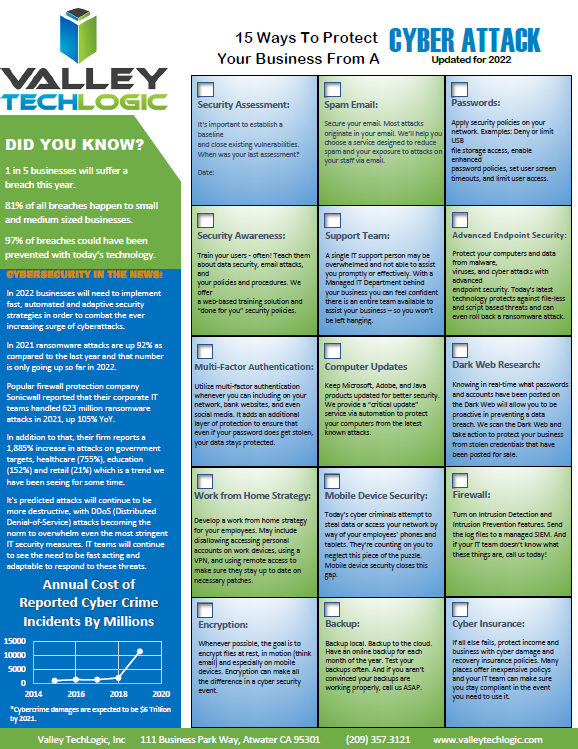
    To up the offer even more, we have updated our most popular for 2022 and are also offering it to you right here, right now. Simply grab it below.


    Valley Techlogics Cybersecurity Checklist
    Click to grab the full size version.

    Both of these are just a small showcase of what’s in store, we know for most people repetition is the key to success. We plan to deliver weekly content including thought provoking reports, eye catching resources that can even be customized for your office, and tech advice that can greatly impact and improve your use of technology within your business.

    If you’d like to learn more, again visit TechTipCards.com or reach out to us for a free consultation today.

    Looking for more to read? We suggest these other articles from our site.

    This article was powered by Valley TechLogic, an IT service provider in Atwater, CA. You can find more information at https://www.valleytechlogic.com/ or on Facebook at https://www.facebook.com/valleytechlogic/ . Follow us on Twitter at https://x.com/valleytechlogic.
  • Our Five Best FREE Resources Ranked

    Our Five Best FREE Resources Ranked

    At Valley Techlogic we believe educating our community on internet safety and providing concrete goals for businesses in our area to help improve their cybersecurity measures whether or not they’re covered by a Valley Techlogic plan is a valuable resource our company can provide to make us all a little safer online.

    We’ve provided quite a few free resources and reports over the years, and we couldn’t help but notice which ones really have struck a cord with our audience.

    Here are our top five free resources and reports, ranked by popularity. Bonus, you can grab all of these right from this page, still absolutely free.?

    #5 The Data Contingency Planning Report

    Our Data Contingency Report tells you EXACTLY what you need to have a solid plan for backing up your business’s files. Click to grab the report now instantly.

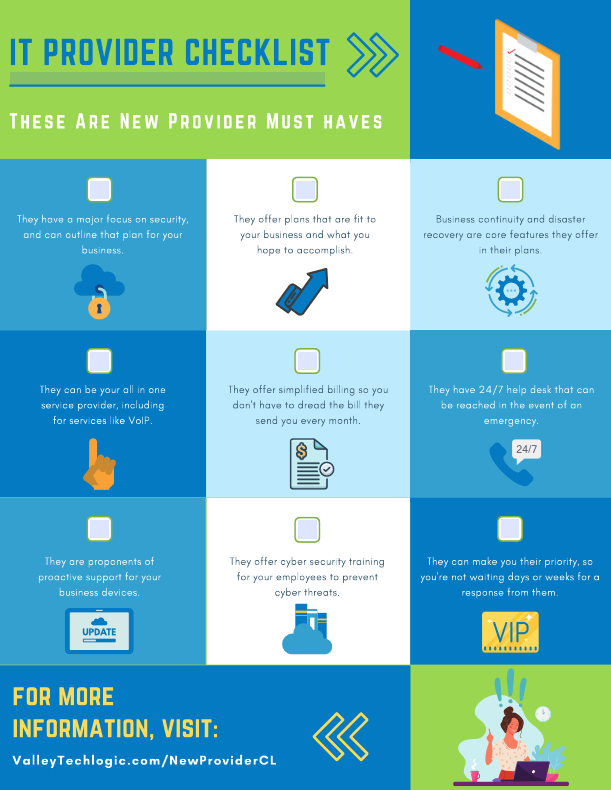
    #4 The New IT Provider Checklist

    Our New IT Provider Checklist lets you check off the MUST have for your new IT provider. If they don’t cover one or more of these items, you should keep looking.

    #3 Our Section 179 Guide

    Our Section 179 helps you get the best tax benefits from the tech purchases you make for your business. We’ll have the updated 2022 version available later this year.

    #2 Our Cyber Security Framework Overview Report

    Our Cyber Security Framework Overview Report goes over in plain text a number of popular frameworks, CMMC, HIPAA and more.

    #1 Our Cyber Security Checklist

    By far our most popular resource, this no nonsense checklist gets straight to the point on what you need to be fully covered from cyber threats.

    To receive these resources and more, reach out to us to be added to our mailing list. That way you’ll be the first to receive tech tips, free reports and resources and more.

    Looking for more to read? We suggest these other articles from our site.

    This article was powered by Valley TechLogic, IT service provider in Atwater, CA. You can find more information at https://www.valleytechlogic.com/ or on Facebook at https://www.facebook.com/valleytechlogic/ . Follow us on Twitter at https://x.com/valleytechlogic.

  • High Tech Holidays – Five Ways Technology Can Make Your Holiday Season Easier

    High Tech Holidays – Five Ways Technology Can Make Your Holiday Season Easier

    We’re right in the middle of the holiday season right now, and we thought the best gift we could give to you (our readers) is some advice straight from the tech experts on how to use technology to make your holiday season easier.

    We have five tips to utilize technology for an efficient and fun holiday season.

    1. Long Distance Calls Don’t Have to Be Expensive: If your phone is stuck in the past make it your New Years resolution to change that. VoIP for home and businesses will save you money on traditional telecom costs, even when Aunt Brenda talks your ear off.
    2. Utilize The Cloud for All Those Photos and Christmas Cards: Skip hauling boxes of cards and photos up to the attic after the holiday season, scan and store those precious memories digitally in the cloud. Bonus, you never have to worry about a roof leak or other disaster ruining them.
    3. Designate a Network for Your Guests: For modern routers, giving out your Wi-Fi password to all your guests is no longer needed. You can activate a “Guest Network” in your router settings with its own password and name, and then turn it off when everyone goes home. You can even give your temporary network holiday themed names like “Winter WonderLAN” or “FalalaLAN”.
    4. Flying? Use a Fare Tracker: If your flight plans can be somewhat flexible, utilizing online fare trackers will be your best bet in saving you a lot of money this holiday season. They will help you figure out when the best time to purchase those tickets is. In the same vein, you can utilize price trackers for gifts you purchase online too.
    5. Get a Head Start on New Year’s Resolutions – Tech Edition: Another thing to consider is making some good tech hygiene a part of your New Year’s resolution. While you make changes in 2022 to make yourself healthier and happier, make your devices healthier too by keeping them up to date with security patches and updates (especially with vulnerabilities such as Log4J running amok).

    We hope these tips help you have a happy holiday at home. For your business, the holidays may represent a time of stress as you wonder if you’ll have coverage for the technology in your business or if your current service provider will be available to take your calls and service requests.

    At Valley Techlogic, we are dedicated to our customers success. We offer after hours, weekend and holiday support – usually at no additional cost for customers who have one of our service plans. Also, for the rest of December we’re offering one month FREE to new customers.

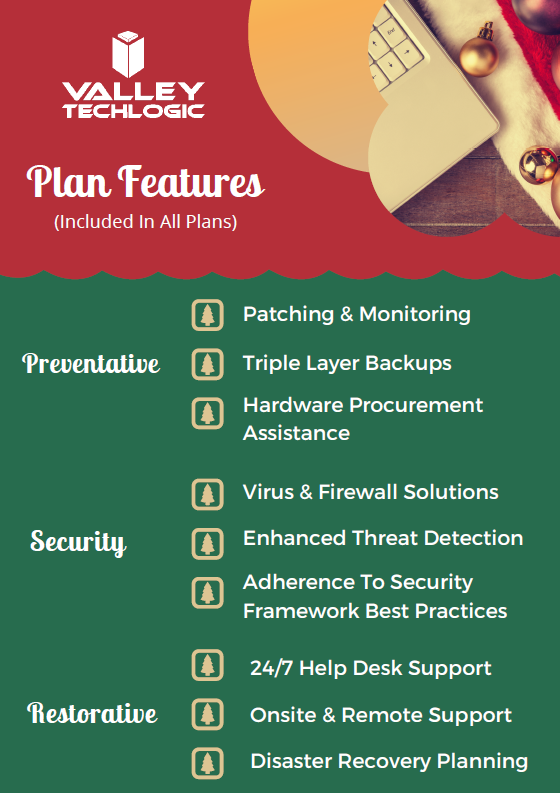
    To learn more about the kind of benefits you receive as a Valley Techlogic customer, we’ve created this chart:

    Click to see the full size version.

    As you can see, all of your preventative maintenance is covered under a Valley Techlogic service plan. This may even free up time for you if you’re a business owner who’s been handling a lot of these items yourself, which during the holiday season is invaluable. If you’d like to learn more schedule a quick consultation with us today. Happy Holidays!

    Looking for more to read? We suggest these other articles from our site.

    This article was powered by Valley TechLogic, IT service provider in Atwater, CA. You can find more information at https://www.valleytechlogic.com/ or on Facebook at https://www.facebook.com/valleytechlogic/ . Follow us on Twitter at https://x.com/valleytechlogic.

  • Can you spot the phishing clues? And 10 tips to avoid falling for a phishing scam

    Can you spot the phishing clues? And 10 tips to avoid falling for a phishing scam

    If you’re not aware, phishing is another word for scams perpetrated over email. It was coined in 1996 and was first associated with hackers attempts to steal America Online (AOL) accounts, and it has not slowed down since then.

    As of 2021 most hacking attempts are phishing scams, the phrase is meant to evoke the image of a hacker literally fishing for their victims by baiting a hook which in this case is a credible looking email from a place you might actually do business from, a colleague or a family member. 94% of malware attempts originate from an email sent to the victim.

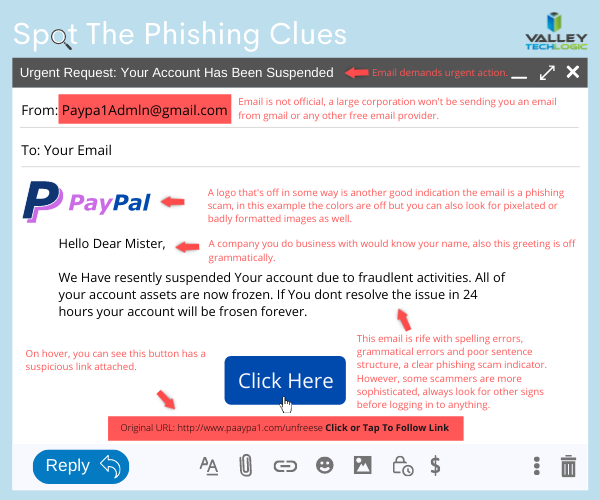
    Well as credible as they can manage, many phishing attempts are poorly worded and grammatically incorrect as the senders are from another country from the victim. In the image below we showcase a phishing email you might receive, click to reveal the answers.

    Spot the phishing clues
    Click to reveal the clues.

    Not all phishing attempts will be so obvious though, here are our 10 tips to avoid falling for a phishing scam.

    1. You are asked to reply with sensitive details. A legitimate business will never ask for your private details via email, if you’re unsure contact the business directly to ask.
    2. The message says you must respond urgently or face dire consequences. Legitimate businesses such as the financial institution you bank with won’t relay an important message over email alone, and they’ll never threaten you.
    3. The email contains a non-standard email attachment. While even standard email attachments can contain malware, a non-standard email attachment is a clear sign something is amiss.
    4. The senders email address doesn’t match the contents. As in our example, a legitimate business (especially a large one) won’t be using a gmail address. You also want to watch out for slight misspellings, such as an email coming from admin@paypa1.com
    5. The email contains an unusual request. You receive an email that looks like it’s from your boss, and he’s saying he wants to reward some key players in your company by gifting them gift cards from a popular big box store. He says not to give them to the players directly, simply reply with the gift card numbers and he’ll handle it. This is just one example of a scam we have unfortunately heard of happening. If the email is requesting large amounts of money be spent in unusual way or private details be sent over email, even if the email looks legitimate you should verify with the supposed sender first.
    6. It has an attachment you weren’t expecting. If receive an email with an attachment and the body suggests you requested information, but you don’t remember doing so, it’s probably a phishing scam.
    7. The email says you won a prize, but you must enter your banking information to claim it. Prizes are a common phishing scam trope; they may also try to get you to download a suspicious attachment.
    8. The URL in the email doesn’t match the business it claims to come from. As in our example, phishing attempts often involve a similar but not quite right URL. Many scammers will try to gain the victims trust by sending them to an “official” looking website where they will login with their legitimate credentials, allowing the scammer to gain access.
    9. The content is canned. Many phishing scammers reuse the materials of others. One example is you receive a suspicious sounding email, such as someone saying you have stolen their copyright images and you must visit a website to confirm. If you Google the email you may find examples of others online who have received that same
    10. The greeting doesn’t match the content. This is a simple one, if you receive an email supposedly from your boss but the greeting starts with “Dear” or another out of character greeting, it’s probably a phishing attempt.

    This is only a start, many phishing attempts are highly sophisticated and difficult to spot but knowing some of the signs will help you be more attentive to things that may be wrong with an email you receive. We also have found for our clients, randomized simulated phishing attempts can help them with training their staff to keep an eye out for phishing attempts.

    Most successful hacking attempts involve a human element, training is your only first line of defense. If you would like to increase your defense against phishing attempts, malware, ransomware and more, Valley Techlogic can help. Schedule an appointment with us today to learn about our comprehensive cyber security packages for businesses.

    Looking for more to read? We suggest these tech articles from the last week.

    This article was powered by Valley TechLogic, an IT service provider in Atwater, CA. You can find more information at https://www.valleytechlogic.com/ or on Facebook at https://www.facebook.com/valleytechlogic/ . Follow us on Twitter at https://x.com/valleytechlogic.
  • The 5 Biggest Mistakes Business Owners Make With Their Technology

    The 5 Biggest Mistakes Business Owners Make With Their Technology

    Running a business requires wearing a lot of hats. You must dabble in a little bit of everything – accounting, management, human resources, technical support.

    We’re all told the best leaders know how to delegate but that can be hard when you’re talking about the business you’ve painstakingly built with your time and effort. Most business owners don’t clock out when the 9-5 day is over, a Gallup poll found that 39% of business owners work more than 60 hours per week.

    Tech News #12

    It’s not just about time logged either, there’s more stress and more on the line. You can’t simply find another job if your business fails, once you’ve owned your own business it can be impossible emotionally to untick that box and work for someone else. That’s not even considering the fallout of a business failing and the mess it leaves behind.

    But enough of the doom and gloom, as a technology company we’re here to support the businesses we take on as clients and lead them down the best possible path. That includes guiding business owners to smarter decisions when it comes to their technology.

    Here are the 5 biggest mistakes we see business owners make from a technology standpoint.

    1. Not keeping your hardware up to date. Look, we get it. Hardware is expensive, especially if you’re making a larger purchase for multiple employees or investing in a new server. However, this is not something you can put off until later. Waiting until your hardware fails will leave you with both the expense of new hardware and the expense of the downtime while you’re waiting for that new hardware to be deployed. We don’t think it makes sense to wait and be double billed, do you?
    2. Not keeping your software up to date either. Updates can feel like a hassle (especially if you’re performing them yourself) but it’s not a good idea to put them off until later. There’s a cumulative effect when you wait. What was once a simple update becomes a complex package of updates that will take longer and leave you with a gap in your coverage that could leave you open to the negative effects those updates were trying to prevent.
    3. Speaking of negative effects, ignoring cyber security. We get the “it will never happen to me” line all the time, and equally as often we hear from those same people later when it The phrase “Don’t be a statistic” is used frequently in cautionary tales and this is no exception. 76% of businesses will experience a cyber-attack and we personally don’t recommend rolling the dice and hoping you’re not part of the majority.
    4. Forgoing any kind of training for employees. In the same vein as #3, some training in technology and how to use the equipment you’re providing employees is a must, and even if you operate on a BYOD (Bring Your Own Device) model you’re not off the hook. Most cyber-attacks happen due to human error. By not training your employees you’re not just giving hackers the keys to your office, you’re holding the door open for them.
    5. Thinking you can do it all yourself. Like we said, the best leaders know when to delegate. If you’re not a technology expert but you’re performing most or all of your own IT services what are you doing? How often does a technology snafu turn into an all day (and night) event? Are things in your business being neglected because you’re the only one that knows how to maintain them?

    There is a better way. Outsourcing is a scary word to many business owners, but the truth is help is out there and it’s local to you. We help business owners across the Central Valley who find that once the technology headache is taken off their plate, they have more time and energy to put back into growing their business. If you would like to find out more, reach out to us for a free consultation here.

    Looking for more to read? We suggest these tech articles from the last week.

    This article was powered by Valley TechLogic, an IT provider in Atwater, CA. You can find more information at https://www.valleytechlogic.com/ or on Facebook at https://www.facebook.com/valleytechlogic/ . Follow us on Twitter at https://x.com/valleytechlogic.

  • Considering Moving to the Cloud? Here Are 5 Things You Should Know.

    Considering Moving to the Cloud? Here Are 5 Things You Should Know.

    Moving to the cloud makes sense for a lot of businesses. The infrastructure required for a business level technology setup can be difficult to budget for, and you also have to consider the ongoing maintenance required.

    Even if your business has an onsite server, it makes sense to have a cloud backup. This way if anything happens to your physical server, you have a backup ready. There are even archival backups available that are incredibly safe from cyber attacks (this is something we offer as part of our TechVault service, you can learn more here).

    Here are 5 things you should consider as you venture into the cloud computing space.

    1. Compatibility. You need to consider whether the cloud service you’re moving to is compatible with your existing software and services for a smooth roll out. Since cloud services are usually used to host remote setups, this is especially important if you don’t have all of your employees at a singular location. Also, if your business uses legacy systems, it may be more difficult and complex to move to the cloud but not necessarily impossible.
    2. Internet Connection. Another thing to consider is the type of internet connection your office has. If you have a slow or unreliable connection, it may make rollovers from backup more difficult. It may be worth looking to see if higher speed/increased bandwidth internet solution is available at your office location to help support your cloud solution.
    3. Service Level Agreements. Most cloud providers have guarantees they spell out in these agreements regarding uptime and maintenance. You will want to review these agreements carefully and make sure the arrangement will work for your particular business. We have a free report on the cost of downtime here.
    4. Disaster Recovery. Piggybacking off topic number 3, you also need sure they cover you on the off chance there is a disaster on their end as well as support your efforts to recover if something happens to your onsite backups. Many cloud service providers offer this type of support for an additional fee or as a service add-on.
    5. Scaling. Finally, you want to pick a provider that can grow with your business. One of the benefits of a cloud solution is the ability to scale without the expensive upfront cost. When it comes time to upgrade you should know how easily you can move from one plan to the next.

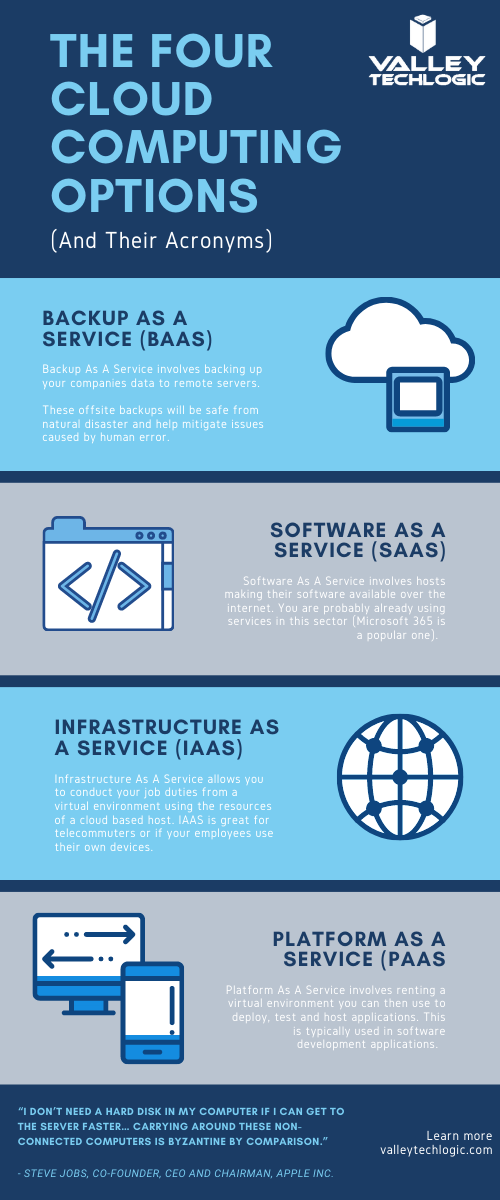
    As a bonus, here is our chart of common Cloud acronyms found in this space.

    Chart With Cloud Acronyms

    Backup solutions, including those in the cloud, can be a complex undertaking. You want to make sure It’s done correctly so if the time should come that you actually need to utilize that backup it goes as smooth as possible and doesn’t leave your business down for an extended period of time.

    At Valley Techlogic we are experts in the field of crafting backup solutions tailored to the businesses we service. If your business is located in the Central Valley and you need assistance in creating a reliable backup solution for your business, we’re happy to provide a free consultation. You can schedule one here.

    Looking for more to read? We suggest these tech articles from the last week.

    This article was powered by Valley TechLogic, an IT provider in Atwater, CA. You can find more information at https://www.valleytechlogic.com/ or on Facebook at https://www.facebook.com/valleytechlogic/ . Follow us on Twitter at https://x.com/valleytechlogic.

  • Top 10 Tips for Managing Your Social Media Presence

    Top 10 Tips for Managing Your Social Media Presence

    As a technology service provider, we don’t think it’s much of a leap to weigh in on the topic of social media, there are many technical aspects that come with managing your business’s presence on all the various social media platforms. You may be asking yourself if it’s worth the effort or which ones would be the best fit for your business – or even how to go about setting them up in the first place.

    We have to be honest that we’re somewhat “green” to this space ourselves, having only dived into it within the last year in earnest. However, I think this gives us a unique perspective as we’re not claiming to be experts. We use and have grown within the social media space this year and these are our tips for getting started.

    1. Claim Your Business. Whether you plan to move forward with a platform or not, we recommend claiming your business identity on as many of the networks as you can, by doing this you can ensure your business name is not taken by someone else later on.
    2. Start And/Or Finish Filling Out Google My Business. While not a social media account per se, Google My Business is a crucial advertising tool that allows visitors to reach not only your website but also all of your social media accounts through a Google search. It is important to maintain this account with valid information.
    3. Fully Fill Out Your Profile Pages. As with Google My Business, it’s important to fully establish the profile before jumping into posting content. The more information about your business you can provide the better.
    4. Decide Which Platforms to Focus Your Efforts. Not every platform is a good fit for every business, you need to go to where your customers are. We recommend LinkedIn and Facebook as good places to start but depending on your business sector platforms such as Instagram or Twitter may net you a good response as well. Even TikTok may be worth the effort for your business depending on your overall audience.
    5. Post Regularly. You should set a schedule and stick to it when it comes to sharing content on social media, these platforms reward regular activity by focusing more eyes (and potential customers) at business’s who utilize their platforms consistently.
    6. Share Things About Your Business. Customers like to get an “inside look” into the inner workings of the business’s they’re thinking about engaging with, especially in the business-to-business sector. Share things like company events and photos to engage with your audience on a personal level.
    7. Share Custom Content. Another idea for content is to share things you make or blogs you post. Both Google and the social media platforms reward custom made content.
    8. Invite People You Know to Like Your Page. When first starting out it’s a good idea to invite customers and colleagues to like your social media pages, this allows them to receive the updates you post and helps you begin building an audience.
    9. Consider Paid Activity. We don’t suggest trying this off the bat but once your page is somewhat established, you might consider paid ads through these platforms to drive the content you’re creating and sharing to an even wider audience.
    10. Engage With Your Audience. Our final tip is just to remind you to always engage with your audience, responding to comments not only lets you form a connection with potential clients but it also shows that your business is proactive and responsive.

    We also found this article on Facebook statistics really helpful when it comes to evaluating Facebook in particular. Facebook falls just behind YouTube and Google on having the most web traffic, but that’s still hundreds of millions of users.

    One bonus tip, many of us don’t consider YouTube to be a social media application, but it really is. Not only can you connect with your audience on a personal level through video, it’s also connected to Google as they own it. Building up a business YouTube account can also lead to more traffic from Google.

    We hope these tips help with getting started in social media, while outside our normal scope if your business would like advice on this topic or on any of regular service topics feel free to reach out.

    Looking for more to read? We suggest these tech articles from the last week.

    This article was powered by Valley TechLogic, an IT provider in Atwater, CA. You can find more information at https://www.valleytechlogic.com/ or on Facebook at https://www.facebook.com/valleytechlogic/ . Follow us on Twitter at https://x.com/valleytechlogic.