Author: rory-admin

  • 5 Ways You Can Prepare Your Technology (and Your Employees) to Return to the Office

    5 Ways You Can Prepare Your Technology (and Your Employees) to Return to the Office

    Whether your employees are still mostly remote, or you’ve moved into a hybrid setup, many employers are looking to return to business as usual as COVID numbers drop and speculation increases that we’re moving into the endemic phase of this illness.

    We covered this topic much earlier in the pandemic, and we still agree with the advice we gave for prepping employee devices before bringing them back into the company network. We’re all aware of the waffling opinion about whether offices are really necessary or remote work is the wave of the future.

    For some businesses the collaboration that occurs in person just couldn’t be replicated remotely, while others found that their employees were even more productive when not subjected to the hustle and bustle of office life. These choices are best made on an individual company and even individual employee basis.

    We do think it’s a good idea to offer some more sound technology advice for returning to the office, even if you’re only considering the idea for now.

    1. Check on your office network: If your office has been mostly unused the past couple of years, or only lightly used, it may be a good idea to make sure your network can still support your whole workforce. Employees coming in the first day and being unable to get online would be a poor way to kick things off.
    2. Think about your existing technology structure as well: Has a server become unreliable in the time you’ve been away, or your current backup solution handles small uploads fine, but your entire staff would overload it? It’s a good idea to perform these upgrades before welcoming employees back.
    3. Don’t switch the current workflow all at once: If there are systems in place that have been working throughout your time spent remote, don’t immediately switch back to “how things used to be”. It’s a good idea to evaluate whether the new systems and processes are perhaps better than the old ones too.
    4. Also be sure to check incoming devices before allowing them on the company network: As we said in our previous article, devices that have been allowed outside of the office should be checked prior to coming back and logging into sensitive work systems. Hackers know how to bide their time so just because a device hasn’t shown any signs of malware doesn’t mean there is no malware.
    5. Finally, now is the best time to bring in new assistance: An event such as returning to the office, or moving offices marks a great time to bring in technical assistance. A technical provider can help you get past where you are to where you want to be.

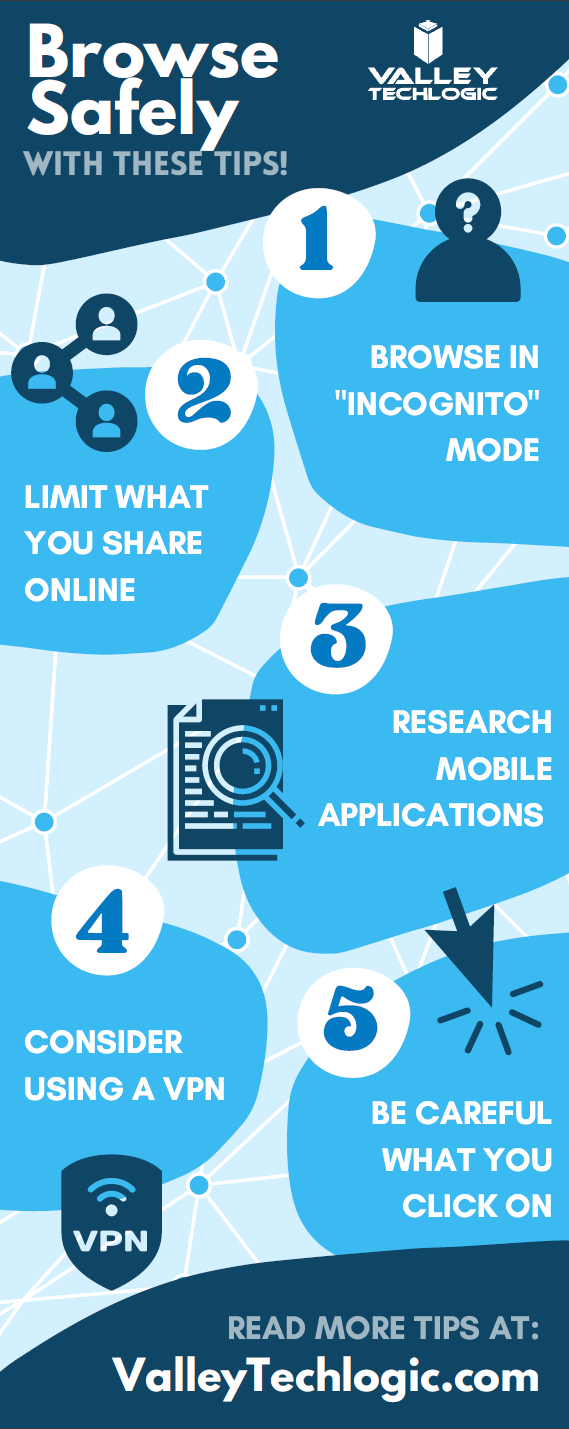
    Is your office planning to stay hybrid or continue remote? Even if you’re not returning back to the office – now or ever – we’ve created this template of online safety tips your employees should keep in mind. Whether it’s with a company device if you allow it to be used personally during off hours or just for keeping their home network safe (because malware can spread).

    Click to download the full printable version.

    In the office, remote or anything in between, Valley Techlogic can assist you with getting the most from the technology you use to facilitate running your business. Learn more with a free 10 minute consultation.

    Looking for more to read? We suggest these other articles from our site.

    This article was powered by Valley TechLogic, IT service provider in Atwater, CA. You can find more information at https://www.valleytechlogic.com/ or on Facebook at https://www.facebook.com/valleytechlogic/ . Follow us on Twitter at https://x.com/valleytechlogic.


  • CMMC Series: The Consequences for CMMC Non-Compliance

    CMMC Series: The Consequences for CMMC Non-Compliance

    You may have thought we finished our series on the Cybersecurity Maturity Model Certification (CMMC) program, but we would be remiss if we didn’t cover the consequences and penalties for not complying with the program if you’re a current Department of Defense (DoD) contractor.

    You may be thinking there’s a window to wait and see while rulings proceed on version 2.0 or have seen dates such as 2025 thrown out as the goal post for when the program will be completely finalized. Or maybe you’re just hoping the whole thing goes away, we get it. Looking at all of the controls and tiers can be overwhelming if your business is new to implementing cybersecurity measures.

    However, the program is here to stay, and your business will be much better equipped to meet the requirements if you begin working on them now. There is a waiting list already for those wishing to obtain their certification earlier, and we expect the wait times to only grow as nearly 40,000 businesses who must comply with this program rush to get their certification before losing eligibility for existing contracts.

    Beyond existing contracts, having your CMMC certification will make your business more competitive when seeking new contracts with the DoD. Progress towards CMMC is an investment in your business’s future, and it also meet the goals of the program which is protecting businesses from cyber threats.

    So, what are the consequences for not working on CMMC compliance now, or in the future?

    The DoD has said that all Defense Industrial Base (DIB) contractors must be compliant by 2025. There are no direct monetary penalties or fines for not being compliant at this time, however your business will no longer be eligible for defense contracts if you have not successfully completed your accreditation by that date.

    Three years may seem like a long time but when you look at the scope of what’s necessary to be compliant with CMMC, it’s really a short window to get your ducks in a row. Tier one could be accomplished relatively easily by most businesses, but if your business handles any Confidential Unclassified Information, you’re really looking at a goal of tier three moving forward (or tier two if/when version 2.0 is released).

    That’s also not counting the time spent in a waiting list for a member of the CMMC Accreditation Body to actually complete your assessment, you will need to work on your self-assessment status and POAM (Plan of Action and Milestones) prior to getting on the waiting list for CMMC accreditation.

    It’s also important to note that your self-assessment must be confirmed by company leadership, it’s not enough to simply have your IT person or team complete the self-assessment and submit it.

    The DoD has said they will randomly test contractor compliance and see if it matches what the contractor has inputted into Supplier Performance Risk System (SPRS). SPRS is a necessary requirement for being compliant with Defense Federal Acquisition Regulation Supplement (DFARS) which many contractors may already be aware of. They will be looking to see if your disclosures for DFARS in regards to CMMC/NIST match.

    Submitting false information could make your business at risk for running afoul of the False Claims Act (FCA), which could leave you liable for civil fines and penalties. There is even a program in place to reward whistleblowers who bring to light businesses who are falsifying information about their cybersecurity practices on these forms.

    This is all so much to say as there are significant risks involved with ignoring CMMC and we suggest you begin working on it now or we’re afraid you’ll be paying for it later.

    If you need assistance with working on your CMMC accreditation, cybersecurity practices and compliance, DFARS forms or more – Valley Techlogic can assist you. Schedule a consultation today to learn how we can help your business meet your CMMC compliance goals for 2022.

    VTL Can Help With Your CMMC Progress!

    Looking for more to read? We suggest these other articles from our site.

    This article was powered by Valley TechLogic, IT service provider in Atwater, CA. You can find more information at https://www.valleytechlogic.com/ or on Facebook at https://www.facebook.com/valleytechlogic/ . Follow us on Twitter at https://x.com/valleytechlogic.
  • If you enabled 2-factor authentication on your Google account recently, your odds of being hacked dropped by half

    If you enabled 2-factor authentication on your Google account recently, your odds of being hacked dropped by half

    Google began requiring 2-factor authentication on some user accounts this past year, and while there’s always some inconvenience involved in making that switch the benefits definitely outweigh it.

    Google enrolled 150 million members in the last three months of 2021 in their 2-factor authentication program, and they’ve found that instances of accounts being hacked dropped by half for those users.

    Google utilizes two-step verification, or 2SV which involves having a login challenge beyond a simple password entry. This may be a message in Google’s own authenticator application or a hardware security key depending on user preference.

    Google said in their blog post on the topic, “This decrease speaks volumes to how effective having a second form of verification can be in protecting your data and personal information, turn on 2SV (or we will!), as it makes all the difference in the event your password is compromised.” Indicating Google’s plan to initiate the requirement across the board in the near future.

    The hesitancy with users to utilize such an effective security measure seems to stem from inconsistent implementation as well as a general lack of education on the topic. We thought it would be helpful to present this “cheat sheet” on multi-factor authentication and other cybersecurity acronyms.

    Cybersecurity Acronym Cheat SheetWith breaches being ever more common, having that additional step past just a password before a hacker can access your account can make all the difference. A password you use across multiple website (which is also a bad idea) may be leaked without you even being aware of it, and the prompt from a multi-factor authentication application may even be your first clue that your accounts are being accessed by someone other than yourself.

    Google’s own authenticator is found on the Play Store and the Apple App Store and is a solid option, however we suggest users use whatever they feel most comfortable with or whatever is offered by the the websites they frequent (especially for important sites like banking or for work related web portals).

    To add to your security effectiveness, we suggest using a password manager as well so you can work on having more varied passwords – especially for sites that don’t currently offer multi-factor authentication as an option.

    If you’d like tangible security, hardware security keys are a good option and many of them have widespread support for your online accounts such as email, social media, or even your password manager (adding another layer).

    Your devices also probably come with multi-factor security options built in, we’ve been pleased with the implementation of Windows Hello for Windows devices (even when we’re bleary eyed in the early morning, it always seems to recognize us). Fingerprint scanners for mobile devices have also come a long way and is a pretty convenient (and secure) way to keep access to your phone limited to just you.

    If you’re a business owner in the Central Valley and want to embark on the process of enabling multi-factor authentication within your business, Valley Techlogic can help. Our security experts can help you with enabling multi-factor authentication within your business as well help you meet your cybersecurity compliance goals. Reach out to us today to learn more.

    Looking for more to read? We suggest these other articles from our site.

    This article was powered by Valley TechLogic, IT service provider in Atwater, CA. You can find more information at https://www.valleytechlogic.com/ or on Facebook at https://www.facebook.com/valleytechlogic/ . Follow us on Twitter at https://x.com/valleytechlogic.

  • CMMC Series: Preparing for your assessment

    CMMC Series: Preparing for your assessment

    This is our fifth article on this topic and as we bring it to a close, I’d like to first look back at what we’ve covered so far.

    We started the series looking at what’s ahead for the Cybersecurity Maturity Model Certification (CMMC) program in 2022. Then we covered tiers one, two and three as they exist in the current 1.0 model of the program. We’re anticipating that tiers two and three will be merged going forward as version 2.0 rolls out (placing a larger burden on defense contractors looking to scale past the beginner controls in tier one and become more competitive in the marketplace).

    So, if you’re reading this you’ve hopefully begun the process of implementing the controls within your business and are thinking it’s time to begin the process of obtaining your certification. There are several steps that come before actually obtaining your certification (although it should be noted that the CMMC Accreditation Body is currently in the process of hiring and waiting lists for certification could be lengthy at this time). The sooner you begin implementing the CMMC controls within your business, the sooner you can attempt to get on the waiting list to receive your certification.

    The assessment process will follow these steps:

    1. You will need to begin implementing a plan for CMMC within your business, and conduct a self-assessment against the NIST 800-171 (or partner with a provider like Valley Techlogic to assist you with this).
    2. As you improve your processes you can submit your score to the Department of Defenses’ (DoD) Supplier Performance Risk System (SPRS).
    3. From there you will need to identify the scope you wish to obtain for your business (it’s our opinion maturity level 3 will be required for most defense contractors in the future).
    4. Obtain a third-party gap assessment, this will show you where your business is and where it needs to be to achieve your goals.
    5. After addressing the gaps found in the assessment, you can look to the CMMC Accreditation Marketplace and choose a CMMC Third-Party Assessment Organization (C3PAO) to conduct your CMMC assessment.
    6. The CMMC Accreditation Body will review the assessment submitted by your C3PAO and award you your CMMC certification.

    Of course, this is boiling down many months (or even years) of preparation into what looks like 6 easy steps.  The process will be time consuming and potentially costly, but for those who wish to continue doing business with the DoD it’s a necessary investment in the future.

    As we’ve mentioned in past articles on the topic, defense contractors who refuse to comply with the CMMC process will no longer be eligible for defense contracts in the future. Beyond that, if you reach a higher level of certification, you will be in a better position to receive more contracts as it will be used as a comparative tool going forward.

    If you’re like assistance with the CMMC self-assessment process or preparing for your CMMC AB assessment, Valley Techlogic has experience in this area. We have helped businesses begin the process of becoming CMMC ready, if you’d like to learn more schedule a consultation with our experts today.

    Looking for more to read? We suggest these other articles from our site.

    This article was powered by Valley TechLogic, IT service provider in Atwater, CA. You can find more information at https://www.valleytechlogic.com/ or on Facebook at https://www.facebook.com/valleytechlogic/ . Follow us on Twitter at https://x.com/valleytechlogic.
  • Cyber Insurance – What you can do to ensure your business will be covered in 2022

    Cyber Insurance – What you can do to ensure your business will be covered in 2022

    Last month we released our new cyber insurance report which is an in depth look into this topic, but we wanted to touch on what we’re specifically seeing so far in 2022 in today’s article because from what we’re seeing in from our clients and in the industry – cyber insurance requirements are on the rise.

    If you’re new to cyber insurance or aren’t sure what’s covered under this sort of policy, for most insurance providers cyber insurance offers coverage for technology related disasters. This could include a cybersecurity event such as ransomware or a data breach but depending on your level of policy it might also include IT related downtime not related to cybersecurity such as internet outages. You may even see coverage for specific device issues, such as the loss of an office server that’s critical for day-to-day operations.

    When it comes to the cybersecurity related coverage what many people don’t realize is it’s not only meant for covering your own losses, but also the potential loss incurred by your customers. If you have a data breach, your cyber insurance coverage will cover the cost of any litigation brought by your customers and it may also cover items such as on-going credit monitoring if their PII (personal identifying information) was exposed in the data breach your company suffered.

    It can be easy to feel detached from a loss you haven’t suffered yet. To put some perspective to, it during the Anthem data breach in 2015 when involved 80 million patient records, their costs to notify their customers (which HIPAA regulations stipulate must be done by snail mail) exceeded $40 million in just postage. That’s not even taking into consideration all of the other costs associated with that breach.

    They’re a major corporation, so again it may be difficult to imagine yourself in those shoes, but even for small companies the average costs are as high as $200,000 per breach. Also, if you’re hit with a ransom and think you can just pay it and get out intact, think again. Many times, even if you receive the de-encryption key from the hackers your data may still be lost.

    It’s not surprising that insurance providers are looking at this and wondering how they can alleviate some of the risk they’re taking providing insurance to customers going forward. The requirements are increasing, even for us as a technology provider for businesses we’re seeing longer forms that we’re assisting our customers with when they go to acquire a new cyber insurance policy.

    These longer forms are featuring more difficult questions as well. We have made cybersecurity a staple feature of our plans so our customers are in a good place for obtaining a cyber insurance policy, but the truth is if cybersecurity has been on the back burner for your business, you may have a difficult time in 2022 and beyond finding an insurer that’s willing to cover you.

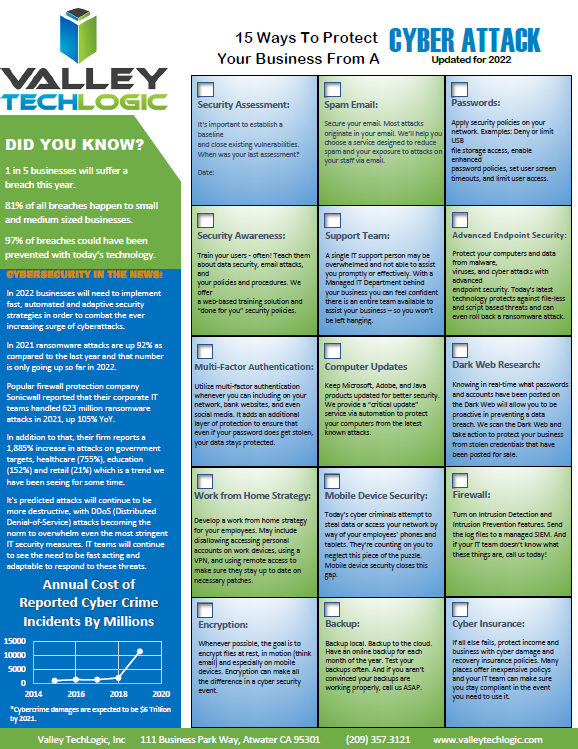
    As an idea of where to start before you go to obtain a cyber insurance policy, we’ve created this checklist of items you can begin to work on to put your business in a better position this year.

    Be Cyber Insurance Ready in 2022
    Click to grab the full size version.

    Many of the items listed are easy for even someone who’s not very tech savvy to tackle, but if you’d really like to protect your business from hackers this year, we suggest teaming up with a tech provider like Valley Techlogic.

    Cybersecurity is a core focus for our business, we will match your business with a cybersecurity framework that makes sense – for example CMMC for defense contractors, HIPAA for healthcare providers, NIST or CIS for small and medium sizes businesses of any industry – and use that framework to have a concrete game plan for making sure your networks and devices are impenetrable to bad actors. Learn more today with a quick consultation

    Looking for more to read? We suggest these other articles from our site.

    This article was powered by Valley TechLogic, IT service provider in Atwater, CA. You can find more information at https://www.valleytechlogic.com/ or on Facebook at https://www.facebook.com/valleytechlogic/ . Follow us on Twitter at https://x.com/valleytechlogic.

  • CMMC Series: Tier Three Overview

    CMMC Series: Tier Three Overview

    We’ve covered tier one and tier two of the Cybersecurity Maturity Model Certification (CMMC) program, and this week we’ll be tackling tier three.

    Before we dive in, we want to mention that we’re covering tier three as it exists currently (in 2022), version 1.0 has five tiers but once version 2.0 of the program releases it will be reduced to three tiers.

    What is currently tiers two and three will just be tier two version 2.0 of CMMC in the future, so it’s still worthwhile to pursue up to tier three in the existing model.

    Tiers four and five in the existing model (or tier three in the future in version 2.0 of CMMC) feature the highest level of protection and may not be necessary for most businesses pursuing Department of Defense (DoD) contracts. It’s estimated less than 1% of businesses will need to pursue beyond tier three.

    If you were to give the first three tiers’ labels, tier one would be considered “basic hygiene”, tier two would be “progressive hygiene” and in tier three you reach “good cyber hygiene”. By tier three your business will be well protected from cyber-attacks.

    Tier one had 17 controls, tier two added 55 more for 72 total, and tier three almost doubles the controls adding another 58 for 130 total.

    Level three expands on Access Control, which adds 8 more controls that focus on encryption and preventing unauthorized access to sensitive systems.

    Next, we see a new control in Asset Management that requests that you develop plans and procedures for handling CUI data.

    Audit and Accountability has 7 new controls that ask you to expand on your logging efforts as well as restrict access to those logs to only authorized users.

    Awareness and Training has one new control and it’s solely around providing and maintaining cyber training for your employees.

    Configuration Management adds three new controls, the CMMC controls in this category are looking for you to tighten up the configurations on your business’s devices, such as preventing downloads of unauthorized software and disallowing users to make security changes on their own.

    In Identification and Authentication we see four controls aimed at tightening up your user security, such as not allowing passwords to be reused and requiring MFA (multi-factor authentication).

    The two controls found in Incident Response ask you to track any incidents that occur and regularly test your organization incident response capabilities.

    Tier three Maintenance adds two new controls, one that asks you to sanitize any equipment of CUI data before it’s removed for maintenance and another that asks you monitor any media meant for testing or diagnostic purposes for malicious code before installing it on your devices.

    Media Protection adds four new controls, they all involve properly marking and restricting access to CUI data.

    Physical Protection in tier three of CMMC adds one control and it asks you to continue expanding on your efforts to prevent physical outside threats to the CUI data your business holds.

    Recovery also adds just one control and it’s aimed at having a schedule for your businesses backups that is strictly maintained and that proper storage capacity for your backups is provided and prioritized.

    Risk Management adds three controls, two are about maintaining risk assessments and developing plans to mitigate any identified risks. The third asks you to manage products not supported by vendors separately, including enforcing access and use restrictions on them. What they mean by this is if your business utilizes an older piece of software you’re not able to discontinue yet – you need to quarantine it to be in compliance with CMMC. Any piece of software not updated is a potential threat vector for your business.

    Security Assessment adds two new controls, they want you to monitor your security controls for ongoing efficacy and also have an independent security assessment conducted to identify any areas of risk that may be missed in your internal efforts.

    Not seen in tiers one or two, tier three introduces the first Situational Awareness control, and it asks that you begin to share cyberthreat intelligence found from reputable sources with your stakeholders. An example would be if there’s been an announcement of a breach occurring with a software your business uses, you would be obligated to share your knowledge of that breach as it becomes available to you.

    System and Communications in tier three adds the most new controls of any category with 15 controls in total. Controls in this category cover items such as ensuring proper information security across your in-house efforts in software engineering and system development to maintaining cryptographic keys for all the cryptography used on your systems. All of the controls are aimed at completing finishing touches when it comes to tightening up the security on your systems.

    Finally, System and Information Integrity adds three new controls. One asks that you beef up your efforts to block spam at all entry points, the second asks that you utilize all available efforts to prevent and detect document forgery and the third asks that you implement “sandboxing” to filter and block potentially malicious emails.

    As you can see, tier three greatly expands on the active role your business will need to take when it comes to cybersecurity measures. Implementing tier three will be made easier though as your business conducts the cumulative process of preparing better cyber readiness.

    For example, in tier two we saw monitoring efforts increase substantially, in tier three you can use the records that have been obtained to fill in the gaps that were uncovered in that process.

    Because such a small portion of businesses will need to obtain tiers four and five, we are not planning to have an in-depth article on those tiers. If you would like to have a consultation with Valley Techlogic on the CMMC process and the maturity level you will need to obtain for your business, you can schedule one here. In next weeks article we’ll talk about the CMMC auditing process and what you’ll need to do to prepare as your audit approaches.

    Looking for more to read? We suggest these other articles from our site.

    This article was powered by Valley TechLogic, IT service provider in Atwater, CA. You can find more information at https://www.valleytechlogic.com/ or on Facebook at https://www.facebook.com/valleytechlogic/ . Follow us on Twitter at https://x.com/valleytechlogic.
  • Five Must Have Features in a Business Continuity Plan

    Five Must Have Features in a Business Continuity Plan

    While business continuity plans should cover topics that extend beyond the realm of technology, it makes sense that technology naturally moves to the forefront when much of the focus of a good business continuity plan focuses on the ability to perform business functions as normal.

    Business continuity is defined as “”the capability of an organization to continue the delivery of products or services at pre-defined acceptable levels following a disruptive incident”, and disruptive event can have many meanings. It could be a natural disaster, a cyberthreat, or even a short-term outage situation like if your office loses power or internet access.

    You should have plans for both short-term and long-term outages written into your plan. However some studies have shown that as high as 51% of businesses globally do not have a business continuity plan in place at all, and what’s worse – only 10% of businesses who experience a disaster and do not have a business continuity plan survive.

    Who should make plans for your business if not you? If you have no continuity plan in place you may find that you’re scrambling to make decisions under duress and attempting to delegate to third party vendors who have their bottom line in mind, not yours.

    So, how do you start in creating that plan? The first step is to have an honest look at your businesses risk factors. This includes environmental factors, does your area face brown outs when the heat starts to peak in the summer? Or snow that prevents employees from reaching the office in the winter at times?

    Maybe there are some things that are individual to you, such as touch and go internet access in your office building or phonelines that are less than reliable. Do you have a server on its last legs that’s been acting finicky? Its eventual failure should be written into your continuity plan.

    You also need to look at your cyber risks, if your employees aren’t being training on cybersecurity safety then that’s a huge factor that must be addressed and planned for. You need to ask yourself what you would do if your data was breached, or an employee email was compromised.

    It’s overwhelming but as with most things starting the process is the hardest part and having a candid look at your business could mean eliminating certain risk factors (like moving data away from the server on it’s last legs into a cloud solution).

    You may even find ways to make your business more efficient, if you know brown outs are common where your office building is located in the summer perhaps you would make a plan to have employees work from home more during that time. Or having your internet service provider address the issue of frequent outages rather than just rolling with them as they occur.

    All in all, these are the five things we would suggest you focus on as you make your business continuity plan:

    1. Technology – How will employees continue to work if your office operations have been waylaid.
    2. Power – If power goes out what kind of backup plan will you need to have in place, such as a generator to keep your server online.
    3. Communications – Do you have a standard way with communicating with your employees? If you need to get a message out quickly to all of them, could you presently do that?
    4. Vendors – Inform your vendors of the provisions you’ve put in place in case a disaster were to occur, and inquire what plans they have in place on their end (because a disaster for them could be a disaster for you).
    5. Data Protection – Most businesses require an online presence to continuing operations, you will need provisions for if your data is compromised or inaccessible. At Valley Techlogic we suggest having a multi-layer backup approach, so if one backup is compromised you will have the others to fall back on.

    To get you started, we’ve prepared this emergency contact worksheet for your employees. You can fill in who they should begin to reach out to and what steps they should take if an emergency occurs. If you would like us to personalize it with your logo just let us know.

    Click to grab the full size version for your business. Need it personalized? Contact us.

    Valley Techlogic can help you to begin establishing a business continuity plan and also help you with mitigating risks to your business, learn more today.

    Looking for more to read? We suggest these other articles from our site.

    This article was powered by Valley TechLogic, IT service provider in Atwater, CA. You can find more information at https://www.valleytechlogic.com/ or on Facebook at https://www.facebook.com/valleytechlogic/ . Follow us on Twitter at https://x.com/valleytechlogic.

  • CMMC Series: Tier Two Overview

    CMMC Series: Tier Two Overview

    This is the third week of our Cybersecurity Maturity Model Certification (CMMC) Series. You can find week one, which was a look at what’s happening with CMMC in 2022 here. Last week, we gave you an overview of tier one which you can review here.

    Tier one in CMMC really covers the basic foundational steps you must take to move on to tier two and tier three. For some contractors, tier one will be enough to keep and maintain compliance with their Department of Defense (DoD) contracts. Every situation is unique, but broadly speaking if you don’t handle Controlled Unclassified Information (CUI) in your business – tier one will probably be the extent that you need to reach.

    If you do handle any CUI data, then we recommend you strive towards tier two or tier three. Many of the protections that come in the later tiers specifically cover how to safeguard this data and it’s in your businesses best interest to meet the requirements. While there are no direct financial penalties at the time of writing for not doing so, the DoD is considering a system of rewarding businesses who achieve greater CMMC maturity levels.

    If you and another business are exactly the same in what you do and, in your pricing, – or even if their pricing is a bit higher than yours – if they have achieved tier three cybersecurity maturity model certification and your business is tier one or not certified at all yet, it’s likely your competitor will win the bid.

    So, what goes into reaching tier two in CMMC?

    Tier two is the next milestone within CMMC, and the difficulty does scale considerably with each level. While tier one had 17 provisions, tier two introduces 55 more for a total of 72 practices you’ll need to cover to meet the requirements (the practices are cumulative).

    In addition to more practices tier two also introduces new domains.

    First there is Access Control, tier two access control looks to limit access to who can log into your organizations systems (and how much they can access when they do).

    Next is Awareness and Training, in tier two you will need to make sure your managers, administrators and anyone else you who would have access to sensitive systems is attending regular cybersecurity training.

    In Audit and Accountability, we look to maintain logs of user activity for review.

    Security Assessment is where we really begin to see accountability being held on organizations, you will need to conduct regular assessments as you work towards your cybersecurity goals and develop cybersecurity plans based on the assessment results.

    Configuration Management covers the need to manage the configurations of your office devices and equipment with cybersecurity best practices in mind.

    Identification and Authentication is similar to access control, but it specifically looks to limit sensitive systems to only those who should have authorization to access them.

    While tier one in CMMC only covered the basics and didn’t address what happens when you have a cyber incident, tier two starts to cover that with the Incident Response control.

    The Maintenance control in tier two actually refers to your devices and how you maintain them, and what you will need to do in case of their failure.

    Media Protection in tier two covers specific provisions around the handling and destruction of removable media, such as flash drives.

    We started looking at Physical Protection in tier one by keeping visitor logs, but tier two asks that you actually begin to escort guests through your facilities and screening personnel.

    Tier one surprisingly doesn’t ask that you backup your data (even though we would always recommend that) – in tier two Recovery you must have a plan for backing up your data.

    In tier two Risk Management, CMMC asks that you begin to conduct risk assessments and fix any vulnerabilities that are uncovered during the process.

    Systems and Communications Protection in tier two includes controlling communications within your organization, not just monitoring them.

    Finally, the System and Information Integrity domain covers actively monitoring your systems for breaches and quickly resolving any that come up.

    As you can see, CMMC maturity tier two dives into the deep end of cybersecurity, but the provisions it covers will make a discernible impact in your cyber readiness throughout your entire business.

    Does your business need to meet the requirements for being certified with CMMC? Valley Techlogic can help, we have experience helping DoD contracted businesses reach their cybersecurity and CMMC goals, as well as helping with the certification process itself. Learn more today in a free consultation.

    Looking for more to read? We suggest these other articles from our site.

    This article was powered by Valley TechLogic, IT service provider in Atwater, CA. You can find more information at https://www.valleytechlogic.com/ or on Facebook at https://www.facebook.com/valleytechlogic/ . Follow us on Twitter at https://x.com/valleytechlogic.
  • The 5G rollout and the concern over C-band has caused some airlines to cancel flights

    The 5G rollout and the concern over C-band has caused some airlines to cancel flights

    Even though major carriers AT&T and Verizon scaled back their 5G rollout scheduled for yesterday, some flights were cancelled or rerouted anyways due to the concerns that 5G could cause airline equipment to malfunction.

    AT&T and Verizon turned on sections of their C-band 5G networks across the US on Wednesday but have agreed to hold off on enabling it directly near airports for now. However, concerns still arouse that interference could occur for aircraft that use the same C-band frequency for their radar altimeters which they use in low visibility conditions.

    It’s estimated that 62% of our current airport fleet have altimeters equipped that will not be affected by the 5G rollout. Severe flight delays are still occurring across the country and also for international inbound flights, and there delays are compounded by the effects the Omnicron COVID variant has had on flights.

    The C-band 5G rollout has been delayed several times as carriers tried to negotiate with the Federal Aviation Administration (FAA) over their concerns. AT&T and Verizon have also agreed to run their towers at low voltages near airports initially so adjustments can be made to aircraft altimeters.

    C-band 5G will change data availability for mobile devices dramatically. It’s better equipped to handle bandwidth traffic at much higher speeds. It can be 10 times as fast as 4G in some scenarios and could make faster internet availability possible for those in rural areas.

    This band of 5G (also known as the “goldilocks band”) also performs better across longer distances than previous iterations. Verizon and AT&T has had a “low band” 5G option that covered large distances but only at the same speeds as 4G, or it could cover a very small area at the desired 5G speeds. The C-band variation of 5G can maintain it’s faster speeds across distances and through buildings.

    As our society continues to become more decentralized, 5G will enable more users faster access to the web on their devices no matter where they’re logging in from. It’s not surprising AT&T and Verizon bid $81 billion dollars for access to the C-band spectrum when it came up for auction.

    3G4G5G Differences Chart

    It’s not available to everyone at the moment though, Wednesdays rollout occurred in several major metropolitan cities. You also need a 5G capable device to access the 5G network, to see if you’re currently using the upgraded 5G look for a 5G+ or 5GuW symbol on your phone.

    How can the US fix concerns surrounding the 5G C-band and aircraft interference? France has successfully rolled out 5G without causing issues for airlines, they’ve ensured that 5G towers were tilted away from flight paths, they also use a slightly slower C-band spectrum to ensure aircraft safety.

    The current plan is for 5G to operate on the 3.7 and 3.98 GHz while flight radar typically operates on 4.2 to 4.4 GHz frequency band – leaving only a very small buffer. In Europe, 5G operates on the 3.4 to 3.8 GHz frequency band which still allows for vastly increased speeds over 4G but a much larger buffer against the aircraft radar frequency.

    Many of our customers currently take advantage of mobile data plans for their remote offices or while on the go. If you would like assistance navigating internet options for your business, Valley Techlogic can help.  Schedule a quick consultation with us today to learn more.

    Looking for more to read? We suggest these other articles from our site.

    This article was powered by Valley TechLogic, IT service provider in Atwater, CA. You can find more information at https://www.valleytechlogic.com/ or on Facebook at https://www.facebook.com/valleytechlogic/ . Follow us on Twitter at https://x.com/valleytechlogic.
  • CMMC Series: Tier One Overview

    CMMC Series: Tier One Overview

    Last week we covered a general overview of what the Cybersecurity Maturity Model Certification (CMMC) program is and what’s been announced for 2022 so far. Presently, there are five maturity tiers found in program, although if (or when) version 2.0 is released it’s been announced that the program will be simplified down to just three tiers.

    The changes that will be happening with version 2.0 however don’t affect tier one very much. Tier one covers basic cybersecurity hygiene in both versions of the program. It sets the groundwork for the later tiers and while the topics covered are “basic”, the foundational coverage they provide is imperative for any business – not just those required to adhere to CMMC for contractual or compliance reasons.

    The Cybersecurity Maturity Model Certification (CMMC) program includes 17 controls at the moment with 171 practices. Thirty of those practices are only found within CMMC and not in the framework which formed the basis for it (NIST) and are anticipated to be removed in version 2.0. However, in both version 1.0 and 2.0 there are 17 practices that must be adhered to for tier one.

    It’s important to note as well this process is not one and done, you must actively maintain your cybersecurity compliance to continue being certified within CMMC. Failure to do so could result in losing your certification, losing contracts that require CMMC compliance, and or even being fined for violating the False Claims Act (FCA) which will talk about in more detail in a future article.

    It’s beneficial to maintain your compliance to both adhere to the program and protect your business from cyber threats.

    In tier one the program begins with “Access Control” and there are five components. These components cover topics such as user privileges and controlling remote access and access to internal systems.

    The next control is “Identification and Authentication” which aligns well with Access Control, the two practices found within that control involve documenting those that access your systems and maintaining reports for those logins.

    Then we have “Media Protection” which has just one practice and it’s aimed at maintaining sanitation of your devices (such as removing sensitive data from hard drives).

    Next, we have “Physical Protection” and in tier one of CMMC this topic covers improving the way you surprise visitors to your office location (a lot of cyber threats stem from an attack known as “spear phishing”). There are four practices found under “Physical Protection”.

    “System and Communication Protection” has two practices and they’re both aimed at securing the private communication you and your employees have (that may include CUI – Controlled Unclassified Information – data).

    Finally, we have “System and Information Integrity” which has five practices that cover better securing your businesses systems, including performing needed updates, and monitoring for malicious code.

    As you can see, these basic practices set a good baseline for activities found in higher maturity tiers. In tier one “System and Information Integrity” you’re monitoring for malicious code – in tier two and three there are practices that stipulate how to actually deal with it.

    We will be continuing to provide more information on CMMC in this series, next week we will take an in depth look at tier two. If your business needs to meet the requirements for being CMMC certified, Valley Techlogic can help. We have experiences helping businesses achieve greater cybersecurity compliance and assisting them with the certification process. Learn more today.

    Looking for more to read? We suggest these other articles from our site.

    This article was powered by Valley TechLogic, IT service provider in Atwater, CA. You can find more information at https://www.valleytechlogic.com/ or on Facebook at https://www.facebook.com/valleytechlogic/ . Follow us on Twitter at https://x.com/valleytechlogic.