Tag: data recovery

  • 5 Smart Data Retention Policies and 3 Data Saving Pitfalls Costing Your Business Money

    5 Smart Data Retention Policies and 3 Data Saving Pitfalls Costing Your Business Money

    In today’s digital business landscape, how you manage your data is just as important as how you collect or store it. For small businesses, having a smart data retention policy isn’t just about staying organized, it’s about staying compliant, secure, and efficient.

    Whether you’re holding on to customer records, invoices, employee files, or emails, you need a clear plan for how long that data stays on your systems and what happens when it reaches the end of its lifecycle. Retaining everything “just in case” or deleting too soon can create legal headaches, security risks, or operational confusion.

    Let’s explore five data retention policies small businesses should implement, and three common mistakes you should absolutely avoid.

    ✅ 5 Smart Data Retention Policies to Implement

    1. Retention by Data Type

    Not all data is created equal. Treat it that way.

    Set different retention periods based on the type of data you’re storing:

      • Financial records may need to be kept for 7+ years (IRS rules).
      • Customer data may have different lifespans depending on usage and consent.
      • HR and employee records often follow labor law guidelines.
      • Emails may only need to be stored for 1–3 years unless tied to legal or financial records.

    Classifying data by type ensures your business is both legally compliant and operationally efficient.

    1. Automatic Archiving

    Out of sight, but not out of reach.

    Instead of deleting data prematurely, implement archiving policies that automatically move older, inactive data to secure long-term storage. This keeps your active systems clean and performing well, while still giving you access to historical data when needed.

    Modern cloud services and document management platforms often offer built-in archiving features, use them to your advantage.

    1. End-of-Life Deletion Protocols

    When data has outlived its purpose or retention period, it’s time to say goodbye — securely. Have a documented process for data deletion:

    • Use secure wipe methods to prevent recovery.
    • Maintain deletion logs for compliance.
    • Be especially cautious with personally identifiable information (PII) and health data.

    Deleting outdated data reduces your risk surface in the event of a data breach and helps you stay on the right side of data privacy regulations.

    1. Regular Audits

    Your business isn’t static, and your data policy shouldn’t be either. Review your retention practices annually to:

    • Stay aligned with evolving regulations.
    • Remove outdated systems or redundant storage.
    • Confirm your team is following protocols.

    Audits help identify gaps and keep your policy relevant.

    1. Employee Training

    Even the best policies can fall apart without employee buy-in. Train your staff on:

      • What data to retain or delete.
      • How to handle sensitive information.
      • Recognizing phishing or security threats that target stored data.

    Make data management part of your onboarding and annual training. It’s easier to maintain compliance when everyone’s on the same page.

    ❌ 3 Common Data Retention Practices to Avoid

    1. Keeping Everything “Just in Case”

    This is one of the most common — and risky — habits. Over-retaining data can:

      • Expose your business in a breach.
      • Increase legal discovery risks.
      • Cost more in storage and management.

    If you don’t need it and aren’t required to keep it then securely dispose of it.

    1. One-Size-Fits-All Retention Periods

    What works for one type of data might be a liability for another.

    Using a blanket policy for all files or records could lead to unintentional violations of compliance laws or operational inefficiencies. Customize your retention schedules by category and jurisdiction.

    1. No Defined Ownership of Data Management

    When no one is responsible, no one is accountable.

    Every small business should assign someone (or a team) to oversee data retention. This ensures policies are applied consistently and gives your staff a go-to resource when questions arise.

    Small businesses face growing data responsibilities, but they don’t have to face them alone. With the right retention policies in place, you can protect your business, reduce clutter, and maintain compliance without wasting valuable time or resources.

    At Valley Techlogic, we help small businesses build smart, secure, and scalable data strategies, including customized retention policies that align with your industry’s regulations and your company’s workflow. Need help building your retention roadmap? Contact us today to schedule a consultation with our team.

    Looking for more to read? We suggest these other articles from our site.

    This article was powered by Valley Techlogic, leading provider of trouble free IT services for businesses in California including Merced, Fresno, Stockton & More. You can find more information at https://www.valleytechlogic.com/ or on Facebook at https://www.facebook.com/valleytechlogic/ . Follow us on X at https://x.com/valleytechlogic and LinkedIn at https://www.linkedin.com/company/valley-techlogic-inc/.


  • McDonald’s AI “McHire” platform was breached, allowing for the potential exposure of 64 million applicants private data

    McDonald’s AI “McHire” platform was breached, allowing for the potential exposure of 64 million applicants private data

    For employers, sorting through applications is ordinarily a tedious but necessary part of the hiring process. Enter AI, with artificial intelligence employers can now have AI tools sort candidates based on specific prompt criteria, shortening the time it takes to sort through dozens or even hundreds of applications and propelling the most worthy candidates to the top of the list for human review.

    Or at least, that was the idea. However recently for McDonald’s that idea backfired with a simple mistake, a security flaw in their AI hiring platform dubbed “McHire” or McHire.com allowed attackers to access the logs of any user in the system simply by using the account and username “123456”.

    This allowed access to an administrator account for Paradox.ai, the vendor behind the creation of the McDonald’s AI hiring platform, and the ability to query “Olivia”. Olivia is is the chatbot potential applicants would chat with as they submitted their application.

    The data they were able to access included applicants’ names, emails, addresses and phone numbers. In total there were 64 million records accessible in the system at the time the breach occurred.

    Luckily, the security flaw was discovered by researchers instead of true bad actors. The breakdown of how it was discovered can be found on the blog by security researchers Ian Carroll and Sam Curry. We have reported on their research before when they discovered a major flaw with Kia and other car brand manufacturers allowing for remote access to vehicles (even while they’re actively being driven).

    It’s a sharp reminder that just because AI solutions may make things easier, doesn’t mean that best practices are automatically being followed. The human review is still an important component when deploying any system that will gather large amounts of PII (Personally Identifiable Information) and it’s important to know the rules and restrictions you must follow when collecting that data for your business.

    Below are three rules we recommend following when collecting PII in your business:

    1. Collect Only What’s Necessary (Data Minimization)

    Only gather the PII that is absolutely essential for the purpose at hand. Avoid collecting excess or sensitive data unless it is required. This reduces risk in the event of a data breach and shows respect for user privacy.

    1. Clearly Inform and Obtain Consent

    Be transparent about what data is being collected, why it’s needed, how it will be used, and with whom it might be shared. Always obtain informed consent before collecting any PII, especially for sensitive data like health, financial, or biometric information.

    1. Protect the Data with Strong Security Measures

    Use up-to-date encryption, access controls, and secure storage practices to protect PII from unauthorized access, loss, or misuse. Regularly audit systems and train employees on proper data handling procedures.

    These rules not only build trust with users but also help ensure compliance with regulations like GDPR, CCPA, HIPAA, CMMC and more. If compliance or data protection is a concern for your business, Valley Techlogic can be your go-to partner in creating secure data collection and safeguarding practices alongside deploying industry leading cyber security preventions within your business. Reach out today to learn more.

    Looking for more to read? We suggest these other articles from our site.

    This article was powered by Valley Techlogic, leading provider of trouble free IT services for businesses in California including Merced, Fresno, Stockton & More. You can find more information at https://www.valleytechlogic.com/ or on Facebook at https://www.facebook.com/valleytechlogic/ . Follow us on X at https://x.com/valleytechlogic and LinkedIn at https://www.linkedin.com/company/valley-techlogic-inc/.

  • Is the cloud still your best option or would an on-premises server be the smarter way to go? 5 facts to consider about both

    Is the cloud still your best option or would an on-premises server be the smarter way to go? 5 facts to consider about both

    Originally touted as the wave of the future “the cloud”, which is nebulous phrasing that basically means putting your data anywhere besides your direct location, is often seen as the solution for corralling data into one central online location that’s managed by someone else (IE cloud providers).

    However, rising costs of data storage and uncertainty surrounding data security and availability in the wake of ever-increasing data breach threats has meant more businesses are seriously considering their options when it comes to the best strategy for data storage in their business. Where once more and more businesses were on board with an all-cloud solution, now many are turning away from the cloud for on-premises solutions or even a hybrid solution.

    First, five facts to consider in favor of an all-cloud solution:

    1. Scalability: Cloud solutions provide on-demand scalability, allowing businesses to easily increase or decrease resources such as storage, processing power, and bandwidth, based on changing needs without having to invest in physical infrastructure.
    2. Cost Efficiency: Moving to the cloud can reduce capital expenses (CapEx) for hardware and maintenance. Instead, businesses can move to an operating expense (OpEx) model, where they only pay for the resources they use, thus reducing waste and optimizing budgets.
    3. Accessibility and Flexibility: Cloud platforms allow employees to access data and applications from anywhere with an internet connection. This supports remote work, global collaboration, and increases flexibility for businesses.
    4. Automatic Updates and Maintenance: Cloud service providers manage routine maintenance, security patches, and software updates, freeing up internal IT teams to focus on more strategic tasks, and ensuring systems are up to date with the latest technologies.
    5. Disaster Recovery and Backup: Cloud solutions offer robust disaster recovery options, ensuring data redundancy and availability. Cloud providers often have geographically distributed data centers, reducing the risk of data loss due to localized incidents and enhancing business continuity.

    On the other hand, here are five facts in favor of an on-premises solution:

    1. Greater Control and Customization: With on-premises servers, organizations have full control over their hardware, software, and network configurations. This allows for highly customized setups that can be tailored to meet specific business or security needs.
    2. Data Security and Privacy: On-premises storage allows businesses to maintain direct oversight of their data, which can be crucial for industries that require strict data security and regulatory compliance (e.g., healthcare or finance). Sensitive data stays within the company’s infrastructure, reducing third-party access risks.
    3. No Dependence on Internet Connectivity: Unlike cloud-based solutions that require constant internet access, on-premises servers allow organizations to access and manage their data even if there are internet outages or network interruptions, ensuring business continuity.
    4. Predictable Costs: While the upfront costs of on-premises servers can be higher, they are typically one-time capital expenditures. Over time, businesses have greater control over their long-term budget for hardware upgrades and maintenance without the recurring subscription fees that cloud services often require.
    5. Legacy Systems Integration: Many businesses have legacy applications or systems that are better suited for, or only compatible with, on-premises infrastructure. Keeping data and applications on-site ensures better performance and integration with existing, sometimes older, internal systems.

    There are factors to consider when it comes to choosing either cloud or on-premises for your business storage solution, but what about a mix of both? Maintaining an on-premises storage solution combined with a cloud storage solution as a backup gives you both the redundancy you need with the flexibility of cloud storage and alongside the control of an on-premises solution in a hybrid solution completely customized for your needs.

    In today’s world, data storage can be customized to your business’s specific needs and here at Valley Techlogic we are experts in developing backup solutions that work for you (through our program TechVault). Whether you’re looking to protect your current data, migrate your data to the cloud or to an on-premises solution, or even if you’ve reached this article while going through a data loss event – Valley Techlogic can help. Reach out for a consultation today.

    Looking for more to read? We suggest these other articles from our site.

    This article was powered by Valley Techlogic, leading provider of trouble free IT services for businesses in California including Merced, Fresno, Stockton & More. You can find more information at https://www.valleytechlogic.com/ or on Facebook at https://www.facebook.com/valleytechlogic/ . Follow us on Twitter at https://x.com/valleytechlogic and LinkedIn at https://www.linkedin.com/company/valley-techlogic-inc/.
  • The day the world stopped (for Windows users anyways)

    The day the world stopped (for Windows users anyways)

    Unless you’ve been living under a rock for the past week, you’re probably well aware of the worldwide outage that occurred last Friday effecting millions of Windows users and causing disruptions for airlines, healthcare facilities, banks and more.

    CrowdStrike, a cybersecurity technology company that provides endpoint protection and cyberattack response services to numerous Fortune 500 companies was behind the outage which was linked to a software glitch.

    The update that was pushed out Friday was supposed to just enable sensors on Windows devices to detect new potential threats, but instead knocked systems offline around the world. CrowdStrike utilizes an update mechanism they call “Rapid Response Content” which is supposed to react to threats in real time and push updates out to respond to those threats. As we know, time is of the essence with cybersecurity especially with Zero Day attacks.

    Instead of addressing threats though, a defect in the update caused an outage that has cost airlines in particular $860 million in losses during the course of the outage. Airlines even resorted to writing flight times on whiteboard in airports for travelers who had no access to flight information during the outage. Affected devices all displayed the infamous blue screen of death.

    Photo courtesy of Reddit user u/New_Fault_1002.

    It’s also being reported that cyber insurers are expected to only cover 10 to 20 percent of the costs associated with this outage, leaving much of the financial burden on companies still trying to recover from the disruption the outage caused to their business.

    The bittersweet news behind this outage is that companies with cloud facing options for their data recovered much more easily than businesses dependent on physical devices. For the example the healthcare sector, which despite the overwhelming coverage airports have received was the hardest hit with $1.94 billion in losses anticipated so far. Companies that could access unaffected devices to reach the data they had stored in the cloud were able to resume business as usual much quicker than those dependent on hard copy data found only on their Windows devices.

    CrowdStrike has pledged to keep an outage created by an update glitch from happening again by taking a more staggered approach to their updates by not having every user receive the same update all at once and also by having a more thorough process to vet updates before they go live.

    However, the fate of the company and its ability to rebound after such a critical failure is unknown at this point and they’re not winning any favors with a measly $10 gift card being offered as a “sorry” for the outage.

    For us at Valley Techlogic, the outcome of relying on having all of your “data eggs” in one basket is unsurprising. We have long been proponents of taking a layered approach to backups, two is good and three is better. Our backup service, TechVault, is included with all our service plans. If you would like to learn more, reach out today for a consultation.

    Looking for more to read? We suggest these other articles from our site.

    This article was powered by Valley Techlogic, leading provider of trouble free IT services for businesses in California including Merced, Fresno, Stockton & More. You can find more information at https://www.valleytechlogic.com/ or on Facebook at https://www.facebook.com/valleytechlogic/ . Follow us on Twitter at https://x.com/valleytechlogic and LinkedIn at https://www.linkedin.com/company/valley-techlogic-inc/.

  • You have cloud backups for your business, but are you wasting money on storage you don’t need? 5 ways to tidy up your cloud storage

    You have cloud backups for your business, but are you wasting money on storage you don’t need? 5 ways to tidy up your cloud storage

    The worst backup situation to have as a business owner is no backups at all, so if you’ve made keeping backups of your data a priority in your business, we want to encourage you to keep the effort up. Having data backups is crucial for making a full recovery in the event of device failure, cyber security breaches and more.

    With that said, the cost of storage and in particular cloud storage is something to be considered when formulating a plan for backups. With physical hardware you have a tangible wall that prevents storage costs from ballooning out of control, but with cloud storage no such wall exists. Your provider will likely sell you as much data storage as you need and if your backups aren’t set up in an efficient way you may find the costs continue to rise while not being entirely sure as to why.

    Here are five ways to setup efficiency for your cloud backup solution and keep costs under control:

    1. Implement Data Archiving Policies: Regularly archive older, infrequently accessed data to cheaper, long-term storage solutions. This reduces the cost of more expensive, high-performance storage.
    2. Use Tiered Storage Solutions: Take advantage of cloud providers’ tiered storage options. Store critical, frequently accessed data in high-performance storage and less critical data in more economical storage tiers.
    3. Automate Backup Schedules and Policies: Set up automated backup schedules to ensure data is backed up regularly without human intervention. Use policies to manage retention, ensuring outdated backups are deleted after a certain period.
    4. Compress and Deduplicate Data: Use data compression and deduplication techniques to reduce the amount of storage required. Compression reduces file size, while deduplication eliminates duplicate copies of data.
    5. Monitor and Optimize Storage Usage: Regularly review storage usage and costs. Use analytics and reporting tools provided by cloud providers to identify unused or underused resources and optimize storage allocation accordingly.

    By implementing these strategies, business owners can effectively manage their cloud storage costs and maintain an organized, efficient backup system.

    Did you know backups are a core feature of Valley Techlogic’s service offering? Not only can we assist you in maintaining your existing backups, we also will keep our own backup of your data as part of your service plan with us.

    You can learn more about our backup program here, but in a nutshell whether you want to keep your current backups and utilize ours as an additional copy or erase that expenditure from your billing and let us handle it – Valley Techlogic can support your business’s backup planning in addition to the other ways we support your business.

    Learn more today by scheduling a meeting with one of our experienced

    Looking for more to read? We suggest these other articles from our site.

    This article was powered by Valley Techlogic, leading provider of trouble free IT services for businesses in California including Merced, Fresno, Stockton & More. You can find more information at https://www.valleytechlogic.com/ or on Facebook at https://www.facebook.com/valleytechlogic/ . Follow us on Twitter at https://x.com/valleytechlogic and LinkedIn at https://www.linkedin.com/company/valley-techlogic-inc/.

  • Are you sure you can count on your data backups? 5 ways to confirm your backups are working (and avoid the 37% data backup failure rate)

    Are you sure you can count on your data backups? 5 ways to confirm your backups are working (and avoid the 37% data backup failure rate)

    Data backups are a big part of our service offering here at Valley Techlogic (learn more here) and we believe backing up your data is one of the easiest preventative option for a host of technology related headaches – including device failure, cyber breaches, accidental deletions and more.

    According to the statistics 91% of business organizations have some form of data backup in place but 76% report having a data loss in the last year. This tells us backups are happening, they’re just not happening very well.

    Here are five ways to check to see if your data backups are functioning as they should:

    1. Regular Backup Testing: Schedule regular tests where you restore data from your backups to ensure they are functional. This can involve restoring a small subset of data or running a full restoration process in a test environment.
    2. Data Integrity Checks: Use checksums or hash functions to verify the integrity of backed-up data. By comparing checksums or hashes of original data with those of the backed-up data, you can ensure that the backup process has not introduced any errors or corruptions.
    3. Backup Monitoring Tools: Implement backup monitoring tools that provide real-time alerts and reports on backup status, including successful completion, errors, or failures. These tools can help you proactively identify any issues with your backup process.
    4. Versioning Verification: If your backup system supports versioning, regularly check that multiple versions of files are being retained as expected. This ensures that you have access to historical versions of data in case of accidental deletions or data corruption.
    5. Backup Logging and Auditing: Maintain detailed logs of backup activities, including start and end times, success or failure statuses, and any error messages encountered. Regularly review these logs to identify any anomalies or patterns that may indicate problems with the backup process.

    Other pitfalls we see when it comes to backups? Not backing up everything you intend to, there’s nothing worse than going to look for a file and realizing it was deleted accidentally at some point. Or not moving your files to the intended central location that does receive regular backing up and experiencing a device failure.

    It’s a good idea to take a look at the full picture when it comes to backups, for many simply backing up your office server is enough because all work stems from that central location (this is especially true if you use a type of specialized software that all employees must work through and that software is stored on the office server).

    For others work is less centralized, and it might make sense to backup the workstations of specific employees because if their devices were lost, compromised, or broken it would also mean a loss of files that are significant to your day-to-day operations.

    Another backup related item to consider? Your email. While most email services offer ample storage, we still find it’s a good idea to add a backup to that just in case (and again, this is another protection against losing data due to a breach which occurs frequently with email). At Valley Techlogic we even have a product that can backup your Microsoft 365 data specifically, and if you use Word, Excel, PowerPoint etc. throughout your business or as your business productivity software suite of choice, this kind of backup coverage can go a long way.

    In a nutshell, if you’re looking for assistance in determining if your backups are functioning as they should, in expanding your backups to include more of your data, a switch from on-premises backups to cloud or even establishing backups from the ground up Valley Techlogic is able to assist you with all of these and more. Backups are one facet of the services you’ll receive as a Valley Techlogic client, so what are you waiting for? Get started today.

    Looking for more to read? We suggest these other articles from our site.

    This article was powered by Valley Techlogic, an IT service provider in Atwater, CA. You can find more information at https://www.valleytechlogic.com/ or on Facebook at https://www.facebook.com/valleytechlogic/ . Follow us on Twitter at https://x.com/valleytechlogic.

  • The biggest cyber security breaches of 2023

    The biggest cyber security breaches of 2023

    Now that it’s 2024 we’re reflecting on the biggest events in tech that occurred in 2024, and in today’s article we want to talk about the biggest cyber security breaches that occurred in 2023.

    Before we get into it, let’s talk about the hard numbers.  Across the board, cyber threats are up year over year and 2023 was no exception. Here are 8 eye opening statistics on cyber threats as of writing:

    1. The global average cost of a data breach is $4.45 million and a ransomware attack $5.13 million as of 2023.
    2. The average lifecycle (discovery to remediation) of a data breach is 277 days.
    3. 74% of data breaches still involve a human element in 2023.
    4. 64% of Americans have not checked to see if there data has been lost in a data breach.
    5. Almost half (46%) of all cyberattacks were on US targets.
    6. More than 1 million identities were stolen in 2023.
    7. 30% of those people were a victim of a data breach in 2023.
    8. 54% of office works express feeling “cybersecurity fatigue” in regards to news of data breaches.

    Unfortunately, public apathy towards cybersecurity preventions from ongoing, sustained attacks and the lucrative nature of successful attacks performed on business entities makes for a potent recipe in these attacks only continuing to increase in 2024.

    We want to take a look back at the biggest breaches that occurred in 2023 and also present our solution for preventing an attack of this nature from occurring to your business.

    1. MGM – Occurring in September, the unusual way MGM was breached made headlines because it did not initially involve a computer. Instead, attackers posed as people of importance to the company via a phone call and gained access to their systems, causing a loss of reputation, $100 million in damages, and 5 class action lawsuits to be filed.
    2. ChatGPT – Not even AI is safe when it comes to targeted attacks from hackers, in March of 2023 a bug in their source code exposed the personal information of a 1.2% of their Plus Subscribers including home addresses, full names and email addresses.
    3. MOVEit File Transfer System – The fallout from this breach that occurred in June 2023 extended far beyond the file system management software company itself, including California’s biggest pension fund holders CalPERS and CalSTRS.
    4. RockStar – RockStar is another example like MGM that proved hackers don’t need expensive equipment to breach insecure systems, with this breach being conducted using a cellphone, a hotel room TV and an Amazon FireStick.
    5. The City of Oakland – An entire city was the target of a hack that occurred in February of 2023, the sustained attack which lasted more than a week prompted the city to even declare a state of emergency while systems remained offline. Class actions lawsuits were also filed in the aftermath of the attack in this case.

    These are just five attacks that made major news last year, but there were thousands more that did not make major news. When an attack occurs on a small business many times it leaves the owners with no choice but to close up shop (60% of small businesses that are the victim of a cyber attack close within 6 months).

    As IT providers it’s a frustrating topic for us as so much of this is preventable. If more preventions were put in place and it was more difficult for attackers to realize their goals than it would have a cumulative positive effect overall. As the saying goes, an ounce of prevention is worth a pound of cure. Let us help you meet your cybersecurity goals in 2024 by clicking on the image below.

    Looking for more to read? We suggest these other articles from our site.

    This article was powered by Valley Techlogic, an IT service provider in Atwater, CA. You can find more information at https://www.valleytechlogic.com/ or on Facebook at https://www.facebook.com/valleytechlogic/ . Follow us on Twitter at https://x.com/valleytechlogic.

  • In 2023 some of the biggest cyber-attacks were orchestrated with “low tech” methods

    In 2023 some of the biggest cyber-attacks were orchestrated with “low tech” methods

    Whether you’re “tech aware” or not, most of us know that the human element is one of the riskiest elements of our business when it comes to our data being compromised.

    2023 proved that in spades with many of the largest attacks of the year being orchestrated with “low tech” methods – whether that be social engineering as we saw with MGM or literally low tech as with the attack on Rockstar that was conducted with a cellphone, TV and an Amazon Firestick.

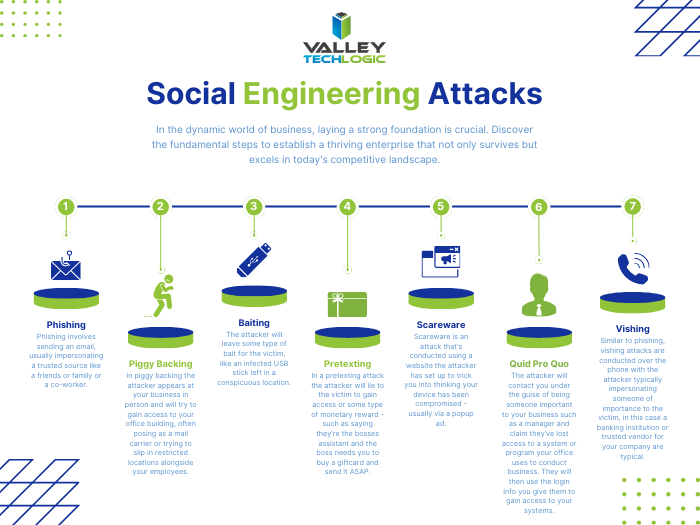
    Attacks such as the one on MGM are conducted with social engineering and the attacker doesn’t need to possess any particularly strong tech skills to pull an attack of that nature off. These attacks are usually accomplished through persistence – the attacker sometimes researches their target and reaches out to decision makers or those close to decision makers to try and gain access through Vishing, Phishing, and other methods (see our chart below for examples).

    They may also “bruteforce” their way in though not in the typical way you might think, compromised credentials are often found very cheaply on the web and many people use the same password for everything. The bad actor will again look for specific targets and then try to purchase credentials that will match their target.

    A common social engineering attack is orchestrated as follows:

    1. The attacker will research their target. This includes trying to figure out who is a decision maker or close to a decision maker. They may also look for details about you found on social media (such as family and friends names they can use to make their attack appear more legitimate).
    2. The attacker will reach out to the victim using what they have learned or try any credentials they’ve managed to find. They may pose as someone you trust and can even spoof that person’s email.
    3. They will use their access to infiltrate your systems or use your account to continue pursuing their target. They may not immediately make themselves known – many attacks are orchestrated over months or years to produce a bigger payout.
    4. Once they have successfully infiltrated your systems the attack may proceed in a variety of ways, whether that be trying to ransom back your compromised data or systems, threatening to release stolen data online if they don’t receive a payout, posing as you to your clients to expand their reach and more.
    5. The attack only ends when you can successfully remediate/remove their access.

    This attack is the end game for many attackers but not all attacks have this level of energy put towards them, phone scams and simple email phishing scams can look to steal your credit card or banking info for a quick payout and these sorts of attacks are conducted en masse often by attackers located overseas. Scams like these are still a variety of social engineering and quite effective – and again any data they manage to get in the process can also be sold on the dark web allowing these attackers to “double dip” on the profits they receive from their nefarious efforts.

    As we mentioned above many attackers are not conducted on a quick timeline, attackers know they can receive a bigger payout the more enmeshed they are in with the victim’s systems and data. Your system could be compromised right now, and you may not even know it.

    Data loss remediation and protection is just two of the cyber security offerings Valley Techlogic provides to help us protect our clients from social engineering and other cyber based attacks. Reach out today to learn more.

    Looking for more to read? We suggest these other articles from our site.

    This article was powered by Valley Techlogic, an IT service provider in Atwater, CA. You can find more information at https://www.valleytechlogic.com/ or on Facebook at https://www.facebook.com/valleytechlogic/ . Follow us on Twitter at https://x.com/valleytechlogic.

  • How to best utilize and organize OneDrive, the free cloud storage included with your Microsoft 365 subscription

    How to best utilize and organize OneDrive, the free cloud storage included with your Microsoft 365 subscription

    We find with our clients we find they’re often unaware they have a personal cloud storage solution right at their fingers tips and included for free with their Microsoft 365 subscription, OneDrive.

    Every Microsoft 365 business subscription user will have 1 TB of storage space free with their Microsoft 365 subscription. If you have an IT provider managing your Microsoft 365 subscriptions they probably have set this up to backup certain folders by default, usually your documents, pictures and desktop folders.

    These folders will automatically be synchronized to the cloud, so it provides excellent protection if one of your company devices is lost, stolen or breaks. It’s also a good cybersecurity measure to have your company workstations backed up in someway so if there’s ever a cybersecurity attack that effects your office, not all of your files will be lost.

    On that note, Microsoft does operate on what they call a “shared responsibility” model, so if your Microsoft account is compromised as well you may still lose those files even if they were backed up (which is why we always recommend enabling 2-Factor Authentication, Microsoft makes it easy).

    If OneDrive is successfully enabled on a device you’ll see a little blue cloud icon on your task bar, that when you hover over will tell you the status of your backup (it should say your files are up to date).

    Clicking on the blue cloud will allow you a glimpse at what files have been backed up recently, as well as a quick way to access the OneDrive folder located on your computer as well as the one that’s found online.

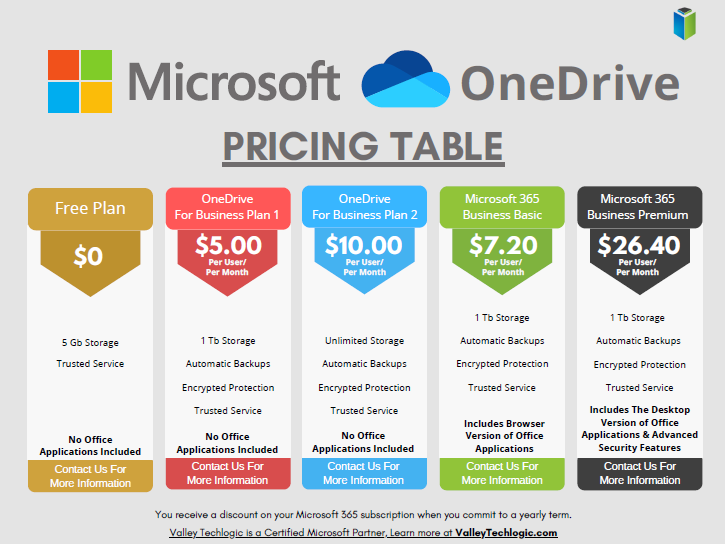
    1 Terabyte of storage is plenty for most users, but if you’re a heavy data user or someone in charge of most of the documentation for your office you may need more. Microsoft offers OneDrive plans outside of the 1 TB you receive for free as a Microsoft 365 user, see our chart below:

    Also, if you just want to try the service out but you’re not yet a Microsoft 365 user, you can either purchase a OneDrive subscription outside of the Microsoft 365 service (though we wouldn’t necessarily recommend it, Microsoft 365 is a better value) or you can test drive the service with their completely free 5 gigabyte storage option.

    5 GB is not a lot of storage these days but if you’re wanting to see if the service would be a good fit for you, it’s plenty for a good test run.

    Once you have your OneDrive set up, you might be thinking about how you’re going to organize it. Luckily, for the folders you back up any pre-existing folder organization you have will be backed up as well. If you have a sub-folder inside your Documents folder labeled “Mikes Important Files 8/20/2019” that same sub-folder will exist in your OneDrive.

    Besides that, here are 5 fast and easy folder organization tips:

    1. Don’t let files languish in your Downloads folder. I’m guilty of this myself, you’re busy and files you receive from colleagues or make just never make it out of their origination folder. It’s a good habit as you go to organization your new OneDrive space to sort things as they come in.
    2. Organize things by project or by date. When you’re looking for work and documents around a certain task or event, sorting by the date or by project is a good system to easily find them again. I’m in favor of by project myself.
    3. Use descriptive names, there’s nothing worse than trying to find a specific receipt if all your receipts from that store have the exact same name. Rename files so they’re easy to find.
    4. While sorting things when they come in is a good idea, even the best intentions fail when we get busy. Set up a time once a week to sort anything that gets left behind.
    5. Don’t make a folder for every single thing. You don’t want the solution to become worse than the problem. Group up items where you can (this is another vote in favor of sorting by project).

    If you need help with your businesses Microsoft 365 subscription and OneDrive, or just for tackling the topic of backups once and for all – Valley Techlogic is here for you. We even have our own backup solution for servers, TechVault. Learn more with a quick consultation today.

    Looking for more to read? We suggest these other articles from our site.

    This article was powered by Valley Techlogic, an IT service provider in Atwater, CA. You can find more information at https://www.valleytechlogic.com/ or on Facebook at https://www.facebook.com/valleytechlogic/ . Follow us on Twitter at https://x.com/valleytechlogic.

  • Your data is safer in the cloud, period.

    Your data is safer in the cloud, period.

    Speaking in absolutes is not usually a good idea, but in the case of data storage we feel the onus is on us to speak plainly – and it’s the plain truth that your data is safer in the cloud.

    It’s natural to be hesitant to move everything into the cloud, especially when it really wasn’t that long ago in the grand scheme of things that all data was stored in filing cabinets. Safely tucked away and (hopefully) properly indexed to be pulled out as needed.

    Sure, we didn’t have to worry about malware with paper files, but theft and natural disasters were the enemy of on premises paper documents. Or just the ravages of time wreaking havoc on plain paper and ink. You also had to make sure to shred important documents and not just trash them lest they fall into the wrong hands.

    With the advent of computers most of our data moved to our personal computers and it greatly elevated our ability to communicate that data to others. Multi-million-dollar transactions can be easily completed by simply emailing a proposal and contract. Billing information, medical documents, all of the private information about an individual or business is often times found online and is available to be pulled up when needed.

    But this ease of information is also it’s downfall. Old fashioned robberies where thieves would break into brick-and-mortar establishments and steal private information to then be used to create false identities and/or use payment details for their own benefit have now been replaced with often a single user attacking a small business’s online accounts. They can dismantle everything that business has built in days or even hours and make recovering difficult or even impossible.

    That’s not even taking to account that a single on-premises server is just as vulnerable to fire or flood damage as your filing cabinet is. A singed or waterlogged hard drive has no more usefulness than the same data contained in a charred or dripping stack of papers.

    Like with many things in life this problem is solved by working together with others, and that’s where cloud data solutions come in. It’s still your data and we, like you, think it should have the same level of accessibility as it does when it’s on your personal computer or even a paper file on your desk.

    With the high-speed internet most of us have in our homes and offices downloading files from the cloud is often a nearly instantaneous click of a button and then you’re working on the file you were last night. Make a mistake a few hours in? Another benefit of the cloud is you can often times roll back to an earlier version.

    The cloud can sound nebulous but it’s not, it’s just using the resources of companies that put their whole stake into safeguarding data. Their existence as a business is in keeping your data safe, companies that fail at that task don’t stay in business long.

    It’s really not that different than utilizing the services of the power company for all of your power, or your local ISP for all of your networking needs. These services work best when they’re maintained by companies that dedicate themselves to the task and can provide a high level of continuity.

    And there are some major players in the game, players that have been in the business of data and even computers themselves as a whole for decades. At Valley Techlogic we greatly utilize the power of Microsoft’s cloud service – One Drive – to collaborate within our business. It’s even paved the way for our remote employees to maintain productivity with the whole team without missing a beat. The default storage capacity is 1 Terabyte (TB) which is more than most users will ever need.

    If our office ever burned down with no one inside, we can state with the utmost confidence it would not affect our ability to do business. Could you say the same?

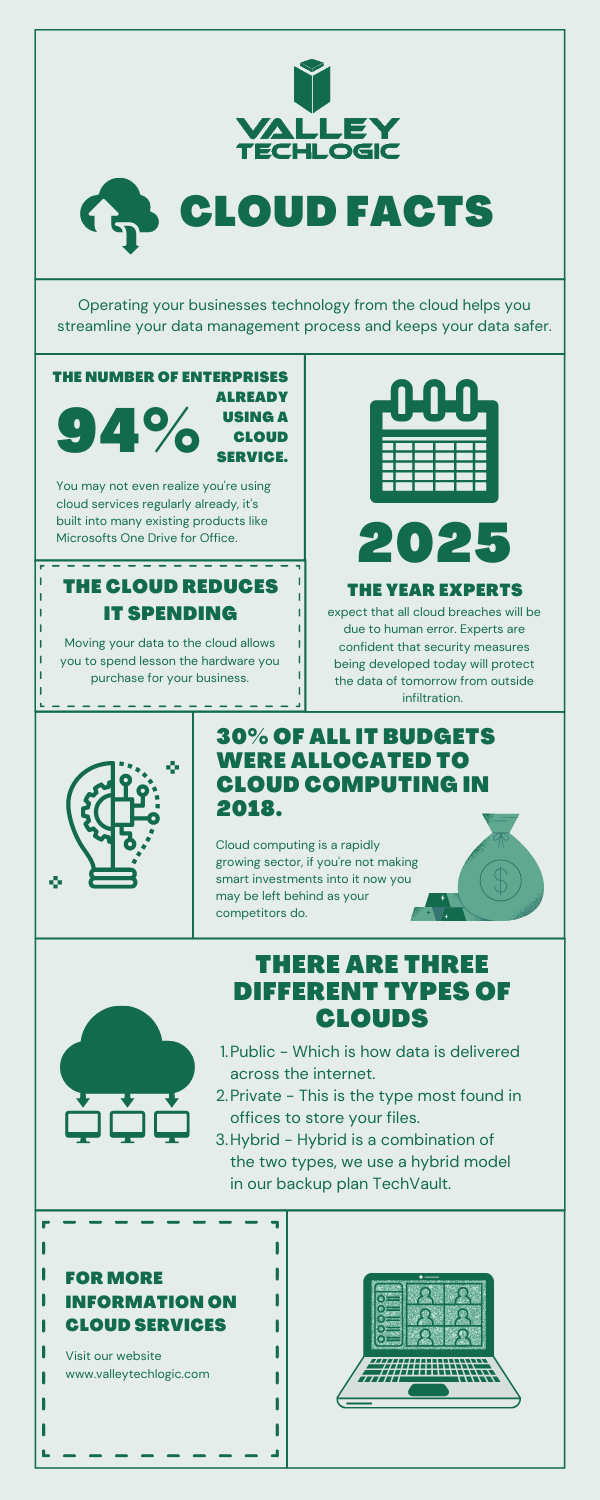
    Cloud Data Facts

    If you’re considering a move to the cloud for your business, we can help. Backups and data recovery solutions are a keystone piece of all of our service plans, learn more today.

    Looking for more to read? We suggest these other articles from our site.

    This article was powered by Valley TechLogic, an IT service provider in Atwater, CA. You can find more information at https://www.valleytechlogic.com/ or on Facebook at https://www.facebook.com/valleytechlogic/ . Follow us on Twitter at https://x.com/valleytechlogic.