Tag: it support

  • 6 Reasons to Choose a Managed Service Provider (MSP) Over Hiring an In-House IT Team

    6 Reasons to Choose a Managed Service Provider (MSP) Over Hiring an In-House IT Team

    When small businesses begin to grow, their technology needs quickly follow. At some point, every business owner faces a critical decision: should you hire in-house IT staff or outsource your technology support to a Managed Service Provider (MSP)? At Valley Techlogic, we’ve seen time and time again that choosing an MSP offers compelling advantages for small and midsize businesses. Here are six key reasons why.

    1. Cost Efficiency Without Compromise

    Hiring internal IT staff comes with a hefty price tag—salaries, benefits, training, equipment, and ongoing development all add up. And if your tech needs change, adjusting your team isn’t easy. MSPs like Valley Techlogic offer flexible, scalable support at a predictable monthly cost. You get expert-level service without the overhead of full-time hires.

    1. Access to a Full Team of Experts

    No single IT professional can master every area of technology. When you partner with Valley Techlogic, you gain access to a full team of specialists across cybersecurity, cloud infrastructure, network management, compliance, and more. This means no skill gaps and faster resolution to complex problems.

    1. 24/7 Monitoring and Support

    Tech issues don’t stick to business hours, and neither do we. Our clients benefit from 24/7 monitoring and support, reducing downtime and catching issues before they disrupt operations. With an MSP, you’re never left waiting for someone to return from vacation or respond after hours.

    1. Faster Response Times

    Our clients value speed, and they get it. Valley Techlogic offers clearly defined service level agreements (SLAs) and ticketing systems to ensure rapid response and resolution. Unlike relying on one in-house staff member who might be overwhelmed, our team is ready to act when you need us.

    1. Enterprise-Level Security and Continuity

    Today’s cyber threats are more advanced than ever. We provide enterprise-grade security tools, proactive threat detection, secure backups, and disaster recovery solutions. Valley Techlogic also helps ensure regulatory compliance for industries like healthcare, finance, and professional services, something a lone IT hire may struggle to maintain.

    1. Stay Focused on Growing Your Business

    Your team didn’t sign up to troubleshoot printers or stress over software updates. With Valley Techlogic as your IT partner, you can redirect internal resources to focus on what truly matters: serving your clients and scaling your business. Let us handle the tech, so you don’t have to.

    For small businesses, the choice between building an in-house IT team and working with a Managed Service Provider is about more than just cost, it’s about capability, reliability, and peace of mind. At Valley Techlogic, we specialize in helping Central Valley businesses thrive with customized IT solutions designed for growth.

    Ready to explore what an MSP can do for your business?
    Contact us today to schedule a free consultation and see how we can become your trusted technology partner.
    Looking for more to read? We suggest these other articles from our site.

    This article was powered by Valley Techlogic, leading provider of trouble free IT services for businesses in California including Merced, Fresno, Stockton & More. You can find more information at https://www.valleytechlogic.com/ or on Facebook at https://www.facebook.com/valleytechlogic/ . Follow us on X at https://x.com/valleytechlogic and LinkedIn at https://www.linkedin.com/company/valley-techlogic-inc/.

  • Black Friday Isn’t just for consumer purchases, business owners can take advantage as well with these tech deals

    Black Friday Isn’t just for consumer purchases, business owners can take advantage as well with these tech deals

    The holidays are rapidly approaching and with Thanksgiving and Black Friday this week we thought it would be a good idea to offer some tips when it comes to Black Friday shopping for your business.

    If you aren’t aware, “Black Friday” is the day following Thanksgiving when retailers offer deep discounts to entice buyers who are holiday shopping. These discounts also occur on technology purchases with laptops being a popular item.

    We’re Dell and Lenovo partners here at Valley Techlogic, and both have their holiday deals live now but things are selling out fast. Dell has laptops and desktops available as well as some peripherals. Lenovo even has a handy page for their Black Friday allowing buyers to sort by what they’re looking for easily.

    Another retailer you can look to for some Black Friday specials for your business is Best Buy. Following the trend this year they’ve also released some of their Black Friday specials earlier this year and would be a great place to look for a laptop or computer monitor.

    It also goes without saying that Amazon is a great place to look for those holiday tech deals, particularly when it comes to peripherals. If you have a business account with them you may even see better pricing then on your regular consumer account, it’s always worth checking.

    If you’re looking to buy in bulk, particularly if you’re also taking advantage of Section 179 this year, then we’ve got you covered. As we mentioned we have partnerships with both Dell and Lenovo and not only can we take advantage of their Black Friday pricing on your behalf, we can also work with our sales representatives to possibly secure a discount on top of that for larger purchases.

    The deals don’t stop at hardware, many software vendors will also offer deals for Black Friday especially in the creative space. Adobe Creative Cloud is 40% off this month and allows you access to Photoshop, Premier Pro and more.

    If you’re been looking for a new webhost Hostinger also has their hosting 80% off (hosting starting at $2.50 per month).

    We’ve also seen deals on VPNs and anti-virus software, though we recommend coordinating with your tech team on whether or not those are worth taking advantage of for your business.

    This year, we’ve decided to join in on the action and offer our own Black Friday Special, for five businesses that sign up we’ll be waving our setup fees and any payments until January 1st, 2023.

    Click to grab the full size version.

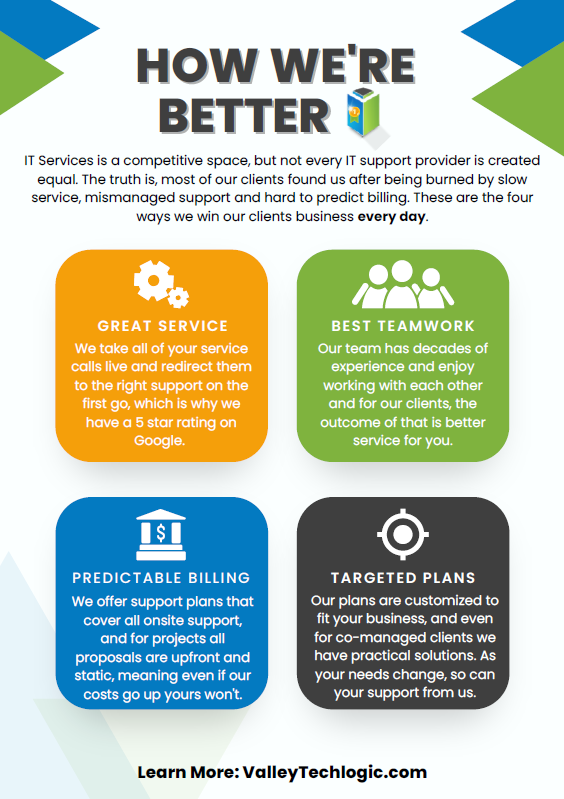
    If your current IT support has left something to be desired, why not start 2023 off on a better foot? Here are four ways we support our clients that differ from our competitors:itWe also make switching easy with our white glove hand off service, we will work directly with your current IT to make for a seamless transition. We can even provide a template for the letter you can send to discontinue your current service. What are you waiting for? Sign up today as this deal ends November 30th!

    Looking for more to read? We suggest these other articles from our site.

    This article was powered by Valley Techlogic, an IT service provider in Atwater, CA. You can find more information at https://www.valleytechlogic.com/ or on Facebook at https://www.facebook.com/valleytechlogic/ . Follow us on Twitter at https://x.com/valleytechlogic.

  • 10 ways to get the most out of your outsourced IT

    10 ways to get the most out of your outsourced IT

    Whether you currently have an outsourced IT resource or you’re considering one (which by the way Valley Techlogic can help with that), you may be wondering how to make the most of the service you’re paying for.

    First let’s describe what we mean by outsourced IT, any personnel resource that’s not directly hired by your organization is outsourced, and with IT specifically there are providers that will provide you access to their entire team for a singular fee (which is often times lower than the cost of hiring one full time person would be).

    Another example is you do have in-house IT personnel, but they’re overwhelmed and unable to keep up with he demand of your organization, or there are projects that fall outside their scope of expertise. In either of these cases, it can make sense to contract with an IT provider to fill in the gaps.

    A third scenario is you have regulatory factors within your business sector and need specialized support to meet those requirements. It can be cost prohibitive as a singular organization to acquire the protections needed but an IT provider is able to share that cost across many clients, which in turn lessens the cost for you and provides the other benefits of outsourced IT as an added bonus.

    There may be a misconception that “outsourced” always means “outside the US”, at Valley Techlogic our technicians are local and able to assist our clients onsite as needed on top of providing remote support. It’s a good idea to ask that question of your provider, especially if they will be handling all of your IT.

    Now that we’ve covered what it means to outsource your IT, here are ten ways to make the most of the services you’re paying for:

    1. Reducing redundancy. You may have redundant IT services you’re paying for, we can identify those services and remove them.
    2. Increased cybersecurity protection. To sum a complicated topic up simply, outsourcing your IT to a provider like Valley Techlogic means you will probably have access to advanced cybersecurity solutions that you may not have otherwise had access to.
    3. Backup for your backups. You hopefully already have a backup plan in place (if you don’t we can help with that too) but are you always sure it’s running appropriately? Part of our daily quality assurance checks is making sure all of our client’s backups are performing optimally.
    4. More time for your existing IT personnel. If you already have IT personnel, they may be swamped just with your day-to-day tasks, if you outsource your IT you can lessen the load so they can focus on business forward activities.
    5. Less time spent down. Downtime is expensive for businesses, your outsourced IT resource should be focusing on eliminating as much downtime as possible due to outages, hardware malfunctions, etc.
    6. Procurement assistance included. Procuring hardware has been more difficult lately due to chip shortages and other delays, our resources for procurement become your resources and we can help you source the equipment you need at possibly a better value.
    7. 24/7 support. Even if you have existing IT staff it’s not realistic to expect them to be on call 24/7, with Valley Techlogic we have a team of technicians, and someone is always available to take your call.
    8. Bring it all under one umbrella. Similar to number one, we can bring all of your IT spending under one umbrella. This includes your Microsoft spending because we’re a dedicated Microsoft partner.
    9. Expert advice. We don’t just provide expert services; we also provide expert advice to our clients on improving their technology and efficiency.
    10. Increased consistency. We usually find with new clients that there’s a lot to do in the beginning, but as we onboard our software and tools and regulate tasks such as performing updates and backup maintenance, the technology process becomes more consistent and reliable for them going forward as a result.

    If you’ve never outsourced your IT before, or have and it didn’t go well you may be wary about trying again with another provider. We value creating a smooth transition to our services for our customers, but we also know sometimes you just need to try something out before committing to it.

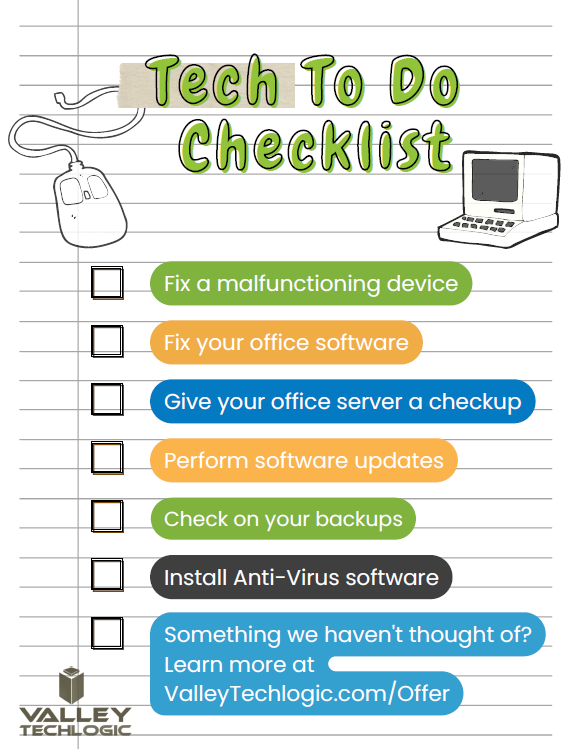
    That’s why we’re offering 2 hours of service free to qualified businesses. Here’s a list of ideas for what we could tackle 2 hours on the table, we’re confident our technicians could complete any one of these tasks for you in 2 hours.

    Click to grab the full size printable version.

    Ready to learn more? Claim your 2 hours here or schedule a consultation with us today.

    Looking for more to read? We suggest these other articles from our site.

    This article was powered by Valley Techlogic, an IT service provider in Atwater, CA. You can find more information at https://www.valleytechlogic.com/ or on Facebook at https://www.facebook.com/valleytechlogic/ . Follow us on Twitter at https://x.com/valleytechlogic.

  • Why “DIY” IT is a bad idea as a business owner

    Why “DIY” IT is a bad idea as a business owner

    We get it, handing over any part of your business to someone who’s not you can be stressful and unnerving. You painstakingly grew your business to where it is today. You may still be personally vetting every new member who walks through your door.  Hiring technical staff can be an arduous process so it’s just made sense so far to learn the ropes yourself to keep devices up and running (and as maintained as possible).

    The problem is, you’re one person with a finite amount of time. By the time cracks start to show it’s often too late, things like server failure or a malware attack can cripple your ability to run your day-to-day operations and fixing it may fall outside the scope of your abilities, making it necessary to bring in emergency help (often at a premium).

    If you survived one round of that you may have vowed to find IT help, but even with a clear indicator of why you need it recently at hand it may still seem like a waste of time or money, and you talked yourself out of it. You may have been doing things yourself for years, what are the odds something catastrophic would happen again any time soon?

    Unfortunately, pretty good. As the famous quote by Joyce Brothers goes, “If you change nothing, nothing changes.”

    So, we thought we would give you some food for thought about other reasons (besides potential disaster) you should consider outsourcing your IT:

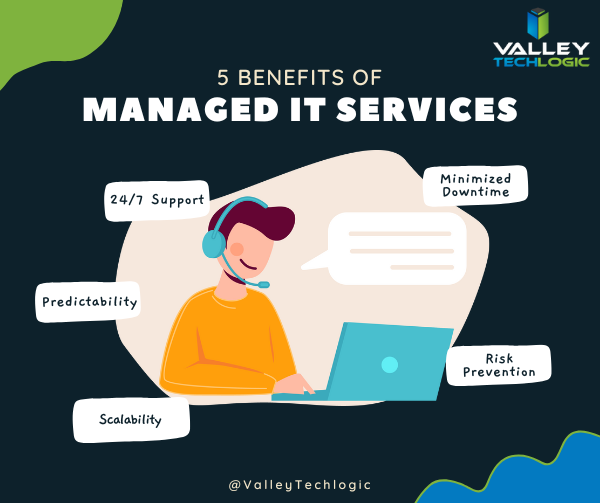
    1. 24/7 Support: This one’s easy, with a Valley Techlogic service plan 24/7 support emergency support is available to you – at no additional cost and no more late nights for you.
    2. Minimized Downtime: Time is money, and with a service plan from us you will spend less time troubleshooting problems and more time on your business.
    3. Predictability: We utilize best in class software to maintain a consistent technical environment for all of our clients, including managing computer updates, anti-virus software and more.
    4. Risk Prevention: Speaking of anti-virus, our cyber security approach doesn’t just help you recover from a cyber threat – it helps prevent one from happening in the first place.
    5. Scalability: This is a big one if you’ve been doing your own IT. We have service plans to fit both businesses who already have an available IT resource or those who want us to be their primary IT – with flexibility to change if needed

    As you can see, many commonsense features are built into all of our plans, but we do offer customization as far as how much or how little we do for your business. If you would like to remain as the primary IT resource, we have co-managed plans so you can still benefit from our solutions and proactive maintenance while still remaining the lead IT person.

    If after utilizing us for a while you’ve reached a point where you would like us to handle it all, we can then change your plan to our “managed IT department” where we are your go to resource for everything IT, your users can even call us if there’s a problem and we’ll take care of it.

    Whichever plan you choose, you’ll still always be “in the know” thanks to our comprehensive reporting and annual or bi-annual Technology Business Review (TBR) meetings where we go over how things are going and formulate a plan together to continue improving the service to fit your needs.

    Interested in learning more? Schedule a consultation with us today.

    Looking for more to read? We suggest these other articles from our site.

    This article was powered by Valley Techlogic, an IT service provider in Atwater, CA. You can find more information at https://www.valleytechlogic.com/ or on Facebook at https://www.facebook.com/valleytechlogic/ . Follow us on Twitter at https://x.com/valleytechlogic.

  • 10 things you can do today (yes today) to make your business’s network safer

    10 things you can do today (yes today) to make your business’s network safer

    There’s an onslaught of information aimed at internet safety and most of it lets be honest, falls on deaf ears.

    Most people online today feel like they’re technology savvy enough to avoid the scams out there (unfortunately at least 1 out of 6 are wrong) and even if you acknowledge tech falls outside your scope of expertise you’re still at risk.

    The good news is we have a list of 10 things you can do today even if you’re technologically challenged that will make a major impact on the network safety in your office.

    1. Confirm your backups are working. Backups are one of your best defenses against ransomware, especially if you have an archival copy which is a backup copy that’s made once and then tucked away until you need it (usually behind layers of security, like with our TechVault solution).
    2. Security awareness training for you and your employees. When we know better, we do better. Many security awareness training programs are implemented in bite size doses that are easy to squeeze into your day. It’s easier to avoid a phishing scam if you’ve seen the obvious examples through training.
    3. Speaking of phishing scams, don’t open suspicious emails. We’ve talked a lot about this topic including how to spot a phishing email, but email scams are one of the top ways hackers can infiltrate your network.
    4. Upgrade software that’s reached End of Life (EoL). If your office computers are still on Windows 7 it’s definitely time for an upgrade and technically you can still upgrade to Windows 10 for free. While other upgrades may not be free, it’s still a good idea to get rid of software that’s no longer being supported by the vendor.
    5. You should also make sure all the software you need to stay safe online is installed on your devices. Programs can go missing or just not be reinstalled if a computer needs to be wiped for whatever reason, you should make sure important software such as anti-virus detection is installed on all of your office computers.
    6. While you’re at it, it’s time to serious think about Multi-Factor Authentication. We always hear a collective groan when this topic comes up, but password managers have become much easier to use and can even make logging into the various sites you use to work easier. Here are our top picks.
    7. Remove any devices you’re no longer using from your network. Besides being a waste of electricity, devices connected to your network that aren’t being used can be vessels for infiltration if they’re not being kept up to date via patching etc. Get rid of them!
    8. Have a plan for reporting suspicious activity. Do your employees know what to do if they receive a suspicious email or their computers acting “funny”? Having a plan documented somewhere (even if the only advice is “Contact our IT service team”) can mean a cyber threat event is recorded and dealt with instead of just ignored because they didn’t know what to do.
    9. Have an office password policy guide as well. It’s a good idea to have a guide for passwords available to your employees, especially if it covers what not to do such as having your phone number or any other PII (Personal Identifying Information) as your password.
    10. Know when to ask for help. This list is a good place to start but if your business has no IT help now (or possibly worse, inadequate help) it’s a good idea to call in the experts. Calling Valley Techlogic for a free consultation is another step you can take today to improve the safety of your office network.

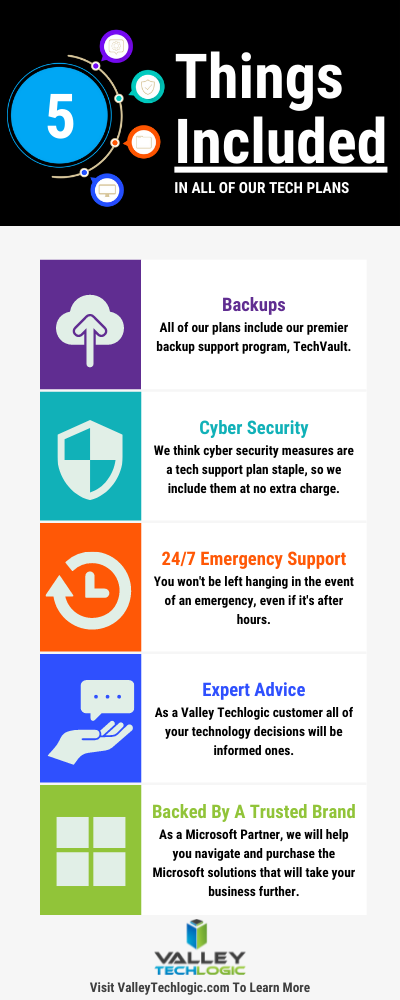
    Here are 5 things all Valley Techlogic Plans includes:

    5 Things Included in Valley Techlogic Plans

    Want to learn more? Reach out today for a free consultation and learn how Valley Techlogic can specifically support your business’s technology.

    Looking for more to read? We suggest these other articles from our site.

    This article was powered by Valley TechLogic, an IT service provider in Atwater, CA. You can find more information at https://www.valleytechlogic.com/ or on Facebook at https://www.facebook.com/valleytechlogic/ . Follow us on Twitter at https://x.com/valleytechlogic.

  • The average cost of hiring IT support staff examined

    The average cost of hiring IT support staff examined

    When you’re talking about IT for businesses there’s a wide range of normal, for some businesses their normal is having in-house IT staff. For many though their IT operational needs are such that having a dedicated staff devoted to the job just doesn’t make financial sense.

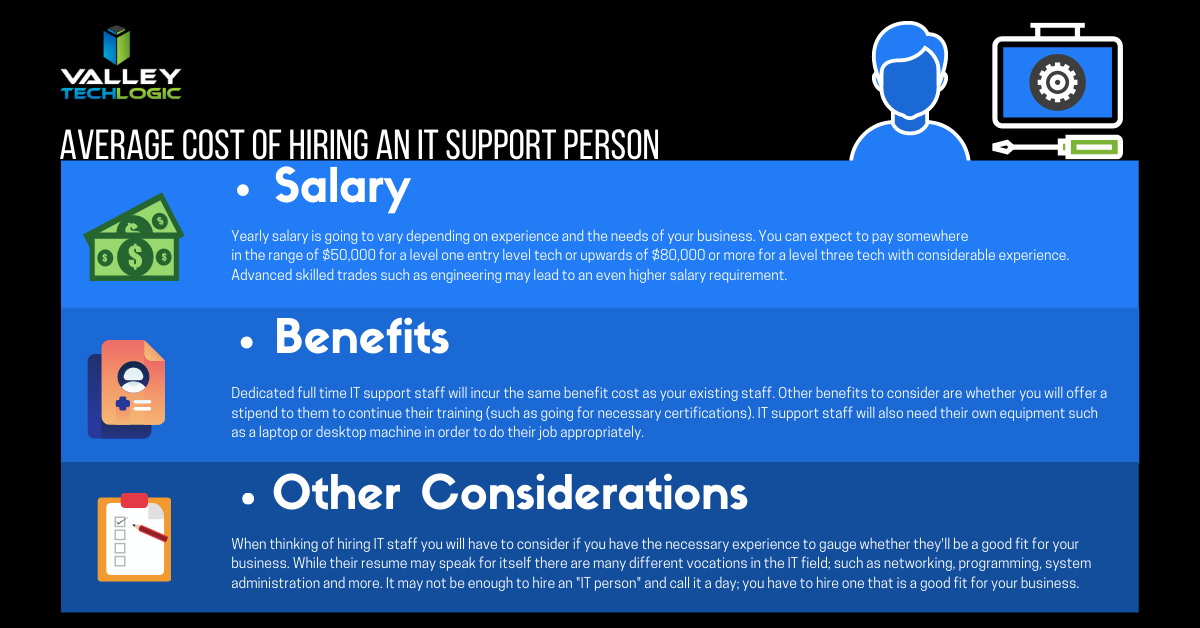
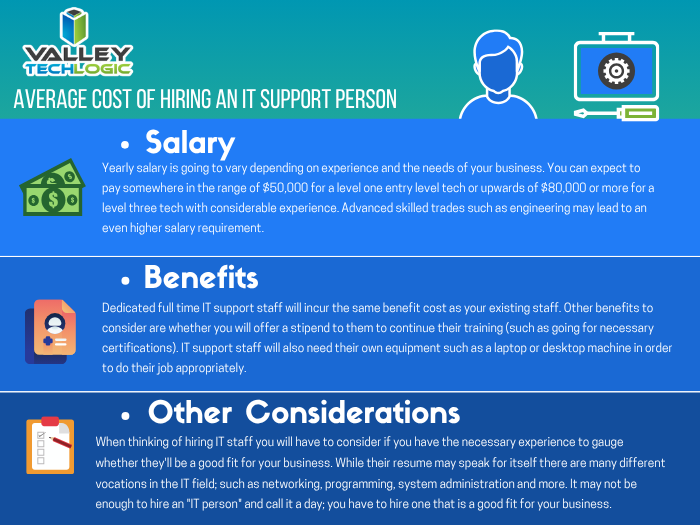
    Average Cost of an IT Support Person
    Click to see the full size version.

    If you look at our chart you can see that the cost of hiring one IT person is quite significant. You also must overcome the usual hiring hurdle of just finding the right person in the first place and dedicating your time to that task is something that should definitely be taken into consideration.

    The benefit of an IT support plan is someone else is doing that job for you, with the right company behind your business you will have an entire team of experienced techs available to you without having to pay a yearly salary for each one.

    Some technology service providers even offer flat monthly cost plans that come with generous or even unlimited support included. We’re proud to be one such company that offer plans that eliminate many of the billing headaches surrounding outsourcing your IT for our clients.

    While our own plans are multifaceted and cover project work, onsite and help desk support, cybersecurity and more – you may be asking what types of plans are usually available in the marketplace.

    1. Full Managed IT Department Support – This is what we offer, we cover everything you could need that’s IT related.
    2. Managed Support Services – This is where remote and help desk support is available but not onsite. Good for getting back into locked email accounts but not ideal for complicated IT issues.
    3. Managed Software as a Service (SAAS) – This is a managed service for one particular type of software. Notable examples include Google Apps, Salesforce, ZenDesk and DocuSign.
    4. Managed Networks and Infrastructure – VPNs would fall into this category, as would managed cloud services such as Amazon Web Services (AWS).
    5. Business Intelligence and Data Analytics – Consulting services that help you with your web presence and the best ways to apply technology to your business would fall into this category of managed services.

    These aren’t the only examples of IT support plans, but we feel they’re the most notable.

    Many small or medium sized business owners also avoid the issue entirely by doing their own IT. We wrote about why that may not make smart business sense here, but in a nutshell it comes down to how much you really value your time and whether your efforts spent there are the best use of it.

    We can offer advice on what the best fit is for your particular business, if you’d like to book a free 10 minute consultation you can find our calendar here. We’re offering easy virtual appointments and even if you don’t choose us, we can help you leave with a plan.

    Looking for more to read? We suggest these tech articles from the last week.

    This article was powered by Valley TechLogic, an IT provider in Atwater, CA. You can find more information at https://www.valleytechlogic.com/ or on Facebook at https://www.facebook.com/valleytechlogic/ . Follow us on Twitter at https://x.com/valleytechlogic.

    Looking for IT Services in Fresno, Modesto, Stockton, Ceres, Atwater, Merced, Visalia or Lodi? We cover all these areas and more!