Author: rory-admin

  • Be careful what you download, malware has made it to Google Adwords

    Be careful what you download, malware has made it to Google Adwords

    Downloading applications from trustworthy sources is something that has been drilled into most of us as internet safety 101, and many of us would consider the top link on Google to be a trustworthy source.

    However, hackers are now taking advantage of that and pushing ads that contain their malware disguised as legitimate applications.

    Initially reported on by cybersecurity firm Cyble last month, their report found that a malware called “Rhadamanthys Stealer” is being spread through Google Ads that allegedly lead the user to download Zoom, Notepad++, AnyDesk and more.

    This malware is also being spread the typical way through email when attached to a PDF. It makes it clear that there is no one way to spread malware and that users need to be vigilante when downloading anything – whether that be a typical .exe or email file attachment.

    The goal is usually financial, with the hacker either “ransoming” the users device or merely spying in the background as they collect data they can sell or use to steal financial credentials. The attempts at stealing data may even be multifaceted and include all three.

    So how can you protect yourself? The first is in knowing how it works, Google ads has requirements for posting so these bad actors are placing ads for legitimate looking “front page” sites that mimic what you were looking for, which then immediately redirects you to the one containing malware.

    So one clue would be if the URL drastically changes during your browsing (and paying attention to the URL and knowing the URL you were trying to reach would squash this attempt altogether). In many cases you can confirm a sites true URL through Wikipedia and it’s a good idea to save it if it’s a site you visit regularly.

    Another way to block these is exceedingly simple, just utilize an ad block on your browser. Ad blocks block Google advertisements as well, so your research will be more likely to contain legitimate results. Many ad block extensions will also block popups too.

    Google has also offered their own advice on blocking “malvertising” and have included a way to report illegitimate websites. It goes without saying these sites are in violation of Googles advertising rules, which include rules against auto-redirects.

    As it becomes increasingly harder to avoid malware infections, many offices are scrambling with how to best protect office devices from being unintentionally used as a threat vector. Employee training is still your best protection but as this article illustrates, even tech savvy employees may have a difficult time avoiding all threats.

    That’s where a Valley Techlogic service plan comes in, we offer proactive cybersecurity protection in the following ways:

    Proactive Cybersecurity through Valley Techlogic

    If you would like to learn more, schedule a consult with us today and we’ll go over how we can help your business increase your cyberthreat awareness and protection capabilities.

    Looking for more to read? We suggest these other articles from our site.

    This article was powered by Valley Techlogic, an IT service provider in Atwater, CA. You can find more information at https://www.valleytechlogic.com/ or on Facebook at https://www.facebook.com/valleytechlogic/ . Follow us on Twitter at https://x.com/valleytechlogic.


  • Proactive vs Reactive Tech Care – Why Tackling Things as They Spring Up Can Backfire BIG

    Proactive vs Reactive Tech Care – Why Tackling Things as They Spring Up Can Backfire BIG

    As a technology service provider, it’s probably a given that we believe in proactive maintenance. We believe being proactive is less costly both in lost revenue and lost time (and time is money so it’s doubling down when a technology outage occurs).

    Many clients are afraid to replace aging hardware, these systems represent a big investment for them typically and they want to get the most “bang for their buck” out of systems they spent thousands of dollars on. They’re also used to how these machines operate and aren’t sure if newer machines will really represent a quality of life upgrade for them.

    There’s also the fear that replacing hardware will be a protracted situation, where transferring files, setup etc. may result in the one thing we all fear most in the business world – downtime.

    This is generally not the case, most of the time switching out systems is an easy seamless process that’s completed in less than a couple of hours or even during a lunch break. Switching out a server can be more time consuming but at Valley Techlogic we perform those upgrades after hours so as not to inconvenience our clients. We can also keep your existing server running as we get the replacement up and going in most cases (and is another reason it’s a good idea to perform these upgrades before a hardware failure occurs).

    Proactive maintenance also applies to software, whether it be updating existing software or finding a new solution for a software product that’s no longer available. Replacing aging hardware and aging software often go hand in hand, with clients keeping a system around that’s functionally way past it’s prime but is necessary to run a line of business software that’s no longer available.

    This is a risky endeavor, machines running Windows 7 or Windows Server 2012 or older are no longer being updated by Microsoft and represent a literal threat vector to which bad actors can infiltrate your business. The same goes for other aging devices that are no longer receiving firmware updates, such as routers and peripherals like smart switches that connect to the internet.

    At Valley Techlogic we are utilizing tools that track the age of equipment and whether it’s been recently updated, that way we can make recommendations to our clients ahead of time when equipment has reached its end of life.

    In many businesses, operating on a “run-to-failure” basis makes sense, if you’re in manufacturing for example repairing large, expensive equipment for as long as you can to maximize your ROI is a smart business practice. However, anyone would agree that replacing equipment that’s become unsafe is absolutely crucial.

    That’s why we operate on a proactive model, in the technology world aging hardware that can’t be updated is a risk to your business whether it be from unintended downtime or a cyber security threat.

    Here are some other items we’re also proactive about for our clients:

    Click to view the full size version.

    If you would like to learn more about obtaining a proactive technology service plan for your business, just request a consultation. We’ll even give you your first service call on the house (up to 2 hours) which we can use to evaluate your existing devices and offer our recommendations. Learn more today.

    Looking for more to read? We suggest these other articles from our site.

    This article was powered by Valley Techlogic, an IT service provider in Atwater, CA. You can find more information at https://www.valleytechlogic.com/ or on Facebook at https://www.facebook.com/valleytechlogic/ . Follow us on Twitter at https://x.com/valleytechlogic.

  • Hiring a tech vs outsourcing, a cost breakdown

    Hiring a tech vs outsourcing, a cost breakdown

    If you’ve realized you need additional IT support for your business but are on the fence about which route to take, hiring IT staff or outsourcing your needs to an IT service provider the choice can be difficult.

    Many of our clients reach us because they have been using an unreliable IT support service, their existing IT staff left, or sometimes because they’ve somehow gotten by with no IT at all but realize that needs to change.

    We also frequently have clients who are utilizing a person in their office who is “tech savvy” but is not IT, it can be quite expensive to hire an IT professional with the experience needed to perform the variety of duties needed work on items such as cybersecurity improvements, hardware upgrades, software deployments and more.

    Here are some benefits of hiring in house IT staff:

    1. They’re already at your office so there’s no waiting for IT support to show up.
    2. They will be well versed on your systems since in many cases they will be the one who set them up in the first place.
    3. They should be pre-emptively taking care of updates that will keep your business more secure.

    On the other hand, here are the benefits of outsourcing your IT:

    1. The cost is usually much lower than hiring personnel.
    2. You get many experts for one price, no matter how well versed your IT person is they can’t be an expert in everything.
    3. You get software tools that may be otherwise unavailable to a single business or not cost effective to purchase.
    4. Round the clock service and monitoring, many IT service providers including us offer 24/7 support.
    5. You will have an agreement with them that spells out the level of service you’re supposed to receive.

    It’s a difficult choice and only you know whether your business would greatly benefit from having in-house staff or whether outsourcing your IT is your best option. As you weigh your options we created this chart with the average baseline cost for an in-house IT person vs. an IT service plan with us.

    However, as we mentioned many of our clients are utilizing an in-house resource already, these tech savvy staff are usually performing the day-to-day activities such as patching and password resets but may be missing crucial items such as cybersecurity prevention or maintaining (or even starting) backups.

    For clients like these we recommend our co-managed plan option. With our co-managed plan we work directly with the staff already performing your IT duties, if there’s an issue they call us directly and we pass on a cost savings to you.

    We do that because usually by working with a staff member that already knows your systems we can bypass a lot of the early troubleshooting that occurs, and that staff member usually still handles minor day to day tech related activities.

    If you would like to learn more about our co-managed plan options just reach out today for a consultation.

    Looking for more to read? We suggest these other articles from our site.

    This article was powered by Valley Techlogic, an IT service provider in Atwater, CA. You can find more information at https://www.valleytechlogic.com/ or on Facebook at https://www.facebook.com/valleytechlogic/ . Follow us on Twitter at https://x.com/valleytechlogic.
  • Microsoft layoffs and how the economy is affecting the tech sector

    Microsoft layoffs and how the economy is affecting the tech sector

    It was announced this week that Microsoft will be laying off 10,000 employees in a bid to cut costs in response to “macroeconomic conditions and changing customer priorities”.

    They join the likes of Amazon who also recently laid off 18,000 employees and Meta who cut 11,000 jobs last November. With increasing costs and decreasing sales across many industries amid economic uncertainty, we expect more layoffs to occur both in the tech sector and beyond.

    Satya Nadella, CEO of Microsoft, commented in a recent interview that Microsoft is not “immune to the global changes” and that he expects two years of challenges ahead for the tech sector.

    We’re still seeing hardware shortages stemming from the pandemic and the chip shortages we’ve written about recently. Suffice to say it’s been even more difficult for businesses to navigate maintaining the technology in their office or making needed tech related purchases.

    The worst thing that you can do is hold still and put off making needed upgrades or addressing technology challenges in your business. There are risks associated with outdated technology, they are:

    1. Lack of security compliance: It’s been shown that are on the rise, even faster than before due to malware being more accessible for even those who are not particularly “net savvy”. Even if you thought your business was too small to be a target before, with increased desperation any target might do – including you.
    2. More crashes and downtime: Time is money, especially in this economy. Old devices are more prone to crashing or just giving out completely, at which point you’ll still have to pay to replace them but you’ll have the added cost of the waiting you have to do until the replacement comes in.
    3. Decreased productivity: Your employees are probably your biggest payroll item, do you really want to hinder their productivity by making them use a device that’s sluggish or not working properly? The cost of a new laptop or desktop is a drop in the bucket compared to the cost of wasted time they may spend navigating around issues.
    4. It could put you at a disadvantage to your competitors: The increase of reliance on digital solutions has not been stymied by the current economic landscape, the extra reliance that was exacerbated by the pandemic conditions is there and continues to grow. If your competitors are keeping up with it and you’re not, that will give them an edge you may not want them to have.
    5. Lack of data and transparency: We’ve mostly focused on hardware here but there are significant risks to not making needed software upgrades as well. Modern software is often leaps and bounds ahead in giving you needed data and reports, and we believe knowledge is power. You can’t be sure you’re making the best choices for your business if you’re doing them blindly.

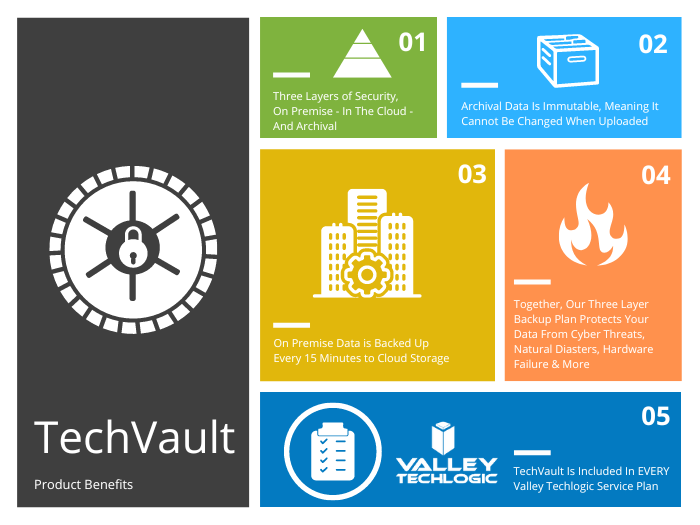
    Now more than ever you need a partner in navigating the technology landscape, and Valley Techlogic can be that partner. We can help you address your technology challenges in a way that still keeps budgetary constraints in mind. We have been in business since 2004 and have experience weathering challenging times. We can even reduce your technology spending in the following ways:

    Click to grab the full size version.

    We’re offering your first service call with us free, because we know you need to be certain when making choices for your business. We know after you try us out you will have the confidence to proceed, you can schedule your first service call here.

    Looking for more to read? We suggest these other articles from our site.

    This article was powered by Valley Techlogic, an IT service provider in Atwater, CA. You can find more information at https://www.valleytechlogic.com/ or on Facebook at https://www.facebook.com/valleytechlogic/ . Follow us on Twitter at https://x.com/valleytechlogic.

  • ChatGPT is allowing even novice wannabe hackers to construct their own malware

    ChatGPT is allowing even novice wannabe hackers to construct their own malware

    ChatGPT is a power AI chatbot that allows the user to communicate a question to it and receive a very thorough answer on any topic the user can dream up. Created by OpenAI and already fielding massive investment offers even from companies like Microsoft, they’ve had a ton of buzz in the news both positive and negative.

    It first came under scrutiny when it became apparent the tool was great for generating lots of content quickly, including articles that students could use and submit (though the quality of these articles can vary greatly).

    This is because tools like ChatGPT scrub great swaths of the internet for their content. Whether it’s being asked to write a paper on the Civil War or generate a Picasso-esque picture, it takes the prompt and quickly compiles the database of knowledge it has built up from data readily available online and provides the user with what they’ve asked for.

    There has been a lot of discussion around the future of AI and the ramifications of copyright, particularly when it comes to original written works or art, but today we’d like to focus on ChatGPT’s scripting capabilities and the potential pros and cons.

    As leaders in the IT space we were already aware of the buzz around ChatGPT’s scripting capabilities, with some programmers praising it’s ability to create simple scripts and the potential it had to make aspects of their jobs easier. While others lamented what it meant for the programming role as a whole or whether the code output was really “up to snuff” especially when used in real world applications.

    It’s become clear there’s a niche for ChatGPT in creating low level tools, but this unfortunately also includes malware and encryption scripts – which often aren’t very complicated and easily deployed via phishing type scams.

    As reported by Axios, there is already evidence that hackers are using ChatGPT in the creation of malware or in improving their existing attempts to create new malware scripts. There is also evidence that it’s being used by less technically inclined people to create malware they otherwise would not be able to make.

    OpenAI has made statements that they are looking to improve their product and prevent it from being abused, in the interim we would advise users to be especially cautious when clicking on links or downloading files. We wrote an article on how to spot phishing clues online that might be worth a review.

    For businesses who have made getting serious about cybersecurity a primary goal in 2023, here are 6 ways Valley Techlogic can help.

    Click to grab the full size version.

    Looking to learn more? Schedule a quick consultation with us today or take advantage of our 2-hour free service offer to experience our commitment to quality service for yourself.

    Looking for more to read? We suggest these other articles from our site.

    This article was powered by Valley Techlogic, an IT service provider in Atwater, CA. You can find more information at https://www.valleytechlogic.com/ or on Facebook at https://www.facebook.com/valleytechlogic/ . Follow us on Twitter at https://x.com/valleytechlogic.
  • New Year’s resolutions for business tech in 2023

    New Year’s resolutions for business tech in 2023

    The new year is upon us and with that comes the opportunity to make needed changes to outdated technology within your business.

    Our clients are usually split on when they want to make changes – for some it’s that mad dash towards the end of the year and for others it’s the fresh mindset that comes after the 1st of January. There really is no wrong answer when it comes to a tech refresh and any move you make will have lasting benefits that increased security protection and less chance of an outage bringing your office to a standstill.

    This can mean hardware or software upgrades but usually means both, and with Windows Server 2012’s end-of-life date occurring in October of this year we anticipate there will be many trying to replace their primary office server before that time. If you have a server current running Windows Server 2012 it probably will also need to be replaced (keep in mind the 2012 reflects the year it came out, so even if you bought your server a few years later it will still be older than the 5 year recommended lifespan for most servers).

    We don’t want to only focus on servers though, here are a few other New Years technology resolutions you can make for 2023:

    1. Move away from software that has reached end-of-life or is no longer supported. Windows Server 2012 Isn’t the only operating system that has recently reached end-of-life, Windows 7 is also no longer supported by Microsoft. Even peripherals such as switches or networking gear such as routers can have end-of-life events and will no longer be updated by the manufacturers.
    2. On the same token, consider moving more to the cloud. More and more of our clients are moving away from traditional in office servers by switching to online storage. There can be an upfront cost to doing this but it’s still often less than purchasing a brand new server if your existing one is on the outs. As a bonus all future maintenance will then fall to your cloud provider.
    3. Increase your security measures in the New Year. There’s no better time than the beginning of the year to begin tackling cyber security measures you wanted to put in place last Year over year the risks continue to increase so why not begin 2023 knowing your business is safe from a cybersecurity attack?
    4. Again in the same realm, begin or strengthen employee training on technology topics. As your employees come back from the holidays why not implement short training measures (our tool takes just 15-20 minutes a week) that could drastically reduce your risk?
    5. Finally, don’t let fear of a recession slow your growth. You may be shying away from making hardware purchases due to fear of a recession, but if existing outdated hardware is already slowing your business down from the productivity level you hope to have not replacing it soon could do more harm than good.

    If you’re not sure where to start with any of these topics, we can help. We’re currently offering a 2-hour service call absolutely free.

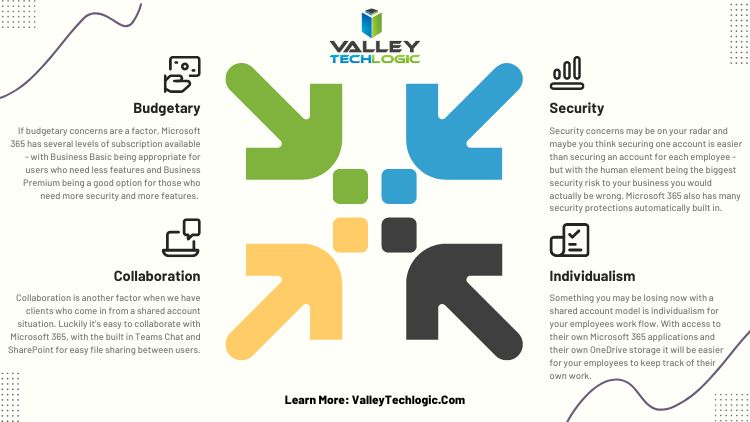
    Here are a few ways we suggest using this service call to put your business in a better position in 2023:

    Click to view the full size version.

    If you would like to learn more about our free service call offer, or would like a consultation on our services you can book one here today.

    Looking for more to read? We suggest these other articles from our site.

    This article was powered by Valley Techlogic, an IT service provider in Atwater, CA. You can find more information at https://www.valleytechlogic.com/ or on Facebook at https://www.facebook.com/valleytechlogic/ . Follow us on Twitter at https://x.com/valleytechlogic.

  • More data breach woes for LastPass and our recommendations for you on how to deal with it

    More data breach woes for LastPass and our recommendations for you on how to deal with it

    We’ve posted about LastPass data breaches before but at that time it was purported to be a false alarm according to the company, the news on this most recent breach is that it’s real and that LastPass users should be concerned.

    The data breach in question happened in August but LastPass is just now revealing the details on what was stolen and the scope of breach. At the time of the hack LastPass was again saying that it was a false alarm but that wasn’t true and “backup customer vault data” was accessed during the August incident.

    This backup vault data included both unencrypted data such as website URLs and encrypted data such as website usernames and passwords. Having both details will allow hackers to easily put two and two together to access customer accounts.

    With that said because the data for usernames and passwords is still encrypted LastPass has let customers know their data is still safe, as they say it can only be unencrypted with their unique encryption key that is derived from your master password. User master passwords are not accessible due to their “Zero Knowledge” architecture.

    With this architecture no one, not even LastPass themselves, has access to a user’s master password. LastPass requires that master passwords be 12 characters long so even if the hackers who accessed this data attempt to brute force individual passwords it would still be difficult to impossible, with LastPass themselves estimating it would take “millions of years using generally-available password-cracking technology”.

    LastPass users should still be on the lookout for phishing attempts in the upcoming days however, even if your data is safe bad actors may still use the news of this breach to attempt to trick users into revealing their data. You should never share your password details with anyone, especially your master password. LastPass will never ask you for your password information.

    Also some additional advice for business owners who may own websites from Google, because the URLs in this breach were not encrypted they may include some that you didn’t want publicly accessible. John Mueller a SEO expert at Google recommends reviewing any website URLs you may have that may inadvertently leak data for your business, including customer form data.

    We still believe password managers are a security benefit to both consumers and businesses alike. They’re one small part of increasing overall cybersecurity awareness and safety and fall under the larger spectrum of increasing user education and accountability.

    We’ve posted about proper password safety and advice on avoiding phishing attacks, but here are the top 5 things you can enable in your business today to improve your cybersecurity safety in 2023.

    Internet Safety InfographicIf news of breaches make you nervous and you aren’t sure if your business is prepared from a cybersecurity standpoint, Valley Techlogic can help. We consider ourselves to be a premier provider of cybersecurity services for businesses in our area and beyond. We can help your business by covering your endpoints, setting up secure backups, virus and malware scanning and prevention and more. Schedule a consultation today.

    Looking for more to read? We suggest these other articles from our site.

    This article was powered by Valley Techlogic, an IT service provider in Atwater, CA. You can find more information at https://www.valleytechlogic.com/ or on Facebook at https://www.facebook.com/valleytechlogic/ . Follow us on Twitter at https://x.com/valleytechlogic.

  • 5 Holiday Tips for Your E-Commerce Business and 5 for Everyone Else

    5 Holiday Tips for Your E-Commerce Business and 5 for Everyone Else

    It doesn’t matter which e-commerce sector you’re in, the holiday time period is always a big opportunity to increase that year’s sales before the New Year rolls in.

    With online shopping growing in popularity year over year there are specific ways to capture more of that online market – especially around the holidays.

    Here are 10 tips for improving your sales during the holiday season (including 5 that apply to all types of business):

    1. Step up your social media game. Anecdotal evidence from us, when we went from posting inconsistently 3-4 times a week to posting consistently 4-5 times a week our impressions didn’t just go up, they doubled. The holidays are a great time to post more updates about your business on your social media platforms.
    2. Make sure your contact information is rock solid. It would be a tragedy to see sales calls go unanswered, make sure the contact information on your website it up to date and your sales people are ready to answer those calls.
    3. Make sure your website it mobile friendly. This may be a tough one to knock out this year if you haven’t done it yet, but having a mobile friendly website is a must have in 2023. Google even offers a free tool for testing if your website is mobile friendly here.
    4. Release holiday ads. During the holiday season your same old ads may not perform as well as a holiday themed one would as people look for those familiar colors and settings (red and green, blue and white, snow and Christmas trees).
    5. Take advantage of marketing automation. Facebook for example lets you schedule posts and you can update your Google advertising with your holiday messaging and let it run.
    6. If you plan on conducting a big sale, make sure your website is ready for it. If you’re planning on running any holiday “one day sales” make sure your website can handle the potential increased traffic or there’s a game plan in place for if it goes down so you don’t lose your momentum. You can check on your current page speeds with this other Google tool here.
    7. Have a chatbot available. You might get the same questions repeatedly, having an automated chatbot that can answer those questions with the same feel as a sales representative could increase your sales.
    8. Improve your holiday key words ahead of time. If you’re an apparel company for example peppering “holiday themed apparel” or “Chrstimas outfits” into your SEO keyword efforts is a good idea leading up to the holiday season.
    9. Have a holiday themed front page. We’ve talked about having holiday themed ads and social media posts but you should also “dress up” your front page temporarily to clue buyers in that you’re ready for the season. Many website providers have the option of changing out a front page temporarily so you can easily switch it back when the season is over.
    10. Make sure your buyers know any email marketing is from you. Phishing scams also increase in the holidays, having ways for a buyer to tell emails sales are from your company and not from a scammer is key. Mirror any sales you have directly on your website as well.

    Speaking of holiday phishing scams, here is an infographic on avoiding holiday scams:

    Click to grab the full size version.

    Whether your business is e-commerce or something else entirely, Valley Techlogic can assist with your technology needs in 2023. We have our own holiday sale going on now that will even save your company money on IT support in the new year. Reach out today to learn more!

    Looking for more to read? We suggest these other articles from our site.

    This article was powered by Valley Techlogic, an IT service provider in Atwater, CA. You can find more information at https://www.valleytechlogic.com/ or on Facebook at https://www.facebook.com/valleytechlogic/ . Follow us on Twitter at https://x.com/valleytechlogic.

  • MRP & ERP explained and how a tech service plan can help

    MRP & ERP explained and how a tech service plan can help

    Our manufacturing clients often rely on custom software to run their business, MRP or Material Requirements Planning software covers items such as making sure materials are available, ensuring the product is ready for delivery and just overall inventory planning.

    ERP or Enterprise Resource Planning software builds upon the existing functionality of ERP software but scales it to include managing operations, finances and staffing as well. While MRP software is normally standalone ERP software usually functions as a stack of applications that communicate with each other for better oversite of your manufacturing business’s operations.

    Some of our clients rely on custom MRP software but most ERPs look to eliminate the need for that, the downside of custom MRP software is it’s often tied to and customized for the system type it was created so upgrades to the operating system of a device can present a roadblock (and a security hurdle).

    MRP software also Isn’t usually not very customizable, it’s built with one purpose and it won’t be able to grow and change as you do. ERP software solutions are more expensive but will probably include updates from the distributor and be more modular and customizable overall since it’s meant to fit a variety of operational needs.

    For simple stock and order management an MRP may be all you need but as your business grows it may be best to look at a comprehensive ERP solution to allow your entire team to work under one umbrella, from accounting to project management. It’s also helpful if your production planning has outgrown your existing MRP software.

    Here are two charts that explain how MRP works vs ERP:

    Now at the end of the day both MRP and ERP are software-based solutions, and thus rely on the same maintenance and troubleshooting to the devices that host and utilize it as in any other business. Whether you utilize a cloud solution or on-premise (or even a mix of both) having an outage that effects this software can halt your day to day operations until it’s fixed.

    Business continuity for our manufacturing clients is paramount, a set back in operations often takes longer to recover from due to the nature of their business. Many of our clients have the wheels going 24/7 and sudden outages are disruptive and costly.

    We offer specialized support for our manufacturing clients, we can address issues you may be facing with hardware and look for solutions to keep your existing MRP solutions running.

    We also have experience supporting clients who utilize an ERP solution or can help you as you make the switch to one. Our engineers will evaluate your existing hardware and make recommendations that make sense for what you’re trying to achieve in your business.

    This is on top of our 24/7 emergency support so if you DO have an issue, we can address it right away and get your operations up and running again.

    If you’re interested in learning more about how Valley Techlogic can help and support your manufacturing business, reach out for a quick consultation today.

    Looking for more to read? We suggest these other articles from our site.

    This article was powered by Valley Techlogic, an IT service provider in Atwater, CA. You can find more information at https://www.valleytechlogic.com/ or on Facebook at https://www.facebook.com/valleytechlogic/ . Follow us on Twitter at https://x.com/valleytechlogic.

  • BYOD (Bring Your Own Device) in the workplace, 5 policies to have in place for 2023

    BYOD (Bring Your Own Device) in the workplace, 5 policies to have in place for 2023

    Last week we touched on tips for buying new tech for your business in 2023, but for some offices BYOD (Bring Your Own Device) is the norm.

    What is BYOD? Bring your own device is where an employee uses their personal device (usually a laptop) for work purposes. There are different ways to go about this, for some offices there employees using an already owned device. For others, they can use a device they own but they must log into a virtual machine to do their work. A third option is that the business still purchases the device an employee uses but because they work remotely from home the same rules of BYOD still apply even though it’s a company owned device.

    During the pandemic we saw more articles related to BYOD and remote working and how to still manage a secure workspace even if your employees aren’t coming into the office. Even with workplaces now open again many are operating on a hybrid model and advice surrounding security of devices that don’t stay in one location is still very relevant.

    Business owners themselves also often take their devices home with them at the end of the day and aren’t immune to the same pitfalls that can happen if you don’t have policies in place to help protect your office network and data. BYOD offers work places a lot of flexibility as long as security measures are adhered to.

    Here are our tips for smart BYOD policies to have in 2023:

    1. First and foremost, have a good password policy. Especially for company websites and other logins. See our chart below for what makes a good password.
    2. Determine what data can be accessible from home or a BYOD. Some data should be restricted to in office/office devices only, especially anything client sensitive. You can also utilize a company SharePoint to share files without having them be locally stored on devices.
    3. Have time-based lock-out procedures to limit long sessions, especially if a device is idle. An idle device left in an unfamiliar place is a potential vector for hacker access. Time-based lockouts will make devices used offsite much more secure.
    4. Utilize the same security stack on BYOD as you do on company or office devices. Many cybersecurity tools don’t require devices to be in the same building, it’s a good policy to have your IT provider install the same tools on BYOD and other devices that leave the office. If your company uses Windows you can also consider something like Microsoft’s Intune for easier management of all of your endpoints no matter where they’re being used from.
    5. Have a policy for wiping company data off a BYOD. Especially if the device is employee owned, you shouldn’t assume that it will always be a smooth hand off. Having policies for this in writing is crucial.

    Like we said the first step is having a good password policy is step one to a good BYOD plan for your business, and we might argue it’s the first step in a good security plan overall. Here are our tips on what makes a good password:

    Click to grab the full size version.

    If you need help with device management in your business, Valley Techlogic can create a plan of action that encompasses both flexibility and security into a package with functionality at the forefront. Reach out today to learn more.

    Looking for more to read? We suggest these other articles from our site.

    This article was powered by Valley Techlogic, an IT service provider in Atwater, CA. You can find more information at https://www.valleytechlogic.com/ or on Facebook at https://www.facebook.com/valleytechlogic/ . Follow us on Twitter at https://x.com/valleytechlogic.