Author: rory-admin

  • Technology that you can build on, supporting your construction business through tech

    Technology that you can build on, supporting your construction business through tech

    We’re continuing from last week where we touched on how technology integrates with the field of dentistry, we want to switch gears from a business sector that helps us maintain our tooth structure to one that helps us maintain our societal structure. We’re looking at how technology can help those in the construction.

    Our construction clients are used to taking on big projects and creating comprehensive plans for tackling those projects with their teams. They aren’t always nailed down to one location, being out in the field and having employees logging in from remote offsite locations is part of their norm.

    Documentation is important for the work they do. They often have a dedicated server that keeps track of all the reports that come with having a construction business. Planning data, financials, insurance information – all of that must be available at a click of a button so they can run their business as smoothly as possible.

    If you’re in construction, ask yourself if any of these tech related items would be applicable to your business:

    1. Slow or non-existent internet on work sites. As we mentioned above, your employees aren’t logging in from one location, they go where the work is that day. You need support for your connectivity that’s flexible for the way you do business.
    2. Equipment that goes “missing”. Like us, you have expensive equipment that needs monitoring and logging. Our construction clients need solutions for making sure their equipment doesn’t “walk off” the job site. Security cameras solutions with the ability to save and review the data they collect are crucial for these clients.
    3. Regulatory compliance concerns. If you work in the government sector (or would like to) you’re probably aware of the ongoing attempt to secure our national data through CMMC (Cybersecurity Maturity Model Certification).

      There’s also the documentation you must do for every portion of your business, because if something goes wrong you need that documentation to back you up. If your documentation goes missing or can’t be retrieved because an outdated server has “malfunctioned”, or your backup solution was inadequate – it can spell trouble for your business.

    The long and short of it is, having a technology solution that supports your business is as crucial as having supports structures in a building to keep it from collapsing. A pillar may not look like much on it’s own but it could be the only thing keeping back a catastrophic collapse.

    At Valley Techlogic, we see ourselves as the pillar that not only keeps your technology equipment running as it should, but also keeps out any intrusions to your business (17.7% of all cyber attacks are aimed at your business model which is second only to the financial sector).

    Here is a chart with 5 ways Valley Techlogic specifically supports our construction clients:

    5 Ways VTL Supports Your Construction Business

    Still on the fence? Why not have a conversation with us directly, book a quick consultation with us here.

    Looking for more to read? We suggest these other articles from our site.

    This article was powered by Valley TechLogic, an IT service provider in Atwater, CA. You can find more information at https://www.valleytechlogic.com/ or on Facebook at https://www.facebook.com/valleytechlogic/ . Follow us on Twitter at https://x.com/valleytechlogic.

  • Bridging the technical gap, how technology can bring your dental practice into the future

    Bridging the technical gap, how technology can bring your dental practice into the future

    Dental practitioners are not technology novices, new technologies emerge all the time that help aid patients in the care of their teeth and in advancing restoration processes to combat the effects of tooth decay (just look at the use of lasers for repairing cavities).

    However, we see all the time that our dental practice owning clients will still be stuck in the past when it comes to the rest of their technology.

    If you’re a dentist, ask yourself if the following is true:

    1. Patient records aren’t as organized as you’d like them to be, you’re either still using the old tried and true (and also slow and cluttered) filing cabinet method, or you made the digital leap but don’t have a system for protecting confidentiality. Did you know dentists can also be subject to HIPAA rules?
    2. You have an office server but it’s ancient, well past the 5-year recommend life span for a server and running a copy of Windows server that’s no longer supported by Microsoft. Anything older than Windows Server 2019 is subject to the downsides of no longer being a supported operating system (including increased cybersecurity risks).
    3. Your own system and/or your employee’s workstations are sluggish, you often hear your office assistants tell patients “Sorry, this system is just so slow!” as they’re trying to check them out after a procedure or cleaning. This is frustrating for your employees, and your patients.

    It doesn’t have to be this way. We know as a dental office owner you’re no stranger to bringing on new technologies that can improve the way you do business. Making investments in the technology you use will make your dental practice more efficient, improve the safety of your clients’ records protecting you from liability, and help you accomplish goals you may have for growing your dental practice.

    Unlike the tools you use to practice your trade, you may be a little unsure where to start. Your clients come to you for your expertise in helping them protect their teeth because you’re a trusted expert. So why wouldn’t you reach out to an expert yourself as you navigate these investments in your business?

    The move from more analogue methods, such as the trusted filing cabinet system, may be intimidating, but think of the time it will save pulling up client records and the space you will reclaim in your office.

    New servers and workstations are large investments, but the downtime that occurs when these methods just fail (and they will) is substantial. Can you afford to be potentially stuck for weeks or even months if your office server that houses everything about your business suddenly goes kaput?

    We don’t want to sound gloom and doom, but help is out there to make informed choices about these issues before they become a problem.

    Valley Techlogic can help your dental practice; we have experience with the intricacies of your business and the concerns dental providers have when addressing these complex topics.

    We can help you bring your business into compliance with HIPAA, so as you grow your business your patients can feel confident their private information is protected at your practice. Below is a chart with some HIPAA rules specifically for dentists:

    Dentist need to follow HIPAA too

    If you’d like to learn more about Valley Techlogic can be a partner in technology for your dental practice, schedule a free consultation today.

    Looking for more to read? We suggest these other articles from our site.

    This article was powered by Valley TechLogic, an IT service provider in Atwater, CA. You can find more information at https://www.valleytechlogic.com/ or on Facebook at https://www.facebook.com/valleytechlogic/ . Follow us on Twitter at https://x.com/valleytechlogic.
  • We have updated our most popular resource for 2022 and have an offer you won’t want to pass up

    We have updated our most popular resource for 2022 and have an offer you won’t want to pass up

    As an IT service provider, we’re passionate about cybersecurity because we see the effects having inadequate coverage can have on businesses first hand.

    The devastation that can occur after a cyber attack is staggering, we’ve given you the statistics before, such as:

    1. The cost of cybercrime is predicted to hit $10.5 trillion by 2025
    2. Cryptojacking cases quadrupled in 2021, but the hackers don’t make very much (less than $6 per day), however that doesn’t stop them from trying to gain access to your machines
    3. It takes on average 287 for cybersecurity teams to detect and contain a data breach
    4. Phishing is involved in 36% of data breaches (can you identify the signs of a phishing email?)
    5. DDoS (Distributed Denial-of-Service) attacks are skyrocketing, with 9.75 million occurring in 2021

    That’s why we’re thrilled to announce the release of our Tech Tip Card Deck, our deck contains 56 tips for getting your cybersecurity house in order with custom art representing each tip. Best of all, the deck is absolutely free to business owners in our area.

    Beyond providing comprehensive technical support, we also want to support our community in staying safe online. If you’re a business owner in Central Valley and would like to have a set of our card deck for yourself, simply visit TechTipCards.com and request one today and we’ll get it shipped out to you ASAP.

    We don’t believe technology has to be intimidating, each bite sized tip featured in the deck is easy to understand and easy to implement and will create real results for the online safety of yourself, your employees, and your business.

    To up the offer even more, we have updated our most popular for 2022 and are also offering it to you right here, right now. Simply grab it below.


    Valley Techlogics Cybersecurity Checklist
    Click to grab the full size version.

    Both of these are just a small showcase of what’s in store, we know for most people repetition is the key to success. We plan to deliver weekly content including thought provoking reports, eye catching resources that can even be customized for your office, and tech advice that can greatly impact and improve your use of technology within your business.

    If you’d like to learn more, again visit TechTipCards.com or reach out to us for a free consultation today.

    Looking for more to read? We suggest these other articles from our site.

    This article was powered by Valley TechLogic, an IT service provider in Atwater, CA. You can find more information at https://www.valleytechlogic.com/ or on Facebook at https://www.facebook.com/valleytechlogic/ . Follow us on Twitter at https://x.com/valleytechlogic.

  • When the business is you, how data brokers create and sell detailed information based on your browsing history

    When the business is you, how data brokers create and sell detailed information based on your browsing history

    This week, John Oliver of “Last Week Tonight with John Oliver” aired an eye-opening segment on the world of data brokers and how easy it is to create a very detailed profile about an individual simply from their online browsing history. We suggest watching that segment (which can be found on YouTube) but we also wanted to touch base on this topic ourselves and explain what happens, why this happens, and what you can do to browse safely (and privately) online.

    There are really five clear ways data brokers capture your information online. The first is browser cookies. A cookie is a piece of information that a website stores on your device that it can than retrieve at a later time. Most websites you visit now ask you to give them permission to store cookies and most of us do so without thinking about it because the process of declining can be complicated (or perhaps you won’t be allowed on the site without doing so).

    Data brokers both buy these cookies and also place cookies on your devices themselves, which allows them to offer you highly targeted advertising. We have two solutions to this once, Chrome and Firefox both have “Do Not Track” options which will not allow the cookies to track you from site to site. There’s also a browser extension called Ghostery which gives you the option of blocking trackers.

    The second way data brokers are able to obtain information about you is through mobile applications. Many mobile applications that are “free” are not really free, you’re paying for them through the wealth of information that’s gained about you, such as your GPS data or even your private pictures and videos on your device (as many of these applications ask for “permission” for every service on your phone).

    The solution to this one is to always research the applications you download on your phone, and never give them more permissions than they need. That “white noise” application you downloaded does not need permission to your location data for instance.

    The third way may seem obvious if you stop to think about it, social media. Data brokers will scrape social media sites for information about you to “complete” their profiles on you. The easiest way to combat this is to think twice about what you’re sharing online, information such as your birthdate or where you work not only put you at risk for receiving very targeted spam – it’s also a cyber security hazard.

    The fourth way is just public records. Court documents, census data, property records, vehicle registration records, marriage and divorce records are all public and all available to data brokers at their leisure. The best way to combat this one is to address the other ones we’ve mentioned so they cannot use this information combined with the above to create a highly detailed information package on you (a singular piece of data is less useful than a full picture). You can also sign up for alerts from Google so if your name is mentioned on the web you’ll be notified.

    The fifth way may surprise you, but it’s your credit card company. Data brokers are able to buy your “anonymized” credit card data directly from your credit card company. They can then combine this data with receipts they may have accessed in other ways and your social media posts “Look at what I just bought!” and voila, data brokers now know how you’re spending your money (and what they should try to sell you next).

    There Isn’t a good way to combat the last one and it illustrates the point the best, we need more restrictions on how our data is used and who is allowed to collect it. Some states are leading the way with this, such as the California Consumer Privacy Act (CCPA) which gives consumers more control over their online data (and the ability to remove it).

    We’ve created this chart to give you five things you can do RIGHT NOW to protect your privacy online.

    Small Version of The Privacy Tips Chart
    Click to grab the full size version.

    While there are steps we can take to protect ourselves, more needs to be done to protect our privacy as we browse online. Privacy is also a concern for business owners and the businesses they run, if you would like to learn more about how Valley Techlogic can help schedule a consultation today.

    Looking for more to read? We suggest these other articles from our site.

    This article was powered by Valley TechLogic, an IT service provider in Atwater, CA. You can find more information at https://www.valleytechlogic.com/ or on Facebook at https://www.facebook.com/valleytechlogic/ . Follow us on Twitter at https://x.com/valleytechlogic.

  • Common tax return scams to watch out for in 2022

    Common tax return scams to watch out for in 2022

    The due date for filing your taxes is just 10 days away as of writing, and as tax filers scramble to gather needed information to finish (or start) their filing – scammers are looking for ways to take advantage of the mad dash that occurs for many Americans every year.

    The IRS has put together a compilation of scams they’re seeing this year, and they mention that scams may not be limited to the virtual space. Scammers may also call, mail or even show up to your door in person. So, it’s a good idea to be extra vigilant when protecting your PII (personal identifying information).

    The “Tax Transcript” scam is one that commonly targets businesses, many employees will use their business email when they sign up to do their taxes and may expect communication from the IRS to come there, but scammers will send fake communications with malware attached instead. Users may click without even thinking twice (especially as email scams of this nature can be very convincing). See below for an example.

    IRS Scam Email Example
    IRS Tax Email Scam Example. Credit: https://www.irs.gov/

    IRS scam calls are also another common tactic. It’s a good time to reiterate that the IRS will NEVER call you asking for personal information. This news segment found on YouTube shows a scammer in action, these calls may increase as we get closer and closer to the filing deadline. You shouldn’t give out your personal information even if they have things like your address or full name (scammers will often do some research on you before calling).

    Another scam aimed at businesses is one where the scammer will pose as a member of the accounting department where you work, they know many people will not question a call or email coming from a work authority. It may be a good idea if you’re a business owner to send out an email or have your accountant contact your employees to mention that like the IRS you will NEVER call or email unprompted requesting private information.

    Stolen Identity Refund Fraud or SIRF is a very lucrative business, 2.8 million false returns were filed in 2018 with a potential worth of $16 billion dollars. It’s important to guard the PII information criminals need to file a false tax return on your behalf. Here are 5 steps you can take to safeguard your information:

    1. The easiest? Have a good spam filter enabled on your email, that way many of these phishing scams won’t even make it to your inbox.
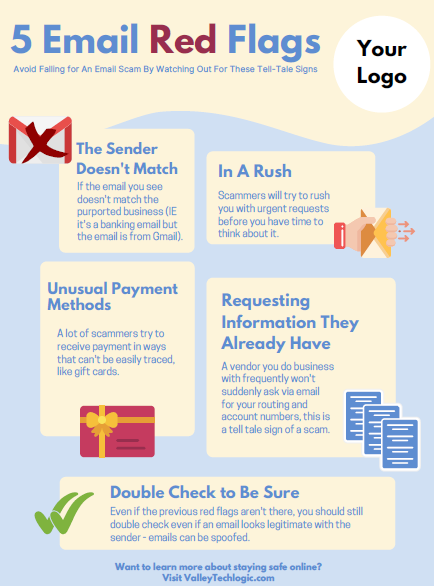
    2. Check emails for signs it’s a phishing scam, we wrote an article on what to look for. Two standouts are an email domain that doesn’t match the sender (an IRS email won’t come from a Gmail account) or links that when you hover on them don’t match where they say they go.
    3. Check with the purported sender, if the email looks like it’s coming from within your office network, but the email contents just don’t seem right – follow your gut and follow up with your department.
    4. If you receive a call from a number you don’t recognize claiming to be the IRS or the authorities, try Googling the number. Many people will share information about experiences with scam numbers online as a way to warn others.
    5. If you’ve already given your PII to a scammer, contact the major credit bureaus to freeze your credit and contact the IRS to report it ASAP. The IRS has steps in place for helping victims of identity theft, the sooner you act the sooner you can put a stop to the scammer’s activity under your identity.

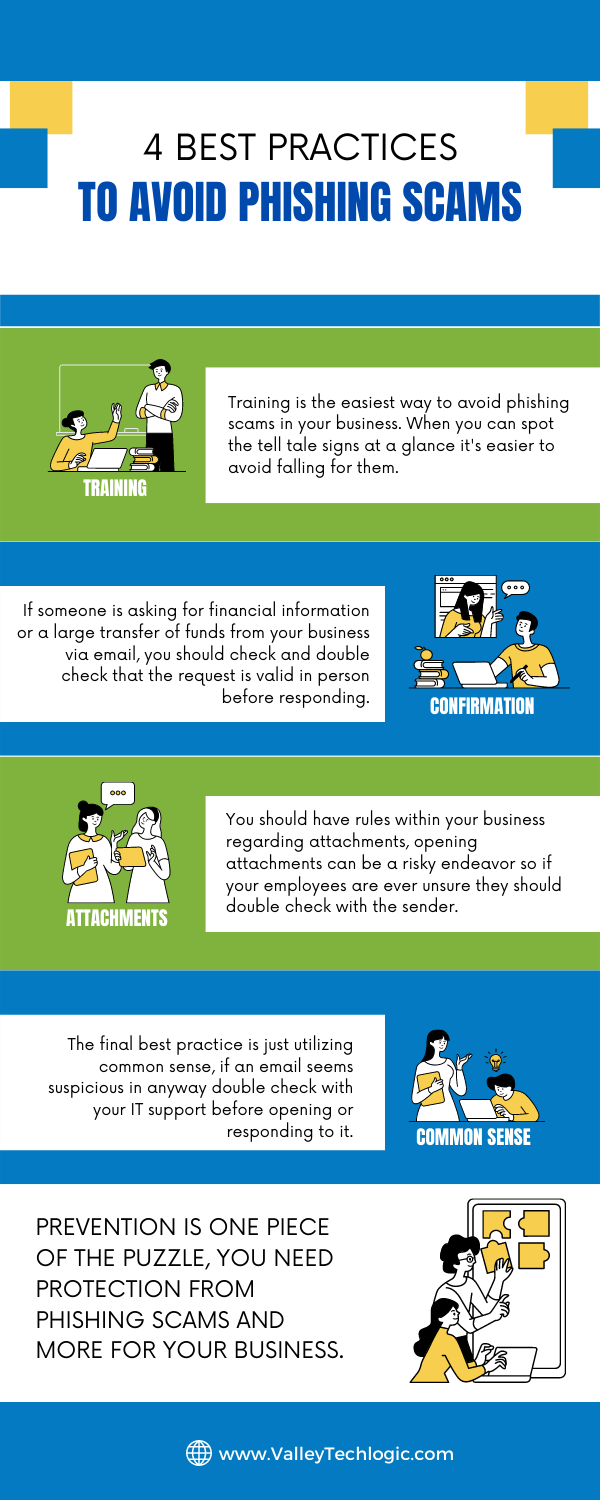
    Employee training is the best defense for business owners who want to prevent scams such as these ones as well as other cyber threats from effecting their business. Valley Techlogic offers security awareness training as well as top of line cyber security defense systems as part of all of our technology packages. Learn more today.

    Looking for more to read? We suggest these other articles from our site.

    This article was powered by Valley TechLogic, an IT service provider in Atwater, CA. You can find more information at https://www.valleytechlogic.com/ or on Facebook at https://www.facebook.com/valleytechlogic/ . Follow us on Twitter at https://x.com/valleytechlogic.
  • Unsure if the person you’re interacting with may be a fake? This Chrome extension can detect fake profile pictures with 99.29% accuracy

    Unsure if the person you’re interacting with may be a fake? This Chrome extension can detect fake profile pictures with 99.29% accuracy

    As we discussed last week, financial scams may be on the rise in 2022. Social engineering is a pretty common tactic utilized by scammers when it comes to siphoning funds from unwitting victims, but there are some tools you can use to combat it.

    Recently a company called V7 Labs has released an extension for Chrome that’s able to detect artificially generated profile pictures, such as those created by Thispersondoesnotexist.com (see below for an example).Examples of "ThisPersonDoesNotExist"

    The Fake Profile Detector extension can help you detect if a social media profile picture is a fake just by right clicking on it, it’s able to zero in on things you may miss at first glance – such as a pupil that’s not in the right place or clothing that appears to be bleeding into the skin. The extension does not work with video (yet). Also, just to note you should always verify an extension is from a trusted source before downloading it to your browser.

    Social engineering scams aren’t limited to just financial scams, they’re also utilized to gain information or to spread misinformation. As AI tools have grown more sophisticated it’s not easy to rely on someone’s profile picture to give you a good indication of who you’re talking to online.

    It’s also very easy to create fake profiles using real pictures, even pictures of people you may actually know. It’s typical for the scammer to start the conversation off with they got “locked out” of their main account and would like you to add their new one. You should also confirm with your friends and family before accepting a request from a new account.

    Or maybe it was their actual social media account, but a scammer was able to gain access. Sometimes scammers may even leave the password alone. The victim then may not know they have an intrusion, and the scammer just monitors and deletes messages of the conversations they’re having without the victim’s knowledge.

    We have created this chart of the top five things you should watch out for when it comes to social engineering scams.

    Click to download the full size version.

    Social engineering is not limited to just social media sites such as Facebook and Twitter. The most common type of social engineering are phishing attacks, and scammers setting their sites on businesses to take advantage of may have an easier time of convincing a user they are who they say they are when it comes to the more casual relationships we tend to have with colleagues.

    We wrote a blog explaining what to look out for when it comes to phishing emails, but at Valley Techlogic we also think this issue can be tackled from a software and training perspective.

    The tools we utilized will make sure that much of that suspicious spam never makes it to your end user, and the training we offer to our clients can help them make sure that if an employee does get a spoofed phishing email – they know exactly what to do about it.

    To learn more, schedule a free consultation with our sales team today.

    Looking for more to read? We suggest these other articles from our site.

    This article was powered by Valley TechLogic, IT service provider in Atwater, CA. You can find more information at https://www.valleytechlogic.com/ or on Facebook at https://www.facebook.com/valleytechlogic/ . Follow us on Twitter at https://x.com/valleytechlogic.

  • As we feared, Ukraine-Russia crisis leads to a surge in cyber attacks

    As we feared, Ukraine-Russia crisis leads to a surge in cyber attacks

    As we’re nearing a month into the conflict between Russia and the Ukraine, cyber warfare between the two countries is reaching an all time peak. We covered the topic of Ukraine’s “IT Army” recently in this blog, and we mentioned growing concerns we’ve seen from users that there may be a spill over effect when it comes to cyber threats.

    Cyberwarfare was inevitable as conflicts on the ground continue on, and as Russian hackers feel the “pinch” of the effects of sanctions imposed against Russia, we may see an uptick in financial scams. Especially as both countries have turned to cryptocurrency which can often be used as a safe haven for financial transactions taking place outside the public eye. In the case of Russia it’s being used to try and liquidate funds out of the country and in the case of the Ukraine they’re using crypto to bolster support for their economy.

    We have created this chart for the types of financial scams we think may increase in the coming days (though it should be noted, financial scams were already up 70% in 2021).

    Cyber Financial Scams Chart
    Click to download the full size version.

    However, hackers have also represented a beacon in the war of information currently happening between Russia and the Ukraine. Ukraine’s “IT Army” is now over 400,000 people strong, with hackers from all over the world lending their support digitally in Ukraine’s effort to protect their democracy.

    DDoS attacks on government sites with Russian origins as well as document leaks – which includes a 360k file data dump from a Russian federal agency – are continuing to happen regularly. It’s estimate that over 90% of exposed Russian cloud databases have been compromised at this point.

    Also, with access being restricted to sites like Twitter and other social media platforms being restricted in Russia, Squad303 is a website that was created by a group of Polish programmers that can help foreigners relay information to Russian citizens. The website founders say that over 7 million text messages and 2 million emails have been sent through the site so far.

    We again want to say we don’t know what the outcome of this conflict will be, but it seems clear that consumers and businesses should be wary of the ripple effects that will occur throughout the cyber sector, possibly for years to come.

    Business owners who still believe they’re “too small” to be a target should be wary that proceeding with out cybersecurity protections may make them the low hanging fruit for hackers reacting to a state of desperation. Cybersecurity protections are a worthwhile investment in your future and the peace of mind in questionable times is priceless.

    At Valley Techlogic, we’re experts in the field of cybersecurity. We can perform an evaluation of your business and tell you where you are now and where you need to be to not worry that your business is “ripe for picking”. Schedule a consultation today to learn more.

    Looking for more to read? We suggest these other articles from our site.

    This article was powered by Valley TechLogic, IT service provider in Atwater, CA. You can find more information at https://www.valleytechlogic.com/ or on Facebook at https://www.facebook.com/valleytechlogic/ . Follow us on Twitter at https://x.com/valleytechlogic.
  • Our Five Best FREE Resources Ranked

    Our Five Best FREE Resources Ranked

    At Valley Techlogic we believe educating our community on internet safety and providing concrete goals for businesses in our area to help improve their cybersecurity measures whether or not they’re covered by a Valley Techlogic plan is a valuable resource our company can provide to make us all a little safer online.

    We’ve provided quite a few free resources and reports over the years, and we couldn’t help but notice which ones really have struck a cord with our audience.

    Here are our top five free resources and reports, ranked by popularity. Bonus, you can grab all of these right from this page, still absolutely free.?

    #5 The Data Contingency Planning Report

    Our Data Contingency Report tells you EXACTLY what you need to have a solid plan for backing up your business’s files. Click to grab the report now instantly.

    #4 The New IT Provider Checklist

    Our New IT Provider Checklist lets you check off the MUST have for your new IT provider. If they don’t cover one or more of these items, you should keep looking.

    #3 Our Section 179 Guide

    Our Section 179 helps you get the best tax benefits from the tech purchases you make for your business. We’ll have the updated 2022 version available later this year.

    #2 Our Cyber Security Framework Overview Report

    Our Cyber Security Framework Overview Report goes over in plain text a number of popular frameworks, CMMC, HIPAA and more.

    #1 Our Cyber Security Checklist

    By far our most popular resource, this no nonsense checklist gets straight to the point on what you need to be fully covered from cyber threats.

    To receive these resources and more, reach out to us to be added to our mailing list. That way you’ll be the first to receive tech tips, free reports and resources and more.

    Looking for more to read? We suggest these other articles from our site.

    This article was powered by Valley TechLogic, IT service provider in Atwater, CA. You can find more information at https://www.valleytechlogic.com/ or on Facebook at https://www.facebook.com/valleytechlogic/ . Follow us on Twitter at https://x.com/valleytechlogic.

  • How the war in the Ukraine is being fought on the digital front

    How the war in the Ukraine is being fought on the digital front

    We’ve all been exposed to the ongoing crisis occurring in the Ukraine as Russian forces have made their way into the country and are heavily attacking major Ukrainian cities as they attempt to gain control of the capital city of Kyiv, causing nearly a million Ukrainian citizens to seek shelter in neighboring countries as of the time of writing.

    The Ukrainian forces have been inspiring the world as they defend their country from this unprovoked invasion, and that defense is also occurring on the cyber front. We’ve reporting ourselves from time to time on Russian hacking gangs and their effects on the US. The Ukraine is not only defending their digital infrastructure during this war, but they are also responding offensively with what’s being dubbed the “IT Army”.

    These volunteers to the Ukrainian government are conducting attacks on Russian led websites – some of which are currently serving propaganda on what’s really happening in the Ukraine to Russian citizens – and bringing those websites down. These also include sites belonging directly to the Kremlin and the Russian Ministry of Defense and more.

    DDoS attacks are also occurring on Russian targets, being conducted by the hacker group Anonymous. They’ve made claims they’ve succeeded in taking down 1,500 Russian led websites and dumping more than 40,000 private Russian files on the Dark Web, including ones that came from the countries Nuclear Safety Institute.

    SpaceX has also jumped into the fray, responding to pleas from the Ukrainian government to add Starlink as an option to keep necessary internet services online in case of a Russian disruption to the service. SpaceX quickly delivered 48 Starlink satellites with more on the way.

    Also, in a move that’s literally slowing things down inside of Russia, it was discovered that a Russian led company had outsourced the main component of their EV charge stationed on along a major motorway between Moscow and St. Petersburg. The Ukrainian company that built the components used a backdoor to hack the machines, shutting them down and displaying anti-Putin messaging on the screen.

    The Ukraine’s IT Army is also requesting assistance through the use of a Telegram channel belonging to the group, which as of time of writing has over 275,000 users. The IT Army is providing live updates on successful attacks on Russian led targets as well as attempting to communicate with Russian citizens as Russia leads a disinformation campaign has tried to unsuccessfully stifle public outage on this war.

    It’s unclear what the outcome to the ongoing conflict will be at this moment, but this is an unprecedented moment in time marking the first time a war has a significant public digital elements involved.  We’re all aware at this point of Russia’s hacking capabilities, but it will be interesting to see if their abilities are strictly offensive as they’re now on the receiving end of the attacks.

    We’ve created this timeline of notable Russian hacking gang linked cyber attacks that have occurred against the US and other countries in the last 15 years.

    Russian Hacking In The Last 15 Years
    Click to view the full size version.


    We want to make a note that there has been some concern that this ongoing war between Russia and the Ukraine may lead to more cyber attacks on the US as the Russian economy has been significantly destabilized by sanctions enacted against Russia as a response to their attack on the Ukraine.

    We’re uncertain if this will end up being the case, but if you’re having cybersecurity concerns for your business or just need some peace of mind, we would be more than happy to provide a consultation. You can schedule one here.

    Looking for more to read? We suggest these other articles from our site.

    This article was powered by Valley TechLogic, IT service provider in Atwater, CA. You can find more information at https://www.valleytechlogic.com/ or on Facebook at https://www.facebook.com/valleytechlogic/ . Follow us on Twitter at https://x.com/valleytechlogic.