Category: Business

Business

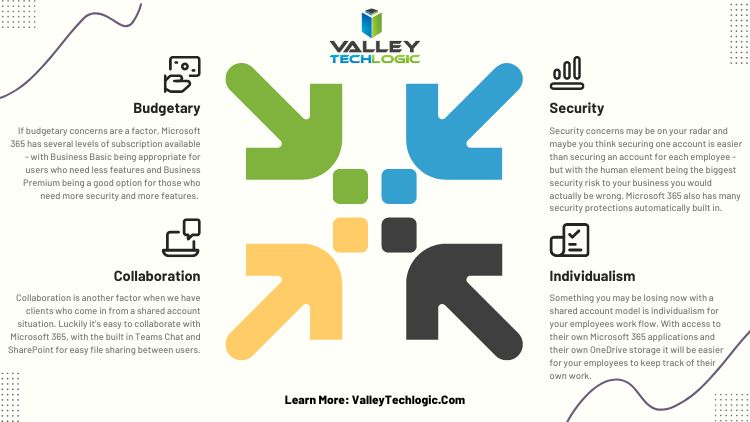
  • Looking to up your online platform game? These 5 tools will help you run your online business better

    Looking to up your online platform game? These 5 tools will help you run your online business better

    If you’re running a business in 2023 you know that having an online presence is often the key to growth (and if you need advice on that we’ve written about it before), but how much of your workflow is presently in the digital workspace?

    We still see plenty of businesses that are still working off pen and paper, eschewing digital files for a wall of file cabinets and communicating via fax rather than email (did you know that you can receive fax via email now)?

    There’s nothing wrong with being old school, but it can slow down the kind of progress you’re hoping to make with your business. Nowadays, people expect an instantaneous response to their questions or concerns and if you’re not used to communicating that way it can cause them to look for a service that will, and automation can cement workflows that would otherwise be hit or miss when left up to an individual (like your marketing efforts via email).

    In a nutshell, it’s a good idea to bring as much of your business into the digital world as you possibly can. That doesn’t mean you can’t keep the techniques that helped you build your client base in the first place – but throwing a modern digital spin on them may help you reach more clients AND impress them.

    So, what are the five tools you should be looking into when it comes to upping your technological game?

    1. First there are marketing tools, such as a CRM (Customer Relationship Management). Beyond being a handy client database, many CRMs provide automated processes for tracking activities with those clients (such as phone calls or emails). It’s also a collaborative tool for your employees, if your employee Susan is wondering if Client A was called last week, she can just check the CRM rather than ask everyone in the office.
    2. Website building tools are also another great option for expanding your business, especially if you don’t currently have a website. It doesn’t have to be a complicated or expensive process, depending on your needs it could be as simple as a one page informational that includes items like your location, hours, and contact information. Making sure your business can be found in a web search is an important part of attracting new customers.
    3. If you’re still handling paper checks for all of your transactions and are left waiting for payments to come in the mail, we ask – why? Online payment processing options have grown dramatically, and they could not be easier to use, for you OR your clients. We think it’s always a good idea to give people more options to give you their money as well.
    4. Branding for your business doesn’t have to be complicated. If you have a company logo that’s really all you need to get started using tools like Canva or Adobe Express. There are many pre-loaded templates for you to use to advertise your business, you just add your logo and download to post on your social media pages (we’ve written about improving your social media presence as well).
    5. Communication tools are another big area you can improve your business technologically, not just with your clients but with your employees as well. Online meetings grew in popularity in the last few years, and we think they’re still an excellent way to keep in touch with clients who might otherwise not want to expend the time or effort on an in-person meeting. You can also use chat programs to touch base with employees without interrupting their workflow with a phone call or visit to their office. We use Microsoft Teams here at Valley Techlogic but there are many great and versatile options available now.

    Of course, the best way to improve your business’ technological prowess is to engage with a technical provider that can knows the ins and outs of today’s modern technology and can best support your efforts to grow your business. That’s where Valley Techlogic comes in.

    Interested in learning more? Schedule a consultation with us today.

    Looking for more to read? We suggest these other articles from our site.

    This article was powered by Valley Techlogic, an IT service provider in Atwater, CA. You can find more information at https://www.valleytechlogic.com/ or on Facebook at https://www.facebook.com/valleytechlogic/ . Follow us on Twitter at https://x.com/valleytechlogic.

  • Your questions answered, our Microsoft 365 subscription information for Nonprofits

    Your questions answered, our Microsoft 365 subscription information for Nonprofits

    As a Microsoft partner we help our customers receive the maximum benefits from their Microsoft 365 subscriptions, including access to the security features found under Microsoft Business Premium and the line of business software we’re all familiar with Office, featuring programs such as Excel, Word, Powerpoint and more.

    For our nonprofit clients they can reap these same benefits often at a reduced cost or even free. We wanted to break down what’s available and how you can take advantage of these benefits for your nonprofit business in today’s article.

    First, what are the eligibility requirements that nonprofits must meet in order to apply?

    Your organization must be one of the following three:

    1. A Nonprofit that’s recognized by your respective country, in the US if your business has 501(c ) (3) status you most likely qualify.
    2. Public Libraries.
    3. Public Museums.

    Our clients usually fall within the first category and their business sector varies, from healthcare to education and many others.

    Another restriction of the free or reduced cost licensing is you must use it for your non-profit staff. If you also have a for profit side of your business or another business that’s for profit you cannot use your non-profit licensing for those staff members. Also, for executive staff they must be unpaid to qualify to use the licensing.

    Microsoft also requires high utilization of the licenses you use, so we don’t recommend using them on staff members who don’t require a computer. They monitor usage and require 85% utilization.

    If your business meets the above requirements, you can apply using this link. Once you apply processing takes up to 10 business days while they validate your application.

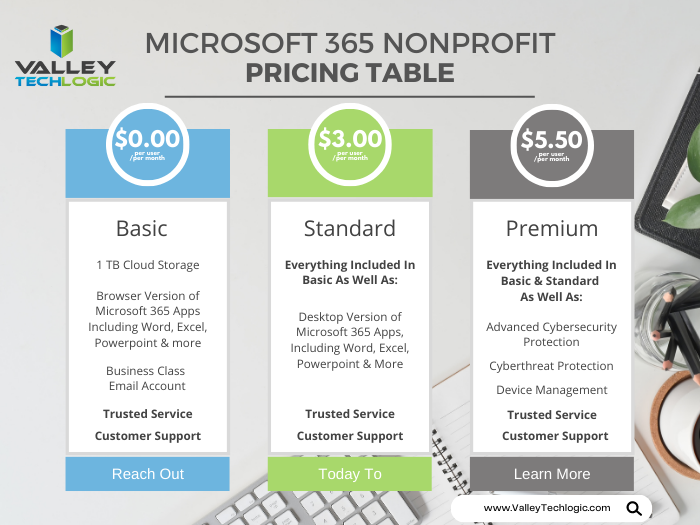
    After you’re approved, you’ll have access to the Microsoft 365 benefits found in the chart below:

    Pricing Table for Microsoft 365 Subscriptions NonprofitAs you can see, these are not scaled back versions of Microsoft 365. Nonprofits receive the same level of service for free (or at a deep discount). If you’re curious what license version makes the most sense for your staff we have a free Microsoft guide that goes into the benefits of Microsoft 365 as well as providing information on Windows, Onedrive and more here.

    Microsoft also provides specialized training for nonprofits and discounts on Surface hardware, you can learn more about these programs here.

    At Valley Techlogic we’re well versed in helping support our nonprofit clients, we can help you with the Microsoft application process as well as helping your business with your day to day technology needs. If you would like to learn more click here to schedule a consultation today.

    Looking for more to read? We suggest these other articles from our site.

    This article was powered by Valley Techlogic, an IT service provider in Atwater, CA. You can find more information at https://www.valleytechlogic.com/ or on Facebook at https://www.facebook.com/valleytechlogic/ . Follow us on Twitter at https://x.com/valleytechlogic.

  • Reddit experienced a major outage yesterday, and our 5 tips for what to say to customers when your website goes down

    Reddit experienced a major outage yesterday, and our 5 tips for what to say to customers when your website goes down

    Reddit was down for several hours yesterday due to an “internal systems issue”. While the mobile version of the site fluctuated between being semi usable to being completed down, the desktop version was unusable for nearly five hours.

    Outages like this that occur to major website are a newsworthy event, as users flock to social media to report the outage and speculate on the cause. A fix was implemented and the site slowly came back up just before 7:30 PM Eastern Standard Time. By the time it was back up it had already been reported on by major tech news sites such as the Verge, Apple Insider, TechCrunch and more.

    We’ve discussed outages before on this site because as we just said, they’re newsworthy events, but what about when your company’s website goes down?

    It might be less news worthy than Facebook, Reddit, Amazon, Twitter etc. having an outage but depending on the type of business you’re in it may still be noticeable to your customers if your website has a major outage.

    When something goes wrong there’s often a knee jerk reaction to move along and pretend it never happened, but outages these days often go hand in hand with cyber threat events and moving along mums the word may leave your customers with the wrong idea (and rightfully concerned).

    If you’re in a business sector that saves customer data at all, and there aren’t many that aren’t, it’s always good to be transparent when you have a major outage. Even if your website was down briefly it still might have been noticed by some and it’s best to keep ahead of the rumor mill.

    Here are our five tips for what to say to your customers when your website experiences an outage:

    1. If the outage is ongoing, update your social media. Customers often look to your social media pages for news about your business and this will be the first place many will check to find out what’s going on. You don’t have to cover everything about the outage, a summary of what’s happening and that you’re aware of it will be enough.
    2. Let your customers know how they can reach if you needed (especially if going through your website is how customers usually contact you). Having an email address available specifically for customer concerns is a good idea.
    3. Also send an email proactively, especially if the outage extends longer than a day. Not every user will check social media, sending an email covers the rest of your digital bases for letting customers know.
    4. Be sure to post an update when the issue is resolved. Again, it’s best to stay ahead of your own narrative for outages within your business, posting an update and a brief description of what the issue was is a good idea.
    5. Finally, if your outage was the result of a breach, follow state and country guidelines for notifying customers of any data leaks that may have occurred.

    Your business reputation can be affected by major outages, we wrote an article on how to protect your reputation and recover. You can find it here.

    Providing advice like this is a service that comes with being a Valley Techlogic customer, here are four other benefits to being a Valley Techlogic customer.

    4 Reasons to Choose Valley TechlogicReach out today to learn more.

    Looking for more to read? We suggest these other articles from our site.

    This article was powered by Valley Techlogic, an IT service provider in Atwater, CA. You can find more information at https://www.valleytechlogic.com/ or on Facebook at https://www.facebook.com/valleytechlogic/ . Follow us on Twitter at https://x.com/valleytechlogic.
  • 5 Ways to Reduce Your IT Costs and Eliminate Wasteful Spending

    5 Ways to Reduce Your IT Costs and Eliminate Wasteful Spending

    In 2023 it feels like the cost of everything is skyrocketing, from eggs being $10 for a dozen, to the price of a used car being up 61% compared to 2019.

    Consumers and business owners alike are scrambling to cut costs where they can, and as a business owner you may be tempted to target your technology spending.

    While technology spending is usually a tiny fraction of the overall cost of running a business (4-6% annually is the average), it’s still a commonly targeted sector. This is usually because it’s one of the least visible items business owners spend money on. While tangible products your business needs day to day are more obvious, a good bit of the money spent on technology in a business is for prevention or maintenance.

    Whether it be software upgrades, new peripherals that function behind the scenes, or money spent on cybersecurity efforts, these are purchases you may not see the obvious immediate benefit from especially if you’re not tech savvy.

    These “invisible” costs occur and leave business owners wondering, do I really need this service or product?

    The answer is a resounding yes, for the most part. While money spent on preventative measures is often a tough pill to swallow, the money you would have to spend recovering from something that could have been prevented will be even tougher (and costlier).

    However, there are some areas of technology spending that are worth taking a look at. We have found that many business owners who utilize our services are already paying for redundant IT services, they just didn’t know it.

    Another example is we have had many clients that sign up with Valley Techlogic, and upon reviewing their internet bill or phone bill we find that they’re drastically overpaying.

    Here are the five ways we suggest cutting your IT spending in 2023:

    1. The first one is touched on above, check your internet bill. As with consumer internet services there are often specials that can be taken advantage of to reduce your overall cost, but if your internet service costs have ballooned out of control it might be time to look for a new provider.
    2. The same is true for your phone service, especially if you’re still using landline phones. Switching to a VoIP service could save your business a substantial amount, but if you’re not ready for that yet you can also just see if all of the lines you’re paying for are being used. We’ve found during customer audits they often have phone lines that ring to nowhere and can be safely disconnected.
    3. Another thing you can do is look for redundant services, if you have several programs aimed at cybersecurity they may have overlapping services – allowing you to cancel the one with the least features. Also, if you’re a Microsoft 365 customer you could consider switching your users to Premium to take advantage of the security features provided by Microsoft directly (at an often greatly reduced cost to stand alone products).
    4. Consider whether virtualization will reduce your hardware costs. There’s a lot of talk about “moving to the cloud”, but for many business owners that’s a nebulous topic. To put it in a nutshell, there is a significant upfront cost to moving your business’s data to the cloud, but you will reap the reward on the backend from reduced infrastructure costs.
    5. Finally, consider whether it makes sense to hiring internally or outsource your IT help. For larger businesses hiring IT staff can make sense to handle the load of their business, but for medium to small businesses hiring a dedicated person is often much more expensive then having a technology service plan through a provider like us. Even for larger businesses, having a technology service plan from a provider can make more sense than continuously hiring additional staff to address an additional need for help.

    If you need help reviewing your IT spending to find out whether it’s in line, or whether a service plan through us can help you address this topic and many more – schedule a consultation with us today.

    Looking for more to read? We suggest these other articles from our site.

    This article was powered by Valley Techlogic, an IT service provider in Atwater, CA. You can find more information at https://www.valleytechlogic.com/ or on Facebook at https://www.facebook.com/valleytechlogic/ . Follow us on Twitter at https://x.com/valleytechlogic.

  • Microsoft layoffs and how the economy is affecting the tech sector

    Microsoft layoffs and how the economy is affecting the tech sector

    It was announced this week that Microsoft will be laying off 10,000 employees in a bid to cut costs in response to “macroeconomic conditions and changing customer priorities”.

    They join the likes of Amazon who also recently laid off 18,000 employees and Meta who cut 11,000 jobs last November. With increasing costs and decreasing sales across many industries amid economic uncertainty, we expect more layoffs to occur both in the tech sector and beyond.

    Satya Nadella, CEO of Microsoft, commented in a recent interview that Microsoft is not “immune to the global changes” and that he expects two years of challenges ahead for the tech sector.

    We’re still seeing hardware shortages stemming from the pandemic and the chip shortages we’ve written about recently. Suffice to say it’s been even more difficult for businesses to navigate maintaining the technology in their office or making needed tech related purchases.

    The worst thing that you can do is hold still and put off making needed upgrades or addressing technology challenges in your business. There are risks associated with outdated technology, they are:

    1. Lack of security compliance: It’s been shown that are on the rise, even faster than before due to malware being more accessible for even those who are not particularly “net savvy”. Even if you thought your business was too small to be a target before, with increased desperation any target might do – including you.
    2. More crashes and downtime: Time is money, especially in this economy. Old devices are more prone to crashing or just giving out completely, at which point you’ll still have to pay to replace them but you’ll have the added cost of the waiting you have to do until the replacement comes in.
    3. Decreased productivity: Your employees are probably your biggest payroll item, do you really want to hinder their productivity by making them use a device that’s sluggish or not working properly? The cost of a new laptop or desktop is a drop in the bucket compared to the cost of wasted time they may spend navigating around issues.
    4. It could put you at a disadvantage to your competitors: The increase of reliance on digital solutions has not been stymied by the current economic landscape, the extra reliance that was exacerbated by the pandemic conditions is there and continues to grow. If your competitors are keeping up with it and you’re not, that will give them an edge you may not want them to have.
    5. Lack of data and transparency: We’ve mostly focused on hardware here but there are significant risks to not making needed software upgrades as well. Modern software is often leaps and bounds ahead in giving you needed data and reports, and we believe knowledge is power. You can’t be sure you’re making the best choices for your business if you’re doing them blindly.

    Now more than ever you need a partner in navigating the technology landscape, and Valley Techlogic can be that partner. We can help you address your technology challenges in a way that still keeps budgetary constraints in mind. We have been in business since 2004 and have experience weathering challenging times. We can even reduce your technology spending in the following ways:

    Click to grab the full size version.

    We’re offering your first service call with us free, because we know you need to be certain when making choices for your business. We know after you try us out you will have the confidence to proceed, you can schedule your first service call here.

    Looking for more to read? We suggest these other articles from our site.

    This article was powered by Valley Techlogic, an IT service provider in Atwater, CA. You can find more information at https://www.valleytechlogic.com/ or on Facebook at https://www.facebook.com/valleytechlogic/ . Follow us on Twitter at https://x.com/valleytechlogic.

  • Need computers for your office? Purchasing before the New Year could save your business a ton of money

    Need computers for your office? Purchasing before the New Year could save your business a ton of money

    Every year we promote the tax savings benefits of Section 179 to our clients, new clients are often not aware that the computer hardware (and even some software) they use in their business is a tax deductible expense. Making these purchases before year end saves them a boat load of money on the next years tax bill and effectively works as a discount on the equipment they need.

    What is Section 179? Section 179 is an immediate tax saving deduction on any depreciable asset – such as vehicles, hardware and software. Rather than depreciating these items in future tax years and having to track that, you can benefit from lowering your liability right now.

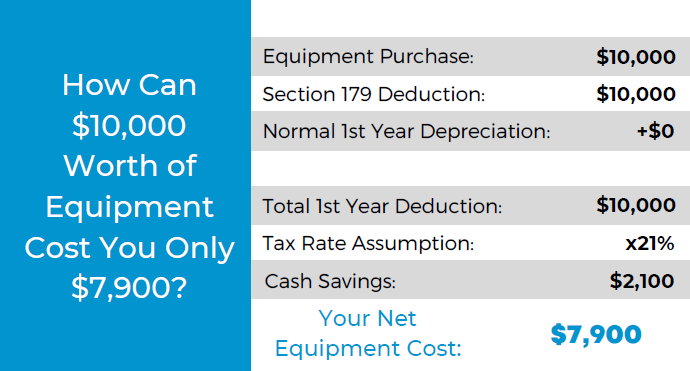
    This especially helps our clients when making larger technology purchases such as replacing aging servers. A new server can easily run $10,000 or more, but when you factor in the benefit of Section 179 it makes for a sizeable discount on a purchase of that size.

    The maximum discount for 2022 is $1,080,000, so the sky is the limit no matter what size purchase you’re planning to make. To maximize the benefits however, we do find that making these purchases at the end of the year is the most beneficial as you see the deduction much sooner when rolled into the next years taxes.

    Here’s a chart on what a $10,000 purchase would look like after utilizing Section 179:

    Of course, every business set up is different and just looking at the numbers may not give you enough of an idea of how you can use Section 179 in your business, so we also made this chart of things our clients often look to do before the year ends that may be an inspiration to you as well.

    Software is a great way to use Section 179 this year in particular, with Windows 7 and 8 for desktops and Windows Server 2012 all losing mainstream support access in 2023.

    While you’re looking to upgrade your Windows software you will probably also want to consider new hardware, the useful life expectancy for computer hardware and servers is around 5 years with typical use and any machines that came from the factory with Windows 7 or Windows Server 2012 installed will be well past that window.

    You may also not know that Microsoft has announced it will no longer allow updates for their Office suite of software on outdated machines, so the time is ticking to get those upgrades done before your office staff loses the ability to use Office software on their devices. You can learn more about the updates coming from Microsoft in 2023 with our free guide here.

    If you’re looking for assistance in procuring technology solutions for your business, Valley Techlogic can help. We have partnerships with Microsoft, Dell, and Lenovo as well as other technology vendors and can help you replace aging equipment easily before time runs out on the benefits of Section 179 this year. Reach out today to learn more.

    Looking for more to read? We suggest these other articles from our site.

    This article was powered by Valley Techlogic, an IT service provider in Atwater, CA. You can find more information at https://www.valleytechlogic.com/ or on Facebook at https://www.facebook.com/valleytechlogic/ . Follow us on Twitter at https://x.com/valleytechlogic.

  • 5 Ways to Establish your Business Presence Online

    5 Ways to Establish your Business Presence Online

    New Twitter owner and billionaire Elon Musk recently announced he may be opening up the “Blue Check” for $8 a month, rather than the rigorous process you had to go through to potentially get it before.

    For most platforms, establishing your business is not a simple monthly charge. It can take time and effort to build an audience on social media or gain traffic for your website. Luckily, the effort you put into one often helps the others, and you don’t need to be an SEO expert to get started.

    The average person spends 8 hours a day doing digital activities, there is no shortage of time or eyes to view the content you create but it is a competitive market now (it’s estimated 252,000 new websites are created daily).

    How do we definite an online presence? It’s not merely existing online, while just having a website or social media page may get you traffic you can still do things to increase that traffic. Your online presence has three key components: visibility, credibility, and reputation.

    Yes, even reputation is a factor that comes in when you’re trying to get your website “ranked” on Google. By ranked we mean having a place in search engine results when a potential customer types in a keyword phrase.

    You want to protect your online reputation by posting content that is relevant to your business, if you’re in refrigerator sales the bulk of your content should be about refrigerators not the latest trendy outwear for the 2023 season. Trying to gain traffic by “tricking’ people into clicking will reduce your reputation and your ability to creep up in the search engine results.

    On a similar note, credibility is another factor and you can greatly amplify that by connecting with other websites in the form of “backlinks”, basically they link to your website and you link to theirs. In our refrigeration example, if you sell refrigerators but don’t repair them sharing links with another business that does would improve your businesses credibility online and give you a boost from whatever traffic that other business sends your way.

    Finally, visibility is what happens when you combine your efforts in improving your reputation and credibility online by posting and sharing valuable content to your audience. There’s a world of difference that happens traffic wise when you appear on the first page of Google vs the 2nd page and beyond.

    It doesn’t stop with optimizing your website though, here are 10 other things to work on to improve your online presence and give your business a boost in traffic that could lead to a boost in customer conversions:

    1. Have an easy to navigate site: The first is a no brainer, if your website is clunky or slow to load people won’t stick around to see what you’re selling. Google has a page speed tool that can give you some insight on how your website stacks up.
    2. Start a blog: If you’re not currently writing a blog (like this) then you’re missing out on a weekly (or daily, or monthly, whatever works for your schedule) injection of new keywords to your website. Landing pages are great but they’re one and done, you can strengthen your online presence by adding new content about your business through a blog.
    3. Post on social media too: You don’t need to be on every social media platform, some may not be relevant to your business. We encourage you to think about the platforms where your customers are likely to be, and then post daily on those platforms. You can create simple marketing graphics with a tool like Canva which practically does the work for you.
    4. Use hashtags too: Hashtags allow you to connect your content to people who enjoy the same content or are interested in a specific topic. Going back to our refrigerator example, if there’s a new model from a popular brand then using that brand name as a hashtag could make sense in the announcement post about it.
    5. Don’t ignore business directories: If you’re struggling to find a way to share links with other websites, starting with the free business directories is one of the best ways to improve your online presence and have your business linked from somewhere else. Start with the big traffic sites like Google My Business, Facebook, and Bing.

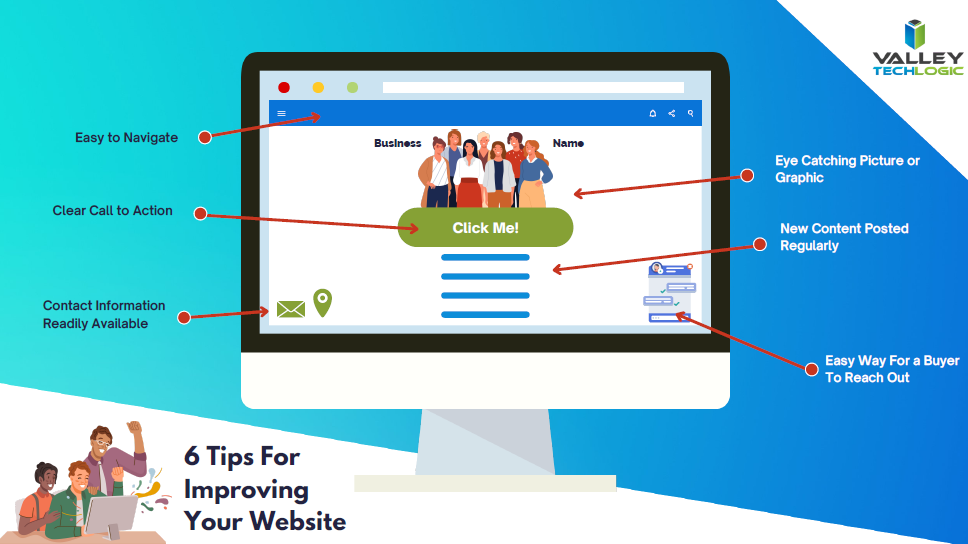
    Wondering what makes a good website? Here are 6 bonus tips:

    Click to view the full size version.

    Trying to work on your online presence can be difficult if the technology you use in your business Isn’t up to the task. Imagine taking the time to write out that first blog post and your computer crashes, you may be done with it before you even get started.

    Valley Techlogic can help you with your technology goals, and having a service plan with us is like working on any of the topics we covered in this blog, you will see a net overall improvement across the board. Learn more with a free consultation today.

    Looking for more to read? We suggest these other articles from our site.

    This article was powered by Valley Techlogic, an IT service provider in Atwater, CA. You can find more information at https://www.valleytechlogic.com/ or on Facebook at https://www.facebook.com/valleytechlogic/ . Follow us on Twitter at https://x.com/valleytechlogic.

  • 2023 is coming, is your business CMMC ready?

    2023 is coming, is your business CMMC ready?

    For some Department of Defense (DoD) contractors, CMMC or Cybersecurity Maturity Model Certification compliance may be a looming figure that they’ve yet to address. If you’re one of the ones currently making headway on it, you may not be certain which level you need to reach for your business.

    CMMC version 2.0 was announced last November, and it seems as if that’s going to be the de facto model going forward. In version one there were 5 levels of CMMC compliance, which have now been reduced to 3. To put it simply, level 1 of the program remained the same, levels 2 and 3 were combined and levels 4 and 5 were also combined.

    This means if you were previously aiming for level 2 in the previous version of the program, you will now need to address topics in level 3 to be compliant.

    Level one or the Foundational Level is meant for who do not handle Federal Contract Information (FCI) data. The checklist features just 17 items, and your compliance is self-attested which means you do not need to have a formal CMMC testing done to be compliant with the program.

    Many DoD contractors though will fall into level 2 or the Advanced Level due to their handling of Controlled Unclassified Information (CUI), level 2 features 110 controls. All of CMMCs level 2 controls originate from NIST SP 800-171.

    With the announcement of version 2.0 it was also announced the additional CMMC specific controls would be removed. If your business has already been working towards compliance with NIST before CMMC was announced you’re in a perfect position to work towards your CMMC compliance goals.

    While 2.0 has not yet been signed into law, it was announced by the Pentagon last April that CMMC language would begin to start showing up in DoD contractors starting July 2023 – so the clock is definitely ticking if your business will be vying for those contracts.

    A small portion of businesses will be required to undertake the rigorous task of being compliant with level 3 of CMMC, or the Expert Level. It’s based on NIST-800-171 and 172 and has 134 requirements at the time of writing, many of which require specialized equipment and software.

    For both levels 2 and 3, audits will be required through the CMMC Accreditation Body (recently renamed Cyber-AB). Cyber-AB is an independent auditing body and we’ve been told the wait times to be audited are lengthy, though this will get a little better as the program gains more auditors. It’s still a good idea to make sure your business is ready and meets the compliance standards though especially as CMMC regulations continue to be rolled out ahead of the official release. You don’t want to be caught needing that proof of compliance to meet your contract requirements and not having it.

    The DoD has also indicated it would take a contractors level of CMMC compliance into consideration when choosing for their contracts – so not being compliant may not just put your existing contracts at risk it could cost you new ones as well.

    We have several articles explaining the levels and controls in more detail, here are our articles on levels one, two and three.

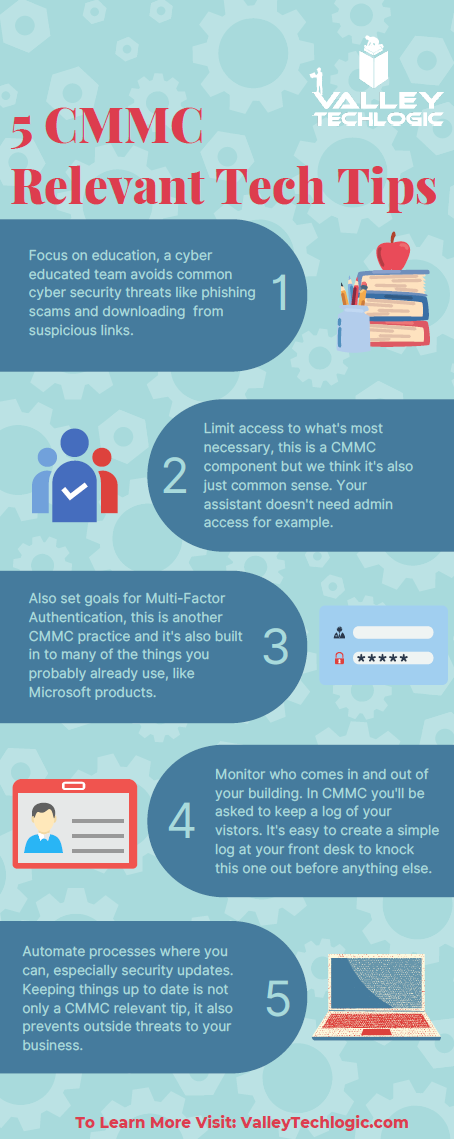
    If you’ve barely scratched the surface in your organization, you can still make changes that will put you in a better position when you begin to tackle it in earnest. Many of the requirements, especially those found in level one, is common sense advice for being safer online. You (and your employees) can work on these five items first:

    If after reviewing the information, you feel like you just need a hand to either cement cybersecurity processes you already have in place or have a partner in your CMMC goals, Valley Techlogic can help.

    We have firsthand knowledge of the CMMC program and helping clients become CMMC certified. Our tools will help you meet the requirements necessary and quickly get your business ready for the audit process.

    Make an appointment today for a free consultation to learn more.

    Looking for more to read? We suggest these other articles from our site.

    This article was powered by Valley Techlogic, an IT service provider in Atwater, CA. You can find more information at https://www.valleytechlogic.com/ or on Facebook at https://www.facebook.com/valleytechlogic/ . Follow us on Twitter at https://x.com/valleytechlogic.

  • 10 ways to get the most out of your outsourced IT

    10 ways to get the most out of your outsourced IT

    Whether you currently have an outsourced IT resource or you’re considering one (which by the way Valley Techlogic can help with that), you may be wondering how to make the most of the service you’re paying for.

    First let’s describe what we mean by outsourced IT, any personnel resource that’s not directly hired by your organization is outsourced, and with IT specifically there are providers that will provide you access to their entire team for a singular fee (which is often times lower than the cost of hiring one full time person would be).

    Another example is you do have in-house IT personnel, but they’re overwhelmed and unable to keep up with he demand of your organization, or there are projects that fall outside their scope of expertise. In either of these cases, it can make sense to contract with an IT provider to fill in the gaps.

    A third scenario is you have regulatory factors within your business sector and need specialized support to meet those requirements. It can be cost prohibitive as a singular organization to acquire the protections needed but an IT provider is able to share that cost across many clients, which in turn lessens the cost for you and provides the other benefits of outsourced IT as an added bonus.

    There may be a misconception that “outsourced” always means “outside the US”, at Valley Techlogic our technicians are local and able to assist our clients onsite as needed on top of providing remote support. It’s a good idea to ask that question of your provider, especially if they will be handling all of your IT.

    Now that we’ve covered what it means to outsource your IT, here are ten ways to make the most of the services you’re paying for:

    1. Reducing redundancy. You may have redundant IT services you’re paying for, we can identify those services and remove them.
    2. Increased cybersecurity protection. To sum a complicated topic up simply, outsourcing your IT to a provider like Valley Techlogic means you will probably have access to advanced cybersecurity solutions that you may not have otherwise had access to.
    3. Backup for your backups. You hopefully already have a backup plan in place (if you don’t we can help with that too) but are you always sure it’s running appropriately? Part of our daily quality assurance checks is making sure all of our client’s backups are performing optimally.
    4. More time for your existing IT personnel. If you already have IT personnel, they may be swamped just with your day-to-day tasks, if you outsource your IT you can lessen the load so they can focus on business forward activities.
    5. Less time spent down. Downtime is expensive for businesses, your outsourced IT resource should be focusing on eliminating as much downtime as possible due to outages, hardware malfunctions, etc.
    6. Procurement assistance included. Procuring hardware has been more difficult lately due to chip shortages and other delays, our resources for procurement become your resources and we can help you source the equipment you need at possibly a better value.
    7. 24/7 support. Even if you have existing IT staff it’s not realistic to expect them to be on call 24/7, with Valley Techlogic we have a team of technicians, and someone is always available to take your call.
    8. Bring it all under one umbrella. Similar to number one, we can bring all of your IT spending under one umbrella. This includes your Microsoft spending because we’re a dedicated Microsoft partner.
    9. Expert advice. We don’t just provide expert services; we also provide expert advice to our clients on improving their technology and efficiency.
    10. Increased consistency. We usually find with new clients that there’s a lot to do in the beginning, but as we onboard our software and tools and regulate tasks such as performing updates and backup maintenance, the technology process becomes more consistent and reliable for them going forward as a result.

    If you’ve never outsourced your IT before, or have and it didn’t go well you may be wary about trying again with another provider. We value creating a smooth transition to our services for our customers, but we also know sometimes you just need to try something out before committing to it.

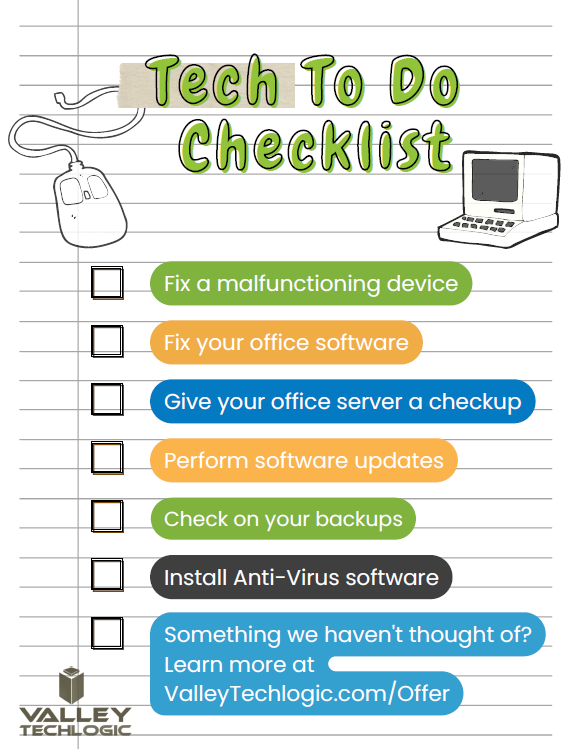
    That’s why we’re offering 2 hours of service free to qualified businesses. Here’s a list of ideas for what we could tackle 2 hours on the table, we’re confident our technicians could complete any one of these tasks for you in 2 hours.

    Click to grab the full size printable version.

    Ready to learn more? Claim your 2 hours here or schedule a consultation with us today.

    Looking for more to read? We suggest these other articles from our site.

    This article was powered by Valley Techlogic, an IT service provider in Atwater, CA. You can find more information at https://www.valleytechlogic.com/ or on Facebook at https://www.facebook.com/valleytechlogic/ . Follow us on Twitter at https://x.com/valleytechlogic.