Tag: cybersecurity

  • Common tax return scams to watch out for in 2022

    Common tax return scams to watch out for in 2022

    The due date for filing your taxes is just 10 days away as of writing, and as tax filers scramble to gather needed information to finish (or start) their filing – scammers are looking for ways to take advantage of the mad dash that occurs for many Americans every year.

    The IRS has put together a compilation of scams they’re seeing this year, and they mention that scams may not be limited to the virtual space. Scammers may also call, mail or even show up to your door in person. So, it’s a good idea to be extra vigilant when protecting your PII (personal identifying information).

    The “Tax Transcript” scam is one that commonly targets businesses, many employees will use their business email when they sign up to do their taxes and may expect communication from the IRS to come there, but scammers will send fake communications with malware attached instead. Users may click without even thinking twice (especially as email scams of this nature can be very convincing). See below for an example.
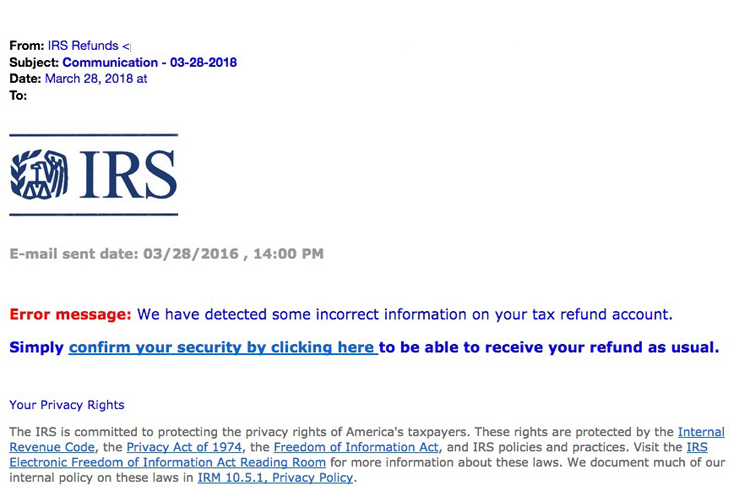
    IRS Scam Email Example
    IRS Tax Email Scam Example. Credit: https://www.irs.gov/

    IRS scam calls are also another common tactic. It’s a good time to reiterate that the IRS will NEVER call you asking for personal information. This news segment found on YouTube shows a scammer in action, these calls may increase as we get closer and closer to the filing deadline. You shouldn’t give out your personal information even if they have things like your address or full name (scammers will often do some research on you before calling).

    Another scam aimed at businesses is one where the scammer will pose as a member of the accounting department where you work, they know many people will not question a call or email coming from a work authority. It may be a good idea if you’re a business owner to send out an email or have your accountant contact your employees to mention that like the IRS you will NEVER call or email unprompted requesting private information.

    Stolen Identity Refund Fraud or SIRF is a very lucrative business, 2.8 million false returns were filed in 2018 with a potential worth of $16 billion dollars. It’s important to guard the PII information criminals need to file a false tax return on your behalf. Here are 5 steps you can take to safeguard your information:

    1. The easiest? Have a good spam filter enabled on your email, that way many of these phishing scams won’t even make it to your inbox.
    2. Check emails for signs it’s a phishing scam, we wrote an article on what to look for. Two standouts are an email domain that doesn’t match the sender (an IRS email won’t come from a Gmail account) or links that when you hover on them don’t match where they say they go.
    3. Check with the purported sender, if the email looks like it’s coming from within your office network, but the email contents just don’t seem right – follow your gut and follow up with your department.
    4. If you receive a call from a number you don’t recognize claiming to be the IRS or the authorities, try Googling the number. Many people will share information about experiences with scam numbers online as a way to warn others.
    5. If you’ve already given your PII to a scammer, contact the major credit bureaus to freeze your credit and contact the IRS to report it ASAP. The IRS has steps in place for helping victims of identity theft, the sooner you act the sooner you can put a stop to the scammer’s activity under your identity.

    Employee training is the best defense for business owners who want to prevent scams such as these ones as well as other cyber threats from effecting their business. Valley Techlogic offers security awareness training as well as top of line cyber security defense systems as part of all of our technology packages. Learn more today.

    Looking for more to read? We suggest these other articles from our site.

    This article was powered by Valley TechLogic, an IT service provider in Atwater, CA. You can find more information at https://www.valleytechlogic.com/ or on Facebook at https://www.facebook.com/valleytechlogic/ . Follow us on Twitter at https://x.com/valleytechlogic.
  • Cyber Insurance – What you can do to ensure your business will be covered in 2022

    Cyber Insurance – What you can do to ensure your business will be covered in 2022

    Last month we released our new cyber insurance report which is an in depth look into this topic, but we wanted to touch on what we’re specifically seeing so far in 2022 in today’s article because from what we’re seeing in from our clients and in the industry – cyber insurance requirements are on the rise.

    If you’re new to cyber insurance or aren’t sure what’s covered under this sort of policy, for most insurance providers cyber insurance offers coverage for technology related disasters. This could include a cybersecurity event such as ransomware or a data breach but depending on your level of policy it might also include IT related downtime not related to cybersecurity such as internet outages. You may even see coverage for specific device issues, such as the loss of an office server that’s critical for day-to-day operations.

    When it comes to the cybersecurity related coverage what many people don’t realize is it’s not only meant for covering your own losses, but also the potential loss incurred by your customers. If you have a data breach, your cyber insurance coverage will cover the cost of any litigation brought by your customers and it may also cover items such as on-going credit monitoring if their PII (personal identifying information) was exposed in the data breach your company suffered.

    It can be easy to feel detached from a loss you haven’t suffered yet. To put some perspective to, it during the Anthem data breach in 2015 when involved 80 million patient records, their costs to notify their customers (which HIPAA regulations stipulate must be done by snail mail) exceeded $40 million in just postage. That’s not even taking into consideration all of the other costs associated with that breach.

    They’re a major corporation, so again it may be difficult to imagine yourself in those shoes, but even for small companies the average costs are as high as $200,000 per breach. Also, if you’re hit with a ransom and think you can just pay it and get out intact, think again. Many times, even if you receive the de-encryption key from the hackers your data may still be lost.

    It’s not surprising that insurance providers are looking at this and wondering how they can alleviate some of the risk they’re taking providing insurance to customers going forward. The requirements are increasing, even for us as a technology provider for businesses we’re seeing longer forms that we’re assisting our customers with when they go to acquire a new cyber insurance policy.

    These longer forms are featuring more difficult questions as well. We have made cybersecurity a staple feature of our plans so our customers are in a good place for obtaining a cyber insurance policy, but the truth is if cybersecurity has been on the back burner for your business, you may have a difficult time in 2022 and beyond finding an insurer that’s willing to cover you.

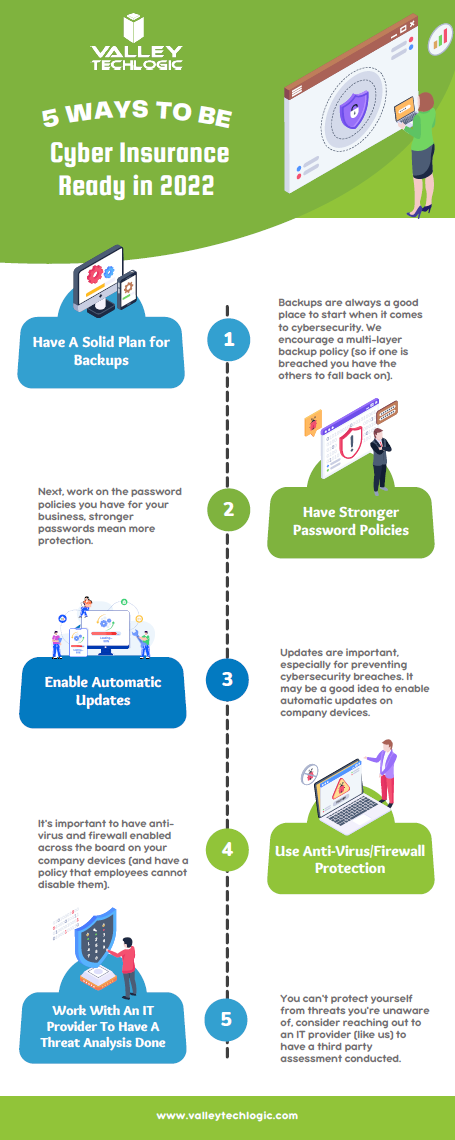
    As an idea of where to start before you go to obtain a cyber insurance policy, we’ve created this checklist of items you can begin to work on to put your business in a better position this year.

    Be Cyber Insurance Ready in 2022
    Click to grab the full size version.

    Many of the items listed are easy for even someone who’s not very tech savvy to tackle, but if you’d really like to protect your business from hackers this year, we suggest teaming up with a tech provider like Valley Techlogic.

    Cybersecurity is a core focus for our business, we will match your business with a cybersecurity framework that makes sense – for example CMMC for defense contractors, HIPAA for healthcare providers, NIST or CIS for small and medium sizes businesses of any industry – and use that framework to have a concrete game plan for making sure your networks and devices are impenetrable to bad actors. Learn more today with a quick consultation

    Looking for more to read? We suggest these other articles from our site.

    This article was powered by Valley TechLogic, IT service provider in Atwater, CA. You can find more information at https://www.valleytechlogic.com/ or on Facebook at https://www.facebook.com/valleytechlogic/ . Follow us on Twitter at https://x.com/valleytechlogic.

  • CMMC Series: Tier Three Overview

    CMMC Series: Tier Three Overview

    We’ve covered tier one and tier two of the Cybersecurity Maturity Model Certification (CMMC) program, and this week we’ll be tackling tier three.

    Before we dive in, we want to mention that we’re covering tier three as it exists currently (in 2022), version 1.0 has five tiers but once version 2.0 of the program releases it will be reduced to three tiers.

    What is currently tiers two and three will just be tier two version 2.0 of CMMC in the future, so it’s still worthwhile to pursue up to tier three in the existing model.

    Tiers four and five in the existing model (or tier three in the future in version 2.0 of CMMC) feature the highest level of protection and may not be necessary for most businesses pursuing Department of Defense (DoD) contracts. It’s estimated less than 1% of businesses will need to pursue beyond tier three.

    If you were to give the first three tiers’ labels, tier one would be considered “basic hygiene”, tier two would be “progressive hygiene” and in tier three you reach “good cyber hygiene”. By tier three your business will be well protected from cyber-attacks.

    Tier one had 17 controls, tier two added 55 more for 72 total, and tier three almost doubles the controls adding another 58 for 130 total.

    Level three expands on Access Control, which adds 8 more controls that focus on encryption and preventing unauthorized access to sensitive systems.

    Next, we see a new control in Asset Management that requests that you develop plans and procedures for handling CUI data.

    Audit and Accountability has 7 new controls that ask you to expand on your logging efforts as well as restrict access to those logs to only authorized users.

    Awareness and Training has one new control and it’s solely around providing and maintaining cyber training for your employees.

    Configuration Management adds three new controls, the CMMC controls in this category are looking for you to tighten up the configurations on your business’s devices, such as preventing downloads of unauthorized software and disallowing users to make security changes on their own.

    In Identification and Authentication we see four controls aimed at tightening up your user security, such as not allowing passwords to be reused and requiring MFA (multi-factor authentication).

    The two controls found in Incident Response ask you to track any incidents that occur and regularly test your organization incident response capabilities.

    Tier three Maintenance adds two new controls, one that asks you to sanitize any equipment of CUI data before it’s removed for maintenance and another that asks you monitor any media meant for testing or diagnostic purposes for malicious code before installing it on your devices.

    Media Protection adds four new controls, they all involve properly marking and restricting access to CUI data.

    Physical Protection in tier three of CMMC adds one control and it asks you to continue expanding on your efforts to prevent physical outside threats to the CUI data your business holds.

    Recovery also adds just one control and it’s aimed at having a schedule for your businesses backups that is strictly maintained and that proper storage capacity for your backups is provided and prioritized.

    Risk Management adds three controls, two are about maintaining risk assessments and developing plans to mitigate any identified risks. The third asks you to manage products not supported by vendors separately, including enforcing access and use restrictions on them. What they mean by this is if your business utilizes an older piece of software you’re not able to discontinue yet – you need to quarantine it to be in compliance with CMMC. Any piece of software not updated is a potential threat vector for your business.

    Security Assessment adds two new controls, they want you to monitor your security controls for ongoing efficacy and also have an independent security assessment conducted to identify any areas of risk that may be missed in your internal efforts.

    Not seen in tiers one or two, tier three introduces the first Situational Awareness control, and it asks that you begin to share cyberthreat intelligence found from reputable sources with your stakeholders. An example would be if there’s been an announcement of a breach occurring with a software your business uses, you would be obligated to share your knowledge of that breach as it becomes available to you.

    System and Communications in tier three adds the most new controls of any category with 15 controls in total. Controls in this category cover items such as ensuring proper information security across your in-house efforts in software engineering and system development to maintaining cryptographic keys for all the cryptography used on your systems. All of the controls are aimed at completing finishing touches when it comes to tightening up the security on your systems.

    Finally, System and Information Integrity adds three new controls. One asks that you beef up your efforts to block spam at all entry points, the second asks that you utilize all available efforts to prevent and detect document forgery and the third asks that you implement “sandboxing” to filter and block potentially malicious emails.

    As you can see, tier three greatly expands on the active role your business will need to take when it comes to cybersecurity measures. Implementing tier three will be made easier though as your business conducts the cumulative process of preparing better cyber readiness.

    For example, in tier two we saw monitoring efforts increase substantially, in tier three you can use the records that have been obtained to fill in the gaps that were uncovered in that process.

    Because such a small portion of businesses will need to obtain tiers four and five, we are not planning to have an in-depth article on those tiers. If you would like to have a consultation with Valley Techlogic on the CMMC process and the maturity level you will need to obtain for your business, you can schedule one here. In next weeks article we’ll talk about the CMMC auditing process and what you’ll need to do to prepare as your audit approaches.

    Looking for more to read? We suggest these other articles from our site.

    This article was powered by Valley TechLogic, IT service provider in Atwater, CA. You can find more information at https://www.valleytechlogic.com/ or on Facebook at https://www.facebook.com/valleytechlogic/ . Follow us on Twitter at https://x.com/valleytechlogic.
  • LastPass say they didn’t leak your password, however some users still received alarming alerts

    LastPass say they didn’t leak your password, however some users still received alarming alerts

    Yesterday, a number of LastPass users received alarming alerts in their email inbox that their passwords – including their master password – had been compromised. The news quickly spread across the internet, starting with forums, and then making its way to Twitter where it was picked up by larger news outlets.

    LastPass immediately denied that a breach had occurred within their organization and at first indicated that the alerts were happening to users who were the victims of “credential shuffling”. That means these users had reused their passwords on other websites who may have had a breach in the past, and now bots trolling the internet for compromised accounts have stumbled upon their password vault credentials.

    This didn’t end up being the case either, but it is a good reminder NOT to password shuffle, especially with the master password for your password vault (if any password should be unique – it should be that one).

    As of this morning LastPass determined that the alerts were sent in error by systems that were set up to be too stringent. They’ve indicated they now adjusted the alerts systems so inaccurate alerts will not be sent again. They also clarified that they don’t store user passwords on their own servers, and that they work on a “zero knowledge” security model which means they are not able to see your master password at all.

    The fact that this news took off in a flash may be indicative of the heightened awareness users have around the security of their data, especially those who currently use a password manager as part of their security repertoire. Even if the alerts occurred in error that may be cold comfort to the scare those users experienced.

    To us, it’s a reminder that the best cybersecurity efforts are multi-layered. We believe it’s equal parts implementation of security measures, monitoring of those measures, and behavioral changes on the part of the users.

    Even if the alerts that occurred yesterday were the result of a system issue not a security issue, we think the users that responded had the right idea when they chose to investigate. It’s also a good idea to change your password if you get a security alert, even if it turns out to be a false alarm. It won’t hurt anything to take that extra step to protect yourself, the old adage “Better Safe Than Sorry” rings especially true when it comes to cybersecurity threats.

    We created this resource on the topic of good password hygiene that you can keep to review, or even pass along to your co-workers/employees.

    Small Version of the Strong Password IG
    Click to view the full size.

    Finally, even if the unthinkable occurs and your passwords are leaked, again a multi-layered approach will protect you. You should enable 2-factor/multi-factor authentication when and where you can. So if someone does get your password somehow, they still will be blocked from logging in.

    If the security measures in your workplace aren’t up to snuff or you’re interested in cybersecurity training for your employees, Valley Techlogic can help. Boosting the security measures for your business and providing a digestible cybersecurity training program for your employees is included as part of our technology service plans. Schedule a free consultation with us today to learn more.

    Looking for more to read? We suggest these other articles from our site.

    This article was powered by Valley TechLogic, IT service provider in Atwater, CA. You can find more information at https://www.valleytechlogic.com/ or on Facebook at https://www.facebook.com/valleytechlogic/ . Follow us on Twitter at https://x.com/valleytechlogic.
  • If you’ve never heard of the Log4J vulnerability, you’re probably at risk

    If you’ve never heard of the Log4J vulnerability, you’re probably at risk

    News is moving fast on the Log4J vulnerability, also known as “Log4shell”. It was first discovered in the video game Minecraft, developers realized hackers could exploit the vulnerability to gain access to the targeted computer and take it over. They quickly released a patch but also made a disclosure that brought the exploit to the public’s view.

    The Cybersecurity & Infrastructure Security Agency (CISA) has now made a running repository that lists all of the software and devices vulnerable to this exploit. There you will find guidance on patching the effected products.

    So, what is the Log4J vulnerability and what does it do?

    It all stems from the building blocks that are used when a programmer is creating their code. Programmers will take bits of code that commonly available and used to act as a foundation for the program they’re trying to write, and in this case one of those foundational bits of code was Log4J. Log4J is used by Java to create a log of activity for the device it’s running on. It copies everything that happens as the program runs, and it makes sense that the vulnerability was initially discovered in Minecraft (a Java based game).

    This communicative bit of code is found in many different programs, which is why it could be devastating if it was widely exploited. Hackers would be able to send a message to the “Log4J” effected product giving it commands. This would essentially allow them to take over the device and have full access.

    Minecraft Isn’t the only thing based in Java either, Java is an extremely popular programming language and bits of it can be found in almost everything. Created in 1995, Java can be found on everything from your own personal laptop to the supercomputers used to solve complex scientific equations. 9937 companies openly report including Java in their tech stack, including Google, Airbnb, Amazon and more.

    Java is also the preferred language for mobile applications, such as Android. Any business interested in having a mobile facing application (which they absolutely should considering mobile devices command the highest percentage of the worldwide web traffic at 54.8%) will need to utilize Java to accomplish it.

    This is so much to say, Java is in nearly everything which makes an exploit that targets a common component of it a recipe for disaster.

    All is not lost however, now that the exploit has been discovered many businesses are working furiously on patches and notifying their customers. You can check the CISA link found at the beginning of this article to keep track of what’s being done by specific businesses.

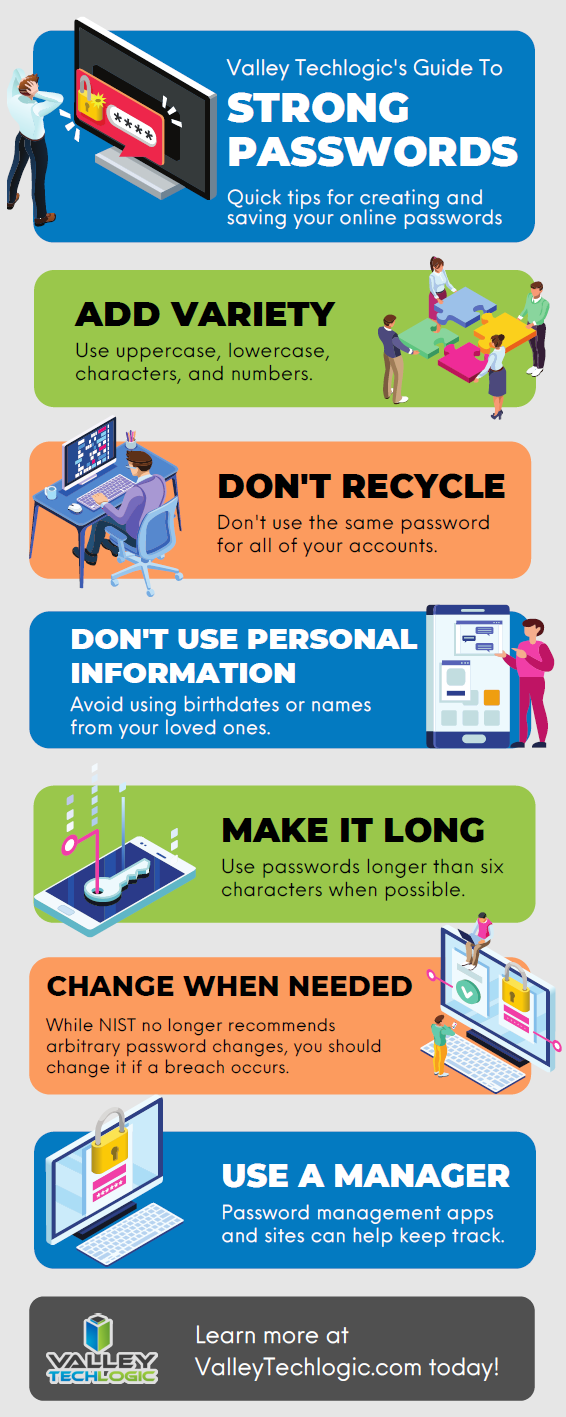
    Click to open the full size version.

    This ordeal is a good reminder to stay up to date on patches that are offered by the software you utilize, but if you’re running a business, orchestrating patching across many different devices company wide can be much more difficult.

    Valley Techlogic offers preventative maintenance in all of our service plans, as well as disaster recovery services if the unthinkable does occur. Learn more today by scheduling a short consultation with us.

    Looking for more to read? We suggest these other articles from our site.

    This article was powered by Valley TechLogic, IT service provider in Atwater, CA. You can find more information at https://www.valleytechlogic.com/ or on Facebook at https://www.facebook.com/valleytechlogic/ . Follow us on Twitter at https://x.com/valleytechlogic.

  • Hackers and the holidays, US government warns ransomware doesn’t take days off

    Hackers and the holidays, US government warns ransomware doesn’t take days off

    As you prepare to take some time off to enjoy with your families (especially if a certain health crisis kept the festivities to a minimum in 2020) it’s important to take some steps to make sure your business is still protected in your absence.

    The Cybersecurity and Infrastructure Security Agency (CISA) issued an advisory yesterday to businesses and consumers alike, warning that hackers often take advantages of holidays and other times people may let their guard down to wreak more havoc.

    The advisory included a warning of a possible increase on the following cyber threat events:

    1. Phishing attacks: That email from your Aunt Beth seeing if you’re going to bring the green bean casserole with a “Google Form” to check it off may not be what it seems to be.
    2. Fraudulent site spoofing: Especially for sites that may be seeing increased traffic due to holiday shopping (Black Friday anyone?).
    3. Unencrypted financial transactions: An easy way to check, is to look for the S in HTTPS, don’t enter your financial data into unencrypted websites.

    Beyond attacks aimed at individuals, attacks aimed at businesses also tend to rise during the holidays and on weekends.

    Such was the case for the attack on Kaseya, which occurred over Fourth of July weekend in 2021, and the Colonial Pipeline hack happened during Mother’s Day weekend the same year. Hackers realize there is less coverage on the weekend and during Holidays and they have taken advantage of it to great success.

    It’s not just large businesses that are a target either, many wannabe hackers have day jobs too and more time on their hands during the holidays to target businesses that could be local to them. That includes yours.

    So, here’s a list of things to check off before you leave the office this week to enjoy some well deserved time off.

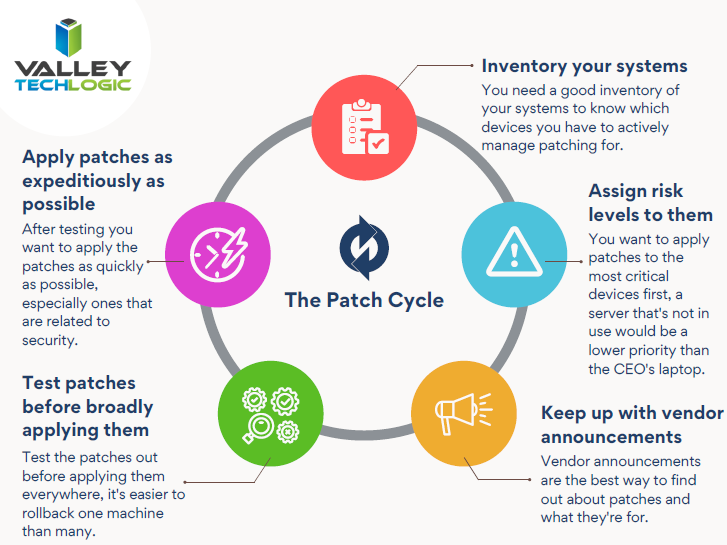
    Holiday Crisis Checklist
    Click to view the full size version.

    As you can see, our number one recommendation is knowing who is going to cover your business if a cyber event does happen while everyone is home for the holidays. If you try to think of who that person is and you either come up empty or maybe it’s you, that’s a problem.

    Another problem is if your normal IT coverage is on a one time or break fix solution basis. The service you normally use could either be too swamped themselves to help you during the holidays, or maybe they’re taking time off too and are simply unavailable to help you.

    This is where having a contract with a technology service provider could really save the day during a crisis. When you have a contract with a business to provide your technology services, they’re bound by the service level agreement (SLA) you sign at the start of service. They will be better equipped to help your business if there’s a crisis – even during the holidays.

    If you’re in the Fresno, Modesto, Sacramento or anywhere else in the Central Valley and aren’t really sure who you would turn to if a technology crisis occurred during the holidays, Valley Techlogic is here for you. Learn more today.

    Looking for more to read? We suggest these other articles from our site.

    This article was powered by Valley TechLogic, IT service provider in Atwater, CA. You can find more information at https://www.valleytechlogic.com/ or on Facebook at https://www.facebook.com/valleytechlogic/ . Follow us on Twitter at https://x.com/valleytechlogic.
  • How much are you worth on the Dark Web?

    How much are you worth on the Dark Web?

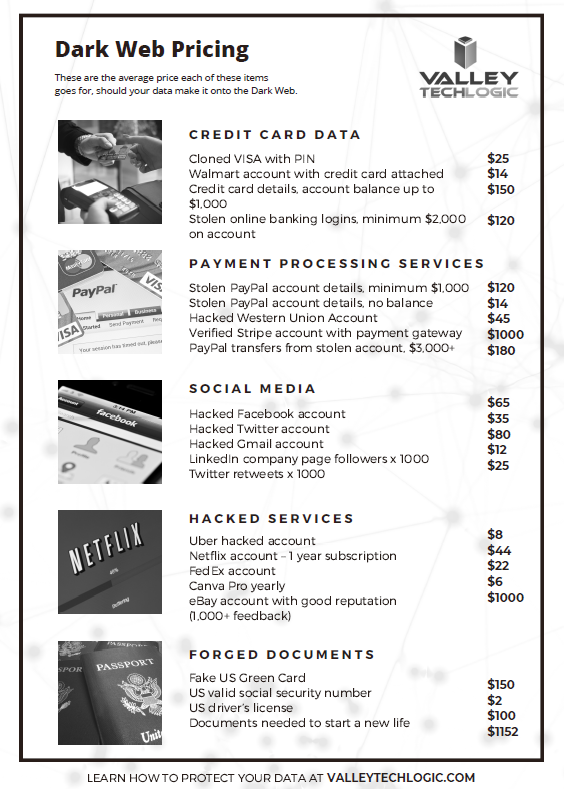
    Not you specifically, but the data that makes up your online activities and private details? What about your various web accounts, for example did you know a hacked Netflix account with 12 months of service is worth $44 on the Dark Web as of 2021?

    We know the Dark Web is a nebulous concept and most of the people we talk to really don’t feel as though it has much to do with them. There’s even those that have resigned themselves to the fact their data is just “out there”, but take solace that in the flux of so many people who experience identify theft (1, 387, 615 reported cases in 2020) there’s just no way a hacker would ever reach them personally.

    If you’re a business owner this is of course, a crock of baloney. While there are many business owners in the US, their numbers pale in comparison to the vast swafts of people who don’t own a business and thereby don’t have valuable employee and financial data within their purview. The fact is by simply owning a business, you’re more vulnerable to being a target of identity theft.

    Business identity theft and consumer identity theft typically occur with the same goal in mind, financial gain for the bad actor. However, business identity theft carries a much larger trickle-down effect. It’s not only your own data that’s at risk, there’s also that of your employees and your business itself.

    Business size doesn’t affect the rate at which you’ll be targeted either, in fact during the COVID pandemic, business identity theft soared across the board.

    This all leads us back to what hackers hope to gain and what your financial data and other pertinent details and accounts are really worth on the dark web, we’ve created this chart with some notable items, but you can find the whole list for 2021 here:

    Click to grab the full size version.

    As the website above states, the quantity of these items found on the dark web also has grown considerably in the last year. It’s predicted cyber theft will cost the world $10.5 trillion annually by 2025. Cyber crime is more profitable than the global drug trade at this point in time.

    So instead of thinking “it won’t happen to me” you should begin considering what you will do when it does happen to you, or even better – what you can do to stop it.

    For instance, at Valley Techlogic we provide all of our customers with Dark Web Monitoring as a routine part of their services with us.

    Dark web monitoring won’t stop your details from being leaked but it will help you monitor and prevent further damage. If your credentials are made available to hackers and you’re aware of it, it’s a lot easier to change them ahead of any damage being done to your accounts and systems.

    You can also partner with an IT provider who has a cyber security stack that exceeds what you could procure on your own. This allows you to take advantage of a robust cyber security package without trying to manage and absorb the cost yourself, allowing you to protect your business and even save money.

    Finally, your provider can help you comply with a cybersecurity framework recommended by the US government, such as NIST or CMMC. This will offer you the best most comprehensive protection from business identity theft.

    Valley Techlogic can assist you with all of these recommended cybersecurity practices. Learn more by taking a quick 10 minute discovery call with one of our tech experts.

    Looking for more to read? We suggest these other articles from our site.

    This article was powered by Valley TechLogic, an IT service provider in Atwater, CA. You can find more information at https://www.valleytechlogic.com/ or on Facebook at https://www.facebook.com/valleytechlogic/ . Follow us on Twitter at https://x.com/valleytechlogic.

  • 5 Ways “Tribal Knowledge” Sabotages Your Cybersecurity Efforts

    5 Ways “Tribal Knowledge” Sabotages Your Cybersecurity Efforts

    Even if you’re unfamiliar with the phrase “tribal knowledge” you’ve still most likely participated in it. Tribal knowledge is anything in your workplace people just “know”. If you have a particular co-worker that gets upset if the AC is turned down below 75 so no one does, that’s tribal knowledge. If the snacks in the breakroom are first come first serve and no one can claim dibs, that’s also tribal knowledge.

    Tribal knowledge is anything in your workplace that is common knowledge and is not documented. If the rules are posted somewhere it goes from being tribal knowledge to policy, and when it comes to the technology in your business, it is much more secure to rely on policy than tribal knowledge.

    Having policies for your technology holds everyone in your organization accountable. No one can claim they didn’t know the rules if the rules are clearly outlined and defined. Having effective policies are also necessary for maintaining your compliancy with federal rules regarding cybersecurity and business and for meeting the requirements for things like cybersecurity insurance.

    Here are the five ways tribal knowledge typically sabotages your cybersecurity efforts:

    1. The rules are loosely applied. If somethings not policy, then it can be difficult to make sure everyone is on the same page. A new hire will not be aware of your rules from the start and others may feel the rule doesn’t apply to them because they haven’t been strictly told it does.
    2. The rules are up to interpretation. What you think something means and what someone else may interpret something meaning can be vastly different, especially when being communicated person to person where some of it is probably getting lost in translation.
    3. You have no documentation. If the guidelines for online safety in your business are communicated verbally, you have no documentation for how or when they’re being applied. If you have a ransomware attack and you go to your insurance company without documentation, you’ll most likely be turned down.
    4. You’re not keeping up with the times. If you have employees stuck on the way things “have always been done” instead of evolving policies to fit your workspace as it grows, you’re going run into a problem if you ever need to implement comprehensive cybersecurity changes in the future.
    5. You’re losing access to relevant data. Policies help you document your processes, and that documentation is data that could help your business grow. If a certain activity is not working or could be working better, the documentation you’re creating with comprehensive policies could help you find out sooner which will save your business time and money.

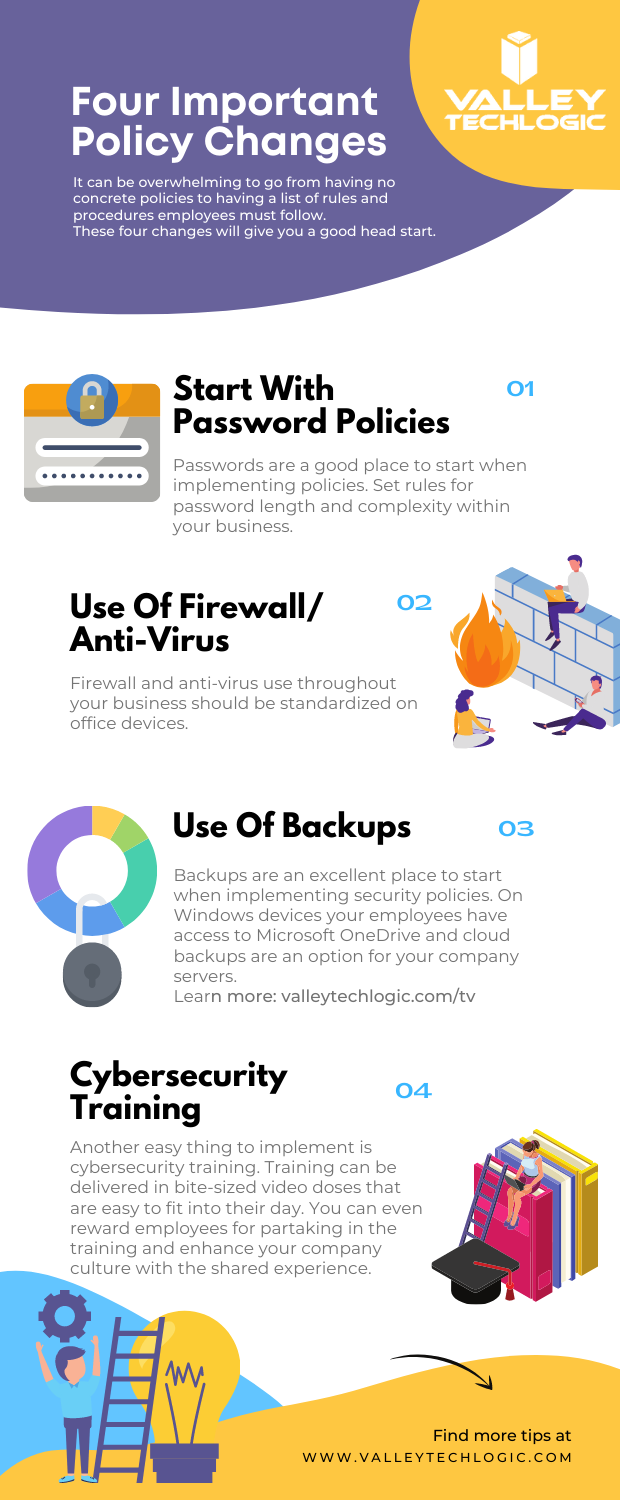
    In addition to these five tips, we’ve also created this PDF for four easy things to implement in your business (click to download).

    Four Policy Changes To Start With
    Click to download.

    These items will get you on the right track but if you feel like it’s time to get serious about cybersecurity, it’s best to leave it to the professionals. At Valley Techlogic, we have over 15 years in the cybersecurity space. We have a robust cybersecurity package that can be used standalone to leverage our cybersecurity stack if you already have an IT team in place or in conjunction with our IT service plans if you don’t currently have reliable assistance for your business’s technology. Schedule a consult today to learn more.

    Looking for more to read? We suggest these other articles from our site.

    This article was powered by Valley TechLogic, adns, n IT service provider in Atwater, CA. You can find more information at https://www.valleytechlogic.com/ or on Facebook at https://www.facebook.com/valleytechlogic/ . Follow us on Twitter at https://x.com/valleytechlogic.
  • October is National CyberSecurity Awareness Month, Our Checklist Will Get You Started

    October is National CyberSecurity Awareness Month, Our Checklist Will Get You Started

    Every October the CyberSecurity & Infrastructure Security Agency (CISA) releases a list of resources and tips for National CyberSecurity Awareness Month – which is now in its 18th year.

    This year’s theme is “Do Your Part. #BeCyberSmart”. There has been an onslaught of news worthy ransomware attacks, DDoS attacks and data breaches (up 38% this year compared to last) in 2021 and there has never been a better time to address what the average person or business can do so they don’t end up as part of these statistics.

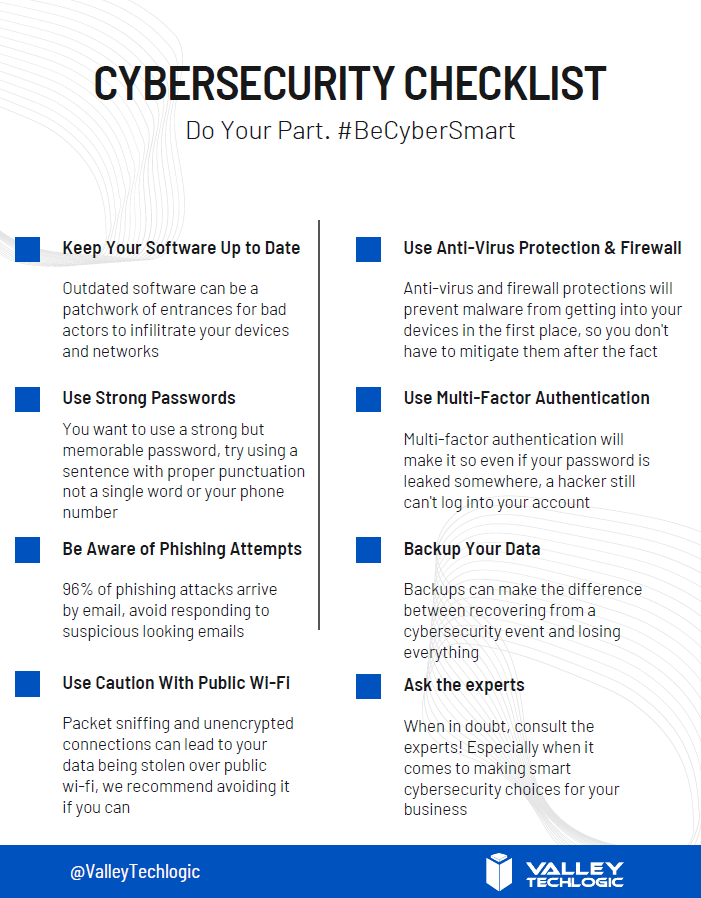
    We’ve created this checklist so you can see if you’re following the right path to keep your business safe from outside intruders.

    Click to download the online capable version.

    Cybersecurity requires ongoing maintenance to succeed. Following simple safety steps will help but it’s important not to disregard active threats to your business from the outside.

    Ongoing employee training is one way to combat those threats, cybersecurity training has evolved to include bite size doses of good advice for your employees that could make the difference between inadvertently falling for a phishing scam or attack attempt and reporting it to your IT team as they should. 95% of data breaches involve human error.

    It can also be important to have a team behind you making sure all of your company devices are maintained and updated, even if that outdated Windows 7 computer that sits in a corner is barely used it can still be a threat to your business. Older devices with outdated software can act as a gateway to allow bad actors into your business.

    More advanced maintenance such as enabling two-factor or multi-factor authentication on company accounts can be another important step to keeping threats out. If someone gets your password from another company’s data breach (which happens all the time) that phone pop up could prevent you from being hacked.

    Finally, having a comprehensive backup program for your businesses data is the final shield against cyber threats. We’re unique in that we offer not only active backups but archival backups as well. The archival backup is “Write once, Read many” which means you can look at the data as often as you like but it can’t be edited or deleted.

    A bad actor may find your unbacked up data, and they may gain access to your active backups, but that archival data is virtually bullet proof. For your important files, the ones that must not be deleted at any cost, having that backup there and ready if you need it is the peace of mind most of us would not want to be without (learn more about our backup program here).

    If this article has gotten you thinking about what you can do to improve your cybersecurity processes or even that you need to create a plan to get there, we’d love to help. Schedule a discovery call with us to learn more about how Valley Techlogic can help you be #CyberSmart.

    Looking for more to read? We suggest these other articles from our site.

    This article was powered by Valley TechLogic, adns, n IT service provider in Atwater, CA. You can find more information at https://www.valleytechlogic.com/ or on Facebook at https://www.facebook.com/valleytechlogic/ . Follow us on Twitter at https://x.com/valleytechlogic.
  • Can you spot the phishing clues? And 10 tips to avoid falling for a phishing scam

    Can you spot the phishing clues? And 10 tips to avoid falling for a phishing scam

    If you’re not aware, phishing is another word for scams perpetrated over email. It was coined in 1996 and was first associated with hackers attempts to steal America Online (AOL) accounts, and it has not slowed down since then.

    As of 2021 most hacking attempts are phishing scams, the phrase is meant to evoke the image of a hacker literally fishing for their victims by baiting a hook which in this case is a credible looking email from a place you might actually do business from, a colleague or a family member. 94% of malware attempts originate from an email sent to the victim.

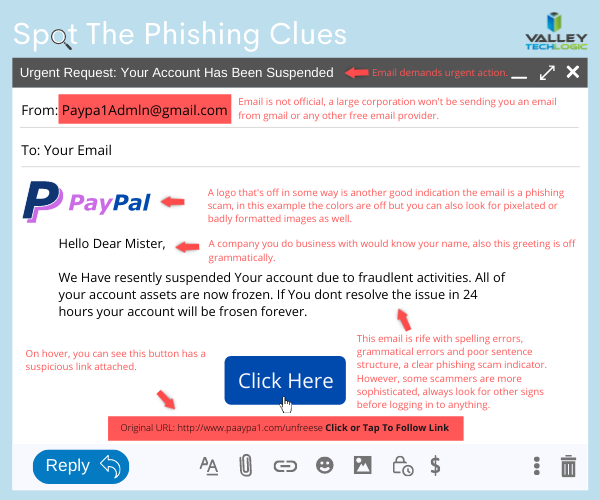
    Well as credible as they can manage, many phishing attempts are poorly worded and grammatically incorrect as the senders are from another country from the victim. In the image below we showcase a phishing email you might receive, click to reveal the answers.

    Spot the phishing clues
    Click to reveal the clues.

    Not all phishing attempts will be so obvious though, here are our 10 tips to avoid falling for a phishing scam.

    1. You are asked to reply with sensitive details. A legitimate business will never ask for your private details via email, if you’re unsure contact the business directly to ask.
    2. The message says you must respond urgently or face dire consequences. Legitimate businesses such as the financial institution you bank with won’t relay an important message over email alone, and they’ll never threaten you.
    3. The email contains a non-standard email attachment. While even standard email attachments can contain malware, a non-standard email attachment is a clear sign something is amiss.
    4. The senders email address doesn’t match the contents. As in our example, a legitimate business (especially a large one) won’t be using a gmail address. You also want to watch out for slight misspellings, such as an email coming from admin@paypa1.com
    5. The email contains an unusual request. You receive an email that looks like it’s from your boss, and he’s saying he wants to reward some key players in your company by gifting them gift cards from a popular big box store. He says not to give them to the players directly, simply reply with the gift card numbers and he’ll handle it. This is just one example of a scam we have unfortunately heard of happening. If the email is requesting large amounts of money be spent in unusual way or private details be sent over email, even if the email looks legitimate you should verify with the supposed sender first.
    6. It has an attachment you weren’t expecting. If receive an email with an attachment and the body suggests you requested information, but you don’t remember doing so, it’s probably a phishing scam.
    7. The email says you won a prize, but you must enter your banking information to claim it. Prizes are a common phishing scam trope; they may also try to get you to download a suspicious attachment.
    8. The URL in the email doesn’t match the business it claims to come from. As in our example, phishing attempts often involve a similar but not quite right URL. Many scammers will try to gain the victims trust by sending them to an “official” looking website where they will login with their legitimate credentials, allowing the scammer to gain access.
    9. The content is canned. Many phishing scammers reuse the materials of others. One example is you receive a suspicious sounding email, such as someone saying you have stolen their copyright images and you must visit a website to confirm. If you Google the email you may find examples of others online who have received that same
    10. The greeting doesn’t match the content. This is a simple one, if you receive an email supposedly from your boss but the greeting starts with “Dear” or another out of character greeting, it’s probably a phishing attempt.

    This is only a start, many phishing attempts are highly sophisticated and difficult to spot but knowing some of the signs will help you be more attentive to things that may be wrong with an email you receive. We also have found for our clients, randomized simulated phishing attempts can help them with training their staff to keep an eye out for phishing attempts.

    Most successful hacking attempts involve a human element, training is your only first line of defense. If you would like to increase your defense against phishing attempts, malware, ransomware and more, Valley Techlogic can help. Schedule an appointment with us today to learn about our comprehensive cyber security packages for businesses.

    Looking for more to read? We suggest these tech articles from the last week.

    This article was powered by Valley TechLogic, an IT service provider in Atwater, CA. You can find more information at https://www.valleytechlogic.com/ or on Facebook at https://www.facebook.com/valleytechlogic/ . Follow us on Twitter at https://x.com/valleytechlogic.