Tag: malware

  • McDonald’s AI “McHire” platform was breached, allowing for the potential exposure of 64 million applicants private data

    McDonald’s AI “McHire” platform was breached, allowing for the potential exposure of 64 million applicants private data

    For employers, sorting through applications is ordinarily a tedious but necessary part of the hiring process. Enter AI, with artificial intelligence employers can now have AI tools sort candidates based on specific prompt criteria, shortening the time it takes to sort through dozens or even hundreds of applications and propelling the most worthy candidates to the top of the list for human review.

    Or at least, that was the idea. However recently for McDonald’s that idea backfired with a simple mistake, a security flaw in their AI hiring platform dubbed “McHire” or McHire.com allowed attackers to access the logs of any user in the system simply by using the account and username “123456”.

    This allowed access to an administrator account for Paradox.ai, the vendor behind the creation of the McDonald’s AI hiring platform, and the ability to query “Olivia”. Olivia is is the chatbot potential applicants would chat with as they submitted their application.

    The data they were able to access included applicants’ names, emails, addresses and phone numbers. In total there were 64 million records accessible in the system at the time the breach occurred.

    Luckily, the security flaw was discovered by researchers instead of true bad actors. The breakdown of how it was discovered can be found on the blog by security researchers Ian Carroll and Sam Curry. We have reported on their research before when they discovered a major flaw with Kia and other car brand manufacturers allowing for remote access to vehicles (even while they’re actively being driven).

    It’s a sharp reminder that just because AI solutions may make things easier, doesn’t mean that best practices are automatically being followed. The human review is still an important component when deploying any system that will gather large amounts of PII (Personally Identifiable Information) and it’s important to know the rules and restrictions you must follow when collecting that data for your business.

    Below are three rules we recommend following when collecting PII in your business:

    1. Collect Only What’s Necessary (Data Minimization)

    Only gather the PII that is absolutely essential for the purpose at hand. Avoid collecting excess or sensitive data unless it is required. This reduces risk in the event of a data breach and shows respect for user privacy.

    1. Clearly Inform and Obtain Consent

    Be transparent about what data is being collected, why it’s needed, how it will be used, and with whom it might be shared. Always obtain informed consent before collecting any PII, especially for sensitive data like health, financial, or biometric information.

    1. Protect the Data with Strong Security Measures

    Use up-to-date encryption, access controls, and secure storage practices to protect PII from unauthorized access, loss, or misuse. Regularly audit systems and train employees on proper data handling procedures.

    These rules not only build trust with users but also help ensure compliance with regulations like GDPR, CCPA, HIPAA, CMMC and more. If compliance or data protection is a concern for your business, Valley Techlogic can be your go-to partner in creating secure data collection and safeguarding practices alongside deploying industry leading cyber security preventions within your business. Reach out today to learn more.

    Looking for more to read? We suggest these other articles from our site.

    This article was powered by Valley Techlogic, leading provider of trouble free IT services for businesses in California including Merced, Fresno, Stockton & More. You can find more information at https://www.valleytechlogic.com/ or on Facebook at https://www.facebook.com/valleytechlogic/ . Follow us on X at https://x.com/valleytechlogic and LinkedIn at https://www.linkedin.com/company/valley-techlogic-inc/.


  • As you’re doing your holiday shopping online this year be aware of “malvertising”

    As you’re doing your holiday shopping online this year be aware of “malvertising”

    Malicious online ads or “malvertising” is on the rise, and no time is more ripe for online scamming then the busiest shopping season of the year.

    Malvertising is a cyberattack that involves bad actors injecting malicious code into online ads. These ads will appear from a Google search to be a genuine website, but when users click on the ad they are falling into the attackers trap.

    There are several variations on the scam, with some only intending to steal your payment information and others go so far as to try where others get you to download a malicious program and infect your entire computer. They can then use your device to scam people you know or add it to an online botnet user list to carry out other nefarious attacks.

    It can be difficult to defend against this type of attack because these attackers go to great pains to set up a legitimate looking storefront and credible looking ad. These types of ads are even found on major search engines such as Google.

    There are a few ways you can protect yourself though, here are our five recommendations:

    1. Use a Trusted Ad Blocker
    • Install a reputable ad blocker, such as uBlock Origin or AdBlock Plus, to block potentially harmful ads. Ad blockers prevent many ads from being displayed, reducing exposure to malicious ones.
    1. Enable Browser Security Features
    • Keep Your Browser Updated: Ensure your web browser is updated to the latest version, as updates often patch vulnerabilities.
    • Enable Pop-Up Blocking: Most modern browsers have built-in pop-up blockers to prevent intrusive ads.
    • Turn On Safe Browsing: Enable security settings like Google Chrome’s Safe Browsing to get warnings about dangerous sites.
    1. Use Security Software
    • Install and maintain robust antivirus or anti-malware software that includes web protection. Programs like Malwarebytes or Bitdefender can detect and block threats from malvertising.
    1. Be Wary of Suspicious Ads
    • Avoid clicking on ads, especially those offering deals that seem too good to be true, free prizes, or urgent requests to “update” software. Even legitimate-looking ads can redirect you to malicious sites.
    1. Browse Securely
    • Use HTTPS: Stick to websites with HTTPS encryption. These are generally more secure and less likely to host malicious ads.
    • Sandbox or Virtual Environment: For extra protection, use a sandboxed browser session (like in a virtual machine) for risky browsing activities.

    Cyber security protections are a key piece of the services provided by Valley Techlogic under our technology support plans, at no additional cost. For the holidays we’re also offering a free device for new customers, take advantage of great service and a great holiday offer, partner with Valley Techlogic today.

    Looking for more to read? We suggest these other articles from our site.

    This article was powered by Valley Techlogic, leading provider of trouble free IT services for businesses in California including Merced, Fresno, Stockton & More. You can find more information at https://www.valleytechlogic.com/ or on Facebook at https://www.facebook.com/valleytechlogic/ . Follow us on Twitter at https://x.com/valleytechlogic and LinkedIn at https://www.linkedin.com/company/valley-techlogic-inc/.

  • If you have a computer or server with an Intel Processor, you need to patch for this vulnerability ASAP

    If you have a computer or server with an Intel Processor, you need to patch for this vulnerability ASAP

    Intel just released a fix for a vulnerability that would make certain CPUs in jeopardy of being compromised. The vulnerability would allow an attacker to gain privileged access to machines or trigger a denial-of-service attack.

    You can see the list of affected CPUs here, patching for this vulnerability may need to occur in phases including micro-updates to the BIOs, system OS and drivers. In a statement on their website Intel says malicious exploitation of this code would need execution of an arbitrary code (so it can’t be exploited with no input from the end user). They don’t believe patching for this issue will impact devices in a noticeable way.

    Originally discovered by a Google Security Engineering team and dubbed “Reptar”, a researcher at Google commented on how strange this vulnerability appears to be.

    The vulnerability changes how redundant prefixes, basically small bits of code, are interpreted by the effected CPUs. Normally CPUs ignore redundant prefixes for obvious reasons (the key word being “redundant”) but instead these prefixes triggered expanding errors within the system. The Google team found that when it was left without remediation eventually the affected machines would report processing errors and begin to malfunction.

    Destructive code like this is frightening because it may not just be a loss of data or temporary use of the affected machine, but it may cause the computer or server to fail altogether.

    This Isn’t the first CPU exploit Intel has suffered and they’re not the only ones battling attacks to their hardware, with AMD also announcing news of their own “CacheWarp” vulnerability that allowed attackers to gain root access to Linux Virtual Machines. So, if you thought these types of attacks were limited to Windows, think again. In this case the vulnerability only affects 1st through 3rd generation EPYC processors, the 4th generation is not vulnerable in this case.

    Also, with the AMD vulnerability it’s also important to note that while a patch is available for just the 3rd generation EPYC processor. For 1st and 2nd generation there is no mitigation available. As with Intel it’s not expected that the patch will have any effect on the CPU performance.

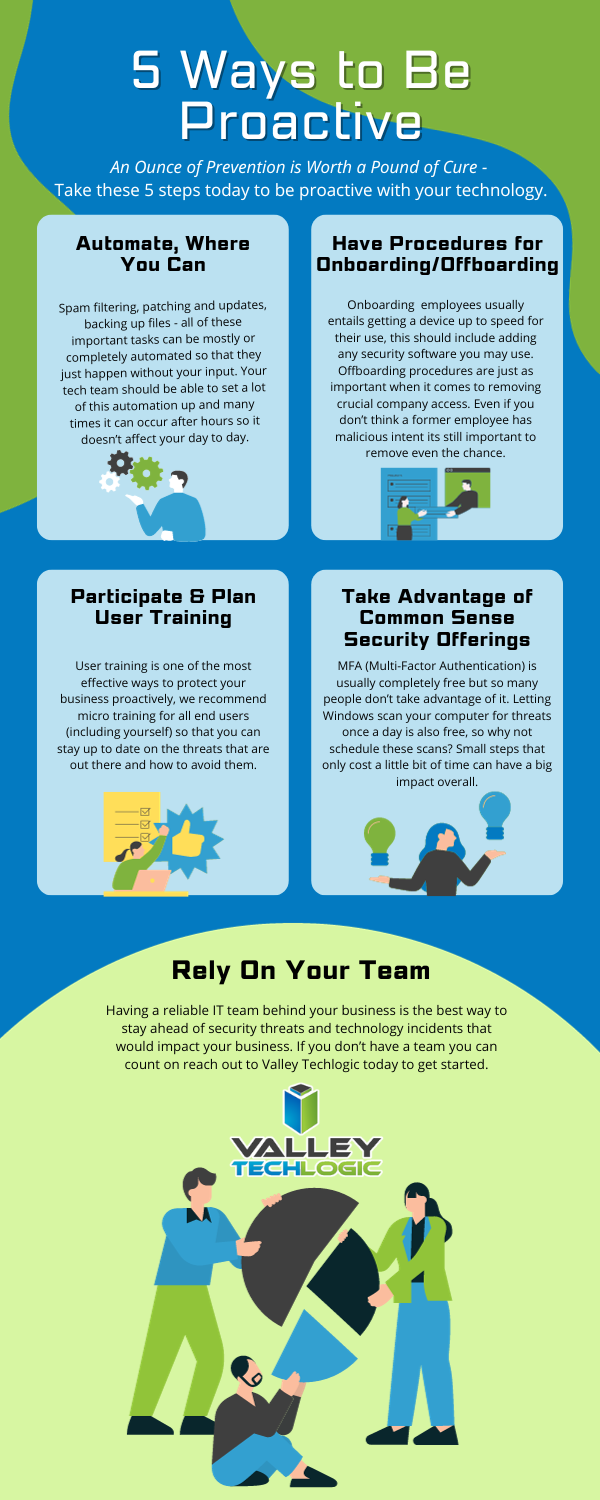
    Both companies have been very quick to patch these aggressive vulnerabilities and attacks like these highlight the need to make sure regular patching is a primary component of any tech service plan. Below are 5 key components we recommend when it comes to proactive technology support

    Proactive care is often a tough sell, with many business owners not feeling the need to spend the money on proactive tech care as these things “won’t happen to them”. It’s important to note that many attacks that occur are widespread and have no specific target in mind. If you have unpatched equipment in your office, you may be a sitting duck to any widespread attack issued to a vendor you use or because you bought a certain kind of hardware that ended up having a vulnerability. These attacks are ones of convenience not of malice as is often misconstrued.

    Even if it can be recovered from, why take the chance? Having a partner like Valley Techlogic to make sure vulnerabilities like the ones in this article are patched as soon as a fix is available means you will never be part of the eye-opening statistic about businesses who suffer a major breach. If you’re not aware, 60% of businesses close after a cyberattack. Don’t let that be you, reach out for a free consultation with us today.

    Looking for more to read? We suggest these other articles from our site.

    This article was powered by Valley Techlogic, an IT service provider in Atwater, CA. You can find more information at https://www.valleytechlogic.com/ or on Facebook at https://www.facebook.com/valleytechlogic/ . Follow us on Twitter at https://x.com/valleytechlogic.

  • BEC Scams are becoming increasingly more common, and the payouts more lucrative

    BEC Scams are becoming increasingly more common, and the payouts more lucrative

    BEC or Business Email Compromise is a type of phishing scam where the target of the scam receives an email purporting to be someone they know, like a vendor they work with or a colleague. These scams are so common place that the Federal Bureau of Investigation even has a guide to protecting yourself from them.

    We’ve even written before on how to spot a typical BEC email and a few ways to combat it, but we would like to circle back to this topic now as we creep into what is typically a very busy time for most business owners – the fourth quarter.

    You may or may not be surprised to learn that BEC attacks rose in the fourth quarter last year and we’re not anticipating 2023 to be any different. 2022 even saw a rise in the ever popular “as-a-service” variant of attacks which means would be bad actors could enact their attacks with little actual effort on their part.

    The technical know-how required for these attacks is also low, with some of them being as simple as just a variant on your normal phishing scheme but with the end goal being a direct payout rather than the user’s credentials or private information.

    CISA (Cybersecurity and Infrastructure Security Agency) even reported on Russian state sponsored bad actors specifically targeting defense contractors using Microsoft 365 with their BEC schemes. Imitating Microsoft support is not a new scam, and like always you should be wary about any support person reaching out to you directly asking for your credentials, but the single-minded focus of this particular scam put government agencies like CISA and the FBI on red alert.

    When we say these scams are becoming more lucrative, we definitely mean it, with it being estimated BEC victims lost 2.74 billion dollars in 2022 which was $300 million more than 2021. Like with most cyber attacks we anticipate they’ll continue to rise.

    So how do you protect yourself from a Business Email Compromise scam in 2023?

    1. Don’t overshare online. BEC is a social engineering scam, so the less information that’s readily available about you on the internet the less able a scammer is to pretend to be someone you know.
    2. Forward emails instead of replying to them. As with normal phishing these scams are perpetrated over email. Forwarding emails forces you to type out the email address (thereby guaranteeing it goes to the right person). BEC attacks usually involve spoofing an email address or simply choosing a domain that’s similar to one you may be use to corresponding but having a slight misspelling or rewording.
    3. In the same vein, check the sender’s email address before responding at all. You may be able to simply block the scammer when you discover they’re trying to imitate someone else by verifying the email address is incorrect.
    4. Secure your own domain against domain spoofing. Many times, the attack is coming from “inside the house”. A very common BEC scam involves one of your employees receiving an email that looks like it’s from you or someone high up in your organization, except it’s not. Registering the domains you use for email will help protect against this very common variety of this scam.
    5. Again, in the same vein as our last tip, use a domain that you’ve registered instead of a free email service. It might be tempting to keep using the Gmail address you’ve always used to avoid paying for a domain and email services, but it greatly increases your risk of a BEC attack being successful. Using a free email service allows attackers to create a new email with your name to then tell those you know you just “got a new email”. It would be very difficult to prove this is false without talking to you directly.

    Many of the defense strategies against a BEC attack involve employee training.  Attackers may not target you directly as the business owner when it’s easier to get to you (and your business) through a weaker link – often employees who don’t have the strategies available to avoid these kinds of scams.

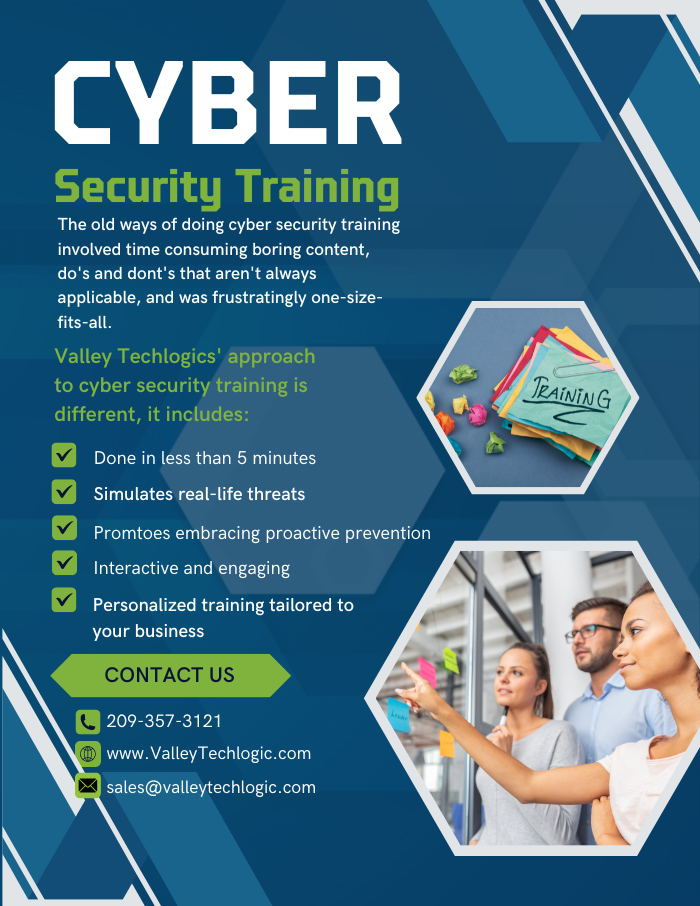
    Luckily, Valley Techlogic provides security training as part of our service packages. Below is a list of some of the training topics we cover for our clients:

    Cyber security training is quick and is one of the easiest and most effective ways to have an overall safer environment for your business. Learn more about Cyber Security Training through Valley Techlogic as well as other the other cyber security services we offer today through a quick consultation.

    Looking for more to read? We suggest these other articles from our site.

    This article was powered by Valley Techlogic, an IT service provider in Atwater, CA. You can find more information at https://www.valleytechlogic.com/ or on Facebook at https://www.facebook.com/valleytechlogic/ . Follow us on Twitter at https://x.com/valleytechlogic.

  • Zero-click exploits, how they work and how to avoid them

    Zero-click exploits, how they work and how to avoid them

    What comes to mind when it comes to viruses and malware and how they infect a device?

    Most of us think of someone accidentally downloading an infected program from an email or website, which we’re sorry to say doesn’t always end in the much maligned and feared .exe. These days executable files with malware can take the guise of an image, PDF, and more.

    Unfortunately, now users can be infected by malware or a virus without clicking on anything at all. A zero-click exploit can compromise a device without any action from its owner. While most malware is spread through social engineering attacks (tricking a user via email or on a webpage) zero-click exploits make use of existing vulnerabilities found on operating systems.

    So far these attacks have been mostly affecting mobile devices, with Apple having to release its third update recently aimed at addressing a zero-click spyware campaign that’s been launched to specifically target iMessage users in Russia. The attack dubbed “Operation Triangulation” affected a wide range of Apple devices including iPhones, iPads, Mac OS devices and even Apple TV.

    This type of attack was actually discovered when the iPhone of a journalist in Azerbaijani in 2020 received a silent command to open the Apple Music app. From there, the app connected to a malicious server and downloaded spyware onto the phone, which remained on the phone for 17 months collecting data silently in the background.

    The spyware in this instance was placed and developed by the NSO Group, which is an Israeli based security firm that sells technology to governments and law enforcement agencies. While the company says they’re developing this software as a way to address terrorism and curb crime, it has been misused by the government agencies who contract it in the past. Human rights groups have been critical of the NSO group for the violation of privacy this type of software poses.

    While most of these attacks have been aimed at Apple devices in particular, the NSO group also developed a version that exploited WhatsApp on Android devices. Both Android and Apple have been quick to patch these vulnerabilities as they are discovered.

    While in a different category, these attacks have a similarity to “zero-day” attacks which is when bad actors discover a vulnerability in a specific system and utilize it to gain access or enact malicious activity against the devices that are targeted. It’s referred to as “zero-day” because the product merchant has had zero days to deal with the issue when it’s discovered. The difference between a zero-day attack and a zero-click attack though is with zero-day attacks there’s typically some action that’s needed on behalf of the device owner.

    With zero-click attacks, no action is needed and these attacks can happen completely silently and with no warning.

    So how do you avoid something that sounds at first glance, pretty unavoidable? There are some mobile device hygiene habits that, while not making your phone completely impervious will drastically decrease your risk of falling victim to zero-click attack.

    When it comes to zero-click or zero-day the truth is cyber attacks can happen quickly and with little to no warning. As a business owner, your risk is multiplied by the number of devices you must maintain and secure in your office. That’s where Valley Technlogic can help.

    We are experts in the field of cyber security, we even wrote the book on it (claim a free copy today!) or reach out for a free consultation to learn how we can help mitigate these types of attacks on your business.

    Looking for more to read? We suggest these other articles from our site.

    This article was powered by Valley Techlogic, an IT service provider in Atwater, CA. You can find more information at https://www.valleytechlogic.com/ or on Facebook at https://www.facebook.com/valleytechlogic/ . Follow us on Twitter at https://x.com/valleytechlogic.

  • Western Digital suffers a ransomware attack, with hackers requesting an 8 figure sum and leaking image from internal meeting

    Western Digital suffers a ransomware attack, with hackers requesting an 8 figure sum and leaking image from internal meeting

    Western Digital is a well-known name in the data production and storage industry. Established in 1970, they were one of the original players in the process of making semiconductors and they have a storied history that began with calculator chips, included a bankruptcy as well as being at the forefront of floppy disc creation in the 1980’s to eventually the hard drives they became known for in the 1990’s. Chances are good you have had a Western Digital drive in one of your devices (you may even have one now).

    Despite being leaders in the digital storage industry, they’ve unfortunately proven no one is immune when it comes to ransomware attacks. While this story emerged mid-April (and the attack occurred March 26) we have an update as the hacker group “BlackCat” taunts Western Digital by leaking an internal video conference on the topic just this week. They leaked an image from the meeting on social media coyly dubbing the people included “the finest threat hunters Western Digital has to offer”. A clear mockery of their attempts to remediate the threat thus far.

    The hacker group is clearly trying to up the ante to get the company to fork over the ransom they’ve requested, a sum reportedly coming in at an eye watering 8 figures. For context a typical ransomware payment paid out by a business in Quarter 1 of 2022 was $228, 125. For individuals payouts hover around $6000. In a nutshell, ransomware is a lucrative business for those with unscrupulous motives.

    To make matters worse, it’s been reported that the group BlackCat has access to multiple Western Digital systems. Meaning this attack was well orchestrated and highly effective at not only making their data vulnerable but creating a disruption to all parts of their business. Western Digital has reported requested the services of outside security and forensic experts to try and recover what they can but needless to say this is an expensive lesson for their business both in money and time lost as well as their reputation in the technical industry.

    You would think being a leader in data storage that their backup recovery process would be flawless, unfortunately when hackers gain domain level access even the best laid plans for your data can go out the window. That’s why Valley Techlogic offers a multi-pronged approach to backups.

    Many clients like the idea that all their data is at their fingertips within their on-premises server. The server itself serves as a physical reminder that their data is ready and available when they need it.

    Unfortunately, having your data all in one place is not a good idea. Other than ransomware attacks such as this, it also leaves your business vulnerable if your server fails for whatever reason. We’ve seen it before; many clients aren’t expecting their servers to just give out or for something like a fire or other disaster to affect them and when it happens, they’re left scrambling. The process to recover from scratch is not always guaranteed and even if a recovery is possible, it can take as long as 3 months to get back mostly to where you were. Generally, a 100% recovery is not possible in these instances.

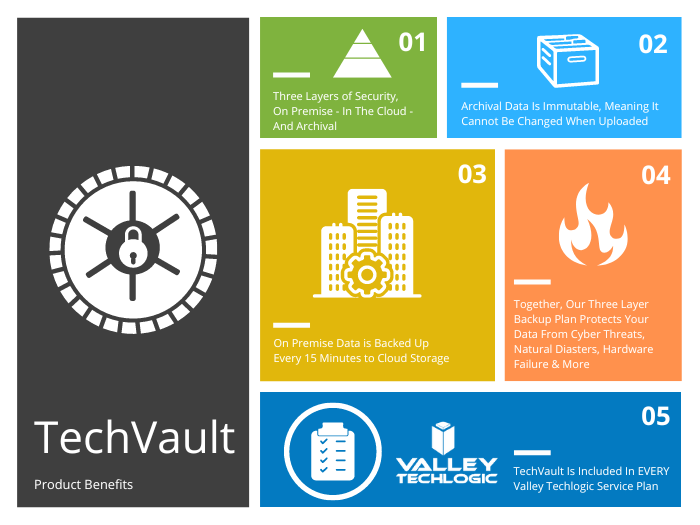
    That’s why at Valley Techlogic our backup solution TechVault is available and used by each of our clients. We have this chart on the benefits of our TechVault solution.

    You can also learn more about it by visiting here. If the Western Digital breach has left you concerned for the safety of your data, or you would just like more information on our backup solution you can request a consultation with our expert sales staff here.

    Looking for more to read? We suggest these other articles from our site.

    This article was powered by Valley Techlogic, an IT service provider in Atwater, CA. You can find more information at https://www.valleytechlogic.com/ or on Facebook at https://www.facebook.com/valleytechlogic/ . Follow us on Twitter at https://x.com/valleytechlogic.

  • 5 USB flash drive safety and usage tips, also our 3 recommended drives for 2023

    5 USB flash drive safety and usage tips, also our 3 recommended drives for 2023

    USB flash drives (also known as thumb drives or memory sticks) have grown a lot in the last few years, what was once a handy tool for transporting small files but couldn’t compete with the capacity of CD disks or traditional drives is now available in sizes up to 1 terabyte which makes them a competitive product for even backup purposes.

    While they may have fallen in favor due to cloud services becoming more ubiquitous, many are looking for more tangible ways to backup important files and take them on the go.

    Many users also worry about the safety of these devices. This is because they’re a common vector for drop attacks, which is where a USB drive is left in a conspicuous location for someone to find and try to use not knowing it contains a virus or trojan horse.

    They also can be insecure if left on a desk or somewhere in public. Luckily, there are even options now that offer 2 factor authentication, biometric verification, and encryption. This means even if your flash drive fell into the wrong hands, it would be useless to the thief. You should also be wary of where you plug your flash drive into as the data path is a two way street.

    Here are 5 more safely and usage tips for utilizing a USB flash drive:

    1. Have separate flash drives for work and home. This will reduce the risk of cross-contamination if one of your devices is compromised, it will also make it easier to organize your files.
    2. Be careful where you purchase your flash drives from. There are irreputable sellers online selling fake drives that don’t contain the amount of storage they’re supposed to, or worse they could be infected with malware. Always buy from a reputable source.
    3. Don’t purchase any drives that require software for use. This is unnecessary and again opens up your device to being compromised with malware. USB drives should be “plug and play”.
    4. Think about the physical size of the drive you’re buying. It needs to be able to fit into the device you’re trying to plug it into, and a bulky USB drive may not be compatible with all devices.
    5. Be aware of the lifespan for the device you’re buying. USB flash drives (also solid-state drives and hard drives) have a certain number of write/erase cycles. Longer is better but if you plan to just keep a static backup on it you can get away with a lower number. Typical USB flash drives have 10,000 to 100,000 write/erase cycles.

    If we’ve piqued your interest in USB flash drives, you still might not be sure where or what to buy. There are thousands upon thousands of options but here are three options we can recommend. We have one that fits the bill as a budget friendly option for general use, one that has a slim sturdy form factor, and one that meets the requirements if security is a concern.

    Security conscious.
    Slim form factor.
    Budget friendly.


    All of the options we have selected have USB 3.0 speeds, while this is changing all the time this is the minimum we recommend as of writing. You also want to be aware of what kind of connector you’re looking for. USB-A is the most common but there are options for USB-C, MicroUSB and Lightning connectors on the market. You can also use an adaptor if needed.

    If you need hardware buying advice for your business, including the topic of digital storage, Valley Techlogic is happy to help. We can help you select the best option and offer advice on how to secure it. You can learn more about procurement assistance through Valley Techlogic here or schedule a meeting to find out more about our services.

    Looking for more to read? We suggest these other articles from our site.

    This article was powered by Valley Techlogic, an IT service provider in Atwater, CA. You can find more information at https://www.valleytechlogic.com/ or on Facebook at https://www.facebook.com/valleytechlogic/ . Follow us on Twitter at https://x.com/valleytechlogic.

  • The Rockstar Games data leak and how reputation loss can be one of the costliest aspects of being hacked

    The Rockstar Games data leak and how reputation loss can be one of the costliest aspects of being hacked

    Video game news might fall outside our normal wheelhouse but reporting on cybersecurity events is right up our alley, and this the most recent hack on major game developer Rockstar Games made major news over the weekend so we wanted to chime in with our thoughts.

    The hacker going under the moniker “Tea Pot” released video clips of Rockstar Games unreleased (and previously unannounced) new game, Grand Theft Auto 6. The clips revealed spoilers on the games content and also showcased rougher assets as the game is still in early development, something game publishers don’t ordinarily highlight.

    In a message acknowledging the breach the Rockstar Games Team had this to say:

    Rockstar Games Response to the data leak.

    The hacker returned after releasing the data and sent a message on the GTAForums claiming they wanted to “negotiate a deal” with Rockstar Games, hinting that they had more data to release. Speculation proliferated across the internet that the hacker had somehow obtained some of the games source code.

    With the source code portions of the game could be re-engineered (outside Rockstar Games) and that could even possibly be used to provide at least a semi-playable version. The fallout from that would be devastating as it would steal the developer’s agency in releasing their own content and also reveal trade secrets that could be used to help create knockoff or pirated versions.

    Rockstars parent company, Take-Two, has issued take down notices to social media accounts and Youtube channels broadcasting the stolen footage as work to perform damage control. There will probably be a costly investigation into the origination of the hack and there may even be financial complications beyond that, as investors may question what effect this leak will have on the eventual release of the game.

    This hack is a perfect example of the reputation cost associated with being hacked. Recovering data you need to do your day to day job is one aspect, but you also need to think about data you wouldn’t want released to the public.

    Projects that haven’t been announced yet or information that’s not easily changed (tax information, personal identifying information) are just two factors, but there’s also the release of your customers private data. Many aren’t aware a breach involving client information can even lead to legal ramifications depending on regulatory factors in your sector.

    There’s also your private emails or messages, which could have future business plans, personal information, or other things that could be used by the hackers in a ransomware attempt (or even ongoing blackmail).

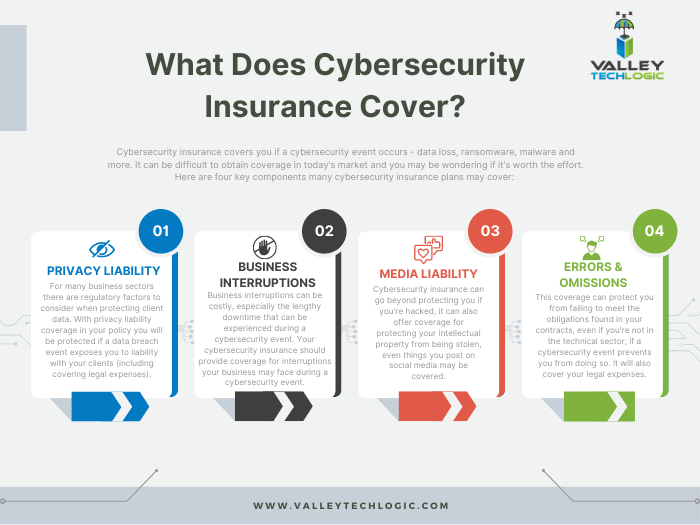
    Cybersecurity prevention’s are important but one element that has surged to the forefront of our minds is a recovery tool that’s becoming more difficult to obtain – cybersecurity insurance.

    You can review our comprehensive guide on the topic but here’s a brief chart on what cybersecurity insurance typically covers:

    Click to view the full size version.

    Obtaining coverage can be challenging, the requirements have grown much steeper as cybersecurity attacks become more common place, and that doesn’t look like it’s going to change anytime soon. At Valley Techlogic we have experience in helping clients obtain coverage so if the unthinkable does occur, their business will survive the hit.

    Whether you’re are in the early stages of researching cybersecurity coverage or if you have an application form in front of you, we can be your guide through the process. Schedule a consultation today to learn more.

    Looking for more to read? We suggest these other articles from our site.

    This article was powered by Valley Techlogic, an IT service provider in Atwater, CA. You can find more information at https://www.valleytechlogic.com/ or on Facebook at https://www.facebook.com/valleytechlogic/ . Follow us on Twitter at https://x.com/valleytechlogic.

  • 10 things you can do today (yes today) to make your business’s network safer

    10 things you can do today (yes today) to make your business’s network safer

    There’s an onslaught of information aimed at internet safety and most of it lets be honest, falls on deaf ears.

    Most people online today feel like they’re technology savvy enough to avoid the scams out there (unfortunately at least 1 out of 6 are wrong) and even if you acknowledge tech falls outside your scope of expertise you’re still at risk.

    The good news is we have a list of 10 things you can do today even if you’re technologically challenged that will make a major impact on the network safety in your office.

    1. Confirm your backups are working. Backups are one of your best defenses against ransomware, especially if you have an archival copy which is a backup copy that’s made once and then tucked away until you need it (usually behind layers of security, like with our TechVault solution).
    2. Security awareness training for you and your employees. When we know better, we do better. Many security awareness training programs are implemented in bite size doses that are easy to squeeze into your day. It’s easier to avoid a phishing scam if you’ve seen the obvious examples through training.
    3. Speaking of phishing scams, don’t open suspicious emails. We’ve talked a lot about this topic including how to spot a phishing email, but email scams are one of the top ways hackers can infiltrate your network.
    4. Upgrade software that’s reached End of Life (EoL). If your office computers are still on Windows 7 it’s definitely time for an upgrade and technically you can still upgrade to Windows 10 for free. While other upgrades may not be free, it’s still a good idea to get rid of software that’s no longer being supported by the vendor.
    5. You should also make sure all the software you need to stay safe online is installed on your devices. Programs can go missing or just not be reinstalled if a computer needs to be wiped for whatever reason, you should make sure important software such as anti-virus detection is installed on all of your office computers.
    6. While you’re at it, it’s time to serious think about Multi-Factor Authentication. We always hear a collective groan when this topic comes up, but password managers have become much easier to use and can even make logging into the various sites you use to work easier. Here are our top picks.
    7. Remove any devices you’re no longer using from your network. Besides being a waste of electricity, devices connected to your network that aren’t being used can be vessels for infiltration if they’re not being kept up to date via patching etc. Get rid of them!
    8. Have a plan for reporting suspicious activity. Do your employees know what to do if they receive a suspicious email or their computers acting “funny”? Having a plan documented somewhere (even if the only advice is “Contact our IT service team”) can mean a cyber threat event is recorded and dealt with instead of just ignored because they didn’t know what to do.
    9. Have an office password policy guide as well. It’s a good idea to have a guide for passwords available to your employees, especially if it covers what not to do such as having your phone number or any other PII (Personal Identifying Information) as your password.
    10. Know when to ask for help. This list is a good place to start but if your business has no IT help now (or possibly worse, inadequate help) it’s a good idea to call in the experts. Calling Valley Techlogic for a free consultation is another step you can take today to improve the safety of your office network.

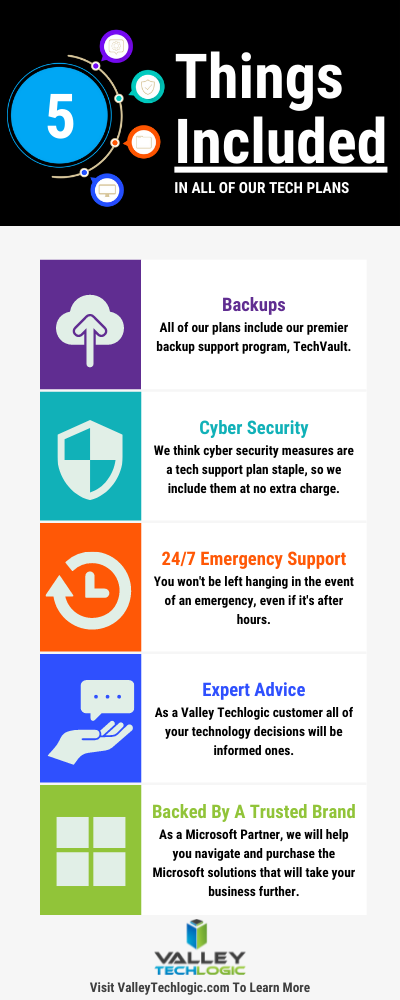
    Here are 5 things all Valley Techlogic Plans includes:

    5 Things Included in Valley Techlogic Plans

    Want to learn more? Reach out today for a free consultation and learn how Valley Techlogic can specifically support your business’s technology.

    Looking for more to read? We suggest these other articles from our site.

    This article was powered by Valley TechLogic, an IT service provider in Atwater, CA. You can find more information at https://www.valleytechlogic.com/ or on Facebook at https://www.facebook.com/valleytechlogic/ . Follow us on Twitter at https://x.com/valleytechlogic.

  • Unsure if the person you’re interacting with may be a fake? This Chrome extension can detect fake profile pictures with 99.29% accuracy

    Unsure if the person you’re interacting with may be a fake? This Chrome extension can detect fake profile pictures with 99.29% accuracy

    As we discussed last week, financial scams may be on the rise in 2022. Social engineering is a pretty common tactic utilized by scammers when it comes to siphoning funds from unwitting victims, but there are some tools you can use to combat it.

    Recently a company called V7 Labs has released an extension for Chrome that’s able to detect artificially generated profile pictures, such as those created by Thispersondoesnotexist.com (see below for an example).Examples of "ThisPersonDoesNotExist"

    The Fake Profile Detector extension can help you detect if a social media profile picture is a fake just by right clicking on it, it’s able to zero in on things you may miss at first glance – such as a pupil that’s not in the right place or clothing that appears to be bleeding into the skin. The extension does not work with video (yet). Also, just to note you should always verify an extension is from a trusted source before downloading it to your browser.

    Social engineering scams aren’t limited to just financial scams, they’re also utilized to gain information or to spread misinformation. As AI tools have grown more sophisticated it’s not easy to rely on someone’s profile picture to give you a good indication of who you’re talking to online.

    It’s also very easy to create fake profiles using real pictures, even pictures of people you may actually know. It’s typical for the scammer to start the conversation off with they got “locked out” of their main account and would like you to add their new one. You should also confirm with your friends and family before accepting a request from a new account.

    Or maybe it was their actual social media account, but a scammer was able to gain access. Sometimes scammers may even leave the password alone. The victim then may not know they have an intrusion, and the scammer just monitors and deletes messages of the conversations they’re having without the victim’s knowledge.

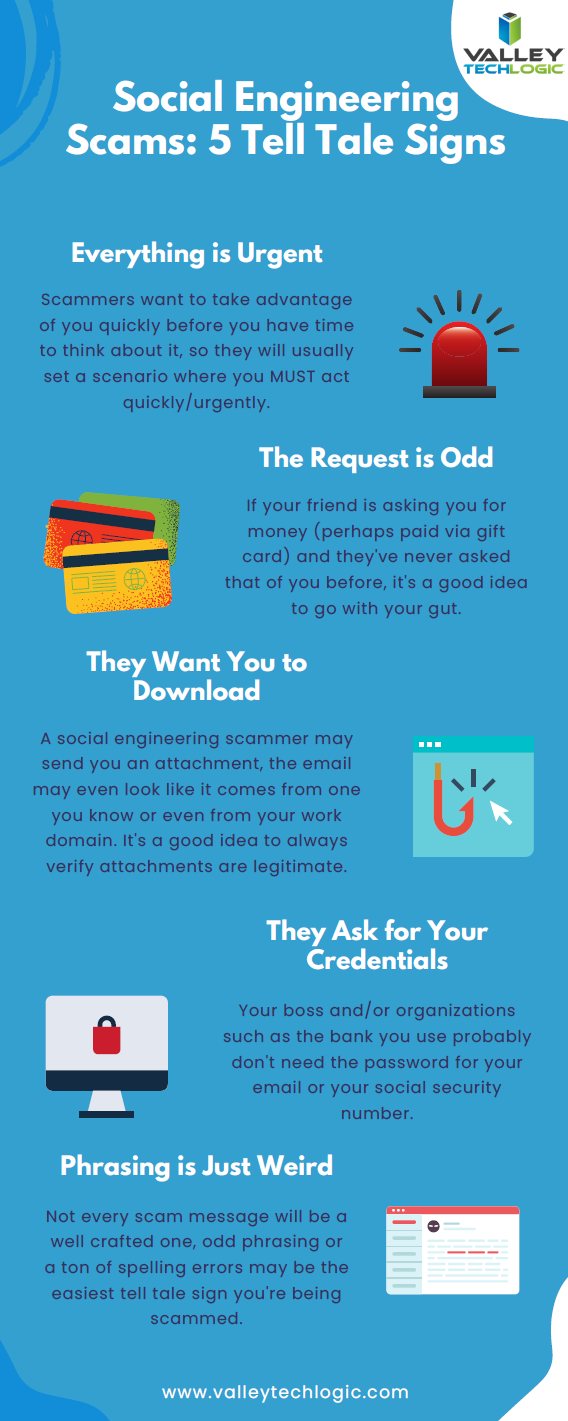
    We have created this chart of the top five things you should watch out for when it comes to social engineering scams.

    Click to download the full size version.

    Social engineering is not limited to just social media sites such as Facebook and Twitter. The most common type of social engineering are phishing attacks, and scammers setting their sites on businesses to take advantage of may have an easier time of convincing a user they are who they say they are when it comes to the more casual relationships we tend to have with colleagues.

    We wrote a blog explaining what to look out for when it comes to phishing emails, but at Valley Techlogic we also think this issue can be tackled from a software and training perspective.

    The tools we utilized will make sure that much of that suspicious spam never makes it to your end user, and the training we offer to our clients can help them make sure that if an employee does get a spoofed phishing email – they know exactly what to do about it.

    To learn more, schedule a free consultation with our sales team today.

    Looking for more to read? We suggest these other articles from our site.

    This article was powered by Valley TechLogic, IT service provider in Atwater, CA. You can find more information at https://www.valleytechlogic.com/ or on Facebook at https://www.facebook.com/valleytechlogic/ . Follow us on Twitter at https://x.com/valleytechlogic.