Tag: tech advice

  • 5 Ways to Establish your Business Presence Online

    5 Ways to Establish your Business Presence Online

    New Twitter owner and billionaire Elon Musk recently announced he may be opening up the “Blue Check” for $8 a month, rather than the rigorous process you had to go through to potentially get it before.

    For most platforms, establishing your business is not a simple monthly charge. It can take time and effort to build an audience on social media or gain traffic for your website. Luckily, the effort you put into one often helps the others, and you don’t need to be an SEO expert to get started.

    The average person spends 8 hours a day doing digital activities, there is no shortage of time or eyes to view the content you create but it is a competitive market now (it’s estimated 252,000 new websites are created daily).

    How do we definite an online presence? It’s not merely existing online, while just having a website or social media page may get you traffic you can still do things to increase that traffic. Your online presence has three key components: visibility, credibility, and reputation.

    Yes, even reputation is a factor that comes in when you’re trying to get your website “ranked” on Google. By ranked we mean having a place in search engine results when a potential customer types in a keyword phrase.

    You want to protect your online reputation by posting content that is relevant to your business, if you’re in refrigerator sales the bulk of your content should be about refrigerators not the latest trendy outwear for the 2023 season. Trying to gain traffic by “tricking’ people into clicking will reduce your reputation and your ability to creep up in the search engine results.

    On a similar note, credibility is another factor and you can greatly amplify that by connecting with other websites in the form of “backlinks”, basically they link to your website and you link to theirs. In our refrigeration example, if you sell refrigerators but don’t repair them sharing links with another business that does would improve your businesses credibility online and give you a boost from whatever traffic that other business sends your way.

    Finally, visibility is what happens when you combine your efforts in improving your reputation and credibility online by posting and sharing valuable content to your audience. There’s a world of difference that happens traffic wise when you appear on the first page of Google vs the 2nd page and beyond.

    It doesn’t stop with optimizing your website though, here are 10 other things to work on to improve your online presence and give your business a boost in traffic that could lead to a boost in customer conversions:

    1. Have an easy to navigate site: The first is a no brainer, if your website is clunky or slow to load people won’t stick around to see what you’re selling. Google has a page speed tool that can give you some insight on how your website stacks up.
    2. Start a blog: If you’re not currently writing a blog (like this) then you’re missing out on a weekly (or daily, or monthly, whatever works for your schedule) injection of new keywords to your website. Landing pages are great but they’re one and done, you can strengthen your online presence by adding new content about your business through a blog.
    3. Post on social media too: You don’t need to be on every social media platform, some may not be relevant to your business. We encourage you to think about the platforms where your customers are likely to be, and then post daily on those platforms. You can create simple marketing graphics with a tool like Canva which practically does the work for you.
    4. Use hashtags too: Hashtags allow you to connect your content to people who enjoy the same content or are interested in a specific topic. Going back to our refrigerator example, if there’s a new model from a popular brand then using that brand name as a hashtag could make sense in the announcement post about it.
    5. Don’t ignore business directories: If you’re struggling to find a way to share links with other websites, starting with the free business directories is one of the best ways to improve your online presence and have your business linked from somewhere else. Start with the big traffic sites like Google My Business, Facebook, and Bing.

    Wondering what makes a good website? Here are 6 bonus tips:
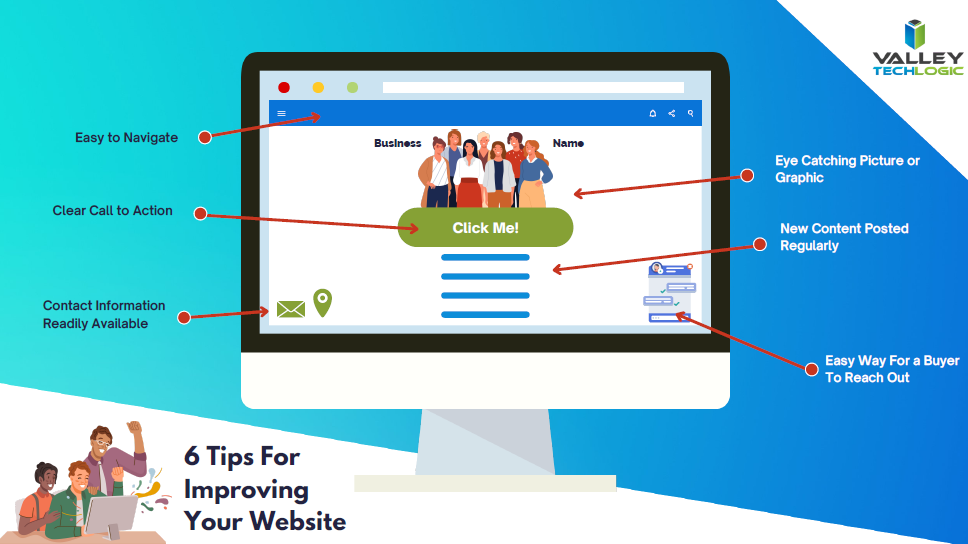
    Click to view the full size version.

    Trying to work on your online presence can be difficult if the technology you use in your business Isn’t up to the task. Imagine taking the time to write out that first blog post and your computer crashes, you may be done with it before you even get started.

    Valley Techlogic can help you with your technology goals, and having a service plan with us is like working on any of the topics we covered in this blog, you will see a net overall improvement across the board. Learn more with a free consultation today.

    Looking for more to read? We suggest these other articles from our site.

    This article was powered by Valley Techlogic, an IT service provider in Atwater, CA. You can find more information at https://www.valleytechlogic.com/ or on Facebook at https://www.facebook.com/valleytechlogic/ . Follow us on Twitter at https://x.com/valleytechlogic.


  • Winamp is BACK again, and our 3 best Windows media player recommendations

    Winamp is BACK again, and our 3 best Windows media player recommendations

    If you came of age in the 90’s to early 2000’s then you probably have fond memories of Winamp (short for Windows Advanced Multimedia Products).

    Released in 1997 it was the dominant music player for a while on PC, having 3 million downloads by 1998. With fun features such as music visualization and the ability to change “skins” it was one of the most downloaded software for Windows devices for a few years.

    Winamp in 2022
    Winamp looks the same today as it did 20 years.

    Skins and visualizations were just two of the popular “plugin” modules that could be downloaded, it could also be used as a media library and had the ability to add album art to help you sort your music. Remember having a plethora of MP3s on your PC before services like Spotify and Apple Music existed?

    Winamp has passed through a number of owners over the years, with updates stopping in 2013 under parent company AOL as streaming music rose in popularity. It’s now owned by Radionomy and it’s first update in 4 years has just been released to the public.

    Whether it sees success riding a wave of nostalgia during a time when 90s era clothing and branding seems to be making a comeback is yet to be seen, but we were excited to give it a try. Their new website is sleek and modern but we’re happy to report the application still feels the “same as it ever was” (another throwback for you guys).

    If you clicked on this article, you may be wondering what’s available for media players on Windows besides the default – Groove music for well, music and Windows Media Player for video.

    As no muss no fuss options those are fine but there are media players out there that will expand your capabilities, allowing you to stream the same content across multiple devices – even your TV.

    Here are our top 3 picks:

    1. Plex – Plex not only allows you to stream your own media for free across devices, including TV, PC, Android and Apple, they also have on demand content and even live TV.
    2. VLC Media Player – Open source and cross device, this lightweight media player often has support for file types the others fail to play, especially useful for playing subtitles in a variety of languages.
    3. Kodi – Another free media player option, this one is unique in that it works on Raspberry Pi devices, making it a good choice for helping you set up an inexpensive media playing platform for your television even if it’s not a “smart” tv.
    Click to grab the full size version.

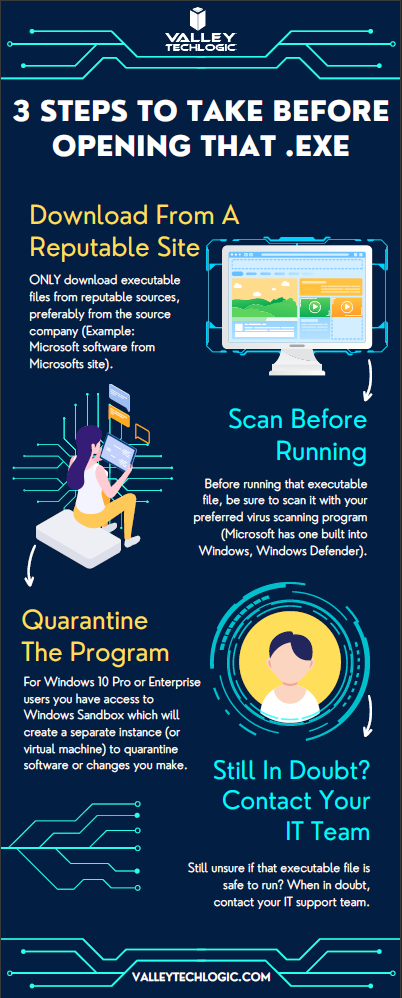
    While this topic falls outside our normal wheelhouse we wanted to touch on it and offer our advice on safe picks for media players. It’s always a good idea to do your research when downloading any software. Here is our three-step guide for what you should do with any newly downloaded executable file:While Valley Techlogic can’t help you with your media playing setup at home, we can help you navigate software choices for your business. Set up a consultation with us today to learn more.

    Looking for more to read? We suggest these other articles from our site.

    This article was powered by Valley Techlogic, an IT service provider in Atwater, CA. You can find more information at https://www.valleytechlogic.com/ or on Facebook at https://www.facebook.com/valleytechlogic/ . Follow us on Twitter at https://x.com/valleytechlogic.
  • 10 things you can do today (yes today) to make your business’s network safer

    10 things you can do today (yes today) to make your business’s network safer

    There’s an onslaught of information aimed at internet safety and most of it lets be honest, falls on deaf ears.

    Most people online today feel like they’re technology savvy enough to avoid the scams out there (unfortunately at least 1 out of 6 are wrong) and even if you acknowledge tech falls outside your scope of expertise you’re still at risk.

    The good news is we have a list of 10 things you can do today even if you’re technologically challenged that will make a major impact on the network safety in your office.

    1. Confirm your backups are working. Backups are one of your best defenses against ransomware, especially if you have an archival copy which is a backup copy that’s made once and then tucked away until you need it (usually behind layers of security, like with our TechVault solution).
    2. Security awareness training for you and your employees. When we know better, we do better. Many security awareness training programs are implemented in bite size doses that are easy to squeeze into your day. It’s easier to avoid a phishing scam if you’ve seen the obvious examples through training.
    3. Speaking of phishing scams, don’t open suspicious emails. We’ve talked a lot about this topic including how to spot a phishing email, but email scams are one of the top ways hackers can infiltrate your network.
    4. Upgrade software that’s reached End of Life (EoL). If your office computers are still on Windows 7 it’s definitely time for an upgrade and technically you can still upgrade to Windows 10 for free. While other upgrades may not be free, it’s still a good idea to get rid of software that’s no longer being supported by the vendor.
    5. You should also make sure all the software you need to stay safe online is installed on your devices. Programs can go missing or just not be reinstalled if a computer needs to be wiped for whatever reason, you should make sure important software such as anti-virus detection is installed on all of your office computers.
    6. While you’re at it, it’s time to serious think about Multi-Factor Authentication. We always hear a collective groan when this topic comes up, but password managers have become much easier to use and can even make logging into the various sites you use to work easier. Here are our top picks.
    7. Remove any devices you’re no longer using from your network. Besides being a waste of electricity, devices connected to your network that aren’t being used can be vessels for infiltration if they’re not being kept up to date via patching etc. Get rid of them!
    8. Have a plan for reporting suspicious activity. Do your employees know what to do if they receive a suspicious email or their computers acting “funny”? Having a plan documented somewhere (even if the only advice is “Contact our IT service team”) can mean a cyber threat event is recorded and dealt with instead of just ignored because they didn’t know what to do.
    9. Have an office password policy guide as well. It’s a good idea to have a guide for passwords available to your employees, especially if it covers what not to do such as having your phone number or any other PII (Personal Identifying Information) as your password.
    10. Know when to ask for help. This list is a good place to start but if your business has no IT help now (or possibly worse, inadequate help) it’s a good idea to call in the experts. Calling Valley Techlogic for a free consultation is another step you can take today to improve the safety of your office network.

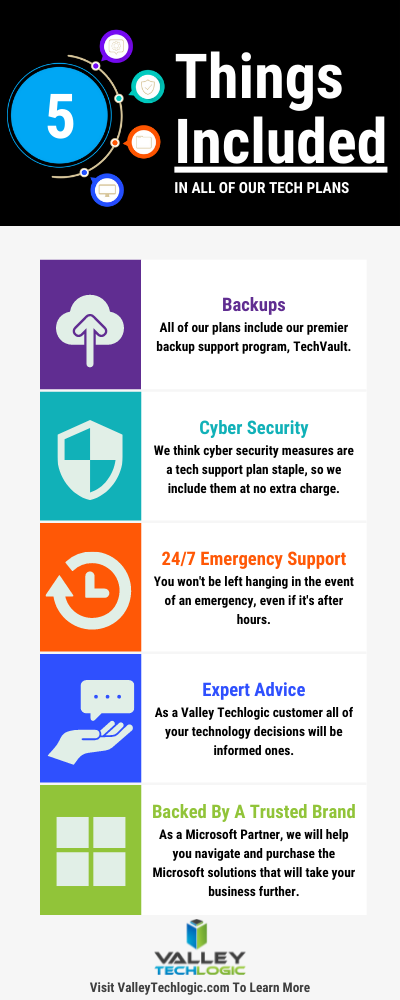
    Here are 5 things all Valley Techlogic Plans includes:

    5 Things Included in Valley Techlogic Plans

    Want to learn more? Reach out today for a free consultation and learn how Valley Techlogic can specifically support your business’s technology.

    Looking for more to read? We suggest these other articles from our site.

    This article was powered by Valley TechLogic, an IT service provider in Atwater, CA. You can find more information at https://www.valleytechlogic.com/ or on Facebook at https://www.facebook.com/valleytechlogic/ . Follow us on Twitter at https://x.com/valleytechlogic.

  • It’s starting to feel like summer and that means rising temperatures and the potential for rolling blackouts – 3 ways to protect your devices during a power outage

    It’s starting to feel like summer and that means rising temperatures and the potential for rolling blackouts – 3 ways to protect your devices during a power outage

    While summer won’t officially start in the Northern Hemisphere until June 21st, Memorial Day week often marks the “unofficial” start of summer for many and May in general is when many states start to see rising temperatures – especially with the effects of climate changes causing record highs across the country.

    For California – and in particular the Central Valley where we’re located – rolling blackouts are a common occurrence as temperatures begin to rise, and these sudden unexpected power outages can damage expensive equipment that’s not properly protected.

    Sometimes power companies will give some notice of when an outage will be occurring in your area and in this case, we recommend unplugging what you can as that’s a surefire way to protect your equipment if an unexpected power surge were to occur.

    However, blackouts are often random and so we recommend the following preventative measures:

    1. Surge Protectors – A quality surge protector is a must have for every device on your office network, and not all surge protectors are created equal. Surge protectors always list a joule rating which tells you how much power they can absorb without failing, for computers we recommend a surge protector with a joule rating of at least a 1000.
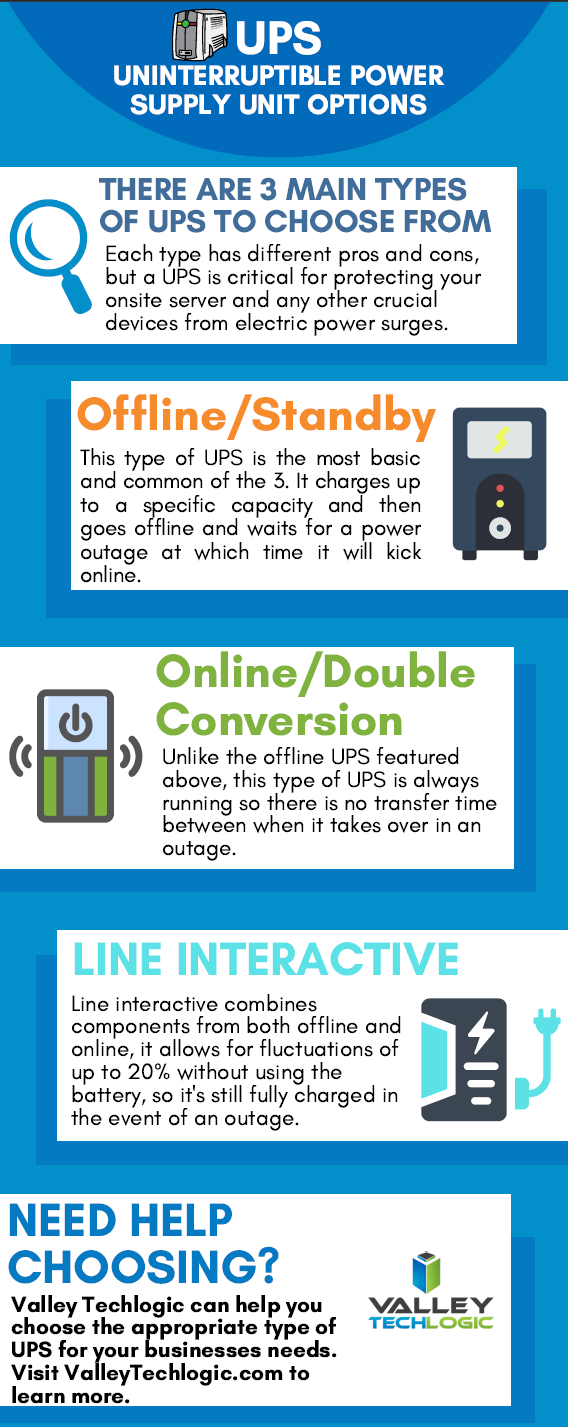
    2. UPS (Uninterruptible Power Supply) – Next on the list is a UPS, this is a battery backup for your devices and for your office server in particular a must have item. When choosing a UPS, you want to ask yourself if you’re looking for something with enough power to let you safely turn your device off or if you wanted something that would keep your device online for days in an extended outage. We also created a short guide found below to what else you should look for when choosing a UPS.
    3. Power Generators – Finally power generators could be necessary for certain office scenarios, an automatic standby generator will be a big investment but if it’s mission critical your office power stay intact during a rolling blackout it could be worth it.

    Also here is our guide on what to look for in a UPS:

    UPS Choices Chart

    We’ve been talking about the power side of rolling blackouts and how an electric surge could potentially damage your devices but there’s also another thing to consider, your data.

    If a power outage occurs suddenly, anything that hasn’t been saved could be lost. If you’re a Microsoft 365 customer, you will have the benefit of the short-term backups they provide for your office documents (if you’ve ever had your computer restart while working on something and have experienced the profound relief seeing that “Recovered” documents bar you’ll know what we’re talking about).

    If you’re not a Microsoft 365 customer or you’re worried about data corruption or your service backups failing (or maybe your server Isn’t being backed up at all) we suggest talking to us about what your options are.

    We offer our clients our triple layer backup solution TechVault. Not only will we back up your onsite data, but we will also create a cloud copy that is updated every 15 minutes and an archival copy that is virtually impenetrable to bad actors.

    Want to learn more? Schedule a quick consultation with one of our sales representatives today.

    Looking for more to read? We suggest these other articles from our site.

    This article was powered by Valley TechLogic, an IT service provider in Atwater, CA. You can find more information at https://www.valleytechlogic.com/ or on Facebook at https://www.facebook.com/valleytechlogic/ . Follow us on Twitter at https://x.com/valleytechlogic.
  • We have updated our most popular resource for 2022 and have an offer you won’t want to pass up

    We have updated our most popular resource for 2022 and have an offer you won’t want to pass up

    As an IT service provider, we’re passionate about cybersecurity because we see the effects having inadequate coverage can have on businesses first hand.

    The devastation that can occur after a cyber attack is staggering, we’ve given you the statistics before, such as:

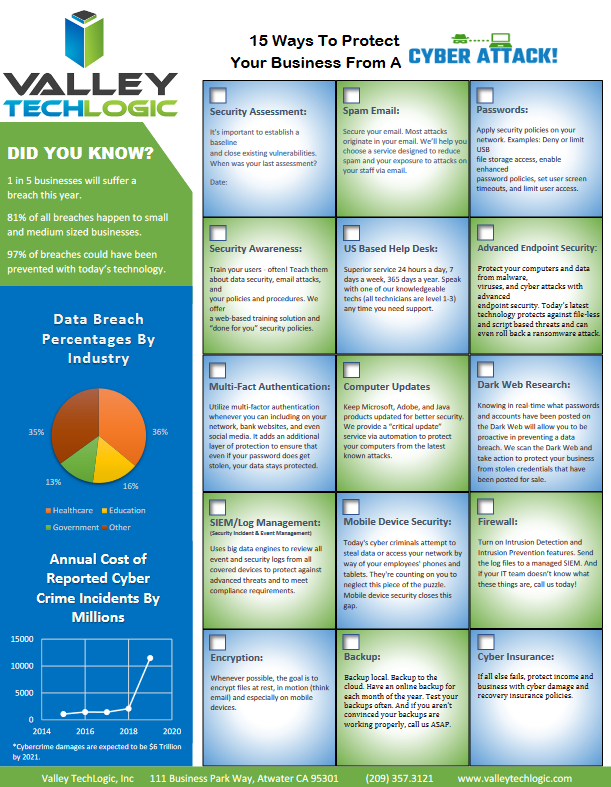
    1. The cost of cybercrime is predicted to hit $10.5 trillion by 2025
    2. Cryptojacking cases quadrupled in 2021, but the hackers don’t make very much (less than $6 per day), however that doesn’t stop them from trying to gain access to your machines
    3. It takes on average 287 for cybersecurity teams to detect and contain a data breach
    4. Phishing is involved in 36% of data breaches (can you identify the signs of a phishing email?)
    5. DDoS (Distributed Denial-of-Service) attacks are skyrocketing, with 9.75 million occurring in 2021

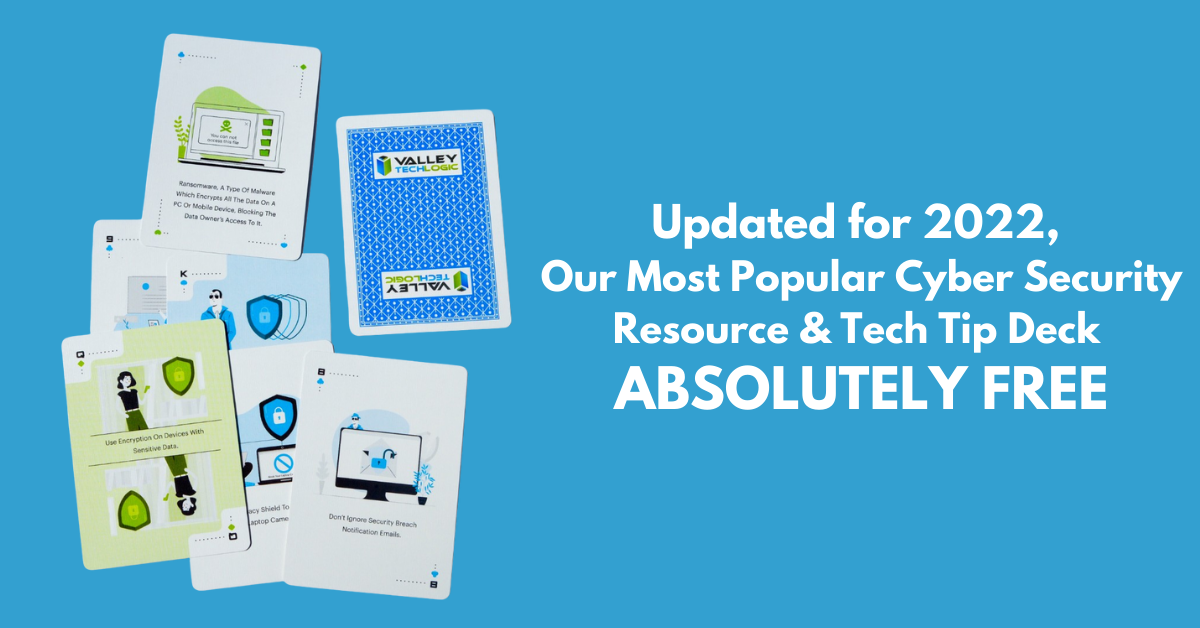
    That’s why we’re thrilled to announce the release of our Tech Tip Card Deck, our deck contains 56 tips for getting your cybersecurity house in order with custom art representing each tip. Best of all, the deck is absolutely free to business owners in our area.

    Beyond providing comprehensive technical support, we also want to support our community in staying safe online. If you’re a business owner in Central Valley and would like to have a set of our card deck for yourself, simply visit TechTipCards.com and request one today and we’ll get it shipped out to you ASAP.

    We don’t believe technology has to be intimidating, each bite sized tip featured in the deck is easy to understand and easy to implement and will create real results for the online safety of yourself, your employees, and your business.

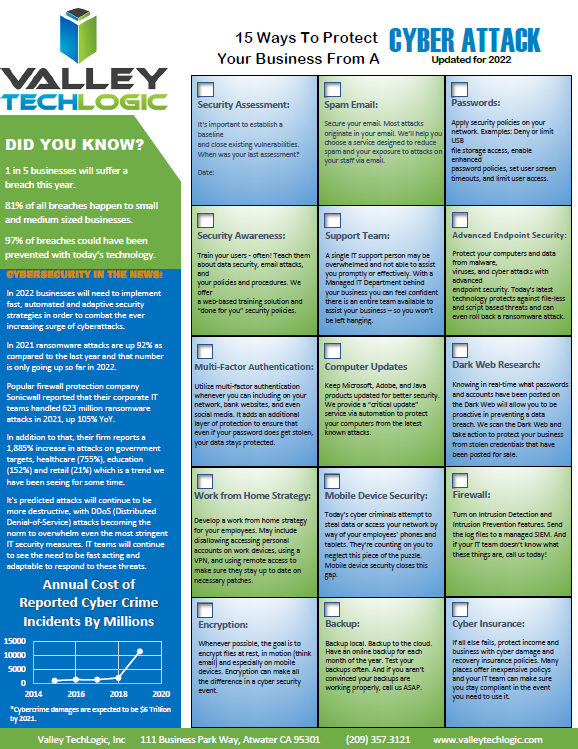
    To up the offer even more, we have updated our most popular for 2022 and are also offering it to you right here, right now. Simply grab it below.


    Valley Techlogics Cybersecurity Checklist
    Click to grab the full size version.

    Both of these are just a small showcase of what’s in store, we know for most people repetition is the key to success. We plan to deliver weekly content including thought provoking reports, eye catching resources that can even be customized for your office, and tech advice that can greatly impact and improve your use of technology within your business.

    If you’d like to learn more, again visit TechTipCards.com or reach out to us for a free consultation today.

    Looking for more to read? We suggest these other articles from our site.

    This article was powered by Valley TechLogic, an IT service provider in Atwater, CA. You can find more information at https://www.valleytechlogic.com/ or on Facebook at https://www.facebook.com/valleytechlogic/ . Follow us on Twitter at https://x.com/valleytechlogic.

  • Our Five Best FREE Resources Ranked

    Our Five Best FREE Resources Ranked

    At Valley Techlogic we believe educating our community on internet safety and providing concrete goals for businesses in our area to help improve their cybersecurity measures whether or not they’re covered by a Valley Techlogic plan is a valuable resource our company can provide to make us all a little safer online.

    We’ve provided quite a few free resources and reports over the years, and we couldn’t help but notice which ones really have struck a cord with our audience.

    Here are our top five free resources and reports, ranked by popularity. Bonus, you can grab all of these right from this page, still absolutely free.?

    #5 The Data Contingency Planning Report

    Our Data Contingency Report tells you EXACTLY what you need to have a solid plan for backing up your business’s files. Click to grab the report now instantly.

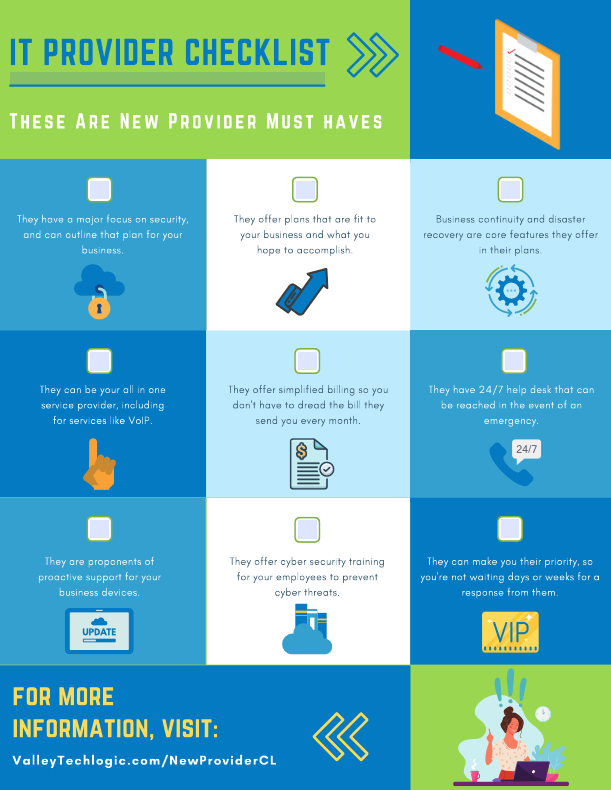
    #4 The New IT Provider Checklist

    Our New IT Provider Checklist lets you check off the MUST have for your new IT provider. If they don’t cover one or more of these items, you should keep looking.

    #3 Our Section 179 Guide

    Our Section 179 helps you get the best tax benefits from the tech purchases you make for your business. We’ll have the updated 2022 version available later this year.

    #2 Our Cyber Security Framework Overview Report

    Our Cyber Security Framework Overview Report goes over in plain text a number of popular frameworks, CMMC, HIPAA and more.

    #1 Our Cyber Security Checklist

    By far our most popular resource, this no nonsense checklist gets straight to the point on what you need to be fully covered from cyber threats.

    To receive these resources and more, reach out to us to be added to our mailing list. That way you’ll be the first to receive tech tips, free reports and resources and more.

    Looking for more to read? We suggest these other articles from our site.

    This article was powered by Valley TechLogic, IT service provider in Atwater, CA. You can find more information at https://www.valleytechlogic.com/ or on Facebook at https://www.facebook.com/valleytechlogic/ . Follow us on Twitter at https://x.com/valleytechlogic.