Tag: cyber security

  • Zero trust or zero effort, how does your businesses security stack measure up?

    Zero trust or zero effort, how does your businesses security stack measure up?

    Have you been working on strengthening your cyber security stack in your business or crossing your fingers and hoping for the best? How much protection is really enough?

    There are a lot of remedies for improving cyber security out there, but which ones present the best value for your business, and what constitutes a “zero trust” environment?

    If you’re just starting out, these 10 items will greatly improve your business’s cyber security safety in a short amount of time (we call these “best practices”):

    1. Use multi-factor authentication. This one is obvious, but we still see it not being employed regularly. Multi-factor authentication is generally extremely easy to enable (often times just a checkbox) and it greatly improves the safety of that account. When we’re talking about accounts like your business email, or your banking account it’s a no brainer.
    2. Use a password manager. This is another easy one to employ but people still ignore it, or even worse they use the password manager built into their browser. We’re not saying that’s completely wrong, especially if you’ve started using stronger passwords because of it. It’s still a good idea, however, to use a password manager that’s not directly connected to your system. Often times the same password or biometric you use to log onto your computer is the one used to unlock your browsers password database, so if someone has breached the device all those passwords will be available to them too.
    3. Employ Biometrics. Speaking of biometrics, they can be an improvement over passwords when it comes to a physical devices security. Especially for mobile devices, most of us access our work emails, banking accounts, etc. through our phones. It’s very easy to lose a phone, so making that phone unusable to whoever finds it (or has taken it) is a good idea.
    4. Don’t give everyone admin privileges. Not every employee needs all the keys to your kingdom, limit admin access only to those who really need it so if you do have a breach the damage can be limited as well. This is a key component of a zero trust environment (which we describe in the chart below).
    5. Communicate your goals and train your employees. Loop employees into your increased cyber security efforts and provide training, no one wants to be responsible for a cyber-attack in their workplace but without training employees can become unknowing and unwilling threat vectors.
    6. Monitor network activity. Now we’re starting to get into the more challenging topics, monitoring your network activity can be a very effective way of noticing early when something is amiss. There are tools out there that can do this monitoring for you and provide warnings if suspicious behavior is detected (like a device being logged in after hours when it never usually is).
    7. Use encryption. It’s pretty easy to use encryption in email or with sensitive documents (again often just a checkbox) but it’s an effective way to make sure sensitive data doesn’t fall into the wrong hands.
    8. Use backups. Again, in the same vein of protecting your data having automatic backups will greatly increase your chances of recovering after a cyber-attack. Especially if those backups were stored offsite (such as cloud backups). We wrote an article on the best ways to manage your OneDrive storage (which is included in your Microsoft 365 subscription) here.
    9. Regularly patch your devices. Many of your vendors actually provide security protections for you via their patches, which more often than not are addressing specific security concerns that have been identified. Patching costs nothing but your time and the benefits are ten-fold compared to the costs of a security breach in your business.
    10. Have a security audit performed. The best way to address the holes in your security plan is to have a reputable IT company perform a security audit. Valley Techlogic is a provider of these audits in the Central Valley and you can request a consultation here.

    Performing these ten activities in your business will greatly improve your cybersecurity effectiveness across the board, but if you’ve reached the bottom of this article and have realized you do all of these you may be wondering what’s next? Or perhaps you’ve heard of zero trust but aren’t sure what that entails, here are the key components to having a zero-trust cybersecurity environment:
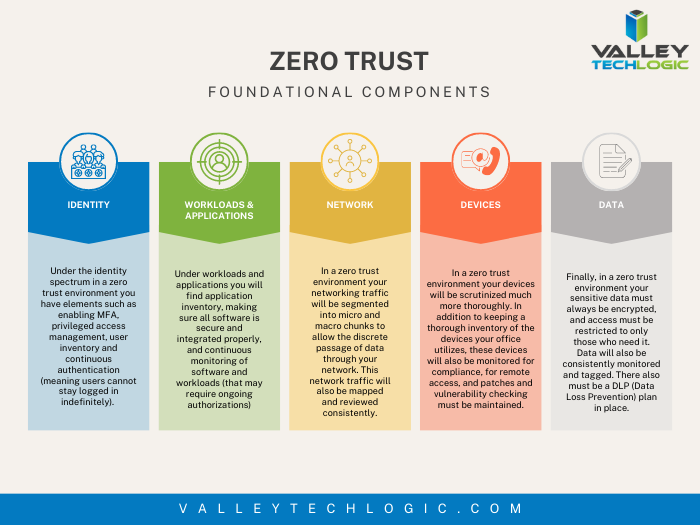
    We address ALL of these topics in our new book, Cyber Security Essentials, which covers all the components of a cybersecurity framework and how to implement them in your business. You can see a preview of the book in the video below.

    [youtube https://youtu.be/jlBAoq4tLNc]

    Looking for more to read? We suggest these other articles from our site.

    This article was powered by Valley Techlogic, an IT service provider in Atwater, CA. You can find more information at https://www.valleytechlogic.com/ or on Facebook at https://www.facebook.com/valleytechlogic/ . Follow us on Twitter at https://x.com/valleytechlogic.

  • Be careful what you download, malware has made it to Google Adwords

    Be careful what you download, malware has made it to Google Adwords

    Downloading applications from trustworthy sources is something that has been drilled into most of us as internet safety 101, and many of us would consider the top link on Google to be a trustworthy source.

    However, hackers are now taking advantage of that and pushing ads that contain their malware disguised as legitimate applications.

    Initially reported on by cybersecurity firm Cyble last month, their report found that a malware called “Rhadamanthys Stealer” is being spread through Google Ads that allegedly lead the user to download Zoom, Notepad++, AnyDesk and more.

    This malware is also being spread the typical way through email when attached to a PDF. It makes it clear that there is no one way to spread malware and that users need to be vigilante when downloading anything – whether that be a typical .exe or email file attachment.

    The goal is usually financial, with the hacker either “ransoming” the users device or merely spying in the background as they collect data they can sell or use to steal financial credentials. The attempts at stealing data may even be multifaceted and include all three.

    So how can you protect yourself? The first is in knowing how it works, Google ads has requirements for posting so these bad actors are placing ads for legitimate looking “front page” sites that mimic what you were looking for, which then immediately redirects you to the one containing malware.

    So one clue would be if the URL drastically changes during your browsing (and paying attention to the URL and knowing the URL you were trying to reach would squash this attempt altogether). In many cases you can confirm a sites true URL through Wikipedia and it’s a good idea to save it if it’s a site you visit regularly.

    Another way to block these is exceedingly simple, just utilize an ad block on your browser. Ad blocks block Google advertisements as well, so your research will be more likely to contain legitimate results. Many ad block extensions will also block popups too.

    Google has also offered their own advice on blocking “malvertising” and have included a way to report illegitimate websites. It goes without saying these sites are in violation of Googles advertising rules, which include rules against auto-redirects.

    As it becomes increasingly harder to avoid malware infections, many offices are scrambling with how to best protect office devices from being unintentionally used as a threat vector. Employee training is still your best protection but as this article illustrates, even tech savvy employees may have a difficult time avoiding all threats.

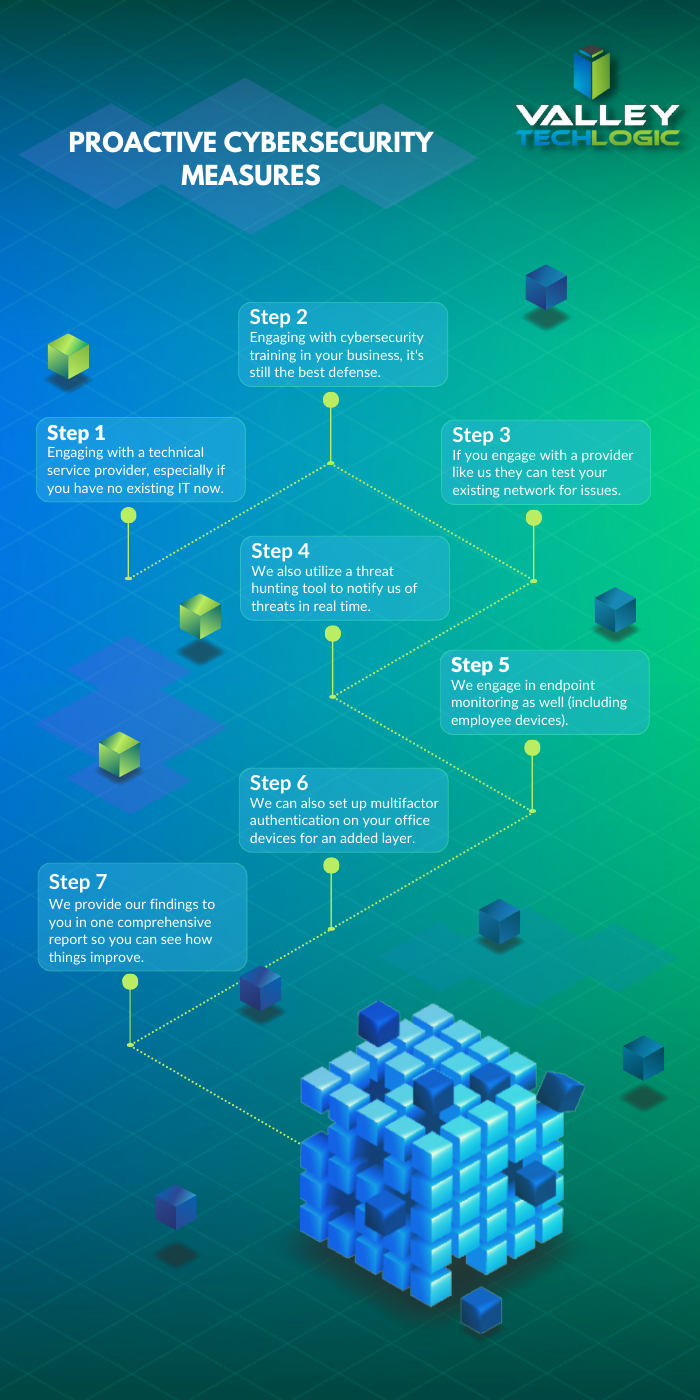
    That’s where a Valley Techlogic service plan comes in, we offer proactive cybersecurity protection in the following ways:

    Proactive Cybersecurity through Valley Techlogic

    If you would like to learn more, schedule a consult with us today and we’ll go over how we can help your business increase your cyberthreat awareness and protection capabilities.

    Looking for more to read? We suggest these other articles from our site.

    This article was powered by Valley Techlogic, an IT service provider in Atwater, CA. You can find more information at https://www.valleytechlogic.com/ or on Facebook at https://www.facebook.com/valleytechlogic/ . Follow us on Twitter at https://x.com/valleytechlogic.
  • More data breach woes for LastPass and our recommendations for you on how to deal with it

    More data breach woes for LastPass and our recommendations for you on how to deal with it

    We’ve posted about LastPass data breaches before but at that time it was purported to be a false alarm according to the company, the news on this most recent breach is that it’s real and that LastPass users should be concerned.

    The data breach in question happened in August but LastPass is just now revealing the details on what was stolen and the scope of breach. At the time of the hack LastPass was again saying that it was a false alarm but that wasn’t true and “backup customer vault data” was accessed during the August incident.

    This backup vault data included both unencrypted data such as website URLs and encrypted data such as website usernames and passwords. Having both details will allow hackers to easily put two and two together to access customer accounts.

    With that said because the data for usernames and passwords is still encrypted LastPass has let customers know their data is still safe, as they say it can only be unencrypted with their unique encryption key that is derived from your master password. User master passwords are not accessible due to their “Zero Knowledge” architecture.

    With this architecture no one, not even LastPass themselves, has access to a user’s master password. LastPass requires that master passwords be 12 characters long so even if the hackers who accessed this data attempt to brute force individual passwords it would still be difficult to impossible, with LastPass themselves estimating it would take “millions of years using generally-available password-cracking technology”.

    LastPass users should still be on the lookout for phishing attempts in the upcoming days however, even if your data is safe bad actors may still use the news of this breach to attempt to trick users into revealing their data. You should never share your password details with anyone, especially your master password. LastPass will never ask you for your password information.

    Also some additional advice for business owners who may own websites from Google, because the URLs in this breach were not encrypted they may include some that you didn’t want publicly accessible. John Mueller a SEO expert at Google recommends reviewing any website URLs you may have that may inadvertently leak data for your business, including customer form data.

    We still believe password managers are a security benefit to both consumers and businesses alike. They’re one small part of increasing overall cybersecurity awareness and safety and fall under the larger spectrum of increasing user education and accountability.

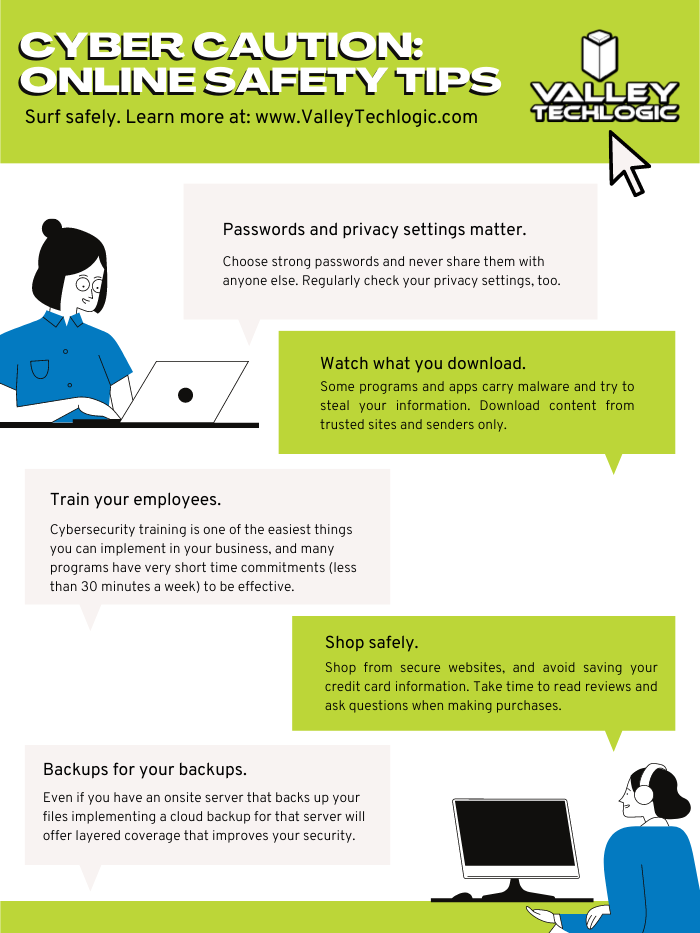
    We’ve posted about proper password safety and advice on avoiding phishing attacks, but here are the top 5 things you can enable in your business today to improve your cybersecurity safety in 2023.

    Internet Safety InfographicIf news of breaches make you nervous and you aren’t sure if your business is prepared from a cybersecurity standpoint, Valley Techlogic can help. We consider ourselves to be a premier provider of cybersecurity services for businesses in our area and beyond. We can help your business by covering your endpoints, setting up secure backups, virus and malware scanning and prevention and more. Schedule a consultation today.

    Looking for more to read? We suggest these other articles from our site.

    This article was powered by Valley Techlogic, an IT service provider in Atwater, CA. You can find more information at https://www.valleytechlogic.com/ or on Facebook at https://www.facebook.com/valleytechlogic/ . Follow us on Twitter at https://x.com/valleytechlogic.
  • October is Cybersecurity Awareness Month, now in its 18th year

    October is Cybersecurity Awareness Month, now in its 18th year

    We’re announcing this a bit late, but we did want to touch on this annual event (now in its 18th year). Every year CISA (Cybersecurity and Infrastructure Security Agency) releases new resources that are free to download and share for Cybersecurity Awareness Month. The theme this year is “See Yourself in Cyber” and we appreciate the effort to help everyone understand that cybersecurity measures are up to all of us to maintain.

    So many cybersecurity measures feel very passive, you’re protected by your anti-virus or firewall automatically. Your IT team helps you navigate any issues that make come up. For businesses, advanced cybersecurity threat protection can detect a threat just from activities that fall outside the norm (like your computer being online at three in the morning) and send you a warning.

    Unfortunately, hackers are always trying to circumvent these automatic measures no matter how advanced they become. The human element is still the biggest cybersecurity threat to your network and business. That’s why acknowledging we all have a role to play in preventing cyber threats is so important.

    CISA recommends four important steps we all need to take online:

    1. Think Before You Click: Before you click on that link in an email or download an attachment, do a little research. Is the sender who you expect it to be? Phishing emails are still the #1-way users are hacked.
    2. Update Your Software: This is good common-sense advice; most patches also include important security updates and it doesn’t take very long to install them (and for Windows devices you can even have them run automatically).
    3. Use Strong Passwords: This is another easy one and if you use one of our password manager recommendations, it’s even easier to create stronger passwords that you don’t have to manually remember.
    4. Enable Multi-Factor Authentication: This is CISA’s fourth tip for this year and lucky for you we have a guide for this too.

    These tips may seem simple, but they will be hugely beneficial to preventing a cyber threat for you, your business or your employees. However, you can take it a step further and engage with cyber security training.

    You may be wondering what that would look like, well you’re in luck. We have a sample training session right here for you to review with your employees:

    This is just a quick sample lesson; through our partner we have bite sized lessons that include video that you and your team can take to beef up your cybersecurity knowledge. They average 2-3 minutes long with a quick quiz at the end to make sure the knowledge was absorbed, and you can even see your employees average scores to see how everyone is doing.

    If you incentivize taking this training it will not only be a team building opportunity, it will also help your business stay safe from cyber security threats. If you’d like to learn more about cybersecurity training or stepping up your cybersecurity measures in your business (including the aforementioned advanced cyber threat detection) reach out today for a consultation.

    Looking for more to read? We suggest these other articles from our site.

    This article was powered by Valley Techlogic, an IT service provider in Atwater, CA. You can find more information at https://www.valleytechlogic.com/ or on Facebook at https://www.facebook.com/valleytechlogic/ . Follow us on Twitter at https://x.com/valleytechlogic.
  • 2023 is coming, is your business CMMC ready?

    2023 is coming, is your business CMMC ready?

    For some Department of Defense (DoD) contractors, CMMC or Cybersecurity Maturity Model Certification compliance may be a looming figure that they’ve yet to address. If you’re one of the ones currently making headway on it, you may not be certain which level you need to reach for your business.

    CMMC version 2.0 was announced last November, and it seems as if that’s going to be the de facto model going forward. In version one there were 5 levels of CMMC compliance, which have now been reduced to 3. To put it simply, level 1 of the program remained the same, levels 2 and 3 were combined and levels 4 and 5 were also combined.

    This means if you were previously aiming for level 2 in the previous version of the program, you will now need to address topics in level 3 to be compliant.

    Level one or the Foundational Level is meant for who do not handle Federal Contract Information (FCI) data. The checklist features just 17 items, and your compliance is self-attested which means you do not need to have a formal CMMC testing done to be compliant with the program.

    Many DoD contractors though will fall into level 2 or the Advanced Level due to their handling of Controlled Unclassified Information (CUI), level 2 features 110 controls. All of CMMCs level 2 controls originate from NIST SP 800-171.

    With the announcement of version 2.0 it was also announced the additional CMMC specific controls would be removed. If your business has already been working towards compliance with NIST before CMMC was announced you’re in a perfect position to work towards your CMMC compliance goals.

    While 2.0 has not yet been signed into law, it was announced by the Pentagon last April that CMMC language would begin to start showing up in DoD contractors starting July 2023 – so the clock is definitely ticking if your business will be vying for those contracts.

    A small portion of businesses will be required to undertake the rigorous task of being compliant with level 3 of CMMC, or the Expert Level. It’s based on NIST-800-171 and 172 and has 134 requirements at the time of writing, many of which require specialized equipment and software.

    For both levels 2 and 3, audits will be required through the CMMC Accreditation Body (recently renamed Cyber-AB). Cyber-AB is an independent auditing body and we’ve been told the wait times to be audited are lengthy, though this will get a little better as the program gains more auditors. It’s still a good idea to make sure your business is ready and meets the compliance standards though especially as CMMC regulations continue to be rolled out ahead of the official release. You don’t want to be caught needing that proof of compliance to meet your contract requirements and not having it.

    The DoD has also indicated it would take a contractors level of CMMC compliance into consideration when choosing for their contracts – so not being compliant may not just put your existing contracts at risk it could cost you new ones as well.

    We have several articles explaining the levels and controls in more detail, here are our articles on levels one, two and three.

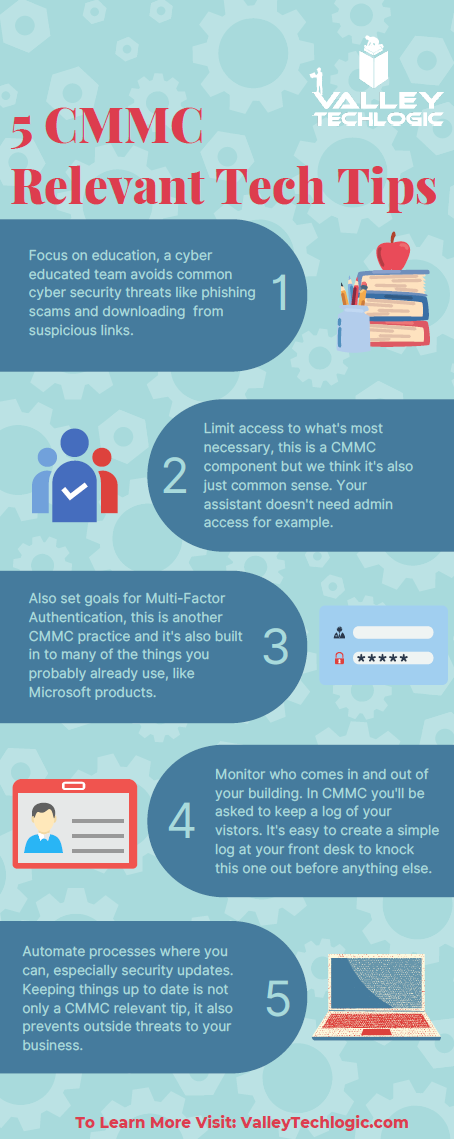
    If you’ve barely scratched the surface in your organization, you can still make changes that will put you in a better position when you begin to tackle it in earnest. Many of the requirements, especially those found in level one, is common sense advice for being safer online. You (and your employees) can work on these five items first:

    If after reviewing the information, you feel like you just need a hand to either cement cybersecurity processes you already have in place or have a partner in your CMMC goals, Valley Techlogic can help.

    We have firsthand knowledge of the CMMC program and helping clients become CMMC certified. Our tools will help you meet the requirements necessary and quickly get your business ready for the audit process.

    Make an appointment today for a free consultation to learn more.

    Looking for more to read? We suggest these other articles from our site.

    This article was powered by Valley Techlogic, an IT service provider in Atwater, CA. You can find more information at https://www.valleytechlogic.com/ or on Facebook at https://www.facebook.com/valleytechlogic/ . Follow us on Twitter at https://x.com/valleytechlogic.
  • Why “DIY” IT is a bad idea as a business owner

    Why “DIY” IT is a bad idea as a business owner

    We get it, handing over any part of your business to someone who’s not you can be stressful and unnerving. You painstakingly grew your business to where it is today. You may still be personally vetting every new member who walks through your door.  Hiring technical staff can be an arduous process so it’s just made sense so far to learn the ropes yourself to keep devices up and running (and as maintained as possible).

    The problem is, you’re one person with a finite amount of time. By the time cracks start to show it’s often too late, things like server failure or a malware attack can cripple your ability to run your day-to-day operations and fixing it may fall outside the scope of your abilities, making it necessary to bring in emergency help (often at a premium).

    If you survived one round of that you may have vowed to find IT help, but even with a clear indicator of why you need it recently at hand it may still seem like a waste of time or money, and you talked yourself out of it. You may have been doing things yourself for years, what are the odds something catastrophic would happen again any time soon?

    Unfortunately, pretty good. As the famous quote by Joyce Brothers goes, “If you change nothing, nothing changes.”

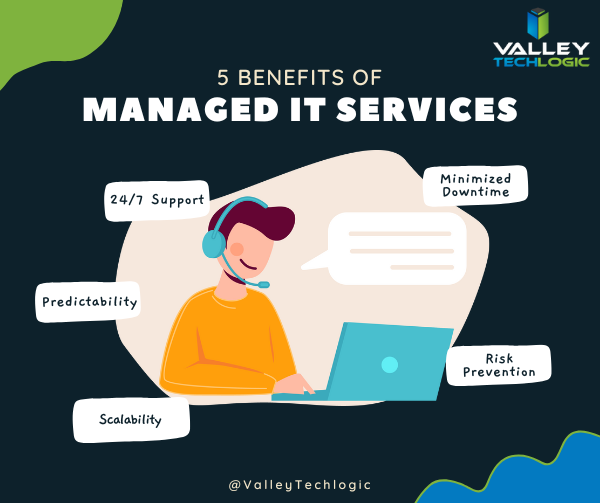
    So, we thought we would give you some food for thought about other reasons (besides potential disaster) you should consider outsourcing your IT:

    1. 24/7 Support: This one’s easy, with a Valley Techlogic service plan 24/7 support emergency support is available to you – at no additional cost and no more late nights for you.
    2. Minimized Downtime: Time is money, and with a service plan from us you will spend less time troubleshooting problems and more time on your business.
    3. Predictability: We utilize best in class software to maintain a consistent technical environment for all of our clients, including managing computer updates, anti-virus software and more.
    4. Risk Prevention: Speaking of anti-virus, our cyber security approach doesn’t just help you recover from a cyber threat – it helps prevent one from happening in the first place.
    5. Scalability: This is a big one if you’ve been doing your own IT. We have service plans to fit both businesses who already have an available IT resource or those who want us to be their primary IT – with flexibility to change if needed

    As you can see, many commonsense features are built into all of our plans, but we do offer customization as far as how much or how little we do for your business. If you would like to remain as the primary IT resource, we have co-managed plans so you can still benefit from our solutions and proactive maintenance while still remaining the lead IT person.

    If after utilizing us for a while you’ve reached a point where you would like us to handle it all, we can then change your plan to our “managed IT department” where we are your go to resource for everything IT, your users can even call us if there’s a problem and we’ll take care of it.

    Whichever plan you choose, you’ll still always be “in the know” thanks to our comprehensive reporting and annual or bi-annual Technology Business Review (TBR) meetings where we go over how things are going and formulate a plan together to continue improving the service to fit your needs.

    Interested in learning more? Schedule a consultation with us today.

    Looking for more to read? We suggest these other articles from our site.

    This article was powered by Valley Techlogic, an IT service provider in Atwater, CA. You can find more information at https://www.valleytechlogic.com/ or on Facebook at https://www.facebook.com/valleytechlogic/ . Follow us on Twitter at https://x.com/valleytechlogic.

  • 5 of the Most Important Cybersecurity Training Topics to Cover with Your Employees

    5 of the Most Important Cybersecurity Training Topics to Cover with Your Employees

    We’ve discussed cybersecurity training before and its importance in preventing the number 1 cause of cybersecurity disasters – human error.

    We offer cybersecurity training as a core feature in our tech care plans, but many topics you can (and should) cover yourself with your employees. There couple be rules that specifically apply to your business sector; like HIPAA for healthcare or CMMC for Department of Defense contractors.

    Maybe you’ve experienced a cybersecurity attack before and after the dust settled you came up with a game plan specifically to prevent it from happening again. If it hasn’t happened to you yet, it’s a mistake to assume it never will. In 2021 42% of businesses experienced a cyberattack. It’s a numbers game most won’t win without preventions in place.

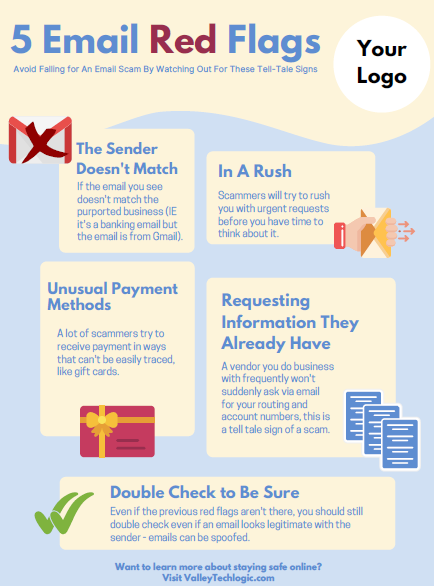
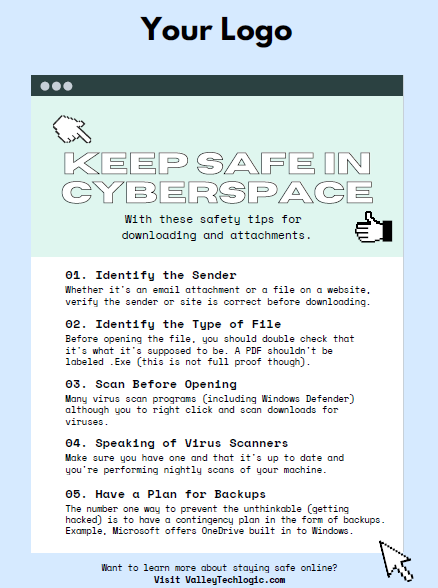
    To start, we want to offer these posters we’ve created on two common cybersecurity threat topics, email and malicious attachments. These posters are free for you to print and brand to use in your office or send as a reminder, and these are two excellent places to start when you’re looking to beef up your office security.

    Click to grab the full size version.
    Click to grab the full size version.

    Here are five more training topics all workplaces should also cover:

    1. Like our posters above, email security and having strict guidelines for attachments and downloads is one key thing to focus on in your cybersecurity training efforts.
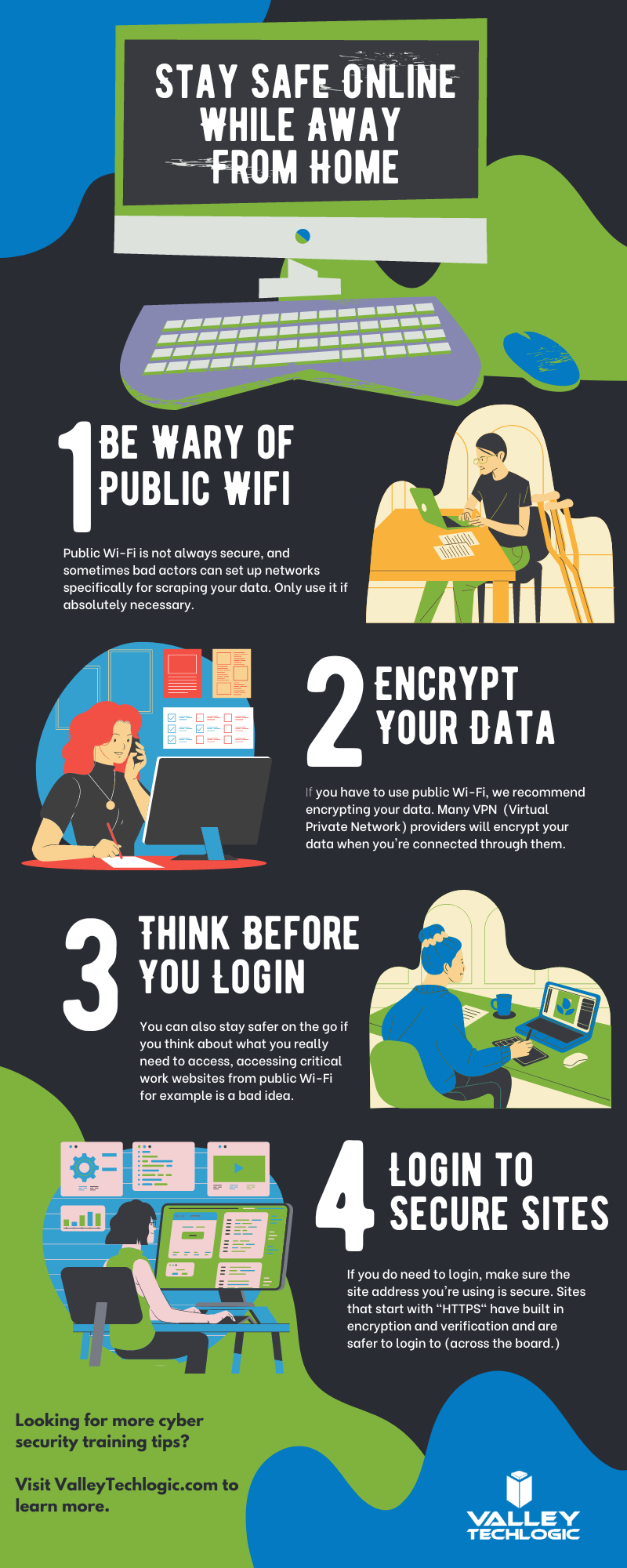
    2. It’s also important to provide guidance for internet usage while at work. Many employers try to digitally lock this down, but these efforts are usually met with annoyance and disdain from employees and are often in vain. Instead of arbitrarily trying to block everything with software we suggest having guidance about what’s appropriate for work devices (and what Isn’t). We also suggest noting that even if a website looks legitimate it may not be, so they should be wary of sites that ask you to download something or enter private credentials.
    3. This comes to the next topic which is practicing good safety hygiene with work devices. Three easy steps are: Locking your computer when you walk away, only downloading software from work authorized sites, and keeping your device up to date with patching and software updates. They may need assistance with the third step so it’s a good idea to have your IT provider manage workstations if you’re able to (this is something Valley Techlogic providers for all clients).
    4. The fourth step is protecting company data. If you’re employees have to interact with documents that are confidential in nature you should have rules for the sharing of those documents, as well as a comprehensive plan for backing them up safety.
    5. Finally, you should provide guidance on passwords and multi-factor authentication. Having a rule in your workplace that for work accounts they must have multi-factor enabled (or have your IT team enable it across the board) will drastically improve your office’s online safety. We have guidance for this topic here.

    It can feel overwhelming to have all of these topics to cover with your employees, but we cannot overstate how important it is to cover these topics with your employees, even if you think they’re things they should already “know”.

    At Valley Techlogic we have partnered with a platform that not only provides cybersecurity training resources, but it also allows you the ability to create your own training modules. You can even cover topics that fall outside the cybersecurity spectrum. We can also work with your business to assist you in the creation of these training modules, if you would like to learn more schedule a consultation with our sales manager Annette today!

    Looking for more to read? We suggest these other articles from our site.

    This article was powered by Valley Techlogic, an IT service provider in Atwater, CA. You can find more information at https://www.valleytechlogic.com/ or on Facebook at https://www.facebook.com/valleytechlogic/ . Follow us on Twitter at https://x.com/valleytechlogic.
  • How a phishing scam swindled this Shark Tank host out of $400,000

    How a phishing scam swindled this Shark Tank host out of $400,000

    We’ve focused a lot of articles on phishing scams and how no one is immune, even major money moguls like Barbara Corcoran from ABC’s Shark Tank with a net worth estimated at over $100 million fell victim to a phishing scam that wound up costing her $400,000.

    Business owners are a particularly lucrative target for bad actors, and phishing emails continue to grow more sophisticated. In this instance Barbara reports receiving an email that looked like it came from her secretary going to her accountant authorizing the amount to go to a real estate deal.

    Barbara like many business owners has deals going on all the time so the amount and type of authorization wasn’t unusual, allowing it to fly under everyone’s noses and make the scammers involved $400,000 richer. It wasn’t until her accountant sent an email to her real secretary confirming the transaction one last time that the scam was uncovered – and by then it was too late the transfer had already been sent.

    This case proves that even with strong checks and balances in place, phishing scams can happen to almost anyone. While Barbara was able to absorb the hit without it hurting her business – many out there could not.

    While the amount of money lost in this instance is quite substantial, millions of dollars are lost every day to cyber crime. It’s estimated that $1,797,945 is lost per minute according to Risk IQ’s Evil Internet Minute Report.

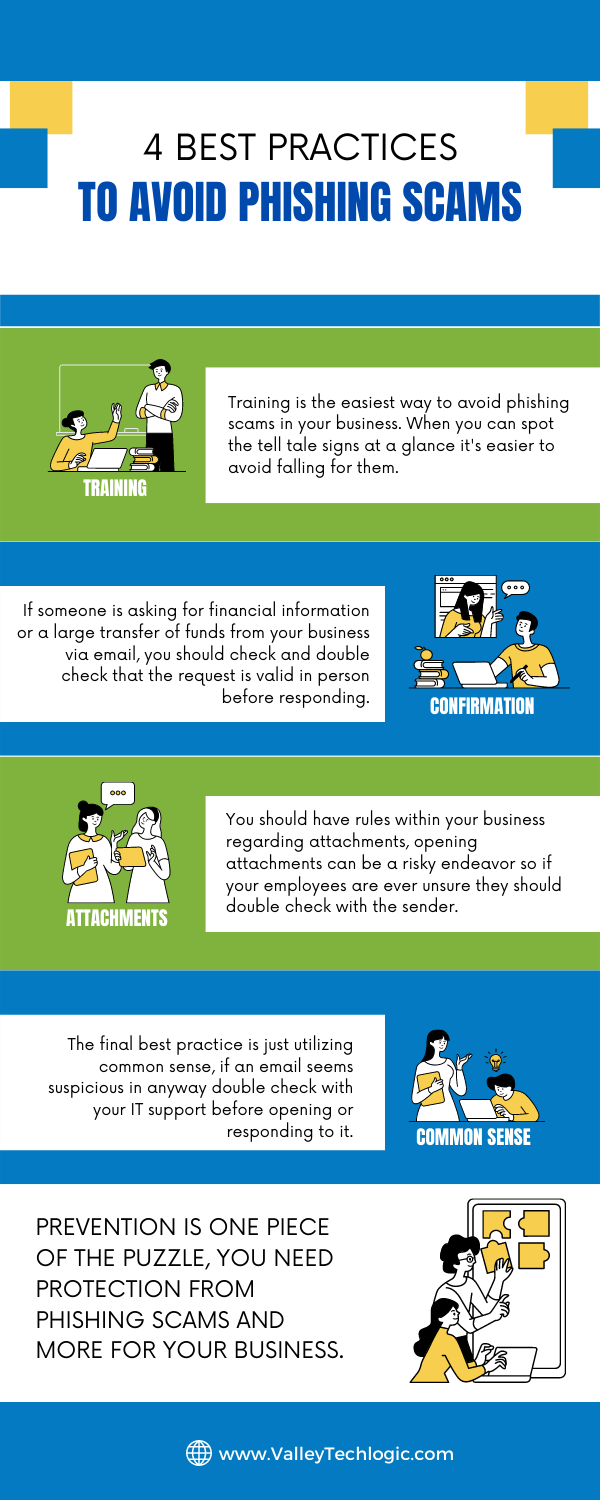
    Even if you think your business is too small to be a target you would be wrong, scammers cast wide nets looking for victims to fall in. Here are 4 things you can have in place that could prevent this kind of scam from happening to you.

    Email Best Practices

    Even with these checks in place it can still be tricky to avoid, especially if your business has become a particular target for a scammer. Another famous example is how Facebook and Google were tricked out of $100 million due to an extended attack phishing attack organized by a scammer located in Lithuania. A little less than half of the money lost was recovered.

    Another famous attack in 2014 saw the early release of four movies produced by Sony Pictures when North Korean hackers, upset about a movie that was being released at the time, sent targeted phishing emails that appeared as if they were coming from Apple to a top Sony executive. The damage that incurred from this attack was estimated to be over $80 million.

    With both of these attacks it’s not just about the money lost either, these attacks are easily searchable to this day and had an untold effect on their reputation at the time. Massive companies like Google, Facebook and Sony can weather the storm, but could your business do the same?

    Education is just one piece of the puzzle, active protection is another crucial element to avoiding the lengthy damage that can arise from a successful phishing campaign. At Valley Techlogic cyber security is a core focus for all of our plans. Learn more today with a quick and easy consultation.

    Looking for more to read? We suggest these other articles from our site.

    This article was powered by Valley TechLogic, an IT service provider in Atwater, CA. You can find more information at https://www.valleytechlogic.com/ or on Facebook at https://www.facebook.com/valleytechlogic/ . Follow us on Twitter at https://x.com/valleytechlogic.

  • College shuttered after 157 years due to ransomware attack

    College shuttered after 157 years due to ransomware attack

    While ransomware wasn’t the only thing behind the decision to close Lincoln College, located in rural Illinois and established in 1865, it was the final blow after taking substantial financial losses due to the COVID-19 pandemic.

    The school, which had survived through the Spanish Flu, the Great Depression, two world wars and even a fire in 1912 will close its doors for good on May 13th, 2022.

    The ransomware attack which occurred in December 2021 crippled their recruiting and fundraising efforts for two months, not being resolved until March 2022 as a statement on the school’s website reads.

    “Furthermore, Lincoln College was a victim of a cyberattack in December 2021 that thwarted admissions activities and hindered access to all institutional data, creating an unclear picture of Fall 2022 enrollment projections. All systems required for recruitment, retention, and fundraising efforts were inoperable.

    Fortunately, no personal identifying information was exposed. Once fully restored in March 2022, the projections displayed significant enrollment shortfalls, requiring a transformational donation or partnership to sustain Lincoln College beyond the current semester.”

    The school made attempts to avoid the closure, but the efforts came too late, and we’re sorry to say they’re far from unique in being a school that was targeted by a cyberattack. According to this report over 1043 schools suffered ransomware attacks in 2021.

    Cyber criminals don’t think twice when targeting schools, hospitals, and infrastructure that’s needed by the community. We reported on the on Colonial Pipeline hack that created a major disruption at gas stations across eastern US last May.

    Schools and hospitals are appealing targets because investing in cyber security measures is not generally a priority and they often store large amounts of PII (Personal Identifying Information) in their systems.

    Many senators have taken note of this and have called on the Department of Homeland Security to instate measures that would bolster the security of our schools, especially K-12.

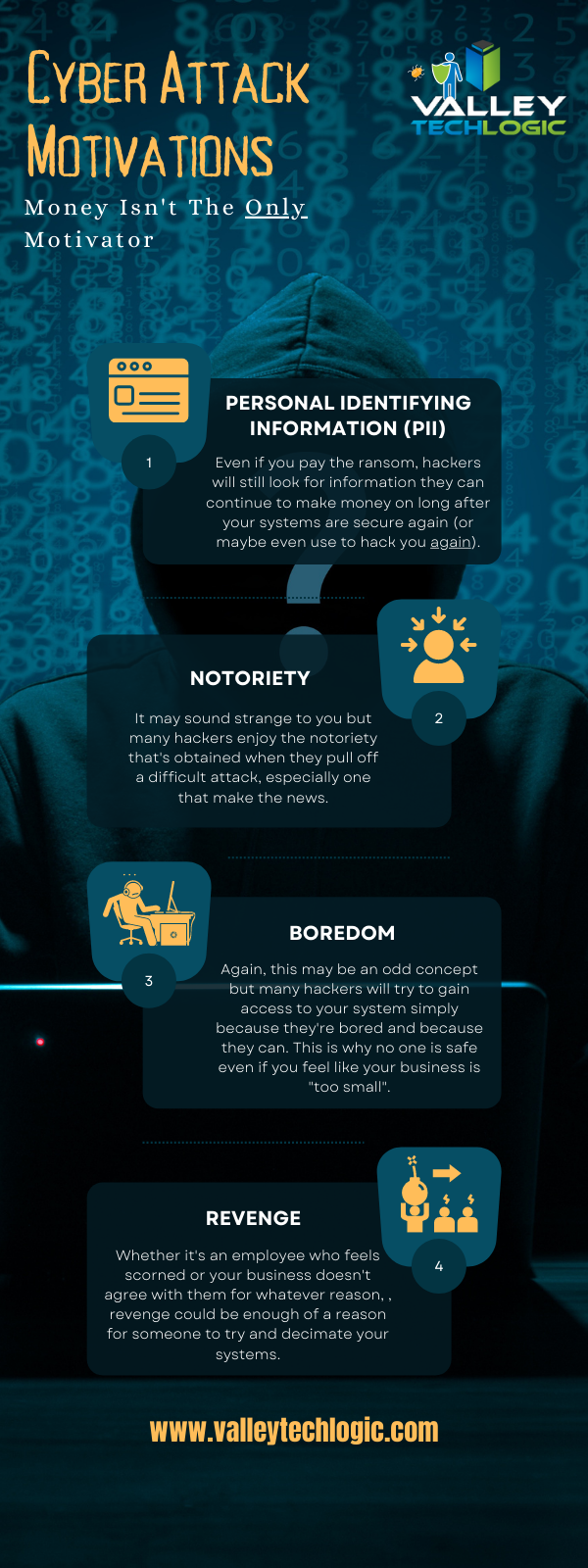
    A ransomware payment isn’t the only thing attackers stand to gain when they successfully infiltrate a network, here’s a chart with the way hackers “double dip” from during their attacks:

    Hacker Motivations Infographic

    In the end Lincoln College did choose to pay the ransom to gain control of their systems again, but it sadly made no difference in saving the college.

    60% of businesses close within 6 months following a ransomware attack, and only half businesses have a cyber response plan available to quickly respond to an attack. The slow response time will only add insult to injury as you try to get back on your feet and as we’ve seen in this case, it can be fatal to your business.

    Valley Techlogic can help you not only have a contingency plan in place, but also help you enact cyber security measures in your business that will prevent an attack from occurring in the first place. Learn more today through a quick consultation.

    Looking for more to read? We suggest these other articles from our site.

    This article was powered by Valley TechLogic, an IT service provider in Atwater, CA. You can find more information at https://www.valleytechlogic.com/ or on Facebook at https://www.facebook.com/valleytechlogic/ . Follow us on Twitter at https://x.com/valleytechlogic.
  • Common tax return scams to watch out for in 2022

    Common tax return scams to watch out for in 2022

    The due date for filing your taxes is just 10 days away as of writing, and as tax filers scramble to gather needed information to finish (or start) their filing – scammers are looking for ways to take advantage of the mad dash that occurs for many Americans every year.

    The IRS has put together a compilation of scams they’re seeing this year, and they mention that scams may not be limited to the virtual space. Scammers may also call, mail or even show up to your door in person. So, it’s a good idea to be extra vigilant when protecting your PII (personal identifying information).

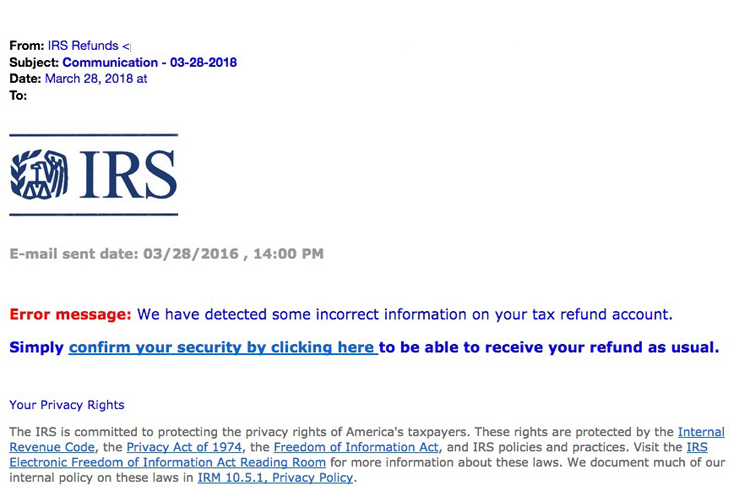
    The “Tax Transcript” scam is one that commonly targets businesses, many employees will use their business email when they sign up to do their taxes and may expect communication from the IRS to come there, but scammers will send fake communications with malware attached instead. Users may click without even thinking twice (especially as email scams of this nature can be very convincing). See below for an example.

    IRS Scam Email Example
    IRS Tax Email Scam Example. Credit: https://www.irs.gov/

    IRS scam calls are also another common tactic. It’s a good time to reiterate that the IRS will NEVER call you asking for personal information. This news segment found on YouTube shows a scammer in action, these calls may increase as we get closer and closer to the filing deadline. You shouldn’t give out your personal information even if they have things like your address or full name (scammers will often do some research on you before calling).

    Another scam aimed at businesses is one where the scammer will pose as a member of the accounting department where you work, they know many people will not question a call or email coming from a work authority. It may be a good idea if you’re a business owner to send out an email or have your accountant contact your employees to mention that like the IRS you will NEVER call or email unprompted requesting private information.

    Stolen Identity Refund Fraud or SIRF is a very lucrative business, 2.8 million false returns were filed in 2018 with a potential worth of $16 billion dollars. It’s important to guard the PII information criminals need to file a false tax return on your behalf. Here are 5 steps you can take to safeguard your information:

    1. The easiest? Have a good spam filter enabled on your email, that way many of these phishing scams won’t even make it to your inbox.
    2. Check emails for signs it’s a phishing scam, we wrote an article on what to look for. Two standouts are an email domain that doesn’t match the sender (an IRS email won’t come from a Gmail account) or links that when you hover on them don’t match where they say they go.
    3. Check with the purported sender, if the email looks like it’s coming from within your office network, but the email contents just don’t seem right – follow your gut and follow up with your department.
    4. If you receive a call from a number you don’t recognize claiming to be the IRS or the authorities, try Googling the number. Many people will share information about experiences with scam numbers online as a way to warn others.
    5. If you’ve already given your PII to a scammer, contact the major credit bureaus to freeze your credit and contact the IRS to report it ASAP. The IRS has steps in place for helping victims of identity theft, the sooner you act the sooner you can put a stop to the scammer’s activity under your identity.

    Employee training is the best defense for business owners who want to prevent scams such as these ones as well as other cyber threats from effecting their business. Valley Techlogic offers security awareness training as well as top of line cyber security defense systems as part of all of our technology packages. Learn more today.

    Looking for more to read? We suggest these other articles from our site.

    This article was powered by Valley TechLogic, an IT service provider in Atwater, CA. You can find more information at https://www.valleytechlogic.com/ or on Facebook at https://www.facebook.com/valleytechlogic/ . Follow us on Twitter at https://x.com/valleytechlogic.