Category: eTechTip

eTechTip

  • New Year’s resolutions for business tech in 2023

    New Year’s resolutions for business tech in 2023

    The new year is upon us and with that comes the opportunity to make needed changes to outdated technology within your business.

    Our clients are usually split on when they want to make changes – for some it’s that mad dash towards the end of the year and for others it’s the fresh mindset that comes after the 1st of January. There really is no wrong answer when it comes to a tech refresh and any move you make will have lasting benefits that increased security protection and less chance of an outage bringing your office to a standstill.

    This can mean hardware or software upgrades but usually means both, and with Windows Server 2012’s end-of-life date occurring in October of this year we anticipate there will be many trying to replace their primary office server before that time. If you have a server current running Windows Server 2012 it probably will also need to be replaced (keep in mind the 2012 reflects the year it came out, so even if you bought your server a few years later it will still be older than the 5 year recommended lifespan for most servers).

    We don’t want to only focus on servers though, here are a few other New Years technology resolutions you can make for 2023:

    1. Move away from software that has reached end-of-life or is no longer supported. Windows Server 2012 Isn’t the only operating system that has recently reached end-of-life, Windows 7 is also no longer supported by Microsoft. Even peripherals such as switches or networking gear such as routers can have end-of-life events and will no longer be updated by the manufacturers.
    2. On the same token, consider moving more to the cloud. More and more of our clients are moving away from traditional in office servers by switching to online storage. There can be an upfront cost to doing this but it’s still often less than purchasing a brand new server if your existing one is on the outs. As a bonus all future maintenance will then fall to your cloud provider.
    3. Increase your security measures in the New Year. There’s no better time than the beginning of the year to begin tackling cyber security measures you wanted to put in place last Year over year the risks continue to increase so why not begin 2023 knowing your business is safe from a cybersecurity attack?
    4. Again in the same realm, begin or strengthen employee training on technology topics. As your employees come back from the holidays why not implement short training measures (our tool takes just 15-20 minutes a week) that could drastically reduce your risk?
    5. Finally, don’t let fear of a recession slow your growth. You may be shying away from making hardware purchases due to fear of a recession, but if existing outdated hardware is already slowing your business down from the productivity level you hope to have not replacing it soon could do more harm than good.

    If you’re not sure where to start with any of these topics, we can help. We’re currently offering a 2-hour service call absolutely free.

    Here are a few ways we suggest using this service call to put your business in a better position in 2023:
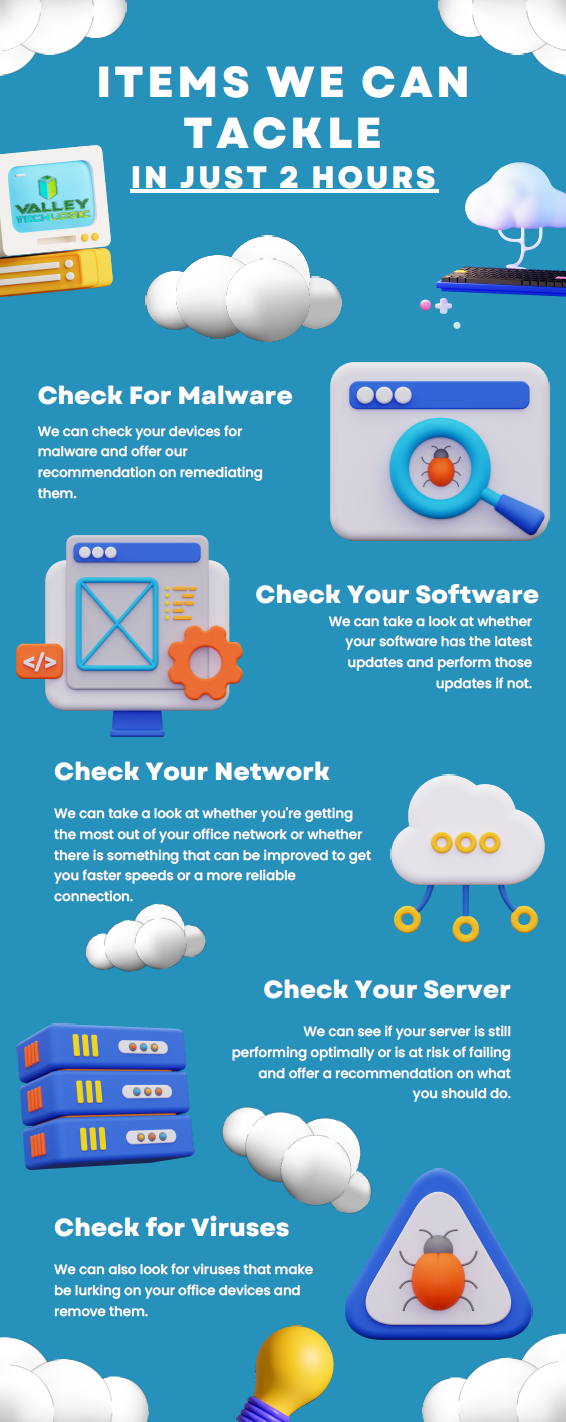
    Click to view the full size version.

    If you would like to learn more about our free service call offer, or would like a consultation on our services you can book one here today.

    Looking for more to read? We suggest these other articles from our site.

    This article was powered by Valley Techlogic, an IT service provider in Atwater, CA. You can find more information at https://www.valleytechlogic.com/ or on Facebook at https://www.facebook.com/valleytechlogic/ . Follow us on Twitter at https://x.com/valleytechlogic.


  • 5 Holiday Tips for Your E-Commerce Business and 5 for Everyone Else

    5 Holiday Tips for Your E-Commerce Business and 5 for Everyone Else

    It doesn’t matter which e-commerce sector you’re in, the holiday time period is always a big opportunity to increase that year’s sales before the New Year rolls in.

    With online shopping growing in popularity year over year there are specific ways to capture more of that online market – especially around the holidays.

    Here are 10 tips for improving your sales during the holiday season (including 5 that apply to all types of business):

    1. Step up your social media game. Anecdotal evidence from us, when we went from posting inconsistently 3-4 times a week to posting consistently 4-5 times a week our impressions didn’t just go up, they doubled. The holidays are a great time to post more updates about your business on your social media platforms.
    2. Make sure your contact information is rock solid. It would be a tragedy to see sales calls go unanswered, make sure the contact information on your website it up to date and your sales people are ready to answer those calls.
    3. Make sure your website it mobile friendly. This may be a tough one to knock out this year if you haven’t done it yet, but having a mobile friendly website is a must have in 2023. Google even offers a free tool for testing if your website is mobile friendly here.
    4. Release holiday ads. During the holiday season your same old ads may not perform as well as a holiday themed one would as people look for those familiar colors and settings (red and green, blue and white, snow and Christmas trees).
    5. Take advantage of marketing automation. Facebook for example lets you schedule posts and you can update your Google advertising with your holiday messaging and let it run.
    6. If you plan on conducting a big sale, make sure your website is ready for it. If you’re planning on running any holiday “one day sales” make sure your website can handle the potential increased traffic or there’s a game plan in place for if it goes down so you don’t lose your momentum. You can check on your current page speeds with this other Google tool here.
    7. Have a chatbot available. You might get the same questions repeatedly, having an automated chatbot that can answer those questions with the same feel as a sales representative could increase your sales.
    8. Improve your holiday key words ahead of time. If you’re an apparel company for example peppering “holiday themed apparel” or “Chrstimas outfits” into your SEO keyword efforts is a good idea leading up to the holiday season.
    9. Have a holiday themed front page. We’ve talked about having holiday themed ads and social media posts but you should also “dress up” your front page temporarily to clue buyers in that you’re ready for the season. Many website providers have the option of changing out a front page temporarily so you can easily switch it back when the season is over.
    10. Make sure your buyers know any email marketing is from you. Phishing scams also increase in the holidays, having ways for a buyer to tell emails sales are from your company and not from a scammer is key. Mirror any sales you have directly on your website as well.

    Speaking of holiday phishing scams, here is an infographic on avoiding holiday scams:

    Click to grab the full size version.

    Whether your business is e-commerce or something else entirely, Valley Techlogic can assist with your technology needs in 2023. We have our own holiday sale going on now that will even save your company money on IT support in the new year. Reach out today to learn more!

    Looking for more to read? We suggest these other articles from our site.

    This article was powered by Valley Techlogic, an IT service provider in Atwater, CA. You can find more information at https://www.valleytechlogic.com/ or on Facebook at https://www.facebook.com/valleytechlogic/ . Follow us on Twitter at https://x.com/valleytechlogic.

  • MRP & ERP explained and how a tech service plan can help

    MRP & ERP explained and how a tech service plan can help

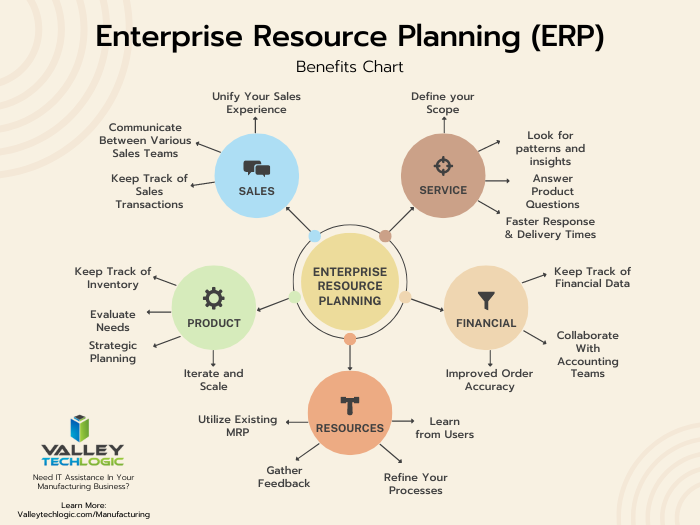
    Our manufacturing clients often rely on custom software to run their business, MRP or Material Requirements Planning software covers items such as making sure materials are available, ensuring the product is ready for delivery and just overall inventory planning.

    ERP or Enterprise Resource Planning software builds upon the existing functionality of ERP software but scales it to include managing operations, finances and staffing as well. While MRP software is normally standalone ERP software usually functions as a stack of applications that communicate with each other for better oversite of your manufacturing business’s operations.

    Some of our clients rely on custom MRP software but most ERPs look to eliminate the need for that, the downside of custom MRP software is it’s often tied to and customized for the system type it was created so upgrades to the operating system of a device can present a roadblock (and a security hurdle).

    MRP software also Isn’t usually not very customizable, it’s built with one purpose and it won’t be able to grow and change as you do. ERP software solutions are more expensive but will probably include updates from the distributor and be more modular and customizable overall since it’s meant to fit a variety of operational needs.

    For simple stock and order management an MRP may be all you need but as your business grows it may be best to look at a comprehensive ERP solution to allow your entire team to work under one umbrella, from accounting to project management. It’s also helpful if your production planning has outgrown your existing MRP software.

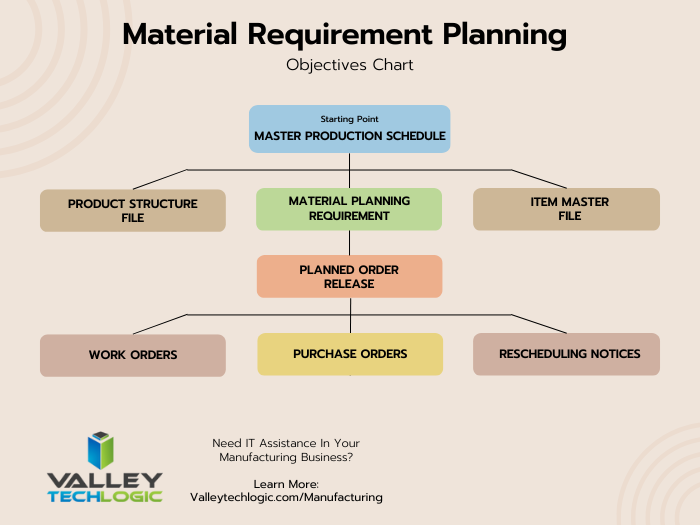
    Here are two charts that explain how MRP works vs ERP:

    Now at the end of the day both MRP and ERP are software-based solutions, and thus rely on the same maintenance and troubleshooting to the devices that host and utilize it as in any other business. Whether you utilize a cloud solution or on-premise (or even a mix of both) having an outage that effects this software can halt your day to day operations until it’s fixed.

    Business continuity for our manufacturing clients is paramount, a set back in operations often takes longer to recover from due to the nature of their business. Many of our clients have the wheels going 24/7 and sudden outages are disruptive and costly.

    We offer specialized support for our manufacturing clients, we can address issues you may be facing with hardware and look for solutions to keep your existing MRP solutions running.

    We also have experience supporting clients who utilize an ERP solution or can help you as you make the switch to one. Our engineers will evaluate your existing hardware and make recommendations that make sense for what you’re trying to achieve in your business.

    This is on top of our 24/7 emergency support so if you DO have an issue, we can address it right away and get your operations up and running again.

    If you’re interested in learning more about how Valley Techlogic can help and support your manufacturing business, reach out for a quick consultation today.

    Looking for more to read? We suggest these other articles from our site.

    This article was powered by Valley Techlogic, an IT service provider in Atwater, CA. You can find more information at https://www.valleytechlogic.com/ or on Facebook at https://www.facebook.com/valleytechlogic/ . Follow us on Twitter at https://x.com/valleytechlogic.
  • 10 Holiday Shopping Tips for Safer Online Shopping

    10 Holiday Shopping Tips for Safer Online Shopping

    The holiday season is upon us and with Thanksgiving around the corner many are anticipating doing some holiday shopping the day after during Black Friday.

    In previous years stores seemed to open earlier and earlier, creeping into Thanksgiving itself to allow buyers who really wanted those deals to snatch them up before their competition (if they were willing to sacrifice some time with family). Many felt this was unfair to employees and with the pandemic that activity has been scaled back so now most businesses are closed on Thanksgiving.

    That doesn’t stop you from shopping on Thanksgiving if you want to however, with online buying growing in popularity year over year “Black Friday” sales occur all over the internet at a wide variety of retailers – and even a wide variety of dates outside of the traditional day after Thanksgiving.

    Still, the main event is typically when the best sales occur with retailers holding back their “door buster” items until midnight on Friday as they do in traditional retail spaces.

    If you’re going to be hitting up those sales this year we have 8 tips for safer shopping online while you do so, and two bonus tips related to getting the best deal while you’re at it.

    1. Make sure the URL is what you expect it to be. Phishing emails may try to take advantage of those looking to get a good deal by misdirecting you to a site with a similar URL that can collect your payment information. Look for any misspellings such as Paypale or Wallmart instead of Paypal and Walmart.
    2. The same goes for products that may be found on multiple vendors. Hint, no one is going to sell a top of the line laptop for $25. If a price seems like it’s too good to be true, it probably is.
    3. Even if the website is legit, the product might not be. Sites like Amazon or Ebay allow private vendors to sell on their site, and this sometimes includes scammers. Look out again for pricing that seems too good to be true or product reviews that don’t match the product you’re trying to buy.
    4. Also read the small print. You want to make sure you’re buying that Xbox you’ve been looking for, not just the box it comes in.
    5. As always, watch out for popups. If you’re browsing for a specific product a loved one requested you may hit sites that try to scam you with malicious software delivered via popups. Letting your browser block all popups unless specifically allowed is a good idea.
    6. Make sure the website is HTTPS not just HTTP. HTTPS is a layer of encryption that protects your payment information when checking out through a website.
    7. If you’re buying from a vendor you’ve never purchased from before, keep an eye on your bank or credit card account. You want to catch any potentially suspicious activity early so you can report it.
    8. Also look for online reviews. Using Trustpilot or just doing a Google search before buying is a good idea, it will help you avoid scams and retailers that are a nightmare to deal with.
    9. Bonus Tip: Use a browser extension like Honey or one your credit card or bank account offers to automatically apply coupons or even get cashback on purchases. Searching for coupon codes is a hassle, however do keep in mind they’re offering you these discounts in lieu of information on your purchase making habits.
    10. Bonus Tip: For Black Friday specifically you can see the deals major online retailers will have ahead of time in the circulars collected by com . That way you can strategically plan your online shopping before the clock hits midnight this Friday.

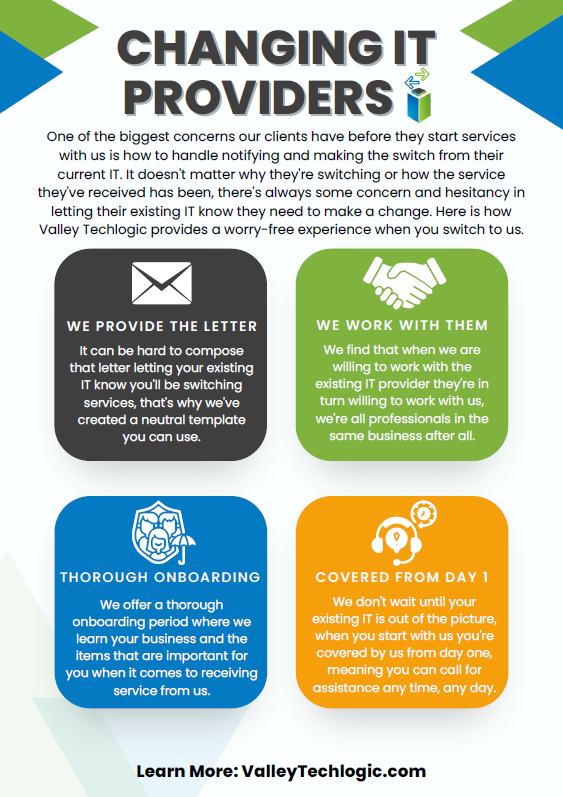
    Speaking of Black Friday, if you have been in the market for technology services for your business then look no further. We’re offering the best deal we have ever offered for new customers. In our last blog we listed four reasons to consider a service plan with Valley Techlogic. Here are four ways we will make switching easy in 2023.Click to view the full size version.Learn more about taking advantage of our Black Friday sale today.

    Looking for more to read? We suggest these other articles from our site.

    This article was powered by Valley Techlogic, an IT service provider in Atwater, CA. You can find more information at https://www.valleytechlogic.com/ or on Facebook at https://www.facebook.com/valleytechlogic/ . Follow us on Twitter at https://x.com/valleytechlogic.
  • Black Friday Isn’t just for consumer purchases, business owners can take advantage as well with these tech deals

    Black Friday Isn’t just for consumer purchases, business owners can take advantage as well with these tech deals

    The holidays are rapidly approaching and with Thanksgiving and Black Friday this week we thought it would be a good idea to offer some tips when it comes to Black Friday shopping for your business.

    If you aren’t aware, “Black Friday” is the day following Thanksgiving when retailers offer deep discounts to entice buyers who are holiday shopping. These discounts also occur on technology purchases with laptops being a popular item.

    We’re Dell and Lenovo partners here at Valley Techlogic, and both have their holiday deals live now but things are selling out fast. Dell has laptops and desktops available as well as some peripherals. Lenovo even has a handy page for their Black Friday allowing buyers to sort by what they’re looking for easily.

    Another retailer you can look to for some Black Friday specials for your business is Best Buy. Following the trend this year they’ve also released some of their Black Friday specials earlier this year and would be a great place to look for a laptop or computer monitor.

    It also goes without saying that Amazon is a great place to look for those holiday tech deals, particularly when it comes to peripherals. If you have a business account with them you may even see better pricing then on your regular consumer account, it’s always worth checking.

    If you’re looking to buy in bulk, particularly if you’re also taking advantage of Section 179 this year, then we’ve got you covered. As we mentioned we have partnerships with both Dell and Lenovo and not only can we take advantage of their Black Friday pricing on your behalf, we can also work with our sales representatives to possibly secure a discount on top of that for larger purchases.

    The deals don’t stop at hardware, many software vendors will also offer deals for Black Friday especially in the creative space. Adobe Creative Cloud is 40% off this month and allows you access to Photoshop, Premier Pro and more.

    If you’re been looking for a new webhost Hostinger also has their hosting 80% off (hosting starting at $2.50 per month).

    We’ve also seen deals on VPNs and anti-virus software, though we recommend coordinating with your tech team on whether or not those are worth taking advantage of for your business.

    This year, we’ve decided to join in on the action and offer our own Black Friday Special, for five businesses that sign up we’ll be waving our setup fees and any payments until January 1st, 2023.

    Click to grab the full size version.

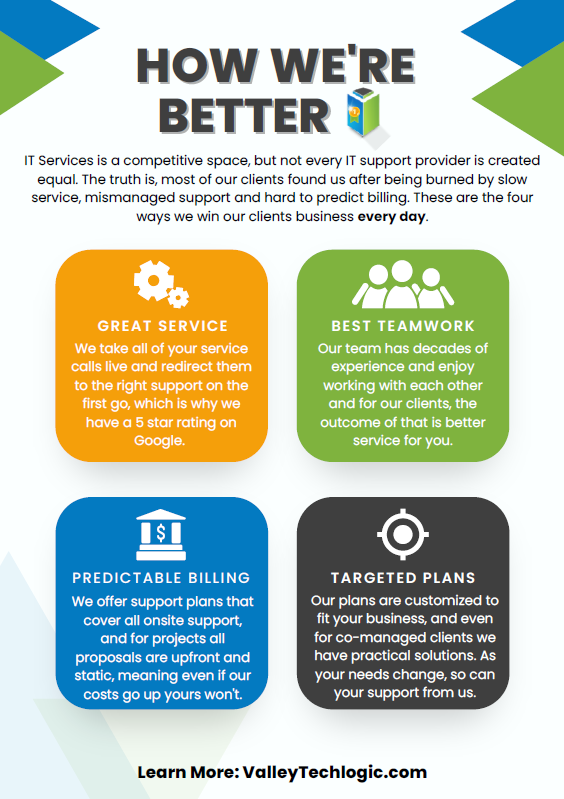
    If your current IT support has left something to be desired, why not start 2023 off on a better foot? Here are four ways we support our clients that differ from our competitors:itWe also make switching easy with our white glove hand off service, we will work directly with your current IT to make for a seamless transition. We can even provide a template for the letter you can send to discontinue your current service. What are you waiting for? Sign up today as this deal ends November 30th!

    Looking for more to read? We suggest these other articles from our site.

    This article was powered by Valley Techlogic, an IT service provider in Atwater, CA. You can find more information at https://www.valleytechlogic.com/ or on Facebook at https://www.facebook.com/valleytechlogic/ . Follow us on Twitter at https://x.com/valleytechlogic.

  • Why “DIY” IT is a bad idea as a business owner

    Why “DIY” IT is a bad idea as a business owner

    We get it, handing over any part of your business to someone who’s not you can be stressful and unnerving. You painstakingly grew your business to where it is today. You may still be personally vetting every new member who walks through your door.  Hiring technical staff can be an arduous process so it’s just made sense so far to learn the ropes yourself to keep devices up and running (and as maintained as possible).

    The problem is, you’re one person with a finite amount of time. By the time cracks start to show it’s often too late, things like server failure or a malware attack can cripple your ability to run your day-to-day operations and fixing it may fall outside the scope of your abilities, making it necessary to bring in emergency help (often at a premium).

    If you survived one round of that you may have vowed to find IT help, but even with a clear indicator of why you need it recently at hand it may still seem like a waste of time or money, and you talked yourself out of it. You may have been doing things yourself for years, what are the odds something catastrophic would happen again any time soon?

    Unfortunately, pretty good. As the famous quote by Joyce Brothers goes, “If you change nothing, nothing changes.”

    So, we thought we would give you some food for thought about other reasons (besides potential disaster) you should consider outsourcing your IT:

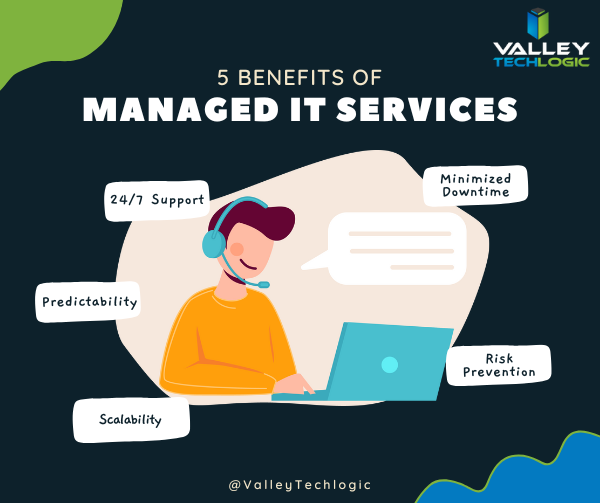
    1. 24/7 Support: This one’s easy, with a Valley Techlogic service plan 24/7 support emergency support is available to you – at no additional cost and no more late nights for you.
    2. Minimized Downtime: Time is money, and with a service plan from us you will spend less time troubleshooting problems and more time on your business.
    3. Predictability: We utilize best in class software to maintain a consistent technical environment for all of our clients, including managing computer updates, anti-virus software and more.
    4. Risk Prevention: Speaking of anti-virus, our cyber security approach doesn’t just help you recover from a cyber threat – it helps prevent one from happening in the first place.
    5. Scalability: This is a big one if you’ve been doing your own IT. We have service plans to fit both businesses who already have an available IT resource or those who want us to be their primary IT – with flexibility to change if needed

    As you can see, many commonsense features are built into all of our plans, but we do offer customization as far as how much or how little we do for your business. If you would like to remain as the primary IT resource, we have co-managed plans so you can still benefit from our solutions and proactive maintenance while still remaining the lead IT person.

    If after utilizing us for a while you’ve reached a point where you would like us to handle it all, we can then change your plan to our “managed IT department” where we are your go to resource for everything IT, your users can even call us if there’s a problem and we’ll take care of it.

    Whichever plan you choose, you’ll still always be “in the know” thanks to our comprehensive reporting and annual or bi-annual Technology Business Review (TBR) meetings where we go over how things are going and formulate a plan together to continue improving the service to fit your needs.

    Interested in learning more? Schedule a consultation with us today.

    Looking for more to read? We suggest these other articles from our site.

    This article was powered by Valley Techlogic, an IT service provider in Atwater, CA. You can find more information at https://www.valleytechlogic.com/ or on Facebook at https://www.facebook.com/valleytechlogic/ . Follow us on Twitter at https://x.com/valleytechlogic.
  • Winamp is BACK again, and our 3 best Windows media player recommendations

    Winamp is BACK again, and our 3 best Windows media player recommendations

    If you came of age in the 90’s to early 2000’s then you probably have fond memories of Winamp (short for Windows Advanced Multimedia Products).

    Released in 1997 it was the dominant music player for a while on PC, having 3 million downloads by 1998. With fun features such as music visualization and the ability to change “skins” it was one of the most downloaded software for Windows devices for a few years.

    Winamp in 2022
    Winamp looks the same today as it did 20 years.

    Skins and visualizations were just two of the popular “plugin” modules that could be downloaded, it could also be used as a media library and had the ability to add album art to help you sort your music. Remember having a plethora of MP3s on your PC before services like Spotify and Apple Music existed?

    Winamp has passed through a number of owners over the years, with updates stopping in 2013 under parent company AOL as streaming music rose in popularity. It’s now owned by Radionomy and it’s first update in 4 years has just been released to the public.

    Whether it sees success riding a wave of nostalgia during a time when 90s era clothing and branding seems to be making a comeback is yet to be seen, but we were excited to give it a try. Their new website is sleek and modern but we’re happy to report the application still feels the “same as it ever was” (another throwback for you guys).

    If you clicked on this article, you may be wondering what’s available for media players on Windows besides the default – Groove music for well, music and Windows Media Player for video.

    As no muss no fuss options those are fine but there are media players out there that will expand your capabilities, allowing you to stream the same content across multiple devices – even your TV.

    Here are our top 3 picks:

    1. Plex – Plex not only allows you to stream your own media for free across devices, including TV, PC, Android and Apple, they also have on demand content and even live TV.
    2. VLC Media Player – Open source and cross device, this lightweight media player often has support for file types the others fail to play, especially useful for playing subtitles in a variety of languages.
    3. Kodi – Another free media player option, this one is unique in that it works on Raspberry Pi devices, making it a good choice for helping you set up an inexpensive media playing platform for your television even if it’s not a “smart” tv.
    Click to grab the full size version.

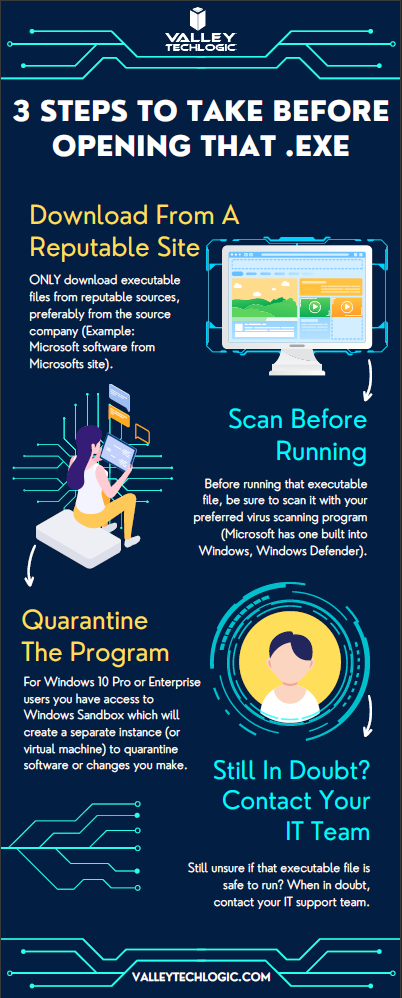
    While this topic falls outside our normal wheelhouse we wanted to touch on it and offer our advice on safe picks for media players. It’s always a good idea to do your research when downloading any software. Here is our three-step guide for what you should do with any newly downloaded executable file:While Valley Techlogic can’t help you with your media playing setup at home, we can help you navigate software choices for your business. Set up a consultation with us today to learn more.

    Looking for more to read? We suggest these other articles from our site.

    This article was powered by Valley Techlogic, an IT service provider in Atwater, CA. You can find more information at https://www.valleytechlogic.com/ or on Facebook at https://www.facebook.com/valleytechlogic/ . Follow us on Twitter at https://x.com/valleytechlogic.

  • 5 of the Most Important Cybersecurity Training Topics to Cover with Your Employees

    5 of the Most Important Cybersecurity Training Topics to Cover with Your Employees

    We’ve discussed cybersecurity training before and its importance in preventing the number 1 cause of cybersecurity disasters – human error.

    We offer cybersecurity training as a core feature in our tech care plans, but many topics you can (and should) cover yourself with your employees. There couple be rules that specifically apply to your business sector; like HIPAA for healthcare or CMMC for Department of Defense contractors.

    Maybe you’ve experienced a cybersecurity attack before and after the dust settled you came up with a game plan specifically to prevent it from happening again. If it hasn’t happened to you yet, it’s a mistake to assume it never will. In 2021 42% of businesses experienced a cyberattack. It’s a numbers game most won’t win without preventions in place.

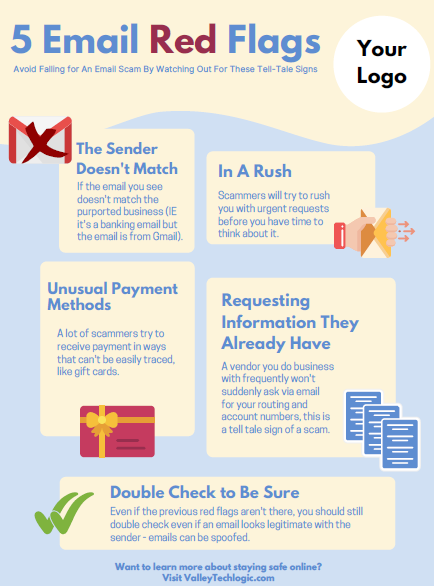
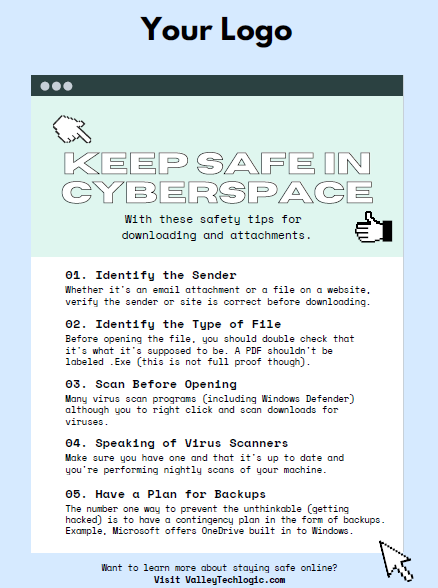
    To start, we want to offer these posters we’ve created on two common cybersecurity threat topics, email and malicious attachments. These posters are free for you to print and brand to use in your office or send as a reminder, and these are two excellent places to start when you’re looking to beef up your office security.

    Click to grab the full size version.
    Click to grab the full size version.

    Here are five more training topics all workplaces should also cover:

    1. Like our posters above, email security and having strict guidelines for attachments and downloads is one key thing to focus on in your cybersecurity training efforts.
    2. It’s also important to provide guidance for internet usage while at work. Many employers try to digitally lock this down, but these efforts are usually met with annoyance and disdain from employees and are often in vain. Instead of arbitrarily trying to block everything with software we suggest having guidance about what’s appropriate for work devices (and what Isn’t). We also suggest noting that even if a website looks legitimate it may not be, so they should be wary of sites that ask you to download something or enter private credentials.
    3. This comes to the next topic which is practicing good safety hygiene with work devices. Three easy steps are: Locking your computer when you walk away, only downloading software from work authorized sites, and keeping your device up to date with patching and software updates. They may need assistance with the third step so it’s a good idea to have your IT provider manage workstations if you’re able to (this is something Valley Techlogic providers for all clients).
    4. The fourth step is protecting company data. If you’re employees have to interact with documents that are confidential in nature you should have rules for the sharing of those documents, as well as a comprehensive plan for backing them up safety.
    5. Finally, you should provide guidance on passwords and multi-factor authentication. Having a rule in your workplace that for work accounts they must have multi-factor enabled (or have your IT team enable it across the board) will drastically improve your office’s online safety. We have guidance for this topic here.

    It can feel overwhelming to have all of these topics to cover with your employees, but we cannot overstate how important it is to cover these topics with your employees, even if you think they’re things they should already “know”.

    At Valley Techlogic we have partnered with a platform that not only provides cybersecurity training resources, but it also allows you the ability to create your own training modules. You can even cover topics that fall outside the cybersecurity spectrum. We can also work with your business to assist you in the creation of these training modules, if you would like to learn more schedule a consultation with our sales manager Annette today!

    Looking for more to read? We suggest these other articles from our site.

    This article was powered by Valley Techlogic, an IT service provider in Atwater, CA. You can find more information at https://www.valleytechlogic.com/ or on Facebook at https://www.facebook.com/valleytechlogic/ . Follow us on Twitter at https://x.com/valleytechlogic.
  • 5 Tips for Conquering Email Spam (and Phishing) in 2022

    We’ve posted on how to spot a phishing email before on this website, but what about just thwarting the attempt before it even reaches your inbox?

    Email filtering is a complex topic, too strict and you miss important emails. Too lax, your inbox is flooded with spam and attempts to scam you. At Valley Techlogic, we feel like we have a good regimen for helping our clients get the emails they need and not the ones they don’t.

    On top of that, email phishing is STILL the biggest security threat to your business. In 2021, 83% of businesses experienced phishing attack attempts and 15 billion spam emails occur every day.

    That’s a lot of attempts to circumvent the security features you have in place within your business, or if you don’t have protections in place (especially highly effective ones like multi-factor authentication) then your business may be a sitting duck. All it takes is one employee clicking on the wrong attachment and you have a major security headache on your hands.

    So, to foil those attempts, here are 5 tips for conquering email spam and preventing phishing attempts at the same time:

    1. Mark spam as spam. One of the easiest ways to see less spam in your inbox is to mark spam as spam, email filters learn from you what you’re looking to see in your inbox. While the most egregious spam will still be filtered out by your email provider for the most part, for sophisticated spam attempts your assistance helps. This also blocks the sender from sending future attempts.
    2. Learn the telltale signs. There 5 easy telltale signs an email is spam or phishing. They are: an unrecognizable sender, requesting personal information, an email that doesn’t match the purported sender, it asks you to take immediate action and/or there are a lot of typos.
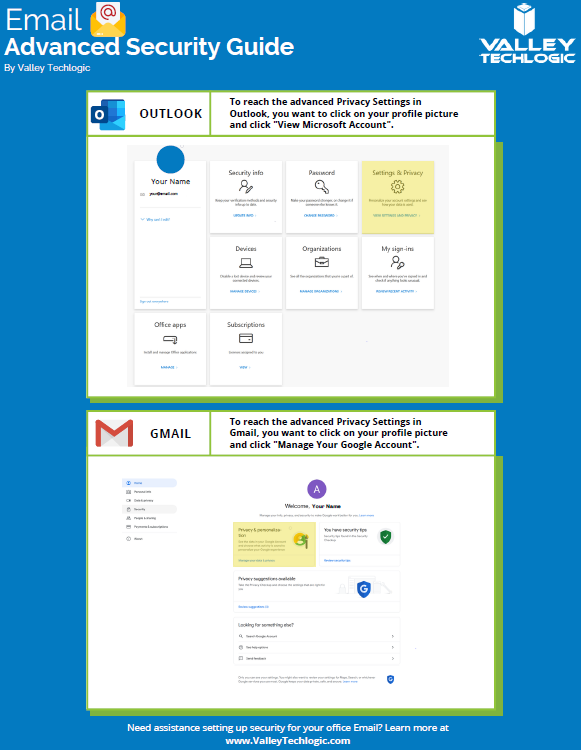
    3. Enable more advanced privacy settings. Many email providers have privacy and security settings to provide more advanced protection. See our guide below for enabling these settings for Gmail and Outlook.
    4. For businesses, don’t go with the obvious choice for email. Many of us use just our first name or our first name and a last initial when creating our work emails, while this helps make our emails more memorable and easier to recite, it also opens us up to spam. If you have a spam problem, it might be best to switch things up in this area.
    5. Unsubscribe from mailing lists, especially the ones you didn’t sign up for. Another good way to combat spam in particular is to unsubscribe from mailing lists, there are rules and regulations that say vendors must respect this request or they’re potentially violating their emailing providers terms and conditions.
      Email Security Guide for Gmail and Outlook
      Click to view the full size version.

      Another way to combat spam and phishing emails is through a tool. There are tools that can be built into your browser or email client, many of them use the SLAM method. With this method they check the sender, the links, the attachments, and the message itself to look for telltale signs it’s a spam or phishing email.

    At Valley Techlogic we provide security awareness training – which is another excellent tool for preventing cyberattacks – and an extension for Outlook that includes the training and spam/phishing testing tool right in your inbox to all of our clients.

    We can also offer simulated phishing attempts so you will know if anyone in your organization could use additional training on the topic. Schedule a consultation today to learn more about how we can help you with your business’s email related goals.

    Looking for more to read? We suggest these other articles from our site.

    This article was powered by Valley Techlogic, an IT service provider in Atwater, CA. You can find more information at https://www.valleytechlogic.com/ or on Facebook at https://www.facebook.com/valleytechlogic/ . Follow us on Twitter at https://x.com/valleytechlogic.

  • Summer is Here and with it Comes Vacations – Our Top 10 Travel Tech Tips

    Summer is Here and with it Comes Vacations – Our Top 10 Travel Tech Tips

    As we approach Fourth of July weekend, reduced COVID era restrictions have made travel feasible (and desirable) for many across the US for the first time since spring 2020. We all might be a little rusty when it comes to internet safety on the go or maybe you’re looking for tech tips that will make traveling easier? Well, we have you covered.

    Traveling and using your devices away from your home or office network carries some risks. Here are 5 things you should do before you travel to protect your devices.

    1. While traveling sometimes you can’t avoid using a public network, but one good way to protect your device is to make sure it’s been fully updated. That way it will be slightly safer when using less secure networks (although it’s still a good idea to avoid it if you can).
    2. Another good bit of advice is to make sure you have strong passwords, and to have a password manager setup and ready to go on the device you’ll be traveling with.
    3. One tool for traveling and using risky public networks is to enable a VPN, a VPN will help shield your data.
    4. You should also avoid logging into websites that contain important data, like your email or banking website on a public network.
    5. Finally, another good tip if you haven’t done so already is to set up “Find My Phone” on your mobile device. This will allow you to remotely wipe your mobile phone if you were to lose it while traveling (or possibly even find it if it’s still nearby).

    If you’re already on the road or away from home, we also have these 5 tips for making your travel easier with technology:

    1. Power banks are a must have while on the go, having a fully charged power bank on you will make sure you can charge your phone if the battery is low while you’re out and about.
    2. RFID blocking bags can help protect your personal information from intrusive scanning, especially for things like your credit card.
    3. Save pictures you take with your mobile phone automatically to the cloud with a service like Google Photos or Amazon Photos (the pricing for these products is very reasonable as well).
    4. A tip specifically for iPhone users, you can update friends and family on your airline travels just by texting them the airline and flight information. Texting “American Airlines 425” will allow them to tap and automatically see a flight tracker with the flight information. Handy!
    5. Looking for more legroom in your return flight home? Search SeatGuru to find the best seat on a particular flight.

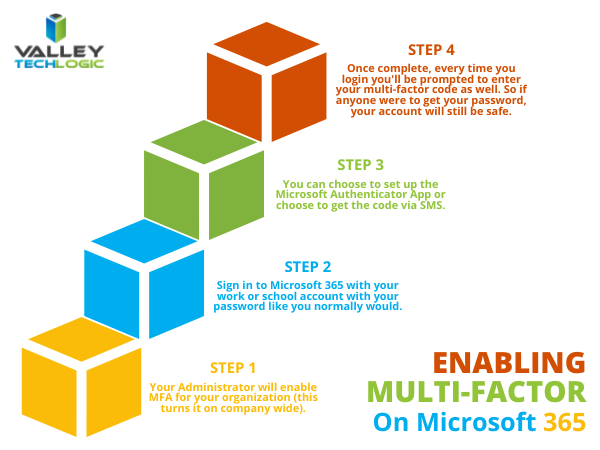
    Company travel is a different can of worms, especially when it comes to securing your office devices while on the road. At a minimum, we recommend enabling 2-factor or multi-factor authentication for company devices – especially those that are used on the go. For Microsoft 365 users, it’s easy to setup multi-factor authentication. Here are the steps:

    Enabling MFA on Microsoft 365

    If your office needs help setting up multi-factor authentication for remote and traveling employees, Valley Techlogic would be happy to assist. Tell us more in a quick consultation.

    Looking for more to read? We suggest these other articles from our site.

    This article was powered by Valley TechLogic, an IT service provider in Atwater, CA. You can find more information at https://www.valleytechlogic.com/ or on Facebook at https://www.facebook.com/valleytechlogic/ . Follow us on Twitter at https://x.com/valleytechlogic.