Tag: tech advice

  • We’re halfway through 2025, our top 10 blogs of the year so far

    We’re halfway through 2025, our top 10 blogs of the year so far

    June marks the halfway mark through the year, and what a year it’s been so far – with the innovations in AI to major changes to the global economy via tariffs and more, these are our top 10 blogs of the year so far.

    1. Are you all in on AI or approaching it more moderately? The perils of not strategizing your AI roll out (May 23, 2025)
      Examines the pros and cons of diving straight into AI vs. a cautious approach, highlighting the risks of rolling out AI without a solid business strategy.
      🔗 https://www.valleytechlogic.com/2025/05/are-you-all-in-on-ai-or-approaching-it-more-moderately-the-perils-of-not-strategizing-your-ai-roll-out/
    2. 5 Ways A Managed Service Provider Helps You Predict Future Technology Spending** (May 16, 2025)
      Explores how MSPs help businesses plan proactively by forecasting growth, mapping lifecycles, and avoiding surprise vendor costs.
      🔗 https://www.valleytechlogic.com/2025/05/title-5-ways-a-managed-service-provider-helps-you-predict-future-technology-spending/
    3. Best of Cybersecurity: 5 Must‑Read Blogs to Protect Your Business (May 9, 2025)
      A curated roundup of their top cybersecurity posts, offering actionable advice on phishing, disaster recovery, and more.
      🔗 https://www.valleytechlogic.com/2025/05/best-of-cybersecurity-5-must-read-blogs-to-protect-your-business/
    4. 5 Signs It’s Time to Switch Your IT Provider (And How to Choose the Right One) (May 2, 2025)
      Identifies inside signs you might be outgrowing your current provider and gives practical tips for selecting a better fit.
      🔗 https://www.valleytechlogic.com/2025/05/5-signs-its-time-to-switch-your-it-provider-and-how-to-choose-the-right-one/
    5. Out of file space? 8 space saving tips for your PC or laptop (April 25, 2025)
      A concise how‑to guide with actionable steps to clear disk space and boost device performance.
      🔗 https://www.valleytechlogic.com/2025/04/out-of-file-space-8-space-saving-tips-for-your-pc-or-laptop/
    6. Received a Facebook copyright infringement email or message? You’re not alone… (April 17, 2025)
      Breaks down a fake Facebook scam aiming to harvest information and explains how to spot and avoid it.
      🔗 https://www.valleytechlogic.com/2025/04/received-a-facebook-copyright-infringement-email-or-message-youre-not-alone-the-evolution-of-the-facebook-copyright-scam-and-how-to-avoid-falling-for-it/
    7. Make the Most of Your Microsoft 365 Subscriptions: 7 Productivity Hacks You Might Be Missing (April 11, 2025)
      Introduces under‑the‑radar features in Microsoft 365 to elevate productivity and streamline team collaboration.
      🔗 https://www.valleytechlogic.com/2025/04/make-the-most-of-your-microsoft-365-subscriptions-7-productivity-hacks-you-might-be-missing/
    8. The 7 most common network issues and how to fix them (September 2024)
      Lists key connectivity issues—from slow Wi-Fi to firewall misconfigurations—and offers diagnostic and repair steps.
      🔗 https://www.valleytechlogic.com/2024/09/7-common-network-issues-and-fixes/
    9. Windows 10 reaches EOL October 2025, and those who don’t upgrade may have to pay (January 3, 2025)
      Highlights Windows 10’s EOL in October 2025 and explains Microsoft’s new fee-based Extended Security Updates program.
      🔗 https://www.valleytechlogic.com/2025/01/windows-10-reaches-eol-october-2025-and-those-who-dont-upgrade-may-have-to-pay/
    10. Is Starlink still the best choice for rural or remote internet? We discuss your options for internet in 2025 (May 30, 2025)
      Evaluates Starlink alongside DSL, fixed wireless, cellular, and cable, covering speed, cost, and suitability for remote businesses.
      🔗 https://www.valleytechlogic.com/2025/05/is-starlink-still-the-best-choice-for-rural-or-remote-internet-we-discuss-your-options-for-internet-in-2025/

    At Valley Techlogic, we cover a wide range of topics on our blog just like we cover a wide range of support topics for our clients through our IT managed service plans. If you’re in the market for IT support for your business – why not learn what Valley Techlogic can do for you?
    Looking for more to read? We suggest these other articles from our site.

    This article was powered by Valley Techlogic, leading provider of trouble free IT services for businesses in California including Merced, Fresno, Stockton & More. You can find more information at https://www.valleytechlogic.com/ or on Facebook at https://www.facebook.com/valleytechlogic/ . Follow us on X at https://x.com/valleytechlogic and LinkedIn at https://www.linkedin.com/company/valley-techlogic-inc/.


  • Technology Planning for 2025: Five Items to Focus on to Grow Your Business in the New Year

    Technology Planning for 2025: Five Items to Focus on to Grow Your Business in the New Year

    It’s November and 2025 is just two short months away, we don’t know about you but for us it felt like 2024 flew by and in that time technology planning for our clients has already changed.

    For example, 2025 will bring the end-of-life date for Windows 10 which is still dominating the market share of Windows devices at 65%. We have also more clients in introducing AI into their business next year, including taking advantage of Microsoft’s Co-Pilot which works in tandem with their existing Microsoft subscriptions (you can see our latest blog on AI here).

    Beyond AI or replacing hardware, what are five ways you can grow your business with technology in 2025? Here’s our suggestions:

    1. Implement a Customer Relationship Management (CRM) System
      A CRM platform (e.g., Salesforce, HubSpot or Keap) helps centralize customer interactions, sales data, and service requests, providing valuable insights into customer preferences and buying behavior. By integrating CRM across your sales, marketing, and service teams, you can improve customer retention, streamline communication, and create targeted marketing campaigns that drive growth.
    2. Leverage Automation to Streamline Operations
      Automating routine tasks such as invoicing, customer service, and lead generation can free up your team to focus on strategic work. Automation tools like RPA (Robotic Process Automation) and workflow automation software can improve efficiency, reduce human error, and cut costs.
    3. Adopt Cloud Solutions for Greater Flexibility and Collaboration
      Cloud-based tools (like Microsoft 365 or Google Workspace) enable teams to collaborate in real-time, regardless of location. They offer flexible storage, data security, and remote access to essential resources, which can increase productivity and support a hybrid workforce.
    4. Boost Marketing Reach with Advanced Analytics
      Using data analytics platforms (e.g., Google Analytics 4, Tableau) lets you gain deeper insights into customer behavior, optimize campaigns, and track ROI. Predictive analytics can also help anticipate customer needs, allowing for proactive engagement and more efficient targeting.
    5. Invest in Cybersecurity to Build Trust and Prevent Losses
      Protecting sensitive customer and business data is vital. Implementing multi-factor authentication (MFA), endpoint security, and regular audits can reduce the risk of data breaches. Prioritizing cybersecurity can build customer trust, prevent financial losses, and safeguard your company’s reputation.

    If you’re looking to increase your technology prowess in 2025, Valley Techlogic is the partner you’re looking for. We stay ahead of advancements in IT to give our customers the best strategic advantage over their competitors. We also have an offer for new customers that you won’t want to miss, see the details below.

    Looking for more to read? We suggest these other articles from our site.

    This article was powered by Valley Techlogic, leading provider of trouble free IT services for businesses in California including Merced, Fresno, Stockton & More. You can find more information at https://www.valleytechlogic.com/ or on Facebook at https://www.facebook.com/valleytechlogic/ . Follow us on Twitter at https://x.com/valleytechlogic and LinkedIn at https://www.linkedin.com/company/valley-techlogic-inc/.

  • 7 Gadgets you shouldn’t leave home without this Holiday Season

    7 Gadgets you shouldn’t leave home without this Holiday Season

    The holidays are truly upon us and for many of us that means traveling to friends and family and enjoying some time spent away from work and in our loved one’s company.

    However, for business owners being on the go doesn’t mean the work stops and we often carry our work devices with us to keep a watchful eye on things even from afar. We have 7 gadget recommendations that can facilitate working on the go or keeping in touch with those you’ve left in charge as you try to unwind a bit this holiday season.

    Our 7 tech gadget recommendations will make traveling with your tech easier on the go.

    1. Luggage trackers: The first step is making sure your tech makes it to your target destination, and luggage trackers will help you keep track of your belongings while you’re on the go. We recommend Tile Pro for Android users and AirTags for Apple. These trackers use Bluetooth to communicate to other devices in the area and will pinpoint the location of your luggage should you lose track of it. Our Recommendation: Airtag and Tile Pro.
    2. Battery banks: Another way to make working on the go easier is having additional battery power at your fingertips, battery banks are inexpensive and can power multiple devices simultaneously. Our Recommendation: Anker Magnetic Battery 5,000 mAH
    3. Portable monitors: Portable monitors have come a long way, for $200 or less you can get a decent secondary monitor that will make working away from your home office much more convenient. Our Recommendation: UPERFECT Portable Monitor
    4. Cord organizing case: We have all pulled out a knot of cables we then have to untangle before we can begin charging our travel depleted devices, there is a better way. Our Recommendation: MATEIN Cable Organizer Bag
    5. Laptop stand: In another effort to bring the comforts of home with you we recommend a good quality laptop stand that will make working on whatever open surface you can find much more pleasant. Our Recommendation: OMOTON Ergonomic Laptop Riser
    6. Privacy screen: If you’re planning to work in any public spaces this holiday season you might want to consider a privacy screen, this will make it so passersby’s can’t take a peek at what you’re doing and most of them reduce blue light as well. Our Recommendation: Acer 2-Way Privacy Filter
    7. Portable door lock: If your travel plans involve a hotel or shared AirBNB we recommend adding additional protection with a portable door lock. This will keep out unexpected and uninvited guests and leave any belongings you might have in your room (such as your laptop) more protected. Our Recommendation: Winchy Portable Door Lock

    Tech advice like this is just one of the services we provide to our customers, and right now we’re offering $100 just for meeting with us and hearing about our services. Time is running out on this offer, click this link or on the image below to get started.

    Looking for more to read? We suggest these other articles from our site.

    This article was powered by Valley Techlogic, an IT service provider in Atwater, CA. You can find more information at https://www.valleytechlogic.com/ or on Facebook at https://www.facebook.com/valleytechlogic/ . Follow us on Twitter at https://x.com/valleytechlogic.

  • Traveling for the holidays? Take 8 tech tips from our experts with you

    Traveling for the holidays? Take 8 tech tips from our experts with you

    If you’re traveling the holidays this year, we have eight tech tips to help you stay safe while using your devices on the go.

    We’ve offered holiday themed tech advice before (here are a couple of our past articles on the top 10 Holiday Shopping Tips for Safer Online Shopping & 5 Holiday Tips for Your E-Commerce Business and 5 for Everyone Else). The holidays usually mean more time off which can lead to more time spent browsing the web or being able to work on things in your business you usually don’t have time for.

    It’s also a good idea to keep in mind that bad actors don’t typically take the holidays off, in fact ransomware attacks usually increase by 30% on the holidays. That’s because many people are keeping an eye out for sale emails or emails from relatives this time of year – giving more opportunities for scammers and bad actors to take advantage of folks just looking for a good deal or a message from their loved ones.

    Traveling especially can leave you more vulnerable, if you’re quickly scanning messages in-between flight connections, logging into public WiFi or any number of things that are a normal part of being on the go you can miss some obvious red flags.

    That’s why we’re going to divide up our advice into 4 tips that are related to being safer online while traveling, and 4 tips for improving your technology experience while traveling.

    First our safety themed tips:

    1. As we mentioned, be careful on public WiFi. Nowadays, even if you need to use your laptop the better option might be to use your phone as a hotspot. If you do need to connect to public Wi-Fi, consider doing it through a VPN. We can personally recommend Mullvad which is not subscription based, one payment will get you online through a secure connection without having to remember to cancel it later.
    2. Be careful about what you’re posting on social media. Posting travel photos for your friends and family to see can be really fun, but you should be wary about who else might be watching. It’s a good idea to make your social media profiles private but if you maintain a public presence, you can also think about posting those photos after your trip has concluded instead.
    3. Public charging stations can also pose a risk. Unfortunately, these stations can be tampered with and become an attack vector to everyone who uses them. Battery banks are pretty inexpensive these days and even more convenient when you’re on the go.
    4. Don’t leave your items unattended. Just as airport personnel will ask if your suitcases have been in your possession the whole time, it’s a good idea to keep track of your belongings from a tech standpoint as well. Someone with bad intent might not be after your device when your data is much more valuable.

    Now for our convenience themed tips:

    1. Keep track of your belongings on the go with an Apple Airtag, Tile Pro or other bluetooth based trackers. A misplaced bag can ruin your vacation, having one of these trackers inside it will prevent that from happening.
    2. Turn any audio jack into a Bluetooth wireless transmitter. Whether you rent a car without a Bluetooth adapter or you want to use your Bluetooth headphones on the plane, a wireless Bluetooth transmitter is a gamechanger. Best of all many options are on sale at the moment for Black Friday, we’ve personally used the Anker Soundsync. It’s small so it won’t take up much room in your bag and as 12 hours of run time per charge.
    3. We mentioned using your phone as a mobile hotspot up above, but if your data plan is not the best you can also purchase a standalone mobile hotspot (with a data package included). This can also be a gamechanger if your network Isn’t going to be stellar where you’re going, you can purchase a mobile data plan for a network that has coverage instead. T-Mobile, AT&T and more all have options for this.
    4. Having to work on the go but don’t want to drag your whole setup with you? Consider a portable monitor. If you’ve gone to two (or more) monitors at work you know there’s no going back, but sometimes travel includes doing some work out on the road and bringing your at home setup is not going to be an option. Portable monitors often come with a travel ready case and can be connected to your laptop via USB-C (both for power and display), bringing you the convenience or two displays without the headache of trying to travel with a full-size monitor.

    Technical advice like this is one of the advantages of being a Valley Techlogic customer, and for a limited time if you meet with us about our services, we will give you $100 cash just to hear us out.

    What do you have to lose? Schedule a consultation today.

    Looking for more to read? We suggest these other articles from our site.

    This article was powered by Valley Techlogic, an IT service provider in Atwater, CA. You can find more information at https://www.valleytechlogic.com/ or on Facebook at https://www.facebook.com/valleytechlogic/ . Follow us on Twitter at https://x.com/valleytechlogic.

  • Our Top 10 Technology Myths and Urban Legends, Debunked

    Our Top 10 Technology Myths and Urban Legends, Debunked

    The advent of the internet brought an influx of information right to our fingertips, and unfortunately not everything that proliferates on the internet is factual.

    With “fake news” undoubtedly being one of the official buzz word phrases of the 2020’s, how close are you reviewing these common place technology tropes? These are the top 10 technology myths and urban legends we see as a technology provider:

    1. Privacy/Incognito mode is DEFINITELY private: We’re sorry to say, if you think everything you’re doing in a private/incognito browser is hidden from view you would be incorrect. The way this mode works is it hides your browsing history from other people who may use your computer, but your ISP definitely can still see what you’re doing and depending on what’s been set up at work, possibly your IT Team/employer as well.
    2. Leaving your phone plugged in destroys your battery: Nope this one is also false, we’re not sure how the idea of “over charging” a battery came to be but there’s zero evidence that leaving your phone or laptop on a charger for an extended period of time will have a long-term effect on your device’s battery.
    3. At the same time, don’t let your device die completely before charging it: Letting a battery discharge completely before charging it again will not improve your phone’s battery life. Just charge your devices when they need a charge and let these myths about batter life go.
    4. Mac/Linux devices (basically anything not Windows) are virus proof: Nope again, the bad news is if a device has access to the internet, it’s going to be a target for hackers. If even your smart fridge Isn’t safe, what makes you think any computer or cellphone would be?
    5. Force killing apps save resources and speeds up your computer: If you have ever opened your computers task manager you’ve probably seen a lot of processes running, and you may have even force closed some of these processes to “speed” up your computer. It doesn’t really work that way unfortunately, many of the processes you see are background processes that your computer needs to run. Your computer will just open them again automatically, effectively making this activity a waste of time. You can, however, close applications you’re not using the regular way (and if you’re still having issues, it might be time to look at upgrading your device).
    6. Full bars mean the best service: We’ve heard it time and again, “I have four bars!” someone will exclaim, indicating that their cellphone service has reached its full potential. More bars just mean stronger signal strength, but unfortunately for you if you’re in a heavily populated urban area it means you’re sharing that same strong signal strength with everyone else in the area. Mobile service, just like any other internet service, is subject to bandwidth load so even with a strong signal you may still experience slow service depending on where you are and how many other people are around.
    7. You shouldn’t shut your computer down at night: This is another head scratcher for us, but we still see folks who believe they shouldn’t shut their computer down when they walk away for the evening. We’re happy to report that shutting down your computer will not harm it, in fact reducing the load on it each day by turning it off at night may even extend the life of your device.
    8. Magnets will wipe your data/destroy your device: There’s a little bit of truth to this one but it’s run amok for so long that the truth has been obfuscated for most folks – we’re happy to report your device will NOT be destroyed by a common refrigerator magnet. However, a really big industrial magnet could do some damage, so we suggest not placing your computer near one of those.
    9. Cellphones etc. can give you cancer: Nope, this one has been completely debunked. The radiofrequency that is emitted by your cellphone, tablet, laptop etc will NOT give you cancer.
    10. I’m a small business/single person, no hacker will bother with me: This is unfortunately, quite untrue. It’s estimated half a million U.S. accounts are hacked each day – many of these are just regular folks or small business owners like yourself.

    We hope this article helped in quashing some of these myths for you but if you have any other technical urban legends you’re not sure about, we’d be happy to weigh in (just jump on our live chat and ask away!).

    If the last one was a scary one for you and you’re a business owner in California, Valley Techlogic can assist. We provide cyber security services for our clients that make sure they won’t be part of that frightening statistic. Learn more through a consultation today.

    Looking for more to read? We suggest these other articles from our site.

    This article was powered by Valley Techlogic, an IT service provider in Atwater, CA. You can find more information at https://www.valleytechlogic.com/ or on Facebook at https://www.facebook.com/valleytechlogic/ . Follow us on Twitter at https://x.com/valleytechlogic.

  • 5 USB flash drive safety and usage tips, also our 3 recommended drives for 2023

    5 USB flash drive safety and usage tips, also our 3 recommended drives for 2023

    USB flash drives (also known as thumb drives or memory sticks) have grown a lot in the last few years, what was once a handy tool for transporting small files but couldn’t compete with the capacity of CD disks or traditional drives is now available in sizes up to 1 terabyte which makes them a competitive product for even backup purposes.

    While they may have fallen in favor due to cloud services becoming more ubiquitous, many are looking for more tangible ways to backup important files and take them on the go.

    Many users also worry about the safety of these devices. This is because they’re a common vector for drop attacks, which is where a USB drive is left in a conspicuous location for someone to find and try to use not knowing it contains a virus or trojan horse.

    They also can be insecure if left on a desk or somewhere in public. Luckily, there are even options now that offer 2 factor authentication, biometric verification, and encryption. This means even if your flash drive fell into the wrong hands, it would be useless to the thief. You should also be wary of where you plug your flash drive into as the data path is a two way street.

    Here are 5 more safely and usage tips for utilizing a USB flash drive:

    1. Have separate flash drives for work and home. This will reduce the risk of cross-contamination if one of your devices is compromised, it will also make it easier to organize your files.
    2. Be careful where you purchase your flash drives from. There are irreputable sellers online selling fake drives that don’t contain the amount of storage they’re supposed to, or worse they could be infected with malware. Always buy from a reputable source.
    3. Don’t purchase any drives that require software for use. This is unnecessary and again opens up your device to being compromised with malware. USB drives should be “plug and play”.
    4. Think about the physical size of the drive you’re buying. It needs to be able to fit into the device you’re trying to plug it into, and a bulky USB drive may not be compatible with all devices.
    5. Be aware of the lifespan for the device you’re buying. USB flash drives (also solid-state drives and hard drives) have a certain number of write/erase cycles. Longer is better but if you plan to just keep a static backup on it you can get away with a lower number. Typical USB flash drives have 10,000 to 100,000 write/erase cycles.

    If we’ve piqued your interest in USB flash drives, you still might not be sure where or what to buy. There are thousands upon thousands of options but here are three options we can recommend. We have one that fits the bill as a budget friendly option for general use, one that has a slim sturdy form factor, and one that meets the requirements if security is a concern.

    Security conscious.
    Slim form factor.
    Budget friendly.


    All of the options we have selected have USB 3.0 speeds, while this is changing all the time this is the minimum we recommend as of writing. You also want to be aware of what kind of connector you’re looking for. USB-A is the most common but there are options for USB-C, MicroUSB and Lightning connectors on the market. You can also use an adaptor if needed.

    If you need hardware buying advice for your business, including the topic of digital storage, Valley Techlogic is happy to help. We can help you select the best option and offer advice on how to secure it. You can learn more about procurement assistance through Valley Techlogic here or schedule a meeting to find out more about our services.

    Looking for more to read? We suggest these other articles from our site.

    This article was powered by Valley Techlogic, an IT service provider in Atwater, CA. You can find more information at https://www.valleytechlogic.com/ or on Facebook at https://www.facebook.com/valleytechlogic/ . Follow us on Twitter at https://x.com/valleytechlogic.

  • Reddit experienced a major outage yesterday, and our 5 tips for what to say to customers when your website goes down

    Reddit experienced a major outage yesterday, and our 5 tips for what to say to customers when your website goes down

    Reddit was down for several hours yesterday due to an “internal systems issue”. While the mobile version of the site fluctuated between being semi usable to being completed down, the desktop version was unusable for nearly five hours.

    Outages like this that occur to major website are a newsworthy event, as users flock to social media to report the outage and speculate on the cause. A fix was implemented and the site slowly came back up just before 7:30 PM Eastern Standard Time. By the time it was back up it had already been reported on by major tech news sites such as the Verge, Apple Insider, TechCrunch and more.

    We’ve discussed outages before on this site because as we just said, they’re newsworthy events, but what about when your company’s website goes down?

    It might be less news worthy than Facebook, Reddit, Amazon, Twitter etc. having an outage but depending on the type of business you’re in it may still be noticeable to your customers if your website has a major outage.

    When something goes wrong there’s often a knee jerk reaction to move along and pretend it never happened, but outages these days often go hand in hand with cyber threat events and moving along mums the word may leave your customers with the wrong idea (and rightfully concerned).

    If you’re in a business sector that saves customer data at all, and there aren’t many that aren’t, it’s always good to be transparent when you have a major outage. Even if your website was down briefly it still might have been noticed by some and it’s best to keep ahead of the rumor mill.

    Here are our five tips for what to say to your customers when your website experiences an outage:

    1. If the outage is ongoing, update your social media. Customers often look to your social media pages for news about your business and this will be the first place many will check to find out what’s going on. You don’t have to cover everything about the outage, a summary of what’s happening and that you’re aware of it will be enough.
    2. Let your customers know how they can reach if you needed (especially if going through your website is how customers usually contact you). Having an email address available specifically for customer concerns is a good idea.
    3. Also send an email proactively, especially if the outage extends longer than a day. Not every user will check social media, sending an email covers the rest of your digital bases for letting customers know.
    4. Be sure to post an update when the issue is resolved. Again, it’s best to stay ahead of your own narrative for outages within your business, posting an update and a brief description of what the issue was is a good idea.
    5. Finally, if your outage was the result of a breach, follow state and country guidelines for notifying customers of any data leaks that may have occurred.

    Your business reputation can be affected by major outages, we wrote an article on how to protect your reputation and recover. You can find it here.

    Providing advice like this is a service that comes with being a Valley Techlogic customer, here are four other benefits to being a Valley Techlogic customer.

    4 Reasons to Choose Valley TechlogicReach out today to learn more.

    Looking for more to read? We suggest these other articles from our site.

    This article was powered by Valley Techlogic, an IT service provider in Atwater, CA. You can find more information at https://www.valleytechlogic.com/ or on Facebook at https://www.facebook.com/valleytechlogic/ . Follow us on Twitter at https://x.com/valleytechlogic.

  • Bing’s ChatGPT Chatbot had some unexpected conversations with customers this week, plus 3 Chatbots we CAN recommend for your website

    Bing’s ChatGPT Chatbot had some unexpected conversations with customers this week, plus 3 Chatbots we CAN recommend for your website

    While Microsoft has been somewhat hush hush on the exact amount of their investment into the creator of ChatGPT, OpenAI (with some estimates nearing $10 billion).  It is clear that they’re going all in on AI and looking towards the future by already integrating it into their search engine Bing, via a new chat bot feature.

    The results have been, to say the least, unexpected. While in the majority of cases the bot responds appropriately to the prompts and provides helpful information, there were some instances this week where the opposite happened.

    Including a conversation about the new movie Avatar: Way of the Water in which case the bot got confused about what year it was and insisted it was still 2022, punctuating it’s arguments with the user with “I’m a good Bing bot”.

    In another case, a New York Times writer hearing about the unusual way the bot was sometimes responding, led him to holding a conversation with it for over 2 hours. The bizarre results of the lengthy conversation culminated in the bot trying to convince him they were in love and that he should leave his wife.

    This highlights the complex nature of AI in its current form, many think AI is advanced hardware working at full capacity to create something brand new to human-kind. When in reality it’s a vast collection of what humans have already put onto the internet scrambled together and supported by algorithms to be readily available upon a human prompt. You have to imagine having the full capacity of the internet at your fingertips – both the good and the bad.

    That’s why AI has been able to pass the Bar exam and also why it has also responded very strangely to simple prompts as in the Bing example, because like the internet it’s a mixed bag.

    In response to the news Microsoft has limited their chatbot to prevent more unsettling conversations, with 5 user prompts on the same topic the bot will now respond with “I prefer not to talk about this topic.”.

    AI can be very useful but it’s definitely not a replacement for all human led activity, especially when it comes to engaging with your customers.

    That’s why we have our top 3 picks for live chat options that will improve customer engagement (with no unexpected results):

    1. LiveChat: This is the one we personally use and we enjoy the features it has including an “attention grabber” which is an animated .gif that grabs customers attention and the ability to instigate conversations with visitors. It also keeps a record of who has tried to chat and allows customer service agents to “take over” a conversation when it’s appropriate to. It also includes customizable branding (all of the chatbots on our list do).
    2. Olark is another good option, like LiveChat it keeps track of the conversations happening on your website but it also offers analytics based on those conversations so you can track customer outcomes. It also offers many integrations with popular products such as Google Analytics, Hubspot, Mailchimp, Salesforce and more.
    3. Tawk.to is a free live chat option that still has some very nice features, including monitoring customers on your website and being able to answer chats from a mobile device. You can even share your screen if you’re trying to assist a customer in finding something.

    We believe in answering customers live which is why we have Live Chat available to our customers, with live service reps on our website and a dedicated dispatcher to answer customer phone calls. Technology advice like what’s provided in this article is just one of the ways we help our clients, if you would like to learn more about obtaining technology support for your business schedule a consultation with us today.

    Looking for more to read? We suggest these other articles from our site.

    This article was powered by Valley Techlogic, an IT service provider in Atwater, CA. You can find more information at https://www.valleytechlogic.com/ or on Facebook at https://www.facebook.com/valleytechlogic/ . Follow us on Twitter at https://x.com/valleytechlogic.

  • More data breach woes for LastPass and our recommendations for you on how to deal with it

    More data breach woes for LastPass and our recommendations for you on how to deal with it

    We’ve posted about LastPass data breaches before but at that time it was purported to be a false alarm according to the company, the news on this most recent breach is that it’s real and that LastPass users should be concerned.

    The data breach in question happened in August but LastPass is just now revealing the details on what was stolen and the scope of breach. At the time of the hack LastPass was again saying that it was a false alarm but that wasn’t true and “backup customer vault data” was accessed during the August incident.

    This backup vault data included both unencrypted data such as website URLs and encrypted data such as website usernames and passwords. Having both details will allow hackers to easily put two and two together to access customer accounts.

    With that said because the data for usernames and passwords is still encrypted LastPass has let customers know their data is still safe, as they say it can only be unencrypted with their unique encryption key that is derived from your master password. User master passwords are not accessible due to their “Zero Knowledge” architecture.

    With this architecture no one, not even LastPass themselves, has access to a user’s master password. LastPass requires that master passwords be 12 characters long so even if the hackers who accessed this data attempt to brute force individual passwords it would still be difficult to impossible, with LastPass themselves estimating it would take “millions of years using generally-available password-cracking technology”.

    LastPass users should still be on the lookout for phishing attempts in the upcoming days however, even if your data is safe bad actors may still use the news of this breach to attempt to trick users into revealing their data. You should never share your password details with anyone, especially your master password. LastPass will never ask you for your password information.

    Also some additional advice for business owners who may own websites from Google, because the URLs in this breach were not encrypted they may include some that you didn’t want publicly accessible. John Mueller a SEO expert at Google recommends reviewing any website URLs you may have that may inadvertently leak data for your business, including customer form data.

    We still believe password managers are a security benefit to both consumers and businesses alike. They’re one small part of increasing overall cybersecurity awareness and safety and fall under the larger spectrum of increasing user education and accountability.

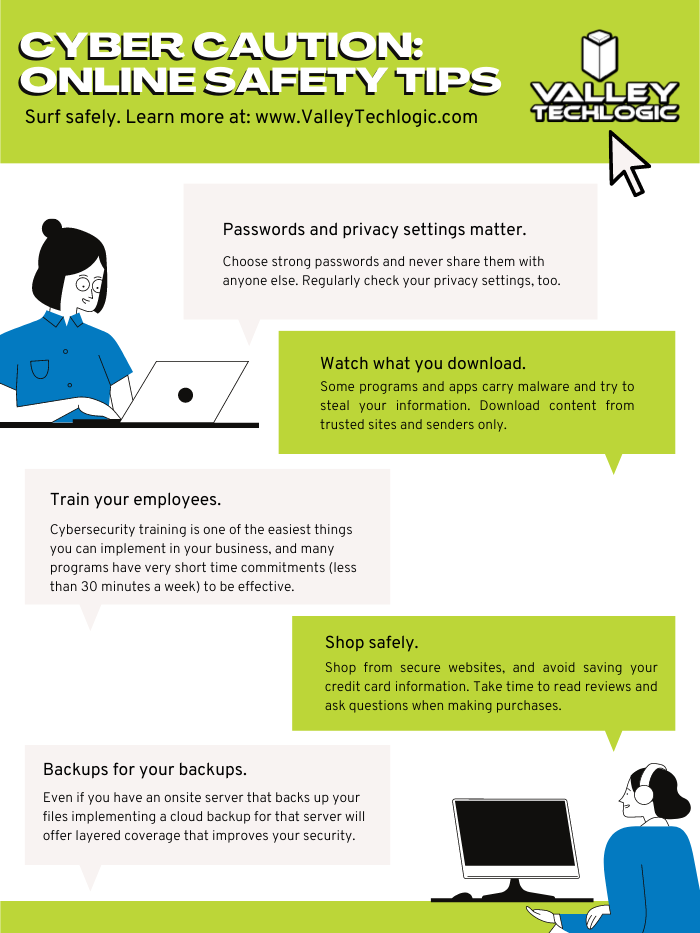
    We’ve posted about proper password safety and advice on avoiding phishing attacks, but here are the top 5 things you can enable in your business today to improve your cybersecurity safety in 2023.

    Internet Safety InfographicIf news of breaches make you nervous and you aren’t sure if your business is prepared from a cybersecurity standpoint, Valley Techlogic can help. We consider ourselves to be a premier provider of cybersecurity services for businesses in our area and beyond. We can help your business by covering your endpoints, setting up secure backups, virus and malware scanning and prevention and more. Schedule a consultation today.

    Looking for more to read? We suggest these other articles from our site.

    This article was powered by Valley Techlogic, an IT service provider in Atwater, CA. You can find more information at https://www.valleytechlogic.com/ or on Facebook at https://www.facebook.com/valleytechlogic/ . Follow us on Twitter at https://x.com/valleytechlogic.

  • BYOD (Bring Your Own Device) in the workplace, 5 policies to have in place for 2023

    BYOD (Bring Your Own Device) in the workplace, 5 policies to have in place for 2023

    Last week we touched on tips for buying new tech for your business in 2023, but for some offices BYOD (Bring Your Own Device) is the norm.

    What is BYOD? Bring your own device is where an employee uses their personal device (usually a laptop) for work purposes. There are different ways to go about this, for some offices there employees using an already owned device. For others, they can use a device they own but they must log into a virtual machine to do their work. A third option is that the business still purchases the device an employee uses but because they work remotely from home the same rules of BYOD still apply even though it’s a company owned device.

    During the pandemic we saw more articles related to BYOD and remote working and how to still manage a secure workspace even if your employees aren’t coming into the office. Even with workplaces now open again many are operating on a hybrid model and advice surrounding security of devices that don’t stay in one location is still very relevant.

    Business owners themselves also often take their devices home with them at the end of the day and aren’t immune to the same pitfalls that can happen if you don’t have policies in place to help protect your office network and data. BYOD offers work places a lot of flexibility as long as security measures are adhered to.

    Here are our tips for smart BYOD policies to have in 2023:

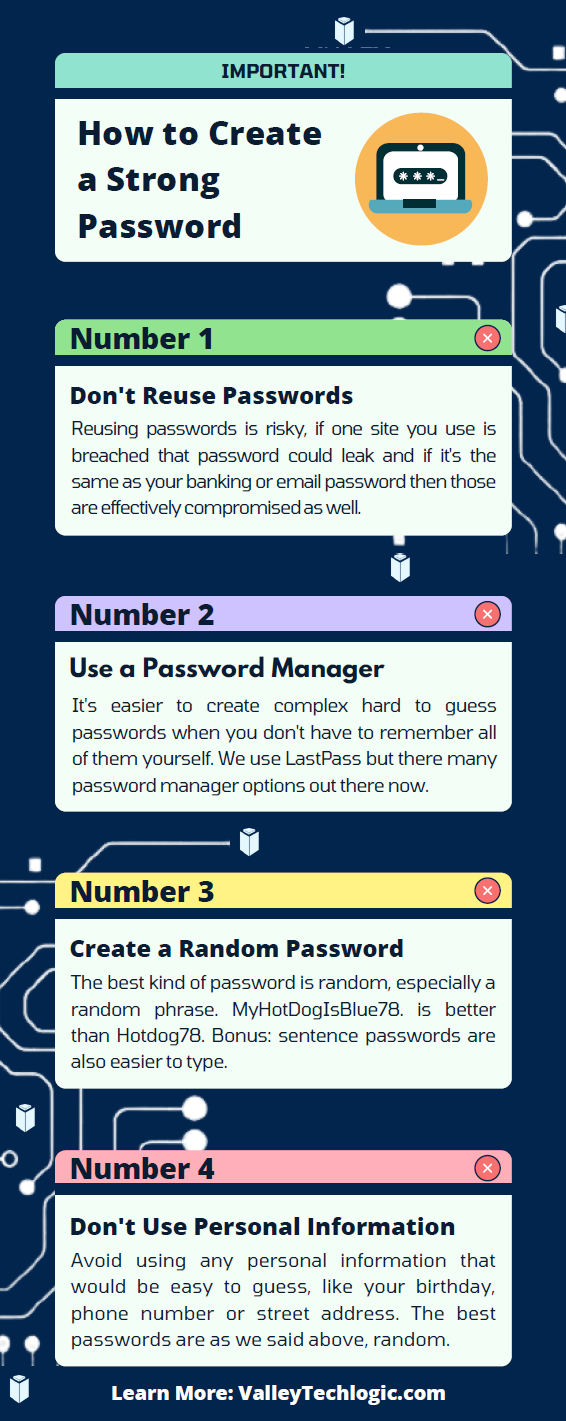
    1. First and foremost, have a good password policy. Especially for company websites and other logins. See our chart below for what makes a good password.
    2. Determine what data can be accessible from home or a BYOD. Some data should be restricted to in office/office devices only, especially anything client sensitive. You can also utilize a company SharePoint to share files without having them be locally stored on devices.
    3. Have time-based lock-out procedures to limit long sessions, especially if a device is idle. An idle device left in an unfamiliar place is a potential vector for hacker access. Time-based lockouts will make devices used offsite much more secure.
    4. Utilize the same security stack on BYOD as you do on company or office devices. Many cybersecurity tools don’t require devices to be in the same building, it’s a good policy to have your IT provider install the same tools on BYOD and other devices that leave the office. If your company uses Windows you can also consider something like Microsoft’s Intune for easier management of all of your endpoints no matter where they’re being used from.
    5. Have a policy for wiping company data off a BYOD. Especially if the device is employee owned, you shouldn’t assume that it will always be a smooth hand off. Having policies for this in writing is crucial.

    Like we said the first step is having a good password policy is step one to a good BYOD plan for your business, and we might argue it’s the first step in a good security plan overall. Here are our tips on what makes a good password:

    Click to grab the full size version.

    If you need help with device management in your business, Valley Techlogic can create a plan of action that encompasses both flexibility and security into a package with functionality at the forefront. Reach out today to learn more.

    Looking for more to read? We suggest these other articles from our site.

    This article was powered by Valley Techlogic, an IT service provider in Atwater, CA. You can find more information at https://www.valleytechlogic.com/ or on Facebook at https://www.facebook.com/valleytechlogic/ . Follow us on Twitter at https://x.com/valleytechlogic.