Author: rory-admin

  • Your data is safer in the cloud, period.

    Your data is safer in the cloud, period.

    Speaking in absolutes is not usually a good idea, but in the case of data storage we feel the onus is on us to speak plainly – and it’s the plain truth that your data is safer in the cloud.

    It’s natural to be hesitant to move everything into the cloud, especially when it really wasn’t that long ago in the grand scheme of things that all data was stored in filing cabinets. Safely tucked away and (hopefully) properly indexed to be pulled out as needed.

    Sure, we didn’t have to worry about malware with paper files, but theft and natural disasters were the enemy of on premises paper documents. Or just the ravages of time wreaking havoc on plain paper and ink. You also had to make sure to shred important documents and not just trash them lest they fall into the wrong hands.

    With the advent of computers most of our data moved to our personal computers and it greatly elevated our ability to communicate that data to others. Multi-million-dollar transactions can be easily completed by simply emailing a proposal and contract. Billing information, medical documents, all of the private information about an individual or business is often times found online and is available to be pulled up when needed.

    But this ease of information is also it’s downfall. Old fashioned robberies where thieves would break into brick-and-mortar establishments and steal private information to then be used to create false identities and/or use payment details for their own benefit have now been replaced with often a single user attacking a small business’s online accounts. They can dismantle everything that business has built in days or even hours and make recovering difficult or even impossible.

    That’s not even taking to account that a single on-premises server is just as vulnerable to fire or flood damage as your filing cabinet is. A singed or waterlogged hard drive has no more usefulness than the same data contained in a charred or dripping stack of papers.

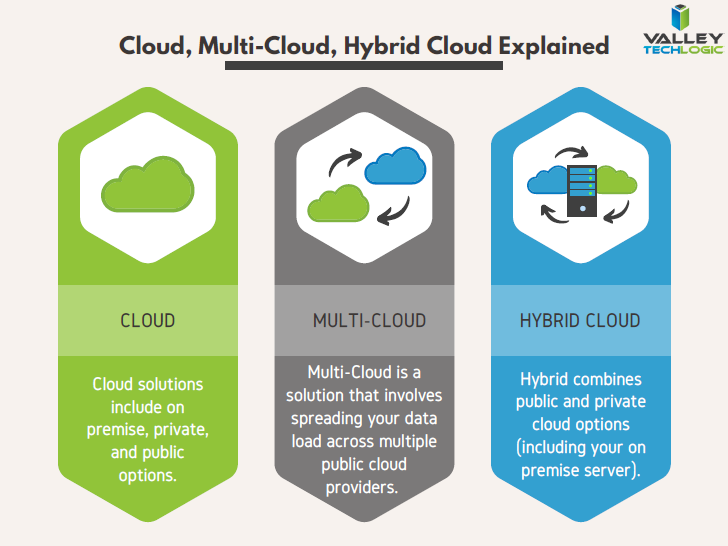
    Like with many things in life this problem is solved by working together with others, and that’s where cloud data solutions come in. It’s still your data and we, like you, think it should have the same level of accessibility as it does when it’s on your personal computer or even a paper file on your desk.

    With the high-speed internet most of us have in our homes and offices downloading files from the cloud is often a nearly instantaneous click of a button and then you’re working on the file you were last night. Make a mistake a few hours in? Another benefit of the cloud is you can often times roll back to an earlier version.

    The cloud can sound nebulous but it’s not, it’s just using the resources of companies that put their whole stake into safeguarding data. Their existence as a business is in keeping your data safe, companies that fail at that task don’t stay in business long.

    It’s really not that different than utilizing the services of the power company for all of your power, or your local ISP for all of your networking needs. These services work best when they’re maintained by companies that dedicate themselves to the task and can provide a high level of continuity.

    And there are some major players in the game, players that have been in the business of data and even computers themselves as a whole for decades. At Valley Techlogic we greatly utilize the power of Microsoft’s cloud service – One Drive – to collaborate within our business. It’s even paved the way for our remote employees to maintain productivity with the whole team without missing a beat. The default storage capacity is 1 Terabyte (TB) which is more than most users will ever need.

    If our office ever burned down with no one inside, we can state with the utmost confidence it would not affect our ability to do business. Could you say the same?

    Cloud Data Facts

    If you’re considering a move to the cloud for your business, we can help. Backups and data recovery solutions are a keystone piece of all of our service plans, learn more today.

    Looking for more to read? We suggest these other articles from our site.

    This article was powered by Valley TechLogic, an IT service provider in Atwater, CA. You can find more information at https://www.valleytechlogic.com/ or on Facebook at https://www.facebook.com/valleytechlogic/ . Follow us on Twitter at https://x.com/valleytechlogic.

  • Microsoft’s Windows 11 finally has an official release date, and more Windows 11 updates

    Microsoft’s Windows 11 finally has an official release date, and more Windows 11 updates

    Microsoft finally has an official release date for their first operating system release in six years, it will be released October 5th, 2021. Windows 11 will be a free upgrade to Windows 10 users – if you’re not already a Windows 10 user we urge you to upgrade while it’s still available and free.

    This means that the release is just over a month away and the buzz surrounding it is only continuing to amp up.  We had word last week that while Windows 11 may work on older computers, you may be prevented from completing updates as normal.

    Microsoft is drawing a line in the sand when it comes to not supporting old hardware. We talked about the specifications required in this article a few weeks ago and nothing has changed on Microsoft’s end when it comes to those required specifications so far. They’ll also be unveiling their own hardware lineup that will feature Windows 11 on September 22nd.

    There are even some indications you not only won’t get software updates, but you may not get security patches either, although they’ve proven to be somewhat soft on that stance on the past when it comes to unsupported copies of their operating systems. Either way with chip shortages and other pandemic related shipping delays this may be a tricky time for those looking to upgrade but realizing they don’t have a machine with the hardware capable of supporting the new operating system.

    Another thing we now know is that even though the Android support found in Windows 11 was a heavily lauded feature, it won’t be there at launch. All of the other showcased featured will be there but the Android support will come later in the year, although a preview of it should be available to Microsoft Insiders soon.

    If you’re wondering how you’ll know when Windows 11 is available to you or whether it will be difficult to figure out, you need not worry. Microsoft is aiming for a “phased and measured” launch and will prompt users via the Windows Update system that the upgrade to Windows 11 is available.

    It won’t be available to all PCs and laptops right on October 5th however, they’ll be slowing releasing it in waves dependent on your computer specifications, the age of your device and other factors. It’s been noted though that some users will have to wait until 2022 to receive the upgrade.

    That should give users plenty of time to sort out any of their hardware related questions and for those on the fence about upgrading, time to see how it fares for other people first.

    For business users, who often opt for the pro version, the choice to upgrade can require more thought and planning then simply clicking the upgrade button when it pops up. We’ve made this chart that outlines the differences between Windows 11 Home and Windows 11 Pro.Windows11HomevsProChart

    One other big difference is that going forward Microsoft is requiring home users to tie a Microsoft account to their Windows installation, but this Isn’t a requirement for Pro users, you can just set up your computer with a local account.

    It will be interesting to see what other details are released as we continue to creep closer to the October release. If you’ve got Windows 11 on your radar for your business Valley Techlogic can help with the planning, we’re a certified Microsoft partner and help businesses all over the Central Valley manager their Windows applications, both for PC and server. Learn more today.

    Looking for more to read? We suggest these other articles from our site.

    This article was powered by Valley TechLogic, an IT service provider in Atwater, CA. You can find more information at https://www.valleytechlogic.com/ or on Facebook at https://www.facebook.com/valleytechlogic/ . Follow us on Twitter at https://x.com/valleytechlogic.

  • Microsoft 365 and Office 365 prices are going up, when and by how much?

    Microsoft 365 and Office 365 prices are going up, when and by how much?

    We’ve been on a roll lately discussing the changes and products being rolled out by Microsoft this year, primarily Windows 11 which should be launched this fall. Last week Microsoft announced a price increase to their ubiquitous business products, Microsoft 365 and Office 365.

    Office has been a business staple since it’s launch in 1989 (although Word predated the Office grouping of products quite a bit, launching in 1983). The original launch set was Word, Excel and Powerpoint but the product line up has exploded since then including other must-have features such as Outlook, Teams, OneDrive and more. For many business users the Office suite of products is their go to collaboration and productivity center.

    Microsoft 365 was announced in 2017 and aimed to take things up a notch and out of just the business productivity center of activity, bringing many Windows specific cyber security features to the table as well as expanding the usability for remote employees.

    It also expanded the ease at which IT administrators can manage their office’s users in a Windows centric environment. The outcome was an all-in-one platform for business users especially that brought functionality, safety and security, and collaborative work processes together in unison all for one easy to budget for monthly fee.

    But as with many online services, fee increases are to be expected (remember when Netflix was just $7.99 a month for the standard package?). Microsoft however has bucked this trend for quite a while, pricing has been the same since Office 365 was launched in 2011.

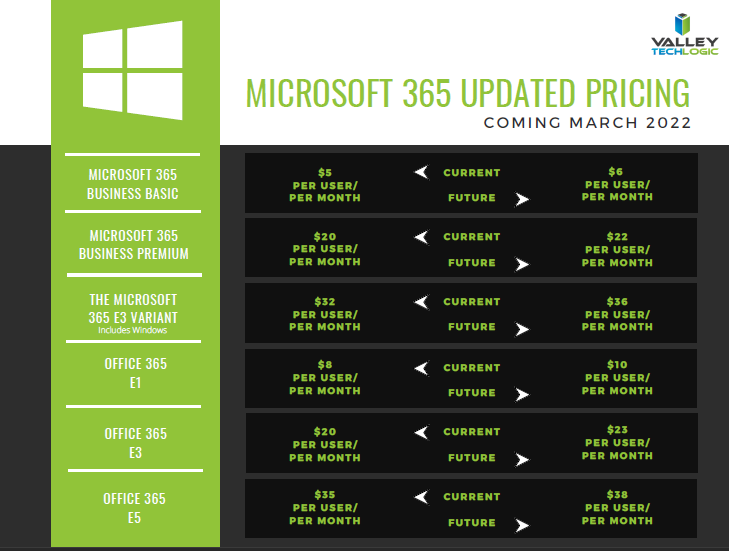
    In that time, they’ve added untold value in the way of product innovation all for no increased monthly fee, so this price increase is both expected and possibly overdue. It’s also expected to be just a few dollars more for each product category, so you won’t need to worry about a drastic price hike. Have a look at our chart below to see what to expect.

    Microsoft Price Increase Chart

    As you can see the price increases are moderate and shouldn’t result in a drastically higher overall IT bill for most users. If you’re in the education sector you won’t have a price increase at all, and consumer products will also stay the same price at this time. These price increases are expected to go into effect March 1, 2022.

    One thing that’s worth mentioning is the program Microsoft has for non-profits, if you own or operate a non-profit organization you can receive your Microsoft products at a deeply discounted rate. This includes Microsoft 365 and Office 365 subscriptions. We have helped our non-profit clients navigate this in the past to great success, if you’re a non-profit in the Central Valley area feel free to reach out to us for more information.

    We also assist businesses with their questions when it comes to the Microsoft line or products or their Windows desktop and server machines, we’re a long time Microsoft partner and consider ourselves experts when it comes to navigating even the most complex setups. We even include the subscriptions we discussed in today’s article within our all-inclusive plans to reduce our customers IT spending to one easy to read monthly bill. Find out more today.

    Looking for more to read? We suggest these tech articles from the last week.

    This article was powered by Valley TechLogic, an IT service provider in Atwater, CA. You can find more information at https://www.valleytechlogic.com/ or on Facebook at https://www.facebook.com/valleytechlogic/ . Follow us on Twitter at https://x.com/valleytechlogic.
  • Windows 11 updates as the fall release rapidly approaches

    Windows 11 updates as the fall release rapidly approaches

    While it hasn’t been made official yet, all sources seem to indicate an October 2021 release of Windows 11 is eminent. That date would track with previous release schedules and merges nicely with the big feature updates that always occurs around that time for mainstream Microsoft products.

    As we inch closer, and the beta versions reveal new details we want to continue our coverage of new features that are being announced as well as specification requirement updates that may impact your future device purchases (or device upgrades).

    For example as of August 2021 here are the minimum specifications to run Windows 11:

    • Processor:1 gigahertz (GHz) or faster with at least two cores on a compatible 64-bit processor or SoC
    • RAM:4GB
    • Storage: 64GB
    • Graphics Card:DirectX 12 or later with WDDM 2.0 driver
    • Display:720p, 8-bit per color channel, at least 9-inch diagonal

    These requirements are published by Microsoft but are still subject to change as the release nears. Also, computers currently running Windows 10 may not have the upgrade available to them as soon as October hits. It seems likely that new machines will be released featuring Windows 11 at that time but the free upgrade for Windows 10 running machines may come later in 2022.

    Tech News #12

    If you would like to try Windows 11 for free right now you can do so by joining the Microsoft Insider program. This program allows you to preview you Windows releases before they’re pushed out to the market, and you can take part in the Microsoft community to see what others are saying about Windows 11 in real time.

    Another option if you would just like to get a feel for the UI without downloading anything is a widget that was created by Github user BlueEdgeTechno. This Windows 11 simulator lets you access all the UI navigation elements and even browse through the new Microsoft Store. You can find it here: win11.blueedge.me/

    Also making a comeback in Windows 11 are Windows widgets. These widgets are AI determined, meaning your use of Windows 11 will help Microsoft dynamically choose widgets that will give you a customized Windows experience. Widgets such as weather and news as well as 3rd party widgets that you may have available on your Android and OS devices will all be possible options.

    Windows 11 is also making it much easier for users (even those not technically inclined) to keep track of the health of their device. With the new health check feature you can see at a glance how your machine is performing including applications that may have higher than normal battery usage or how much space is available on your SSD.

    Windows 11 is expected to be a free upgrade from Windows 10. If you’re still using Windows 7 or 8 on your device, we urge you to make the jump to Windows 10 while it’s still available as a free upgrade. You can learn how to take advantage of that here. We realize upgrading can be a complex task for businesses, especially if a number of machines are involved. You can schedule a consultation here and we can help you create a plan to bring your office computer software current.

    Looking for more to read? We suggest these tech articles from the last week.

    This article was powered by Valley TechLogic, an IT service provider in Atwater, CA. You can find more information at https://www.valleytechlogic.com/ or on Facebook at https://www.facebook.com/valleytechlogic/ . Follow us on Twitter at https://x.com/valleytechlogic.
  • Your IT Guy Quit, Now What?

    Your IT Guy Quit, Now What?

    Your relationship with your IT person can be a somewhat fragile dichotomy, sure you’re friendly with them and they’re probably a great person (you chose/hired them after all).

    But for many small business owners they couldn’t really tell you what this person does beyond making the computers “work”. You hired them for their skills and those skills should exist outside the realm of what you could manage for your own IT (though many owners try).

    So, if they quit, you’re suddenly in the lurch. You have all these systems that were being maintained by one individual that are now in limbo as you try to figure out what to do next, perhaps even trying to entice them to come back.

    For any new person you bring on, the relics of your old IT person may haunt them for them for the entirety of their tenure with you. When you’re just one person trying to manage many systems and users, documenting as you go can feel like a lost cause – especially during the busy times.

    That’s also supposing the split was amicable. If it was not, the damage can be difficult to recover from. We always recommend business owners maintain access to their own systems and never let themselves be completely cut off from the admin side of things no matter how capable your IT person is. Recovering those accounts can be difficult to impossible depending on the system in question.

    That leads us to our list of the top 4 things you should do as soon as your IT person quits.

    First 4 things to do when your IT person quits

    As we say in our infographic, leaving the entirety of your technology support to one person can be a dicey proposition. That’s where our co-managed solution comes in.

    In a co-managed scenario, you keep your IT guy, and we work with him to offload some of the tasks that may be bogging him down day to day. We also will bring our tools that we have honed and perfected across nearly two decades in the business to improve your processes.

    This includes better documentation, better reporting, and just overall better transparency so you as a business owner can have a bird’s eye view into this process that is so important to the continued success of your business.

    The added bonus to lightening their load is that they can then focus on activities that will move your business forward, such as projects that had been on hold because there just wasn’t time or activities that can actually grow your business.

    For example, they can address aging hardware issues that there just hasn’t been time for in the past that are holding your business back and representing a cybersecurity threat. We can even help with sourcing. Technology is a necessary component in the success of any business no matter what category or size – if yours is stuck in the past it’s going to curtail your efforts to grow your business.

    If your IT person just quit and you’re thinking you would rather have a competent IT team managing your technology, we have a plan for that as well. Our managed IT department plan is all encompassing and includes all of the support you will need, 24/7. You can learn more by taking a quick consultation with us here.


    Looking for more to read? We suggest these tech articles from the last week.

    This article was powered by Valley TechLogic, an IT service provider in Atwater, CA. You can find more information at https://www.valleytechlogic.com/ or on Facebook at https://www.facebook.com/valleytechlogic/ . Follow us on Twitter at https://x.com/valleytechlogic.
  • Can you spot the phishing clues? And 10 tips to avoid falling for a phishing scam

    Can you spot the phishing clues? And 10 tips to avoid falling for a phishing scam

    If you’re not aware, phishing is another word for scams perpetrated over email. It was coined in 1996 and was first associated with hackers attempts to steal America Online (AOL) accounts, and it has not slowed down since then.

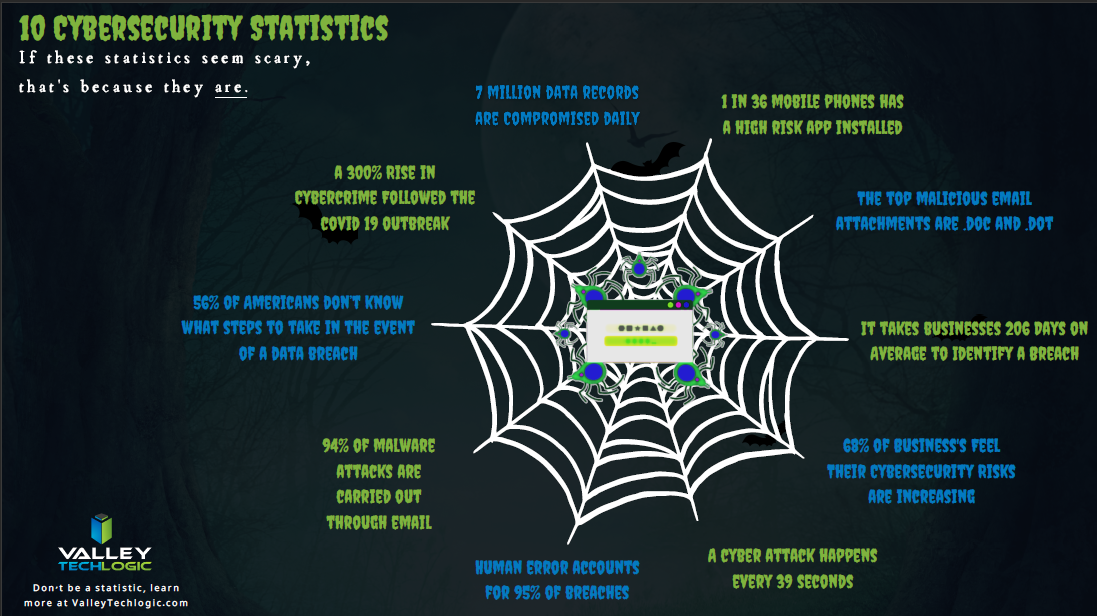
    As of 2021 most hacking attempts are phishing scams, the phrase is meant to evoke the image of a hacker literally fishing for their victims by baiting a hook which in this case is a credible looking email from a place you might actually do business from, a colleague or a family member. 94% of malware attempts originate from an email sent to the victim.

    Well as credible as they can manage, many phishing attempts are poorly worded and grammatically incorrect as the senders are from another country from the victim. In the image below we showcase a phishing email you might receive, click to reveal the answers.

    Spot the phishing clues
    Click to reveal the clues.

    Not all phishing attempts will be so obvious though, here are our 10 tips to avoid falling for a phishing scam.

    1. You are asked to reply with sensitive details. A legitimate business will never ask for your private details via email, if you’re unsure contact the business directly to ask.
    2. The message says you must respond urgently or face dire consequences. Legitimate businesses such as the financial institution you bank with won’t relay an important message over email alone, and they’ll never threaten you.
    3. The email contains a non-standard email attachment. While even standard email attachments can contain malware, a non-standard email attachment is a clear sign something is amiss.
    4. The senders email address doesn’t match the contents. As in our example, a legitimate business (especially a large one) won’t be using a gmail address. You also want to watch out for slight misspellings, such as an email coming from admin@paypa1.com
    5. The email contains an unusual request. You receive an email that looks like it’s from your boss, and he’s saying he wants to reward some key players in your company by gifting them gift cards from a popular big box store. He says not to give them to the players directly, simply reply with the gift card numbers and he’ll handle it. This is just one example of a scam we have unfortunately heard of happening. If the email is requesting large amounts of money be spent in unusual way or private details be sent over email, even if the email looks legitimate you should verify with the supposed sender first.
    6. It has an attachment you weren’t expecting. If receive an email with an attachment and the body suggests you requested information, but you don’t remember doing so, it’s probably a phishing scam.
    7. The email says you won a prize, but you must enter your banking information to claim it. Prizes are a common phishing scam trope; they may also try to get you to download a suspicious attachment.
    8. The URL in the email doesn’t match the business it claims to come from. As in our example, phishing attempts often involve a similar but not quite right URL. Many scammers will try to gain the victims trust by sending them to an “official” looking website where they will login with their legitimate credentials, allowing the scammer to gain access.
    9. The content is canned. Many phishing scammers reuse the materials of others. One example is you receive a suspicious sounding email, such as someone saying you have stolen their copyright images and you must visit a website to confirm. If you Google the email you may find examples of others online who have received that same
    10. The greeting doesn’t match the content. This is a simple one, if you receive an email supposedly from your boss but the greeting starts with “Dear” or another out of character greeting, it’s probably a phishing attempt.

    This is only a start, many phishing attempts are highly sophisticated and difficult to spot but knowing some of the signs will help you be more attentive to things that may be wrong with an email you receive. We also have found for our clients, randomized simulated phishing attempts can help them with training their staff to keep an eye out for phishing attempts.

    Most successful hacking attempts involve a human element, training is your only first line of defense. If you would like to increase your defense against phishing attempts, malware, ransomware and more, Valley Techlogic can help. Schedule an appointment with us today to learn about our comprehensive cyber security packages for businesses.

    Looking for more to read? We suggest these tech articles from the last week.

    This article was powered by Valley TechLogic, an IT service provider in Atwater, CA. You can find more information at https://www.valleytechlogic.com/ or on Facebook at https://www.facebook.com/valleytechlogic/ . Follow us on Twitter at https://x.com/valleytechlogic.

  • Our first look at Teams 2.0

    Our first look at Teams 2.0

    As we mentioned in our last post, Windows 11 is coming and with its announcement also came with the announcement of what’s being dubbed “Teams 2.0”.

    In preview builds right now appearance wise Teams 2.0 is very similar to the Teams you’re used to using. It has the same minimalistic UI you’re used to. However, one change is you can now switch light, dark and high contrast mode. This is a customization feature found in other video conferencing software now brought to Teams to make the program more user friendly and inclusive.

    Speaking of customization, you can also shrink your Teams windows exactly how you like now instead of simply shrinking the window down horizontally only. This will allow users to integrate a Teams window as they’re setting up their workstations for the day. The application can also “click” into place, fitting the size of the square or rectangle the user has left for it.

    Under the hood you’ll find that Teams 2.0 is much lighter than your existing Teams applications. While this is an early build of the program it’s interesting to note and holds true to Microsoft’s promise of making Windows 11 lighter in every fashion. Many video chat programs are memory hogs for older machines and a more agile chat client would be welcome for those as well as lighter duty laptops with less memory capacity.

    You can also quickly invite users with a link with Teams 2.0, allowing users to hold meetings more on the fly without having to schedule something through the Outlook calendar. This is one benefit found in Zoom that we think Microsoft is wise to integrate into Teams to broaden their appeal.

    Another change is you can now find users by their phone number or by syncing your contacts with Outlook and Skype. It’s clear with Windows 11 the goal is to have Teams be the de facto video chat choice and adding the ability to lookup friends and family will greatly extend the use of Teams outside workplaces.

    Although we still expect workplaces to be the primary use of Teams and we’re looking forward to more changes aimed at catering to the workforce marketplace beyond the scaled down client size (though don’t get us wrong, we definitely approve of that benefit). In the current preview builds video chat and voice chat are disabled so we’re unable to comment on that functionality at this time.

    This is still very early on in the process, and we anticipate more changes to come not just for Teams 2.0 but also Microsoft 11 as a whole.

    Skype for Business is Ending News

    In fact, it’s already been announced that the web client version will be released for preview soon, improved PowerPoint integration and also the ability to utilize multiple user accounts under a single client. Microsoft is a flurry of activity as they gear up for the fall release of Windows 11.

    Users currently on Windows 10 are already receiving patches aimed at getting their computers Windows 11 ready. As we noted in a previous blog Windows 11 will be a free upgrade to users already on Windows 10.

    Still on Windows 7 or 8 in your office? It’s still possible to upgrade to Windows 10 either for free or for a small $99 upgrade fee. This is going to much less than Windows 11 will be retailing for at launch and a 50% discount on the Windows 10 Pro retail cost. Windows 7 ended extended support in January of last year and Windows 8 will be soon as well. It’s not a good idea to remain on an operating system no longer supported by Microsoft and can leave your business much more vulnerable to cyber security attacks.

    If you need assistance upgrading the machines in your office so that they’re Windows 10 or 11 ready, reach out to us here.

    Looking for more to read? We suggest these tech articles from the last week.

    This article was powered by Valley TechLogic, an IT service provider in Atwater, CA. You can find more information at https://www.valleytechlogic.com/ or on Facebook at https://www.facebook.com/valleytechlogic/ . Follow us on Twitter at https://x.com/valleytechlogic.
  • Windows 365 has been announced, and it could change workplaces as we know it.

    Windows 365 has been announced, and it could change workplaces as we know it.

    On July 14, 2021, Microsoft held their annual Inspire summit, a conference for Microsoft partners to be given inside information about what the year ahead will look like in the world of Microsoft products and how they can leverage changes and features for their clients.

    This year’s event issued in some big changes, all aimed at what Microsoft has dubbed the “Hybrid Workplace”. It’s clear Microsoft is betting that remote work is here to stay, at least partially.

    While Teams and it’s various new and exciting integrations seemed to take center stage in the event offerings, we want to talk about another massive announcement – Windows 365.

    Microsoft is going all in on cloud computing with Windows 365, and while it won’t be replacing Azure Virtual Desktop which will still be a staple in enterprise applications especially where security is especially crucial – it will offer extreme flexibility for businesses with a remote or hybrid workforce.

    Windows 365 Will Work On Any Device

    In the product demo we attended we were shown Windows 365 machines will be capable of lightning-fast data speeds across Microsoft’s networks. Users will also be given the ability to adapt the virtual computer on the fly from an easy to use and navigate interface that let’s you manage all of your active Windows 365 subscriptions.

    They will even offer recommendations based on the usage on these virtual desktops. For example, if one user is always running out of RAM you can perform the upgrade right then and there, instantly.

    The models pricing will be based on use and the virtual computers specs, but pricing hasn’t been made available yet. These virtual desktops will even have the option of including all of Microsoft 365’s product offerings such as Outlook, Excel, Word and more.

    The most intriguing part Isn’t just the functionality of these desktops, which looks impressive. It’s the flexibility of just where and how you use them.

    Windows 365 can purportedly be used across devices, that means not just laptops and desktops but even smart phones and tablets. You can use the web client but there’s also a browser option which could be a game changer for those with slow or unreliable internet connection speeds.

    If you think security features are limited to Azure Virtual Desktop you would also be wrong, Windows 365 will have two factor authentication built in and allow you to tie the virtual machine instance to the user’s phone. When they go to log in they will be prompted to allow the login via the registered phone. This is a necessary aspect for business’s who have been struggling to implement cybersecurity features in their business, especially when it comes to their remote workforce.

    Their Windows 365 virtual desktop will also be cross platform and save the user’s instance. If your employee is working from home three days a week and from the office two days a week, they can use their virtual desktop to remain on track because their work will be saved and ready to go no matter where they are logging in from.

    At Valley Techlogic we have long been a proponent of cloud computing and have implemented creative cloud solutions for our clients. We are excited to see where Windows 365 is going and to have the chance to bring this offering to our customers.

    Are you looking to implement Windows 365 or other cloud offerings such as backups in your business? Valley Techlogic is a dedicated Microsoft partner, and creator of the triple layer backup program TechVault. Schedule a consultation today to learn more.

    Looking for more to read? We suggest these tech articles from the last week.

    This article was powered by Valley TechLogic, an IT service provider in Atwater, CA. You can find more information at https://www.valleytechlogic.com/ or on Facebook at https://www.facebook.com/valleytechlogic/ . Follow us on Twitter at https://x.com/valleytechlogic.

  • Windows 11 system requirements – Will your computer be able to run it?

    Windows 11 system requirements – Will your computer be able to run it?

    Continuing our talking points about Windows 11 (which was officially announced June 24th of this year), we would be remiss to not talk about one very important thing – will your computer be able to run it?

    We know for business owners this question is even more loaded as you consider not only your personal machine(s) but also those of your employees. The initial system requirements looked pretty steep, requiring an 8th Gen processor and other specifications that would have phased out a lot of machines that are perhaps not even very old.

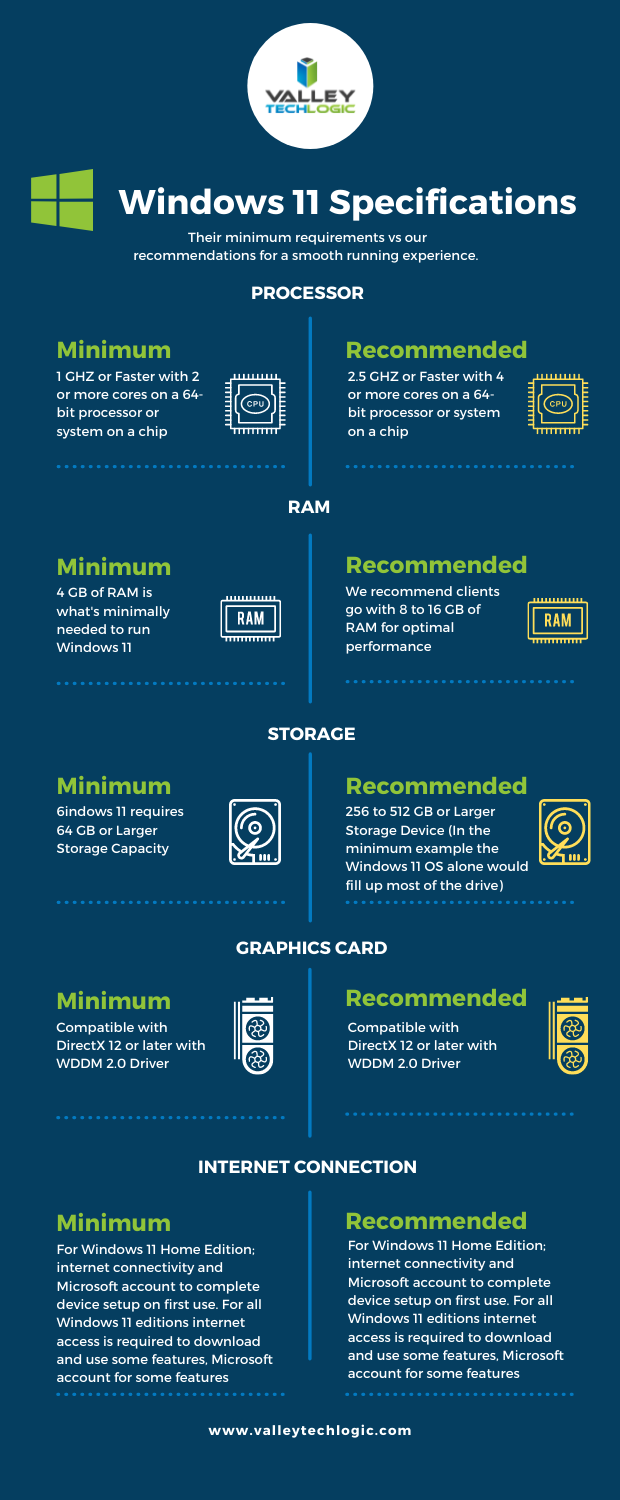
    However, Microsoft has since retracted their initially stated requirements in favor of a more modest range of specs that may still leave some very old machines out of the running but for anyone who’s replaced their computer in the last several years (which we recommend anyways) you should be fine. You can see the requirements in the chart below.

    However, minimum requirements are just one piece of the puzzle. By those markers most computers built in the last 5 years can run Windows 11, but what specs would allow it to run well and allow you to have access to the full benefit of all of the new features? Not only that, as we demand more of our computers we really need to consider optimizing them for our current usage.

    For instance, if you frequently are running out of storage space, or if having a lot of tabs open really bogs down your machine, you may find that the enhanced strain caused by a more demanding operating system could make using your machine a hassle to use. Or even just plain unusable.

    We decided to list out our recommendations for system requirements that would most benefit when upgraded to Windows 11.

    Windows 11 Our Recommendations

    As you can see some requirements mirrored those set by Microsoft, but we boosted the recommended storage space considerably and also the RAM. When it comes to RAM we really recommend clients lean towards the higher end of the spectrum, 16 GB would be a better option for future proofing your device in our opinion.

    The same goes for the processor, 4 cores is really a bare minimum requirement for a device that runs smoothly and helps you complete your tasks (no matter how demanding).

    Minimum system specs should never be seen as the best option when assessing what level of device will fit your needs, they’re just the base mark software companies must set when considering older devices on the market. The minimum requirements lets consumers know whether what they already have will work with their software.

    Microsoft also has a tool for easily checking to see if your device is ready for Windows 11, PC Health Check, however as of writing it’s currently down as they make changes to it to be in line with the current recommendations they recently set.

    Windows 11 will not be out until later this year and these recommendations may change yet again as they gather data from the version they currently have out in early access. We feel confident our recommendations will hold up and continue to serve as a viable option for anyone in the market for a new PC or laptop.

    If you’re considering upgrading the machines in your business to make them “Windows 11 ready”, we can help. We’re a Microsoft partner and specialize in helping our clients manage their Windows applications and devices on top of a host of other IT services we provide. You can learn more through a free consultation here.

    Looking for more to read? We suggest these tech articles from the last week.

    This article was powered by Valley TechLogic, an IT service provider in Atwater, CA. You can find more information at https://www.valleytechlogic.com/ or on Facebook at https://www.facebook.com/valleytechlogic/ . Follow us on Twitter at https://x.com/valleytechlogic.
  • Why you SHOULD upgrade to Windows 11, but not necessarily Windows Server 2022

    Why you SHOULD upgrade to Windows 11, but not necessarily Windows Server 2022

    It feels like Windows 11 news is everywhere at the moment following the official announcement on June 24th. We covered that announcement in our post found here.

    More details will continue to be released as we move toward the estimated fall release of Windows 11. It’s going to be a free upgrade for Windows 10 users, and we think making the move to Windows 11 will be a smart choice for most customers so long as they’re running newer hardware (which to be fair is a big caveat). We’ll be covering the hardware required for Windows 11 in next weeks post as it’s an ongoing situation.

    In this week’s article we want to cover servers instead, and specifically whether Windows 2022 will be the smart choice for business’s when it’s officially released. It’s been out for preview for Azure Virtual Machines since March of this year, but the commercial release is estimated for later this year. It’s seems it will closely coincide with the estimated release of Windows 11.

    That’s pretty much where the similarities between the two operating systems ends. Servers are a different beast both in their hardware requirements and their intention.

    Many very small businesses get by without a physical server and by just relying on cloud backups for their data. There are some downsides to that, we talk more about moving to the cloud in this article.

    If you already have a server (or even more than one) in place for your business though you may have an understanding of the undertaking that is upgrading your Windows Server version. It’s not quite as cut and dry as it is with upgrading your desktop version of Windows, which is usually just a few clicks of the mouse.

    There are usually vendor considerations in place with a Windows Server upgrade. Some clients even have proprietary software that will not work with an updated version of Windows Server that necessitates having a plan in place to mitigate the issues that come from having an older version, many of those cyber security related.

    We’ve made a chart that shows the risk level with various versions of Windows Server as you move out from their End of Life date as well as from their Extended Support date.

    Windows Server Chart Small

    It’s a good idea to keep as current as you can but we don’t necessarily advocate for jumping onto the newest server version immediately. Like we said there are vendor considerations and also the compatibility with software you use in your business, it can take a while for developers to create patches and drivers that make the usability of the newest version of Windows Server the same as what you’re used to.

    Also, like with the desktop version of Windows there are hardware considerations. Upgrading server hardware is always a significant expense for your business and can result in significant downtime. We help our clients mitigate this downtime but it’s still a consideration especially if you’re navigating this topic without a good IT team behind your business.

    We would never discourage anyone from upgrading when the time is right, aging hardware that fails suddenly can also result in significant downtime, much longer than an upgrade would take before you reached that point. We recommend reaching out to an IT professional and having them run diagnostics on your current server as that will help you make an informed choice.

    If you find yourself trying to navigate this topic and other IT service related topics, Valley Techlogic can help. As a Windows partner, we’re well versed in everything Windows and have navigated even the most complicated server setups. Like we mentioned, we even help clients mitigate downtime when it comes to performing necessary upgrades. You can reach us for a consultation here to get started.

    Looking for more to read? We suggest these tech articles from the last week.

    This article was powered by Valley TechLogic, an IT provider in Atwater, CA. You can find more information at https://www.valleytechlogic.com/ or on Facebook at https://www.facebook.com/valleytechlogic/ . Follow us on Twitter at https://x.com/valleytechlogic.