Tag: cybersecurity

  • Traveling for the holidays? Take 8 tech tips from our experts with you

    Traveling for the holidays? Take 8 tech tips from our experts with you

    If you’re traveling the holidays this year, we have eight tech tips to help you stay safe while using your devices on the go.

    We’ve offered holiday themed tech advice before (here are a couple of our past articles on the top 10 Holiday Shopping Tips for Safer Online Shopping & 5 Holiday Tips for Your E-Commerce Business and 5 for Everyone Else). The holidays usually mean more time off which can lead to more time spent browsing the web or being able to work on things in your business you usually don’t have time for.

    It’s also a good idea to keep in mind that bad actors don’t typically take the holidays off, in fact ransomware attacks usually increase by 30% on the holidays. That’s because many people are keeping an eye out for sale emails or emails from relatives this time of year – giving more opportunities for scammers and bad actors to take advantage of folks just looking for a good deal or a message from their loved ones.

    Traveling especially can leave you more vulnerable, if you’re quickly scanning messages in-between flight connections, logging into public WiFi or any number of things that are a normal part of being on the go you can miss some obvious red flags.

    That’s why we’re going to divide up our advice into 4 tips that are related to being safer online while traveling, and 4 tips for improving your technology experience while traveling.

    First our safety themed tips:

    1. As we mentioned, be careful on public WiFi. Nowadays, even if you need to use your laptop the better option might be to use your phone as a hotspot. If you do need to connect to public Wi-Fi, consider doing it through a VPN. We can personally recommend Mullvad which is not subscription based, one payment will get you online through a secure connection without having to remember to cancel it later.
    2. Be careful about what you’re posting on social media. Posting travel photos for your friends and family to see can be really fun, but you should be wary about who else might be watching. It’s a good idea to make your social media profiles private but if you maintain a public presence, you can also think about posting those photos after your trip has concluded instead.
    3. Public charging stations can also pose a risk. Unfortunately, these stations can be tampered with and become an attack vector to everyone who uses them. Battery banks are pretty inexpensive these days and even more convenient when you’re on the go.
    4. Don’t leave your items unattended. Just as airport personnel will ask if your suitcases have been in your possession the whole time, it’s a good idea to keep track of your belongings from a tech standpoint as well. Someone with bad intent might not be after your device when your data is much more valuable.

    Now for our convenience themed tips:

    1. Keep track of your belongings on the go with an Apple Airtag, Tile Pro or other bluetooth based trackers. A misplaced bag can ruin your vacation, having one of these trackers inside it will prevent that from happening.
    2. Turn any audio jack into a Bluetooth wireless transmitter. Whether you rent a car without a Bluetooth adapter or you want to use your Bluetooth headphones on the plane, a wireless Bluetooth transmitter is a gamechanger. Best of all many options are on sale at the moment for Black Friday, we’ve personally used the Anker Soundsync. It’s small so it won’t take up much room in your bag and as 12 hours of run time per charge.
    3. We mentioned using your phone as a mobile hotspot up above, but if your data plan is not the best you can also purchase a standalone mobile hotspot (with a data package included). This can also be a gamechanger if your network Isn’t going to be stellar where you’re going, you can purchase a mobile data plan for a network that has coverage instead. T-Mobile, AT&T and more all have options for this.
    4. Having to work on the go but don’t want to drag your whole setup with you? Consider a portable monitor. If you’ve gone to two (or more) monitors at work you know there’s no going back, but sometimes travel includes doing some work out on the road and bringing your at home setup is not going to be an option. Portable monitors often come with a travel ready case and can be connected to your laptop via USB-C (both for power and display), bringing you the convenience or two displays without the headache of trying to travel with a full-size monitor.

    Technical advice like this is one of the advantages of being a Valley Techlogic customer, and for a limited time if you meet with us about our services, we will give you $100 cash just to hear us out.

    What do you have to lose? Schedule a consultation today.

    Looking for more to read? We suggest these other articles from our site.

    This article was powered by Valley Techlogic, an IT service provider in Atwater, CA. You can find more information at https://www.valleytechlogic.com/ or on Facebook at https://www.facebook.com/valleytechlogic/ . Follow us on Twitter at https://x.com/valleytechlogic.

  • In the aftermath of the MGM cyberattack, five class action lawsuits have already been filed

    In the aftermath of the MGM cyberattack, five class action lawsuits have already been filed

    MGM Resorts are a staple on the Las Vegas strip, operating more than two dozen hotels and casinos around the world with nine of them being found in Las Vegas itself. You may have heard of the Bellagio, Mandalay Bay, and the Luxor? These are all MGM properties that host millions of visitors each year.

    Now some of those same visitors are wondering if the chain gambled with their private data. It was reported on September 11th that MGM was facing some kind of “cybersecurity issue” that trickled down to their facilities, with customers facing problems using the digital keys to their hotel rooms to slot machines not functioning as intended.

    Guests were left spending hours waiting to check in as the hotels shifted away from digital entry back to manual keys to get guests into the rooms they’d already paid for. It reportedly took 10 days for things to resume normal operations with some problems still occurring here or there.

    It’s now being reported that the cause of this hack was a persuasive phone call made by one of the members of a hacker group called “Scattered Spider” which has since claimed ownership of this attack. In a strange turn of events this group does not prioritize technology-based attacks such as malware or phishing but instead mostly engages in “Vishing”.

    “Vishing” or voice phishing is when someone calls you pretending to be someone else, they usually are purporting to be from a company you might do business with financially – such as your credit card company or banking institution.

    With number spoofing this type of attack can be very effective, and as the MGM attack shows even a massive organization is not necessarily immune from an attack if the bad actors is using the right attack vector for the job. That’s why it’s important to have several safeguards in place when it comes to protecting your systems and data.

    It’s alleged that a member of the Scattered Spider group found an MGM employee’s information on LinkedIn and was able to convince a member of their help desk to give them all the access they needed to perform the attack. Someone close to the group has said the original plan was to hack their slot machines but when that plan failed, they moved to plan B which was holding MGM’s data hostage for a payment in Crypto.

    Even though they’re now back to normal operations, MGM is not out of the woods yet. Five class action lawsuits have been filed with customers claiming the chain risked their personal identifiable information (PII) by falling for this attack. Two were filed against MGM directly, and three against their partner company Caesars Entertainment. We have talked about the legal ramifications. of cyber attacks before and it’s something companies should definitely be aware of, the insult of being hacked may not end just with the loss of data or systems being damaged – there may be legal consequences as well.

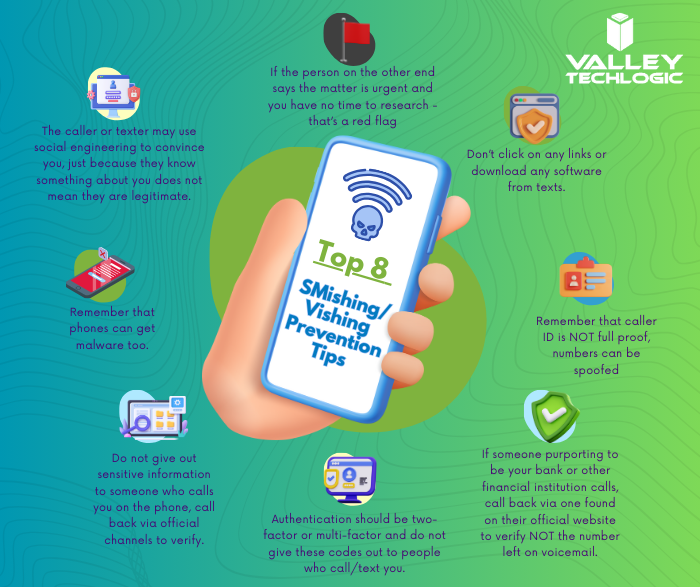
    Over 90% of successful attacks have a human element to them, with this most recent attack on MGM included in that figure. Cyber security training can go a long way in preventing cyber threats to your business, but vishing may still catch you or your employees off guard. You may be wondering how someone on the phone could possibly be so convincing that you give them access to your systems or financial accounts. We made a chart on the top 8 steps you need to take to guard against a vishing(voice phishing or)’ smishing (text message phishing) attack on your business.

    Of course, as we mentioned the best defense against cyber attacks in general is a layered approach, that way if one wall is breached an attacker would still have to get through several more to do any damage to your business. That’s where a partnership with Valley Techlogic comes in – we take a layered approach to protecting your backups, protecting your systems, and protecting you and your employees from bad actors. Learn more today through a consultation.

    Looking for more to read? We suggest these other articles from our site.

    This article was powered by Valley Techlogic, an IT service provider in Atwater, CA. You can find more information at https://www.valleytechlogic.com/ or on Facebook at https://www.facebook.com/valleytechlogic/ . Follow us on Twitter at https://x.com/valleytechlogic.

  • Discord.io data breach sees 760,000 users information stolen and an end to the service

    Discord.io data breach sees 760,000 users information stolen and an end to the service

    If you’re not familiar with Discord, it’s a chat service that first opened to the public in 2015 and quickly grew in popularity having a base of 3 million users just one year later in 2016. Now in 2023 there are over 150 million users, and the platform has been valued at $7 billion.

    Discord filled a niche that had been previously left vacant since chat services like AOL and MSN were discontinued. In the early 2000’s to 2010’s forum-based communication rose in popularity and left many chat rooms empty.

    Now as trends have changed, chat has seen a resurgence in popularity with Discord acting as a vector for many special interest groups to gather and discuss their hobbies, or for consumers to follow live updates about a product they’re interested in and even speak directly with its creators and get an inside look into the development process. No matter what your interest is, gaming, home improvement, DIY, art, music – there’s probably a Discord channel dedicated to it.

    Discord.io was a third-party website that allowed users to find and share chat channels, we’re unfortunately saying was because after the breach they announced their services would be closed for the “foreseeable future”.

    On the website it says “”We are still investigating the breach, but we believe that the breach was caused by a vulnerability in our website’s code, which allowed an attacker to gain access to our database. The attacker then proceeded to download the entire database, and put it up for sale on a [third] party site,”. They’ve also listed the information that was released in the breach which included users encrypted passwords, their email and username, and even billing and payment information if they partook in a premium membership through the site.

    While they’re not directly associated with Discord, this breach will still have an effect on Discord itself not just because this service has been discontinued but because of the overlapping data Discord and a Discord-centric third party application will have.

    The unfortunate rub of it is when you utilize third party vendors for the products and services you use you’re sharing the same information with them as you are with everyone else, and a breach through an outside vendor can effect you as much as a breach to your business directly.

    That’s why it’s important to vet your vendors and have protections in place to limit the effects a data breach can have. Protections can include:

    1. If the breach involves financial data that could be used for identity theft, consider freezing your credit. This will limit the damage someone can do with your identifying information. If you’re not ready or aren’t able to freeze your credit, then we suggest credit monitoring at the very least (often provided for free by banking and credit card companies).
    2. Don’t use the same password from one account to another. As we mentioned, password data was leaked in the Discord.io breach. While it’s encrypted data which is a good protection, many of these passwords will be cracked, and the people who purchased this information will try the password on users other accounts such as their email. If you use a different password for all of your accounts in unison with a password manager then a password leaked in a breach will only effect one account, greatly limiting the damage that can be done.
    3. Similarly to above, to protect your accounts from intrusion you SHOULD be using MFA (Multi-Factor Authentication). We recently posted another article outlining the benefits of MFA, but in a nutshell if a hacker has gotten enough information about you from data breaches they may be able to utilize it to gain access to your accounts – even WITHOUT a password. MFA will stop most hackers in their tracks.

    Even with protecting yourself, it’s still a good idea to try to limit the funnel of information about you or your business that can unknowingly end up on the web through third party breaches. Here are 5 additional ways to protect your data:

    Want to learn more about how to recover from a data breach, boost your cyber security readiness, or gain additional insight in the kinds of questions you should be asking your vendors about your data? Valley Techlogic can cover all these topics and more. Schedule a consultation with us today.

    Looking for more to read? We suggest these other articles from our site.

    This article was powered by Valley Techlogic, an IT service provider in Atwater, CA. You can find more information at https://www.valleytechlogic.com/ or on Facebook at https://www.facebook.com/valleytechlogic/ . Follow us on Twitter at https://x.com/valleytechlogic.
  • Zero trust or zero effort, how does your businesses security stack measure up?

    Zero trust or zero effort, how does your businesses security stack measure up?

    Have you been working on strengthening your cyber security stack in your business or crossing your fingers and hoping for the best? How much protection is really enough?

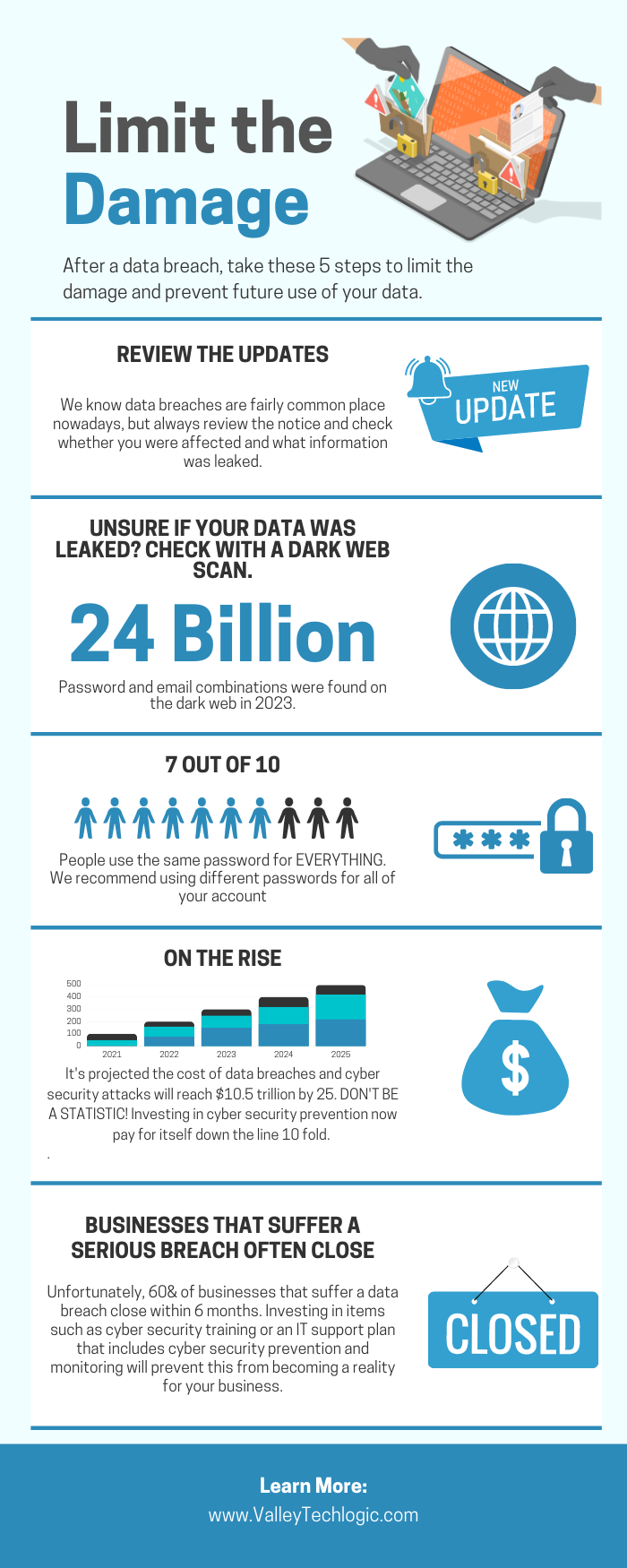
    There are a lot of remedies for improving cyber security out there, but which ones present the best value for your business, and what constitutes a “zero trust” environment?

    If you’re just starting out, these 10 items will greatly improve your business’s cyber security safety in a short amount of time (we call these “best practices”):

    1. Use multi-factor authentication. This one is obvious, but we still see it not being employed regularly. Multi-factor authentication is generally extremely easy to enable (often times just a checkbox) and it greatly improves the safety of that account. When we’re talking about accounts like your business email, or your banking account it’s a no brainer.
    2. Use a password manager. This is another easy one to employ but people still ignore it, or even worse they use the password manager built into their browser. We’re not saying that’s completely wrong, especially if you’ve started using stronger passwords because of it. It’s still a good idea, however, to use a password manager that’s not directly connected to your system. Often times the same password or biometric you use to log onto your computer is the one used to unlock your browsers password database, so if someone has breached the device all those passwords will be available to them too.
    3. Employ Biometrics. Speaking of biometrics, they can be an improvement over passwords when it comes to a physical devices security. Especially for mobile devices, most of us access our work emails, banking accounts, etc. through our phones. It’s very easy to lose a phone, so making that phone unusable to whoever finds it (or has taken it) is a good idea.
    4. Don’t give everyone admin privileges. Not every employee needs all the keys to your kingdom, limit admin access only to those who really need it so if you do have a breach the damage can be limited as well. This is a key component of a zero trust environment (which we describe in the chart below).
    5. Communicate your goals and train your employees. Loop employees into your increased cyber security efforts and provide training, no one wants to be responsible for a cyber-attack in their workplace but without training employees can become unknowing and unwilling threat vectors.
    6. Monitor network activity. Now we’re starting to get into the more challenging topics, monitoring your network activity can be a very effective way of noticing early when something is amiss. There are tools out there that can do this monitoring for you and provide warnings if suspicious behavior is detected (like a device being logged in after hours when it never usually is).
    7. Use encryption. It’s pretty easy to use encryption in email or with sensitive documents (again often just a checkbox) but it’s an effective way to make sure sensitive data doesn’t fall into the wrong hands.
    8. Use backups. Again, in the same vein of protecting your data having automatic backups will greatly increase your chances of recovering after a cyber-attack. Especially if those backups were stored offsite (such as cloud backups). We wrote an article on the best ways to manage your OneDrive storage (which is included in your Microsoft 365 subscription) here.
    9. Regularly patch your devices. Many of your vendors actually provide security protections for you via their patches, which more often than not are addressing specific security concerns that have been identified. Patching costs nothing but your time and the benefits are ten-fold compared to the costs of a security breach in your business.
    10. Have a security audit performed. The best way to address the holes in your security plan is to have a reputable IT company perform a security audit. Valley Techlogic is a provider of these audits in the Central Valley and you can request a consultation here.

    Performing these ten activities in your business will greatly improve your cybersecurity effectiveness across the board, but if you’ve reached the bottom of this article and have realized you do all of these you may be wondering what’s next? Or perhaps you’ve heard of zero trust but aren’t sure what that entails, here are the key components to having a zero-trust cybersecurity environment:

    We address ALL of these topics in our new book, Cyber Security Essentials, which covers all the components of a cybersecurity framework and how to implement them in your business. You can see a preview of the book in the video below.

    [youtube https://youtu.be/jlBAoq4tLNc]

    Looking for more to read? We suggest these other articles from our site.

    This article was powered by Valley Techlogic, an IT service provider in Atwater, CA. You can find more information at https://www.valleytechlogic.com/ or on Facebook at https://www.facebook.com/valleytechlogic/ . Follow us on Twitter at https://x.com/valleytechlogic.
  • More data breach woes for LastPass and our recommendations for you on how to deal with it

    More data breach woes for LastPass and our recommendations for you on how to deal with it

    We’ve posted about LastPass data breaches before but at that time it was purported to be a false alarm according to the company, the news on this most recent breach is that it’s real and that LastPass users should be concerned.

    The data breach in question happened in August but LastPass is just now revealing the details on what was stolen and the scope of breach. At the time of the hack LastPass was again saying that it was a false alarm but that wasn’t true and “backup customer vault data” was accessed during the August incident.

    This backup vault data included both unencrypted data such as website URLs and encrypted data such as website usernames and passwords. Having both details will allow hackers to easily put two and two together to access customer accounts.

    With that said because the data for usernames and passwords is still encrypted LastPass has let customers know their data is still safe, as they say it can only be unencrypted with their unique encryption key that is derived from your master password. User master passwords are not accessible due to their “Zero Knowledge” architecture.

    With this architecture no one, not even LastPass themselves, has access to a user’s master password. LastPass requires that master passwords be 12 characters long so even if the hackers who accessed this data attempt to brute force individual passwords it would still be difficult to impossible, with LastPass themselves estimating it would take “millions of years using generally-available password-cracking technology”.

    LastPass users should still be on the lookout for phishing attempts in the upcoming days however, even if your data is safe bad actors may still use the news of this breach to attempt to trick users into revealing their data. You should never share your password details with anyone, especially your master password. LastPass will never ask you for your password information.

    Also some additional advice for business owners who may own websites from Google, because the URLs in this breach were not encrypted they may include some that you didn’t want publicly accessible. John Mueller a SEO expert at Google recommends reviewing any website URLs you may have that may inadvertently leak data for your business, including customer form data.

    We still believe password managers are a security benefit to both consumers and businesses alike. They’re one small part of increasing overall cybersecurity awareness and safety and fall under the larger spectrum of increasing user education and accountability.

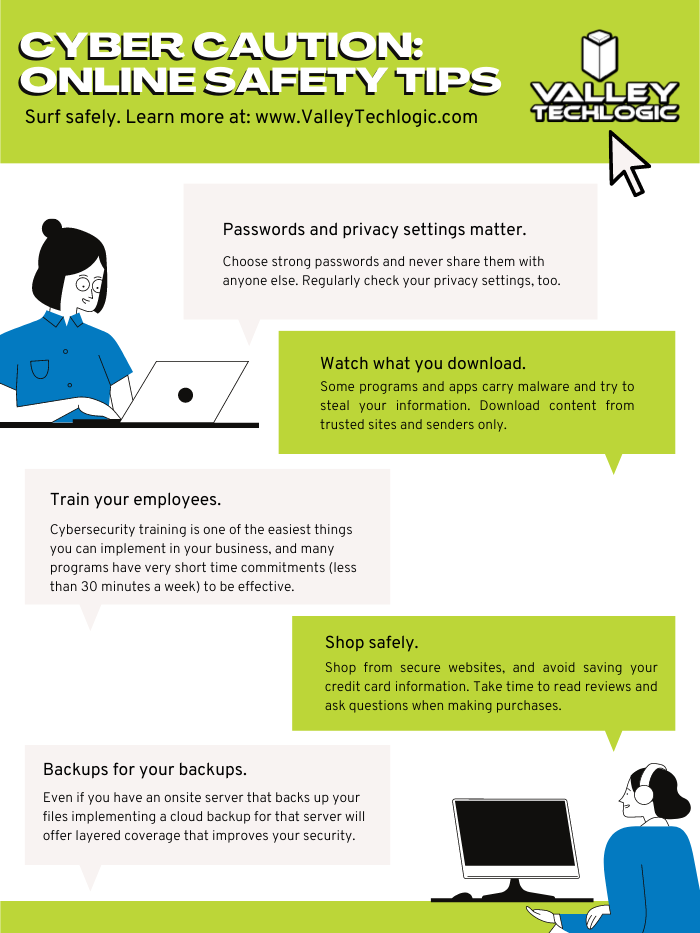
    We’ve posted about proper password safety and advice on avoiding phishing attacks, but here are the top 5 things you can enable in your business today to improve your cybersecurity safety in 2023.

    Internet Safety InfographicIf news of breaches make you nervous and you aren’t sure if your business is prepared from a cybersecurity standpoint, Valley Techlogic can help. We consider ourselves to be a premier provider of cybersecurity services for businesses in our area and beyond. We can help your business by covering your endpoints, setting up secure backups, virus and malware scanning and prevention and more. Schedule a consultation today.

    Looking for more to read? We suggest these other articles from our site.

    This article was powered by Valley Techlogic, an IT service provider in Atwater, CA. You can find more information at https://www.valleytechlogic.com/ or on Facebook at https://www.facebook.com/valleytechlogic/ . Follow us on Twitter at https://x.com/valleytechlogic.
  • The Rockstar Games data leak and how reputation loss can be one of the costliest aspects of being hacked

    The Rockstar Games data leak and how reputation loss can be one of the costliest aspects of being hacked

    Video game news might fall outside our normal wheelhouse but reporting on cybersecurity events is right up our alley, and this the most recent hack on major game developer Rockstar Games made major news over the weekend so we wanted to chime in with our thoughts.

    The hacker going under the moniker “Tea Pot” released video clips of Rockstar Games unreleased (and previously unannounced) new game, Grand Theft Auto 6. The clips revealed spoilers on the games content and also showcased rougher assets as the game is still in early development, something game publishers don’t ordinarily highlight.

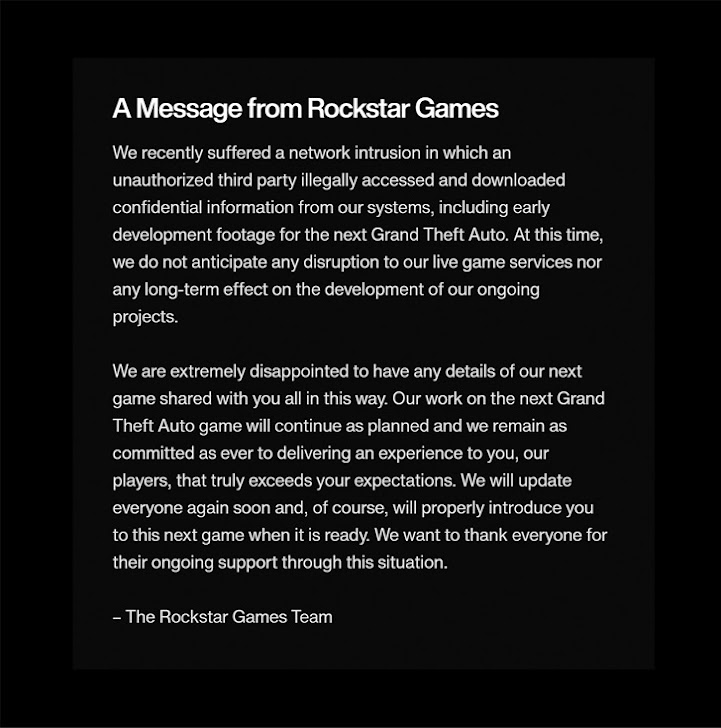
    In a message acknowledging the breach the Rockstar Games Team had this to say:

    Rockstar Games Response to the data leak.

    The hacker returned after releasing the data and sent a message on the GTAForums claiming they wanted to “negotiate a deal” with Rockstar Games, hinting that they had more data to release. Speculation proliferated across the internet that the hacker had somehow obtained some of the games source code.

    With the source code portions of the game could be re-engineered (outside Rockstar Games) and that could even possibly be used to provide at least a semi-playable version. The fallout from that would be devastating as it would steal the developer’s agency in releasing their own content and also reveal trade secrets that could be used to help create knockoff or pirated versions.

    Rockstars parent company, Take-Two, has issued take down notices to social media accounts and Youtube channels broadcasting the stolen footage as work to perform damage control. There will probably be a costly investigation into the origination of the hack and there may even be financial complications beyond that, as investors may question what effect this leak will have on the eventual release of the game.

    This hack is a perfect example of the reputation cost associated with being hacked. Recovering data you need to do your day to day job is one aspect, but you also need to think about data you wouldn’t want released to the public.

    Projects that haven’t been announced yet or information that’s not easily changed (tax information, personal identifying information) are just two factors, but there’s also the release of your customers private data. Many aren’t aware a breach involving client information can even lead to legal ramifications depending on regulatory factors in your sector.

    There’s also your private emails or messages, which could have future business plans, personal information, or other things that could be used by the hackers in a ransomware attempt (or even ongoing blackmail).

    Cybersecurity prevention’s are important but one element that has surged to the forefront of our minds is a recovery tool that’s becoming more difficult to obtain – cybersecurity insurance.

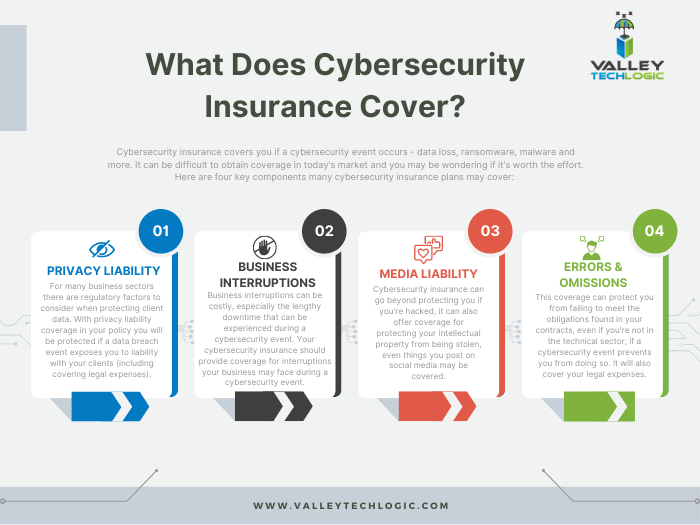
    You can review our comprehensive guide on the topic but here’s a brief chart on what cybersecurity insurance typically covers:

    Click to view the full size version.

    Obtaining coverage can be challenging, the requirements have grown much steeper as cybersecurity attacks become more common place, and that doesn’t look like it’s going to change anytime soon. At Valley Techlogic we have experience in helping clients obtain coverage so if the unthinkable does occur, their business will survive the hit.

    Whether you’re are in the early stages of researching cybersecurity coverage or if you have an application form in front of you, we can be your guide through the process. Schedule a consultation today to learn more.

    Looking for more to read? We suggest these other articles from our site.

    This article was powered by Valley Techlogic, an IT service provider in Atwater, CA. You can find more information at https://www.valleytechlogic.com/ or on Facebook at https://www.facebook.com/valleytechlogic/ . Follow us on Twitter at https://x.com/valleytechlogic.
  • Google blocked the largest DDoS attack ever, peaking at 46 million requests per second

    Google blocked the largest DDoS attack ever, peaking at 46 million requests per second

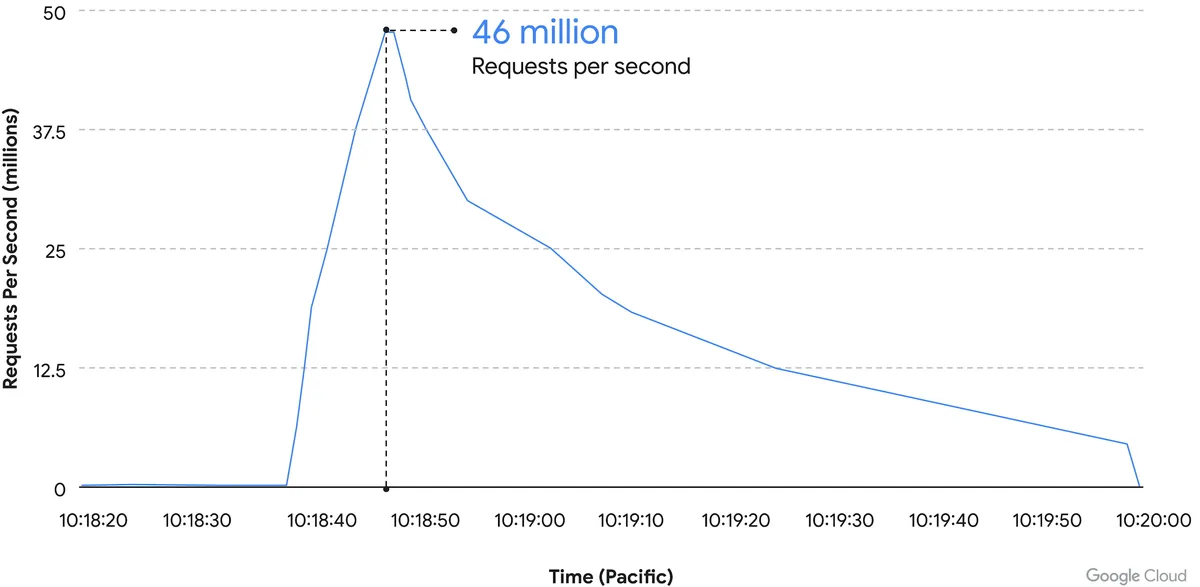
    While it’s just now being reported on, the DDoS attack on Google Cloud occurred on June 1st and lasted for 69 minutes – reaching a peak of 46 million requests per second.

    Source: Google Cloud

    We’ve covered Distributed Denial of Service (DDoS) attacks before in this blog, but the scale of this one is mind boggling. It’s nearly twice the size of Cloudflare DDoS attack from last year around this same time, which peaked at 26 million requests per second (sent from just over 5000 devices).

    If you’re wondering where the devices used in these attacks originate from, the answer in this case is unsecured devices. Specifically compromised Mikrotik routers.

    There’s been a number of articles regarding possible compromises to the Mikrotik brand of router including one instance that involved over 200,000 devices. Many in the security space wondered if there would be a fallout from that and now, we have our answer.

    However, what’s more impressive is not the scale of this attack, but the fact that it was successfully blocked by Google.

    Botnet attacks of this nature are not rare, it’s difficult to say exactly how many attacks occur per day but it has been noted they’re on the rise since the Russian invasion of Ukraine. A botnet is essentially an assembly of compromised devices that are used to attack a target. DDoS attacks are one of the most common uses, but they’re also used for phishing, cryptomining, or to bruteforce passwords just to name a few. The largest botnet ever recorded belonged to Russian BredoLab and consisted of 30,000,000 devices.

    Would be bad actors can even purchase DDoS as a service for as little as $5 per hour which should give you an indication how prevalent and common they are as an attack vector.

    Google blocked this attack by leveraging their Cloud Armor product, a network security service directly aimed at preventing DDoS attacks. If they were looking for a powerful case study for the effectiveness of this product, we can think of no better example then effectively blocking the largest DDoS attack in history (so far).

    Part of blocking a DDoS attack is early detection. DDoS attacks ramp up, if you can detect an incoming flux of peculiar traffic to your network you can block the attack before it’s able to scale up and cripple your network.

    Besides blocking potential attacks, the other side of the coin is not becoming an unwilling participant in a botnet through a compromised device in your home or business.

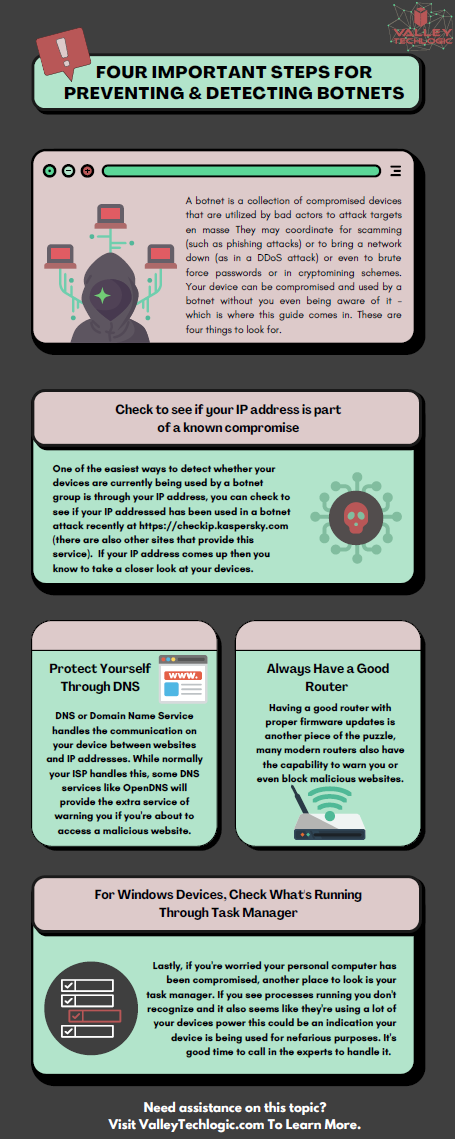
    The sinister part of it is you may not even be aware your device is compromised and it’s not just mobile devices and personal computers that can be affected, even IoT (Internet of Things) devices can be hacked. There are a few things you can do to prevent your devices from being taken over by hackers as we outline in the chart below:

    If your business needs assistance with protecting from any potential attacks or making sure your devices stay uncompromised, Valley Techlogic can help. All of our plans include robust cybersecurity protections at no additional charge, including assisting in your cyber security training goals (after all, human error is the #1 cause of data breaches). Schedule a consultation today to learn more.

    Looking for more to read? We suggest these other articles from our site.

    This article was powered by Valley Techlogic, an IT service provider in Atwater, CA. You can find more information at https://www.valleytechlogic.com/ or on Facebook at https://www.facebook.com/valleytechlogic/ . Follow us on Twitter at https://x.com/valleytechlogic.
  • How a phishing scam swindled this Shark Tank host out of $400,000

    How a phishing scam swindled this Shark Tank host out of $400,000

    We’ve focused a lot of articles on phishing scams and how no one is immune, even major money moguls like Barbara Corcoran from ABC’s Shark Tank with a net worth estimated at over $100 million fell victim to a phishing scam that wound up costing her $400,000.

    Business owners are a particularly lucrative target for bad actors, and phishing emails continue to grow more sophisticated. In this instance Barbara reports receiving an email that looked like it came from her secretary going to her accountant authorizing the amount to go to a real estate deal.

    Barbara like many business owners has deals going on all the time so the amount and type of authorization wasn’t unusual, allowing it to fly under everyone’s noses and make the scammers involved $400,000 richer. It wasn’t until her accountant sent an email to her real secretary confirming the transaction one last time that the scam was uncovered – and by then it was too late the transfer had already been sent.

    This case proves that even with strong checks and balances in place, phishing scams can happen to almost anyone. While Barbara was able to absorb the hit without it hurting her business – many out there could not.

    While the amount of money lost in this instance is quite substantial, millions of dollars are lost every day to cyber crime. It’s estimated that $1,797,945 is lost per minute according to Risk IQ’s Evil Internet Minute Report.

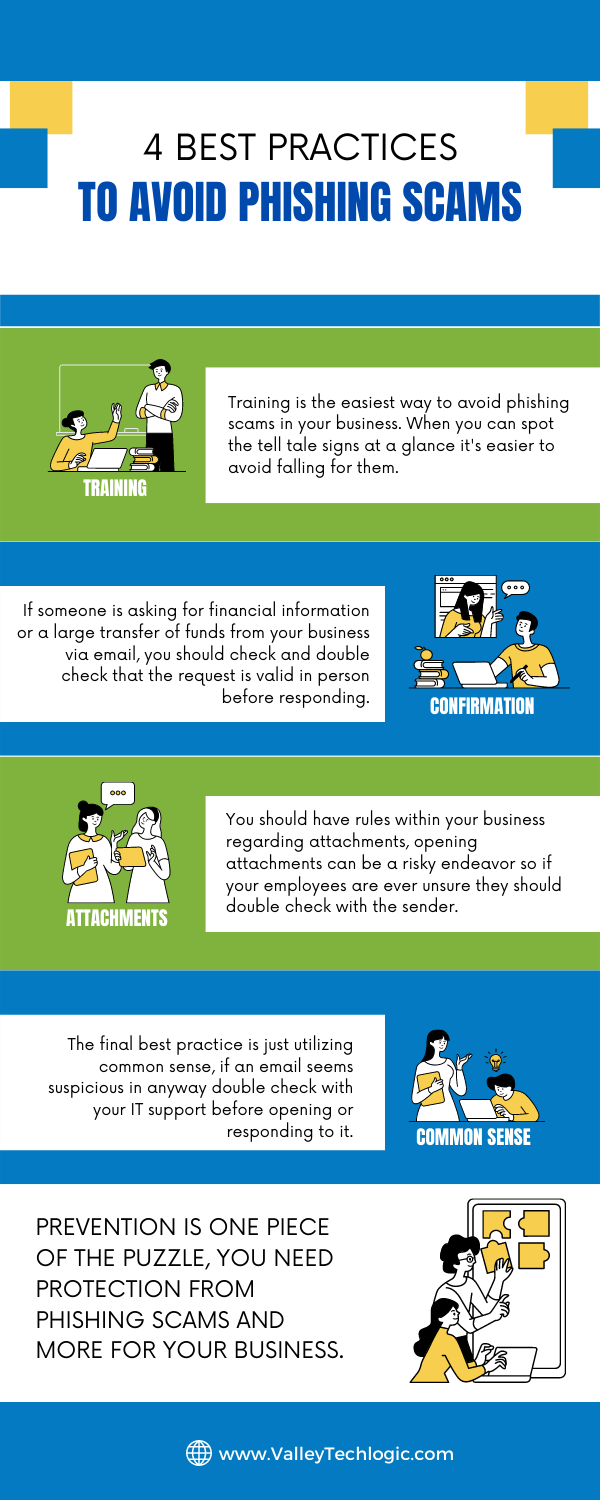
    Even if you think your business is too small to be a target you would be wrong, scammers cast wide nets looking for victims to fall in. Here are 4 things you can have in place that could prevent this kind of scam from happening to you.

    Email Best Practices

    Even with these checks in place it can still be tricky to avoid, especially if your business has become a particular target for a scammer. Another famous example is how Facebook and Google were tricked out of $100 million due to an extended attack phishing attack organized by a scammer located in Lithuania. A little less than half of the money lost was recovered.

    Another famous attack in 2014 saw the early release of four movies produced by Sony Pictures when North Korean hackers, upset about a movie that was being released at the time, sent targeted phishing emails that appeared as if they were coming from Apple to a top Sony executive. The damage that incurred from this attack was estimated to be over $80 million.

    With both of these attacks it’s not just about the money lost either, these attacks are easily searchable to this day and had an untold effect on their reputation at the time. Massive companies like Google, Facebook and Sony can weather the storm, but could your business do the same?

    Education is just one piece of the puzzle, active protection is another crucial element to avoiding the lengthy damage that can arise from a successful phishing campaign. At Valley Techlogic cyber security is a core focus for all of our plans. Learn more today with a quick and easy consultation.

    Looking for more to read? We suggest these other articles from our site.

    This article was powered by Valley TechLogic, an IT service provider in Atwater, CA. You can find more information at https://www.valleytechlogic.com/ or on Facebook at https://www.facebook.com/valleytechlogic/ . Follow us on Twitter at https://x.com/valleytechlogic.

  • College shuttered after 157 years due to ransomware attack

    College shuttered after 157 years due to ransomware attack

    While ransomware wasn’t the only thing behind the decision to close Lincoln College, located in rural Illinois and established in 1865, it was the final blow after taking substantial financial losses due to the COVID-19 pandemic.

    The school, which had survived through the Spanish Flu, the Great Depression, two world wars and even a fire in 1912 will close its doors for good on May 13th, 2022.

    The ransomware attack which occurred in December 2021 crippled their recruiting and fundraising efforts for two months, not being resolved until March 2022 as a statement on the school’s website reads.

    “Furthermore, Lincoln College was a victim of a cyberattack in December 2021 that thwarted admissions activities and hindered access to all institutional data, creating an unclear picture of Fall 2022 enrollment projections. All systems required for recruitment, retention, and fundraising efforts were inoperable.

    Fortunately, no personal identifying information was exposed. Once fully restored in March 2022, the projections displayed significant enrollment shortfalls, requiring a transformational donation or partnership to sustain Lincoln College beyond the current semester.”

    The school made attempts to avoid the closure, but the efforts came too late, and we’re sorry to say they’re far from unique in being a school that was targeted by a cyberattack. According to this report over 1043 schools suffered ransomware attacks in 2021.

    Cyber criminals don’t think twice when targeting schools, hospitals, and infrastructure that’s needed by the community. We reported on the on Colonial Pipeline hack that created a major disruption at gas stations across eastern US last May.

    Schools and hospitals are appealing targets because investing in cyber security measures is not generally a priority and they often store large amounts of PII (Personal Identifying Information) in their systems.

    Many senators have taken note of this and have called on the Department of Homeland Security to instate measures that would bolster the security of our schools, especially K-12.

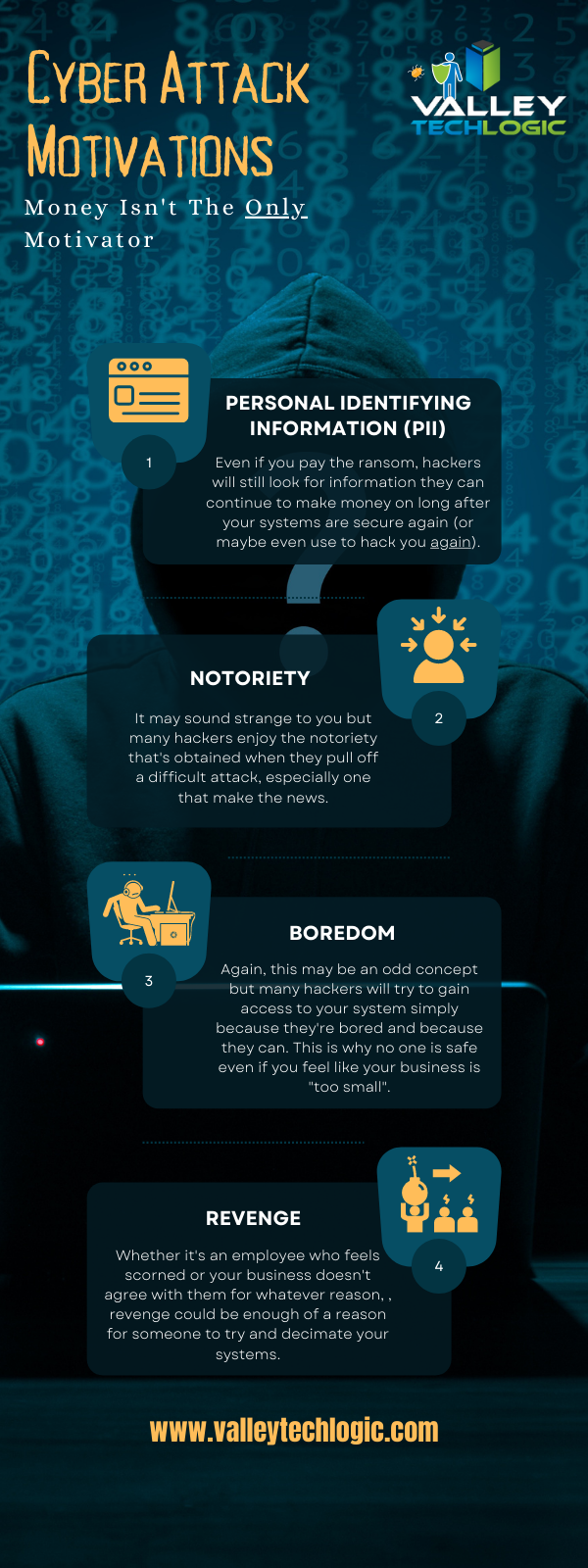
    A ransomware payment isn’t the only thing attackers stand to gain when they successfully infiltrate a network, here’s a chart with the way hackers “double dip” from during their attacks:

    Hacker Motivations Infographic

    In the end Lincoln College did choose to pay the ransom to gain control of their systems again, but it sadly made no difference in saving the college.

    60% of businesses close within 6 months following a ransomware attack, and only half businesses have a cyber response plan available to quickly respond to an attack. The slow response time will only add insult to injury as you try to get back on your feet and as we’ve seen in this case, it can be fatal to your business.

    Valley Techlogic can help you not only have a contingency plan in place, but also help you enact cyber security measures in your business that will prevent an attack from occurring in the first place. Learn more today through a quick consultation.

    Looking for more to read? We suggest these other articles from our site.

    This article was powered by Valley TechLogic, an IT service provider in Atwater, CA. You can find more information at https://www.valleytechlogic.com/ or on Facebook at https://www.facebook.com/valleytechlogic/ . Follow us on Twitter at https://x.com/valleytechlogic.
  • We have updated our most popular resource for 2022 and have an offer you won’t want to pass up

    We have updated our most popular resource for 2022 and have an offer you won’t want to pass up

    As an IT service provider, we’re passionate about cybersecurity because we see the effects having inadequate coverage can have on businesses first hand.

    The devastation that can occur after a cyber attack is staggering, we’ve given you the statistics before, such as:

    1. The cost of cybercrime is predicted to hit $10.5 trillion by 2025
    2. Cryptojacking cases quadrupled in 2021, but the hackers don’t make very much (less than $6 per day), however that doesn’t stop them from trying to gain access to your machines
    3. It takes on average 287 for cybersecurity teams to detect and contain a data breach
    4. Phishing is involved in 36% of data breaches (can you identify the signs of a phishing email?)
    5. DDoS (Distributed Denial-of-Service) attacks are skyrocketing, with 9.75 million occurring in 2021

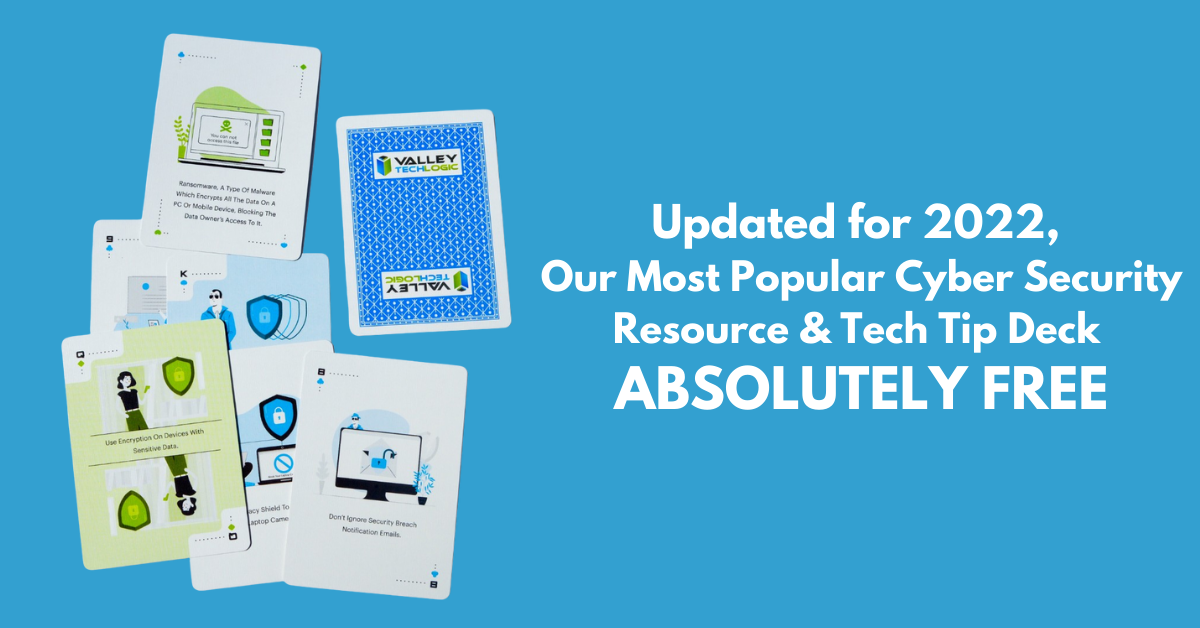
    That’s why we’re thrilled to announce the release of our Tech Tip Card Deck, our deck contains 56 tips for getting your cybersecurity house in order with custom art representing each tip. Best of all, the deck is absolutely free to business owners in our area.

    Beyond providing comprehensive technical support, we also want to support our community in staying safe online. If you’re a business owner in Central Valley and would like to have a set of our card deck for yourself, simply visit TechTipCards.com and request one today and we’ll get it shipped out to you ASAP.

    We don’t believe technology has to be intimidating, each bite sized tip featured in the deck is easy to understand and easy to implement and will create real results for the online safety of yourself, your employees, and your business.

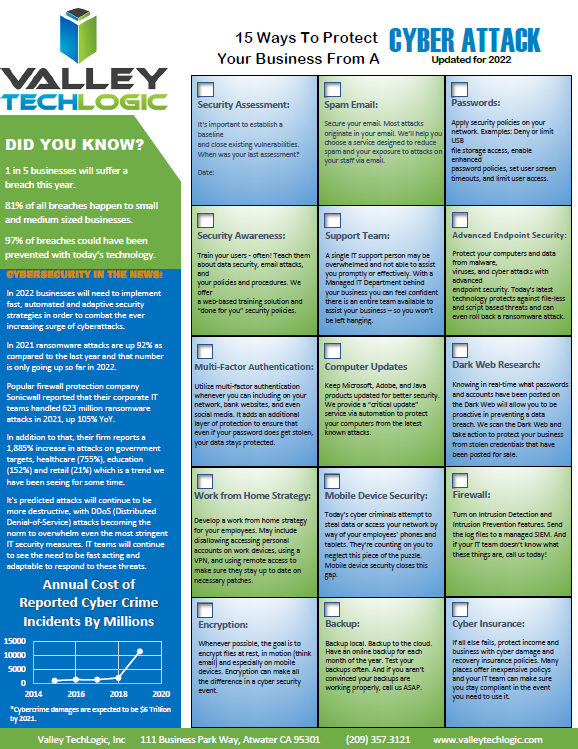
    To up the offer even more, we have updated our most popular for 2022 and are also offering it to you right here, right now. Simply grab it below.


    Valley Techlogics Cybersecurity Checklist
    Click to grab the full size version.

    Both of these are just a small showcase of what’s in store, we know for most people repetition is the key to success. We plan to deliver weekly content including thought provoking reports, eye catching resources that can even be customized for your office, and tech advice that can greatly impact and improve your use of technology within your business.

    If you’d like to learn more, again visit TechTipCards.com or reach out to us for a free consultation today.

    Looking for more to read? We suggest these other articles from our site.

    This article was powered by Valley TechLogic, an IT service provider in Atwater, CA. You can find more information at https://www.valleytechlogic.com/ or on Facebook at https://www.facebook.com/valleytechlogic/ . Follow us on Twitter at https://x.com/valleytechlogic.